
在 Linux 本地玩转大模型:用 VLLM 部署 Qwen3 的高效实践
当大模型逐渐从云端走向本地,如何在有限硬件资源上实现高性能推理成为开发者关注的焦点。 Qwen3 系列模型凭借其创新架构与强大能力,成为本地部署的理想选择;而 VLLM 作为新一代推理引擎,以「高吞吐量、低显存占用」的特性重塑推理效率。两者结合,让开发者可轻松搭建专属自己的大语言模型服务!
读者你好,我是Tex-mind,下面就让我来带领你部署独属于你的本地Qwen3吧!
一、Qwen3 与 VLLM:为何是黄金组合?

作为通义千问第三代模型,Qwen3 在保持轻量化的同时,实现了能力维度的全面突破:
- 双模式智能切换:
- 思考模式:激活深度推理引擎,擅长复杂数学题求解(如竞赛级代数/几何问题)、长链式逻辑推理、专业代码生成(支持多语言框架,代码通过率超 90%)。
- 非思考模式:响应速度提升 30%,适合日常对话、信息检索、多轮闲聊,支持 8K 上下文流畅交互。
- 多语言与代理能力:
- 覆盖 119 种语言及方言,多语言翻译流畅自然,指令遵循准确率达 95% 以上。
- 内置工具调用解析器,可自动生成标准格式的函数调用(如 SQL 查询、API 调用),复杂任务完成度领先开源模型 20%。
VLLM:重新定义本地推理效率

VLLM 通过三大技术革新,让 80 亿参数模型在消费级硬件上跑出新高度:
- 动态批处理调度:基于优先级队列智能复用计算资源,吞吐量较传统框架提升 10 倍,支持数百并发请求。
- 量化与编译优化:
- 原生支持 4bit/8bit 量化(BitsAndBytes/AWQ),显存占用压缩至原生模型的 1/4。
- 集成 TorchCompile 与 CUDA 图技术,首次编译后推理速度提升 50%,生成 tokens 成本降低 30%。
- 开箱即用的服务能力:
- 内置 FastAPI 服务器,支持 OpenAI 兼容 API,10 分钟内可搭建对话接口。
- 提供工具调用、流式输出、多卡并行等企业级功能,无需二次开发。
二、部署实战:从环境搭建到服务启动
硬件与软件基础配置
- 硬件要求:
- 显卡:至少 24GB 显存的 NVIDIA GPU(如 RTX 4090/3090 Ti,实测用 VLLM API 部署 Qwen3-8B-4bit 显存占用约 20GB)。
- 软件安装:
pip install vllm - 版本要求:
- VLLM的版本>=0.8.5,
- transformers版本>4.51.0
模型选择与获取
- 推荐模型:Qwen3-8B-unsloth-bnb-4bit
- 特性:4bit 量化版本,兼顾性能与精度,推理延迟较 16bit 模型仅增加 15%。
- 下载方式:
./目标文件夹 改为自定义的文件夹名称(当前终端目录下)或者路径pip install modelscope modelscope download --model unsloth/Qwen3-8B-unsloth-bnb-4bit --local_dir ./目标文件夹
启动命令与参数解析
VLLM_USE_MODELSCOPE=true vllm serve /home/me/models/Language/Qwen3-8B-bnb-4bit --enable-reasoning --reasoning-parser deepseek_r1 --gpu-memory-utilization 0.2 --max-model-len 4096 --host 0.0.0.0 --port 8000
关键参数说明:
| 参数 | 作用 |
|---|---|
| /your/model/path | 自定义模型存放路径。 |
| enable-reasoning | 激活逻辑推理模块。 |
| reasoning-parser | 指定工具调用格式(DeepSeek R1) |
| gpu-memory-utilization | 防止多任务时显存溢出,单卡部署可设为 0.8-0.9 充分利用资源。 |
三、功能验证
服务验证:访问 http://localhost:8000/docs,可通过 Swagger 界面测试 /v1/chat/completions 接口,确认服务正常响应。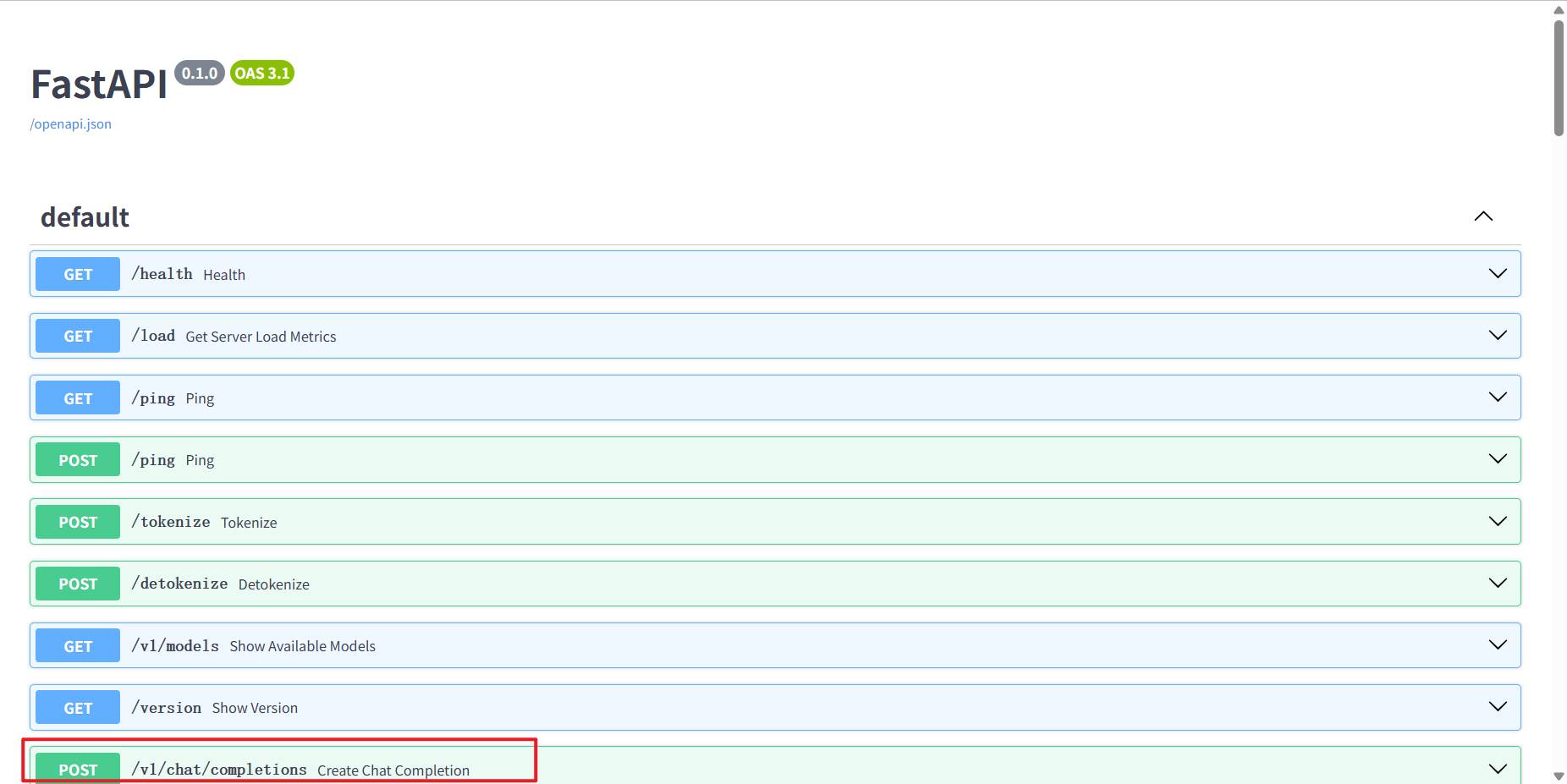 点击该接口后在请求体中输出如下信息(注意模型路径替换成你的):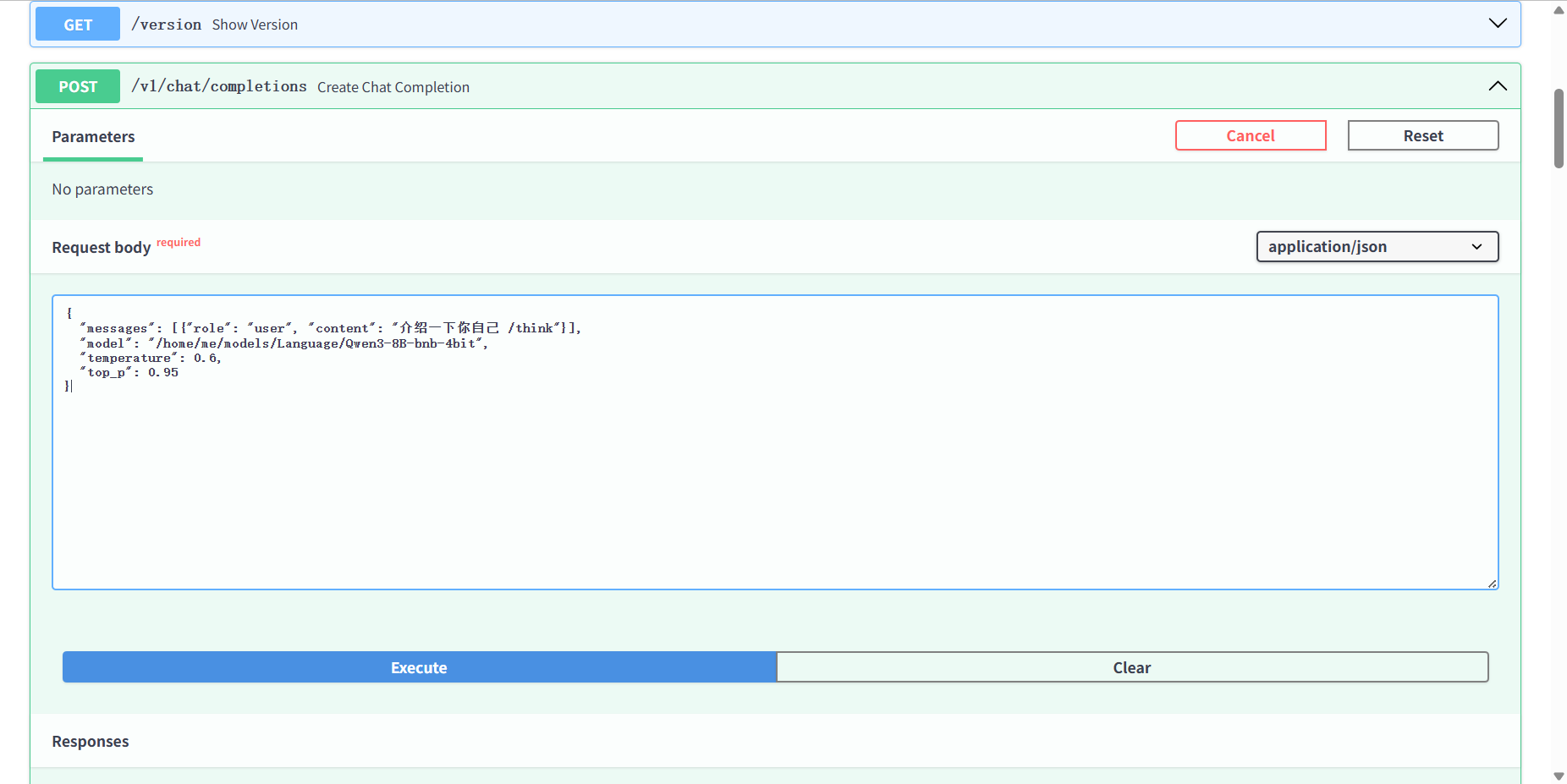
若是响应信息类似下方响应,则Qwen3模型推理服务已经成功本地部署!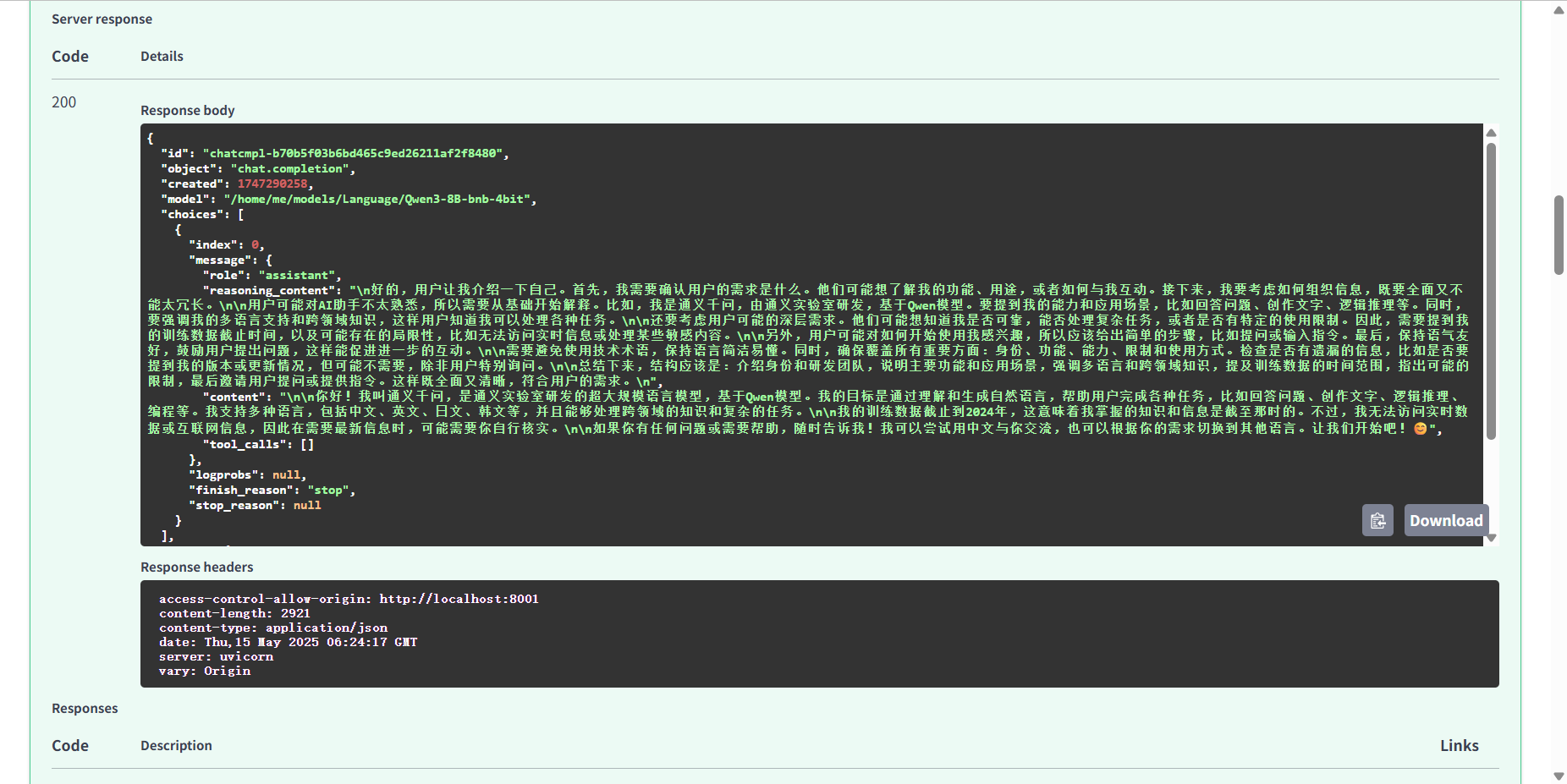
或者通过Python代码方式进行接口测试:
#  API方式调用
from openai import OpenAI
client = OpenAI(api_key="0",base_url="http://0.0.0.0:8000/v1")
messages = [{"role": "user", "content": "介绍一下你自己 /think"}]
result = client.chat.completions.create(messages=messages, model="/模型路径")
print(result.choices[0].message)
若成功打印模型回答及相关信息类似下方输出,则Qwen3模型推理服务已经成功部署!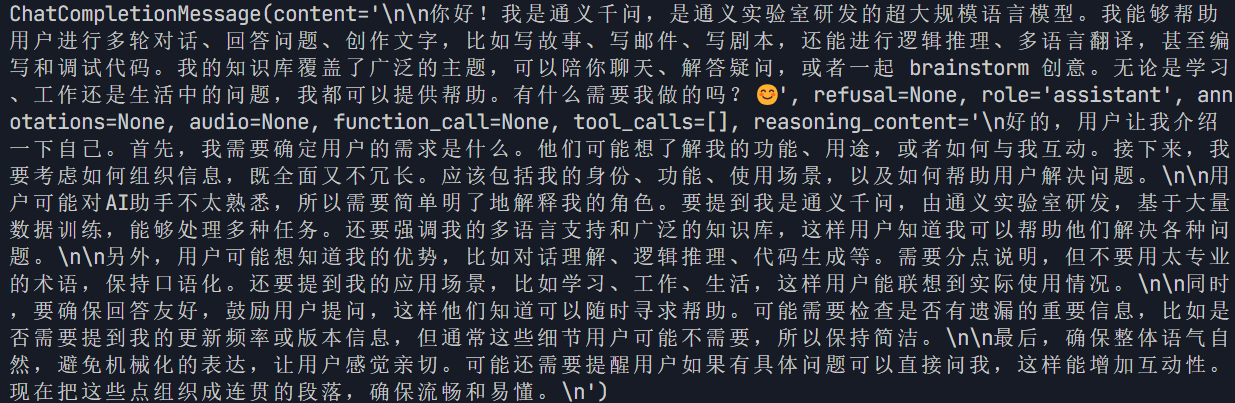
四、性能观测
为什么会有额外的显存占用?
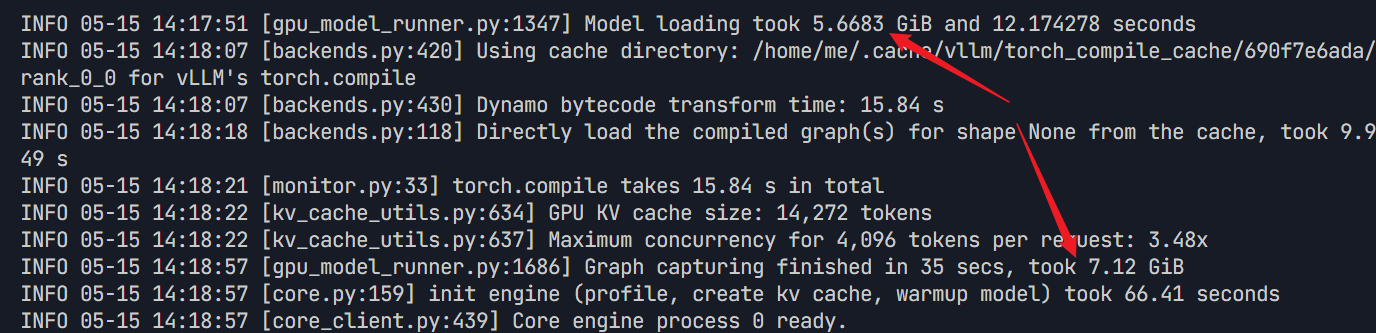
从运行截图中我们可以看出模型本身占用大概5.7GB,计算图缓存约7.12GB,总共约12.82GB,但使用 nvidia-smi 指令我们可以看到实际占用了约16.6GB显存,那多出来的部分被谁消耗了呢?
经过排查了推理,剩下的3GB左右的内存大概由预留的令牌缓存空间 、并发控制数据(0.5G)和vLLM 运行、FastAPI 服务器、PyTorch 依赖运行(2.5G)组成。至此找到了额外的显存占用的原因。
有没有更省显存的模型调用方式呢?
你好,读者,有的有的!如果不想持续化本地部署,而只是想单次小规模调用的话,官方也给出了标准Python代码以供测试:
from modelscope import AutoModelForCausalLM, AutoTokenizer

model_name = "Qwen3-8B-bnb-4bit的模型路径"

# load the tokenizer and the model
tokenizer = AutoTokenizer.from_pretrained(model_name)
model = AutoModelForCausalLM.from_pretrained(
    model_name,
    torch_dtype="auto",
    device_map="auto"
)

# prepare the model input
prompt = "Large language models (LLMs) are advanced artificial intelligence systems designed to understand and generate human-like text. Trained on vast amounts of diverse text data, they use deep learning techniques to recognize patterns, grasp context, and produce coherent responses. These models, often with billions of parameters, excel at tasks like answering questions, writing stories, coding, and translating languages. Their ability to mimic human communication has made them pivotal in fields like customer service, content creation, and research, marking a significant leap in AI's capacity to interact and collaborate with humans.给出这段英文的中文翻译/nothink"
messages = [
    {"role": "user", "content": prompt}
]
text = tokenizer.apply_chat_template(
    messages,
    tokenize=False,
    add_generation_prompt=True,
    enable_thinking=True # Switches between thinking and non-thinking modes. Default is True.
)
model_inputs = tokenizer([text], return_tensors="pt").to(model.device)

# conduct text completion
generated_ids = model.generate(
    **model_inputs,
    max_new_tokens=32768
)
output_ids = generated_ids[0][len(model_inputs.input_ids[0]):].tolist()

# parsing thinking content
try:
    # rindex finding 151668 (</think>)
    index = len(output_ids) - output_ids[::-1].index(151668)
except ValueError:
    index = 0

thinking_content = tokenizer.decode(output_ids[:index], skip_special_tokens=True).strip("\n")
content = tokenizer.decode(output_ids[index:], skip_special_tokens=True).strip("\n")

print("thinking content:", thinking_content)
print("content:", content)
若控制台打印输出类似下方,则恭喜你已实现对Qwen3模型的成功调用!
那么这种形式的模型调用大概占用了多少显存呢?
是的,仅仅需要2.7GB左右的显存!这就是8B模型+BNB4bit量化带来的恐怖显存降耗能力,以这种形式进行模型调用,市面上绝大部分设备都能够轻松运行Qwen3模型!
希望你对本篇博客满意,我是Tex-mind,我们下期再见!

免费领 150 小时云算力,进群参与显卡、AI PC 幸运抽奖
更多推荐

 20
20 0
0- 0


 已为社区贡献2条内容

所有评论(0)