
VLLM部署Qwen3-4B实现本地HTML交互详细流程
前文
Qwen3是阿里最新开源的大预言模型,性能在目前的开源模型中排名靠前,尤其是4B模型性能突出,本文将详细介绍如何在Linux上部署Qwen3模型,并规避一些可能的问题
框架选择
一般我们会使用大语言模型框架来部署模型,这样可以省去许多配置上的麻烦。目前的主流框架有:modelscope、ollama、LM studio、VLLM、SGLang。其中ollama与LM studio配置简单,可在Windows系统上使用,其中ollama仅需要一定命令行基础即可使用,而LM studio更是提供了可视化界面,但这两个框架存在部分推理限制与BUG。VLLM与SGLang则提供了优化,可以较大幅度提升推理速度,SGLang推出时间较短,社区不是很完善。故本文使用VLLM进行部署。
预备工作
本文使用4台3090进行部署与推理(后续可能更新训练),使用的Conda环境,CUDA版本为12.1。VLLM官方建议的CUDA版本为12.1\12.4。如果不是可以进行配置,若环境已配置其他版本CUDA,可以参考下文同一环境配置多个CUDA版本配置多种CUDA版本并切换。(注意参考文章存在两个问题,1是最后的swtich脚本无法显示安装CUDA版本,2是switch脚本如果在windows书写并传到linux中,需要转换。解决方法均在评论区)
VLLM安装
先创建一个新的环境,然后启动环境
conda create -n vllm python=3.12 -yconda activate vllm安装VLLM,建议安装最新的版本的(如下代码),直接pip install vllm安装的0.85版本存在以下问题'AsyncLLM' object has no attribute 'engine'
pip install vllm --pre --extra-index-url https://wheels.vllm.ai/nightly下载不了的使用清华镜像,下载好的跳过这一步
pip install vllm --pre --index-url https://pypi.tuna.tsinghua.edu.cn/simple --extra-index-url https://wheels.vllm.ai/nightlyQwen3-4B下载
使用ModelScope下载并启动Qwen3-4B,在此之前要先pip install modelscope,也可以不安装modelscope删除VLLM_USE_MODELSCOPE=true直接下载模型启动
VLLM_USE_MODELSCOPE=true vllm serve Qwen/Qwen3-4B --enable-reasoning --reasoning-parser deepseek_r1 --tensor-parallel-size 4使用脚本进行交互
将下述代码保存至一个python文件,替换content后面的内容,输入想输入的文本,之后运行即可
from openai import OpenAI
# Set OpenAI's API key and API base to use vLLM's API server.
openai_api_key = "EMPTY"
openai_api_base = "http://localhost:8000/v1"

client = OpenAI(
    api_key=openai_api_key,
    base_url=openai_api_base,
)

chat_response = client.chat.completions.create(
    model="Qwen/Qwen3-4B",
    messages=[
        {"role": "user", "content": "你好,请向我介绍一下你自己."},
    ],
    max_tokens=32768,
    temperature=0.6,
    top_p=0.95,
    extra_body={
        "top_k": 20,
    }
)
print("Chat response:", chat_response)
如果出现报错openai.InternalServerError: Error code: 502
在脚本中添加以下代码
import os
os.environ['http_proxy'] = ''
os.environ['https_proxy'] = ''
以下是一个实现服务器架设模型,本地HTML UI访问的方法
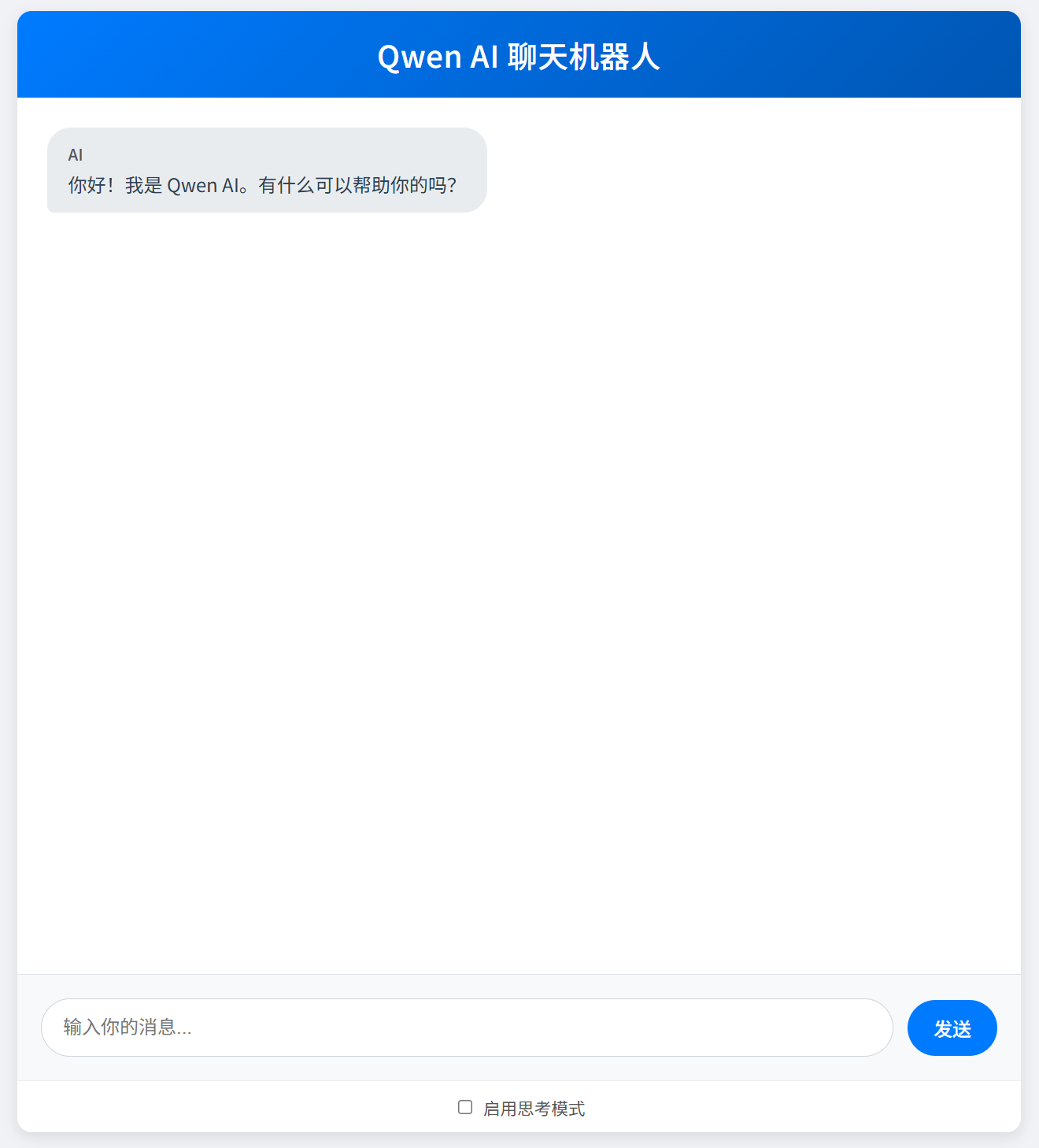
服务器执行命令(单卡,开放端口便于远程访问)
VLLM_USE_MODELSCOPE=true vllm serve Qwen/Qwen3-4B --enable-reasoning --reasoning-parser deepseek_r1 --host 0.0.0.0 --port 8000将下述代码保存为一个HTML,并修改其中的ip部分,本地打开即可访问远程模型,并使用软开关切换思考模式:

<!DOCTYPE html>
<html lang="zh-CN">
<head>
<meta charset="UTF-8">
<meta name="viewport" content="width=device-width, initial-scale=1.0">
<title>Qwen AI 对话</title>
<style>
@import url('https://fonts.googleapis.com/css2?family=Noto+Sans+SC:wght@300;400;500;700&display=swap');
body {
/* font-family: 'Arial', sans-serif; */
font-family: 'Noto Sans SC', -apple-system, BlinkMacSystemFont, "Segoe UI", Roboto, "Helvetica Neue", Arial, sans-serif;
margin: 0;
padding: 0;
background-color: #f0f2f5; /* Slightly softer background */
display: flex;
flex-direction: column;
align-items: center;
height: 100vh;
color: #333;
}
#chat-container {
width: 90%; /* Slightly wider on larger screens */
max-width: 850px; /* Increased max-width */
height: calc(100vh - 40px); /* Adjust height to leave some margin */
background-color: #ffffff;
border-radius: 12px; /* Softer border radius */
box-shadow: 0 4px 12px rgba(0, 0, 0, 0.1); /* Softer shadow */
display: flex;
flex-direction: column;
overflow: hidden;
margin-top: 20px;
margin-bottom: 20px; /* Added bottom margin */
}
#chat-header {
background: linear-gradient(135deg, #007bff, #0056b3); /* Gradient header */
color: white;
padding: 18px 20px; /* Adjusted padding */
text-align: center;
font-size: 1.6em; /* Slightly larger font */
font-weight: 500;
/* border-bottom: 1px solid #0056b3; Removed border, gradient is enough */
letter-spacing: 0.5px;
}
#chat-history {
flex-grow: 1;
padding: 25px; /* Increased padding */
overflow-y: auto;
display: flex;
flex-direction: column;
gap: 18px; /* Adjusted gap */
scrollbar-width: thin; /* For Firefox */
scrollbar-color: #007bff #e9ecef; /* For Firefox */
}
/* Webkit scrollbar styling */
#chat-history::-webkit-scrollbar {
width: 8px;
}
#chat-history::-webkit-scrollbar-track {
background: #f8f9fa;
border-radius: 10px;
}
#chat-history::-webkit-scrollbar-thumb {
background-color: #007bff;
border-radius: 10px;
border: 2px solid #f8f9fa;
}
#chat-history::-webkit-scrollbar-thumb:hover {
background-color: #0056b3;
}
.message {
padding: 12px 18px; /* Adjusted padding */
border-radius: 20px; /* More rounded bubbles */
max-width: 75%; /* Slightly increased max-width for messages */
word-wrap: break-word;
line-height: 1.5;
transition: transform 0.2s ease-out, box-shadow 0.2s ease-out;
}
.message:hover {
transform: translateY(-2px);
box-shadow: 0 2px 8px rgba(0,0,0,0.08);
}
.user-message {
background-color: #007bff;
color: white;
align-self: flex-end;
border-bottom-right-radius: 6px; /* Adjusted for bubble style */
}
.assistant-message {
background-color: #e9ecef;
color: #2c3e50; /* Darker text for better contrast */
align-self: flex-start;
border-bottom-left-radius: 6px; /* Adjusted for bubble style */
}
.assistant-message .message-sender {
color: #555; /* For assistant message */
margin-bottom: 4px; /* Reduced margin for AI sender to lessen top gap */
}
.assistant-message .thinking-header,
.assistant-message .reasoning-text,
.assistant-message .content-text {
margin-top: 0; /* Ensure no extra top margin for these content blocks */
padding-top: 0; /* Ensure no extra top padding if not intended */
}
/* If content-text is the first actual content after sender, ensure its inherent top padding (from .message) is enough */
/* This might require more specific selectors if structure is complex, but let's start with this general rule */
.assistant-message .message-sender + .content-text {
/* If .content-text directly follows .message-sender, its content will start after sender's margin. */
/* The .message padding-top should provide the main spacing from the bubble's top edge. */
/* No specific adjustment needed here yet, unless the general padding is too much. */
}
.assistant-message .message-sender + .thinking-header {
/* No specific adjustment needed here yet. Header will follow sender's margin */
}
.thinking-header {
font-weight: 500; /* Medium weight */
font-size: 0.9em;
margin-bottom: 6px;
color: #0056b3; /* Themed color */
}
.reasoning-text {
font-size: 0.95em; /* Slightly larger for readability */
color: #555;
padding: 10px;
border-left: 3px solid #007bff;
background-color: #fdfdff; /* Very light background */
margin-bottom: 10px;
border-radius: 0 8px 8px 0; /* Rounded on one side */
line-height: 1.6;
}
.content-text {
/* No specific styles yet, inherits from .message or .assistant-message */
/* Add a small padding-top if it's the very first element after sender and looks too cramped */
/* However, this should ideally be handled by the parent .message's padding-top */
}
.message-sender {
font-weight: 500; /* Medium weight */
margin-bottom: 6px;
font-size: 0.85em; /* Slightly smaller */
color: rgba(255,255,255,0.85); /* For user message */
}
.assistant-message .message-sender {
color: #555; /* For assistant message */
}
#input-area {
display: flex;
padding: 20px; /* Increased padding */
border-top: 1px solid #dee2e6; /* Softer border */
background-color: #f8f9fa;
align-items: center; /* Vertically align items */
}
#user-input {
flex-grow: 1;
padding: 12px 18px; /* Adjusted padding */
border: 1px solid #ced4da;
border-radius: 25px; /* More rounded */
margin-right: 12px;
font-size: 1em;
line-height: 1.5;
transition: border-color 0.2s ease, box-shadow 0.2s ease;
}
#user-input:focus {
outline: none;
border-color: #007bff;
box-shadow: 0 0 0 0.2rem rgba(0,123,255,.25);
}
#send-button {
padding: 12px 22px; /* Adjusted padding */
background-color: #007bff;
color: white;
border: none;
border-radius: 25px; /* More rounded */
cursor: pointer;
font-size: 1em;
font-weight: 500;
transition: background-color 0.2s ease, transform 0.1s ease;
}
#send-button:hover {
background-color: #0056b3;
}
#send-button:active {
transform: scale(0.96);
}
.loading-dots span {
display: inline-block;
width: 9px; /* Slightly larger dots */
height: 9px;
background-color: #007bff;
border-radius: 50%;
animation: bounce 1.4s infinite ease-in-out both;
}
.loading-dots span:nth-child(1) {
animation-delay: -0.32s;
}
.loading-dots span:nth-child(2) {
animation-delay: -0.16s;
}
@keyframes bounce {
0%, 80%, 100% {
transform: scale(0);
}
40% {
transform: scale(1.0);
}
}
</style>
</head>
<body>
<div id="chat-container">
<div id="chat-header">Qwen AI 聊天机器人</div>
<div id="chat-history">
<!-- 示例消息 -->
<!-- <div class="message assistant-message">
<div class="message-sender">AI</div>
你好!有什么可以帮你的吗?
</div> -->
</div>
<div id="input-area">
<input type="text" id="user-input" placeholder="输入你的消息...">
<button id="send-button">发送</button>
</div>
<div id="options-area" style="padding: 10px; text-align: center; border-top: 1px solid #eee;">
<input type="checkbox" id="thinking-mode-checkbox" style="margin-right: 5px;">
<label for="thinking-mode-checkbox" style="font-size: 0.9em; color: #555;">启用思考模式</label>
</div>
</div>
<script>
const chatHistory = document.getElementById('chat-history');
const userInput = document.getElementById('user-input');
const sendButton = document.getElementById('send-button');
const thinkingModeCheckbox = document.getElementById('thinking-mode-checkbox'); // 获取复选框元素
const OPENAI_API_BASE = "http://ip:8000/v1"; // 修改为您的服务器地址和端口
const MODEL_NAME = "Qwen/Qwen3-4B"; // 根据您的模型名称修改
let messages = []; // 用于存储对话历史
sendButton.addEventListener('click', sendMessage);
userInput.addEventListener('keypress', function(e) {
if (e.key === 'Enter') {
sendMessage();
}
});
function appendMessage(sender, textOrParts, isLoading = false) {
const messageDiv = document.createElement('div');
messageDiv.classList.add('message');
if (sender === 'user') {
messageDiv.classList.add('user-message');
} else {
messageDiv.classList.add('assistant-message');
}
const senderDiv = document.createElement('div');
senderDiv.classList.add('message-sender');
senderDiv.textContent = sender === 'user' ? '你' : 'AI';
messageDiv.appendChild(senderDiv);
if (isLoading) {
const loadingDiv = document.createElement('div');
loadingDiv.classList.add('loading-dots');
loadingDiv.innerHTML = '<span></span><span></span><span></span>';
messageDiv.appendChild(loadingDiv);
} else if (sender === 'assistant') {
// For assistant, textOrParts can be an object {reasoning: "...", content: "..."}
// or just a string for simple messages like errors or welcome.
if (typeof textOrParts === 'object' && textOrParts !== null) {
if (textOrParts.reasoning) {
const thinkingHeader = document.createElement('div');
thinkingHeader.classList.add('thinking-header');
thinkingHeader.textContent = "思考过程:";
messageDiv.appendChild(thinkingHeader);
const reasoningDiv = document.createElement('div');
reasoningDiv.classList.add('reasoning-text');
reasoningDiv.innerHTML = textOrParts.reasoning.replace(/\n/g, '<br>');
messageDiv.appendChild(reasoningDiv);
}
const contentDiv = document.createElement('div');
contentDiv.classList.add('content-text');
contentDiv.innerHTML = (textOrParts.content || "").replace(/\n/g, '<br>');
messageDiv.appendChild(contentDiv);
} else { // Simple string message
const textNode = document.createElement('div');
textNode.innerHTML = String(textOrParts).replace(/\n/g, '<br>');
messageDiv.appendChild(textNode);
}
} else { // User message (always string)
const textNode = document.createElement('div');
textNode.innerHTML = String(textOrParts).replace(/\n/g, '<br>');
messageDiv.appendChild(textNode);
}
chatHistory.appendChild(messageDiv);
chatHistory.scrollTop = chatHistory.scrollHeight;
return messageDiv;
}
function updateLoadingMessage(loadingMessageDiv, newParts, isThinkingEnabled) {
const loadingDots = loadingMessageDiv.querySelector('.loading-dots');
if (loadingDots) {
loadingDots.remove();
}
const senderDiv = loadingMessageDiv.querySelector('.message-sender');
// Preserve current content if it exists, before clearing
let preservedContentHTML = "";
const existingContentDiv = loadingMessageDiv.querySelector('.content-text');
if (existingContentDiv) {
preservedContentHTML = existingContentDiv.innerHTML;
}
// Clear all specific content holders (header, reasoning, content)
const existingThinkingHeader = loadingMessageDiv.querySelector('.thinking-header');
if (existingThinkingHeader) existingThinkingHeader.remove();
const existingReasoningDiv = loadingMessageDiv.querySelector('.reasoning-text');
if (existingReasoningDiv) existingReasoningDiv.remove();
if (existingContentDiv) existingContentDiv.remove(); // Remove old content div to rebuild fresh
// --- Rebuild based on mode ---
let thinkingHeader = null;
let reasoningDiv = null;
let contentDiv = null;
if (isThinkingEnabled) {
// THINKING MODE: Potentially create thinking-header and reasoning-text
if (newParts.reasoning && newParts.reasoning.trim() !== "") {
thinkingHeader = document.createElement('div');
thinkingHeader.classList.add('thinking-header');
thinkingHeader.textContent = "思考过程:";
loadingMessageDiv.appendChild(thinkingHeader);
reasoningDiv = document.createElement('div');
reasoningDiv.classList.add('reasoning-text');
reasoningDiv.innerHTML = newParts.reasoning.replace(/\n/g, '<br>');
loadingMessageDiv.appendChild(reasoningDiv);
}
// Always add content div in thinking mode (might be empty initially)
contentDiv = document.createElement('div');
contentDiv.classList.add('content-text');
contentDiv.innerHTML = (newParts.content || "").replace(/\n/g, '<br>');
loadingMessageDiv.appendChild(contentDiv);
} else {
// NOT THINKING MODE: Only content-text div
contentDiv = document.createElement('div');
contentDiv.classList.add('content-text');
let mainDisplayText = newParts.content || "";
if ((!newParts.content || newParts.content.trim() === "") && (newParts.reasoning && newParts.reasoning.trim() !== "")) {
mainDisplayText = newParts.reasoning; // Use reasoning if content is empty
}
contentDiv.innerHTML = mainDisplayText.replace(/\n/g, '<br>');
loadingMessageDiv.appendChild(contentDiv);
}
// Hide contentDiv if it ends up empty and (if thinking) there's no reasoning either
if (contentDiv && contentDiv.innerHTML.trim() === "") {
if (isThinkingEnabled && thinkingHeader && reasoningDiv && reasoningDiv.innerHTML.trim() !== "") {
// In thinking mode, if reasoning has content, contentDiv can be empty (temporarily)
} else {
contentDiv.style.display = 'none';
}
}
chatHistory.scrollTop = chatHistory.scrollHeight;
}
async function sendMessage() {
const userText = userInput.value.trim();
if (userText === '') return;
const isThinkingEnabled = thinkingModeCheckbox.checked;
const modifiedUserText = isThinkingEnabled ? userText + "/think" : userText + "/no_think";
appendMessage('user', userText);
messages.push({ "role": "user", "content": modifiedUserText });
userInput.value = '';
const isThinkingEnabled = thinkingModeCheckbox.checked;
console.log("Checkbox 'thinkingModeCheckbox.checked' value:", thinkingModeCheckbox.checked); // DEBUG LINE
console.log("Variable 'isThinkingEnabled' value:", isThinkingEnabled); // DEBUG LINE
let assistantMessageDiv = appendMessage('assistant', { reasoning: "", content: "" }, true);
let currentReasoning = "";
let currentContent = "";
try {
let temperature, top_p;
if (isThinkingEnabled) {
temperature = 0.6;
top_p = 0.95;
} else {
temperature = 0.7;
top_p = 0.8;
}
const requestPayload = {
model: MODEL_NAME,
messages: messages,
max_tokens: 32768,
temperature: temperature,
top_p: top_p,
presence_penalty: 1.5,
stream: true,
extra_body: { // Attempting extra_body again as per latest user prompt
top_k: 20,
min_p: 0,
chat_template_kwargs: {
enable_thinking: isThinkingEnabled
}
}
};
console.log("Sending payload (with extra_body for enable_thinking):", JSON.stringify(requestPayload, null, 2));
const response = await fetch(`${OPENAI_API_BASE}/chat/completions`, {
method: 'POST',
headers: {
'Content-Type': 'application/json',
},
body: JSON.stringify(requestPayload)
});
if (!response.ok) {
const errorData = await response.json();
console.error('API Error:', errorData);
updateLoadingMessage(assistantMessageDiv, { reasoning: "", content: `错误: ${errorData.error ? errorData.error.message : response.statusText}` }, isThinkingEnabled);
messages.pop();
return;
}
const reader = response.body.getReader();
const decoder = new TextDecoder();
let firstChunkProcessed = false;
let receivedDoneSignal = false; // Flag to indicate if [DONE] was received
while (true) {
const { value, done } = await reader.read();
if (done) break; // Primary exit for the while loop if stream ends
const chunk = decoder.decode(value, { stream: true });
const lines = chunk.split('\n').filter(line => line.trim() !== '');
for (const line of lines) {
if (line.startsWith('data: ')) {
const jsonDataLine = line.substring(6).trim();
if (jsonDataLine === '[DONE]') {
receivedDoneSignal = true; // Set flag if [DONE] is received
break; // Exit the for...of loop
}
try {
const parsed = JSON.parse(jsonDataLine);
if (parsed.choices && parsed.choices[0].delta) {
const delta = parsed.choices[0].delta;
let reasoningChunk = "";
let contentChunk = "";
// Check for Qwen-specific fields for reasoning and content
if (delta.reasoning_content) {
reasoningChunk = delta.reasoning_content;
currentReasoning += reasoningChunk;
}
// Standard content field
if (delta.content) {
contentChunk = delta.content;
currentContent += contentChunk;
}
updateLoadingMessage(assistantMessageDiv, { reasoning: currentReasoning, content: currentContent }, isThinkingEnabled);
firstChunkProcessed = true;
}
} catch (e) {
console.error('Error parsing stream JSON:', jsonDataLine, e);
}
}
}
if (receivedDoneSignal) break; // Exit the while loop if [DONE] was processed in the inner loop
}
if (!firstChunkProcessed) { // If no data chunks were processed at all
updateLoadingMessage(assistantMessageDiv, { reasoning: "", content: "抱歉,未能获取到有效的回复流。" }, isThinkingEnabled);
}
// Store the combined or primary content in history
let finalContentForHistory = currentContent;
if (!isThinkingEnabled && !currentContent && currentReasoning) {
finalContentForHistory = currentReasoning; // For 2.py case
}
messages.push({ "role": "assistant", "content": finalContentForHistory, "reasoning_content": currentReasoning });
} catch (error) {
console.error('Fetch Error during stream or post-stream processing:', error);
let errorMessage = `网络错误: ${error.message}`;
if (error instanceof TypeError && error.message.includes("JSON.parse")) {
errorMessage = "网络错误: 解析服务器响应时出错。";
}
updateLoadingMessage(assistantMessageDiv, { reasoning: "", content: errorMessage }, isThinkingEnabled);
}
}
function addWelcomeMessage() {
const welcomeText = "你好!我是 Qwen AI。有什么可以帮助你的吗?";
// Welcome message doesn't have reasoning
messages.push({ "role": "assistant", "content": welcomeText, reasoning_content: null });
appendMessage('assistant', { content: welcomeText });
}
// 页面加载时添加欢迎消息
window.onload = addWelcomeMessage;
</script>
</body>
</html>
免费领 150 小时云算力,进群参与显卡、AI PC 幸运抽奖
更多推荐


 5
5 0
0- 0


 已为社区贡献2条内容

所有评论(0)