
vllm -- 调用vllm(离线方式) (小白级教程)
上一篇介绍完如何在cpu下安装vllm,接下来介绍如何调用vllm。
参照官方文档,调用vllm的demo代码分为两大类。
第一类: 直接在python代码内部调用vllm,即: 离线方式。
第二类: 通过http调用vllm,即: 在线方式。
掌握了第二种方式,就可以构建一个简单的大模型应用了。
今天我们只介绍离线方式,代码也很简单。
离线方式
离线方式通俗点解释: 在代码里直接调用vllm框架提供的python接口,不需要启动独立的模型推理服务,就好比模型直接在你的代码里运行。
运行第一个示例:
在你的源代码下执行
python examples/basic/offline_inference/basic.py
注: 一定要激活你的uv环境 source .venv/bin/activate(替换成你的路径)
看到如下图结果,说明运行成功!!!
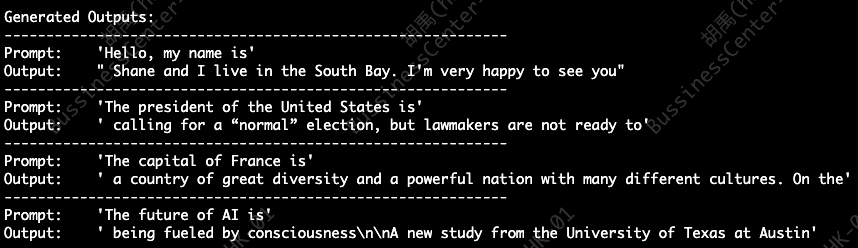
来看代码
from vllm import LLM, SamplingParams

prompts = [
    "Hello, my name is",
    "The president of the United States is",
    "The capital of France is",
    "The future of AI is",
]
sampling_params = SamplingParams(temperature=0.8, top_p=0.95)


def main():
    llm = LLM(model="facebook/opt-125m")
    outputs = llm.generate(prompts, sampling_params)

    print("\nGenerated Outputs:\n" + "-" * 60)
    for output in outputs:
        prompt = output.prompt
        generated_text = output.outputs[0].text
        print(f"Prompt:    {prompt!r}")
        print(f"Output:    {generated_text!r}")
        print("-" * 60)


if __name__ == "__main__":
    main()
逐行解释源码:
from vllm import LLM, SamplingParams
导入 vLLM 的大模型推理类和采样参数类,类比c++中引入头文件,可以在本代码中使用LLM和SamplingParams类
prompts = [ "Hello, my name is",
"The president of the United States is",
"The capital of France is",
"The future of AI is", ]
声明列表变量(提示词),用于模型的输入
sampling_params = SamplingParams(temperature=0.8, top_p=0.95)
创建采样参数对象,用来控制AI说话的“创造力” 和 “随机性”。
temperature: 控制生成的 “随机程度 / 创意程度”
top_p: 控制 AI 只从 “概率最高的 95% 单词” 里选,通俗理解选词范围
llm = LLM(model="facebook/opt-125m")
创建大模型推理实例(使用 facebook/opt-125m 模型)
outputs = llm.generate(prompts, sampling_params)
让大模型生成提示词文本
for output in outputs:
prompt = output.prompt # 输入提示词
generated_text = output.outputs[0].text # 模型生成的文本
print(f"Prompt: {prompt!r}")
print(f"Output: generated_text!r") print("-" * 60)
遍历结果

免费领 200 小时云算力,进群参与显卡、AI PC 幸运抽奖
更多推荐
 15
15 0
0- 0


 已为社区贡献5条内容

所有评论(0)