
LangGraph 多 Agent 架构与 Supervisor 模式
·
LangGraph 多 Agent 架构与 Supervisor 模式
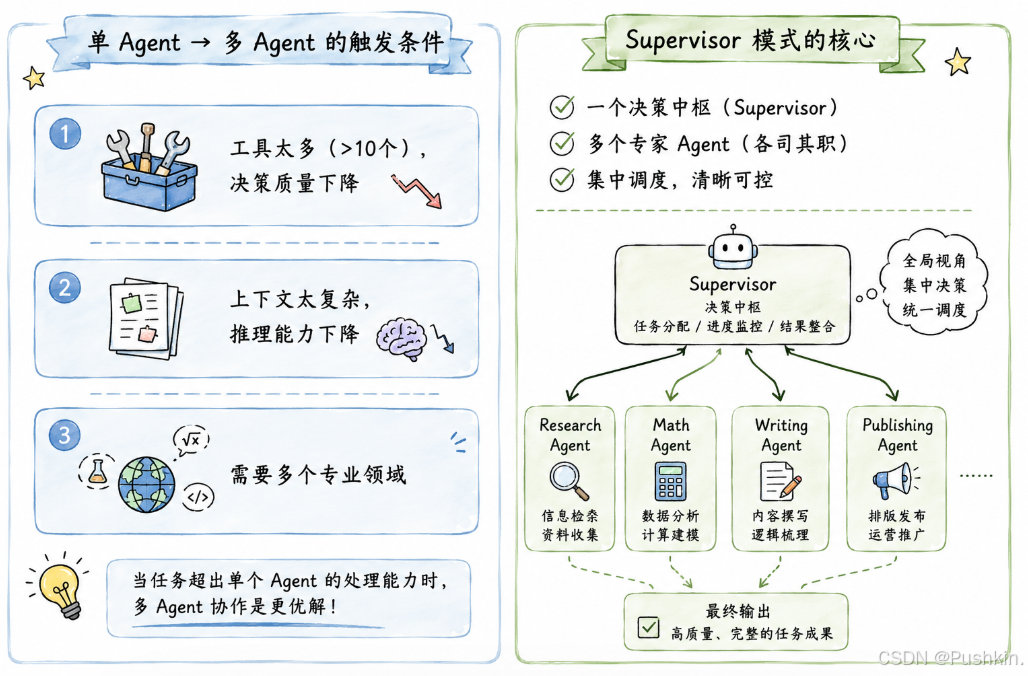
核心观点:当一个 Agent 的工具太多、上下文太复杂、需要多个专业领域时,就该拆成多 Agent 系统了。Supervisor 模式是多 Agent 架构中最实用的一种——一个"主管"Agent 负责调度,多个"专家"Agent 各司其职。
一、为什么需要多 Agent 系统?
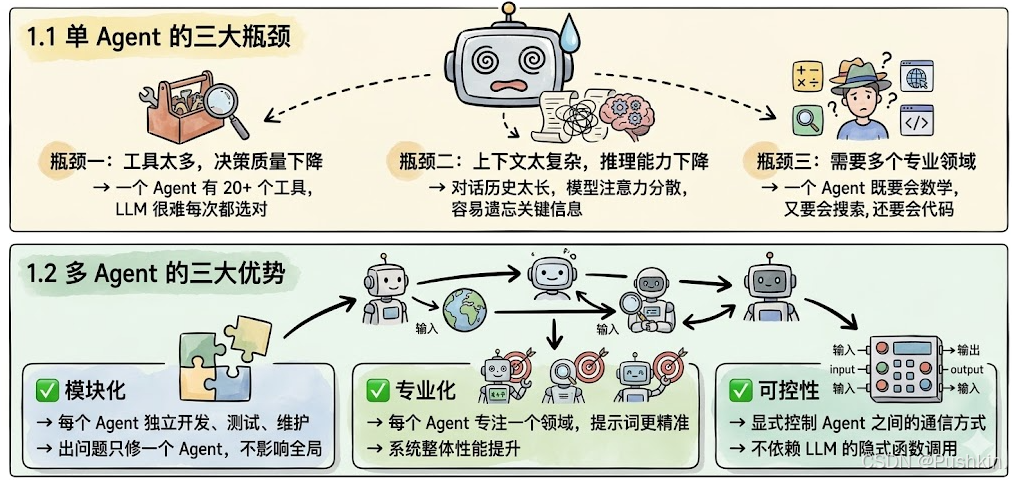
二、多 Agent 架构全景图
LangGraph 定义了四种多 Agent 架构: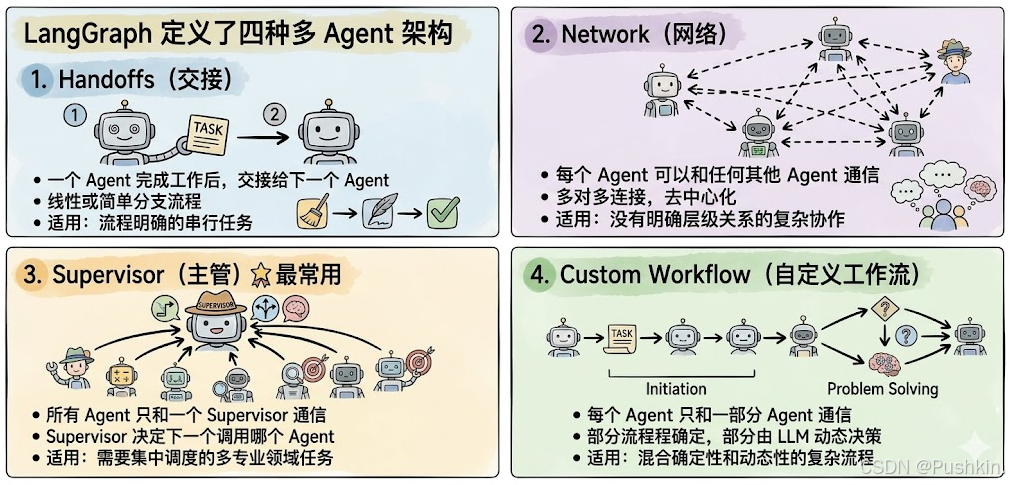
三、Supervisor 模式详解
3.1 架构原理
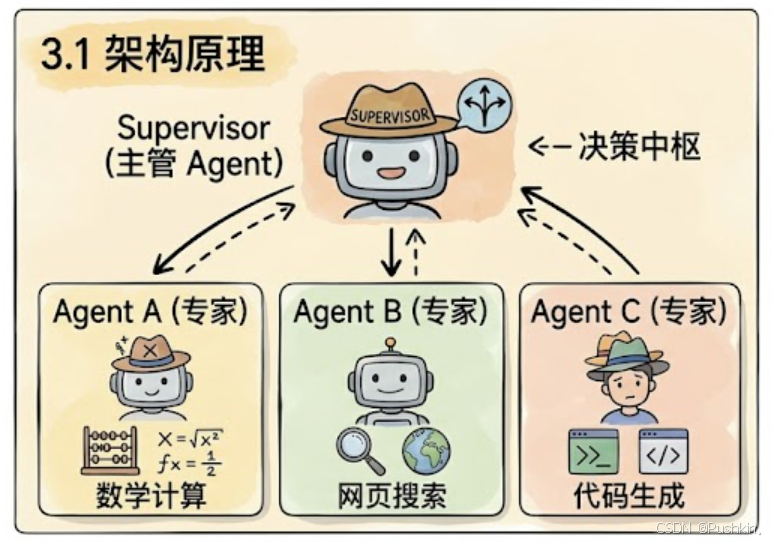
核心流程:
- 用户请求进入 Supervisor
- Supervisor 分析请求,决定调用哪个 Agent
- 被调用的 Agent 执行任务,返回结果给 Supervisor
- Supervisor 判断是否需要继续调用其他 Agent,或给出最终答案
3.2 手动实现 Supervisor
import {
  StateGraph,
  MessagesAnnotation,
  Command,
} from "@langchain/langgraph";
import { ChatOpenAI } from "@langchain/openai";

const model = new ChatOpenAI({ model: "gpt-4o-mini" });

// ─── Supervisor 节点 ───
const supervisor = async (state: typeof MessagesAnnotation.State) => {
  // 让 LLM 决定下一个调用哪个 Agent
  const response = await model.withStructuredOutput(...).invoke(...);

  // 路由到指定 Agent,或结束
  return new Command({
    goto: response.next_agent,  // "agent1" / "agent2" / "__end__"
  });
};

// ─── Agent 1 ───
const agent1 = async (state: typeof MessagesAnnotation.State) => {
  const response = await model.invoke(...);
  return new Command({
    goto: "supervisor",  // 完成后回到 Supervisor
    update: { messages: [response] },
  });
};

// ─── Agent 2 ───
const agent2 = async (state: typeof MessagesAnnotation.State) => {
  const response = await model.invoke(...);
  return new Command({
    goto: "supervisor",
    update: { messages: [response] },
  });
};

// ─── 组装 Graph ───
const graph = new StateGraph(MessagesAnnotation)
  .addNode("supervisor", supervisor, {
    ends: ["agent1", "agent2", "__end__"],
  })
  .addNode("agent1", agent1, {
    ends: ["supervisor"],
  })
  .addNode("agent2", agent2, {
    ends: ["supervisor"],
  })
  .addEdge("__start__", "supervisor")
  .compile();
关键点:
- Supervisor 是唯一的决策者,所有 Agent 只和 Supervisor 通信
- Agent 完成后必须
goto: "supervisor",回到决策中枢 - Supervisor 可以
goto: "__end__"结束整个流程
3.3 使用 @langchain/langgraph-supervisor 包
LangGraph 官方提供了 @langchain/langgraph-supervisor 包,一行代码创建 Supervisor 架构:
import { ChatOpenAI } from "@langchain/openai";
import { createSupervisor } from "@langchain/langgraph-supervisor";
import { createReactAgent } from "@langchain/langgraph/prebuilt";
import { tool } from "@langchain/core/tools";
import { z } from "zod";

const model = new ChatOpenAI({ modelName: "gpt-4o" });

// ─── 创建专家 Agent ───
const add = tool(
  async (args) => args.a + args.b,
  {
    name: "add",
    description: "Add two numbers.",
    schema: z.object({ a: z.number(), b: z.number() }),
  }
);

const multiply = tool(
  async (args) => args.a * args.b,
  {
    name: "multiply",
    description: "Multiply two numbers.",
    schema: z.object({ a: z.number(), b: z.number() }),
  }
);

const webSearch = tool(
  async (args) => {
    return "Here are the headcounts for each FAANG company in 2024:\n" +
      "1. Facebook (Meta): 67,317 employees.\n" +
      "2. Apple: 164,000 employees.\n" +
      "3. Amazon: 1,551,000 employees.\n" +
      "4. Netflix: 14,000 employees.\n" +
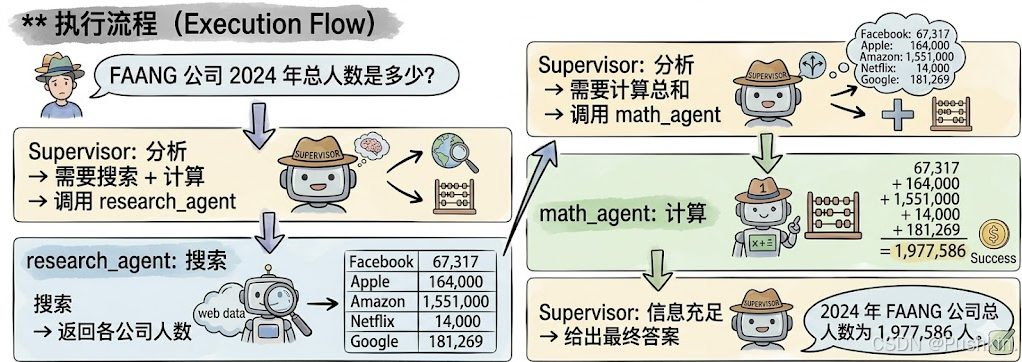
      "5. Google (Alphabet): 181,269 employees.";
  },
  {
    name: "web_search",
    description: "Search the web for information.",
    schema: z.object({ query: z.string() }),
  }
);

// 数学专家 Agent
const mathAgent = createReactAgent({
  llm: model,
  tools: [add, multiply],
  name: "math_expert",
  prompt: "You are a math expert. Always use one tool at a time.",
});

// 研究专家 Agent
const researchAgent = createReactAgent({
  llm: model,
  tools: [webSearch],
  name: "research_expert",
  prompt: "You are a world class researcher with access to web search. Do not do any math.",
});

// ─── 创建 Supervisor ───
const workflow = createSupervisor({
  agents: [researchAgent, mathAgent],
  llm: model,
  prompt:
    "You are a team supervisor managing a research expert and a math expert. " +
    "For current events, use research_agent. " +
    "For math problems, use math_agent.",
});

// ─── 运行 ───
const app = workflow.compile();
const result = await app.invoke({
  messages: [
    {
      role: "user",
      content: "what's the combined headcount of the FAANG companies in 2024??",
    },
  ],
});
执行流程:
四、Agent 之间的通信方式
4.1 共享消息列表(Shared Message List)
最常用方式:所有 Agent 共享一个消息列表,通过读写这个列表来协作。
// 所有 Agent 共享 MessagesAnnotation 中的 messages 字段
const graph = new StateGraph(MessagesAnnotation)
  .addNode("agent1", agent1)
  .addNode("agent2", agent2)
  // ...
两种共享策略:
策略一:共享完整历史(Share Full History)
   → 所有 Agent 看到完整的思考过程
   → 优点:帮助其他 Agent 做出更好决策
   → 缺点:上下文快速增长,需要记忆管理

策略二:只共享最终结果(Share Final Result)
   → 每个 Agent 有自己的私有"草稿纸"
   → 只把最终结果放入共享消息列表
   → 优点:上下文可控,适合多 Agent 场景
   → 缺点:丢失中间推理过程

4.2 不同 State Schema
不同 Agent 可能需要不同的 State 结构。LangGraph 提供两种方式:
方式一:Subgraph 独立 State
   → 子图有独立的 State Schema
   → 通过 input/output transformation 与父图通信

方式二:私有输入 State
   → Agent 节点函数有独立的私有 State
   → 只接收它需要的信息
五、多层级层级架构
Supervisor 可以嵌套 Supervisor,形成多层级架构:
// 第一层:研究团队
const researchTeam = createSupervisor({
  agents: [researchAgent, mathAgent],
  llm: model,
}).compile({ name: "research_team" });

// 第一层:写作团队
const writingTeam = createSupervisor({
  agents: [writingAgent, publishingAgent],
  llm: model,
}).compile({ name: "writing_team" });

// 第二层:顶层 Supervisor
const topLevelSupervisor = createSupervisor({
  agents: [researchTeam, writingTeam],
  llm: model,
}).compile({ name: "top_level_supervisor" });
架构示意: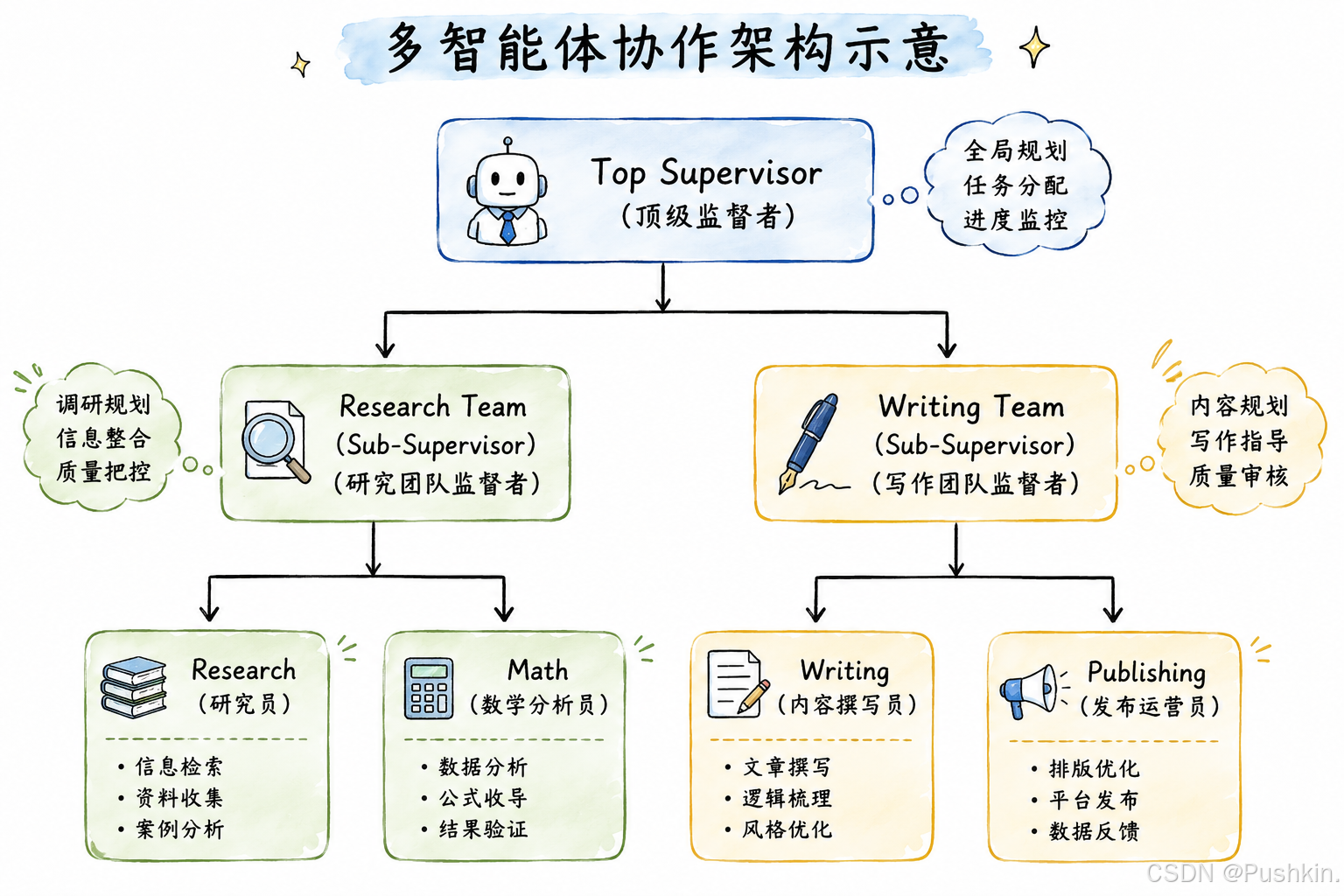
六、实战:构建一个多 Agent 研究助手
6.1 需求
用户: "帮我研究一下 2024 年 AI 领域的最新进展,
      并写一份总结报告"

需要:
1. 搜索最新 AI 新闻
2. 整理和分析信息
3. 撰写报告
6.2 实现
import { createSupervisor } from "@langchain/langgraph-supervisor";
import { createReactAgent } from "@langchain/langgraph/prebuilt";
import { tool } from "@langchain/core/tools";
import { z } from "zod";

const model = new ChatOpenAI({ modelName: "gpt-4o" });

// ─── 搜索 Agent ───
const searchAgent = createReactAgent({
  llm: model,
  tools: [webSearchTool],
  name: "search_expert",
  prompt: "You are a search expert. Find the latest information on the topic.",
});

// ─── 分析 Agent ───
const analysisAgent = createReactAgent({
  llm: model,
  tools: [],  // 不需要工具,只做分析
  name: "analysis_expert",
  prompt: "You are an analysis expert. Organize and analyze the information provided.",
});

// ─── 写作 Agent ───
const writingAgent = createReactAgent({
  llm: model,
  tools: [],
  name: "writing_expert",
  prompt: "You are a writing expert. Write a clear and well-structured report.",
});

// ─── Supervisor ───
const workflow = createSupervisor({
  agents: [searchAgent, analysisAgent, writingAgent],
  llm: model,
  prompt:
    "You are a research supervisor. " +
    "For finding information, use search_expert. " +
    "For organizing information, use analysis_expert. " +
    "For writing reports, use writing_expert. " +
    "Always follow the order: search → analyze → write.",
  outputMode: "last_message",  // 只共享最终结果
});

const app = workflow.compile();

// ─── 运行 ───
const result = await app.invoke({
  messages: [
    {
      role: "user",
      content: "帮我研究一下 2024 年 AI 领域的最新进展,并写一份总结报告",
    },
  ],
});
6.3 执行流程
用户请求
  │
  ▼
Supervisor: 需要搜索 → 调用 search_expert
  │
  ▼
search_expert: 搜索 "2024 AI latest developments"
  │  返回:GPT-5 发布、Claude 4、Gemini 2.0 等
  │
  ▼
Supervisor: 搜索完成 → 调用 analysis_expert
  │
  ▼
analysis_expert: 整理信息,分类(模型发布、应用落地、行业趋势)
  │
  ▼
Supervisor: 分析完成 → 调用 writing_expert
  │
  ▼
writing_expert: 撰写结构化报告
  │
  ▼
Supervisor: 写作完成 → 返回最终答案
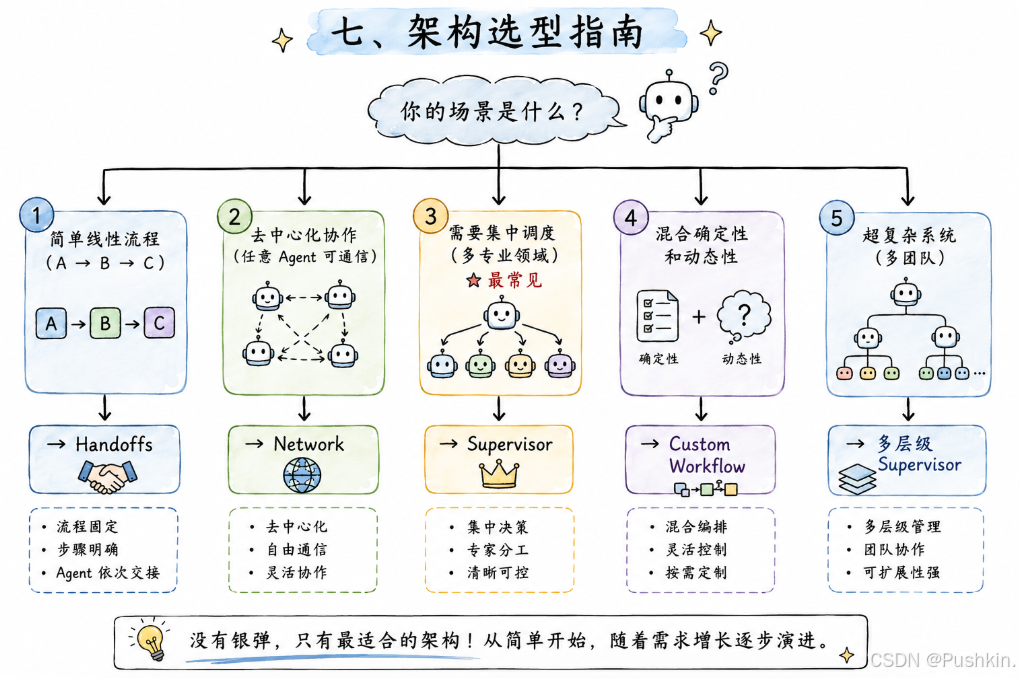
七、架构选型指南
八、总结
核心认知
关键 API
// 一行代码创建 Supervisor
const workflow = createSupervisor({
  agents: [agent1, agent2, agent3],
  llm: model,
  prompt: "调度规则...",
  outputMode: "last_message",  // 或 "full_history"
});

// 编译运行
const app = workflow.compile();
const result = await app.invoke({ messages: [...] });
参考:
更多推荐


 8
8 0
0- 0


 已为社区贡献3条内容

所有评论(0)