python中图像的几何扭曲
·
回答问题
我想使用 python 对图像执行几何变换,沿给定曲线“拉直”或校正图像。 scikit-imageProjectiveTransform()和warp()似乎对此非常有用,但文档很少。我在这里遵循了文档,但是对于示例案例,我无法使其正常工作。
下面是一个例子:我将创建一个带有两个同心圆的图像,目标是矫正这些圆的四分之一,使生成的图像是两条平行线。这是示例数据:
import numpy as np
a = np.zeros((500, 500))

# create two concentric circles with a thickness of a few pixels:
for i in range(500):
    for j in range(500):
        r = np.sqrt((i - 250)**2 + (j - 250)**2)
        if r > 50 and r < 52:
            a[i, j] = 10
        if r > 100 and r < 102:
            a[i, j] = 10
# now create the coordinates of the control points in the original image:
(x0, y0) = (250, 250)
r = 30   # inner circle
x = np.linspace(250 - r, 250, 50)
y = np.sqrt(r ** 2 - (x - x0) ** 2) + x0
r2 = 120   # outer circle
x2 = np.linspace(250 - r2, 250, 50)
y2 = np.sqrt(r2 ** 2 - (x2 - x0) ** 2) + x0
dst = np.concatenate((np.array([x, y]).T, np.array([x2, y2]).T))
这可以绘制出来,例如:
imshow(a, cmap='gist_gray_r')
plot(x, y, 'r.')
plot(x2, y2, 'r.')
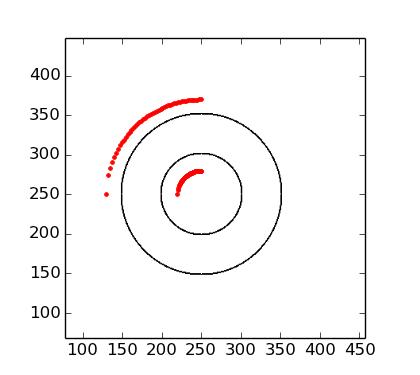
所以我的目标是纠正红色控制点给出的象限中的图像。 (在这种情况下,这与笛卡尔到极坐标的转换相同。)使用文档示例中的 scikit 图像,我已经完成了:
# create corresponding coordinates for control points in final image:
xi = np.linspace(0, 100, 50)
yi = np.zeros(50)
xi2 = xi
yi2 = yi + (r2 - r)
src = np.concatenate((np.array([xi, yi]).T, np.array([xi2, yi2]).T))

# transform image
from skimage import transform, data
tform3 = transform.ProjectiveTransform()
tform3.estimate(src, dst)
warped = transform.warp(a, tform3)
我期待这个warped图像显示两条平行线,但我得到: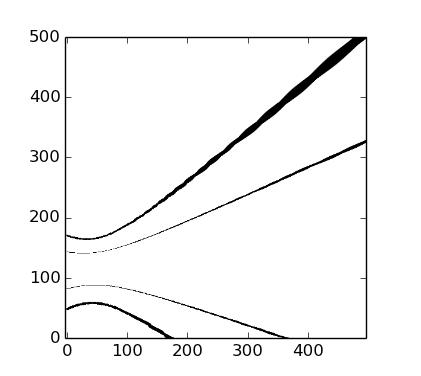
我在这里做错了什么?
请注意,虽然在这种情况下它是笛卡尔到极坐标的变换,但在最一般的情况下,我正在寻找来自任意曲线的变换。如果有人知道使用其他软件包的更好方法,请告诉我。我可以通过将ndimage.map_coordinates用于一堆径向线来解决这个问题,但我正在寻找更优雅的东西。
Answers
ProjectiveTransform是线性变换,无法匹配您的变形方案。可能有更好的选择,但是对于任意曲线,您可以使其与PiecewiseAffineTransform一起使用,它可以通过镶嵌线性变换来匹配您扔给它的任何东西。如果您只是在代码中更改转换的名称,这就是我得到的输出:
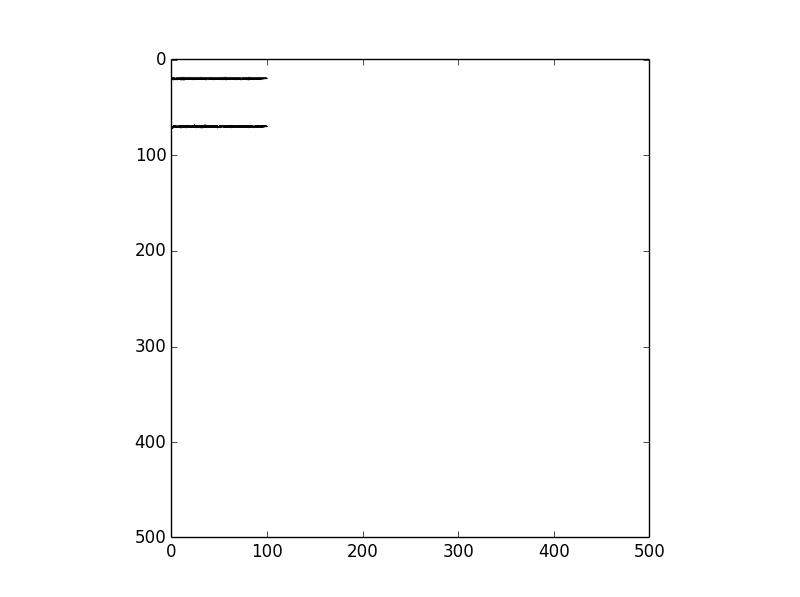
所以你可能需要稍微调整一下才能得到你想要的,但至少它会在你的转换明确定义的区域产生两条平行线。

Python社区为您提供最前沿的新闻资讯和知识内容
更多推荐

 0
0 0
0- 0


 已为社区贡献126440条内容

所有评论(0)