
第七章 实战项目 — 个人知识库问答 Agent
·
第7章:实战项目 — 个人知识库问答 Agent
📌 本章目标
- 把前6章的知识整合成一个完整的应用
- 学会项目结构设计
- 用 Streamlit 搭建一个可交互的 Web 界面
- 实现文档上传、解析、问答的完整流程
7.1 项目概述
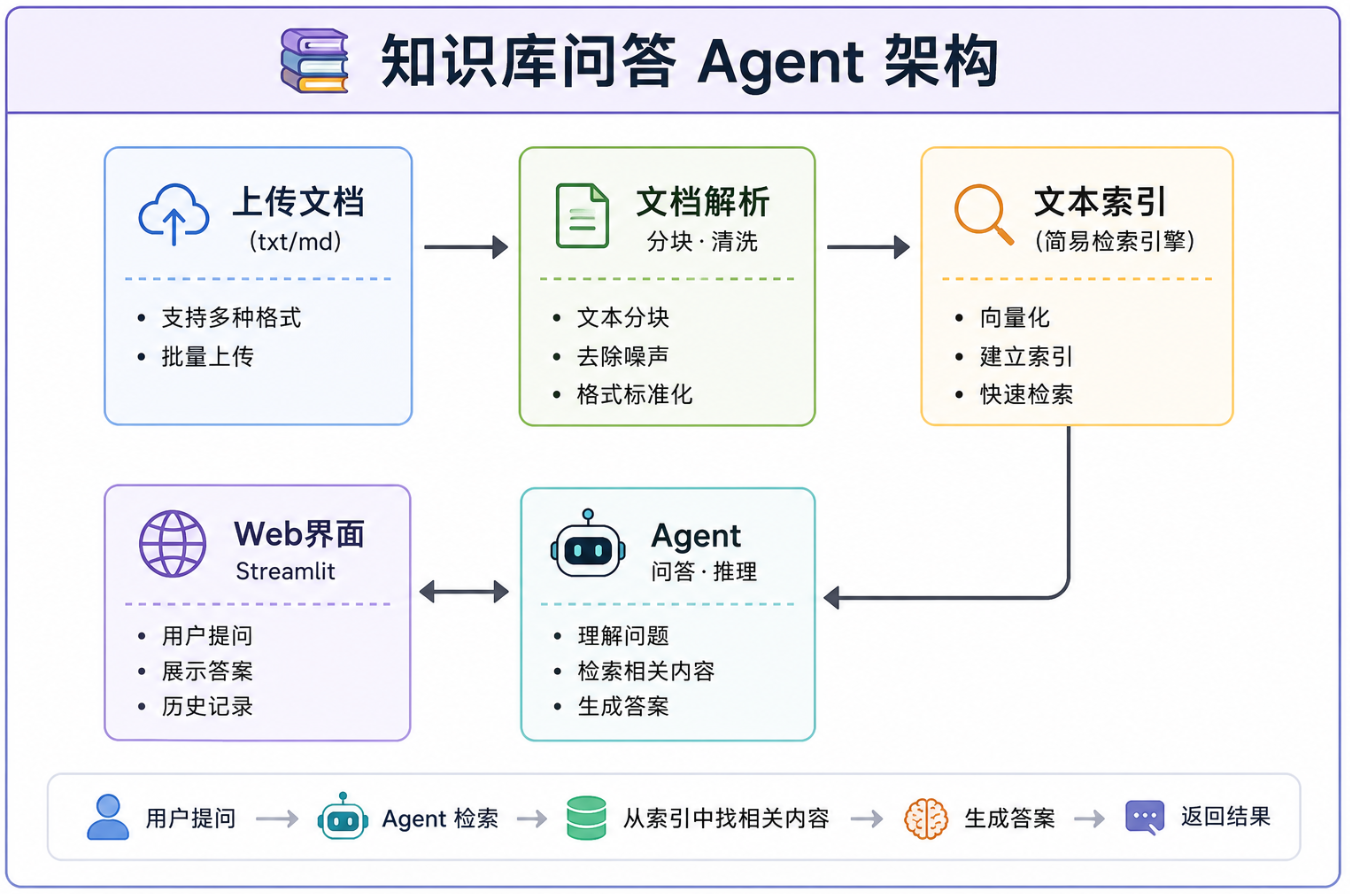
我们要做一个 个人知识库问答系统,功能如下:
- 📤 用户上传自己的笔记/文档(txt、md、pdf)
- 🔍 Agent 理解文档内容并建立索引
- 💬 用户可以针对文档内容提问
- 🧠 Agent 能记住对话上下文
- 🌐 有 Web 界面,不需要命令行
7.2 准备工作:安装依赖
在开始之前,确保已安装以下依赖:
pip install openai streamlit python-dotenv pypdf
并在项目目录下创建 .env 文件:
# .env 文件内容
DEEPSEEK_API_KEY=sk-你的密钥
7.3 完整代码(单文件,复制即用)
以下是完整的 app.py,一个文件包含所有功能——直接复制保存为 app.py,然后在同目录下创建 .env 文件,运行 streamlit run app.py 即可启动。
"""
=============================================================================
知识库问答 Agent —— 完整单文件应用
=============================================================================
使用前准备:
  1. pip install openai streamlit python-dotenv pypdf
  2. 在同目录下创建 .env 文件,写入: DEEPSEEK_API_KEY=sk-你的密钥
  3. 运行: streamlit run app.py
  4. 浏览器打开 http://localhost:8501
=============================================================================
"""
import streamlit as st
import os
import re
import json
import tempfile
from pathlib import Path
from openai import OpenAI
from dotenv import load_dotenv

load_dotenv()

# ============================================================
# 1. DeepSeek 客户端
# ============================================================
client = OpenAI(
    api_key=os.getenv("DEEPSEEK_API_KEY"),
    base_url="https://api.deepseek.com/v1"
)

# ============================================================
# 2. 文档解析器
# ============================================================
def parse_file(file_path: str) -> str:
    """解析文件为文本,支持 .txt / .md / .py / .pdf"""
    ext = Path(file_path).suffix.lower()
    if ext == ".pdf":
        return _parse_pdf(file_path)
    else:
        return _parse_text(file_path)

def _parse_text(file_path: str) -> str:
    """读取文本文件,自动检测编码"""
    for encoding in ["utf-8", "gbk", "gb2312", "latin-1"]:
        try:
            with open(file_path, "r", encoding=encoding) as f:
                return f.read()
        except (UnicodeDecodeError, UnicodeError):
            continue
    raise ValueError(f"无法解析文件: {file_path}")

def _parse_pdf(file_path: str) -> str:
    """解析 PDF 文件"""
    try:
        from pypdf import PdfReader
        reader = PdfReader(file_path)
        text = ""
        for page in reader.pages:
            page_text = page.extract_text()
            if page_text:
                text += page_text + "\n"
        return text
    except ImportError:
        raise ImportError("请安装 pypdf: pip install pypdf")

def chunk_text(text: str, chunk_size: int = 500, overlap: int = 50) -> list:
    """将长文本切分为小块,保证上下文连贯"""
    chunks = []
    start = 0
    while start < len(text):
        end = start + chunk_size
        if end < len(text):
            for sep in ["\n\n", "\n", "。", ".", "!", "?"]:
                last_sep = text.rfind(sep, start, end)
                if last_sep > start + chunk_size // 2:
                    end = last_sep + len(sep)
                    break
        chunk = text[start:end].strip()
        if chunk:
            chunks.append(chunk)
        start = end - overlap
    return chunks

# ============================================================
# 3. 简易检索器(关键词匹配)
# ============================================================
class SimpleRetriever:
    """基于关键词匹配的检索器"""
    def __init__(self):
        self.chunks: list = []

    def add_document(self, file_name: str, chunks: list):
        for chunk in chunks:
            self.chunks.append({"text": chunk, "source": file_name})

    def clear(self):
        self.chunks = []

    def search(self, query: str, top_k: int = 3) -> list:
        if not self.chunks:
            return ["(知识库为空,请先上传文档)"]

        keywords = self._extract_keywords(query)
        scored = []
        for chunk in self.chunks:
            score = 0
            text_lower = chunk["text"].lower()
            for kw in keywords:
                score += text_lower.count(kw.lower()) * 10
            if query.lower() in text_lower:
                score += 50
            if any(kw.lower() in chunk["source"].lower() for kw in keywords):
                score += 20
            if score > 0:
                scored.append((score, chunk))

        scored.sort(key=lambda x: x[0], reverse=True)
        results = []
        for score, chunk in scored[:top_k]:
            results.append(f"[来源: {chunk['source']},相关度: {score}]\n{chunk['text']}")
        return results if results else ["未找到相关内容,请尝试换个问法。"]

    def _extract_keywords(self, text: str) -> list:
        text = re.sub(r'[,。!?、;:""''()【】《》\s]+', ' ', text)
        words = text.split()
        stopwords = {"的", "是", "了", "在", "和", "与", "或", "一个",
                     "这个", "那个", "什么", "怎么", "如何", "为什么"}
        return [w for w in words if len(w) >= 2 and w not in stopwords]

# ============================================================
# 4. 知识库搜索工具
# ============================================================
def search_knowledge_base(query: str, retriever: SimpleRetriever) -> str:
    """在知识库中搜索"""
    results = retriever.search(query)
    return "\n\n---\n\n".join(results)

# ============================================================
# 5. Agent 核心
# ============================================================
class KnowledgeAgent:
    """知识库问答 Agent"""
    def __init__(self):
        self.retriever = SimpleRetriever()
        self.tools = [
            {
                "type": "function",
                "function": {
                    "name": "search_knowledge_base",
                    "description": "在用户上传的文档中搜索相关内容。当用户询问文档中的信息时使用。",
                    "parameters": {
                        "type": "object",
                        "properties": {
                            "query": {
                                "type": "string",
                                "description": "搜索关键词或问题"
                            }
                        },
                        "required": ["query"]
                    }
                }
            }
        ]
        self.memory = []

    def add_document(self, file_name: str, chunks: list):
        self.retriever.add_document(file_name, chunks)

    def chat(self, user_input: str) -> str:
        system_prompt = """你是一个知识库问答助手。你可以:
1. 使用 search_knowledge_base 工具在用户的文档中搜索信息
2. 根据搜索到的内容回答问题
3. 如果文档中没有相关答案,如实告诉用户

回答要求:
- 引用文档中的具体内容
- 说明信息来源(文档名称)
- 如果文档内容不足以回答,给出你的建议"""

        messages = [
            {"role": "system", "content": system_prompt},
            *self.memory[-10:],
            {"role": "user", "content": user_input}
        ]

        for _ in range(5):
            response = client.chat.completions.create(
                model="deepseek-chat",
                messages=messages,
                tools=self.tools,
            )
            msg = response.choices[0].message

            if msg.tool_calls:
                messages.append(msg)
                for tc in msg.tool_calls:
                    if tc.function.name == "search_knowledge_base":
                        args = json.loads(tc.function.arguments)
                        result = search_knowledge_base(args["query"], self.retriever)
                        messages.append({
                            "role": "tool",
                            "tool_call_id": tc.id,
                            "content": result
                        })
            else:
                answer = msg.content
                self.memory.append({"role": "user", "content": user_input})
                self.memory.append({"role": "assistant", "content": answer})
                if len(self.memory) > 20:
                    self.memory = self.memory[-20:]
                return answer

        return "抱歉,处理超时,请简化问题后重试。"

# ============================================================
# 6. Streamlit Web 界面
# ============================================================
st.set_page_config(
    page_title="📚 知识库问答 Agent",
    page_icon="🤖",
    layout="wide"
)

st.title("📚 个人知识库问答 Agent")
st.caption("上传你的笔记/文档,然后向它提问!基于 DeepSeek 大模型")

# 初始化 Agent(只创建一次)
if "agent" not in st.session_state:
    st.session_state.agent = KnowledgeAgent()
    st.session_state.messages = []
    st.session_state.docs_loaded = False

agent = st.session_state.agent

# ── 侧边栏:文档上传 ──
with st.sidebar:
    st.header("📤 上传文档")
    st.caption("支持格式: txt / md / py / pdf")
    st.caption("💡 提示:先创建一个 test.txt 写几段内容用来测试")

    uploaded_files = st.file_uploader(
        "选择文档文件",
        type=["txt", "md", "py", "pdf"],
        accept_multiple_files=True
    )

    if uploaded_files and st.button("🔍 解析并索引文档", use_container_width=True):
        agent.retriever.clear()
        for file in uploaded_files:
            with tempfile.NamedTemporaryFile(
                delete=False, suffix=Path(file.name).suffix
            ) as tmp:
                tmp.write(file.getvalue())
                tmp_path = tmp.name

            try:
                text = parse_file(tmp_path)
                chunks = chunk_text(text)
                agent.add_document(file.name, chunks)
                st.success(f"✅ {file.name}: {len(chunks)} 个文本块")
            except Exception as e:
                st.error(f"❌ {file.name} 解析失败: {e}")
            finally:
                os.unlink(tmp_path)

        st.session_state.docs_loaded = True
        st.success("🎉 所有文档加载完成!现在可以提问了")

    if st.session_state.docs_loaded:
        st.divider()
        st.caption(f"📊 已加载 {len(agent.retriever.chunks)} 个文本块")

    if st.button("🗑️ 清空对话", use_container_width=True):
        st.session_state.messages = []
        agent.memory = []
        st.rerun()

# ── 主区域:对话界面 ──
for msg in st.session_state.messages:
    with st.chat_message(msg["role"]):
        st.markdown(msg["content"])

if prompt := st.chat_input("请输入你的问题(基于已上传的文档)..."):
    st.session_state.messages.append({"role": "user", "content": prompt})
    with st.chat_message("user"):
        st.markdown(prompt)

    with st.chat_message("assistant"):
        with st.spinner("🤔 思考中..."):
            if not st.session_state.docs_loaded:
                response = "⚠️ 请先在左侧上传文档并点击「解析并索引文档」"
            else:
                response = agent.chat(prompt)
        st.markdown(response)
        st.session_state.messages.append({"role": "assistant", "content": response})
7.4 运行方法
# 1. 把上面的代码保存为 app.py
# 2. 在同目录下创建 .env 文件:
#    DEEPSEEK_API_KEY=sk-你的密钥
# 3. 安装依赖
pip install openai streamlit python-dotenv pypdf

# 4. 启动应用
streamlit run app.py

# 5. 浏览器打开 http://localhost:8501
# 6. 上传一个测试文档(txt/md 均可),开始提问!
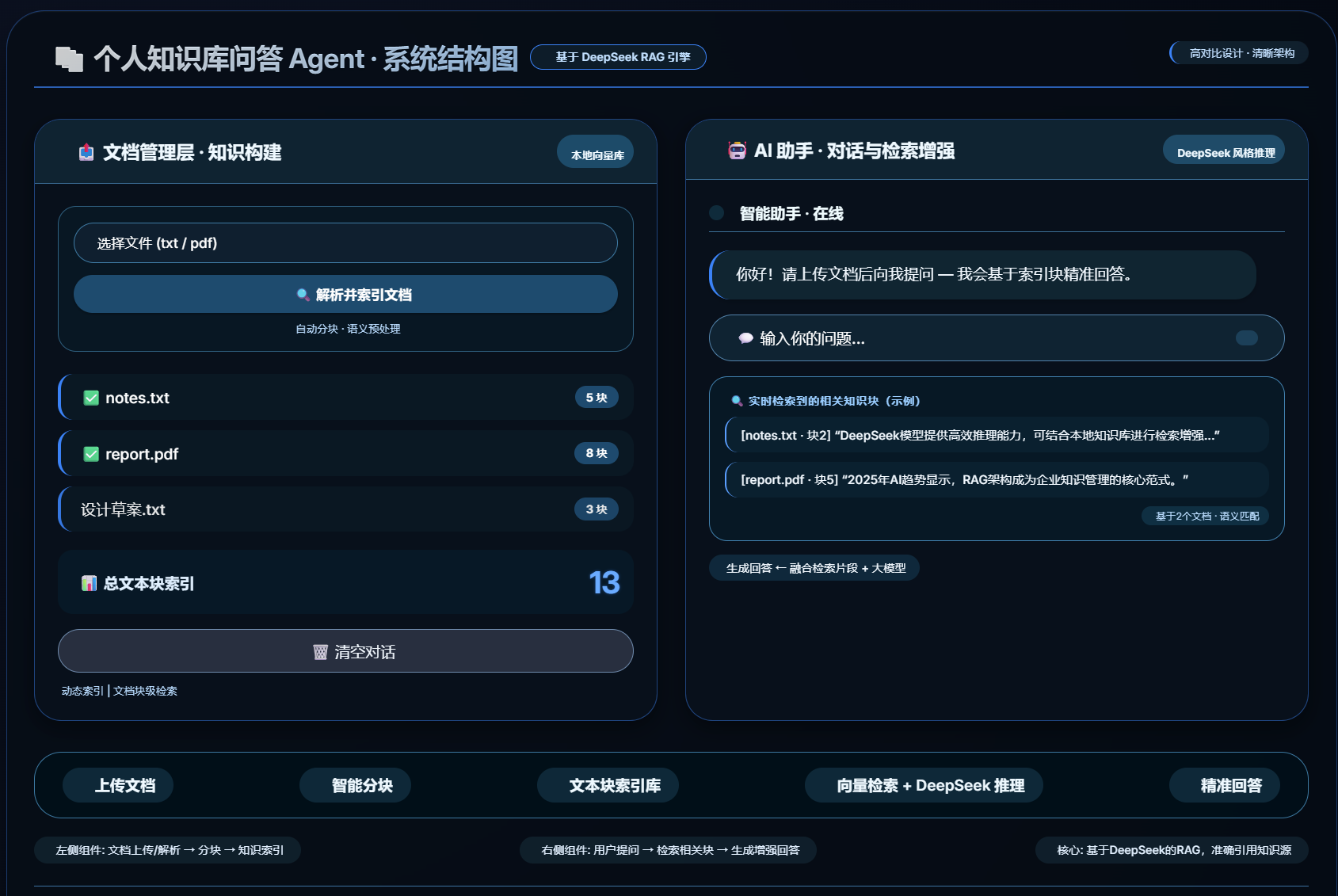
7.5 运行效果
7.6 后续优化方向
当前版本是 MVP(最小可用产品),你可以在此基础上:
| 优化方向 | 难度 | 效果 |
|---|---|---|
| 用 ChromaDB 替代简易检索器(向量搜索) | ⭐⭐ | 检索准确率大幅提升 |
| 支持更多文件格式(Word、Excel、网页) | ⭐ | 更实用 |
| 支持多个知识库切换 | ⭐⭐ | 适合多项目场景 |
| 添加引用标注(回答中标注来自哪个文档) | ⭐ | 更可信 |
| 用 FastAPI 包装成 API 服务 | ⭐⭐ | 可以对接其他应用 |
| 添加用户登录和数据隔离 | ⭐⭐⭐ | 可以给多人使用 |
📝 本章小结
恭喜你!你完成了一个能真正跑起来的 AI Agent 应用。
回顾一下你学到了什么:
- ✅ 文档解析和文本分块
- ✅ 简易检索器(关键词匹配版搜索引擎)
- ✅ Agent 核心循环(工具调用 + 记忆)
- ✅ Streamlit Web 界面
- ✅ 完整项目的文件结构设计
✏️ 练习题
-
基础题:给你的 Agent 增加一个
summarize_document工具,让用户可以对上传的文档生成摘要。 -
进阶题:用 ChromaDB(
pip install chromadb)替换SimpleRetriever,体验向量检索和关键词检索的差异。 -
挑战题:给应用增加"多知识库"功能——用户可以选择在不同的知识库之间切换,每个知识库存放不同的文档。
下一章(最后一章):第8章:进阶方向与生态概览 —— 学完这门课,接下来往哪个方向走?

小龙虾开发者社区是 CSDN 旗下专注 OpenClaw 生态的官方阵地,聚焦技能开发、插件实践与部署教程,为开发者提供可直接落地的方案、工具与交流平台,助力高效构建与落地 AI 应用
更多推荐

 10
10 0
0- 0


 已为社区贡献3条内容

所有评论(0)