
Python数据采集方法——数据接口&爬虫(可用的证券接口+可用的财报爬网站+BeautifulSoup库+缺失/重复/异常值处理)
数据采集
数据库
通过数据库获取数据受限较多,通常需要有数据库的访问权限才行,基于数据安全考量一般人员很难拥有数据库的访问权限。
本文主要介绍以下两种方式。
数据接口
- 证券宝baostock,
baostock是一个免费的金融数据接口,可以获取A股、港股等市场的历史数据。
官网Baostock证券数据平台
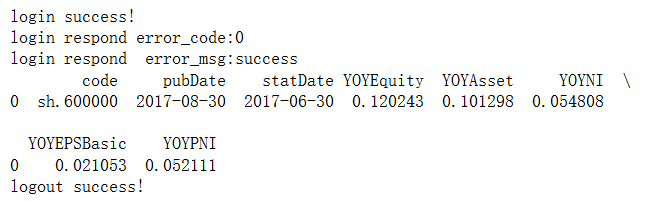
使用范例:在Baostock知识库中左侧选择需要的数据类型比如“季频成长能力”
首先需要安装baostock库,然后进行登录操作。
 import baostock as bs
 import pandas as pd

  # 登陆系统
  lg = bs.login()
  # 显示登陆返回信息
  print('login respond error_code:'+lg.error_code)
  print('login respond  error_msg:'+lg.error_msg)

  # 成长能力
  growth_list = []
  rs_growth = bs.query_growth_data(code="sh.600000", year=2017, quarter=2)
  while (rs_growth.error_code == '0') & rs_growth.next():
      growth_list.append(rs_growth.get_row_data())
  result_growth = pd.DataFrame(growth_list, columns=rs_growth.fields)
  # 打印输出
  print(result_growth)
  # 结果集输出到csv文件
  result_growth.to_csv("D:\\growth_data.csv", encoding="gbk", index=False)

  # 登出系统
  bs.logout()
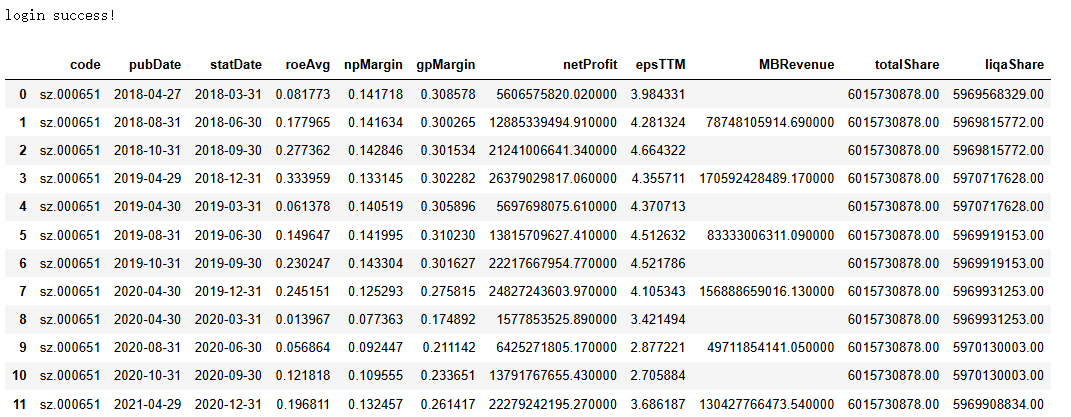
利用循环,获取更多数据
import baostock as bs
import pandas as pd
# 登陆系统
lg = bs.login()
# 查看季频盈利能力数据
profit_list = []
for year in range(2018,2023,1):         #年度循环,获取 2018—2022 年的财报数据
    for quarter in range(1,5,1):        #季度循环,获取 4 个季度的财报数据
        rs_profit = bs.query_profit_data(code="sz.000651", year=year, quarter=quarter)
        while (rs_profit.error_code == '0') & rs_profit.next():
            profit_list.append(rs_profit.get_row_data())
        result_profit = pd.DataFrame(profit_list, columns=rs_profit.fields)
# 以DataFrame格式输出返回数据
result_profit
- AKShare
官网AKShare是一个开源的Python金融数据接口库,提供A股/港股/美股/外汇/债券/期货/宏观经济等金融数据的实时和历史数据获取。
进入AKShare官方文档
AI工具辅助数据接口采集:AI提示词需明确数据源(如AKShare)、目标(农业企业数据采集)、背景(乡村振兴)、输出格式(DataFrame)及展示要求(代码注释+结果),
例如:“利用AKShare接口,分步骤采集北大荒(600598)2025.7.1-9.30日线数据,以DataFrame输出并注释”。
import akshare as ak
import pandas as pd

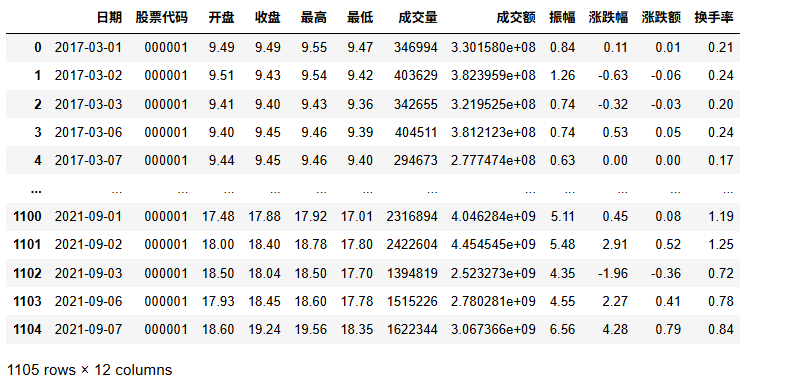
stock_zh_a_hist_df = ak.stock_zh_a_hist(symbol="000001", period="daily", start_date="20170301", end_date='20210907', adjust="")
stock_zh_a_hist_df
网络爬虫
可以根据用户指定的URL地址,自动获取网页中的信息。
- 基本原理:
客户端(用户)向服务器发送访问请求,服务器接收到请求后验证请求的有效性,然后向客户端发送响应内容,客户端接收并将内容展示出来。 - 爬虫工作流程
网络爬虫工作流程主要包括发起请求、接收响应、解析内容、提取数据、存储数据等环节。
1. 静态网页数据爬取
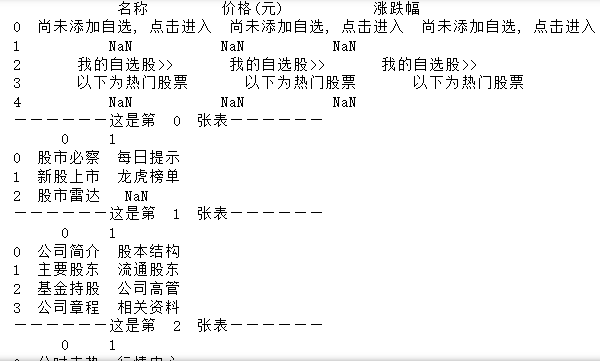
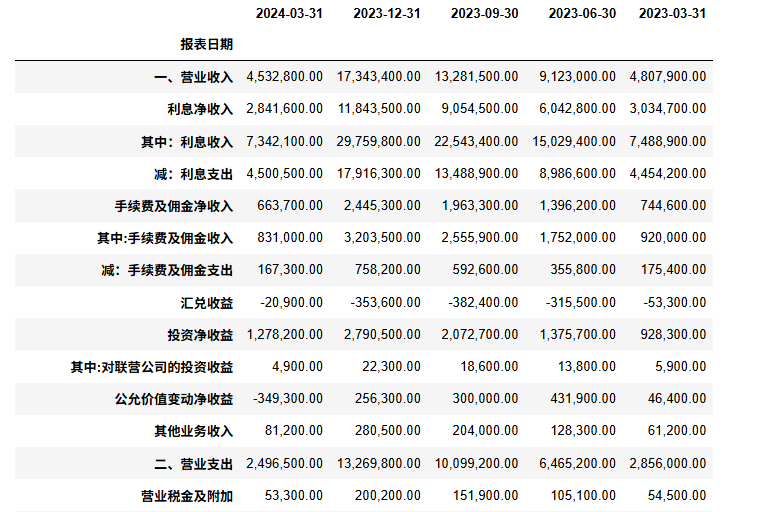
(1)查看数据所在网页,浏览器右键查看网页源代码,可以看到其中包含的数据说明,该页面为静态页面,数据呈现表格样式,适合使用功能 read_html() 进行爬取
# 以新浪财经网财务报表数据为例
# 读取浦发银行(sh.600000)的利润表
import pandas as pd
profitStatement = pd.read_html('http://vip.stock.finance.sina.com.cn/corp/go.php/vFD_ProfitStatement/stockid/600000/ctrl/part/displaytype/4.phtml')
profitStatement
# 显示 profitStatement 表格数量
len(profitStatement)
# 将 profitStatement 里的表格一一输出,并定位到利润表
i=0
for table in profitStatement:
    print(table)
    print('——————这是第 ',i,' 张表—————— ')
    i+=1
2.动态网页数据爬取
beautifulsoup模块,提供一系列标签选择器,用于选择文档中的特定标签,一起获取标签的属性和内容。CSS选择器一般结构为[tagName][attName][=value]
爬取东方财富网
爬取新浪财经中浦发银行的财报数据
# 导入所需模块
import requests
from bs4 import BeautifulSoup
import pandas as pd
# 导入要爬取的数据所在的网页网址
url = "https://vip.stock.finance.sina.com.cn/corp/go.php/vFD_ProfitStatement/stockid/600000/ctrl/part/displaytype/4.phtml"
response = requests.get(url)# 用requests模块下的get()函数发起请求,获取网页源代码
soup = BeautifulSoup(response.text,'html.parser') # 利用beautifulsoup模块对网页源代码进行解析
print(soup)

# 通过分析以上源代码,发现利润表数据在table标签中,并且指定id为'ProfitStatementNewTable0'
table = soup.find_all('table',id='ProfitStatementNewTable0')
print(table)

# 利用css选择器,找到利润表数据所在的定位标签,即“tr”
trls=table[0].select('tr')
print(trls)

# 利用for...in循环,抓取每一列的列名,即报表日期
columns=[]
tdls=trls[1].find_all('td')
for td in tdls:
    columns.append(td.get_text())
print(columns)

# 利用for...in嵌套循环,抓取报表中每一行的数据
rows=[]
for i in range(3,len(trls)):
    tdls=trls[i].select('td')

    columns1=[]
    for j in range(0,len(tdls)):
        columns1.append(tdls[j].get_text())
    rows.append(columns1)
print(rows)

# 利用pandas模块下的DataFrame()函数,将列表形式的数据转换成数据框架形式的数据
df=pd.DataFrame(rows,columns=columns)
df.set_index('报表日期') #将报表日期设置为行索引
BeautifulSoup
详见Python 爬虫 - BeautifulSoup
爬虫的流程可以分为以下几个步骤:
- 发送 HTTP 请求:爬虫通过 HTTP 请求从目标网站获取 HTML 页面,常用的库包括 requests。
- 解析 HTML 内容:获取 HTML 页面后,爬虫需要解析内容并提取数据,常用的库有 BeautifulSoup、lxml、Scrapy 等。
- 提取数据:通过定位 HTML 元素(如标签、属性、类名等)来提取所需的数据。
- 存储数据:将提取的数据存储到数据库、CSV 文件、JSON 文件等格式中,以便后续使用或分析。
BeautifulSoup,它是一个用于解析 HTML 和 XML 文档的 Python 库,能够从网页中提取数据,常用于网页抓取和数据挖掘。
pip install beautifulsoup4
pip install lxml  # 推荐使用 lxml 作为解析器(速度更快)
先用request获取网页内容:
from bs4 import BeautifulSoup
import requests

# 使用 requests 获取网页内容
url = 'https://cn.bing.com/' # 抓取bing搜索引擎的网页内容
response = requests.get(url)

# 中文乱码问题
response.encoding = 'utf-8'

# 使用 BeautifulSoup 解析网页
soup = BeautifulSoup(response.text, 'lxml')  # 使用 lxml 解析器
# soup = BeautifulSoup(response.text, 'html.parser')# html.parser 解析器
中文乱码问题
使用 requests 库抓取中文网页时,可能会遇到编码问题,导致中文内容无法正确显示,为了确保能够正确抓取并显示中文网页,通常需要处理网页的字符编码。
自动检测编码 requests 通常会自动根据响应头中的 Content-Type 来推测网页的编码,但有时可能不准确,此时可以使用 chardet 来自动检测编码。
import requests

url = 'https://cn.bing.com/'
response = requests.get(url)

# 使用 chardet 自动检测编码
import chardet
encoding = chardet.detect(response.content)['encoding']
print(encoding)
response.encoding = encoding
# 如果你知道网页的编码(例如 utf-8 或 gbk),可以直接设置 response.encoding:
response.encoding = 'utf-8'  # 或者 'gbk',根据实际情况选择
find
BeautifulSoup 提供了多种方法来查找网页中的标签,最常用的包括 find() 和 find_all()。
find() 返回第一个匹配的标签
find_all() 返回所有匹配的标签
soup.find(‘title’)
获取标签的文本
通过 get_text() 方法,你可以提取标签中的文本内容:
获取标签的属性
通过 get(‘’)方法,你可以提取标签中的属性:
查找子标签和父标签
你可以通过 parent 和 children 属性访问标签的父标签和子标签:
from bs4 import BeautifulSoup
import requests

# 指定你想要获取标题的网站
url = 'https://www.runoob.com/' # 抓取bing搜索引擎的网页内容

# 发送HTTP请求获取网页内容
response = requests.get(url)
# 中文乱码问题
response.encoding = 'utf-8'

soup = BeautifulSoup(response.text, 'lxml')

# 查找第一个 <a> 标签
first_link = soup.find('a')
print(first_link)
print("----------------------------")

# 获取第一个 <a> 标签的 href 属性
first_link_url = first_link.get('href')
print(first_link_url)
print("----------------------------")

# 获取第一个 <a> 标签中的文本内容
first_link_text = first_link.get_text()
print(first_link_text)
print("----------------------------")

# 获取当前标签的父标签
parent_tag = first_link.parent
print(parent_tag.get_text())

# 查找所有 <a> 标签
all_links = soup.find_all('a')
print(all_links)
查找具有特定属性的标签
你可以通过传递属性来查找具有特定属性的标签。
例如,查找类名为 example-class 的所有 div 标签:
# 查找所有 class="example-class" 的 <div> 标签
divs_with_class = soup.find_all('div', class_='example-class')

# 查找具有 id="unique-id" 的 <p> 标签
unique_paragraph = soup.find('p', id='unique-id')
CSS 选择器
BeautifulSoup 也支持通过 CSS 选择器来查找标签。
select() 方法允许使用类似 jQuery 的选择器语法来查找标签:
# 使用 CSS 选择器查找所有 class 为 'example' 的 <div> 标签
example_divs = soup.select('div.example')

# 查找所有 <a> 标签中的 href 属性
links = soup.select('a[href]')
例题
from bs4 import BeautifulSoup
import pandas as pd
import os


def parse_html(file_name):
    current = os.path.dirname(__file__)
    html_path = os.path.join(current, file_name)
    # 读取HTML文件
    with open(html_path, 'r', encoding='utf-8') as f:
        contents = f.read()

    soup = BeautifulSoup(contents, 'lxml')

    # 找到所有的商品卡片
    product_cards = soup.find_all('div', class_='product-card')

    # 用于存储所有商品信息的列表
    products = []

    for card in product_cards:
        # 使用标签和属性获取商品图片链接
        img = card.find('img')['']
        # 使用class属性获取商品名称
        name = card.find(attrs={'class': ''}).text
        # 使用class属性获取商品价格
        price = card.find(attrs={'class': ''}).text
        # 使用class属性获取商品付款人数
        payment = card.find(attrs={'class': ''}).text
        # 使用class属性获取商品位置
        location = card.find(attrs={'class': ''}).text
        # 使用class属性获取商品店铺
        shop = card.find(attrs={'class': ''}).text
        # 将商品信息添加到列表中
        products.append([img, name, price, payment, location, shop])

    return products
提取table中数据
from bs4 import BeautifulSoup
import requests
import pandas as pd
# 指定你想要获取标题的网站
url = 'https://vip.stock.finance.sina.com.cn/corp/go.php/vFD_ProfitStatement/stockid/600000/ctrl/part/displaytype/4.phtml' # 抓取bing搜索引擎的网页内容


# 发送HTTP请求获取网页内容
response = requests.get(url)
soup = BeautifulSoup(response.text, 'lxml')


# 查找所有 <a> 标签
table = soup.find('table',id="ProfitStatementNewTable0")# soup.find('table',{'id':"ProfitStatementNewTable0"})
# print(table)
data=[]
rows = table.find_all('tr')
for row in rows:
    cells = row.find_all(['th', 'td'])  # 查找表头和单元格
    row_data=[]
    for cell in cells:
        row_data.append(cell.get_text().strip())# .strip()删除字符串首尾的指定字符(默认为空格或换行符)
    if len(row_data)!=0:# 过滤掉空行
        data.append(row_data)
df=pd.DataFrame(data)
# print(df)
# 日期作为列名
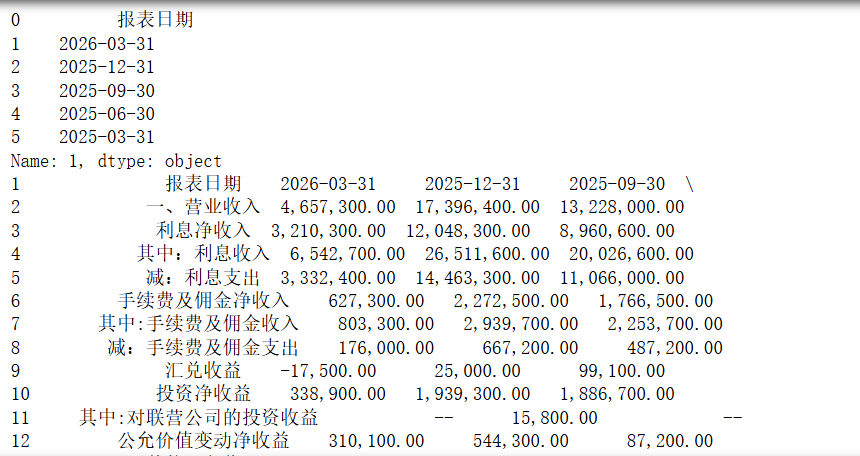
columnNames = df.iloc[1]
print(columnNames)
df = df[2:]
df.columns = columnNames
print(df)
# 判断利润表中是否存在缺失值
df.isnull()
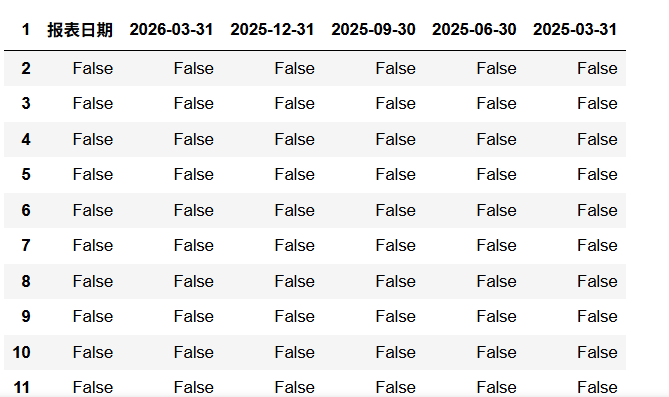
缺失值检验
# 判断利润表中是否存在缺失值
df.isnull()
# 筛选出含有缺失值的行
df[df.isnull().T.any()]
# (1)删除缺失值所在的行
df1=df.dropna()
df1
# (2)将缺失值用“ 0”填充
df2=df.fillna(0)
df2
# (3)临近填充
df4 = df3.fillna(method='backfill')
df4
重复值检验
# 查看重复行
pd.DataFrame.duplicated(df)
处理异常数据
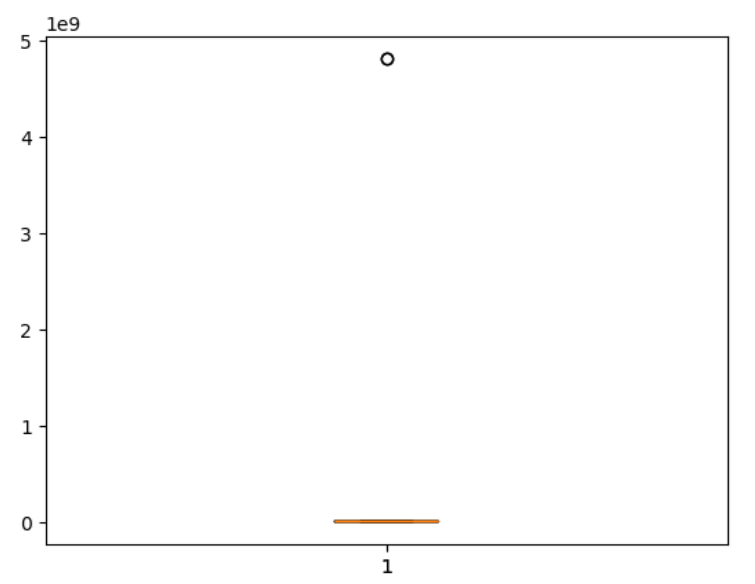
通过箱型图检测出异常值
import pandas as pd
from matplotlib import pyplot as plt
%matplotlib inline
data = pd.read_excel('5-3 利润表.xlsx', header=0)          # 读取利润简表数据
revenue = data["营业收入"]                               # 读取营业收入数据
plt.boxplot(revenue)
P = plt.boxplot(revenue)
outlier = P['fliers'][0].get_ydata()
outlier

小龙虾开发者社区是 CSDN 旗下专注 OpenClaw 生态的官方阵地,聚焦技能开发、插件实践与部署教程,为开发者提供可直接落地的方案、工具与交流平台,助力高效构建与落地 AI 应用
更多推荐

 7
7 0
0- 0


 已为社区贡献5条内容

所有评论(0)