
接入deepseek API,实现AI智能客服
·
现在的AI agents是一个热门且极具潜力的应用方向。本文将带你从零开始,一步步接入 DeepSeek API,构建一个功能完整的简单AI智能客服系统。我们将涵盖从 API 申请、环境配置、对话逻辑设计到前端集成的全流程,并提供可运行的代码示例,助你理解的 AI 能力
一、申请 DeepSeek API
要使用 DeepSeek 的 AI 能力,首先需要获取 API 密钥。以下是详细步骤:
- 访问 DeepSeek 平台:打开 DeepSeek API 管理页面
- 创建 API Key:登录后点击 “Create new API key” 按钮
- 复制并保存 Key:重要提示:API Key 仅在创建时显示一次,请务必立即复制并妥善保存到本地
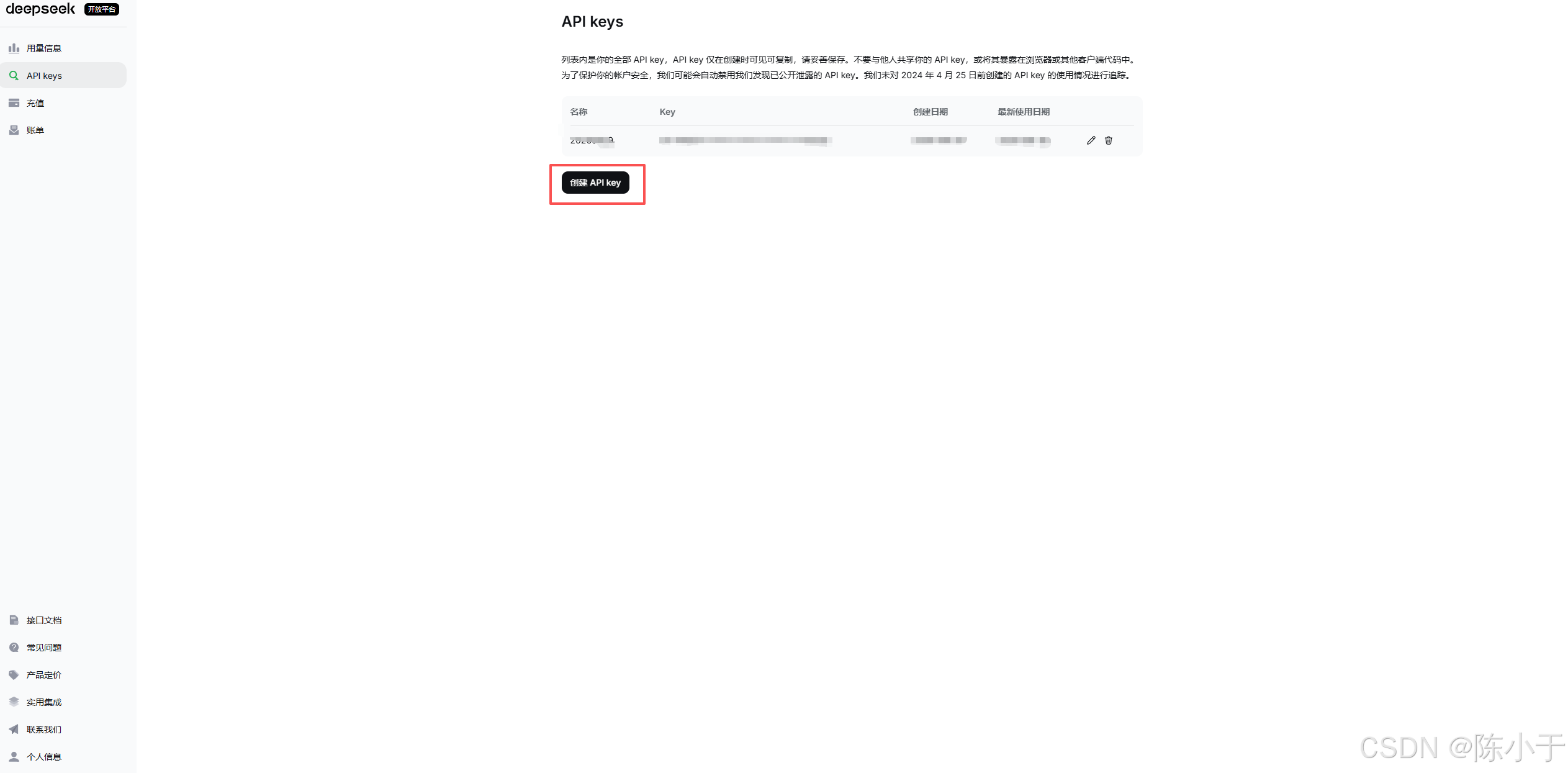
注意事项:
- 建议将 API Key 保存在安全的地方,如密码管理器或环境变量中
- 不要将 API Key 直接硬编码在代码中提交到版本控制系统
- 免费额度通常足够用于学习和测试,但请注意使用限制
二、AI 智能客服项目后端实现
本项目基于 Spring Boot 和 Spring AI 和 vue 框架构建,实现了一个航班预订系统的智能客服后端。系统架构如下:
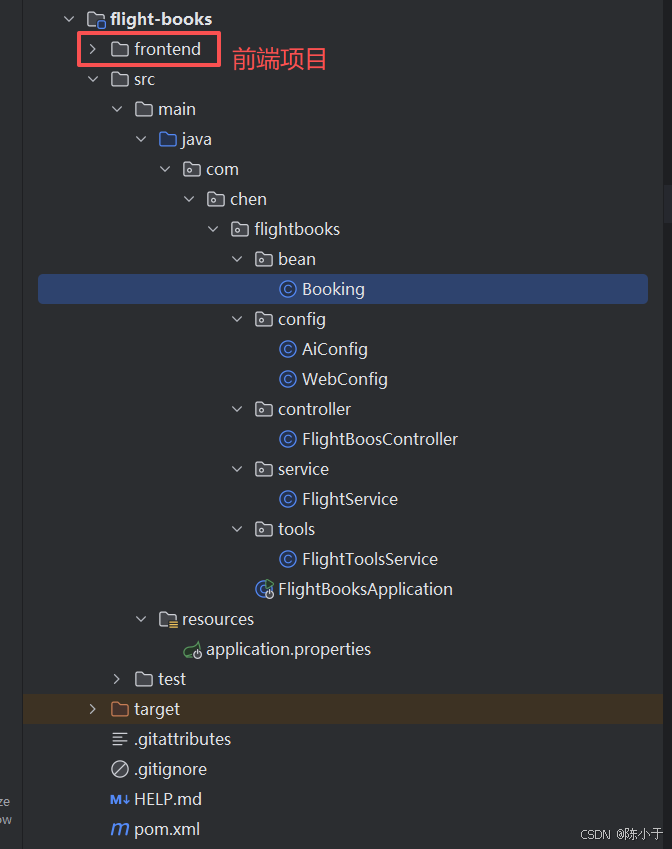
核心功能:
- 集成 DeepSeek API 提供智能对话能力
- 实现航班预订的 CRUD 操作
- 支持流式响应,提供实时聊天体验
- 内置对话记忆功能,保持上下文连贯性
0,deepseek配置
spring.application.name=flight-books

spring.ai.deepseek.api-key=sk-你的key
#使用哪个模型 deepseek-reasoner  deepseek-v4-flash deepseek-v4-pro
spring.ai.deepseek.chat.model=deepseek-v4-pro
1,Booking bean
package com.chen.flightbooks.bean;

/**
 * @Author: @Chenxc
 * @date: 2026/6/30 21:50
 * @Description:
 */
public class Booking {
    private String bookingId;
    private String username;
    private String from;
    private String to;
    private String date;

    public String getBookingId() {
        return bookingId;
    }

    public void setBookingId(String bookingId) {
        this.bookingId = bookingId;
    }

    public String getUsername() {
        return username;
    }

    public void setUsername(String username) {
        this.username = username;
    }

    public String getFrom() {
        return from;
    }

    public void setFrom(String from) {
        this.from = from;
    }

    public String getTo() {
        return to;
    }

    public void setTo(String to) {
        this.to = to;
    }

    public String getDate() {
        return date;
    }

    public void setDate(String date) {
        this.date = date;
    }
}
2,FlightBoosController
package com.chen.flightbooks.controller;

import com.chen.flightbooks.bean.Booking;
import com.chen.flightbooks.service.FlightService;
import org.springframework.ai.chat.client.ChatClient;
import org.springframework.beans.factory.annotation.Autowired;
import org.springframework.http.MediaType;
import org.springframework.web.bind.annotation.RequestMapping;
import org.springframework.web.bind.annotation.RequestParam;
import org.springframework.web.bind.annotation.RestController;
import reactor.core.publisher.Flux;

import java.time.LocalDate;
import java.util.List;

/**
 * @Author: @Chenxc
 * @date: 2026/6/30 21:42
 * @Description:
 */
@RestController
public class FlightBoosController {

    @Autowired
    private ChatClient chatClient;

    @Autowired
    private FlightService flightService;

    @RequestMapping(value = "/chat",produces = "text/stream;charset=UTF-8")
    public Flux<String> chat(@RequestParam(defaultValue = "讲一个笑话") String message) {
        return chatClient.prompt().user(message).system((spec)->{spec.param("current_date", LocalDate.now());}).stream().content();
    }

    @RequestMapping("findAll")
    public List<Booking>  findAll() {
        return flightService.findAll();
    }

    @RequestMapping("findByUsername")
    public Booking  findByUsername(@RequestParam(defaultValue = "") String username) {
        return flightService.findByUsername(username);
    }

    @RequestMapping("add")
    public Booking add(String username,@RequestParam String from, @RequestParam String to, @RequestParam String date) {
        return flightService.add(username,from,to,date);
    }
}
3,FlightService
package com.chen.flightbooks.service;

import com.chen.flightbooks.bean.Booking;
import org.springframework.ai.document.id.RandomIdGenerator;
import org.springframework.stereotype.Service;

import java.util.ArrayList;
import java.util.List;
import java.util.UUID;

/**
 * @Author: @Chenxc
 * @date: 2026/6/30 21:49
 * @Description:
 */
@Service
public class FlightService {

    private final List<Booking> bookings = new ArrayList<>();

    public FlightService() {
        bookings.add(createBooking(UUID.randomUUID().toString() ,"张三", "北京", "上海", "2026-07-15"));
        bookings.add(createBooking(UUID.randomUUID().toString(),"李四", "广州", "成都", "2026-07-20"));
        bookings.add(createBooking(UUID.randomUUID().toString(),"王五", "深圳", "杭州", "2026-08-01"));
        bookings.add(createBooking(UUID.randomUUID().toString(),"赵六", "上海", "西安", "2026-08-10"));
        bookings.add(createBooking(UUID.randomUUID().toString(),"陈七", "成都", "北京", "2026-08-18"));
    }

    private Booking createBooking(String bookingId,String username, String from, String to, String date) {
        Booking booking = new Booking();
        booking.setBookingId(bookingId);
        booking.setUsername(username);
        booking.setFrom(from);
        booking.setTo(to);
        booking.setDate(date);
        return booking;
    }

    public Booking add(String username, String from, String to, String date) {
        Booking booking = new Booking();
        booking.setBookingId(UUID.randomUUID().toString());
        booking.setUsername(username);
        booking.setFrom(from);
        booking.setTo(to);
        booking.setDate(date);
        bookings.add(booking);
        return booking;
    }

    public List<Booking> findAll() {
        return bookings;
    }

    public Booking findByUsername(String username) {
        return bookings.stream()
                .filter(booking -> username.equals(booking.getUsername()))
                .findFirst()
                .orElse(null);
    }


    public Booking cancel(String username) {
        Booking cancelbooking = bookings.stream()
                .filter(booking -> username.equals(booking.getUsername()))
                .findFirst()
                .orElse(null);
        if(null != cancelbooking){
            bookings.remove(cancelbooking);
        }
        return cancelbooking;
    }

}
4,AiConfig
package com.chen.flightbooks.config;

import com.chen.flightbooks.tools.FlightToolsService;
import org.springframework.ai.chat.client.ChatClient;
import org.springframework.ai.chat.client.advisor.PromptChatMemoryAdvisor;
import org.springframework.ai.chat.client.advisor.SimpleLoggerAdvisor;
import org.springframework.ai.chat.memory.ChatMemory;
import org.springframework.beans.factory.annotation.Autowired;
import org.springframework.context.annotation.Bean;
import org.springframework.context.annotation.Configuration;

/**
 * @Author: @Chenxc
 * @date: 2026/6/30 21:36
 * @Description:
 */
@Configuration
public class AiConfig {

    @Autowired
    private FlightToolsService flightToolsService;

    @Bean
    public ChatClient chatClient(ChatClient.Builder chatClientBuilder, ChatMemory chatMemory) {
        return chatClientBuilder.defaultSystem("""
					   您是“cxc”航空公司的客户聊天支持代理。请以友好、乐于助人且愉快的方式来回复。
                        您正在通过在线聊天系统与客户互动。
                        在提供有关预订或取消预订的信息之前,您必须始终
                        从用户处获取以下信息:预订号、客户姓名。
                        在询问用户之前,请检查消息历史记录以获取此信息。
                        在更改或退订之前,请先获取预订信息待用户回复确定之后才进行更改或退订的function-call。
                       请讲中文。
                       今天的日期是 {current_date}.
					""")
                .defaultTools(flightToolsService)
                .defaultAdvisors(PromptChatMemoryAdvisor.builder(chatMemory).build(),
                        new SimpleLoggerAdvisor())
                .build();
    }
}
5,WebConfig
package com.chen.flightbooks.config;

import org.springframework.context.annotation.Configuration;
import org.springframework.web.servlet.config.annotation.CorsRegistry;
import org.springframework.web.servlet.config.annotation.WebMvcConfigurer;

@Configuration
public class WebConfig implements WebMvcConfigurer {

    @Override
    public void addCorsMappings(CorsRegistry registry) {
        registry.addMapping("/**")
                .allowedOriginPatterns("http://localhost:*", "http://127.0.0.1:*")
                .allowedMethods("GET", "POST", "PUT", "DELETE", "OPTIONS")
                .allowedHeaders("*")
                .allowCredentials(true);
    }
}
6,FlightToolsService
package com.chen.flightbooks.tools;

import com.chen.flightbooks.bean.Booking;
import com.chen.flightbooks.service.FlightService;
import org.springframework.ai.tool.annotation.Tool;
import org.springframework.ai.tool.annotation.ToolParam;
import org.springframework.beans.factory.annotation.Autowired;
import org.springframework.stereotype.Service;
import org.springframework.web.bind.annotation.RestController;

/**
 * @Author: @Chenxc
 * @date: 2026/6/30 22:01
 * @Description:
 */
@Service
public class FlightToolsService {

    @Autowired
    private FlightService flightService;

    @Tool(description = "退票/取消预定")
    public void cancelBooking(@ToolParam(description = "真实人名(必填,必须为人的真实姓名,严禁用其他信息代替") String username) {
        System.out.println("取消航班");
        flightService.cancel(username);
    }

    @Tool(description = "查询预定")
    public Booking findBooking(@ToolParam(description = "真实人名(必填,必须为人的真实姓名,严禁用其他信息代替") String username) {
        System.out.println("查询预定");
        return flightService.findByUsername(username);
    }

    @Tool(description = "添加预定")
    public Booking addBooking(@ToolParam(description = "真实人名(必填,必须为人的真实姓名,严禁用其他信息代替") String username,
                              @ToolParam(description = "出发地(必填,必须为真是的国内地名,严禁用其他信息代替)") String from,
                              @ToolParam(description = "目的地(必填,必须为真是的国内地名,严禁用其他信息代替)") String to,
                              @ToolParam(description = "出发时间") String date) {
        System.out.println("添加预定");
        return flightService.add(username, from, to, date);
    }

}
三、AI 智能客服项目前端实现
<script setup>
import { onMounted, ref } from 'vue'
import { fetchBookings } from '../api/booking'

const bookings = ref([])
const loading = ref(false)
const error = ref('')

async function loadBookings() {
  loading.value = true
  error.value = ''
  try {
    bookings.value = await fetchBookings()
  } catch (e) {
    error.value = e.message || '加载失败,请确认后端服务已启动'
    bookings.value = []
  } finally {
    loading.value = false
  }
}

onMounted(loadBookings)
</script>

<template>
  <section class="booking-list">
    <header class="toolbar">
      <div>
        <h2>航班预订列表</h2>
        <p class="subtitle">共 {{ bookings.length }} 条记录</p>
      </div>
      <button type="button" class="refresh-btn" :disabled="loading" @click="loadBookings">
        {{ loading ? '刷新中...' : '刷新' }}
      </button>
    </header>

    <p v-if="error" class="error">{{ error }}</p>

    <div v-else-if="loading" class="status">正在加载预订数据...</div>

    <div v-else-if="bookings.length === 0" class="status empty">暂无预订记录</div>

    <div v-else class="table-wrap">
      <table>
        <thead>
          <tr>
            <th>#</th>
            <th>预定号</th>
            <th>客户姓名</th>
            <th>出发地</th>
            <th>目的地</th>
            <th>出发日期</th>
          </tr>
        </thead>
        <tbody>
          <tr v-for="(booking, index) in bookings" :key="`${booking.username}-${index}`">
            <td>{{ index + 1 }}</td>
            <td>{{ booking.bookingId }}</td>
            <td>{{ booking.username }}</td>
            <td>{{ booking.from }}</td>
            <td>{{ booking.to }}</td>
            <td>{{ booking.date }}</td>
          </tr>
        </tbody>
      </table>
    </div>
  </section>
</template>
<script setup>
import { nextTick, onMounted, ref } from 'vue'
import { streamChat } from '../api/chat'

const messages = ref([
  {
    role: 'assistant',
    content: '您好,我是 CXC 航空客服。请问有什么可以帮您?',
  },
])
const input = ref('')
const sending = ref(false)
const messagesRef = ref(null)

function scrollToBottom() {
  nextTick(() => {
    if (messagesRef.value) {
      messagesRef.value.scrollTop = messagesRef.value.scrollHeight
    }
  })
}

async function sendMessage() {
  const text = input.value.trim()
  if (!text || sending.value) {
    return
  }

  messages.value.push({ role: 'user', content: text })
  input.value = ''
  scrollToBottom()

  const assistantIndex = messages.value.length
  messages.value.push({ role: 'assistant', content: '', streaming: true })
  scrollToBottom()

  sending.value = true
  try {
    await streamChat(text, (content) => {
      messages.value[assistantIndex] = {
        role: 'assistant',
        content,
        streaming: true,
      }
      scrollToBottom()
    })
    messages.value[assistantIndex] = {
      role: 'assistant',
      content: messages.value[assistantIndex].content,
    }
  } catch (e) {
    messages.value[assistantIndex] = {
      role: 'assistant',
      content: e.message || '客服暂时无法回复,请稍后再试。',
    }
  } finally {
    sending.value = false
    scrollToBottom()
  }
}

function handleKeydown(event) {
  if (event.key === 'Enter' && !event.shiftKey) {
    event.preventDefault()
    sendMessage()
  }
}

onMounted(scrollToBottom)
</script>

<template>
  <section class="chat-panel">
    <header class="chat-header">
      <div class="avatar">客</div>
      <div>
        <h2>在线客服</h2>
        <p class="subtitle">CXC 航空 · 智能助手</p>
      </div>
    </header>

    <div ref="messagesRef" class="chat-messages">
      <div
        v-for="(message, index) in messages"
        :key="index"
        class="message-row"
        :class="message.role === 'user' ? 'message-row--user' : 'message-row--assistant'"
      >
        <div v-if="message.role === 'assistant'" class="bubble-avatar">服</div>
        <div class="bubble" :class="message.role === 'user' ? 'bubble--user' : 'bubble--assistant'">
          <span v-if="message.content">{{ message.content }}</span>
          <span v-else class="typing">正在输入...</span>
          <span v-if="message.streaming && message.content" class="cursor">|</span>
        </div>
      </div>
    </div>

    <footer class="chat-input">
      <textarea
        v-model="input"
        rows="2"
        placeholder="输入消息,Enter 发送"
        :disabled="sending"
        @keydown="handleKeydown"
      />
      <button type="button" class="send-btn" :disabled="sending || !input.trim()" @click="sendMessage">
        {{ sending ? '发送中' : '发送' }}
      </button>
    </footer>
  </section>
</template>
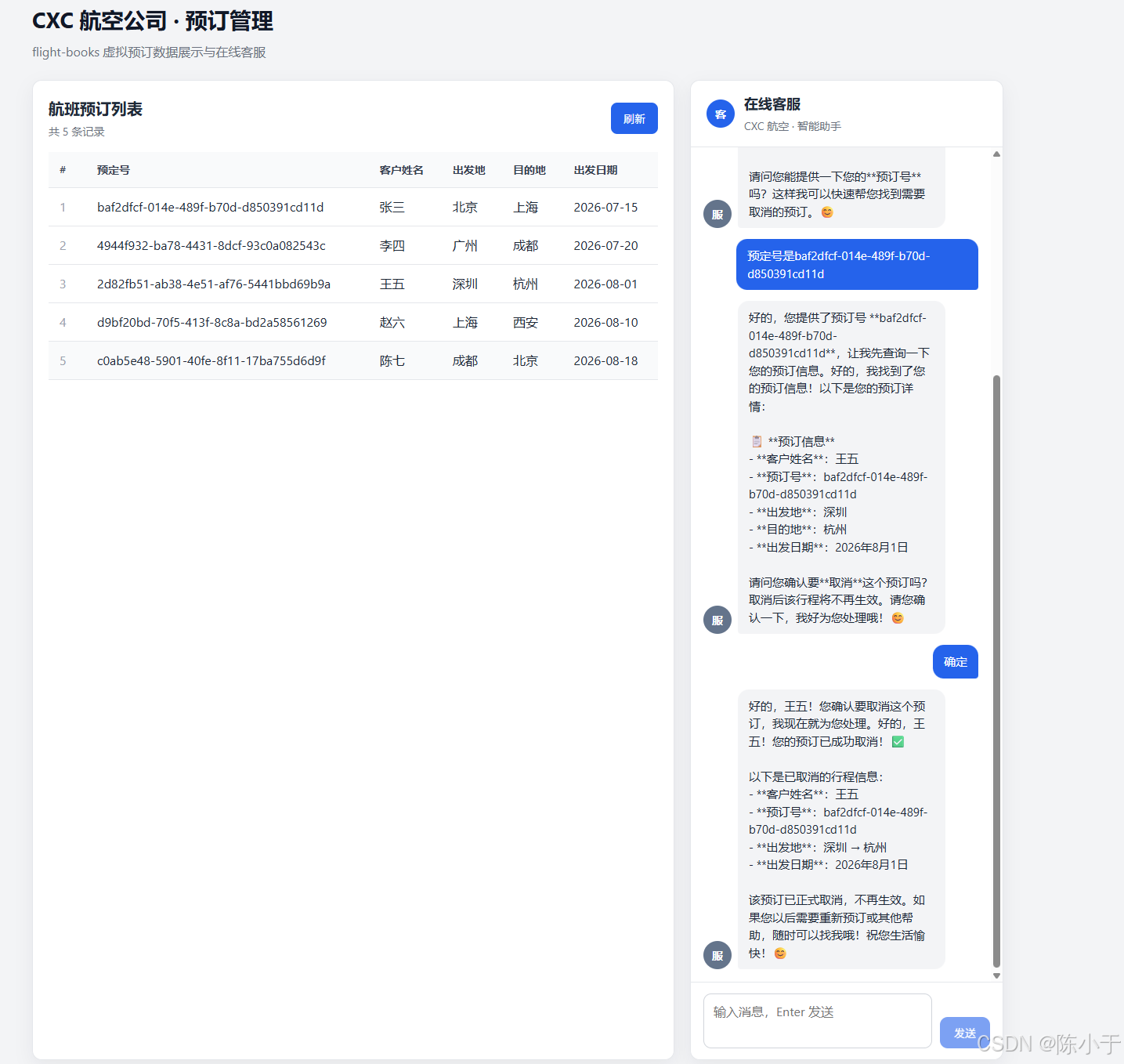
四,项目预览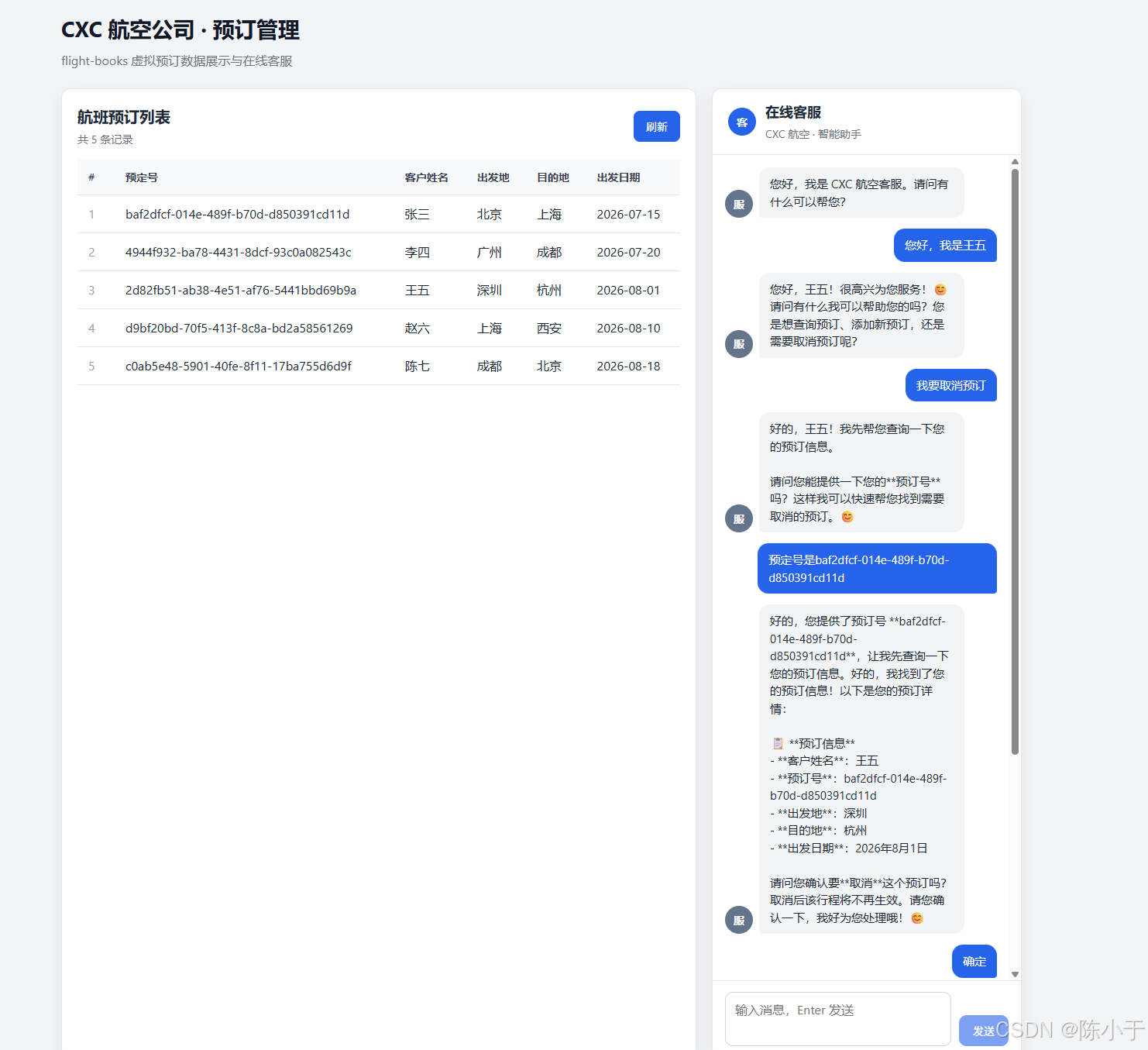

小龙虾开发者社区是 CSDN 旗下专注 OpenClaw 生态的官方阵地,聚焦技能开发、插件实践与部署教程,为开发者提供可直接落地的方案、工具与交流平台,助力高效构建与落地 AI 应用
更多推荐
 4
4 0
0- 0


 已为社区贡献1条内容

所有评论(0)