
openclaw 配置文件详解-多agent多飞书机器人踩坑解决指南-配置文件构成,以及注意事项
openclaw-lark” :飞书官方插件安装信息,在安装飞书官方插件时会自动写入,请不要做任何修改。“feishu” 为 openclaw 内置的飞书插件,由 openclaw 维护,权限较小。“openclaw-lark” 为飞书官方维护的飞书插件,需要自行安装、权限较大。(安装官方插件时会自动禁用内置插件)。推荐飞书官方插件,权限更高。“installs” 里面包含你安装的第三方插件。的配
标题标题多agent多飞书机器人踩坑解决指南在文章后半段
多agent多飞书机器人踩坑解决指南在文章后半段,不明白欢迎在评论区询问
使用ai更改配置文件容易出错的是id、appId、agentId、accountId,参考以下配置
一、openclaw配置文件总览
{
  "plugins": {
    "entries": {
      "feishu": {
        "enabled": false
      },
      "openclaw-lark": {
        "enabled": true
      },
      "kimi": {
        "enabled": true
      }
    },
    "installs": {
      "openclaw-lark": {
        "source": "archive",
        "sourcePath": "/var/folders/wc/t_w3ds1j64j3xndg49s_lvxc0000gn/T/openclaw-lark-2jnbec/larksuite-openclaw-lark-2026.4.7.tgz",
        "installPath": "/Users/openclaw/.openclaw/extensions/openclaw-lark",
        "version": "2026.4.7",
        "installedAt": "2026-04-15T03:32:23.475Z"
      }
    },
    "allow": [
      "openclaw-lark",
      "kimi",
      "memory-core"
    ]
  },
  "agents": {
    "defaults": {
      "compaction": {
        "mode": "safeguard"
      },
      "models": {
        "kimi/kimi-code": {
          "alias": "Kimi"
        }
      },
      "model": {
        "primary": "kimi/kimi-code"
      }
    },
    "list": [
      {
        "id": "main",
        "default": true,
        "workspace": "/Users/openclaw/.openclaw/workspace"
      },
      {
        "id": "ocr",
        "name": "ocr",
        "workspace": "/Users/openclaw/.openclaw/workspace-ocr",
        "agentDir": "/Users/openclaw/.openclaw/agents/ocr/agent"
      }
    ]
  },
  "meta": {
    "lastTouchedVersion": "2026.4.14",
    "lastTouchedAt": "2026-04-16T01:23:12.978Z"
  },
  "channels": {
    "feishu": {
      "enabled": true,
      "domain": "feishu",
      "connectionMode": "websocket",
      "requireMention": true,
      "dmPolicy": "pairing",
      "allowFrom": [],
      "groupAllowFrom": [],
      "groupPolicy": "open",
      "streaming": true,
      "footer": {
        "elapsed": true,
        "status": true
      },

      "appId": "cli_a9562cc81f781cef",
      "appSecret": {
        "source": "file",
        "provider": "lark-secrets",
        "id": "/lark/appSecret"
      },
      "accounts": {
        "default": {},
        "ocr":{
          "appId": "cli_a96a803f27395cba",
          "appSecret": {
          "source": "file",
          "provider": "lark-secrets",
          "id": "/lark/appSecretOCR"
          },
          "domain": "feishu"
        }
      }
    }
  },
  "secrets": {
    "providers": {
      "lark-secrets": {
        "source": "file",
        "path": "~/.openclaw/credentials/lark.secrets.json"
      }
    }
  },
  "tools": {
    "alsoAllow": [
      "feishu_bitable_app",
      "feishu_bitable_app_table",
      "feishu_bitable_app_table_field",
      "feishu_bitable_app_table_record",
      "feishu_bitable_app_table_view",
      "feishu_calendar_calendar",
      "feishu_calendar_event",
      "feishu_calendar_event_attendee",
      "feishu_calendar_freebusy",
      "feishu_chat",
      "feishu_chat_members",
      "feishu_create_doc",
      "feishu_doc_comments",
      "feishu_doc_media",
      "feishu_drive_file",
      "feishu_fetch_doc",
      "feishu_get_user",
      "feishu_im_bot_image",
      "feishu_im_user_fetch_resource",
      "feishu_im_user_get_messages",
      "feishu_im_user_get_thread_messages",
      "feishu_im_user_message",
      "feishu_im_user_search_messages",
      "feishu_oauth",
      "feishu_oauth_batch_auth",
      "feishu_search_doc_wiki",
      "feishu_search_user",
      "feishu_sheet",
      "feishu_task_comment",
      "feishu_task_subtask",
      "feishu_task_task",
      "feishu_task_tasklist",
      "feishu_update_doc",
      "feishu_wiki_space",
      "feishu_wiki_space_node"
    ]
  },
  "gateway": {
    "auth": {
      "mode": "token",
      "token": "bfedf4d98e03748de4a66f45bd3a18269a2a0b19d1356729"
    },
    "mode": "local"
  },
  "wizard": {
    "lastRunAt": "2026-04-15T03:38:28.085Z",
    "lastRunVersion": "2026.4.14",
    "lastRunCommand": "configure",
    "lastRunMode": "local"
  },
  "models": {
    "mode": "merge",
    "providers": {
      "kimi": {
        "baseUrl": "https://api.kimi.com/coding/",
        "api": "anthropic-messages",
        "models": [
          {
            "id": "kimi-code",
            "name": "Kimi Code",
            "reasoning": true,
            "input": [
              "text",
              "image"
            ],
            "cost": {
              "input": 0,
              "output": 0,
              "cacheRead": 0,
              "cacheWrite": 0
            },
            "contextWindow": 262144,
            "maxTokens": 32768
          }
        ]
      }
    }
  },
  "auth": {
    "profiles": {
      "kimi:default": {
        "provider": "kimi",
        "mode": "api_key"
      }
    }
  },
  "bindings": [
    {
      "agentId": "main",
      "match": {
        "channel": "feishu",
        "accountId": "default"
      }
    },
    {
      "agentId": "ocr",
      "match": {
        "channel": "feishu",
        "accountId": "ocr"
      }
    }
  ]
}
二、分块解析
1、插件(plugins)
"plugins": {
    "entries": {
      "feishu": {
        "enabled": false
      },
      "openclaw-lark": {
        "enabled": true
      },
      "kimi": {
        "enabled": true
      }
    },
    "installs": {
      "openclaw-lark": {
        "source": "archive",
        "sourcePath": "/var/folders/wc/t_w3ds1j64j3xndg49s_lvxc0000gn/T/openclaw-lark-2jnbec/larksuite-openclaw-lark-2026.4.7.tgz",
        "installPath": "/Users/openclaw/.openclaw/extensions/openclaw-lark",
        "version": "2026.4.7",
        "installedAt": "2026-04-15T03:32:23.475Z"
      }
    },
    "allow": [
      "openclaw-lark",
      "kimi",
      "memory-core"
    ]
  },
1.1 插件启动部分(entries)
"entries": {
      "feishu": {
        "enabled": false
      },
      "openclaw-lark": {
        "enabled": true
      },
      "kimi": {
        "enabled": true
      }
    },
“feishu” 为 openclaw 内置的飞书插件,由 openclaw 维护,权限较小。
“openclaw-lark” 为飞书官方维护的飞书插件,需要自行安装、权限较大。
“kimi” 为你添加的模型。
“enabled”: 表示是否启用该插件
两个插件不能同时使用(安装官方插件时会自动禁用内置插件)。推荐飞书官方插件,权限更高
| 维度 | 飞书官方插件 | OpenClaw 内置插件 |
|---|---|---|
| 操作身份 | 以你本人身份(OAuth) | 以机器人身份 |
| 消息 | 读取、发送、回复、搜索 | 读取、发送、回复 |
| 文档 | 创建 + 编辑 + 读取 | 读取为主 |
| 多维表格 | 完整操作(表、字段、记录、视图) | 基础读写 |
| 日历日程 | ✅ 创建/查询/修改/搜索/忙闲查询 | ❌ |
| 任务管理 | ✅ 创建/查询/更新/完成/子任务 | ❌ |
| 知识库 | ✅ 完整读写 | ✅ 只读 |
| 云盘 | ✅ 上传/下载 | ✅ 基础操作 |
| 流式输出 | ✅ | ✅ |
| 安装复杂度 | 需要额外安装 CLI 工具 + OAuth 授权 | OpenClaw 内置,openclaw channels add 即可 |
| 维护方 | 飞书团队 | OpenClaw 社区 |
| 问题反馈 | 飞书反馈群 | 本项目 Issues / Discord |
该表格来自 openclaw-feishu
1.2 第三方插件安装声明(installs)
"installs": {
      "openclaw-lark": {
        "source": "archive",
        "sourcePath": "/var/folders/wc/t_w3ds1j64j3xndg49s_lvxc0000gn/T/openclaw-lark-2jnbec/larksuite-openclaw-lark-2026.4.7.tgz",
        "installPath": "/Users/openclaw/.openclaw/extensions/openclaw-lark",
        "version": "2026.4.7",
        "installedAt": "2026-04-15T03:32:23.475Z"
      }
    },
“installs” 里面包含你安装的第三方插件
“openclaw-lark” :飞书官方插件安装信息,在安装飞书官方插件时会自动写入,请不要做任何修改
2、代理(agents)配置(注意是 id)
"agents": {
    "defaults": {
      "compaction": {
        "mode": "safeguard"
      },
      "models": {
        "kimi/kimi-code": {
          "alias": "Kimi"
        }
      },
      "model": {
        "primary": "kimi/kimi-code"
      }
    },
    "list": [
      {
        "id": "main",
        "default": true,
        "workspace": "/Users/openclaw/.openclaw/workspace"
      },
      {
        "id": "ocr",
        "name": "ocr",
        "workspace": "/Users/openclaw/.openclaw/workspace-ocr",
        "agentDir": "/Users/openclaw/.openclaw/agents/ocr/agent"
      }
    ]
  },
agents 内是所有你有关 代理(agnet) 的配置信息,主要包括两个部分:(注意这里是id)
- " default ":代理(agent)默认配置,如果没有特别指定相关配置,将默认采用此配置
"compaction":上下文处理方式"models":LLM模型列表,包括你添加的所有模型"model":模型设置,这里指定了优先模型
- " list ":代理(agent)列表,包括所有你创建的agent,同时可以指定default中的配置,优先级更大
- 推荐使用
openclaw agents add <名称>添加 agent ,这样会自动帮你创建 agent 所需要的必要文件以及文件夹,并且会引导你设置工作空间(workspace) id是 agent 的唯一认证,name是 agent 的名称(可以不写),workspace是 agnet 的工作空间,agentDir是 agent 的所在路径
- 推荐使用
3、频道(channels)(注意是 appId)
"channels": {
    "feishu": {
      "enabled": true,
      "domain": "feishu",
      "connectionMode": "websocket",
      "requireMention": true,
      "dmPolicy": "pairing",
      "allowFrom": [],
      "groupAllowFrom": [],
      "groupPolicy": "open",
      "streaming": true,
      "footer": {
        "elapsed": true,
        "status": true
      },

      "appId": "cli_a9562cc81f781cef",
      "appSecret": {
        "source": "file",
        "provider": "lark-secrets",
        "id": "/lark/appSecret"
      },
      "accounts": {
        "default": {},
        "ocr":{
          "appId": "cli_a96a803f27395cba",
          "appSecret": {
          "source": "file",
          "provider": "lark-secrets",
          "id": "/lark/appSecretOCR"
          },
          "domain": "feishu"
        }
      }
    }
  },
- 我这里只配置了飞书,使用的是飞书官方插件
- 飞书机器人主要就是
appId和appSecret- 飞书官方插件的
appSecret存放在~.openclaw/credentials/lark.secrets.json- 读取
appSecret的方式是看内部的"id": "/lark/appSecretOCR",appSecretOCR对应lark.secrets.json文件内的值
这里主要说一下踩坑点
- 在配置飞书机器人的时候必须要有一个主要的机器人配置在
"accounts"外面:(注意这里是appId)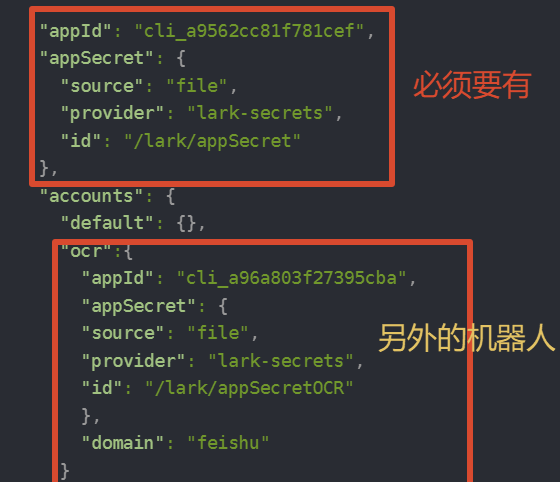
4、关联(bindings)(注意是agentId和accountId)
"bindings": [
   {
     "agentId": "main",
     "match": {
       "channel": "feishu",
       "accountId": "default"
     }
   },
   {
     "agentId": "ocr",
     "match": {
       "channel": "feishu",
       "accountId": "ocr"
     }
   }
 ]
这个也不复杂,看图:(注意这里是accountId)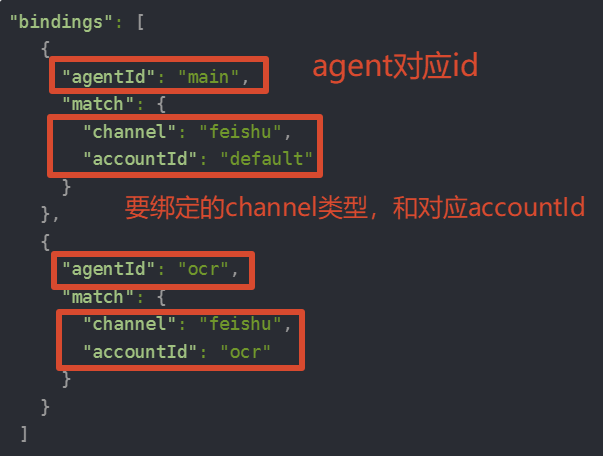
想要添加关联也可以使用命令:openclaw agents bind --agent <agent_name> --bind <channel>[:accountId]
比较重要的就这些了,不明白可以在评论区问,看到就会回答

小龙虾开发者社区是 CSDN 旗下专注 OpenClaw 生态的官方阵地,聚焦技能开发、插件实践与部署教程,为开发者提供可直接落地的方案、工具与交流平台,助力高效构建与落地 AI 应用
更多推荐

 10
10 0
0- 0


 已为社区贡献2条内容

所有评论(0)