
UBuntu+openClaw实现个人AI助手
记录于2026年3月9号个人博客,现转录CSDN
在 Ubuntu 上用 OpenClaw 搭建个人 AI 助手,核心是:一行命令安装 → 配置大模型 API → 启动服务 → 用 Web / 微信 / Telegram 交互。全程本地部署、数据可控、支持自动任务与自定义技能。
系统要求(Ubuntu)
系统:Ubuntu 20.04 / 22.04 / 24.04 LTS(推荐 22.04+)
CPU:2 核 +
内存:最低 2GB,推荐 4GB+
硬盘:2GB+ 可用空间
依赖:Node.js ≥ 22、curl、git
1安装openclaw相关运行环境
nodejs
#步骤 1:安装依赖工具
sudo apt update
sudo apt install -y curl gnupg2 ca-certificates lsb-release
#添加 NodeSource 源
# 安装 Node.js 20.x(LTS 稳定版)
curl -fsSL https://deb.nodesource.com/setup_20.x | sudo -E bash -
#安装
sudo apt install -y nodejs
#安装完成后,检查版本确认是否成功:
# 检查 Node.js 版本
node -v
# 检查 npm 版本(npm 会随 Node.js 自动安装)
npm -v
git
#步骤 1:更新系统包列表
sudo apt update
#步骤 2:安装 Git
sudo apt install -y git
#步骤 3:验证安装是否成功
git --version
# 配置全局用户名(替换成你的名字)
git config --global user.name "Your Name"
# 配置全局邮箱(替换成你的邮箱)
git config --global user.email "your.email@example.com"
#验证
git config --list
openclaw
## 国内一键安装脚本(自动配置、引导)
curl -fsSL https://open-claw.org.cn/install-cn.sh | bash

# 安装 pnpm(推荐,速度更快)
npm install -g pnpm
# 配置国内镜像(必做,否则下载慢)
pnpm config set registry https://registry.npmmirror.com/
# 全局安装 OpenClaw
pnpm add -g openclaw@latest
# 验证
openclaw --version
安装
openclaw onboard 以 阿里百炼qwen 模型 为例:

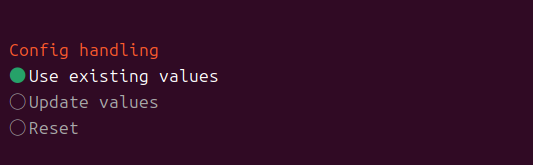
随后接入大模型LLM
可选择厂商模型,也可以选择本地模型。
常用指令
# 启动初始化向导(配置模型、网关等)
openclaw onboard
# 启动网关服务
openclaw gateway start
# 查看状态
openclaw status --all
# 停止现有服务
openclaw gateway stop
# 强制重新安装系统服务(刷新版本号)
openclaw gateway install --force
# 重新启动
openclaw gateway start
# 查看日志确认无报错
openclaw logs --follow

# 先修复配置
openclaw doctor --fix

# 重新安装服务,同步新配置和Token
openclaw gateway install --force

# 重启网关
openclaw gateway restart
2配置大模型apiKey
核心配置文件:openclaw.json
本人选择千问-3.5plus,阿里百炼提供免费次数,举例
apiKey: '__OPENCLAW_REDACTED__',
搜索阿里云百炼,登录后 点击模块广场>搜Qwen3.5-plus>滚动
可查看免费额度剩余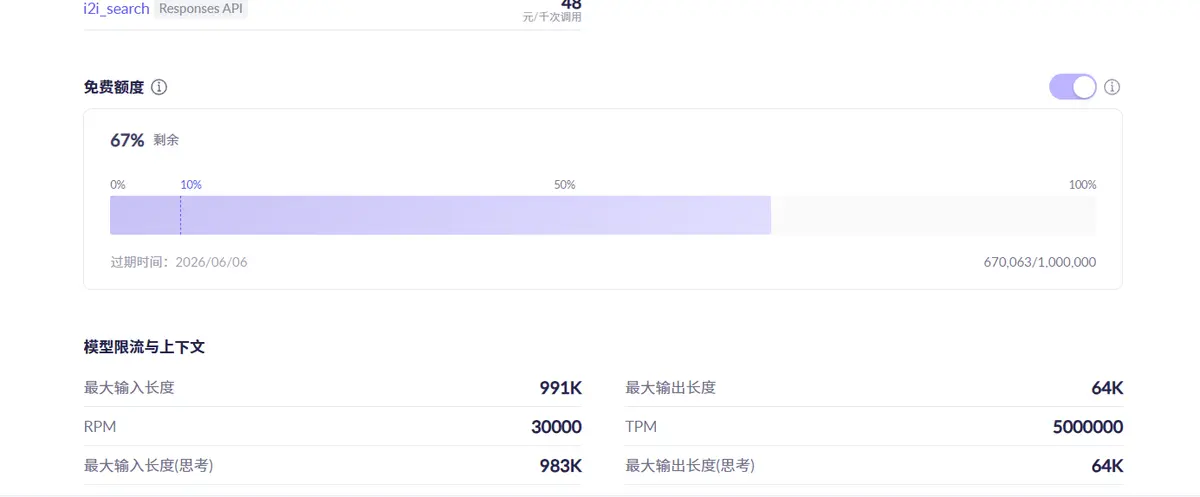
选择你对应大模型的apikey,此处使用手动配置,简单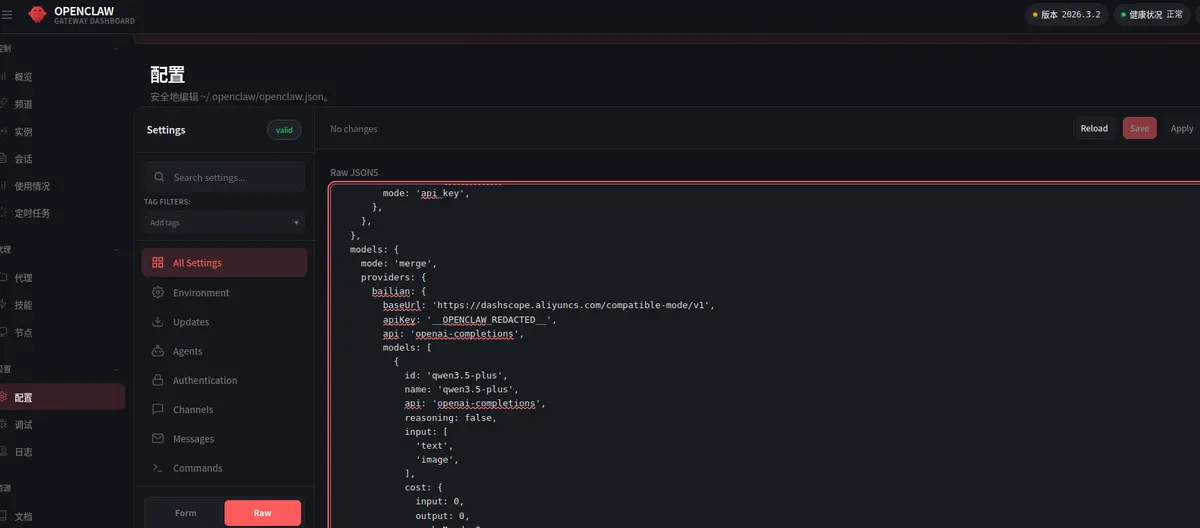
{
  meta: {
    lastTouchedVersion: '2026.3.2',
    lastTouchedAt: '2026-03-09T05:42:38.743Z',
  },
  wizard: {
    lastRunAt: '2026-03-08T11:52:24.041Z',
    lastRunVersion: '2026.3.2',
    lastRunCommand: 'onboard',
    lastRunMode: 'local',
  },
  auth: {
    profiles: {
      'kimi-coding:default': {
        provider: 'kimi-coding',
        mode: 'api_key',
      },
    },
  },
  models: {
    mode: 'merge',
    providers: {
      bailian: {
        baseUrl: 'https://dashscope.aliyuncs.com/compatible-mode/v1',
        apiKey: '__OPENCLAW_REDACTED__',
        api: 'openai-completions',
        models: [
          {
            id: 'qwen3.5-plus',
            name: 'qwen3.5-plus',
            api: 'openai-completions',
            reasoning: false,
            input: [
              'text',
              'image',
            ],
            cost: {
              input: 0,
              output: 0,
              cacheRead: 0,
              cacheWrite: 0,
            },
            contextWindow: 1000000,
            maxTokens: 65536,
          },
          {
            id: 'qwen3-coder-next',
            name: 'qwen3-coder-next',
            api: 'openai-completions',
            reasoning: false,
            input: [
              'text',
            ],
            cost: {
              input: 0,
              output: 0,
              cacheRead: 0,
              cacheWrite: 0,
            },
            contextWindow: 262144,
            maxTokens: 65536,
          },
        ],
      },
    },
  },
  agents: {
    defaults: {
      model: {
        primary: 'bailian/qwen3.5-plus',
      },
      models: {
        'bailian/qwen3.5-plus': {},
        'bailian/qwen3-coder-next': {},
      },
      workspace: '/home/admin1/.openclaw/workspace',
      compaction: {
        mode: 'safeguard',
      },
    },
  },
  tools: {
    profile: 'messaging',
  },
  commands: {
    native: 'auto',
    nativeSkills: 'auto',
    restart: true,
    ownerDisplay: 'raw',
  },
  session: {
    dmScope: 'per-channel-peer',
  },
  hooks: {
    internal: {
      enabled: true,
      entries: {
        'command-logger': {
          enabled: true,
        },
        'bootstrap-extra-files': {
          enabled: true,
        },
        'boot-md': {
          enabled: true,
        },
      },
    },
  },
  gateway: {
    port: 18789,
    mode: 'local',
    bind: 'lan',
    controlUi: {
      allowedOrigins: [
        'http://localhost:18789',
        'http://127.0.0.1:18789',
        'http://192.168.29.130:18789',
        'http://192.168.29.1:18789',
      ],
    },
    auth: {
      mode: 'token',
      token: '__OPENCLAW_REDACTED__',
    },
    tailscale: {
      mode: 'off',
      resetOnExit: false,
    },
  },
}
3使用主机访问虚拟机openclaw
虚拟机与主机关系NAT连接,配置端口转发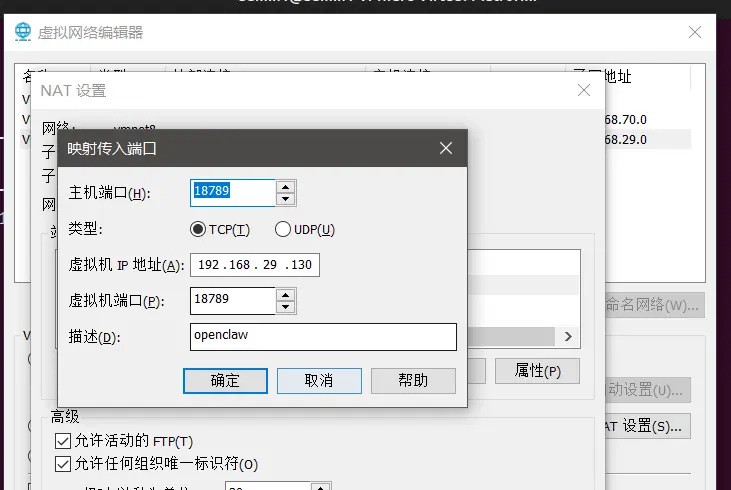
修改虚拟机网关配置: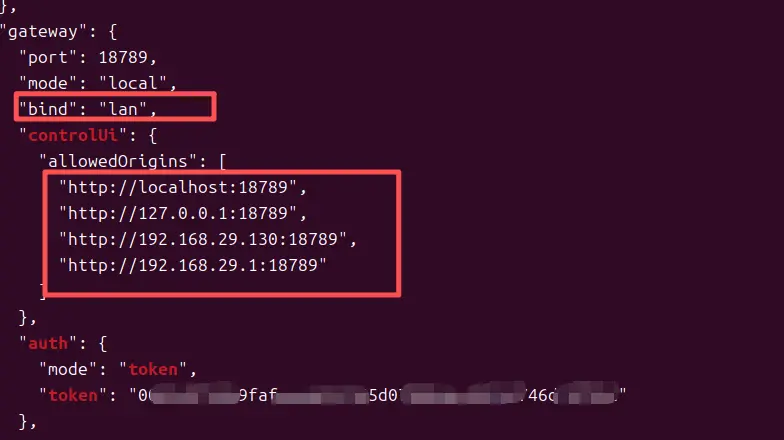
allowedOrigins 是 OpenClaw 网关(Gateway)的 CORS 跨域来源白名单,用于控制哪些网页地址(Origin)可以访问其 Web 控制面板(Control UI),是核心安全配置。
核心作用(安全机制)
当在浏览器访问 http://192.168.29.130:18789 时,浏览器会自动发送当前页面的 Origin 给网关:
网关校验:只有在 allowedOrigins 列表中的 Origin 才允许连接
不在列表 → 直接拒绝,浏览器报 origin not allowed 错误
本质:防止未授权网页 / 域名调用你的 OpenClaw 网关接口
"allowedOrigins": [
  "http://localhost:18789",    // 本机域名访问
  "http://127.0.0.1:18789",    // 本机回环IP
  "http://192.168.29.130:18789", // 本机局域网IP(你的设备)
  "http://192.168.29.1:18789"    // 路由器/网关地址
]
作用:允许本机 + 内网这 4 个地址访问控制面板
场景:你在本机 / 局域网打开 OpenClaw 控制台
bind: “lan” 必须配 allowedOrigins,当前 bind: “lan”(监听所有网卡,允许外网 / 内网访问)
# 1. 查看当前配置
cat ~/.openclaw/config.json

# 2. 修改 host 为 0.0.0.0
gateway  "bind": "lan",  // 核心修改:从 0.0.0.0 改成 lan

# 3. 重启网关
openclaw gateway restart

# 4. 验证(应该看到 0.0.0.0:18789)
ss -tlnp | grep 18789
之后能配置token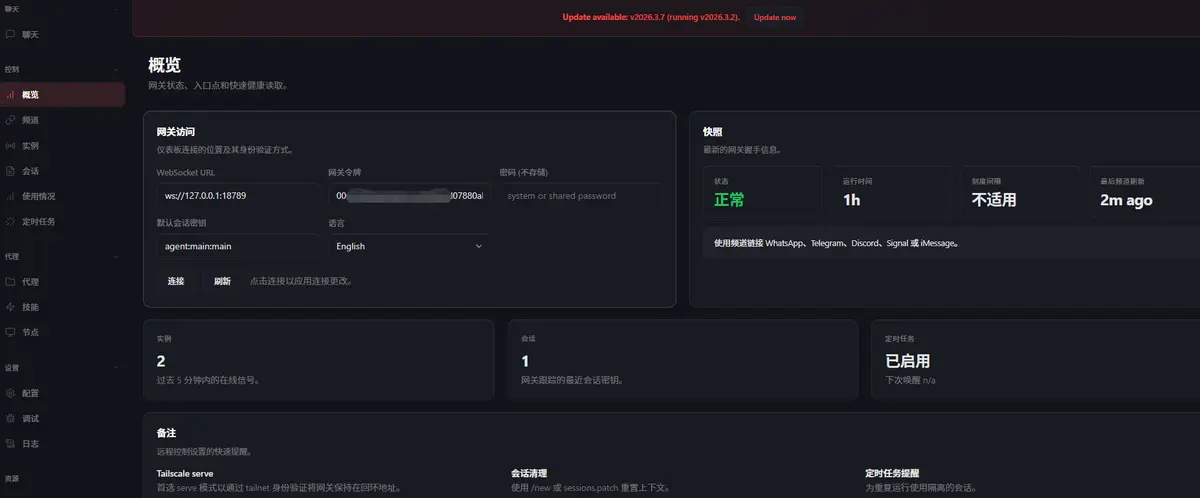
主机访问报错
#查看并授权待批准的设备
openclaw devices list
# 授权指定 (Request ID)
openclaw devices approve c74f9c91-ssss-aaa-be8c-ssss
#全部授权
openclaw devices approve --all
完成,效果展示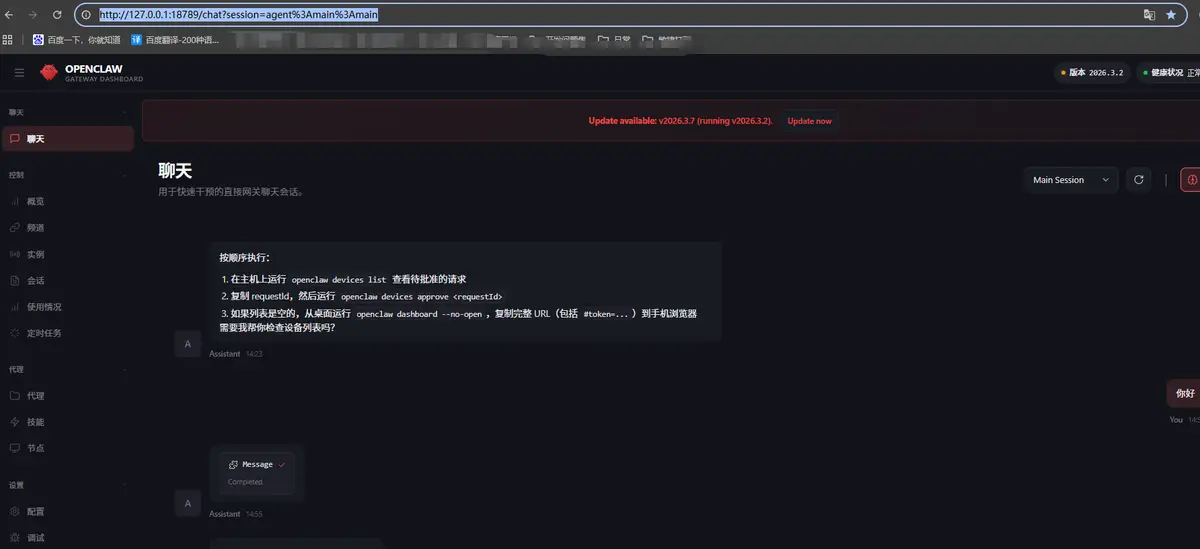
常用指令跳转
OpenClaw 命令速查手册

小龙虾开发者社区是 CSDN 旗下专注 OpenClaw 生态的官方阵地,聚焦技能开发、插件实践与部署教程,为开发者提供可直接落地的方案、工具与交流平台,助力高效构建与落地 AI 应用
更多推荐


 19
19 0
0- 0


 已为社区贡献1条内容

所有评论(0)