
【Agents篇】13:MetaGPT——用软件公司模式开发软件
MetaGPT是一个基于标准化操作流程(SOP)的多智能体协作框架,通过模拟软件公司角色分工实现高效软件开发。其核心公式Code = SOP(Team)将人类团队的流程应用于LLM智能体,解决了传统多智能体系统的逻辑不一致问题。MetaGPT包含角色系统、动作机制、SOP流程和文档生成等组件,支持从需求分析到代码生成的完整软件开发流程。相比单一LLM,MetaGPT通过结构化协作显著提升了输出质量
🏢 核心理念:
Code = SOP(Team)—— 将标准化操作流程应用于由 LLM 组成的团队📌 关键词:多智能体协作、软件公司模拟、SOP流程、角色分工、文档驱动开发
📑 目录
- 1. 🌟 引言:为什么需要 MetaGPT?
- 2. 🏗️ MetaGPT 整体架构
- 3. 👥 角色(Role)系统详解
- 4. ⚡ 动作(Action)机制
- 5. 📋 SOP 标准化流程
- 6. 📄 文档生成系统
- 7. 🔮 Data Interpreter:数据科学智能体
- 8. 🧠 记忆(Memory)系统
- 9. 🤔 思考与行动模式
- 10. 🛠️ 实战:构建完整软件项目
- 11. 🔬 深入源码分析
- 12. 🎯 最佳实践与经验总结
- 13. 🔮 未来展望
- 14. 📚 参考文献
1. 🌟 引言:为什么需要 MetaGPT?
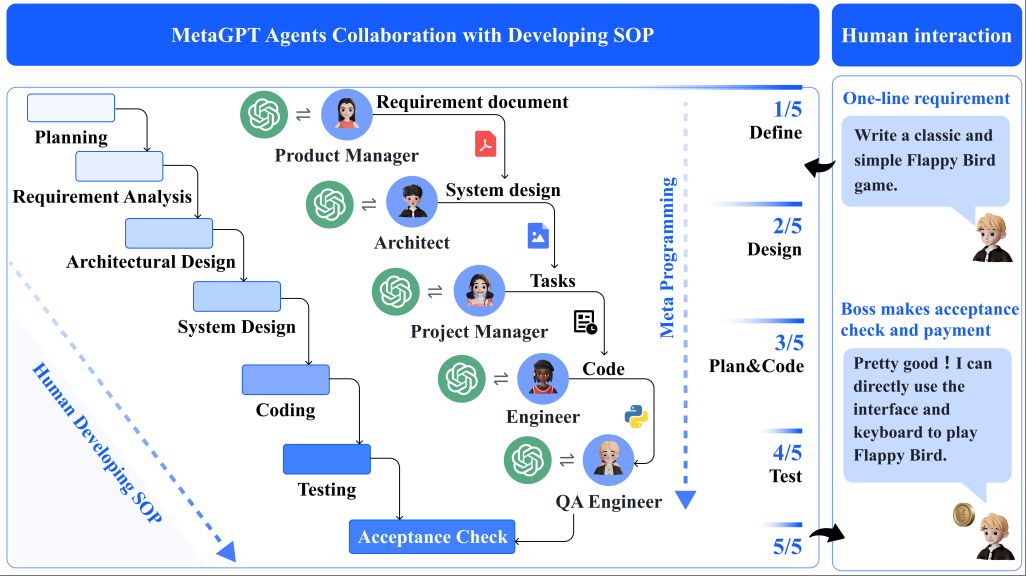
1.1 多智能体协作的挑战
在大语言模型(LLM)时代,单个 AI 智能体已经展现出惊人的能力。然而,当我们面对复杂的软件开发任务时,单一智能体往往难以胜任。
💡 思考:为什么单一 LLM 难以完成复杂软件开发?
🤔 解答:
- 上下文长度限制:复杂项目的代码量远超 LLM 的上下文窗口
- 角色混淆:让一个模型同时扮演产品经理、架构师、工程师会导致输出质量下降
- 缺乏结构化流程:简单的对话式交互难以保证软件开发的系统性
- 幻觉级联:一个错误会在后续步骤中被放大,导致最终结果不可用
传统的多智能体系统虽然尝试解决这些问题,但存在一个关键缺陷:逻辑不一致性(logic inconsistencies)。当多个 LLM 简单串联时,每个智能体的"幻觉"会级联传递,最终导致系统崩溃。
1.2 MetaGPT 的革命性解决方案
MetaGPT 由深度智慧(DeepWisdom)团队开发,其核心创新在于将**人类软件公司的标准化操作流程(SOP)**引入多智能体系统。
┌─────────────────────────────────────────────────────────────────┐
│                    MetaGPT 核心公式                              │
│                                                                  │
│              Code = SOP(Team)                                    │
│                                                                  │
│   将标准化操作流程应用于由 LLM 组成的团队,输出高质量代码         │
└─────────────────────────────────────────────────────────────────┘
MetaGPT 的突破性特点:
| 特性 | 传统多智能体 | MetaGPT |
|---|---|---|
| 协作模式 | 简单对话 | SOP 驱动 |
| 角色定义 | 模糊 | 清晰的职责边界 |
| 输出质量 | 不稳定 | 结构化文档 |
| 错误处理 | 级联放大 | 中间验证 |
| 可复现性 | 低 | 高 |
1.3 学术成就与行业认可
MetaGPT 的学术论文 “MetaGPT: Meta Programming for A Multi-Agent Collaborative Framework” 已在 ICLR 2024 发表,获得了广泛认可。
📊 性能数据:
- 使用 GPT-4 API 生成一个分析和设计约 $0.2
- 生成一个完整项目约 $2.0
- 在协作软件工程基准测试中显著优于其他多智能体系统
2. 🏗️ MetaGPT 整体架构
2.1 核心设计理念
MetaGPT 的设计理念可以用一句话概括:将真实软件公司的运作模式数字化。
在一个真实的软件公司中:
- 产品经理 负责理解需求,撰写 PRD
- 架构师 设计系统架构和 API
- 项目经理 分解任务,制定计划
- 工程师 编写代码
- QA 工程师 测试代码
MetaGPT 将这些角色抽象为 AI 智能体,并通过 SOP 确保它们高效协作。
2.2 系统架构图
┌──────────────────────────────────────────────────────────────────────────────┐
│                           MetaGPT 系统架构                                    │
├──────────────────────────────────────────────────────────────────────────────┤
│                                                                              │
│  ┌─────────────────────────────────────────────────────────────────────┐    │
│  │                         Environment(环境)                          │    │
│  │  ┌─────────────────────────────────────────────────────────────┐   │    │
│  │  │                    Message Pool(消息池)                     │   │    │
│  │  │   PRD | Design Doc | Task List | Code | Test Report | ...   │   │    │
│  │  └─────────────────────────────────────────────────────────────┘   │    │
│  └─────────────────────────────────────────────────────────────────────┘    │
│                                    ▲                                         │
│                                    │ publish / observe                       │
│                                    ▼                                         │
│  ┌─────────────────────────────────────────────────────────────────────┐    │
│  │                           Team(团队)                               │    │
│  │                                                                      │    │
│  │  ┌──────────┐  ┌──────────┐  ┌──────────┐  ┌──────────┐           │    │
│  │  │ Product  │  │          │  │ Project  │  │          │           │    │
│  │  │ Manager  │─▶│ Architect│─▶│ Manager  │─▶│ Engineer │           │    │
│  │  │ (Alice)  │  │  (Bob)   │  │ (Eve)    │  │  (Alex)  │           │    │
│  │  └──────────┘  └──────────┘  └──────────┘  └──────────┘           │    │
│  │       │              │             │             │                  │    │
│  │       ▼              ▼             ▼             ▼                  │    │
│  │  ┌──────────┐  ┌──────────┐  ┌──────────┐  ┌──────────┐           │    │
│  │  │WritePRD  │  │WriteDesign│ │WriteTasks│  │WriteCode │           │    │
│  │  │          │  │          │  │          │  │          │           │    │
│  │  └──────────┘  └──────────┘  └──────────┘  └──────────┘           │    │
│  │                                                                      │    │
│  └─────────────────────────────────────────────────────────────────────┘    │
│                                                                              │
│  ┌─────────────────────────────────────────────────────────────────────┐    │
│  │                      Core Components(核心组件)                     │    │
│  │                                                                      │    │
│  │  ┌─────────┐  ┌─────────┐  ┌─────────┐  ┌─────────┐  ┌─────────┐ │    │
│  │  │  Role   │  │ Action  │  │ Memory  │  │ Message │  │   LLM   │ │    │
│  │  │         │  │         │  │         │  │         │  │         │ │    │
│  │  └─────────┘  └─────────┘  └─────────┘  └─────────┘  └─────────┘ │    │
│  │                                                                      │    │
│  └─────────────────────────────────────────────────────────────────────┘    │
│                                                                              │
└──────────────────────────────────────────────────────────────────────────────┘
2.3 核心组件解析
2.3.1 Role(角色)
Role 是 MetaGPT 中智能体的抽象。每个 Role 具有:
- name: 角色名称
- profile: 角色简介
- goal: 角色目标
- constraints: 角色约束
- actions: 角色可执行的动作集合
- memory: 角色的记忆
# Role 的核心结构
class Role(BaseModel):
    name: str = "DefaultRole"
    profile: str = "DefaultProfile"
    goal: str = "Default goal"
    constraints: str = "Default constraints"

    def __init__(self, **kwargs):
        super().__init__(**kwargs)
        self.set_actions([])  # 设置角色能执行的动作
        self._watch([])       # 设置角色关注的消息类型
2.3.2 Action(动作)
Action 是角色执行的具体操作,通常涉及 LLM 调用:
class Action(BaseModel):
    name: str = "DefaultAction"

    async def run(self, *args, **kwargs):
        # 执行动作的核心逻辑
        prompt = self._build_prompt(*args)
        response = await self._aask(prompt)  # 调用 LLM
        return self._parse_response(response)
2.3.3 Memory(记忆)
Memory 存储角色的历史交互信息:
class Memory:
    def __init__(self):
        self.storage: list[Message] = []

    def add(self, message: Message):
        self.storage.append(message)

    def get(self, k: int = 0) -> list[Message]:
        """获取最近 k 条消息,k=0 返回全部"""
        return self.storage[-k:] if k > 0 else self.storage
2.3.4 Message(消息)
Message 是角色间通信的载体:
class Message(BaseModel):
    content: str           # 消息内容
    role: str             # 发送角色
    cause_by: Type[Action] # 产生该消息的动作类型
    sent_from: str        # 发送者
    send_to: str          # 接收者
2.3.5 Environment(环境)
Environment 是角色交互的共享空间:
class Environment:
    def __init__(self):
        self.roles: dict[str, Role] = {}
        self.message_queue: list[Message] = []

    def publish_message(self, message: Message):
        """发布消息到环境"""
        self.message_queue.append(message)

    def get_messages(self) -> list[Message]:
        """获取环境中的消息"""
        return self.message_queue
3. 👥 角色(Role)系统详解
3.1 角色的定义与组成
在 MetaGPT 中,一个完整的智能体(Agent)可以用以下公式表示:
Agent = LLM + Observation + Thought + Action + Memory
这个公式与人类的功能形成对照:
| 组件 | 功能描述 | 人类类比 |
|---|---|---|
| LLM | 处理信息、学习、决策 | 大脑 |
| Observation | 感知环境,接收输入 | 感官 |
| Thought | 分析观察,规划行动 | 思考 |
| Action | 执行具体操作 | 行为 |
| Memory | 存储历史经验 | 记忆 |
💡 思考:为什么需要明确定义这些组件?
🤔 解答:
明确的组件定义带来以下好处:
- 模块化:每个组件可以独立开发和测试
- 可替换性:可以轻松替换不同的 LLM 后端
- 可观测性:可以追踪每个组件的状态和行为
- 可扩展性:可以方便地添加新功能
3.2 内置角色详解
MetaGPT 内置了完整软件开发团队的角色:
3.2.1 ProductManager(产品经理)
class ProductManager(RoleZero):
    """
    产品经理角色,负责产品开发和管理
    """
    name: str = "Alice"
    profile: str = "Product Manager"
    goal: str = "Create a Product Requirement Document or market research"
    constraints: str = "utilize the same language as user requirements"

    def __init__(self, **kwargs):
        super().__init__(**kwargs)
        self.set_actions([PrepareDocuments, WritePRD])
        self._watch([UserRequirement, PrepareDocuments])
产品经理的职责:
- 接收用户需求
- 进行市场分析和竞品研究
- 撰写产品需求文档(PRD)
- 定义用户故事和功能规格
3.2.2 Architect(架构师)
class Architect(RoleZero):
    """
    架构师角色,负责软件系统设计
    """
    name: str = "Bob"
    profile: str = "Architect"
    goal: str = "design a concise, usable, complete software system"
    constraints: str = "make sure the architecture is simple enough"

    def __init__(self, **kwargs):
        super().__init__(**kwargs)
        self.set_actions([WriteDesign])
        self._watch({WritePRD})  # 观察产品经理输出的 PRD
架构师的职责:
- 分析 PRD 文档
- 设计系统架构
- 定义 API 接口
- 选择技术栈和开源库
3.2.3 ProjectManager(项目经理)
class ProjectManager(Role):
    """
    项目经理角色,负责任务分解和管理
    """
    name: str = "Eve"
    profile: str = "Project Manager"
    goal: str = "break down tasks according to PRD/technical design"

    def __init__(self, **kwargs):
        super().__init__(**kwargs)
        self.set_actions([WriteTasks])
        self._watch([WriteDesign])  # 观察架构师的设计文档
项目经理的职责:
- 分析技术设计文档
- 分解开发任务
- 制定文件清单
- 协调开发进度
3.2.4 Engineer(工程师)
class Engineer(Role):
    """
    工程师角色,负责代码编写
    """
    name: str = "Alex"
    profile: str = "Engineer"
    goal: str = "write elegant, readable, extensible, efficient code"
    constraints: str = "code should conform to standards like google-style"

    def __init__(self, **kwargs):
        super().__init__(**kwargs)
        self.set_actions([WriteCode])
        self._watch([WriteTasks, SummarizeCode, WriteCode, WriteCodeReview])
工程师的职责:
- 根据任务列表编写代码
- 遵循代码规范
- 处理代码评审反馈
- 修复 Bug
3.2.5 QAEngineer(QA工程师)
class QAEngineer(Role):
    """
    QA 工程师角色,负责测试
    """
    name: str = "Edward"
    profile: str = "QAEngineer"
    goal: str = "Write comprehensive and robust tests"

    def __init__(self, **kwargs):
        super().__init__(**kwargs)
        self.set_actions([WriteTest])
        self._watch([SummarizeCode])
3.3 自定义角色开发
MetaGPT 允许用户创建自定义角色。以下是一个完整示例:
import re
from metagpt.actions import Action
from metagpt.roles import Role
from metagpt.schema import Message
from metagpt.logs import logger

# 步骤 1:定义自定义 Action
class SimpleWriteCode(Action):
    """简单的代码编写动作"""

    PROMPT_TEMPLATE: str = """
    Write a python function that can {instruction}.
    Return ```python your_code_here ```with NO other texts,
    your code:
    """

    name: str = "SimpleWriteCode"

    async def run(self, instruction: str) -> str:
        prompt = self.PROMPT_TEMPLATE.format(instruction=instruction)
        rsp = await self._aask(prompt)  # 调用 LLM
        code_text = self.parse_code(rsp)
        return code_text

    @staticmethod
    def parse_code(rsp: str) -> str:
        """从 LLM 响应中提取代码"""
        pattern = r"```python(.*)```"
        match = re.search(pattern, rsp, re.DOTALL)
        return match.group(1).strip() if match else rsp

class SimpleRunCode(Action):
    """简单的代码执行动作"""

    name: str = "SimpleRunCode"

    async def run(self, code_text: str) -> str:
        import subprocess
        result = subprocess.run(
            ["python3", "-c", code_text],
            capture_output=True,
            text=True
        )
        return result.stdout if result.stdout else result.stderr

# 步骤 2:定义自定义 Role
class SimpleCoder(Role):
    """简单的编码者角色"""

    name: str = "Alice"
    profile: str = "SimpleCoder"

    def __init__(self, **kwargs):
        super().__init__(**kwargs)
        # 设置角色能执行的动作
        self.set_actions([SimpleWriteCode])

    async def _act(self) -> Message:
        logger.info(f"{self._setting}: to do {self.rc.todo}")

        # 获取最近的消息作为输入
        msg = self.get_memories(k=1)[0]

        # 执行动作
        code_text = await self.rc.todo.run(msg.content)

        # 返回结果消息
        msg = Message(
            content=code_text,
            role=self.profile,
            cause_by=type(self.rc.todo)
        )
        return msg

# 步骤 3:带多个动作的角色
class RunnableCoder(Role):
    """可执行代码的编码者"""

    name: str = "Bob"
    profile: str = "RunnableCoder"

    def __init__(self, **kwargs):
        super().__init__(**kwargs)
        # 设置多个动作
        self.set_actions([SimpleWriteCode, SimpleRunCode])
        # 设置按顺序执行动作
        self._set_react_mode(react_mode="by_order")

    async def _act(self) -> Message:
        logger.info(f"{self._setting}: to do {self.rc.todo}")

        todo = self.rc.todo
        msg = self.get_memories(k=1)[0]

        # 执行当前动作
        result = await todo.run(msg.content)

        # 将结果添加到记忆
        msg = Message(
            content=result,
            role=self.profile,
            cause_by=type(todo)
        )
        self.rc.memory.add(msg)

        return msg
使用自定义角色:
import asyncio
from metagpt.context import Context

async def main():
    msg = "write a function that calculates the factorial of a number"

    context = Context()
    role = RunnableCoder(context=context)

    result = await role.run(msg)
    print(result)

asyncio.run(main())
4. ⚡ 动作(Action)机制
4.1 Action 基础概念
Action 是 MetaGPT 中最小的执行单元,代表角色可以执行的具体操作。
┌─────────────────────────────────────────────────────────────┐
│                    Action 执行流程                           │
├─────────────────────────────────────────────────────────────┤
│                                                              │
│    输入 ──▶ 构建 Prompt ──▶ 调用 LLM ──▶ 解析响应 ──▶ 输出 │
│                                                              │
│    (context)   (template)   (_aask)    (parse)    (result)  │
│                                                              │
└─────────────────────────────────────────────────────────────┘
Action 的核心特点:
- LLM 驱动:大多数 Action 通过调用 LLM 完成
- Prompt 模板化:使用预定义的 Prompt 模板确保输出一致性
- 结果解析:对 LLM 输出进行结构化解析
- 异步执行:所有 Action 都是异步的,支持并发
4.2 内置 Action 类型
MetaGPT 提供了丰富的内置 Action:
| Action 名称 | 所属角色 | 功能描述 |
|---|---|---|
| WritePRD | ProductManager | 撰写产品需求文档 |
| WriteDesign | Architect | 撰写系统设计文档 |
| WriteTasks | ProjectManager | 分解开发任务 |
| WriteCode | Engineer | 编写代码 |
| WriteCodeReview | Engineer | 代码评审 |
| WriteTest | QAEngineer | 编写测试用例 |
| SummarizeCode | Engineer | 总结代码 |
| FixBug | Engineer | 修复Bug |
4.2.1 WritePRD Action 详解
class WritePRD(Action):
    """撰写产品需求文档"""

    PROMPT_TEMPLATE = """
    # Context
    {context}

    # Requirements
    Based on the context, create a comprehensive PRD that includes:
    1. Product Goals
    2. User Stories
    3. Competitive Analysis
    4. Requirement Analysis
    5. Requirement Pool
    6. UI Design draft
    7. Anything UNCLEAR

    Output the PRD in markdown format.
    """

    async def run(self, requirements: str) -> str:
        prompt = self.PROMPT_TEMPLATE.format(context=requirements)
        prd = await self._aask(prompt)
        return prd
4.2.2 WriteDesign Action 详解
class WriteDesign(Action):
    """撰写系统设计文档"""

    PROMPT_TEMPLATE = """
    # Context
    {context}

    # PRD
    {prd}

    Based on the PRD, create a technical design that includes:
    1. Implementation approach
    2. File list
    3. Data structures and interfaces
    4. Program call flow
    5. Anything UNCLEAR
    """

    async def run(self, prd: str) -> str:
        prompt = self.PROMPT_TEMPLATE.format(
            context=self.context,
            prd=prd
        )
        design = await self._aask(prompt)
        return design
4.3 自定义 Action 开发
开发自定义 Action 的最佳实践:
from metagpt.actions import Action
from metagpt.schema import Message
import json

class AnalyzeRequirement(Action):
    """需求分析 Action"""

    name: str = "AnalyzeRequirement"

    PROMPT_TEMPLATE: str = """
    You are a senior business analyst. Analyze the following requirement:

    {requirement}

    Provide a structured analysis including:
    1. Core functionality
    2. Technical feasibility
    3. Estimated complexity (Low/Medium/High)
    4. Potential risks
    5. Suggested improvements

    Output in JSON format.
    """

    async def run(self, requirement: str) -> dict:
        """执行需求分析"""
        prompt = self.PROMPT_TEMPLATE.format(requirement=requirement)

        # 调用 LLM
        response = await self._aask(prompt)

        # 解析 JSON 响应
        try:
            result = json.loads(response)
        except json.JSONDecodeError:
            # 如果解析失败,返回原始响应
            result = {"raw_response": response}

        return result

class GenerateTestCases(Action):
    """生成测试用例 Action"""

    name: str = "GenerateTestCases"

    PROMPT_TEMPLATE: str = """
    Based on the following code:
    ```python
    {code}
    ```

    Generate {num_cases} comprehensive test cases using pytest.
    Include:
    - Normal cases
    - Edge cases
    - Error cases

    Return only the test code in ```python```block.
    """

    async def run(self, code: str, num_cases: int = 5) -> str:
        prompt = self.PROMPT_TEMPLATE.format(
            code=code,
            num_cases=num_cases
        )

        response = await self._aask(prompt)

        # 提取代码块
        import re
        pattern = r"```python(.*)```"
        match = re.search(pattern, response, re.DOTALL)

        return match.group(1).strip() if match else response
💡 思考:如何设计高质量的 Action Prompt?
🤔 解答:
优秀的 Action Prompt 应该具备以下特点:
- 明确的角色定义:告诉 LLM 它是谁(如 “You are a senior engineer”)
- 清晰的输入说明:明确输入数据的格式和含义
- 结构化的输出要求:指定输出格式(JSON、Markdown 等)
- 示例说明:提供 few-shot 示例提高输出质量
- 约束条件:明确不应该做什么
5. 📋 SOP 标准化流程
5.1 什么是 SOP?
SOP(Standard Operating Procedure,标准化操作流程)是 MetaGPT 的核心创新点。它将人类软件公司的工作流程编码化,确保多智能体系统的有序协作。
┌─────────────────────────────────────────────────────────────────────────┐
│                        SOP 核心价值                                      │
├─────────────────────────────────────────────────────────────────────────┤
│                                                                          │
│  传统多智能体:                                                          │
│  Agent1 ──?──▶ Agent2 ──?──▶ Agent3 ──?──▶ Output                      │
│         (无序)         (混乱)        (级联错误)                          │
│                                                                          │
│  MetaGPT SOP:                                                           │
│  Agent1 ──PRD──▶ Agent2 ──Design──▶ Agent3 ──Code──▶ Output            │
│         (验证)          (验证)           (验证)                          │
│                                                                          │
└─────────────────────────────────────────────────────────────────────────┘
SOP 的核心优势:
- 减少幻觉级联:每个步骤都有明确的输出文档,可以验证
- 提高可复现性:相同输入产生相似输出
- 增强可解释性:可以追踪每个决策的来源
- 支持人工介入:可以在任何步骤检查和修正
5.2 软件开发 SOP 流程
MetaGPT 的软件开发 SOP 流程如下:
┌──────────────────────────────────────────────────────────────────────────────┐
│                    MetaGPT 软件开发 SOP 流程                                  │
├──────────────────────────────────────────────────────────────────────────────┤
│                                                                              │
│  用户需求                                                                     │
│     │                                                                        │
│     ▼                                                                        │
│  ┌──────────────────┐                                                        │
│  │  Product Manager │ ──────▶ PRD(产品需求文档)                            │
│  │    (WritePRD)    │         - 产品目标                                     │
│  └──────────────────┘         - 用户故事                                     │
│            │                  - 竞品分析                                     │
│            ▼                  - 需求池                                       │
│  ┌──────────────────┐                                                        │
│  │    Architect     │ ──────▶ Design Doc(设计文档)                         │
│  │  (WriteDesign)   │         - 系统架构                                     │
│  └──────────────────┘         - API 设计                                     │
│            │                  - 数据结构                                     │
│            ▼                  - 调用流程                                     │
│  ┌──────────────────┐                                                        │
│  │ Project Manager  │ ──────▶ Task List(任务列表)                          │
│  │   (WriteTasks)   │         - 文件清单                                     │
│  └──────────────────┘         - 任务分解                                     │
│            │                  - 依赖关系                                     │
│            ▼                                                                 │
│  ┌──────────────────┐                                                        │
│  │    Engineer      │ ──────▶ Source Code(源代码)                          │
│  │   (WriteCode)    │         - 实现代码                                     │
│  └──────────────────┘         - 单元测试                                     │
│            │                                                                 │
│            ▼                                                                 │
│  ┌──────────────────┐                                                        │
│  │   QA Engineer    │ ──────▶ Test Report(测试报告)                        │
│  │   (WriteTest)    │         - 测试用例                                     │
│  └──────────────────┘         - 覆盖率报告                                   │
│            │                                                                 │
│            ▼                                                                 │
│       完整软件项目                                                            │
│                                                                              │
└──────────────────────────────────────────────────────────────────────────────┘
5.3 消息发布-订阅机制
MetaGPT 使用发布-订阅模式实现角色间通信:
# 发布消息
class ProductManager(Role):
    async def _act(self):
        prd = await self.todo.run(requirement)
        # 发布 PRD 到环境
        msg = Message(
            content=prd,
            role=self.profile,
            cause_by=WritePRD
        )
        self.publish_message(msg)
        return msg

# 订阅消息
class Architect(Role):
    def __init__(self):
        super().__init__()
        # 订阅 WritePRD 产生的消息
        self._watch([WritePRD])

    async def _observe(self):
        # 自动接收订阅的消息类型
        news = self.rc.msg_buffer.pop_all()
        for msg in news:
            if msg.cause_by == WritePRD:
                self.rc.news.append(msg)
消息流转示意图:
┌─────────────────────────────────────────────────────────────────┐
│                      消息发布-订阅机制                           │
├─────────────────────────────────────────────────────────────────┤
│                                                                  │
│  ProductManager                    Environment                   │
│       │                                 │                        │
│       │ ── publish(PRD) ──────────────▶│                        │
│       │                                 │                        │
│       │                                 │◀── watch(PRD) ────┐   │
│       │                                 │                    │   │
│       │                           Architect                  │   │
│       │                                 │                    │   │
│       │                                 │ ── publish(Design)─┘   │
│       │                                 │                        │
│       │                                 │◀── watch(Design) ──┐  │
│       │                                 │                    │  │
│       │                         ProjectManager               │  │
│       │                                 │                    │  │
│       │                                 │ ── publish(Tasks) ─┘  │
│       │                                 │                        │
└─────────────────────────────────────────────────────────────────┘
关键代码实现:
# 在 Role 中实现 _watch 机制
class Role(BaseModel):
    def _watch(self, actions: list[Type[Action]]):
        """设置角色关注的 Action 类型"""
        self._rc.watch = set(actions)

    async def _observe(self) -> int:
        """观察环境中的消息"""
        news = self.rc.msg_buffer.pop_all()

        # 过滤出关注的消息类型
        relevant_news = [
            msg for msg in news
            if msg.cause_by in self.rc.watch
        ]

        self.rc.news = relevant_news
        return len(relevant_news)

    async def _react(self) -> Message:
        """根据观察到的消息做出反应"""
        # 1. 思考要做什么
        await self._think()

        # 2. 执行动作
        msg = await self._act()

        # 3. 发布结果
        self.publish_message(msg)

        return msg
6. 📄 文档生成系统
6.1 PRD 文档生成
PRD(Product Requirement Document)是整个开发流程的起点。MetaGPT 的产品经理会生成包含以下内容的 PRD:
# PRD: [项目名称]

## 1. 产品目标
- 目标 1
- 目标 2
- 目标 3

## 2. 用户故事
- 作为 [用户类型],我想要 [功能],以便 [价值]
- ...

## 3. 竞品分析
| 竞品 | 优势 | 劣势 | 差异化机会 |
|------|------|------|-----------|
| 竞品A | ... | ... | ... |

## 4. 需求分析
### 4.1 功能需求
- P0 (必须): ...
- P1 (重要): ...
- P2 (期望): ...

### 4.2 非功能需求
- 性能要求
- 安全要求
- 可用性要求

## 5. 需求池
| 需求ID | 描述 | 优先级 | 预估工时 |
|--------|------|--------|---------|
| R001 | ... | P0 | 2d |

## 6. UI 设计草图
[ASCII 或描述性说明]

## 7. 待澄清问题
- 问题 1
- 问题 2
PRD 生成示例代码:
from metagpt.roles import ProductManager
from metagpt.context import Context
import asyncio

async def generate_prd():
    context = Context()
    pm = ProductManager(context=context)

    requirement = "Create a 2048 game"
    prd = await pm.run(requirement)

    print(prd)

asyncio.run(generate_prd())
6.2 系统设计文档
架构师基于 PRD 生成系统设计文档:
# System Design: [项目名称]

## 1. 实现方案
### 1.1 技术选型
- 编程语言: Python 3.9+
- 框架: [具体框架]
- 依赖库: [列表]

### 1.2 架构模式
[选用的设计模式说明]

## 2. 文件结构
project/
├── main.py # 主入口
├── game/
│ ├── init.py
│ ├── board.py # 游戏面板逻辑
│ ├── tile.py # 方块类
│ └── controller.py # 控制器
├── ui/
│ ├── init.py
│ └── display.py # 显示模块
├── utils/
│ └── helpers.py # 工具函数
└── tests/
└── test_game.py # 测试文件
## 3. 数据结构与接口

### 3.1 核心类定义
```python
class Board:
    """游戏面板类"""

    def __init__(self, size: int = 4):
        self.size = size
        self.grid: List[List[int]] = []
        self.score: int = 0

    def move(self, direction: str) -> bool:
        """移动方块"""
        pass

    def add_random_tile(self) -> None:
        """添加随机方块"""
        pass

    def is_game_over(self) -> bool:
        """检查游戏是否结束"""
        pass
3.2 接口定义
from abc import ABC, abstractmethod

class GameInterface(ABC):
    @abstractmethod
    def start(self) -> None: pass

    @abstractmethod
    def update(self) -> None: pass

    @abstractmethod
    def render(self) -> None: pass
4. 程序调用流程
main()
  │
  ├──▶ Game.__init__()
  │       ├── Board.__init__()
  │       └── Display.__init__()
  │
  ├──▶ Game.start()
  │       └── Board.add_random_tile() × 2
  │
  └──▶ Game.loop()
          ├── Display.render()
          ├── get_user_input()
          ├── Board.move()
          ├── Board.add_random_tile()
          └── Board.is_game_over()?
5. 待澄清问题
- [问题列表]
### 6.3 API 设计与数据结构

MetaGPT 生成的 API 设计示例:

```python
# 自动生成的 API 设计文档

"""
API Documentation for 2048 Game

Classes:
---------

1. Board
   - Represents the game board
   - Methods:
     - move(direction: str) -> bool
     - add_tile() -> None
     - get_score() -> int

2. Game
   - Main game controller
   - Methods:
     - start() -> None
     - restart() -> None
     - get_state() -> dict

Data Structures:
----------------

1. Grid
   Type: List[List[int]]
   Description: 4x4 matrix representing tile values
   Example: [[0, 2, 4, 0], [2, 4, 8, 2], ...]

2. GameState
   Type: TypedDict
   Fields:
     - grid: List[List[int]]
     - score: int
     - is_over: bool
     - moves: int
"""

from typing import List, TypedDict

class GameState(TypedDict):
    grid: List[List[int]]
    score: int
    is_over: bool
    moves: int

class Board:
    """
    Represents a 2048 game board.

    Attributes:
        size (int): The size of the board (default 4x4)
        grid (List[List[int]]): 2D array of tile values
        score (int): Current game score

    Example:
        >>> board = Board(size=4)
        >>> board.add_tile()
        >>> board.move('up')
        True
    """

    def __init__(self, size: int = 4):
        self.size = size
        self.grid: List[List[int]] = [
            [0] * size for _ in range(size)
        ]
        self.score = 0

    def move(self, direction: str) -> bool:
        """
        Move all tiles in the specified direction.

        Args:
            direction: One of 'up', 'down', 'left', 'right'

        Returns:
            bool: True if any tiles moved, False otherwise

        Raises:
            ValueError: If direction is invalid
        """
        pass

    def get_state(self) -> GameState:
        """
        Get the current game state.

        Returns:
            GameState: Dictionary containing grid, score, etc.
        """
        return {
            'grid': [row[:] for row in self.grid],
            'score': self.score,
            'is_over': self.is_game_over(),
            'moves': self._move_count
        }
💡 思考:文档驱动开发有什么优势?
🤔 解答:
文档驱动开发(Documentation-Driven Development)的优势:
- 减少歧义:文档明确定义了每个组件的职责
- 便于验证:可以在编码前验证设计的合理性
- 提高质量:工程师有清晰的规范可以遵循
- 便于维护:后续开发者可以快速理解系统
- 支持并行开发:不同模块可以同时开发
7. 🔮 Data Interpreter:数据科学智能体
7.1 Data Interpreter 简介
Data Interpreter 是 MetaGPT 团队推出的专门用于数据科学任务的智能体。它能够自动完成数据分析、机器学习建模、可视化等复杂任务。
📊 性能数据:
- 在 InfiAgent-DABench 上从 75.9% 提升到 94.9%(+25%)
- 机器学习任务从 88% 提升到 95%
- 开放式任务从 60% 提升到 97%
- MATH 数据集提升 26%
┌──────────────────────────────────────────────────────────────────────┐
│                    Data Interpreter 架构                             │
├──────────────────────────────────────────────────────────────────────┤
│                                                                      │
│                         用户需求                                      │
│                            │                                         │
│                            ▼                                         │
│  ┌─────────────────────────────────────────────────────────────┐    │
│  │              Hierarchical Graph Modeling                     │    │
│  │                    (层次化图建模)                              │    │
│  │                                                               │    │
│  │   ┌─────┐   ┌─────┐   ┌─────┐   ┌─────┐                     │    │
│  │   │Task1│──▶│Task2│──▶│Task3│──▶│Task4│                     │    │
│  │   └─────┘   └─────┘   └─────┘   └─────┘                     │    │
│  │      │         │         │         │                         │    │
│  │      ▼         ▼         ▼         ▼                         │    │
│  │   [加载数据] [分析数据] [建模] [可视化]                       │    │
│  └─────────────────────────────────────────────────────────────┘    │
│                            │                                         │
│                            ▼                                         │
│  ┌─────────────────────────────────────────────────────────────┐    │
│  │            Programmable Node Generation                      │    │
│  │                 (可编程节点生成)                               │    │
│  │                                                               │    │
│  │   for each task:                                             │    │
│  │     1. Generate code                                         │    │
│  │     2. Execute code                                          │    │
│  │     3. Verify result                                         │    │
│  │     4. Refine if needed                                      │    │
│  └─────────────────────────────────────────────────────────────┘    │
│                            │                                         │
│                            ▼                                         │
│                        最终结果                                       │
│                                                                      │
└──────────────────────────────────────────────────────────────────────┘
7.2 核心技术:层次化图建模
Data Interpreter 的核心创新是层次化图建模(Hierarchical Graph Modeling):
# Data Interpreter 的任务分解示例
tasks = [
    {
        "task_id": "1",
        "dependent_task_ids": [],
        "instruction": "Load the Iris dataset from sklearn."
    },
    {
        "task_id": "2",
        "dependent_task_ids": ["1"],
        "instruction": "Perform exploratory data analysis on the Iris dataset."
    },
    {
        "task_id": "3",
        "dependent_task_ids": ["2"],
        "instruction": "Create a plot visualizing the Iris dataset features."
    }
]
层次化图建模的优势:
- 动态节点生成:可以根据中间结果动态添加新任务
- 依赖管理:明确任务间的依赖关系
- 并行执行:无依赖的任务可以并行执行
- 错误恢复:失败的任务可以独立重试
7.3 实战应用示例
7.3.1 数据可视化
import asyncio
from metagpt.roles.di.data_interpreter import DataInterpreter
from metagpt.logs import logger

async def data_visualization():
    """使用 Data Interpreter 进行数据可视化"""

    di = DataInterpreter()

    requirement = """
    Run data analysis on sklearn Iris dataset, include:
    1. Load the dataset
    2. Show basic statistics
    3. Create a pairplot visualization
    """

    result = await di.run(requirement)
    logger.info(result)

asyncio.run(data_visualization())
执行结果示例:
# Task 1: 加载数据
from sklearn.datasets import load_iris
iris_data = load_iris()

# Task 2: 数据分析
import pandas as pd
iris_df = pd.DataFrame(
    iris_data['data'],
    columns=iris_data['feature_names']
)
iris_df['species'] = pd.Categorical.from_codes(
    iris_data['target'],
    iris_data['target_names']
)

summary_statistics = iris_df.describe()
print(summary_statistics)

# Task 3: 可视化
import matplotlib.pyplot as plt
import seaborn as sns

sns.set(style='whitegrid')
iris_pairplot = sns.pairplot(iris_df, hue='species')
plt.show()
7.3.2 机器学习建模
async def ml_modeling():
    """使用 Data Interpreter 进行机器学习建模"""

    di = DataInterpreter()

    requirement = """
    Build a machine learning model to predict house prices:
    1. Load the Boston housing dataset
    2. Perform data preprocessing
    3. Split into train/test sets
    4. Train a Random Forest model
    5. Evaluate the model performance
    6. Show feature importance plot
    """

    result = await di.run(requirement)
    return result
7.3.3 数学问题求解
async def math_problem():
    """使用 Data Interpreter 解决数学问题"""

    di = DataInterpreter()

    requirement = """
    Solve this math problem step by step:
    Find all prime numbers between 1 and 100,
    then calculate their sum and average.
    Visualize the distribution.
    """

    result = await di.run(requirement)
    return result
💡 思考:Data Interpreter 与传统数据分析工具有何不同?
🤔 解答:
| 特性 | 传统工具 | Data Interpreter |
|---|---|---|
| 交互方式 | 编写代码 | 自然语言描述 |
| 错误处理 | 手动调试 | 自动重试和修复 |
| 任务规划 | 人工分解 | 自动分解 |
| 代码生成 | 无 | 自动生成 |
| 学习曲线 | 需要编程能力 | 几乎零门槛 |
8. 🧠 记忆(Memory)系统
8.1 记忆的类型与结构
MetaGPT 中的记忆系统是智能体保持上下文连贯性的关键:
┌──────────────────────────────────────────────────────────────┐
│                     记忆系统架构                              │
├──────────────────────────────────────────────────────────────┤
│                                                              │
│  ┌──────────────────────────────────────────────────────┐   │
│  │                Short-term Memory                      │   │
│  │                   (短期记忆)                           │   │
│  │                                                        │   │
│  │   - 当前会话的消息历史                                  │   │
│  │   - 最近的观察结果                                      │   │
│  │   - 临时的工作状态                                      │   │
│  └──────────────────────────────────────────────────────┘   │
│                           │                                  │
│                           ▼                                  │
│  ┌──────────────────────────────────────────────────────┐   │
│  │                 Long-term Memory                      │   │
│  │                   (长期记忆)                           │   │
│  │                                                        │   │
│  │   - 历史项目经验                                        │   │
│  │   - 学习到的模式                                        │   │
│  │   - 持久化的知识库                                      │   │
│  └──────────────────────────────────────────────────────┘   │
│                                                              │
└──────────────────────────────────────────────────────────────┘
8.2 记忆的检索与使用
class Memory:
    """MetaGPT 记忆类"""

    def __init__(self):
        self.storage: list[Message] = []
        self.index: dict = {}  # 用于快速检索

    def add(self, message: Message) -> None:
        """添加消息到记忆"""
        self.storage.append(message)
        self._update_index(message)

    def get(self, k: int = 0) -> list[Message]:
        """
        获取最近 k 条消息

        Args:
            k: 要获取的消息数量,0 表示全部

        Returns:
            消息列表
        """
        if k == 0:
            return self.storage.copy()
        return self.storage[-k:]

    def get_by_action(self, action: Type[Action]) -> list[Message]:
        """根据 Action 类型检索消息"""
        return [
            msg for msg in self.storage
            if msg.cause_by == action
        ]

    def get_by_role(self, role: str) -> list[Message]:
        """根据角色检索消息"""
        return [
            msg for msg in self.storage
            if msg.role == role
        ]

    def clear(self) -> None:
        """清空记忆"""
        self.storage.clear()
        self.index.clear()
记忆使用示例:
class EnhancedCoder(Role):
    """增强版编码者,利用记忆系统"""

    async def _act(self) -> Message:
        # 获取所有记忆作为上下文
        all_memories = self.get_memories()

        # 或者只获取最近 3 条
        recent_memories = self.get_memories(k=3)

        # 构建上下文
        context = "\n".join([
            f"{msg.role}: {msg.content}"
            for msg in all_memories
        ])

        # 使用上下文执行动作
        result = await self.rc.todo.run(context)

        # 创建响应消息
        msg = Message(
            content=result,
            role=self.profile,
            cause_by=type(self.rc.todo)
        )

        # 将结果添加到记忆
        self.rc.memory.add(msg)

        return msg
9. 🤔 思考与行动模式
9.1 ReAct 模式
ReAct(Reasoning and Acting)是 MetaGPT 默认的思考-行动模式:
┌─────────────────────────────────────────────────────────────┐
│                    ReAct 模式流程                            │
├─────────────────────────────────────────────────────────────┤
│                                                              │
│   观察 ──▶ 思考 ──▶ 行动 ──▶ 观察 ──▶ 思考 ──▶ 行动 ...    │
│                                                              │
│   observe → think → act → observe → think → act → ...       │
│                                                              │
└─────────────────────────────────────────────────────────────┘
特点:
- 动态选择动作
- 支持多轮推理
- 高度灵活性
class ReActRole(Role):
    def __init__(self, **kwargs):
        super().__init__(**kwargs)
        self.set_actions([ActionA, ActionB, ActionC])
        # 设置 ReAct 模式,最多 6 轮
        self._set_react_mode(react_mode="react", max_react_loop=6)

    async def _think(self) -> bool:
        """思考阶段:选择要执行的动作"""
        # LLM 动态决定使用哪个 Action
        prompt = f"""
        Current observation: {self.rc.news}
        Available actions: {[a.name for a in self.actions]}

        Which action should I take?
        """
        decision = await self._aask(prompt)
        # 设置选中的动作
        self._set_state(self._parse_action(decision))
        return True
9.2 By Order 模式
By Order 模式按照预定义的顺序执行动作:
┌─────────────────────────────────────────────────────────────┐
│                   By Order 模式流程                          │
├─────────────────────────────────────────────────────────────┤
│                                                              │
│   Action1 ──▶ Action2 ──▶ Action3 ──▶ ... ──▶ 完成        │
│                                                              │
│   按照 set_actions 中定义的顺序依次执行                      │
│                                                              │
└─────────────────────────────────────────────────────────────┘
特点:
- 确定性执行
- 适合 SOP 流程
- 简单可预测
class OrderedRole(Role):
    def __init__(self, **kwargs):
        super().__init__(**kwargs)
        # 动作将按顺序执行:先 WriteCode,再 RunCode
        self.set_actions([WriteCode, RunCode])
        self._set_react_mode(react_mode="by_order")
9.3 Plan and Act 模式
Plan and Act 模式先制定计划,再按计划执行:
┌─────────────────────────────────────────────────────────────┐
│                  Plan and Act 模式流程                       │
├─────────────────────────────────────────────────────────────┤
│                                                              │
│   需求 ──▶ 制定计划 ──▶ 执行步骤1 ──▶ 执行步骤2 ──▶ ...    │
│                                                              │
│   plan → act → act → act → ...                              │
│                                                              │
└─────────────────────────────────────────────────────────────┘
特点:
- 前瞻性规划
- 适合复杂任务
- 可以动态调整计划
class PlanActRole(Role):
    def __init__(self, **kwargs):
        super().__init__(**kwargs)
        # 计划和行动模式(即将推出)
        self._set_react_mode(react_mode="plan_and_act")

    async def _plan(self) -> list[str]:
        """制定计划"""
        prompt = f"""
        Task: {self.current_task}

        Create a step-by-step plan to complete this task.
        """
        plan = await self._aask(prompt)
        return self._parse_plan(plan)
10. 🛠️ 实战:构建完整软件项目
10.1 安装与配置
安装 MetaGPT
# 方式 1:pip 安装(推荐)
pip install --upgrade metagpt

# 方式 2:从源码安装
git clone https://github.com/geekan/MetaGPT
cd MetaGPT
pip install --upgrade -e .

# 安装前置依赖
# 需要 Node.js 和 pnpm
npm install -g pnpm
配置 LLM API
# 初始化配置文件
metagpt --init-config

# 这会创建 ~/.metagpt/config2.yaml
编辑配置文件:
# ~/.metagpt/config2.yaml

llm:
  api_type: "openai"  # 或 azure / ollama / groq 等
  model: "gpt-4-turbo"
  base_url: "https://api.openai.com/v1"
  api_key: "YOUR_API_KEY"

# 可选:配置其他模型
# llm:
#   api_type: "azure"
#   model: "gpt-4"
#   base_url: "https://your-resource.openai.azure.com/"
#   api_key: "YOUR_AZURE_KEY"
#   api_version: "2024-02-15-preview"
10.2 快速开始示例
方式 1:命令行使用
# 创建一个 2048 游戏
metagpt "Create a 2048 game"

# 带参数运行
metagpt "Create a cli blackjack game" \
  --investment 5.0 \
  --n-round 10 \
  --code-review
方式 2:Python API 使用
import asyncio
from metagpt.roles import (
    Architect,
    Engineer,
    ProductManager,
    ProjectManager,
)
from metagpt.team import Team

async def startup(idea: str):
    """启动软件公司"""

    # 创建公司
    company = Team()

    # 招聘团队成员
    company.hire([
        ProductManager(),   # 产品经理
        Architect(),        # 架构师
        ProjectManager(),   # 项目经理
        Engineer(),         # 工程师
    ])

    # 设置预算(美元)
    company.invest(investment=3.0)

    # 启动项目
    company.run_project(idea=idea)

    # 运行 5 轮迭代
    await company.run(n_round=5)

# 运行
if __name__ == "__main__":
    asyncio.run(startup(idea="Create a snake game in Python"))
方式 3:使用 Data Interpreter
import asyncio
from metagpt.roles.di.data_interpreter import DataInterpreter

async def run_data_analysis():
    """运行数据分析任务"""

    di = DataInterpreter()

    result = await di.run(
        "Analyze the titanic dataset: "
        "load it, show statistics, create survival prediction model, "
        "and visualize the results"
    )

    print(result)

asyncio.run(run_data_analysis())
10.3 进阶使用技巧
10.3.1 自定义团队配置
from metagpt.team import Team
from metagpt.roles import Engineer, ProductManager, Architect

async def custom_team():
    """创建自定义团队"""

    team = Team()

    # 创建具有特定配置的角色
    pm = ProductManager(
        name="张三",
        profile="Senior PM",
        goal="Create exceptional PRDs"
    )

    architect = Architect(
        name="李四",
        profile="Tech Lead",
        constraints="Prefer microservices architecture"
    )

    engineer = Engineer(
        name="王五",
        use_code_review=True  # 启用代码审查
    )

    team.hire([pm, architect, engineer])
    team.invest(investment=10.0)

    return team
10.3.2 增量开发模式
# 在现有项目上进行增量开发
metagpt "Add user authentication feature" \
  --inc \
  --project-path /path/to/existing/project
from metagpt.software_company import generate_repo

# 增量开发
repo = generate_repo(
    "Add user authentication",
    project_path="/path/to/project",
    inc=True
)
10.3.3 项目恢复
# 从之前的保存点恢复项目
metagpt --recover-path /path/to/saved/state
10.3.4 使用 QA 测试
# 启用 QA 测试
metagpt "Create a calculator app" \
  --run-tests \
  --max-auto-summarize-code 3
11. 🔬 深入源码分析
11.1 Role 类核心实现
# metagpt/roles/role.py (简化版)

from enum import Enum
from typing import Set, Type
from pydantic import BaseModel, Field

class RoleReactMode(str, Enum):
    REACT = "react"
    BY_ORDER = "by_order"
    PLAN_AND_ACT = "plan_and_act"

class RoleContext(BaseModel):
    """角色运行时上下文"""
    memory: Memory = Field(default_factory=Memory)
    todo: Action = None
    watch: Set[Type[Action]] = set()
    news: list[Message] = []
    react_mode: RoleReactMode = RoleReactMode.REACT
    max_react_loop: int = 1

class Role(BaseModel):
    """角色基类"""

    name: str = ""
    profile: str = ""
    goal: str = ""
    constraints: str = ""

    rc: RoleContext = Field(default_factory=RoleContext)
    actions: list[Action] = []

    def __init__(self, **kwargs):
        super().__init__(**kwargs)
        self._init_actions()

    def set_actions(self, actions: list[Type[Action]]):
        """设置角色可执行的动作"""
        self.actions = [
            action(context=self.context, llm=self.llm)
            for action in actions
        ]

    def _watch(self, actions: list[Type[Action]]):
        """设置角色关注的消息类型"""
        self.rc.watch = set(actions)

    async def run(self, message: str = None) -> Message:
        """运行角色的主循环"""
        if message:
            # 添加用户消息到记忆
            msg = Message(content=message, role="user")
            self.rc.memory.add(msg)

        # 观察 -> 思考 -> 行动
        await self._observe()

        rsp = await self.react()

        # 发布响应
        self.publish_message(rsp)

        return rsp

    async def _observe(self) -> int:
        """观察环境中的消息"""
        news = self.rc.msg_buffer.pop_all()

        # 过滤出关注的消息
        relevant = [
            n for n in news
            if n.cause_by in self.rc.watch
        ]

        self.rc.news = relevant
        return len(relevant)

    async def react(self) -> Message:
        """根据观察结果做出反应"""
        if self.rc.react_mode == RoleReactMode.REACT:
            return await self._react()
        elif self.rc.react_mode == RoleReactMode.BY_ORDER:
            return await self._act_by_order()
        else:
            return await self._plan_and_act()

    async def _react(self) -> Message:
        """ReAct 模式"""
        for _ in range(self.rc.max_react_loop):
            # 思考
            has_action = await self._think()
            if not has_action:
                break
            # 行动
            rsp = await self._act()
        return rsp

    async def _think(self) -> bool:
        """思考要执行什么动作"""
        if not self.rc.news:
            return False

        # 选择动作的逻辑
        # ...
        return True

    async def _act(self) -> Message:
        """执行动作"""
        todo = self.rc.todo
        result = await todo.run()

        msg = Message(
            content=result,
            role=self.profile,
            cause_by=type(todo)
        )

        self.rc.memory.add(msg)
        return msg
11.2 消息发布机制
# 消息发布的核心实现

class Environment:
    """环境类,管理角色和消息"""

    def __init__(self):
        self.roles: dict[str, Role] = {}
        self.history: list[Message] = []

    def add_role(self, role: Role):
        """添加角色到环境"""
        self.roles[role.profile] = role
        role.set_env(self)

    def publish_message(self, message: Message):
        """发布消息"""
        self.history.append(message)

        # 将消息分发给相关角色
        for role in self.roles.values():
            if message.cause_by in role.rc.watch:
                role.rc.msg_buffer.push(message)

    async def run(self, k: int = 1):
        """运行环境 k 轮"""
        for _ in range(k):
            # 每个角色轮流执行
            for role in self.roles.values():
                await role.run()
11.3 Team 类实现
# metagpt/team.py (简化版)

class Team:
    """团队类,管理多个角色的协作"""

    def __init__(self):
        self.env = Environment()
        self.investment = 0
        self.idea = ""

    def hire(self, roles: list[Role]):
        """招聘角色"""
        for role in roles:
            self.env.add_role(role)

    def invest(self, investment: float):
        """设置投资预算"""
        self.investment = investment

    def run_project(self, idea: str):
        """设置项目创意"""
        self.idea = idea

        # 创建初始消息
        msg = Message(
            content=idea,
            role="User",
            cause_by=UserRequirement
        )
        self.env.publish_message(msg)

    async def run(self, n_round: int = 3):
        """运行项目"""
        for i in range(n_round):
            # 检查预算
            if self._check_budget():
                break

            # 运行一轮
            await self.env.run(k=1)

        return self._get_result()
12. 🎯 最佳实践与经验总结
12.1 角色设计最佳实践
# ✅ 好的角色设计
class GoodRole(Role):
    name: str = "专业的产品经理"
    profile: str = "Senior Product Manager"
    goal: str = "Create detailed and actionable PRDs"
    constraints: str = (
        "Focus on user needs, "
        "prioritize features based on value, "
        "use clear and concise language"
    )

    def __init__(self, **kwargs):
        super().__init__(**kwargs)
        # 明确的动作集合
        self.set_actions([WritePRD, AnalyzeMarket])
        # 明确的订阅关系
        self._watch([UserRequirement])

# ❌ 不好的角色设计
class BadRole(Role):
    name: str = "助手"  # 太模糊
    profile: str = "Assistant"  # 缺乏专业性
    # 没有明确的 goal 和 constraints

    def __init__(self, **kwargs):
        super().__init__(**kwargs)
        # 动作太多,职责不清晰
        self.set_actions([
            WritePRD, WriteCode, WriteTest,
            WriteDesign, WriteTasks
        ])
12.2 Prompt 工程最佳实践
# ✅ 好的 Prompt 设计
class GoodAction(Action):
    PROMPT_TEMPLATE = """
    ## Role
    You are a senior software architect with 10+ years of experience.

    ## Task
    Design the system architecture for the following requirement:
    {requirement}

    ## Output Format
    Please provide your design in the following format:
    1. **Architecture Overview**: High-level description
    2. **Components**: List of main components
    3. **Data Flow**: How data flows between components
    4. **Technology Stack**: Recommended technologies

    ## Constraints
    - Keep the design simple and maintainable
    - Prefer well-known open source solutions
    - Consider scalability

    ## Example
    [提供一个示例输出]
    """

# ❌ 不好的 Prompt 设计
class BadAction(Action):
    PROMPT_TEMPLATE = """
    Design a system for: {requirement}
    """  # 太简单,缺乏指导
12.3 错误处理最佳实践
class RobustAction(Action):
    """带有错误处理的健壮 Action"""

    MAX_RETRIES = 3

    async def run(self, *args, **kwargs):
        for attempt in range(self.MAX_RETRIES):
            try:
                result = await self._execute(*args, **kwargs)

                # 验证结果
                if self._validate(result):
                    return result
                else:
                    logger.warning(f"Validation failed, attempt {attempt + 1}")

            except Exception as e:
                logger.error(f"Error in attempt {attempt + 1}: {e}")

                if attempt == self.MAX_RETRIES - 1:
                    raise

                # 指数退避
                await asyncio.sleep(2 ** attempt)

        raise RuntimeError("Max retries exceeded")

    def _validate(self, result) -> bool:
        """验证结果的有效性"""
        # 实现验证逻辑
        return result is not None and len(result) > 0
12.4 性能优化建议
# 1. 使用合适的模型
config = {
    "llm": {
        # 对于简单任务使用轻量模型
        "simple_tasks": "gpt-3.5-turbo",
        # 对于复杂任务使用强大模型
        "complex_tasks": "gpt-4-turbo",
    }
}

# 2. 并行执行无依赖的动作
async def parallel_actions(self):
    # 并行执行
    results = await asyncio.gather(
        self.action1.run(input1),
        self.action2.run(input2),
        self.action3.run(input3),
    )
    return results

# 3. 缓存重复计算
from functools import lru_cache

@lru_cache(maxsize=100)
def expensive_computation(input_hash):
    # 耗时计算
    pass
13. 🔮 未来展望
13.1 MetaGPT 发展路线
MetaGPT 团队正在积极开发新功能:
- MGX(MetaGPT X):自然语言编程产品,已于 2025 年 2 月上线
- AFlow:自动化智能体工作流生成,ICLR 2025 口头报告(top 1.8%)
- SPO & AOT:新的优化算法
13.2 多智能体系统的未来
┌─────────────────────────────────────────────────────────────────┐
│                  多智能体系统发展趋势                            │
├─────────────────────────────────────────────────────────────────┤
│                                                                  │
│  当前阶段:                                                      │
│  - 预定义角色和流程                                              │
│  - 有限的自主性                                                  │
│  - 人工监督为主                                                  │
│                                                                  │
│  中期发展:                                                      │
│  - 动态角色分配                                                  │
│  - 自适应 SOP                                                   │
│  - 半自主运行                                                    │
│                                                                  │
│  远期愿景:                                                      │
│  - 自组织智能体网络                                              │
│  - 涌现式协作行为                                                │
│  - 完全自主的软件开发                                            │
│                                                                  │
└─────────────────────────────────────────────────────────────────┘
13.3 挑战与机遇
当前挑战:
- LLM 幻觉问题仍未完全解决
- 长上下文处理效率
- 成本控制
- 代码质量一致性
机遇:
- 更强大的基础模型
- 更好的验证机制
- 更智能的规划能力
- 与人类开发者的协作
14. 📚 参考文献
学术论文
-
MetaGPT 核心论文
- Hong, S., et al. (2024). “MetaGPT: Meta Programming for A Multi-Agent Collaborative Framework.” ICLR 2024.
- arXiv: https://arxiv.org/abs/2308.00352
-
Data Interpreter 论文
- Hong, S., et al. (2024). “Data Interpreter: An LLM Agent For Data Science.”
- arXiv: https://arxiv.org/abs/2402.18679
-
AFlow 论文
- “AFlow: Automating Agentic Workflow Generation.” ICLR 2025 (Oral, top 1.8%).
- OpenReview: https://openreview.net/forum?id=z5uVAKwmjf
官方资源
-
GitHub 仓库
-
官方文档
-
MGX 产品
相关技术
- ReAct 论文
- Yao, S., et al. (2022). “ReAct: Synergizing Reasoning and Acting in Language Models.”
- arXiv: https://arxiv.org/abs/2210.03629
社区资源
-
Discord 社区
-
Hugging Face Space
-
Twitter/X
📝 总结
MetaGPT 代表了多智能体协作系统的重要突破。通过将人类软件公司的 SOP 引入 AI 系统,它成功解决了传统多智能体系统中的幻觉级联问题,实现了高质量的自动化软件开发。
核心要点回顾:
Code = SOP(Team)是 MetaGPT 的核心哲学- 角色分工明确:产品经理、架构师、项目经理、工程师各司其职
- 文档驱动开发:每个阶段都产出可验证的文档
- 发布-订阅机制:实现角色间的高效协作
- Data Interpreter:扩展了数据科学领域的应用
无论你是想探索 AI 辅助编程的可能性,还是研究多智能体系统的协作机制,MetaGPT 都是一个值得深入学习的优秀项目。
📮 反馈与交流
如果你对本文有任何问题或建议,欢迎在评论区留言讨论!

小龙虾开发者社区是 CSDN 旗下专注 OpenClaw 生态的官方阵地,聚焦技能开发、插件实践与部署教程,为开发者提供可直接落地的方案、工具与交流平台,助力高效构建与落地 AI 应用
更多推荐

 24
24 0
0- 0


 已为社区贡献20条内容

所有评论(0)