
【Agents篇】19:具身智能——从虚拟到现实世界
本文探讨了具身智能(Embodied AI)这一前沿领域,旨在让AI系统具备物理形态和行动能力。文章系统性地介绍了具身智能的核心概念、技术架构与实现方法,包括感知-决策-执行框架、SayCan语言模型与机器人结合、PaLM-E多模态模型以及RT-2机器人Transformer等关键技术。同时深入分析了机器人控制、自主导航、仿真环境等实践环节,并展望了群体协作、世界模型等前沿方向。通过理论与实践相结
系列文章导航:本文是 Agents 系列的第 19 篇,聚焦于具身智能(Embodied AI)——让 AI 从虚拟世界走向物理现实,赋予机器人真正的智能行动能力。
📑 目录
- 1. 引言:为什么需要具身智能?
- 2. 具身智能的核心概念与挑战
- 3. 感知-决策-执行:具身智能的技术架构
- 4. SayCan:语言模型遇见机器人
- 5. PaLM-E:多模态具身语言模型
- 6. RT-2:机器人Transformer的进化
- 7. 机器人控制:从规划到执行
- 8. 自主导航:让机器人认路
- 9. 仿真环境:虚拟世界的训练场
- 10. 操作技能学习:抓取、放置与操纵
- 11. 多机器人协作与群体智能
- 12. 前沿进展:最新研究方向
- 13. 实战项目:构建你的具身智能系统
- 14. 总结与展望
- 参考文献
1. 引言:为什么需要具身智能? 🎯
在过去几年中,大语言模型(LLM)取得了令人瞩目的成就:ChatGPT 可以写代码、GPT-4 能通过律师资格考试、Claude 可以进行复杂的推理分析。然而,无论这些模型多么强大,它们都有一个根本性的局限——它们只存在于虚拟世界中。
想象一下,你对 ChatGPT 说:"请帮我倒杯水。"它可能会给你一个完美的倒水教程,但它永远无法真正为你倒一杯水。这就是**具身智能(Embodied AI)**要解决的核心问题:让 AI 拥有物理形态,能够感知真实世界、与环境交互、执行实际任务。
┌─────────────────────────────────────────────────────────────────────┐
│                      AI 能力的演进路径                               │
├─────────────────────────────────────────────────────────────────────┤
│                                                                     │
│   传统 AI          │    大语言模型       │      具身智能             │
│   ──────           │    ────────         │      ────────            │
│   规则系统         │    文本理解         │      感知物理世界         │
│   专家系统         │    代码生成         │      运动控制             │
│   图像识别         │    逻辑推理         │      物体操作             │
│                    │    多模态理解       │      自主导航             │
│                    │                     │      人机协作             │
│                    │                     │                          │
│   ▼                │    ▼                │      ▼                   │
│   感知世界         │    理解世界         │      改变世界             │
│                                                                     │
└─────────────────────────────────────────────────────────────────────┘
💡 思考:为什么现在是具身智能的最佳时机?
🤔 解答:三个关键因素的成熟:
- 大模型能力爆发:GPT-4、PaLM-2 等模型提供了前所未有的语言理解和推理能力
- 硬件成本下降:GPU 算力提升、传感器成本降低、机器人硬件更加可靠
- 仿真技术进步:Isaac Gym 等平台让大规模并行训练成为可能,Sim-to-Real 技术日趋成熟
本文将深入探讨具身智能的核心技术,从理论基础到实际应用,从经典方法到前沿进展,带你全面了解这个正在改变世界的领域。
2. 具身智能的核心概念与挑战 🧠
2.1 什么是具身智能
具身智能(Embodied AI) 是指能够在物理环境中感知、推理和行动的智能系统。与纯粹的"软件 AI"不同,具身智能强调三个核心要素:
┌─────────────────────────────────────────────────────────────────┐
│                     具身智能三要素                               │
├─────────────────────────────────────────────────────────────────┤
│                                                                 │
│         ┌─────────────┐                                         │
│         │   身体      │  ← 物理形态(机器人、无人机等)          │
│         │   (Body)    │                                         │
│         └──────┬──────┘                                         │
│                │                                                │
│        ┌───────┴───────┐                                        │
│        │               │                                        │
│   ┌────▼────┐    ┌─────▼─────┐                                  │
│   │  环境   │    │   大脑    │                                  │
│   │ (Env)   │◄──►│  (Brain)  │  ← 感知-决策-执行循环            │
│   └─────────┘    └───────────┘                                  │
│                                                                 │
│   身体:提供物理交互能力(自由度、力、速度)                      │
│   大脑:处理感知信息,做出决策                                   │
│   环境:真实世界的物理约束和反馈                                 │
│                                                                 │
└─────────────────────────────────────────────────────────────────┘
具身智能的哲学基础可以追溯到**具身认知(Embodied Cognition)**理论:智能不仅仅是大脑的计算,而是身体与环境交互的产物。一个婴儿学会"什么是杯子",不是通过看图片,而是通过抓握、摔落、用它喝水的过程。
2.2 具身智能 vs 传统 AI
| 维度 | 传统 AI | 具身智能 |
|---|---|---|
| 输入 | 结构化数据、预处理信号 | 原始传感器数据(图像、力、IMU) |
| 输出 | 文本、标签、决策 | 连续控制信号(关节角度、力矩) |
| 环境 | 静态、离散 | 动态、连续、不确定 |
| 反馈 | 即时、确定 | 延迟、嘈杂、部分可观测 |
| 安全 | 软件错误可重试 | 物理损坏不可逆 |
| 泛化 | 分布内泛化 | 需要 OOD 鲁棒性 |
2.3 核心技术挑战
具身智能面临的挑战远比传统 AI 复杂:
1. 感知-动作闭环(Perception-Action Loop)
┌──────────────────────────────────────────────────────────────────┐
│                   感知-动作闭环的复杂性                           │
├──────────────────────────────────────────────────────────────────┤
│                                                                  │
│    传感器噪声    延迟    部分可观测    动态变化                    │
│        │          │          │           │                       │
│        ▼          ▼          ▼           ▼                       │
│    ┌──────────────────────────────────────────┐                  │
│    │              感知系统                     │                  │
│    │   RGB相机 + 深度相机 + 力传感器 + IMU   │                  │
│    └───────────────────┬──────────────────────┘                  │
│                        │                                         │
│                        ▼                                         │
│    ┌──────────────────────────────────────────┐                  │
│    │              决策系统                     │                  │
│    │   状态估计 → 规划 → 策略 → 动作选择     │                  │
│    └───────────────────┬──────────────────────┘                  │
│                        │                                         │
│                        ▼                                         │
│    ┌──────────────────────────────────────────┐                  │
│    │              执行系统                     │                  │
│    │   逆运动学 → 轨迹生成 → 电机控制        │                  │
│    └───────────────────┬──────────────────────┘                  │
│                        │                                         │
│              执行器非线性    摩擦    负载变化                     │
│                                                                  │
│    整个闭环需要在 10-100ms 内完成一次迭代                        │
│                                                                  │
└──────────────────────────────────────────────────────────────────┘
2. 长序列任务(Long-Horizon Tasks)
制作一杯咖啡看似简单,但分解后包含数十个子步骤:
- 定位咖啡机 → 移动到咖啡机 → 打开储水箱 → 检查水量 → 加水(如需要)→ 关闭储水箱 → 放入咖啡豆 → 放置杯子 → 按下开关 → 等待 → 取出杯子 → …
每个步骤都可能失败,需要错误检测和恢复策略。
3. 安全与可靠性
# 真实世界中的安全约束示例
class SafetyConstraints:
    MAX_JOINT_VELOCITY = 1.0  # rad/s
    MAX_END_EFFECTOR_FORCE = 50  # N
    MIN_DISTANCE_TO_HUMAN = 0.5  # m
    EMERGENCY_STOP_LATENCY = 10  # ms

    def check_action(self, action, state):
        """每个动作执行前都必须通过安全检查"""
        if self.detect_human_nearby(state):
            action = self.slow_down(action)
        if self.predict_collision(action, state):
            return self.emergency_stop()
        if self.exceeds_force_limit(action):
            return self.compliance_control(action)
        return action
💡 思考:为什么仿真中训练好的策略,到真实机器人上经常失效?
🤔 解答:这就是著名的 Sim-to-Real Gap(仿真-现实差距)问题:
- 物理参数不匹配:摩擦系数、质量分布、关节刚度等
- 传感器差异:仿真图像与真实图像的纹理、光照不同
- 动力学建模误差:仿真器无法完美模拟所有物理现象
- 延迟差异:真实系统有通信延迟、计算延迟
解决方案包括:域随机化(Domain Randomization)、域适应(Domain Adaptation)、真实数据微调等。
3. 感知-决策-执行:具身智能的技术架构 🏗️
3.1 整体架构概览
一个完整的具身智能系统通常包含以下层次:
┌─────────────────────────────────────────────────────────────────────────┐
│                       具身智能系统架构                                   │
├─────────────────────────────────────────────────────────────────────────┤
│                                                                         │
│  ┌─────────────────────────────────────────────────────────────────┐   │
│  │                     高层:任务规划层                              │   │
│  │  ┌─────────────┐  ┌─────────────┐  ┌─────────────────────────┐  │   │
│  │  │ 语言理解    │→│ 任务分解    │→│ 子任务序列生成           │  │   │
│  │  │ (LLM/VLM)   │  │ (Planning)  │  │ [pick, place, navigate] │  │   │
│  │  └─────────────┘  └─────────────┘  └─────────────────────────┘  │   │
│  └────────────────────────────┬────────────────────────────────────┘   │
│                               │                                         │
│  ┌────────────────────────────▼────────────────────────────────────┐   │
│  │                     中层:技能执行层                              │   │
│  │  ┌─────────────┐  ┌─────────────┐  ┌─────────────────────────┐  │   │
│  │  │ 视觉理解    │→│ 运动规划    │→│ 技能策略                 │  │   │
│  │  │ (Detection) │  │ (Motion)    │  │ (Pick/Place/Navigate)   │  │   │
│  │  └─────────────┘  └─────────────┘  └─────────────────────────┘  │   │
│  └────────────────────────────┬────────────────────────────────────┘   │
│                               │                                         │
│  ┌────────────────────────────▼────────────────────────────────────┐   │
│  │                     底层:运动控制层                              │   │
│  │  ┌─────────────┐  ┌─────────────┐  ┌─────────────────────────┐  │   │
│  │  │ 逆运动学    │→│ 轨迹插值    │→│ 关节伺服控制             │  │   │
│  │  │ (IK Solver) │  │ (Interp)    │  │ (PID/Torque Control)    │  │   │
│  │  └─────────────┘  └─────────────┘  └─────────────────────────┘  │   │
│  └─────────────────────────────────────────────────────────────────┘   │
│                                                                         │
│  ┌─────────────────────────────────────────────────────────────────┐   │
│  │                     硬件层:传感器与执行器                        │   │
│  │                                                                   │   │
│  │   RGB相机  深度相机  力/力矩传感器  IMU  编码器  电机驱动器      │   │
│  │                                                                   │   │
│  └─────────────────────────────────────────────────────────────────┘   │
│                                                                         │
└─────────────────────────────────────────────────────────────────────────┘
3.2 感知层:多模态理解
感知层负责从原始传感器数据中提取有意义的信息:
import torch
import torch.nn as nn
from torchvision import transforms

class MultiModalPerception(nn.Module):
    """多模态感知模块"""

    def __init__(self, config):
        super().__init__()

        # RGB 图像编码器
        self.rgb_encoder = nn.Sequential(
            nn.Conv2d(3, 64, kernel_size=7, stride=2, padding=3),
            nn.BatchNorm2d(64),
            nn.ReLU(inplace=True),
            nn.MaxPool2d(kernel_size=3, stride=2, padding=1),
            # ... ResNet backbone
        )

        # 深度图像编码器
        self.depth_encoder = nn.Sequential(
            nn.Conv2d(1, 32, kernel_size=7, stride=2, padding=3),
            nn.BatchNorm2d(32),
            nn.ReLU(inplace=True),
            # ... 深度特征提取
        )

        # 本体感知编码器(关节状态、力反馈)
        self.proprioception_encoder = nn.Sequential(
            nn.Linear(config.proprio_dim, 256),
            nn.ReLU(),
            nn.Linear(256, 128),
        )

        # 多模态融合
        self.fusion = nn.MultiheadAttention(
            embed_dim=config.hidden_dim,
            num_heads=8,
            batch_first=True
        )

    def forward(self, rgb, depth, proprioception):
        """
        Args:
            rgb: [B, 3, H, W] RGB 图像
            depth: [B, 1, H, W] 深度图像
            proprioception: [B, proprio_dim] 本体感知数据
        Returns:
            fused_features: [B, hidden_dim] 融合后的特征
        """
        # 编码各模态
        rgb_feat = self.rgb_encoder(rgb)  # [B, C, H', W']
        depth_feat = self.depth_encoder(depth)  # [B, C', H', W']
        proprio_feat = self.proprioception_encoder(proprioception)  # [B, 128]

        # 展平空间维度
        rgb_tokens = rgb_feat.flatten(2).transpose(1, 2)  # [B, N, C]
        depth_tokens = depth_feat.flatten(2).transpose(1, 2)  # [B, N', C']

        # 拼接所有模态
        all_tokens = torch.cat([
            rgb_tokens,
            depth_tokens,
            proprio_feat.unsqueeze(1)
        ], dim=1)

        # 自注意力融合
        fused, _ = self.fusion(all_tokens, all_tokens, all_tokens)

        return fused.mean(dim=1)  # 全局池化
3.3 决策层:规划与推理
决策层将感知信息转化为行动计划:
┌──────────────────────────────────────────────────────────────────────┐
│                        决策层架构                                     │
├──────────────────────────────────────────────────────────────────────┤
│                                                                      │
│   输入:场景理解 + 任务描述 + 历史状态                                │
│                    │                                                 │
│                    ▼                                                 │
│   ┌────────────────────────────────────────┐                        │
│   │           任务规划器 (Task Planner)     │                        │
│   │   "Make coffee" → [go_to_kitchen,      │                        │
│   │                    find_coffee_machine, │                        │
│   │                    pick_cup, ...]       │                        │
│   └──────────────────┬─────────────────────┘                        │
│                      │                                               │
│                      ▼                                               │
│   ┌────────────────────────────────────────┐                        │
│   │          技能选择器 (Skill Selector)    │                        │
│   │   当前子任务 → 选择合适的技能策略       │                        │
│   │   "pick_cup" → GraspingSkill            │                        │
│   └──────────────────┬─────────────────────┘                        │
│                      │                                               │
│                      ▼                                               │
│   ┌────────────────────────────────────────┐                        │
│   │          运动规划器 (Motion Planner)    │                        │
│   │   起点 + 终点 + 约束 → 轨迹            │                        │
│   │   避障、关节限位、速度平滑              │                        │
│   └──────────────────┬─────────────────────┘                        │
│                      │                                               │
│                      ▼                                               │
│   输出:关节轨迹 / 末端执行器位姿序列                                │
│                                                                      │
└──────────────────────────────────────────────────────────────────────┘
class HierarchicalPlanner:
    """层次化规划器"""

    def __init__(self, llm, skill_library, motion_planner):
        self.llm = llm  # 大语言模型用于任务分解
        self.skill_library = skill_library
        self.motion_planner = motion_planner

    def plan(self, task_description: str, scene_state: dict) -> list:
        """
        将自然语言任务分解为可执行的动作序列

        Args:
            task_description: "把红色的苹果放到碗里"
            scene_state: 场景状态(物体位置、机器人状态等)

        Returns:
            action_sequence: 可执行的动作序列
        """
        # Step 1: 使用 LLM 进行任务分解
        prompt = f"""
        任务:{task_description}
        场景状态:{scene_state}

        请将任务分解为以下技能的序列:
        可用技能:{list(self.skill_library.keys())}

        输出格式:
        1. skill_name(param1, param2)
        2. skill_name(param1, param2)
        ...
        """

        subtasks = self.llm.generate(prompt)
        subtasks = self.parse_subtasks(subtasks)

        # Step 2: 为每个子任务生成运动轨迹
        action_sequence = []
        for subtask in subtasks:
            skill = self.skill_library[subtask.skill_name]

            # 检查前置条件
            if not skill.check_preconditions(scene_state):
                raise PlanningError(f"Precondition failed for {subtask}")

            # 生成轨迹
            trajectory = skill.plan(subtask.params, scene_state)
            action_sequence.append({
                'skill': subtask.skill_name,
                'trajectory': trajectory,
                'expected_effect': skill.get_effect()
            })

            # 模拟状态更新(用于后续规划)
            scene_state = skill.simulate_effect(scene_state)

        return action_sequence
3.4 执行层:运动控制
执行层将规划的轨迹转化为实际的电机控制信号:
import numpy as np

class MotionController:
    """运动控制器"""

    def __init__(self, robot, control_frequency=100):
        self.robot = robot
        self.dt = 1.0 / control_frequency

        # PID 增益
        self.kp = np.array([100, 100, 100, 50, 50, 50, 30])  # 7-DOF
        self.kd = np.array([10, 10, 10, 5, 5, 5, 3])
        self.ki = np.array([1, 1, 1, 0.5, 0.5, 0.5, 0.3])

        self.integral_error = np.zeros(7)

    def compute_control(self, target_q, target_qd=None):
        """
        计算关节力矩控制命令

        Args:
            target_q: 目标关节角度 [7]
            target_qd: 目标关节速度 [7](可选)

        Returns:
            torques: 关节力矩命令 [7]
        """
        # 获取当前状态
        current_q = self.robot.get_joint_positions()
        current_qd = self.robot.get_joint_velocities()

        # 计算误差
        error_q = target_q - current_q

        if target_qd is None:
            target_qd = np.zeros(7)
        error_qd = target_qd - current_qd

        # 积分项(带限幅)
        self.integral_error += error_q * self.dt
        self.integral_error = np.clip(self.integral_error, -0.5, 0.5)

        # PID 控制
        torques = (self.kp * error_q +
                   self.kd * error_qd +
                   self.ki * self.integral_error)

        # 重力补偿
        torques += self.robot.compute_gravity_compensation()

        # 安全限幅
        torques = np.clip(torques, self.robot.min_torque, self.robot.max_torque)

        return torques

    def execute_trajectory(self, trajectory, callback=None):
        """
        执行轨迹

        Args:
            trajectory: 包含时间戳和目标位姿的轨迹
            callback: 每个控制周期调用的回调函数
        """
        for waypoint in trajectory:
            target_q = waypoint['joint_positions']
            target_qd = waypoint.get('joint_velocities', None)

            # 计算控制命令
            torques = self.compute_control(target_q, target_qd)

            # 发送到机器人
            self.robot.set_joint_torques(torques)

            # 等待下一个控制周期
            self.robot.step()

            # 可选的回调(用于监控、日志等)
            if callback:
                callback(self.robot.get_state())
💡 思考:为什么机器人控制需要这么高的频率(100-1000Hz)?
🤔 解答:
- 稳定性要求:控制频率决定了系统对扰动的响应速度。频率太低,机器人可能在两次控制之间产生过大偏差
- 物理交互:与环境接触时(如抓取物体),需要快速响应接触力变化
- 轨迹跟踪精度:高频控制可以更精确地跟踪期望轨迹
- 安全性:快速检测异常并紧急停止
4. SayCan:语言模型遇见机器人 🗣️🤖
4.1 核心思想:Say + Can
SayCan(2022, Google)是具身智能领域的里程碑工作,首次成功地将大语言模型的知识与机器人的物理能力结合起来。
核心思想可以用一个简单的公式表示:
P(action | instruction) = P_LLM(action | instruction) × P_affordance(action | state)
                          ─────────────────────────      ─────────────────────────
                                "Say":语言模型             "Can":可行性评估
                             认为该动作有用的概率         该动作能成功执行的概率
┌──────────────────────────────────────────────────────────────────────────┐
│                        SayCan 核心架构                                    │
├──────────────────────────────────────────────────────────────────────────┤
│                                                                          │
│   用户指令:"I spilled my drink, can you help?"                          │
│                         │                                                │
│                         ▼                                                │
│   ┌──────────────────────────────────────────────────────────────────┐  │
│   │                    大语言模型 (LLM)                               │  │
│   │                                                                  │  │
│   │   评估每个可能动作对完成任务的有用程度:                          │  │
│   │                                                                  │  │
│   │   "find a sponge"     → P_say = 0.85                             │  │
│   │   "pick up the cup"   → P_say = 0.60                             │  │
│   │   "go to the table"   → P_say = 0.30                             │  │
│   │   "say hello"         → P_say = 0.01                             │  │
│   │                                                                  │  │
│   └──────────────────────────────┬───────────────────────────────────┘  │
│                                  │                                       │
│                                  ▼                                       │
│   ┌──────────────────────────────────────────────────────────────────┐  │
│   │                  可行性评估模块 (Affordance)                      │  │
│   │                                                                  │  │
│   │   根据当前场景状态评估每个动作的成功概率:                         │  │
│   │                                                                  │  │
│   │   "find a sponge"     → P_can = 0.90 (海绵在视野中)              │  │
│   │   "pick up the cup"   → P_can = 0.20 (杯子太远)                  │  │
│   │   "go to the table"   → P_can = 0.95 (路径畅通)                  │  │
│   │   "say hello"         → P_can = 0.99 (总是可以说)                │  │
│   │                                                                  │  │
│   └──────────────────────────────┬───────────────────────────────────┘  │
│                                  │                                       │
│                                  ▼                                       │
│   ┌──────────────────────────────────────────────────────────────────┐  │
│   │                      联合评分                                     │  │
│   │                                                                  │  │
│   │   Score = P_say × P_can                                          │  │
│   │                                                                  │  │
│   │   "find a sponge"     → 0.85 × 0.90 = 0.765  ← 最高分!          │  │
│   │   "pick up the cup"   → 0.60 × 0.20 = 0.120                      │  │
│   │   "go to the table"   → 0.30 × 0.95 = 0.285                      │  │
│   │   "say hello"         → 0.01 × 0.99 = 0.010                      │  │
│   │                                                                  │  │
│   └──────────────────────────────────────────────────────────────────┘  │
│                                                                          │
│   选择动作:"find a sponge" → 执行 → 更新状态 → 继续规划下一步         │
│                                                                          │
└──────────────────────────────────────────────────────────────────────────┘
4.2 技术架构详解
SayCan 的关键组件:
1. 技能库(Skill Library)
预训练的低层技能策略,每个技能是一个独立的强化学习策略:
class SkillLibrary:
    """预训练技能库"""

    def __init__(self):
        self.skills = {
            # 导航技能
            "go to the counter": NavigationSkill("counter"),
            "go to the table": NavigationSkill("table"),
            "go to the sink": NavigationSkill("sink"),

            # 抓取技能
            "pick up the sponge": GraspSkill("sponge"),
            "pick up the cup": GraspSkill("cup"),
            "pick up the apple": GraspSkill("apple"),

            # 放置技能
            "place on the counter": PlaceSkill("counter"),
            "place in the sink": PlaceSkill("sink"),
            "put down": PlaceSkill("current_location"),

            # 其他技能
            "wipe the surface": WipeSkill(),
            "pour water": PourSkill(),
        }

    def get_all_skills(self) -> list:
        """返回所有技能的文本描述"""
        return list(self.skills.keys())

    def execute(self, skill_name: str, robot, scene) -> bool:
        """执行指定技能,返回是否成功"""
        if skill_name not in self.skills:
            return False
        return self.skills[skill_name].execute(robot, scene)
2. 可行性评估函数(Affordance Function)
为每个技能训练一个二分类器,预测在当前状态下执行该技能的成功概率:
class AffordanceModel(nn.Module):
    """可行性评估模型"""

    def __init__(self, num_skills, image_encoder):
        super().__init__()
        self.image_encoder = image_encoder
        self.proprio_encoder = nn.Linear(32, 128)

        # 为每个技能训练一个分类头
        self.skill_heads = nn.ModuleList([
            nn.Sequential(
                nn.Linear(512 + 128, 256),
                nn.ReLU(),
                nn.Linear(256, 1),
                nn.Sigmoid()
            ) for _ in range(num_skills)
        ])

    def forward(self, image, proprioception, skill_idx):
        """
        预测特定技能的成功概率

        Args:
            image: 当前观察图像 [B, 3, H, W]
            proprioception: 本体感知 [B, 32]
            skill_idx: 技能索引

        Returns:
            success_prob: 成功概率 [B, 1]
        """
        img_feat = self.image_encoder(image)  # [B, 512]
        proprio_feat = self.proprio_encoder(proprioception)  # [B, 128]

        combined = torch.cat([img_feat, proprio_feat], dim=1)

        return self.skill_heads[skill_idx](combined)
4.3 代码实现示例
完整的 SayCan 系统实现:
import openai
from typing import List, Tuple

class SayCanAgent:
    """SayCan 智能体"""

    def __init__(
        self,
        llm_model: str = "gpt-4",
        skill_library: SkillLibrary = None,
        affordance_model: AffordanceModel = None,
        robot = None
    ):
        self.llm_model = llm_model
        self.skill_library = skill_library or SkillLibrary()
        self.affordance_model = affordance_model
        self.robot = robot

        # 技能列表
        self.skills = self.skill_library.get_all_skills()

    def compute_say_scores(
        self,
        instruction: str,
        history: List[str]
    ) -> dict:
        """
        使用 LLM 计算每个技能的"有用性"分数
        """
        # 构建 prompt
        history_str = "\n".join([f"- {h}" for h in history]) if history else "None"

        prompt = f"""
Task: {instruction}
Actions completed so far:
{history_str}

Available actions:
{chr(10).join([f'{i+1}. {s}' for i, s in enumerate(self.skills)])}

For each available action, rate how useful it would be as the next step
to complete the task (0.0 to 1.0). Consider what has already been done.

Output format (JSON):
{{
  "action_name": score,
  ...
}}
"""

        response = openai.ChatCompletion.create(
            model=self.llm_model,
            messages=[{"role": "user", "content": prompt}],
            temperature=0.0
        )

        # 解析响应
        import json
        scores = json.loads(response.choices[0].message.content)

        return scores

    def compute_can_scores(self, observation: dict) -> dict:
        """
        计算每个技能的"可行性"分数
        """
        image = observation['image']
        proprioception = observation['proprioception']

        can_scores = {}
        for i, skill in enumerate(self.skills):
            prob = self.affordance_model(
                image.unsqueeze(0),
                proprioception.unsqueeze(0),
                i
            )
            can_scores[skill] = prob.item()

        return can_scores

    def select_action(
        self,
        instruction: str,
        observation: dict,
        history: List[str]
    ) -> Tuple[str, float]:
        """
        选择最佳动作

        Returns:
            best_action: 选择的技能名称
            score: 联合分数
        """
        # 计算 Say 分数
        say_scores = self.compute_say_scores(instruction, history)

        # 计算 Can 分数
        can_scores = self.compute_can_scores(observation)

        # 联合评分
        combined_scores = {}
        for skill in self.skills:
            say = say_scores.get(skill, 0.0)
            can = can_scores.get(skill, 0.0)
            combined_scores[skill] = say * can

        # 选择最高分动作
        best_action = max(combined_scores, key=combined_scores.get)

        return best_action, combined_scores[best_action]

    def execute_task(self, instruction: str, max_steps: int = 20):
        """
        执行完整任务
        """
        history = []

        for step in range(max_steps):
            # 获取当前观察
            observation = self.robot.get_observation()

            # 选择动作
            action, score = self.select_action(instruction, observation, history)

            print(f"Step {step + 1}: {action} (score: {score:.3f})")

            # 检查是否应该终止
            if action == "done" or score < 0.1:
                print("Task completed or no viable action found.")
                break

            # 执行动作
            success = self.skill_library.execute(action, self.robot, observation)

            if success:
                history.append(action)
            else:
                print(f"Action '{action}' failed, retrying...")

        return history


# 使用示例
if __name__ == "__main__":
    agent = SayCanAgent(
        llm_model="gpt-4",
        skill_library=SkillLibrary(),
        affordance_model=load_affordance_model(),
        robot=RealRobot()
    )

    # 执行任务
    agent.execute_task("I spilled my drink, can you help clean it up?")
4.4 实验结果与分析
SayCan 在真实机器人上的表现:
| 指标 | SayCan | 仅 LLM | 仅 Affordance |
|---|---|---|---|
| 规划成功率 | 84% | 61% | 42% |
| 执行成功率 | 74% | 47% | 38% |
| 长序列任务完成率 | 67% | 28% | 21% |
💡 思考:SayCan 的主要局限是什么?
🤔 解答:
- 技能库固定:只能组合预定义的技能,无法生成新技能
- 一步规划:每次只考虑下一步,缺乏长期规划能力
- 文本接口:LLM 通过文本描述理解场景,可能丢失关键视觉信息
- 可行性评估瓶颈:需要为每个技能单独训练评估器
这些问题在后续的 PaLM-E 和 RT-2 中得到了改进。
5. PaLM-E:多模态具身语言模型 🌈
5.1 从语言到具身的飞跃
PaLM-E(2023, Google)是一个革命性的工作,它将视觉、语言和机器人控制统一到一个端到端的模型中。与 SayCan 不同,PaLM-E 可以直接"看见"场景,而不是依赖文本描述。
┌──────────────────────────────────────────────────────────────────────────┐
│                   SayCan vs PaLM-E 对比                                  │
├──────────────────────────────────────────────────────────────────────────┤
│                                                                          │
│   SayCan:                                                                │
│   ┌──────────┐    文本描述     ┌──────────┐    技能名称    ┌──────────┐ │
│   │  场景    │ ───────────────►│   LLM    │───────────────►│  技能库  │ │
│   └──────────┘  "桌上有苹果"   └──────────┘  "pick apple" └──────────┘ │
│                                                                          │
│   ────────────────────────────────────────────────────────────────────   │
│                                                                          │
│   PaLM-E:                                                                │
│   ┌──────────┐    图像嵌入     ┌──────────────────────────────────────┐ │
│   │  场景    │ ───────────────►│          PaLM-E (562B)              │ │
│   │  图像    │                 │   视觉 + 语言 + 状态 → 动作计划     │ │
│   └──────────┘                 │                                      │ │
│   ┌──────────┐    文本嵌入     │   端到端多模态推理                   │ │
│   │ 指令文本 │ ───────────────►│                                      │ │
│   └──────────┘                 └───────────────┬──────────────────────┘ │
│   ┌──────────┐    状态嵌入                     │                        │
│   │ 机器人   │ ───────────────►                │                        │
│   │  状态    │                                 ▼                        │
│   └──────────┘                          ┌──────────────┐                │
│                                         │  低层策略    │                │
│                                         │  (动作执行)  │                │
│                                         └──────────────┘                │
│                                                                          │
└──────────────────────────────────────────────────────────────────────────┘
5.2 模型架构与训练
PaLM-E 的核心创新是将连续的传感器数据编码为与语言 token 相同空间的嵌入:
┌──────────────────────────────────────────────────────────────────────────┐
│                       PaLM-E 模型架构                                     │
├──────────────────────────────────────────────────────────────────────────┤
│                                                                          │
│   输入序列(多模态 token 序列):                                         │
│                                                                          │
│   ┌─────┬─────┬─────┬─────┬─────┬─────┬─────┬─────┬─────┬─────┐         │
│   │<img>│<img>│<img>│ ... │<txt>│<txt>│<txt>│<sta>│<sta>│<txt>│         │
│   │ 1   │ 2   │ 3   │     │"Put"│"the"│"red"│robot│ obj │"box"│         │
│   └──┬──┴──┬──┴──┬──┴─────┴──┬──┴──┬──┴──┬──┴──┬──┴──┬──┴──┬──┘         │
│      │     │     │           │     │     │     │     │     │             │
│      ▼     ▼     ▼           ▼     ▼     ▼     ▼     ▼     ▼             │
│   ┌────────────────────────────────────────────────────────────┐        │
│   │              视觉编码器 (ViT-22B)                          │        │
│   │              将图像 patch 转为 embedding                   │        │
│   └────────────────────────────────────────────────────────────┘        │
│                              │                                           │
│                              ▼                                           │
│   ┌────────────────────────────────────────────────────────────┐        │
│   │              线性投影层                                    │        │
│   │              将视觉 embedding 对齐到语言空间               │        │
│   └────────────────────────────────────────────────────────────┘        │
│                              │                                           │
│                              ▼                                           │
│   ┌────────────────────────────────────────────────────────────┐        │
│   │                  PaLM (540B/62B/8B)                        │        │
│   │              Transformer Decoder                           │        │
│   │              自回归生成输出 token                           │        │
│   └────────────────────────────────────────────────────────────┘        │
│                              │                                           │
│                              ▼                                           │
│   输出序列:                                                             │
│   ┌─────┬─────┬─────┬─────┬─────┬─────┬─────┐                           │
│   │"1." │"pick"│"red"│"box"│"2." │"go" │"to" │ ...                      │
│   └─────┴─────┴─────┴─────┴─────┴─────┴─────┘                           │
│   或直接输出低层动作 token                                               │
│                                                                          │
└──────────────────────────────────────────────────────────────────────────┘
5.3 多模态融合机制
PaLM-E 支持多种输入编码器:
import torch
import torch.nn as nn
from transformers import ViTModel

class PaLMEEncoder(nn.Module):
    """PaLM-E 多模态编码器"""

    def __init__(self, config):
        super().__init__()

        self.hidden_size = config.hidden_size  # PaLM 隐藏层维度

        # 视觉编码器(ViT)
        self.vit = ViTModel.from_pretrained("google/vit-huge-patch14-224")
        self.vit_projection = nn.Linear(
            self.vit.config.hidden_size,
            self.hidden_size
        )

        # 物体状态编码器(Object-centric)
        self.object_encoder = ObjectStateEncoder(
            input_dim=16,  # [x, y, z, quat, bbox, class_logits]
            hidden_dim=256,
            output_dim=self.hidden_size
        )

        # 场景状态编码器(Scene representation)
        self.scene_encoder = nn.Sequential(
            nn.Linear(config.scene_state_dim, 512),
            nn.GELU(),
            nn.Linear(512, self.hidden_size)
        )

        # 实体标记(Entity tokens)
        self.entity_separator = nn.Parameter(
            torch.randn(1, 1, self.hidden_size)
        )

    def encode_image(self, images):
        """
        编码图像为 token 序列

        Args:
            images: [B, N_views, 3, H, W] 多视角图像

        Returns:
            image_tokens: [B, N_views * N_patches, hidden_size]
        """
        B, N_views = images.shape[:2]

        # 展平视角维度
        images_flat = images.view(B * N_views, *images.shape[2:])

        # ViT 编码
        vit_output = self.vit(images_flat).last_hidden_state  # [B*N, patches, D]

        # 投影到 PaLM 空间
        projected = self.vit_projection(vit_output)  # [B*N, patches, hidden]

        # 恢复批次和视角维度
        N_patches = projected.shape[1]
        projected = projected.view(B, N_views * N_patches, -1)

        return projected

    def encode_objects(self, object_states, object_mask):
        """
        编码检测到的物体状态

        Args:
            object_states: [B, max_objects, state_dim] 物体状态
            object_mask: [B, max_objects] 有效物体掩码

        Returns:
            object_tokens: [B, N_objects, hidden_size]
        """
        # 编码每个物体
        obj_embeddings = self.object_encoder(object_states)  # [B, max_obj, hidden]

        # 应用掩码(无效物体置零)
        obj_embeddings = obj_embeddings * object_mask.unsqueeze(-1)

        return obj_embeddings

    def create_multimodal_input(
        self,
        text_tokens,
        text_embeddings,
        images=None,
        object_states=None,
        scene_state=None
    ):
        """
        创建多模态输入序列

        将不同模态的 embedding 交错排列,形成统一的输入序列
        """
        embeddings_list = []

        # 处理输入文本中的特殊标记
        # 例如: "Pick up the <obj1> and place it on <obj2>"

        for i, (token, emb) in enumerate(zip(text_tokens, text_embeddings)):
            if token == "<image>":
                # 插入图像 token
                img_tokens = self.encode_image(images)
                embeddings_list.append(img_tokens)
            elif token.startswith("<obj"):
                # 插入物体状态 token
                obj_idx = int(token[4:-1])  # 提取索引
                obj_token = object_states[:, obj_idx:obj_idx+1, :]
                obj_emb = self.object_encoder(obj_token)
                embeddings_list.append(obj_emb)
            elif token == "<scene>":
                # 插入场景状态 token
                scene_emb = self.scene_encoder(scene_state)
                embeddings_list.append(scene_emb.unsqueeze(1))
            else:
                # 普通文本 token
                embeddings_list.append(emb.unsqueeze(1))

        # 拼接所有 embedding
        multimodal_embeddings = torch.cat(embeddings_list, dim=1)

        return multimodal_embeddings


class ObjectStateEncoder(nn.Module):
    """物体状态编码器"""

    def __init__(self, input_dim, hidden_dim, output_dim):
        super().__init__()

        self.mlp = nn.Sequential(
            nn.Linear(input_dim, hidden_dim),
            nn.LayerNorm(hidden_dim),
            nn.GELU(),
            nn.Linear(hidden_dim, hidden_dim),
            nn.LayerNorm(hidden_dim),
            nn.GELU(),
            nn.Linear(hidden_dim, output_dim)
        )

    def forward(self, object_states):
        """
        Args:
            object_states: [B, N_objects, state_dim]
                state_dim includes: position (3), orientation (4),
                bounding box (6), class logits (N_classes)
        """
        return self.mlp(object_states)
5.4 代码实现与应用
以下是一个简化的 PaLM-E 推理流程:
class PaLMEAgent:
    """PaLM-E 风格的具身智能体"""

    def __init__(self, model, tokenizer, robot):
        self.model = model
        self.tokenizer = tokenizer
        self.robot = robot

    def process_observation(self, observation):
        """处理机器人观察"""
        # 获取多视角图像
        images = observation['images']  # [N_views, 3, H, W]

        # 获取检测到的物体
        objects = observation['detected_objects']  # List of dicts

        # 获取机器人状态
        robot_state = observation['robot_state']  # [state_dim]

        return images, objects, robot_state

    def generate_plan(self, instruction, observation, max_steps=10):
        """
        生成任务执行计划

        Args:
            instruction: 自然语言指令
            observation: 当前观察
            max_steps: 最大规划步数

        Returns:
            plan: 动作序列
        """
        images, objects, robot_state = self.process_observation(observation)

        # 构建多模态 prompt
        # 格式: <image> Robot arm state: <robot_state>.
        #       Objects: <obj1>: apple, <obj2>: bowl.
        #       Task: {instruction}. Plan:

        prompt = self._build_prompt(instruction, objects)

        # 编码多模态输入
        inputs = self.model.encode_multimodal(
            text=prompt,
            images=images,
            robot_state=robot_state,
            objects=objects
        )

        # 自回归生成计划
        output_tokens = self.model.generate(
            inputs,
            max_new_tokens=max_steps * 20,
            temperature=0.7,
            stop_sequences=["\n\n", "Done."]
        )

        # 解析输出为动作序列
        plan = self._parse_plan(output_tokens)

        return plan

    def _build_prompt(self, instruction, objects):
        """构建多模态 prompt"""
        obj_descriptions = []
        for i, obj in enumerate(objects):
            obj_descriptions.append(f"<obj{i}>: {obj['class']}")

        prompt = f"""<image>
Current scene observation.
Detected objects: {', '.join(obj_descriptions)}.
Robot state: <robot_state>

Task: {instruction}

Generate a step-by-step plan:"""

        return prompt

    def _parse_plan(self, output_tokens):
        """解析模型输出为结构化计划"""
        text = self.tokenizer.decode(output_tokens)

        # 解析格式如:
        # 1. move_to(<obj0>)
        # 2. grasp(<obj0>)
        # 3. move_to(<obj1>)
        # 4. release()

        plan = []
        for line in text.strip().split('\n'):
            if not line.strip():
                continue

            # 提取动作和参数
            match = re.match(r'\d+\.\s*(\w+)\(([^)]*)\)', line)
            if match:
                action_name = match.group(1)
                params_str = match.group(2)
                params = [p.strip() for p in params_str.split(',')] if params_str else []

                plan.append({
                    'action': action_name,
                    'params': params
                })

        return plan

    def execute_plan(self, plan, observation):
        """执行生成的计划"""
        results = []

        for step in plan:
            action = step['action']
            params = step['params']

            print(f"Executing: {action}({', '.join(params)})")

            # 执行动作
            if action == 'move_to':
                target = self._resolve_target(params[0], observation)
                success = self.robot.move_to(target)
            elif action == 'grasp':
                target = self._resolve_target(params[0], observation)
                success = self.robot.grasp(target)
            elif action == 'release':
                success = self.robot.release()
            elif action == 'push':
                target = self._resolve_target(params[0], observation)
                direction = params[1] if len(params) > 1 else 'forward'
                success = self.robot.push(target, direction)
            else:
                print(f"Unknown action: {action}")
                success = False

            results.append({
                'step': step,
                'success': success
            })

            if not success:
                print(f"Action failed, replanning...")
                break

            # 更新观察
            observation = self.robot.get_observation()

        return results


# 使用示例
def main():
    # 初始化模型(简化版本)
    model = PaLMEModel.from_pretrained("google/palm-e-12b")
    tokenizer = PaLMETokenizer.from_pretrained("google/palm-e-12b")
    robot = MobileManipulator()

    agent = PaLMEAgent(model, tokenizer, robot)

    # 获取当前观察
    observation = robot.get_observation()

    # 执行任务
    instruction = "Put the apple in the bowl"
    plan = agent.generate_plan(instruction, observation)

    print("Generated plan:")
    for i, step in enumerate(plan):
        print(f"  {i+1}. {step['action']}({', '.join(step['params'])})")

    # 执行计划
    results = agent.execute_plan(plan, observation)
💡 思考:PaLM-E 为什么选择 562B 这么大的模型?
🤔 解答:
- 多模态融合需要容量:同时理解视觉、语言、状态需要大量参数
- 涌现能力:大模型展现出小模型没有的推理能力
- 正迁移:在互联网数据上预训练的知识可以迁移到机器人任务
- 实验发现:论文表明规模越大,"灾难性遗忘"越少(视觉-语言能力保持得越好)
但 562B 的推理成本很高,实际部署通常使用蒸馏后的小模型。
6. RT-2:机器人Transformer的进化 🔄
6.1 从 RT-1 到 RT-2
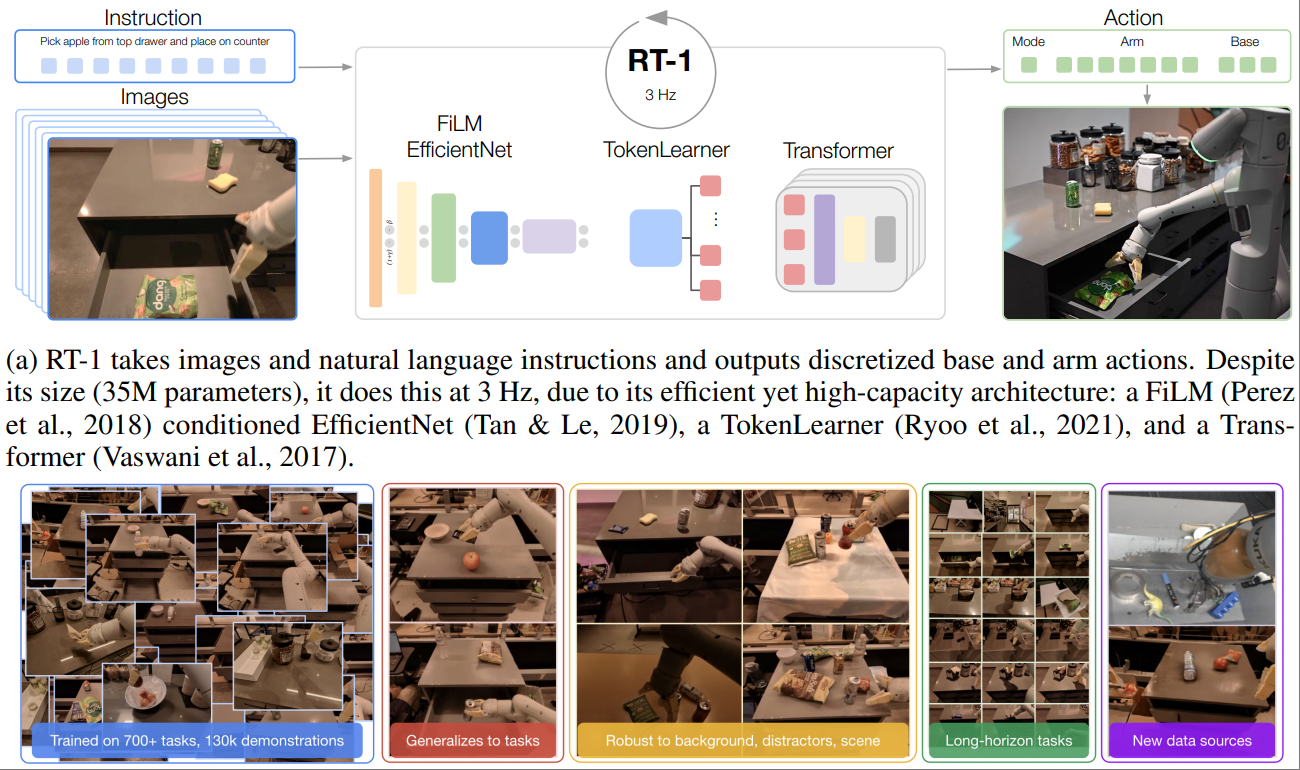
RT-2(Robotics Transformer 2, 2023)代表了视觉-语言-动作(VLA)模型的最新进展。让我们先回顾一下进化路径:
┌──────────────────────────────────────────────────────────────────────────────┐
│                    RT 系列演进路线                                            │
├──────────────────────────────────────────────────────────────────────────────┤
│                                                                              │
│   RT-1 (2022)                                                                │
│   ┌────────────────────────────────────────────────────┐                    │
│   │  输入:图像 + 语言指令                              │                    │
│   │  输出:离散化动作 token                             │                    │
│   │  特点:Transformer 架构,在真实机器人数据上训练     │                    │
│   │  规模:130K 真实机器人演示                          │                    │
│   │  能力:学到的任务范围内表现良好                     │                    │
│   └────────────────────────────────────────────────────┘                    │
│                               │                                              │
│                               ▼                                              │
│   RT-2 (2023)                                                                │
│   ┌────────────────────────────────────────────────────┐                    │
│   │  创新:将动作表示为语言 token                       │                    │
│   │  基座:PaLI-X (55B) 或 PaLM-E (12B)                │                    │
│   │  训练:VLM 预训练 + 机器人数据微调                  │                    │
│   │  能力:                                            │                    │
│   │    - 语义推理("把物体移到泰勒·斯威夫特的国家")   │                    │
│   │    - 符号理解(识别数字、文字)                    │                    │
│   │    - 人类识别("把苹果给穿蓝衣服的人")           │                    │
│   └────────────────────────────────────────────────────┘                    │
│                               │                                              │
│                               ▼                                              │
│   RT-X / Open X-Embodiment (2023)                                           │
│   ┌────────────────────────────────────────────────────┐                    │
│   │  规模:22 个机器人平台,100 万+ 真实机器人轨迹      │                    │
│   │  目标:通用机器人基础模型                          │                    │
│   │  发现:跨具身(cross-embodiment)正迁移            │                    │
│   └────────────────────────────────────────────────────┘                    │
│                                                                              │
└──────────────────────────────────────────────────────────────────────────────┘
6.2 视觉-语言-动作模型(VLA)
RT-2 的核心创新是将机器人动作表示为语言 token,从而可以直接使用预训练的视觉-语言模型:
┌──────────────────────────────────────────────────────────────────────────────┐
│                      RT-2 动作表示方法                                        │
├──────────────────────────────────────────────────────────────────────────────┤
│                                                                              │
│   传统方法:动作是连续向量                                                    │
│   ┌─────────────────────────────────────────────────────────────┐           │
│   │  action = [Δx, Δy, Δz, Δroll, Δpitch, Δyaw, gripper]       │           │
│   │         = [0.02, -0.01, 0.03, 0.0, 0.1, -0.05, 0.8]        │           │
│   └─────────────────────────────────────────────────────────────┘           │
│                                                                              │
│   RT-2 方法:动作是语言 token                                                 │
│   ┌─────────────────────────────────────────────────────────────┐           │
│   │  1. 连续值 → 离散化 (256 bins)                              │           │
│   │     0.02 → bin 128 → token "128"                            │           │
│   │                                                             │           │
│   │  2. 每个维度独立离散化                                      │           │
│   │     [0.02, -0.01, 0.03, ...] → ["128", "127", "129", ...]  │           │
│   │                                                             │           │
│   │  3. 作为文本序列输出                                        │           │
│   │     模型输出: "1 128 2 127 3 129 4 128 5 131 6 125 7 200"  │           │
│   │                    ↓      ↓      ↓      ↓      ↓      ↓      ↓         │
│   │               dim  Δx    Δy    Δz    Δroll Δpitch Δyaw gripper        │
│   └─────────────────────────────────────────────────────────────┘           │
│                                                                              │
│   优势:                                                                     │
│   - 复用 VLM 的语言建模能力                                                 │
│   - 共享语言空间的语义理解                                                   │
│   - 可以利用思维链(CoT)推理                                               │
│                                                                              │
└──────────────────────────────────────────────────────────────────────────────┘
class RT2ActionTokenizer:
    """RT-2 风格的动作编码/解码器"""

    def __init__(self, num_bins=256, action_dim=7):
        self.num_bins = num_bins
        self.action_dim = action_dim

        # 动作空间范围(根据机器人定义)
        self.action_ranges = {
            'x': (-0.1, 0.1),      # 末端位置变化
            'y': (-0.1, 0.1),
            'z': (-0.1, 0.1),
            'roll': (-0.5, 0.5),   # 末端姿态变化
            'pitch': (-0.5, 0.5),
            'yaw': (-0.5, 0.5),
            'gripper': (0, 1),     # 夹爪开合
        }

        self.dim_names = list(self.action_ranges.keys())

    def discretize(self, value, dim_name):
        """将连续值离散化为 bin 索引"""
        min_val, max_val = self.action_ranges[dim_name]

        # 裁剪到范围内
        value = max(min_val, min(max_val, value))

        # 线性映射到 [0, num_bins-1]
        bin_idx = int((value - min_val) / (max_val - min_val) * (self.num_bins - 1))

        return bin_idx

    def undiscretize(self, bin_idx, dim_name):
        """将 bin 索引转换回连续值"""
        min_val, max_val = self.action_ranges[dim_name]

        value = min_val + (bin_idx / (self.num_bins - 1)) * (max_val - min_val)

        return value

    def encode(self, action_vector):
        """
        将动作向量编码为 token 序列

        Args:
            action_vector: [action_dim] 连续动作向量

        Returns:
            token_string: 编码后的字符串
        """
        tokens = []
        for i, (value, dim_name) in enumerate(zip(action_vector, self.dim_names)):
            bin_idx = self.discretize(value, dim_name)
            # 格式: "维度索引 bin值"
            tokens.append(f"{i+1}")
            tokens.append(f"{bin_idx}")

        return " ".join(tokens)

    def decode(self, token_string):
        """
        将 token 序列解码为动作向量

        Args:
            token_string: 模型输出的字符串

        Returns:
            action_vector: [action_dim] 连续动作向量
        """
        tokens = token_string.strip().split()
        action_vector = [0.0] * self.action_dim

        i = 0
        while i < len(tokens) - 1:
            try:
                dim_idx = int(tokens[i]) - 1  # 从 1 开始
                bin_idx = int(tokens[i + 1])

                if 0 <= dim_idx < self.action_dim:
                    dim_name = self.dim_names[dim_idx]
                    action_vector[dim_idx] = self.undiscretize(bin_idx, dim_name)

                i += 2
            except ValueError:
                i += 1

        return action_vector


class RT2Model(nn.Module):
    """RT-2 视觉-语言-动作模型"""

    def __init__(self, vlm_model, action_tokenizer):
        super().__init__()

        self.vlm = vlm_model  # 预训练的 VLM (如 PaLI-X)
        self.action_tokenizer = action_tokenizer

    def forward(self, images, instruction, action_history=None):
        """
        前向传播

        Args:
            images: [B, T, 3, H, W] 历史图像帧
            instruction: List[str] 语言指令
            action_history: [B, T-1, action_dim] 历史动作(可选)

        Returns:
            action_logits: 下一步动作的 logits
        """
        B, T = images.shape[:2]

        # 构建输入 prompt
        prompts = []
        for b in range(B):
            prompt = self._build_prompt(
                instruction[b],
                action_history[b] if action_history is not None else None
            )
            prompts.append(prompt)

        # VLM 前向传播
        outputs = self.vlm(
            images=images,
            text=prompts,
            return_dict=True
        )

        return outputs.logits

    def _build_prompt(self, instruction, action_history):
        """构建 RT-2 风格的 prompt"""
        prompt = f"Instruction: {instruction}\n"

        if action_history is not None:
            prompt += "Previous actions:\n"
            for i, action in enumerate(action_history):
                action_str = self.action_tokenizer.encode(action)
                prompt += f"  Step {i+1}: {action_str}\n"

        prompt += "Next action:"

        return prompt

    @torch.no_grad()
    def predict_action(self, images, instruction, action_history=None):
        """
        预测下一步动作
        """
        # 生成动作 token
        output_text = self.vlm.generate(
            images=images,
            text=self._build_prompt(instruction, action_history),
            max_new_tokens=20,
            do_sample=False
        )

        # 解码为动作向量
        action = self.action_tokenizer.decode(output_text)

        return action
6.3 涌现能力与泛化性
RT-2 展现出了令人惊讶的涌现能力——能够执行训练数据中从未见过的任务:
┌──────────────────────────────────────────────────────────────────────────────┐
│                      RT-2 涌现能力示例                                        │
├──────────────────────────────────────────────────────────────────────────────┤
│                                                                              │
│   1. 语义推理(Semantic Reasoning)                                          │
│   ┌────────────────────────────────────────────────────────────┐            │
│   │  指令:"把物体移到泰勒·斯威夫特的国家"                      │            │
│   │  推理:泰勒·斯威夫特 → 美国 → 美国国旗图案                  │            │
│   │  动作:移动物体到美国国旗上                                 │            │
│   │                                                            │            │
│   │  训练时:从未见过 "泰勒·斯威夫特" 或这种推理任务           │            │
│   │  能力来源:VLM 预训练的世界知识                            │            │
│   └────────────────────────────────────────────────────────────┘            │
│                                                                              │
│   2. 符号理解(Symbol Understanding)                                        │
│   ┌────────────────────────────────────────────────────────────┐            │
│   │  指令:"把物体移到数字最小的位置"                          │            │
│   │  场景:桌上有标记 1, 3, 5 的位置                            │            │
│   │  推理:识别数字 → 比较大小 → 找到最小值 1                   │            │
│   │  动作:移动到标记为 1 的位置                                │            │
│   └────────────────────────────────────────────────────────────┘            │
│                                                                              │
│   3. 视觉问答 + 动作(VQA + Action)                                         │
│   ┌────────────────────────────────────────────────────────────┐            │
│   │  指令:"把垃圾(不能吃的东西)放进垃圾桶"                   │            │
│   │  场景:桌上有苹果、纸巾、香蕉皮                              │            │
│   │  推理:苹果可以吃 → 不是垃圾                               │            │
│   │        纸巾不能吃 → 是垃圾                                 │            │
│   │        香蕉皮不能吃 → 是垃圾                               │            │
│   │  动作:抓取纸巾和香蕉皮放入垃圾桶                           │            │
│   └────────────────────────────────────────────────────────────┘            │
│                                                                              │
│   4. 人类识别(Human Recognition)                                           │
│   ┌────────────────────────────────────────────────────────────┐            │
│   │  指令:"把水瓶递给穿红色衣服的人"                          │            │
│   │  场景:房间里有两个人                                       │            │
│   │  推理:识别人物 → 识别衣服颜色 → 定位目标人物               │            │
│   │  动作:抓取水瓶 → 移动到目标人物 → 递出                     │            │
│   └────────────────────────────────────────────────────────────┘            │
│                                                                              │
│   这些能力的关键:                                                           │
│   - 模型规模:55B 参数带来的表示能力                                         │
│   - VLM 预训练:海量互联网数据中的世界知识                                   │
│   - 统一表示:语言和动作共享同一空间,知识可以迁移                           │
│                                                                              │
└──────────────────────────────────────────────────────────────────────────────┘
6.4 实战代码示例
以下是一个简化的 RT-2 风格训练和推理流程:
import torch
import torch.nn as nn
from torch.utils.data import DataLoader
from transformers import AutoModelForVision2Seq, AutoProcessor

class RT2Trainer:
    """RT-2 训练器"""

    def __init__(self, config):
        self.config = config

        # 加载预训练 VLM
        self.model = AutoModelForVision2Seq.from_pretrained(
            config.vlm_model_name,
            torch_dtype=torch.bfloat16
        )
        self.processor = AutoProcessor.from_pretrained(config.vlm_model_name)

        # 动作 tokenizer
        self.action_tokenizer = RT2ActionTokenizer(
            num_bins=config.num_action_bins,
            action_dim=config.action_dim
        )

        # 添加动作相关的特殊 token(可选)
        special_tokens = [f"<action_dim_{i}>" for i in range(config.action_dim)]
        self.processor.tokenizer.add_special_tokens({
            'additional_special_tokens': special_tokens
        })
        self.model.resize_token_embeddings(len(self.processor.tokenizer))

        # 优化器
        self.optimizer = torch.optim.AdamW(
            self.model.parameters(),
            lr=config.learning_rate,
            weight_decay=config.weight_decay
        )

    def prepare_batch(self, batch):
        """准备训练批次"""
        images = batch['images']  # [B, T, 3, H, W]
        instructions = batch['instructions']  # List[str]
        actions = batch['actions']  # [B, T, action_dim]

        # 构建输入和目标
        input_texts = []
        target_texts = []

        for b in range(len(instructions)):
            # 输入:指令 + 历史
            input_text = f"Instruction: {instructions[b]}\n"

            # 历史动作(除了最后一步)
            for t in range(actions.shape[1] - 1):
                action_str = self.action_tokenizer.encode(actions[b, t].tolist())
                input_text += f"Step {t+1}: {action_str}\n"

            input_text += "Next action:"
            input_texts.append(input_text)

            # 目标:最后一步动作
            target_text = self.action_tokenizer.encode(actions[b, -1].tolist())
            target_texts.append(target_text)

        # Tokenize
        inputs = self.processor(
            text=input_texts,
            images=images[:, -1],  # 使用最后一帧图像
            return_tensors="pt",
            padding=True
        )

        targets = self.processor.tokenizer(
            target_texts,
            return_tensors="pt",
            padding=True
        )

        return inputs, targets

    def train_step(self, batch):
        """单步训练"""
        self.model.train()

        inputs, targets = self.prepare_batch(batch)

        # 前向传播
        outputs = self.model(
            **inputs,
            labels=targets['input_ids']
        )

        loss = outputs.loss

        # 反向传播
        self.optimizer.zero_grad()
        loss.backward()

        # 梯度裁剪
        torch.nn.utils.clip_grad_norm_(
            self.model.parameters(),
            self.config.max_grad_norm
        )

        self.optimizer.step()

        return loss.item()

    def train(self, dataloader, num_epochs):
        """训练循环"""
        for epoch in range(num_epochs):
            total_loss = 0

            for batch_idx, batch in enumerate(dataloader):
                loss = self.train_step(batch)
                total_loss += loss

                if batch_idx % 100 == 0:
                    print(f"Epoch {epoch}, Batch {batch_idx}, Loss: {loss:.4f}")

            avg_loss = total_loss / len(dataloader)
            print(f"Epoch {epoch} completed. Average Loss: {avg_loss:.4f}")


class RT2Inference:
    """RT-2 推理接口"""

    def __init__(self, model_path, device='cuda'):
        self.device = device

        # 加载模型
        self.model = AutoModelForVision2Seq.from_pretrained(
            model_path,
            torch_dtype=torch.bfloat16
        ).to(device)
        self.processor = AutoProcessor.from_pretrained(model_path)

        self.action_tokenizer = RT2ActionTokenizer()

        self.model.eval()

    @torch.no_grad()
    def predict(self, image, instruction, history=None):
        """
        预测下一步动作

        Args:
            image: PIL Image 或 numpy array
            instruction: 语言指令
            history: 历史动作列表(可选)

        Returns:
            action: [action_dim] 动作向量
            confidence: 置信度
        """
        # 构建 prompt
        prompt = f"Instruction: {instruction}\n"

        if history:
            for i, action in enumerate(history):
                action_str = self.action_tokenizer.encode(action)
                prompt += f"Step {i+1}: {action_str}\n"

        prompt += "Next action:"

        # 处理输入
        inputs = self.processor(
            text=prompt,
            images=image,
            return_tensors="pt"
        ).to(self.device)

        # 生成
        outputs = self.model.generate(
            **inputs,
            max_new_tokens=20,
            do_sample=False,
            output_scores=True,
            return_dict_in_generate=True
        )

        # 解码动作
        generated_text = self.processor.decode(
            outputs.sequences[0],
            skip_special_tokens=True
        )

        # 提取新生成的部分
        action_text = generated_text[len(prompt):].strip()
        action = self.action_tokenizer.decode(action_text)

        # 计算置信度(使用生成概率)
        if outputs.scores:
            probs = torch.softmax(outputs.scores[0][0], dim=-1)
            confidence = probs.max().item()
        else:
            confidence = 1.0

        return action, confidence


# 使用示例
def rt2_demo():
    """RT-2 演示"""
    # 初始化推理接口
    rt2 = RT2Inference("path/to/rt2-model")

    # 模拟机器人环境
    env = RobotEnvironment()

    instruction = "Pick up the red block and place it on the blue plate"

    history = []
    max_steps = 50

    for step in range(max_steps):
        # 获取当前观察
        image = env.get_camera_image()

        # 预测动作
        action, confidence = rt2.predict(image, instruction, history)

        print(f"Step {step}: action={action}, confidence={confidence:.3f}")

        # 执行动作
        env.step(action)

        # 检查是否完成
        if env.is_task_complete():
            print("Task completed successfully!")
            break

        # 更新历史
        history.append(action)

        # 置信度过低时可能需要人工干预
        if confidence < 0.3:
            print("Low confidence, requesting human assistance...")
            break
💡 思考:RT-2 将动作表示为语言 token,这有什么潜在问题?
🤔 解答:
- 精度损失:256 bins 的离散化意味着约 0.1mm 的位置精度,可能不够精细操作
- 生成延迟:自回归生成 14 个 token(7 维度 × 2)比直接回归慢
- 动作空间限制:预定义的范围可能不适合所有任务
- 序列长度:多步历史会导致输入序列很长
改进方向:
- 使用更细的离散化(如 1024 bins)
- 并行解码动作 token
- 自适应动作空间范围
- 压缩历史表示
7. 机器人控制:从规划到执行 🎮
7.1 运动规划基础
运动规划是将高层任务转化为具体轨迹的关键步骤:
┌──────────────────────────────────────────────────────────────────────────────┐
│                      运动规划层次结构                                         │
├──────────────────────────────────────────────────────────────────────────────┤
│                                                                              │
│   任务层(Task Level)                                                       │
│   ┌────────────────────────────────────────────────────────────┐            │
│   │  "把杯子放到桌上" → {pick(cup), move(table), place()}      │            │
│   └──────────────────────────────┬─────────────────────────────┘            │
│                                  │                                           │
│                                  ▼                                           │
│   笛卡尔空间(Cartesian Space)                                              │
│   ┌────────────────────────────────────────────────────────────┐            │
│   │  起点: (0.5, 0.0, 0.3) → 终点: (0.3, 0.4, 0.5)             │            │
│   │  约束: 避开障碍物、保持杯子水平                             │            │
│   └──────────────────────────────┬─────────────────────────────┘            │
│                                  │                                           │
│                                  ▼                                           │
│   关节空间(Joint Space)                                                    │
│   ┌────────────────────────────────────────────────────────────┐            │
│   │  q(t) = [q1(t), q2(t), ..., q7(t)]                         │            │
│   │  满足: 关节限位、速度限制、加速度限制                       │            │
│   └──────────────────────────────┬─────────────────────────────┘            │
│                                  │                                           │
│                                  ▼                                           │
│   控制层(Control Level)                                                    │
│   ┌────────────────────────────────────────────────────────────┐            │
│   │  τ(t) = Kp·(q_d - q) + Kd·(q̇_d - q̇) + G(q)                │            │
│   │  实时关节力矩控制                                          │            │
│   └────────────────────────────────────────────────────────────┘            │
│                                                                              │
└──────────────────────────────────────────────────────────────────────────────┘
import numpy as np
from scipy.spatial.transform import Rotation

class MotionPlanner:
    """运动规划器"""

    def __init__(self, robot_model, collision_checker):
        self.robot = robot_model
        self.collision_checker = collision_checker

    def plan_cartesian_path(
        self,
        start_pose,
        end_pose,
        max_step=0.01,
        avoid_collisions=True
    ):
        """
        在笛卡尔空间规划直线路径

        Args:
            start_pose: 起始位姿 (position, quaternion)
            end_pose: 目标位姿 (position, quaternion)
            max_step: 最大步长(米)
            avoid_collisions: 是否避障

        Returns:
            path: 位姿序列
            success: 是否成功
        """
        start_pos, start_quat = start_pose
        end_pos, end_quat = end_pose

        # 计算路径长度
        distance = np.linalg.norm(end_pos - start_pos)
        num_steps = max(int(distance / max_step), 10)

        path = []

        for i in range(num_steps + 1):
            t = i / num_steps

            # 位置线性插值
            pos = start_pos + t * (end_pos - start_pos)

            # 姿态球面线性插值 (SLERP)
            r_start = Rotation.from_quat(start_quat)
            r_end = Rotation.from_quat(end_quat)
            r_interp = Rotation.concatenate([r_start, r_end]).mean()
            # 简化版 SLERP
            quat = self._slerp(start_quat, end_quat, t)

            waypoint = (pos, quat)

            # 碰撞检测
            if avoid_collisions:
                joint_config = self.robot.inverse_kinematics(pos, quat)
                if joint_config is None:
                    return None, False
                if self.collision_checker.check_collision(joint_config):
                    return None, False

            path.append(waypoint)

        return path, True

    def plan_joint_trajectory(
        self,
        cartesian_path,
        max_velocity=1.0,
        max_acceleration=2.0
    ):
        """
        将笛卡尔路径转换为关节空间轨迹

        包含时间参数化(速度、加速度限制)
        """
        joint_path = []

        for pos, quat in cartesian_path:
            joint_config = self.robot.inverse_kinematics(pos, quat)
            if joint_config is None:
                raise PlanningError("IK failed")
            joint_path.append(joint_config)

        joint_path = np.array(joint_path)

        # 时间参数化(梯形速度曲线)
        trajectory = self._time_parameterize(
            joint_path,
            max_velocity,
            max_acceleration
        )

        return trajectory

    def _time_parameterize(self, path, max_vel, max_acc):
        """
        梯形速度曲线时间参数化
        """
        n_points = len(path)
        n_joints = path.shape[1]

        # 计算每段的长度
        segments = np.diff(path, axis=0)
        segment_lengths = np.linalg.norm(segments, axis=1)

        # 计算每段时间(考虑加减速)
        times = []
        velocities = []

        for i, length in enumerate(segment_lengths):
            # 简化:使用三角形或梯形速度
            t_acc = max_vel / max_acc
            d_acc = 0.5 * max_acc * t_acc**2

            if length < 2 * d_acc:
                # 三角形速度
                t = 2 * np.sqrt(length / max_acc)
            else:
                # 梯形速度
                t = 2 * t_acc + (length - 2 * d_acc) / max_vel

            times.append(t)

        times = np.array(times)
        timestamps = np.concatenate([[0], np.cumsum(times)])

        # 构建轨迹
        trajectory = {
            'positions': path,
            'timestamps': timestamps,
            'velocities': np.zeros_like(path),  # 简化
            'accelerations': np.zeros_like(path)  # 简化
        }

        return trajectory

    def _slerp(self, q0, q1, t):
        """四元数球面线性插值"""
        q0 = np.array(q0)
        q1 = np.array(q1)

        dot = np.dot(q0, q1)

        if dot < 0:
            q1 = -q1
            dot = -dot

        if dot > 0.9995:
            result = q0 + t * (q1 - q0)
            return result / np.linalg.norm(result)

        theta_0 = np.arccos(dot)
        theta = theta_0 * t

        q2 = q1 - q0 * dot
        q2 = q2 / np.linalg.norm(q2)

        return q0 * np.cos(theta) + q2 * np.sin(theta)
7.2 强化学习控制
强化学习让机器人可以学习复杂的控制策略:
import torch
import torch.nn as nn
import torch.nn.functional as F

class ActorCritic(nn.Module):
    """Actor-Critic 网络用于机器人控制"""

    def __init__(self, obs_dim, action_dim, hidden_dim=256):
        super().__init__()

        # 共享特征提取器
        self.feature_extractor = nn.Sequential(
            nn.Linear(obs_dim, hidden_dim),
            nn.ReLU(),
            nn.Linear(hidden_dim, hidden_dim),
            nn.ReLU()
        )

        # Actor 网络(策略)
        self.actor_mean = nn.Linear(hidden_dim, action_dim)
        self.actor_log_std = nn.Parameter(torch.zeros(action_dim))

        # Critic 网络(价值函数)
        self.critic = nn.Sequential(
            nn.Linear(hidden_dim, hidden_dim),
            nn.ReLU(),
            nn.Linear(hidden_dim, 1)
        )

    def forward(self, obs):
        features = self.feature_extractor(obs)
        return features

    def get_action(self, obs, deterministic=False):
        features = self.forward(obs)

        action_mean = self.actor_mean(features)
        action_std = self.actor_log_std.exp()

        if deterministic:
            return action_mean
        else:
            # 采样动作
            dist = torch.distributions.Normal(action_mean, action_std)
            action = dist.sample()
            log_prob = dist.log_prob(action).sum(-1)
            return action, log_prob

    def get_value(self, obs):
        features = self.forward(obs)
        return self.critic(features)


class PPOTrainer:
    """PPO 算法训练器"""

    def __init__(
        self,
        env,
        policy,
        learning_rate=3e-4,
        gamma=0.99,
        gae_lambda=0.95,
        clip_epsilon=0.2,
        epochs_per_update=10
    ):
        self.env = env
        self.policy = policy
        self.optimizer = torch.optim.Adam(policy.parameters(), lr=learning_rate)

        self.gamma = gamma
        self.gae_lambda = gae_lambda
        self.clip_epsilon = clip_epsilon
        self.epochs_per_update = epochs_per_update

    def collect_rollout(self, num_steps):
        """收集一段 rollout 数据"""
        obs_list = []
        action_list = []
        reward_list = []
        done_list = []
        log_prob_list = []
        value_list = []

        obs = self.env.reset()

        for _ in range(num_steps):
            obs_tensor = torch.FloatTensor(obs).unsqueeze(0)

            with torch.no_grad():
                action, log_prob = self.policy.get_action(obs_tensor)
                value = self.policy.get_value(obs_tensor)

            action_np = action.squeeze(0).numpy()
            next_obs, reward, done, info = self.env.step(action_np)

            obs_list.append(obs)
            action_list.append(action_np)
            reward_list.append(reward)
            done_list.append(done)
            log_prob_list.append(log_prob.item())
            value_list.append(value.item())

            obs = next_obs
            if done:
                obs = self.env.reset()

        return {
            'obs': np.array(obs_list),
            'actions': np.array(action_list),
            'rewards': np.array(reward_list),
            'dones': np.array(done_list),
            'log_probs': np.array(log_prob_list),
            'values': np.array(value_list)
        }

    def compute_gae(self, rewards, values, dones):
        """计算广义优势估计 (GAE)"""
        advantages = np.zeros_like(rewards)
        last_gae = 0

        for t in reversed(range(len(rewards))):
            if t == len(rewards) - 1:
                next_value = 0
            else:
                next_value = values[t + 1]

            delta = rewards[t] + self.gamma * next_value * (1 - dones[t]) - values[t]
            advantages[t] = last_gae = delta + self.gamma * self.gae_lambda * (1 - dones[t]) * last_gae

        returns = advantages + values
        return advantages, returns

    def update(self, rollout):
        """PPO 更新"""
        obs = torch.FloatTensor(rollout['obs'])
        actions = torch.FloatTensor(rollout['actions'])
        old_log_probs = torch.FloatTensor(rollout['log_probs'])

        advantages, returns = self.compute_gae(
            rollout['rewards'],
            rollout['values'],
            rollout['dones']
        )
        advantages = torch.FloatTensor(advantages)
        returns = torch.FloatTensor(returns)

        # 标准化优势
        advantages = (advantages - advantages.mean()) / (advantages.std() + 1e-8)

        for _ in range(self.epochs_per_update):
            # 获取当前策略的动作概率
            features = self.policy(obs)
            action_mean = self.policy.actor_mean(features)
            action_std = self.policy.actor_log_std.exp()
            dist = torch.distributions.Normal(action_mean, action_std)

            new_log_probs = dist.log_prob(actions).sum(-1)
            entropy = dist.entropy().sum(-1).mean()

            # 计算比率
            ratio = torch.exp(new_log_probs - old_log_probs)

            # PPO clip 目标
            surr1 = ratio * advantages
            surr2 = torch.clamp(ratio, 1 - self.clip_epsilon, 1 + self.clip_epsilon) * advantages
            policy_loss = -torch.min(surr1, surr2).mean()

            # 价值函数损失
            values = self.policy.get_value(obs).squeeze()
            value_loss = F.mse_loss(values, returns)

            # 总损失
            loss = policy_loss + 0.5 * value_loss - 0.01 * entropy

            self.optimizer.zero_grad()
            loss.backward()
            torch.nn.utils.clip_grad_norm_(self.policy.parameters(), 0.5)
            self.optimizer.step()

        return {
            'policy_loss': policy_loss.item(),
            'value_loss': value_loss.item(),
            'entropy': entropy.item()
        }
7.3 模仿学习与示教
模仿学习让机器人从人类演示中学习:
class BehaviorCloning:
    """行为克隆(Behavior Cloning)"""

    def __init__(self, policy, learning_rate=1e-4):
        self.policy = policy
        self.optimizer = torch.optim.Adam(policy.parameters(), lr=learning_rate)

    def train(self, demonstrations, epochs=100, batch_size=64):
        """
        从演示数据中学习

        Args:
            demonstrations: {
                'observations': [N, obs_dim],
                'actions': [N, action_dim]
            }
        """
        obs = torch.FloatTensor(demonstrations['observations'])
        actions = torch.FloatTensor(demonstrations['actions'])

        dataset = torch.utils.data.TensorDataset(obs, actions)
        dataloader = torch.utils.data.DataLoader(
            dataset, batch_size=batch_size, shuffle=True
        )

        for epoch in range(epochs):
            total_loss = 0

            for batch_obs, batch_actions in dataloader:
                # 预测动作
                pred_actions = self.policy.get_action(batch_obs, deterministic=True)

                # MSE 损失
                loss = F.mse_loss(pred_actions, batch_actions)

                self.optimizer.zero_grad()
                loss.backward()
                self.optimizer.step()

                total_loss += loss.item()

            if epoch % 10 == 0:
                print(f"Epoch {epoch}, Loss: {total_loss / len(dataloader):.4f}")


class DAgger:
    """DAgger (Dataset Aggregation) 算法"""

    def __init__(self, policy, expert, env):
        self.policy = policy
        self.expert = expert  # 专家策略(可以是人类或已知最优策略)
        self.env = env

        self.dataset = {'observations': [], 'actions': []}

    def collect_with_expert(self, num_episodes):
        """使用专家策略收集数据"""
        for _ in range(num_episodes):
            obs = self.env.reset()
            done = False

            while not done:
                expert_action = self.expert.get_action(obs)

                self.dataset['observations'].append(obs)
                self.dataset['actions'].append(expert_action)

                obs, _, done, _ = self.env.step(expert_action)

    def collect_with_policy(self, num_episodes, expert_label=True):
        """
        使用学习到的策略收集数据,但用专家标注

        这是 DAgger 的核心:
        - 用当前策略执行
        - 用专家标注应该采取的动作
        """
        for _ in range(num_episodes):
            obs = self.env.reset()
            done = False

            while not done:
                # 用当前策略执行
                with torch.no_grad():
                    policy_action = self.policy.get_action(
                        torch.FloatTensor(obs).unsqueeze(0),
                        deterministic=True
                    ).squeeze(0).numpy()

                # 用专家标注
                if expert_label:
                    expert_action = self.expert.get_action(obs)
                    self.dataset['observations'].append(obs)
                    self.dataset['actions'].append(expert_action)

                obs, _, done, _ = self.env.step(policy_action)

    def train_iteration(self, bc_trainer, epochs=50):
        """一轮 DAgger 训练"""
        demonstrations = {
            'observations': np.array(self.dataset['observations']),
            'actions': np.array(self.dataset['actions'])
        }

        bc_trainer.train(demonstrations, epochs=epochs)
7.4 力控制与柔顺操作
力控制对于与环境安全交互至关重要:
class ImpedanceController:
    """阻抗控制器"""

    def __init__(self, robot, stiffness, damping):
        """
        Args:
            stiffness: [6] 刚度系数 [Kx, Ky, Kz, Kroll, Kpitch, Kyaw]
            damping: [6] 阻尼系数
        """
        self.robot = robot
        self.K = np.diag(stiffness)  # 刚度矩阵
        self.D = np.diag(damping)    # 阻尼矩阵

    def compute_control(self, desired_pose, desired_velocity=None):
        """
        计算阻抗控制力/力矩

        阻抗控制公式:
        F = K * (x_d - x) + D * (ẋ_d - ẋ)

        相当于一个虚拟的弹簧-阻尼系统
        """
        # 获取当前状态
        current_pose = self.robot.get_end_effector_pose()
        current_velocity = self.robot.get_end_effector_velocity()

        if desired_velocity is None:
            desired_velocity = np.zeros(6)

        # 位置误差
        pose_error = self._compute_pose_error(desired_pose, current_pose)

        # 速度误差
        velocity_error = desired_velocity - current_velocity

        # 阻抗控制力
        wrench = self.K @ pose_error + self.D @ velocity_error

        # 转换为关节力矩
        jacobian = self.robot.get_jacobian()
        joint_torques = jacobian.T @ wrench

        return joint_torques

    def _compute_pose_error(self, desired, current):
        """计算位姿误差(位置 + 姿态)"""
        # 位置误差
        pos_error = desired[:3] - current[:3]

        # 姿态误差(使用轴角表示)
        R_d = Rotation.from_quat(desired[3:7]).as_matrix()
        R_c = Rotation.from_quat(current[3:7]).as_matrix()
        R_error = R_d @ R_c.T
        angle_axis = Rotation.from_matrix(R_error).as_rotvec()

        return np.concatenate([pos_error, angle_axis])


class HybridForcePositionController:
    """混合力/位置控制器"""

    def __init__(self, robot, position_gains, force_gains):
        self.robot = robot
        self.Kp_pos = np.diag(position_gains[:3])
        self.Kd_pos = np.diag(position_gains[3:6])
        self.Kp_force = np.diag(force_gains[:3])
        self.Ki_force = np.diag(force_gains[3:6])

        self.force_integral = np.zeros(3)

    def compute_control(
        self,
        desired_position,
        desired_force,
        selection_matrix
    ):
        """
        混合力/位置控制

        Args:
            desired_position: [3] 期望位置
            desired_force: [3] 期望力
            selection_matrix: [3, 3] 选择矩阵
                对角元素为 1 表示该方向使用力控制
                对角元素为 0 表示该方向使用位置控制
        """
        S = selection_matrix
        I = np.eye(3)

        # 获取当前状态
        current_pos = self.robot.get_end_effector_position()
        current_vel = self.robot.get_end_effector_velocity()[:3]
        current_force = self.robot.get_end_effector_force()

        # 位置控制部分
        pos_error = desired_position - current_pos
        vel_error = -current_vel  # 假设期望速度为 0

        F_position = self.Kp_pos @ pos_error + self.Kd_pos @ vel_error

        # 力控制部分
        force_error = desired_force - current_force
        self.force_integral += force_error * self.robot.dt

        F_force = self.Kp_force @ force_error + self.Ki_force @ self.force_integral

        # 混合
        F_hybrid = (I - S) @ F_position + S @ F_force

        return F_hybrid
💡 思考:为什么机器人需要力控制,而不能只用位置控制?
🤔 解答:
- 安全性:与人或柔软物体接触时,需要限制接触力
- 环境不确定性:物体位置可能有误差,纯位置控制可能造成过大接触力
- 柔顺任务:插入、擦拭等任务需要适应环境形状
- 鲁棒性:力反馈提供额外信息,帮助检测异常情况
8. 自主导航:让机器人认路 🗺️
8.1 SLAM与定位技术
SLAM(Simultaneous Localization and Mapping)同时完成定位和建图:
┌──────────────────────────────────────────────────────────────────────────────┐
│                          SLAM 系统架构                                        │
├──────────────────────────────────────────────────────────────────────────────┤
│                                                                              │
│   传感器输入                                                                  │
│   ┌────────────┐  ┌────────────┐  ┌────────────┐  ┌────────────┐            │
│   │  RGB 相机  │  │  深度相机  │  │   LiDAR    │  │    IMU     │            │
│   └─────┬──────┘  └─────┬──────┘  └─────┬──────┘  └─────┬──────┘            │
│         │               │               │               │                    │
│         └───────────────┴───────────────┴───────────────┘                    │
│                               │                                              │
│                               ▼                                              │
│   ┌──────────────────────────────────────────────────────────────────────┐  │
│   │                        前端 (Front-end)                              │  │
│   │  ┌─────────────┐    ┌─────────────┐    ┌─────────────┐               │  │
│   │  │  特征提取   │ →  │  特征匹配   │ →  │  位姿估计   │               │  │
│   │  │  ORB/SIFT   │    │  描述子匹配 │    │  PnP/ICP    │               │  │
│   │  └─────────────┘    └─────────────┘    └─────────────┘               │  │
│   │                             │                                        │  │
│   │                             ▼                                        │  │
│   │                    ┌─────────────┐                                   │  │
│   │                    │  回环检测   │                                   │  │
│   │                    │  Bag of Words│                                   │  │
│   │                    └─────────────┘                                   │  │
│   └──────────────────────────┬───────────────────────────────────────────┘  │
│                              │                                               │
│                              ▼                                               │
│   ┌──────────────────────────────────────────────────────────────────────┐  │
│   │                        后端 (Back-end)                               │  │
│   │  ┌─────────────────────────────────────────────────────────────┐    │  │
│   │  │                    位姿图优化                                │    │  │
│   │  │    x1 ──── x2 ──── x3 ──── x4                               │    │  │
│   │  │    │                         │                               │    │  │
│   │  │    └─────── 回环约束 ────────┘                               │    │  │
│   │  │                                                              │    │  │
│   │  │    最小化: Σ ||xi - xj - zij||² + Σ ||xk - xl - zkl||²      │    │  │
│   │  │            里程计约束            回环约束                    │    │  │
│   │  └─────────────────────────────────────────────────────────────┘    │  │
│   └──────────────────────────┬───────────────────────────────────────────┘  │
│                              │                                               │
│                              ▼                                               │
│   ┌──────────────────────────────────────────────────────────────────────┐  │
│   │                          输出                                        │  │
│   │      ┌─────────────────┐        ┌─────────────────┐                 │  │
│   │      │   机器人位姿    │        │    环境地图     │                 │  │
│   │      │   (x, y, θ)     │        │   (占据栅格等)   │                 │  │
│   │      └─────────────────┘        └─────────────────┘                 │  │
│   └──────────────────────────────────────────────────────────────────────┘  │
│                                                                              │
└──────────────────────────────────────────────────────────────────────────────┘
import numpy as np
from collections import deque

class SimpleSLAM:
    """简化的 2D SLAM 实现"""

    def __init__(self, map_size=(100, 100), resolution=0.05):
        self.map_size = map_size
        self.resolution = resolution

        # 占据栅格地图
        # 0: 未知, 0.5: 空闲, 1: 占据
        self.occupancy_map = np.ones(map_size) * 0.5

        # 机器人位姿 [x, y, theta]
        self.pose = np.array([map_size[0] * resolution / 2,
                              map_size[1] * resolution / 2,
                              0.0])

        # 位姿历史(用于优化)
        self.pose_history = [self.pose.copy()]

        # 里程计约束
        self.odometry_constraints = []

        # 回环约束
        self.loop_constraints = []

    def process_scan(self, scan_ranges, scan_angles):
        """
        处理激光扫描数据

        Args:
            scan_ranges: [N] 距离测量
            scan_angles: [N] 对应角度
        """
        x, y, theta = self.pose

        for r, angle in zip(scan_ranges, scan_angles):
            if r < 0.1 or r > 30.0:  # 无效测量
                continue

            # 计算端点在世界坐标系中的位置
            world_angle = theta + angle
            end_x = x + r * np.cos(world_angle)
            end_y = y + r * np.sin(world_angle)

            # 更新地图(射线追踪)
            self._update_map_ray(x, y, end_x, end_y)

    def _update_map_ray(self, start_x, start_y, end_x, end_y):
        """使用 Bresenham 算法更新射线经过的栅格"""
        # 转换为栅格坐标
        start_cell = self._world_to_grid(start_x, start_y)
        end_cell = self._world_to_grid(end_x, end_y)

        # 获取射线经过的所有栅格
        cells = self._bresenham(start_cell, end_cell)

        # 更新:射线经过的栅格为空闲,端点栅格为占据
        for cell in cells[:-1]:
            if self._is_valid_cell(cell):
                # 对数几率更新
                self.occupancy_map[cell[0], cell[1]] *= 0.9

        if self._is_valid_cell(end_cell):
            self.occupancy_map[end_cell[0], end_cell[1]] = min(
                self.occupancy_map[end_cell[0], end_cell[1]] * 1.2,
                1.0
            )

    def update_odometry(self, delta_x, delta_y, delta_theta):
        """更新里程计"""
        # 在机器人坐标系中的运动
        cos_theta = np.cos(self.pose[2])
        sin_theta = np.sin(self.pose[2])

        # 转换到世界坐标系
        world_dx = cos_theta * delta_x - sin_theta * delta_y
        world_dy = sin_theta * delta_x + cos_theta * delta_y

        # 更新位姿
        self.pose[0] += world_dx
        self.pose[1] += world_dy
        self.pose[2] += delta_theta

        # 角度归一化
        self.pose[2] = np.arctan2(np.sin(self.pose[2]), np.cos(self.pose[2]))

        # 保存约束
        self.odometry_constraints.append({
            'from': len(self.pose_history) - 1,
            'to': len(self.pose_history),
            'delta': np.array([world_dx, world_dy, delta_theta])
        })

        self.pose_history.append(self.pose.copy())

    def detect_loop_closure(self, threshold=0.5):
        """简单的回环检测"""
        current_pose = self.pose_history[-1]

        for i, past_pose in enumerate(self.pose_history[:-20]):  # 跳过最近的位姿
            distance = np.linalg.norm(current_pose[:2] - past_pose[:2])

            if distance < threshold:
                # 找到回环
                self.loop_constraints.append({
                    'from': i,
                    'to': len(self.pose_history) - 1,
                    'delta': current_pose - past_pose
                })
                return True

        return False

    def optimize(self, iterations=10):
        """位姿图优化(简化版梯度下降)"""
        poses = np.array(self.pose_history)

        for _ in range(iterations):
            gradient = np.zeros_like(poses)

            # 里程计约束的梯度
            for constraint in self.odometry_constraints:
                i, j = constraint['from'], constraint['to']
                expected_delta = constraint['delta']
                actual_delta = poses[j] - poses[i]
                error = actual_delta - expected_delta

                gradient[i] -= error
                gradient[j] += error

            # 回环约束的梯度(权重更高)
            for constraint in self.loop_constraints:
                i, j = constraint['from'], constraint['to']
                expected_delta = constraint['delta']
                actual_delta = poses[j] - poses[i]
                error = actual_delta - expected_delta

                # 回环约束权重更高
                gradient[i] -= 10 * error
                gradient[j] += 10 * error

            # 固定第一个位姿
            gradient[0] = 0

            # 更新
            poses -= 0.01 * gradient

        # 更新位姿历史
        self.pose_history = [p for p in poses]
        self.pose = self.pose_history[-1].copy()

    def _world_to_grid(self, x, y):
        """世界坐标转栅格坐标"""
        gx = int(x / self.resolution)
        gy = int(y / self.resolution)
        return (gx, gy)

    def _is_valid_cell(self, cell):
        """检查栅格是否在地图范围内"""
        return (0 <= cell[0] < self.map_size[0] and
                0 <= cell[1] < self.map_size[1])

    def _bresenham(self, start, end):
        """Bresenham 直线算法"""
        cells = []
        x0, y0 = start
        x1, y1 = end

        dx = abs(x1 - x0)
        dy = abs(y1 - y0)
        sx = 1 if x0 < x1 else -1
        sy = 1 if y0 < y1 else -1
        err = dx - dy

        while True:
            cells.append((x0, y0))
            if x0 == x1 and y0 == y1:
                break
            e2 = 2 * err
            if e2 > -dy:
                err -= dy
                x0 += sx
            if e2 < dx:
                err += dx
                y0 += sy

        return cells


### 8.2 路径规划算法

路径规划是自主导航的核心,常用算法包括:
┌──────────────────────────────────────────────────────────────────────────────┐
│ 路径规划算法对比 │
├──────────────────────────────────────────────────────────────────────────────┤
│ │
│ 算法 │ 特点 │ 适用场景 │
│ ─────────────────┼───────────────────────────┼─────────────────────────── │
│ A* │ 最优、完备、启发式搜索 │ 静态环境、离散空间 │
│ Dijkstra │ 最优、完备、无启发式 │ 小规模地图 │
│ RRT/RRT* │ 概率完备、可处理高维 │ 机械臂、复杂约束 │
│ D* Lite │ 增量重规划、动态环境 │ 未知环境导航 │
│ DWA │ 实时、考虑动力学 │ 移动机器人避障 │
│ TEB │ 时间弹性带、优化轨迹 │ 平滑轨迹生成 │
│ │
└──────────────────────────────────────────────────────────────────────────────┘
```python
import heapq
from dataclasses import dataclass, field
from typing import List, Tuple, Optional

@dataclass(order=True)
class Node:
    """A* 搜索节点"""
    f_score: float
    position: Tuple[int, int] = field(compare=False)
    g_score: float = field(compare=False)
    parent: Optional['Node'] = field(compare=False, default=None)


class AStarPlanner:
    """A* 路径规划器"""

    def __init__(self, occupancy_map, resolution=0.05):
        self.map = occupancy_map
        self.resolution = resolution
        self.height, self.width = occupancy_map.shape

        # 8 连通邻居
        self.neighbors = [
            (-1, -1), (-1, 0), (-1, 1),
            (0, -1),          (0, 1),
            (1, -1),  (1, 0), (1, 1)
        ]

    def plan(self, start, goal, occupied_threshold=0.7):
        """
        规划从 start 到 goal 的路径

        Args:
            start: (x, y) 起点(栅格坐标)
            goal: (x, y) 终点(栅格坐标)
            occupied_threshold: 障碍物阈值

        Returns:
            path: [(x, y), ...] 路径点列表
        """
        # 初始化
        open_set = []
        closed_set = set()

        start_node = Node(
            f_score=self._heuristic(start, goal),
            position=start,
            g_score=0
        )

        heapq.heappush(open_set, start_node)
        node_map = {start: start_node}

        while open_set:
            current = heapq.heappop(open_set)

            if current.position == goal:
                return self._reconstruct_path(current)

            if current.position in closed_set:
                continue

            closed_set.add(current.position)

            # 扩展邻居
            for dx, dy in self.neighbors:
                neighbor_pos = (current.position[0] + dx, current.position[1] + dy)

                # 边界检查
                if not self._is_valid(neighbor_pos):
                    continue

                # 障碍物检查
                if self.map[neighbor_pos[0], neighbor_pos[1]] > occupied_threshold:
                    continue

                if neighbor_pos in closed_set:
                    continue

                # 计算代价
                move_cost = 1.414 if dx != 0 and dy != 0 else 1.0
                tentative_g = current.g_score + move_cost

                # 更新或创建节点
                if neighbor_pos in node_map:
                    neighbor = node_map[neighbor_pos]
                    if tentative_g < neighbor.g_score:
                        neighbor.g_score = tentative_g
                        neighbor.f_score = tentative_g + self._heuristic(neighbor_pos, goal)
                        neighbor.parent = current
                        heapq.heappush(open_set, neighbor)
                else:
                    neighbor = Node(
                        f_score=tentative_g + self._heuristic(neighbor_pos, goal),
                        position=neighbor_pos,
                        g_score=tentative_g,
                        parent=current
                    )
                    node_map[neighbor_pos] = neighbor
                    heapq.heappush(open_set, neighbor)

        return None  # 无解

    def _heuristic(self, a, b):
        """欧几里得距离启发函数"""
        return ((a[0] - b[0])**2 + (a[1] - b[1])**2) ** 0.5

    def _is_valid(self, pos):
        """检查位置是否有效"""
        return 0 <= pos[0] < self.height and 0 <= pos[1] < self.width

    def _reconstruct_path(self, node):
        """重建路径"""
        path = []
        current = node
        while current is not None:
            path.append(current.position)
            current = current.parent
        return path[::-1]


class DWAPlanner:
    """动态窗口法(DWA)局部规划器"""

    def __init__(self, robot_config):
        self.config = robot_config

        # 机器人参数
        self.max_speed = robot_config.get('max_speed', 0.5)  # m/s
        self.min_speed = robot_config.get('min_speed', -0.1)
        self.max_yaw_rate = robot_config.get('max_yaw_rate', 1.0)  # rad/s
        self.max_accel = robot_config.get('max_accel', 0.5)
        self.max_yaw_accel = robot_config.get('max_yaw_accel', 2.0)

        # 采样参数
        self.v_resolution = robot_config.get('v_resolution', 0.05)
        self.yaw_rate_resolution = robot_config.get('yaw_rate_resolution', 0.1)

        # 预测参数
        self.predict_time = robot_config.get('predict_time', 2.0)
        self.dt = robot_config.get('dt', 0.1)

        # 代价权重
        self.goal_weight = robot_config.get('goal_weight', 1.0)
        self.speed_weight = robot_config.get('speed_weight', 1.0)
        self.obstacle_weight = robot_config.get('obstacle_weight', 1.0)

    def plan(self, state, goal, obstacles):
        """
        计算最优速度命令

        Args:
            state: [x, y, theta, v, omega] 当前状态
            goal: [x, y] 目标位置
            obstacles: [[x, y], ...] 障碍物列表

        Returns:
            v: 线速度
            omega: 角速度
        """
        # 计算动态窗口
        dw = self._calc_dynamic_window(state)

        best_u = [0, 0]
        best_cost = float('inf')
        best_trajectory = None

        # 遍历所有可能的速度
        v = dw[0]
        while v <= dw[1]:
            omega = dw[2]
            while omega <= dw[3]:
                # 预测轨迹
                trajectory = self._predict_trajectory(state, v, omega)

                # 计算代价
                goal_cost = self._calc_goal_cost(trajectory, goal)
                speed_cost = self._calc_speed_cost(v)
                obstacle_cost = self._calc_obstacle_cost(trajectory, obstacles)

                total_cost = (self.goal_weight * goal_cost +
                             self.speed_weight * speed_cost +
                             self.obstacle_weight * obstacle_cost)

                if total_cost < best_cost:
                    best_cost = total_cost
                    best_u = [v, omega]
                    best_trajectory = trajectory

                omega += self.yaw_rate_resolution
            v += self.v_resolution

        return best_u[0], best_u[1], best_trajectory

    def _calc_dynamic_window(self, state):
        """计算动态窗口"""
        # 当前速度
        v, omega = state[3], state[4]

        # 速度空间
        Vs = [self.min_speed, self.max_speed,
              -self.max_yaw_rate, self.max_yaw_rate]

        # 动态窗口(加速度限制)
        Vd = [v - self.max_accel * self.dt,
              v + self.max_accel * self.dt,
              omega - self.max_yaw_accel * self.dt,
              omega + self.max_yaw_accel * self.dt]

        # 交集
        dw = [max(Vs[0], Vd[0]), min(Vs[1], Vd[1]),
              max(Vs[2], Vd[2]), min(Vs[3], Vd[3])]

        return dw

    def _predict_trajectory(self, state, v, omega):
        """预测轨迹"""
        trajectory = [state.copy()]
        state = state.copy()

        time = 0
        while time < self.predict_time:
            state = self._motion_model(state, v, omega)
            trajectory.append(state.copy())
            time += self.dt

        return np.array(trajectory)

    def _motion_model(self, state, v, omega):
        """运动模型"""
        state[0] += v * np.cos(state[2]) * self.dt
        state[1] += v * np.sin(state[2]) * self.dt
        state[2] += omega * self.dt
        state[3] = v
        state[4] = omega
        return state

    def _calc_goal_cost(self, trajectory, goal):
        """计算到目标的代价"""
        dx = goal[0] - trajectory[-1, 0]
        dy = goal[1] - trajectory[-1, 1]
        return np.sqrt(dx**2 + dy**2)

    def _calc_speed_cost(self, v):
        """速度代价(鼓励高速)"""
        return self.max_speed - v

    def _calc_obstacle_cost(self, trajectory, obstacles):
        """障碍物代价"""
        if len(obstacles) == 0:
            return 0

        min_dist = float('inf')
        for point in trajectory:
            for obs in obstacles:
                dist = np.sqrt((point[0] - obs[0])**2 + (point[1] - obs[1])**2)
                min_dist = min(min_dist, dist)

        if min_dist < 0.5:  # 碰撞阈值
            return float('inf')

        return 1.0 / min_dist
8.3 视觉导航与语义理解
传统导航依赖几何地图,而视觉导航利用图像语义:
import torch
import torch.nn as nn
import torchvision.models as models

class VisualNavigationNet(nn.Module):
    """视觉导航网络"""

    def __init__(self, action_dim=4):
        super().__init__()

        # 使用预训练的 ResNet 作为视觉编码器
        resnet = models.resnet18(pretrained=True)
        self.visual_encoder = nn.Sequential(*list(resnet.children())[:-1])

        # 冻结部分层
        for param in list(self.visual_encoder.parameters())[:20]:
            param.requires_grad = False

        # 目标编码器(目标图像或文本)
        self.goal_encoder = nn.Sequential(
            nn.Linear(512, 256),
            nn.ReLU(),
            nn.Linear(256, 128)
        )

        # 策略网络
        self.policy = nn.Sequential(
            nn.Linear(512 + 128, 256),
            nn.ReLU(),
            nn.Linear(256, 128),
            nn.ReLU(),
            nn.Linear(128, action_dim)
        )

    def forward(self, current_image, goal_image):
        """
        Args:
            current_image: [B, 3, H, W] 当前观察
            goal_image: [B, 3, H, W] 目标图像

        Returns:
            action_logits: [B, action_dim] 动作 logits
        """
        # 编码当前观察
        current_feat = self.visual_encoder(current_image)
        current_feat = current_feat.view(current_feat.size(0), -1)

        # 编码目标
        goal_feat = self.visual_encoder(goal_image)
        goal_feat = goal_feat.view(goal_feat.size(0), -1)
        goal_feat = self.goal_encoder(goal_feat)

        # 组合并预测动作
        combined = torch.cat([current_feat, goal_feat], dim=1)
        action_logits = self.policy(combined)

        return action_logits


class SemanticMapper(nn.Module):
    """语义地图构建器"""

    def __init__(self, num_classes=40):
        super().__init__()

        # 语义分割网络(简化版)
        self.segmentation_net = models.segmentation.deeplabv3_resnet50(
            pretrained=True
        )

        # 修改输出类别数
        self.segmentation_net.classifier[-1] = nn.Conv2d(256, num_classes, 1)

        self.num_classes = num_classes

    def update_map(self, semantic_map, depth_image, semantic_pred, camera_pose):
        """
        更新语义地图

        Args:
            semantic_map: [H, W, num_classes] 现有地图
            depth_image: [h, w] 深度图
            semantic_pred: [h, w, num_classes] 语义分割结果
            camera_pose: [x, y, z, qx, qy, qz, qw] 相机位姿

        Returns:
            updated_map: 更新后的地图
        """
        # 将像素投影到 3D 空间
        points_3d = self._depth_to_3d(depth_image)

        # 转换到世界坐标系
        points_world = self._transform_points(points_3d, camera_pose)

        # 更新地图
        for point, semantic in zip(points_world, semantic_pred.reshape(-1, self.num_classes)):
            x, y = int(point[0] * 10), int(point[1] * 10)  # 假设 0.1m 分辨率

            if 0 <= x < semantic_map.shape[0] and 0 <= y < semantic_map.shape[1]:
                # 贝叶斯更新
                semantic_map[x, y] = self._bayesian_update(
                    semantic_map[x, y], semantic
                )

        return semantic_map

    def _depth_to_3d(self, depth, fx=525, fy=525, cx=320, cy=240):
        """深度图转点云"""
        h, w = depth.shape
        u, v = np.meshgrid(np.arange(w), np.arange(h))

        z = depth
        x = (u - cx) * z / fx
        y = (v - cy) * z / fy

        return np.stack([x, y, z], axis=-1)

    def _transform_points(self, points, pose):
        """坐标系变换"""
        from scipy.spatial.transform import Rotation

        position = pose[:3]
        quaternion = pose[3:]

        R = Rotation.from_quat(quaternion).as_matrix()

        points_flat = points.reshape(-1, 3)
        transformed = (R @ points_flat.T).T + position

        return transformed

    def _bayesian_update(self, prior, likelihood):
        """贝叶斯更新语义概率"""
        posterior = prior * likelihood
        return posterior / (posterior.sum() + 1e-8)
8.4 VLN:视觉-语言导航
VLN(Vision-and-Language Navigation) 让机器人根据自然语言指令导航:
┌──────────────────────────────────────────────────────────────────────────────┐
│                      VLN 任务示例                                            │
├──────────────────────────────────────────────────────────────────────────────┤
│                                                                              │
│   指令:"Exit the bedroom, turn left and walk through the hallway.           │
│          Enter the kitchen on your right and stop near the refrigerator."    │
│                                                                              │
│   机器人需要:                                                                │
│   1. 理解空间关系(左、右、穿过)                                             │
│   2. 识别场景和物体(卧室、走廊、厨房、冰箱)                                  │
│   3. 将语言指令与视觉观察对齐                                                │
│   4. 做出一系列导航决策                                                      │
│                                                                              │
│   ┌─────────┐   ┌─────────┐   ┌─────────┐   ┌─────────┐   ┌─────────┐      │
│   │ Bedroom │ → │  Left   │ → │ Hallway │ → │  Right  │ → │ Kitchen │      │
│   │ (exit)  │   │ (turn)  │   │(through)│   │ (enter) │   │ (stop)  │      │
│   └─────────┘   └─────────┘   └─────────┘   └─────────┘   └─────────┘      │
│                                                                              │
└──────────────────────────────────────────────────────────────────────────────┘
import torch
import torch.nn as nn
from transformers import BertModel, BertTokenizer

class VLNAgent(nn.Module):
    """视觉-语言导航智能体"""

    def __init__(self, hidden_dim=512, num_actions=6):
        super().__init__()

        # 语言编码器(BERT)
        self.language_encoder = BertModel.from_pretrained('bert-base-uncased')
        self.lang_projection = nn.Linear(768, hidden_dim)

        # 视觉编码器
        self.visual_encoder = nn.Sequential(
            nn.Conv2d(3, 64, 7, stride=2, padding=3),
            nn.ReLU(),
            nn.MaxPool2d(3, stride=2, padding=1),
            nn.Conv2d(64, 128, 3, padding=1),
            nn.ReLU(),
            nn.Conv2d(128, 256, 3, padding=1),
            nn.ReLU(),
            nn.AdaptiveAvgPool2d((1, 1))
        )
        self.visual_projection = nn.Linear(256, hidden_dim)

        # 全景视觉编码(多视角)
        self.num_views = 12  # 360度,每30度一个视角
        self.view_encoder = nn.LSTM(
            hidden_dim, hidden_dim, batch_first=True, bidirectional=True
        )

        # 交叉注意力(视觉-语言对齐)
        self.cross_attention = nn.MultiheadAttention(
            hidden_dim, num_heads=8, batch_first=True
        )

        # 历史编码器
        self.history_encoder = nn.LSTM(
            hidden_dim, hidden_dim, batch_first=True
        )

        # 动作预测
        self.action_predictor = nn.Sequential(
            nn.Linear(hidden_dim * 3, hidden_dim),
            nn.ReLU(),
            nn.Dropout(0.3),
            nn.Linear(hidden_dim, num_actions)
        )

        # 停止预测
        self.stop_predictor = nn.Sequential(
            nn.Linear(hidden_dim * 3, hidden_dim),
            nn.ReLU(),
            nn.Linear(hidden_dim, 1),
            nn.Sigmoid()
        )

    def encode_instruction(self, instruction_tokens, attention_mask):
        """编码自然语言指令"""
        # BERT 编码
        outputs = self.language_encoder(
            instruction_tokens,
            attention_mask=attention_mask
        )

        # 投影到共享空间
        lang_features = self.lang_projection(outputs.last_hidden_state)

        return lang_features

    def encode_panorama(self, panorama_images):
        """
        编码全景视觉观察

        Args:
            panorama_images: [B, num_views, 3, H, W] 多视角图像
        """
        B, V, C, H, W = panorama_images.shape

        # 编码每个视角
        images_flat = panorama_images.view(B * V, C, H, W)
        view_features = self.visual_encoder(images_flat)
        view_features = view_features.view(B, V, -1)
        view_features = self.visual_projection(view_features)

        # 视角间关系建模
        view_features, _ = self.view_encoder(view_features)
        view_features = view_features[:, :, :self.hidden_dim] + \
                        view_features[:, :, self.hidden_dim:]

        return view_features

    def forward(self, panorama, instruction_tokens, attention_mask, history=None):
        """
        前向传播

        Args:
            panorama: [B, num_views, 3, H, W] 全景图像
            instruction_tokens: [B, L] 指令 token
            attention_mask: [B, L] 注意力掩码
            history: [B, T, hidden_dim] 历史特征(可选)

        Returns:
            action_logits: [B, num_views] 每个方向的分数
            stop_prob: [B, 1] 停止概率
        """
        # 编码指令
        lang_features = self.encode_instruction(instruction_tokens, attention_mask)

        # 编码全景
        visual_features = self.encode_panorama(panorama)

        # 交叉注意力:视觉关注语言
        attended_visual, _ = self.cross_attention(
            visual_features,  # Query
            lang_features,    # Key
            lang_features     # Value
        )

        # 编码历史
        if history is not None:
            history_features, _ = self.history_encoder(history)
            history_features = history_features[:, -1, :]
        else:
            history_features = torch.zeros_like(attended_visual[:, 0, :])

        # 全局语言特征
        global_lang = lang_features.mean(dim=1)

        # 全局视觉特征
        global_visual = attended_visual.mean(dim=1)

        # 组合特征
        combined = torch.cat([global_lang, global_visual, history_features], dim=1)

        # 预测动作
        action_scores = []
        for v in range(self.num_views):
            view_combined = torch.cat([
                attended_visual[:, v, :],
                global_lang,
                history_features
            ], dim=1)
            score = self.action_predictor(view_combined)
            action_scores.append(score)

        action_logits = torch.cat(action_scores, dim=1)

        # 预测停止
        stop_prob = self.stop_predictor(combined)

        return action_logits, stop_prob


class VLNTrainer:
    """VLN 训练器"""

    def __init__(self, agent, env, tokenizer):
        self.agent = agent
        self.env = env
        self.tokenizer = tokenizer

        self.optimizer = torch.optim.Adam(agent.parameters(), lr=1e-4)
        self.criterion = nn.CrossEntropyLoss()

    def train_episode(self, instruction, ground_truth_path):
        """训练一个 episode"""
        # Tokenize 指令
        tokens = self.tokenizer(
            instruction,
            return_tensors='pt',
            padding=True,
            truncation=True,
            max_length=100
        )

        self.env.reset()
        history = []
        total_loss = 0

        for step, gt_action in enumerate(ground_truth_path):
            # 获取全景观察
            panorama = self.env.get_panorama()

            # 前向传播
            action_logits, stop_prob = self.agent(
                panorama.unsqueeze(0),
                tokens['input_ids'],
                tokens['attention_mask'],
                torch.stack(history).unsqueeze(0) if history else None
            )

            # 计算损失
            action_loss = self.criterion(
                action_logits,
                torch.tensor([gt_action])
            )

            # 是否应该停止
            should_stop = 1.0 if step == len(ground_truth_path) - 1 else 0.0
            stop_loss = nn.BCELoss()(stop_prob, torch.tensor([[should_stop]]))

            loss = action_loss + stop_loss
            total_loss += loss.item()

            # 反向传播
            self.optimizer.zero_grad()
            loss.backward()
            self.optimizer.step()

            # 执行动作(教师强制)
            self.env.step(gt_action)

            # 更新历史
            with torch.no_grad():
                current_feature = self.agent.encode_panorama(
                    panorama.unsqueeze(0)
                ).mean(dim=1).squeeze(0)
                history.append(current_feature)

        return total_loss / len(ground_truth_path)
💡 思考:VLN 的主要挑战是什么?
🤔 解答:
- 语言歧义:同一指令可能有多种理解方式
- 长程依赖:需要记住整个指令并跟踪进度
- 视觉-语言对齐:将 “left” 这样的词与实际方向对应
- 环境多样性:训练和测试环境可能完全不同
- 评估困难:成功与否的边界模糊(差一步算成功吗?)
9. 仿真环境:虚拟世界的训练场 🎮
9.1 为什么需要仿真
仿真在具身智能研究中扮演着至关重要的角色:
┌──────────────────────────────────────────────────────────────────────────────┐
│                      仿真 vs 真实世界训练对比                                  │
├──────────────────────────────────────────────────────────────────────────────┤
│                                                                              │
│   维度                │  仿真                    │  真实世界                 │
│   ───────────────────┼─────────────────────────┼─────────────────────────  │
│   数据收集速度        │  极快(1000x 真实时间)   │  实时                     │
│   成本               │  低(仅计算资源)         │  高(硬件、人力)          │
│   安全性             │  无风险                   │  可能损坏、受伤            │
│   可重复性           │  完美复现                 │  每次都有差异              │
│   并行化             │  数千环境同时运行         │  受限于硬件数量            │
│   Reset              │  即时                     │  需要人工干预              │
│   场景多样性         │  随机生成无限场景         │  物理资源有限              │
│   ──────────────────────────────────────────────────────────────────────── │
│   真实性             │  存在 Sim-to-Real Gap    │  完全真实                  │
│   复杂物理           │  近似或简化               │  完全准确                  │
│   传感器噪声         │  需要模拟                 │  真实噪声                  │
│                                                                              │
└──────────────────────────────────────────────────────────────────────────────┘
9.2 Isaac Gym/Isaac Sim 深度解析
NVIDIA Isaac 是目前最强大的机器人仿真平台之一:
┌──────────────────────────────────────────────────────────────────────────────┐
│                      NVIDIA Isaac 生态系统                                   │
├──────────────────────────────────────────────────────────────────────────────┤
│                                                                              │
│   Isaac Sim                                                                  │
│   ┌────────────────────────────────────────────────────────────────────┐    │
│   │  基于 Omniverse 的高保真仿真平台                                   │    │
│   │  - 光线追踪渲染                                                    │    │
│   │  - PhysX 5 物理引擎                                                │    │
│   │  - 合成数据生成                                                    │    │
│   │  - ROS/ROS2 集成                                                   │    │
│   └────────────────────────────────────────────────────────────────────┘    │
│                               │                                              │
│                               ▼                                              │
│   Isaac Gym (已合并入 Isaac Lab)                                            │
│   ┌────────────────────────────────────────────────────────────────────┐    │
│   │  GPU 加速强化学习训练                                              │    │
│   │  - 数千环境并行运行在单个 GPU                                      │    │
│   │  - 端到端 GPU 流水线(物理 + 渲染 + 神经网络)                     │    │
│   │  - 极低延迟(无 CPU-GPU 数据传输)                                 │    │
│   │  - 支持复杂机器人(人形、四足、机械臂)                            │    │
│   └────────────────────────────────────────────────────────────────────┘    │
│                               │                                              │
│                               ▼                                              │
│   Isaac Lab                                                                  │
│   ┌────────────────────────────────────────────────────────────────────┐    │
│   │  模块化机器人学习框架                                              │    │
│   │  - 预定义任务库                                                    │    │
│   │  - 统一的 API                                                      │    │
│   │  - 与主流 RL 库集成                                                │    │
│   └────────────────────────────────────────────────────────────────────┘    │
│                                                                              │
└──────────────────────────────────────────────────────────────────────────────┘
# Isaac Gym / Isaac Lab 风格的训练代码示例
import torch
from omni.isaac.lab.envs import ManagerBasedRLEnv
from omni.isaac.lab.utils.dict import class_to_dict

class FrankaCubePickEnv:
    """Franka 机械臂抓取立方体环境"""

    def __init__(self, num_envs=4096, device='cuda'):
        self.num_envs = num_envs
        self.device = device

        # 环境参数
        self.dt = 1/60.0
        self.max_episode_length = 500

        # 观察和动作维度
        self.obs_dim = 23  # 7关节角 + 7关节速度 + 3夹爪位置 + 3物体位置 + 3目标位置
        self.action_dim = 7  # 7关节位置增量

        # GPU 张量
        self.obs_buf = torch.zeros(
            (num_envs, self.obs_dim),
            device=device,
            dtype=torch.float32
        )
        self.reward_buf = torch.zeros(num_envs, device=device)
        self.reset_buf = torch.zeros(num_envs, device=device, dtype=torch.bool)
        self.progress_buf = torch.zeros(num_envs, device=device, dtype=torch.int32)

        # 机器人状态
        self.joint_positions = torch.zeros((num_envs, 7), device=device)
        self.joint_velocities = torch.zeros((num_envs, 7), device=device)

        # 物体状态
        self.cube_positions = torch.zeros((num_envs, 3), device=device)
        self.cube_orientations = torch.zeros((num_envs, 4), device=device)

        # 目标位置
        self.target_positions = torch.zeros((num_envs, 3), device=device)

    def reset(self, env_ids=None):
        """重置指定环境"""
        if env_ids is None:
            env_ids = torch.arange(self.num_envs, device=self.device)

        num_resets = len(env_ids)

        # 随机化初始关节位置
        self.joint_positions[env_ids] = torch.randn(
            (num_resets, 7), device=self.device
        ) * 0.1 + self._default_joint_positions()

        self.joint_velocities[env_ids] = 0

        # 随机化立方体位置
        self.cube_positions[env_ids, 0] = torch.rand(num_resets, device=self.device) * 0.3 + 0.4
        self.cube_positions[env_ids, 1] = torch.rand(num_resets, device=self.device) * 0.4 - 0.2
        self.cube_positions[env_ids, 2] = 0.02  # 放在桌上

        # 随机化目标位置
        self.target_positions[env_ids, 0] = torch.rand(num_resets, device=self.device) * 0.3 + 0.3
        self.target_positions[env_ids, 1] = torch.rand(num_resets, device=self.device) * 0.4 - 0.2
        self.target_positions[env_ids, 2] = 0.15

        # 重置缓冲区
        self.reset_buf[env_ids] = False
        self.progress_buf[env_ids] = 0

        return self._compute_observations(env_ids)

    def step(self, actions):
        """
        执行动作

        Args:
            actions: [num_envs, action_dim] 关节位置增量

        Returns:
            obs, reward, done, info
        """
        # 限制动作范围
        actions = torch.clamp(actions, -0.1, 0.1)

        # 应用动作(位置控制)
        self.joint_positions += actions
        self.joint_positions = torch.clamp(
            self.joint_positions,
            self._joint_limits_lower(),
            self._joint_limits_upper()
        )

        # 模拟物理(简化版,实际应使用物理引擎)
        self._simulate_physics()

        # 计算观察
        self.obs_buf = self._compute_observations()

        # 计算奖励
        self.reward_buf = self._compute_rewards()

        # 检查终止条件
        self.progress_buf += 1
        self.reset_buf = self.progress_buf >= self.max_episode_length

        # 检查成功
        cube_to_target = torch.norm(
            self.cube_positions - self.target_positions,
            dim=1
        )
        success = cube_to_target < 0.05
        self.reset_buf = self.reset_buf | success

        # 自动重置完成的环境
        reset_env_ids = torch.where(self.reset_buf)[0]
        if len(reset_env_ids) > 0:
            self.reset(reset_env_ids)

        return self.obs_buf, self.reward_buf, self.reset_buf, {}

    def _compute_observations(self, env_ids=None):
        """计算观察"""
        if env_ids is None:
            env_ids = torch.arange(self.num_envs, device=self.device)

        # 计算末端执行器位置(简化的正运动学)
        ee_positions = self._compute_ee_positions(env_ids)

        obs = torch.cat([
            self.joint_positions[env_ids],
            self.joint_velocities[env_ids],
            ee_positions,
            self.cube_positions[env_ids],
            self.target_positions[env_ids]
        ], dim=1)

        return obs

    def _compute_rewards(self):
        """计算奖励"""
        # 末端到立方体的距离
        ee_positions = self._compute_ee_positions()
        ee_to_cube = torch.norm(ee_positions - self.cube_positions, dim=1)

        # 立方体到目标的距离
        cube_to_target = torch.norm(self.cube_positions - self.target_positions, dim=1)

        # 奖励设计
        reaching_reward = -ee_to_cube
        lifting_reward = -cube_to_target
        success_reward = (cube_to_target < 0.05).float() * 10

        return reaching_reward + lifting_reward + success_reward

    def _simulate_physics(self):
        """简化的物理模拟"""
        # 实际应使用 PhysX 或其他物理引擎
        pass

    def _compute_ee_positions(self, env_ids=None):
        """计算末端执行器位置(简化版)"""
        if env_ids is None:
            env_ids = torch.arange(self.num_envs, device=self.device)

        # 这里应该是完整的正运动学计算
        # 简化为基于关节角的近似
        return torch.zeros((len(env_ids), 3), device=self.device)

    def _default_joint_positions(self):
        """默认关节位置"""
        return torch.tensor([0, -0.785, 0, -2.356, 0, 1.571, 0.785], device=self.device)

    def _joint_limits_lower(self):
        """关节下限"""
        return torch.tensor([-2.8973, -1.7628, -2.8973, -3.0718, -2.8973, -0.0175, -2.8973],
                           device=self.device)

    def _joint_limits_upper(self):
        """关节上限"""
        return torch.tensor([2.8973, 1.7628, 2.8973, -0.0698, 2.8973, 3.7525, 2.8973],
                           device=self.device)


def train_isaac_style():
    """Isaac 风格的并行训练"""
    # 创建数千个并行环境
    env = FrankaCubePickEnv(num_envs=4096, device='cuda')

    # 初始化策略
    policy = ActorCritic(
        obs_dim=env.obs_dim,
        action_dim=env.action_dim
    ).cuda()

    optimizer = torch.optim.Adam(policy.parameters(), lr=3e-4)

    # 训练循环
    obs = env.reset()

    for iteration in range(10000):
        # 收集数据(所有环境并行)
        actions = policy.get_action(obs, deterministic=False)[0]
        next_obs, rewards, dones, _ = env.step(actions)

        # PPO 更新(简化)
        values = policy.get_value(obs)
        advantages = rewards + 0.99 * policy.get_value(next_obs) * (~dones) - values

        # ... PPO 更新逻辑

        obs = next_obs

        if iteration % 100 == 0:
            print(f"Iteration {iteration}, Mean Reward: {rewards.mean().item():.3f}")
9.3 其他主流仿真平台
┌──────────────────────────────────────────────────────────────────────────────┐
│                      主流仿真平台对比                                        │
├──────────────────────────────────────────────────────────────────────────────┤
│                                                                              │
│   平台名称      │ 特点                         │ 适用场景                    │
│   ─────────────┼─────────────────────────────┼─────────────────────────── │
│                │                             │                            │
│   Isaac Sim    │ 高保真渲染、PhysX            │ 合成数据、复杂任务          │
│                │ Omniverse 生态               │ 工业级仿真                  │
│                │                             │                            │
│   MuJoCo       │ 高精度接触动力学             │ 运动控制研究                │
│                │ Google DeepMind 支持         │ 灵巧操作                    │
│                │ 开源免费                     │                            │
│                │                             │                            │
│   PyBullet     │ 开源、易用                   │ 入门学习、快速原型          │
│                │ Python 友好                  │ 通用机器人仿真              │
│                │                             │                            │
│   Gazebo       │ ROS 深度集成                 │ ROS 项目开发                │
│                │ 大量机器人模型               │ 移动机器人                  │
│                │                             │                            │
│   Habitat      │ 室内导航专用                 │ 视觉导航研究                │
│   (Meta)       │ 高效渲染                     │ VLN 任务                    │
│                │ 真实扫描数据                 │                            │
│                │                             │                            │
│   AI2-THOR     │ 交互式室内环境               │ 具身问答                    │
│   (Allen AI)   │ 物体操作                     │ 家庭任务                    │
│                │                             │                            │
│   RoboCasa     │ 家庭场景                     │ 家务机器人                  │
│   (NVIDIA)     │ 基于 MuJoCo                  │ 操作任务                    │
│                │                             │                            │
└──────────────────────────────────────────────────────────────────────────────┘
# PyBullet 示例:快速原型开发
import pybullet as p
import pybullet_data
import time
import numpy as np

class PyBulletEnv:
    """PyBullet 机械臂环境"""

    def __init__(self, render=True):
        # 连接物理引擎
        if render:
            self.physics_client = p.connect(p.GUI)
        else:
            self.physics_client = p.connect(p.DIRECT)

        # 设置路径
        p.setAdditionalSearchPath(pybullet_data.getDataPath())

        # 设置重力
        p.setGravity(0, 0, -9.81)

        # 加载地面
        self.plane_id = p.loadURDF("plane.urdf")

        # 加载机械臂
        self.robot_id = p.loadURDF(
            "franka_panda/panda.urdf",
            basePosition=[0, 0, 0],
            useFixedBase=True
        )

        # 获取关节信息
        self.num_joints = p.getNumJoints(self.robot_id)
        self.joint_indices = list(range(7))  # Franka 有 7 个可动关节

        # 加载目标物体
        self.cube_id = p.loadURDF(
            "cube.urdf",
            basePosition=[0.5, 0, 0.05],
            globalScaling=0.05
        )

    def reset(self):
        """重置环境"""
        # 重置关节位置
        initial_positions = [0, -0.785, 0, -2.356, 0, 1.571, 0.785]
        for i, pos in zip(self.joint_indices, initial_positions):
            p.resetJointState(self.robot_id, i, pos)

        # 随机放置立方体
        cube_x = np.random.uniform(0.4, 0.7)
        cube_y = np.random.uniform(-0.3, 0.3)
        p.resetBasePositionAndOrientation(
            self.cube_id,
            [cube_x, cube_y, 0.05],
            [0, 0, 0, 1]
        )

        return self._get_observation()

    def step(self, action):
        """执行动作"""
        # 设置关节位置目标
        current_positions = self._get_joint_positions()
        target_positions = current_positions + action * 0.05  # 缩放动作

        # 位置控制
        p.setJointMotorControlArray(
            self.robot_id,
            self.joint_indices,
            p.POSITION_CONTROL,
            targetPositions=target_positions,
            forces=[240] * 7
        )

        # 步进仿真
        for _ in range(10):  # 多次步进以实现平滑运动
            p.stepSimulation()
            time.sleep(1/240)  # 如果是渲染模式

        # 获取观察和奖励
        obs = self._get_observation()
        reward = self._compute_reward()
        done = self._check_done()

        return obs, reward, done, {}

    def _get_observation(self):
        """获取观察"""
        # 关节状态
        joint_states = p.getJointStates(self.robot_id, self.joint_indices)
        joint_positions = [s[0] for s in joint_states]
        joint_velocities = [s[1] for s in joint_states]

        # 末端执行器位置
        ee_state = p.getLinkState(self.robot_id, 11)  # 末端链接
        ee_position = ee_state[0]

        # 立方体位置
        cube_pos, _ = p.getBasePositionAndOrientation(self.cube_id)

        return np.concatenate([
            joint_positions,
            joint_velocities,
            ee_position,
            cube_pos
        ])

    def _get_joint_positions(self):
        """获取当前关节位置"""
        joint_states = p.getJointStates(self.robot_id, self.joint_indices)
        return np.array([s[0] for s in joint_states])

    def _compute_reward(self):
        """计算奖励"""
        ee_state = p.getLinkState(self.robot_id, 11)
        ee_pos = np.array(ee_state[0])
        cube_pos, _ = p.getBasePositionAndOrientation(self.cube_id)
        cube_pos = np.array(cube_pos)

        distance = np.linalg.norm(ee_pos - cube_pos)
        return -distance

    def _check_done(self):
        """检查是否完成"""
        ee_state = p.getLinkState(self.robot_id, 11)
        ee_pos = np.array(ee_state[0])
        cube_pos, _ = p.getBasePositionAndOrientation(self.cube_id)
        cube_pos = np.array(cube_pos)

        return np.linalg.norm(ee_pos - cube_pos) < 0.05

    def close(self):
        """关闭环境"""
        p.disconnect()
9.4 Sim-to-Real 迁移
Sim-to-Real 是将仿真中训练的策略迁移到真实机器人的关键技术:
┌──────────────────────────────────────────────────────────────────────────────┐
│                      Sim-to-Real 技术栈                                      │
├──────────────────────────────────────────────────────────────────────────────┤
│                                                                              │
│   1. 域随机化 (Domain Randomization)                                         │
│   ┌────────────────────────────────────────────────────────────────────┐    │
│   │  在仿真中随机化各种参数,让策略对差异具有鲁棒性                      │    │
│   │                                                                    │    │
│   │  - 物理参数:摩擦、质量、阻尼、刚度                                │    │
│   │  - 视觉参数:光照、纹理、颜色、相机位置                            │    │
│   │  - 动力学参数:电机延迟、传感器噪声                                │    │
│   │                                                                    │    │
│   │  关键:随机化范围要覆盖真实世界的可能值                            │    │
│   └────────────────────────────────────────────────────────────────────┘    │
│                                                                              │
│   2. 系统辨识 (System Identification)                                        │
│   ┌────────────────────────────────────────────────────────────────────┐    │
│   │  测量真实系统参数,在仿真中精确建模                                  │    │
│   │                                                                    │    │
│   │  真实机器人 → 测量参数 → 更新仿真模型 → 训练 → 部署                │    │
│   └────────────────────────────────────────────────────────────────────┘    │
│                                                                              │
│   3. 域适应 (Domain Adaptation)                                              │
│   ┌────────────────────────────────────────────────────────────────────┐    │
│   │  学习从仿真到真实的映射                                            │    │
│   │                                                                    │    │
│   │  - 对抗训练:学习域不变特征                                        │    │
│   │  - 图像翻译:仿真图像 → 真实风格图像                               │    │
│   │  - 特征对齐:最小化分布差异                                        │    │
│   └────────────────────────────────────────────────────────────────────┘    │
│                                                                              │
│   4. 真实数据微调 (Fine-tuning)                                              │
│   ┌────────────────────────────────────────────────────────────────────┐    │
│   │  在真实机器人上收集少量数据进行微调                                  │    │
│   │                                                                    │    │
│   │  仿真预训练 → 真实数据微调 → 最终策略                              │    │
│   └────────────────────────────────────────────────────────────────────┘    │
│                                                                              │
└──────────────────────────────────────────────────────────────────────────────┘
class DomainRandomization:
    """域随机化配置"""

    def __init__(self):
        # 物理参数随机化范围
        self.physics_params = {
            'friction': (0.5, 1.5),      # 摩擦系数
            'mass_scale': (0.8, 1.2),    # 质量缩放
            'damping': (0.1, 0.5),       # 阻尼
            'stiffness': (0.8, 1.2),     # 刚度缩放
        }

        # 视觉参数随机化范围
        self.visual_params = {
            'light_intensity': (0.5, 1.5),
            'light_direction': (-30, 30),  # 度
            'camera_fov': (55, 65),        # 度
            'camera_position_noise': 0.02,  # 米
            'texture_randomize': True,
        }

        # 动力学参数随机化范围
        self.dynamics_params = {
            'action_delay': (0, 3),        # 帧
            'action_noise': 0.02,          # 动作噪声标准差
            'observation_noise': 0.01,     # 观察噪声标准差
            'motor_strength_scale': (0.9, 1.1),
        }

    def randomize_physics(self, env):
        """随机化物理参数"""
        friction = np.random.uniform(*self.physics_params['friction'])
        mass_scale = np.random.uniform(*self.physics_params['mass_scale'])

        # 应用到环境(具体实现取决于仿真器)
        env.set_friction(friction)
        env.scale_masses(mass_scale)

    def randomize_visual(self, env):
        """随机化视觉参数"""
        light_intensity = np.random.uniform(*self.visual_params['light_intensity'])

        # 随机纹理
        if self.visual_params['texture_randomize']:
            env.randomize_textures()

        env.set_light_intensity(light_intensity)

    def add_observation_noise(self, obs):
        """添加观察噪声"""
        noise = np.random.normal(0, self.dynamics_params['observation_noise'], obs.shape)
        return obs + noise

    def add_action_noise(self, action):
        """添加动作噪声"""
        noise = np.random.normal(0, self.dynamics_params['action_noise'], action.shape)
        return action + noise


class SimToRealPolicy(nn.Module):
    """具有域适应能力的策略网络"""

    def __init__(self, obs_dim, action_dim, hidden_dim=256):
        super().__init__()

        # 特征编码器
        self.encoder = nn.Sequential(
            nn.Linear(obs_dim, hidden_dim),
            nn.LayerNorm(hidden_dim),
            nn.ReLU(),
            nn.Linear(hidden_dim, hidden_dim),
            nn.LayerNorm(hidden_dim),
            nn.ReLU()
        )

        # 域判别器(用于对抗训练)
        self.domain_discriminator = nn.Sequential(
            nn.Linear(hidden_dim, hidden_dim // 2),
            nn.ReLU(),
            nn.Linear(hidden_dim // 2, 1),
            nn.Sigmoid()
        )

        # 策略头
        self.policy_head = nn.Sequential(
            nn.Linear(hidden_dim, hidden_dim),
            nn.ReLU(),
            nn.Linear(hidden_dim, action_dim)
        )

    def forward(self, obs, return_domain=False):
        """前向传播"""
        features = self.encoder(obs)
        action = self.policy_head(features)

        if return_domain:
            domain_pred = self.domain_discriminator(features)
            return action, domain_pred

        return action

    def compute_domain_loss(self, sim_obs, real_obs):
        """
        计算域对抗损失

        目标:让编码器产生域不变的特征
        """
        # 仿真域
        sim_features = self.encoder(sim_obs)
        sim_domain = self.domain_discriminator(sim_features)

        # 真实域
        real_features = self.encoder(real_obs)
        real_domain = self.domain_discriminator(real_features)

        # 判别器损失:区分仿真和真实
        disc_loss = -torch.mean(torch.log(sim_domain + 1e-8)) - \
                    torch.mean(torch.log(1 - real_domain + 1e-8))

        # 编码器损失:混淆判别器(对抗)
        enc_loss = -torch.mean(torch.log(1 - sim_domain + 1e-8)) - \
                   torch.mean(torch.log(real_domain + 1e-8))

        return disc_loss, enc_loss
💡 思考:域随机化真的有效吗?有什么局限?
🤔 解答:
- 有效性:实验表明域随机化在很多任务上都能成功
- 局限性:
- 需要知道哪些参数需要随机化
- 随机化范围难以确定(太小无效,太大训练困难)
- 某些真实世界现象难以模拟(如光滑表面反光)
- 不保证覆盖所有真实情况
- 替代方案:结合真实数据微调效果更好
10. 操作技能学习:抓取、放置与操纵 🤲
10.1 抓取检测与规划
抓取是机器人操作最基础也最重要的能力:
┌──────────────────────────────────────────────────────────────────────────────┐
│                      抓取流水线                                              │
├──────────────────────────────────────────────────────────────────────────────┤
│                                                                              │
│   RGB-D 图像输入                                                             │
│        │                                                                     │
│        ▼                                                                     │
│   ┌─────────────────────────────────────────────────────────────────────┐   │
│   │                    物体检测与分割                                    │   │
│   │   YOLO / Mask R-CNN / SAM                                           │   │
│   └──────────────────────────────┬──────────────────────────────────────┘   │
│                                  │                                          │
│                                  ▼                                          │
│   ┌─────────────────────────────────────────────────────────────────────┐   │
│   │                    点云处理与重建                                    │   │
│   │   深度图 → 点云 → 滤波 → 分割                                       │   │
│   └──────────────────────────────┬──────────────────────────────────────┘   │
│                                  │                                          │
│                                  ▼                                          │
│   ┌─────────────────────────────────────────────────────────────────────┐   │
│   │                    抓取点生成                                        │   │
│   │                                                                     │   │
│   │   方法1:采样 + 评估                                                │   │
│   │   ├─ 采样候选抓取位姿                                               │   │
│   │   └─ 用网络评估质量分数                                             │   │
│   │                                                                     │   │
│   │   方法2:直接预测                                                   │   │
│   │   ├─ 6-DoF GraspNet:直接预测位姿                                   │   │
│   │   └─ Contact-GraspNet:预测接触点                                   │   │
│   │                                                                     │   │
│   └──────────────────────────────┬──────────────────────────────────────┘   │
│                                  │                                          │
│                                  ▼                                          │
│   ┌─────────────────────────────────────────────────────────────────────┐   │
│   │                    运动规划与执行                                    │   │
│   │   接近 → 抓取 → 提起 → 移动 → 放置                                  │   │
│   └─────────────────────────────────────────────────────────────────────┘   │
│                                                                              │
└──────────────────────────────────────────────────────────────────────────────┘
import torch
import torch.nn as nn
import numpy as np

class GraspNet(nn.Module):
    """抓取检测网络"""

    def __init__(self, num_grasp_samples=1024):
        super().__init__()
        self.num_samples = num_grasp_samples

        # 点云编码器(PointNet++ 风格)
        self.encoder = PointNetEncoder(
            input_dim=3,  # xyz
            output_dim=256
        )

        # 抓取质量预测头
        self.quality_head = nn.Sequential(
            nn.Linear(256 + 7, 128),  # 点特征 + 抓取位姿
            nn.ReLU(),
            nn.Linear(128, 64),
            nn.ReLU(),
            nn.Linear(64, 1),
            nn.Sigmoid()
        )

        # 抓取宽度预测头
        self.width_head = nn.Sequential(
            nn.Linear(256, 64),
            nn.ReLU(),
            nn.Linear(64, 1),
            nn.Sigmoid()
        )

    def forward(self, point_cloud, grasp_candidates):
        """
        评估候选抓取的质量

        Args:
            point_cloud: [B, N, 3] 点云
            grasp_candidates: [B, M, 7] 候选抓取位姿 (x,y,z,qw,qx,qy,qz)

        Returns:
            quality_scores: [B, M] 抓取质量分数
        """
        B, M = grasp_candidates.shape[:2]

        # 编码点云
        point_features = self.encoder(point_cloud)  # [B, N, 256]
        global_feature = point_features.max(dim=1)[0]  # [B, 256]

        # 扩展到每个候选抓取
        global_feature = global_feature.unsqueeze(1).expand(-1, M, -1)

        # 拼接抓取位姿
        combined = torch.cat([global_feature, grasp_candidates], dim=-1)

        # 预测质量
        quality_scores = self.quality_head(combined).squeeze(-1)

        return quality_scores

    def generate_candidates(self, point_cloud, method='antipodal'):
        """生成候选抓取"""
        if method == 'antipodal':
            return self._antipodal_sampling(point_cloud)
        elif method == 'surface':
            return self._surface_sampling(point_cloud)
        else:
            return self._random_sampling(point_cloud)

    def _antipodal_sampling(self, point_cloud):
        """
        对跖点采样:寻找法向相对的点对
        """
        B, N, _ = point_cloud.shape

        # 估计法向量
        normals = self._estimate_normals(point_cloud)

        candidates = []
        for b in range(B):
            batch_candidates = []
            for i in range(self.num_samples):
                # 随机选择一个点
                idx = np.random.randint(N)
                contact1 = point_cloud[b, idx]
                normal1 = normals[b, idx]

                # 寻找对跖点(法向相反)
                dot_products = torch.sum(normals[b] * (-normal1), dim=1)
                opposite_mask = dot_products > 0.9

                if opposite_mask.sum() > 0:
                    candidates_idx = torch.where(opposite_mask)[0]
                    contact2_idx = candidates_idx[np.random.randint(len(candidates_idx))]
                    contact2 = point_cloud[b, contact2_idx]

                    # 计算抓取位姿
                    grasp_pose = self._compute_grasp_pose(contact1, contact2)
                    batch_candidates.append(grasp_pose)

            candidates.append(torch.stack(batch_candidates))

        return torch.stack(candidates)

    def _compute_grasp_pose(self, contact1, contact2):
        """从接触点计算抓取位姿"""
        # 抓取中心
        center = (contact1 + contact2) / 2

        # 抓取方向(沿接触线)
        direction = contact2 - contact1
        direction = direction / (torch.norm(direction) + 1e-8)

        # 转换为四元数(简化)
        quat = torch.tensor([1, 0, 0, 0], dtype=torch.float32)

        return torch.cat([center, quat])

    def _estimate_normals(self, point_cloud, k=20):
        """估计点云法向量"""
        B, N, _ = point_cloud.shape

        # 使用 KNN 找邻近点
        # 简化实现,实际应使用 KD-Tree
        normals = torch.zeros_like(point_cloud)

        for b in range(B):
            for i in range(N):
                # 找最近的 k 个点
                dists = torch.norm(point_cloud[b] - point_cloud[b, i], dim=1)
                _, indices = torch.topk(dists, k, largest=False)
                neighbors = point_cloud[b, indices]

                # PCA 估计法向
                centered = neighbors - neighbors.mean(dim=0)
                cov = centered.T @ centered
                _, _, V = torch.svd(cov)
                normal = V[:, -1]  # 最小特征值对应的特征向量

                normals[b, i] = normal

        return normals


class GraspExecutor:
    """抓取执行器"""

    def __init__(self, robot, grasp_net, motion_planner):
        self.robot = robot
        self.grasp_net = grasp_net
        self.motion_planner = motion_planner

    def execute_grasp(self, point_cloud, target_object=None):
        """
        完整的抓取流程
        """
        # 1. 生成候选抓取
        candidates = self.grasp_net.generate_candidates(point_cloud.unsqueeze(0))

        # 2. 评估候选
        with torch.no_grad():
            scores = self.grasp_net(point_cloud.unsqueeze(0), candidates)

        # 3. 选择最佳抓取
        best_idx = scores.argmax()
        best_grasp = candidates[0, best_idx]

        # 4. 规划运动
        # 预抓取位姿(接近方向后退 10cm)
        approach_offset = torch.tensor([0, 0, -0.1])
        pre_grasp = best_grasp.clone()
        pre_grasp[:3] += approach_offset

        # 规划到预抓取位姿
        trajectory1 = self.motion_planner.plan(
            self.robot.get_end_effector_pose(),
            pre_grasp
        )

        # 规划到抓取位姿
        trajectory2 = self.motion_planner.plan(pre_grasp, best_grasp)

        # 5. 执行
        # 打开夹爪
        self.robot.open_gripper()

        # 移动到预抓取位姿
        self.robot.execute_trajectory(trajectory1)

        # 移动到抓取位姿
        self.robot.execute_trajectory(trajectory2)

        # 闭合夹爪
        success = self.robot.close_gripper()

        # 提起
        lift_pose = best_grasp.clone()
        lift_pose[2] += 0.1
        self.robot.move_to(lift_pose)

        return success
10.2 灵巧操作
灵巧操作涉及更复杂的手部动作:
class DexterousManipulation:
    """灵巧操作控制"""

    def __init__(self, hand_model):
        self.hand = hand_model
        self.num_fingers = 5
        self.joints_per_finger = 4

    def precision_grasp(self, object_info):
        """
        精细抓取(如拿取小物体)
        使用拇指和食指
        """
        thumb_target = object_info['grasp_points'][0]
        index_target = object_info['grasp_points'][1]

        # 计算指尖目标位置
        thumb_ik = self.hand.finger_ik('thumb', thumb_target)
        index_ik = self.hand.finger_ik('index', index_target)

        # 执行抓取动作
        trajectory = self._interpolate_grasp([thumb_ik, index_ik])

        return trajectory

    def power_grasp(self, object_info):
        """
        力量抓取(如抓取杯子)
        使用所有手指包围物体
        """
        object_center = object_info['center']
        object_radius = object_info['radius']

        finger_targets = []
        for i, finger in enumerate(['thumb', 'index', 'middle', 'ring', 'pinky']):
            # 计算每根手指的接触点
            angle = i * 2 * np.pi / 5
            contact_point = object_center + object_radius * np.array([
                np.cos(angle), np.sin(angle), 0
            ])
            finger_targets.append(self.hand.finger_ik(finger, contact_point))

        return self._interpolate_grasp(finger_targets)

    def in_hand_manipulation(self, current_pose, target_pose):
        """
        手内操作:在不松手的情况下调整物体姿态
        """
        # 分解为旋转和平移
        rotation_needed = self._compute_rotation(current_pose, target_pose)

        # 使用手指滚动实现旋转
        finger_motions = self._plan_finger_rolling(rotation_needed)

        return finger_motions

    def _plan_finger_rolling(self, rotation):
        """规划手指滚动动作"""
        # 简化实现:交替移动手指以产生旋转
        motions = []

        for step in range(10):
            if step % 2 == 0:
                # 拇指固定,其他手指向下滑动
                motion = {'thumb': 'hold', 'others': 'slide_down'}
            else:
                # 其他手指固定,拇指向上滑动
                motion = {'thumb': 'slide_up', 'others': 'hold'}

            motions.append(motion)

        return motions
10.3 长序列任务
长序列任务需要任务分解和错误恢复:
class LongHorizonTaskExecutor:
    """长序列任务执行器"""

    def __init__(self, skill_library, llm_planner, perception):
        self.skills = skill_library
        self.planner = llm_planner
        self.perception = perception

    def execute_task(self, task_description, max_retries=3):
        """
        执行长序列任务

        例如:"Make a cup of coffee"
        """
        # 任务分解
        plan = self.planner.decompose_task(task_description)

        print(f"Task: {task_description}")
        print(f"Plan: {plan}")

        executed_steps = []
        current_step = 0

        while current_step < len(plan):
            step = plan[current_step]
            print(f"\nExecuting step {current_step + 1}: {step['skill']}({step['args']})")

            # 获取当前状态
            state = self.perception.get_state()

            # 检查前置条件
            if not self._check_preconditions(step, state):
                print(f"  Preconditions not met, replanning...")
                plan = self._replan(task_description, executed_steps, state)
                continue

            # 执行技能
            success = False
            for attempt in range(max_retries):
                try:
                    result = self.skills.execute(
                        step['skill'],
                        step['args'],
                        state
                    )
                    success = result['success']

                    if success:
                        print(f"  Success!")
                        break
                    else:
                        print(f"  Attempt {attempt + 1} failed: {result['error']}")

                except Exception as e:
                    print(f"  Exception: {e}")

            if success:
                executed_steps.append(step)
                current_step += 1
            else:
                # 尝试恢复
                print(f"  Attempting recovery...")
                recovery_plan = self._plan_recovery(step, state)

                if recovery_plan:
                    plan = recovery_plan + plan[current_step:]
                    current_step = 0
                else:
                    print(f"  Recovery failed, aborting task.")
                    return False

        print(f"\nTask completed successfully!")
        return True

    def _check_preconditions(self, step, state):
        """检查技能的前置条件"""
        skill = self.skills.get(step['skill'])
        return skill.check_preconditions(step['args'], state)

    def _replan(self, task, executed, current_state):
        """基于当前状态重新规划"""
        prompt = f"""
Task: {task}
Completed steps: {executed}
Current state: {current_state}

Generate a new plan to complete the remaining task.
"""
        return self.planner.plan(prompt)

    def _plan_recovery(self, failed_step, state):
        """规划错误恢复"""
        prompt = f"""
The following step failed: {failed_step}
Current state: {state}

Generate a recovery plan to fix the situation and continue.
"""
        return self.planner.plan(prompt)
💡 思考:为什么长序列任务比单步任务难这么多?
🤔 解答:
- 误差累积:每一步的小误差会累积成大误差
- 状态空间爆炸:随着步数增加,可能的状态呈指数增长
- 信用分配问题:任务失败时难以确定哪一步出了问题
- 部分可观测:无法完美感知所有相关状态
- 需要长期记忆:必须记住之前的动作和中间目标
11. 多机器人协作与群体智能 👥🤖
11.1 协作任务分解
当任务超出单个机器人能力时,需要多机器人协作:
┌──────────────────────────────────────────────────────────────────────────────┐
│                      多机器人协作架构                                        │
├──────────────────────────────────────────────────────────────────────────────┤
│                                                                              │
│                         ┌─────────────────┐                                  │
│                         │   任务协调器     │                                  │
│                         │   (Central/     │                                  │
│                         │    Distributed) │                                  │
│                         └────────┬────────┘                                  │
│                                  │                                           │
│              ┌───────────────────┼───────────────────┐                      │
│              │                   │                   │                      │
│              ▼                   ▼                   ▼                      │
│   ┌─────────────────┐ ┌─────────────────┐ ┌─────────────────┐              │
│   │    机器人 A     │ │    机器人 B     │ │    机器人 C     │              │
│   │   (移动底盘)    │ │   (机械臂)     │ │   (移动操作)   │              │
│   │                 │ │                 │ │                 │              │
│   │  能力:导航     │ │  能力:抓取     │ │  能力:搬运     │              │
│   │       运输     │ │       放置     │ │       操作     │              │
│   └─────────────────┘ └─────────────────┘ └─────────────────┘              │
│              │                   │                   │                      │
│              └───────────────────┼───────────────────┘                      │
│                                  │                                           │
│                                  ▼                                           │
│                    ┌────────────────────────────┐                            │
│                    │        共享环境            │                            │
│                    │  (物理世界 / 共享状态)     │                            │
│                    └────────────────────────────┘                            │
│                                                                              │
└──────────────────────────────────────────────────────────────────────────────┘
from enum import Enum
from dataclasses import dataclass
from typing import List, Dict, Optional
import asyncio

class TaskStatus(Enum):
    PENDING = "pending"
    ASSIGNED = "assigned"
    IN_PROGRESS = "in_progress"
    COMPLETED = "completed"
    FAILED = "failed"

@dataclass
class SubTask:
    task_id: str
    description: str
    required_capabilities: List[str]
    dependencies: List[str]  # 依赖的其他子任务 ID
    assigned_robot: Optional[str] = None
    status: TaskStatus = TaskStatus.PENDING

class MultiRobotCoordinator:
    """多机器人任务协调器"""

    def __init__(self, robots: Dict[str, 'Robot']):
        self.robots = robots
        self.task_queue: List[SubTask] = []
        self.completed_tasks: List[str] = []

    def decompose_task(self, task_description: str) -> List[SubTask]:
        """
        将任务分解为可并行执行的子任务

        例如:"收拾餐桌" →
        - 子任务1:机器人A 收集脏盘子
        - 子任务2:机器人B 擦桌子(依赖子任务1)
        - 子任务3:机器人C 搬运盘子到洗碗机(与子任务2并行)
        """
        # 使用 LLM 进行任务分解
        subtasks = [
            SubTask(
                task_id="t1",
                description="收集所有脏盘子到托盘",
                required_capabilities=["manipulation", "navigation"],
                dependencies=[]
            ),
            SubTask(
                task_id="t2",
                description="擦拭桌面",
                required_capabilities=["manipulation", "wiping"],
                dependencies=["t1"]
            ),
            SubTask(
                task_id="t3",
                description="将盘子运送到洗碗机",
                required_capabilities=["navigation", "carrying"],
                dependencies=["t1"]
            ),
        ]

        return subtasks

    def assign_tasks(self, subtasks: List[SubTask]) -> Dict[str, SubTask]:
        """
        任务分配算法
        考虑:机器人能力、当前负载、距离等
        """
        assignments = {}

        for subtask in subtasks:
            # 找到能执行该任务的机器人
            capable_robots = self._find_capable_robots(subtask.required_capabilities)

            if not capable_robots:
                raise ValueError(f"No robot can handle task: {subtask.description}")

            # 选择最优机器人(简单策略:最少当前任务)
            best_robot = min(
                capable_robots,
                key=lambda r: self._get_robot_workload(r)
            )

            subtask.assigned_robot = best_robot
            assignments[subtask.task_id] = subtask

        return assignments

    def _find_capable_robots(self, required_capabilities: List[str]) -> List[str]:
        """找到具有所需能力的机器人"""
        capable = []
        for robot_id, robot in self.robots.items():
            if all(cap in robot.capabilities for cap in required_capabilities):
                capable.append(robot_id)
        return capable

    def _get_robot_workload(self, robot_id: str) -> int:
        """获取机器人当前工作负载"""
        return sum(1 for t in self.task_queue
                   if t.assigned_robot == robot_id and
                   t.status == TaskStatus.IN_PROGRESS)

    async def execute_plan(self, subtasks: List[SubTask]):
        """
        执行协作计划
        支持并行执行无依赖的任务
        """
        self.task_queue = subtasks
        assignments = self.assign_tasks(subtasks)

        while not all(t.status == TaskStatus.COMPLETED for t in subtasks):
            # 找到可以执行的任务(依赖已完成)
            ready_tasks = [
                t for t in subtasks
                if t.status == TaskStatus.PENDING and
                all(dep in self.completed_tasks for dep in t.dependencies)
            ]

            # 并行执行
            if ready_tasks:
                await asyncio.gather(*[
                    self._execute_subtask(task) for task in ready_tasks
                ])

            await asyncio.sleep(0.1)  # 避免忙等待

    async def _execute_subtask(self, subtask: SubTask):
        """执行单个子任务"""
        subtask.status = TaskStatus.IN_PROGRESS
        robot = self.robots[subtask.assigned_robot]

        print(f"Robot {subtask.assigned_robot} executing: {subtask.description}")

        try:
            success = await robot.execute_task(subtask.description)

            if success:
                subtask.status = TaskStatus.COMPLETED
                self.completed_tasks.append(subtask.task_id)
                print(f"Task {subtask.task_id} completed!")
            else:
                subtask.status = TaskStatus.FAILED
                print(f"Task {subtask.task_id} failed!")

        except Exception as e:
            subtask.status = TaskStatus.FAILED
            print(f"Task {subtask.task_id} error: {e}")


### 11.2 通信与协调机制

```python
import json
from dataclasses import dataclass, asdict
from typing import Any
import asyncio
import aiohttp

@dataclass
class RobotMessage:
    sender_id: str
    message_type: str  # "status", "request", "response", "broadcast"
    content: Dict[str, Any]
    timestamp: float

class CommunicationHub:
    """机器人通信中枢"""

    def __init__(self):
        self.robots: Dict[str, 'RobotClient'] = {}
        self.message_queue: asyncio.Queue = asyncio.Queue()
        self.subscriptions: Dict[str, List[str]] = {}  # topic -> [robot_ids]

    def register_robot(self, robot_id: str, client: 'RobotClient'):
        """注册机器人"""
        self.robots[robot_id] = client

    def subscribe(self, robot_id: str, topic: str):
        """订阅话题"""
        if topic not in self.subscriptions:
            self.subscriptions[topic] = []
        self.subscriptions[topic].append(robot_id)

    async def broadcast(self, message: RobotMessage, topic: str):
        """广播消息到订阅者"""
        if topic in self.subscriptions:
            for robot_id in self.subscriptions[topic]:
                if robot_id != message.sender_id:  # 不发给自己
                    await self.robots[robot_id].receive_message(message)

    async def send_direct(self, message: RobotMessage, target_id: str):
        """点对点消息"""
        if target_id in self.robots:
            await self.robots[target_id].receive_message(message)

    async def request_response(
        self,
        sender_id: str,
        target_id: str,
        request: Dict,
        timeout: float = 5.0
    ) -> Optional[Dict]:
        """请求-响应模式"""
        request_msg = RobotMessage(
            sender_id=sender_id,
            message_type="request",
            content=request,
            timestamp=asyncio.get_event_loop().time()
        )

        # 创建响应等待
        response_future = asyncio.Future()
        request_id = f"{sender_id}_{asyncio.get_event_loop().time()}"
        self.pending_requests[request_id] = response_future

        # 发送请求
        request_msg.content['request_id'] = request_id
        await self.send_direct(request_msg, target_id)

        # 等待响应
        try:
            response = await asyncio.wait_for(response_future, timeout=timeout)
            return response
        except asyncio.TimeoutError:
            return None
        finally:
            del self.pending_requests[request_id]


class DistributedConsensus:
    """分布式共识算法"""

    def __init__(self, robot_ids: List[str], comm_hub: CommunicationHub):
        self.robot_ids = robot_ids
        self.comm = comm_hub
        self.proposals: Dict[str, Any] = {}

    async def propose_and_agree(
        self,
        proposer_id: str,
        proposal: Any
    ) -> bool:
        """
        简单的投票共识算法

        1. 提议者广播提案
        2. 其他机器人投票
        3. 超过半数同意则通过
        """
        # 广播提案
        proposal_msg = RobotMessage(
            sender_id=proposer_id,
            message_type="proposal",
            content={"proposal": proposal},
            timestamp=asyncio.get_event_loop().time()
        )

        await self.comm.broadcast(proposal_msg, "consensus")

        # 收集投票
        votes = await self._collect_votes(proposal, timeout=3.0)

        # 计算结果
        approve_count = sum(1 for v in votes.values() if v)
        total_count = len(self.robot_ids)

        return approve_count > total_count / 2

    async def _collect_votes(
        self,
        proposal: Any,
        timeout: float
    ) -> Dict[str, bool]:
        """收集投票"""
        votes = {}
        deadline = asyncio.get_event_loop().time() + timeout

        while asyncio.get_event_loop().time() < deadline:
            if len(votes) >= len(self.robot_ids) - 1:  # 排除提议者
                break
            await asyncio.sleep(0.1)

        return votes
12. 前沿进展:最新研究方向 🚀
12.1 Open X-Embodiment
Open X-Embodiment(2023)是 Google DeepMind 领导的大规模开源数据集和模型项目:
┌──────────────────────────────────────────────────────────────────────────────┐
│                      Open X-Embodiment 项目                                  │
├──────────────────────────────────────────────────────────────────────────────┤
│                                                                              │
│   规模:                                                                     │
│   - 22 种不同机器人平台                                                      │
│   - 527 种技能                                                               │
│   - 100 万+ 真实机器人轨迹                                                   │
│   - 21 个研究机构合作                                                        │
│                                                                              │
│   ┌─────────────────────────────────────────────────────────────────────┐   │
│   │                      数据来源                                        │   │
│   │                                                                     │   │
│   │   Google RT   │  Berkeley    │  Stanford   │  CMU        │  ...    │   │
│   │   Robots      │  Bridge      │  Kuka       │  Stretch    │         │   │
│   │   ──────────  │  ──────────  │  ──────────  │  ──────────  │         │   │
│   │   ┌────┐     │  ┌────┐      │  ┌────┐      │  ┌────┐      │         │   │
│   │   │    │     │  │    │      │  │    │      │  │    │      │         │   │
│   │   └────┘     │  └────┘      │  └────┘      │  └────┘      │         │   │
│   │   移动操作    │  桌面操作     │  工业臂      │  服务机器人   │         │   │
│   │                                                                     │   │
│   └─────────────────────────────────────────────────────────────────────┘   │
│                                  │                                          │
│                                  ▼                                          │
│   ┌─────────────────────────────────────────────────────────────────────┐   │
│   │                      RT-X 模型                                       │   │
│   │                                                                     │   │
│   │   发现:跨具身(Cross-Embodiment)正迁移                             │   │
│   │                                                                     │   │
│   │   在 A 机器人上的经验可以帮助 B 机器人学习                           │   │
│   │   即使 A 和 B 的形态完全不同!                                       │   │
│   │                                                                     │   │
│   │   原因猜测:                                                        │   │
│   │   - 共享的视觉理解                                                  │   │
│   │   - 共享的任务语义                                                  │   │
│   │   - 共享的物理直觉                                                  │   │
│   └─────────────────────────────────────────────────────────────────────┘   │
│                                                                              │
└──────────────────────────────────────────────────────────────────────────────┘
12.2 世界模型与预测
世界模型让机器人能够"想象"行动的后果:
class WorldModel(nn.Module):
    """世界模型:预测行动后果"""

    def __init__(self, state_dim, action_dim, latent_dim=256):
        super().__init__()

        # 编码器:观察 → 潜在状态
        self.encoder = nn.Sequential(
            nn.Conv2d(3, 32, 4, stride=2),
            nn.ReLU(),
            nn.Conv2d(32, 64, 4, stride=2),
            nn.ReLU(),
            nn.Conv2d(64, 128, 4, stride=2),
            nn.ReLU(),
            nn.Flatten(),
            nn.Linear(128 * 6 * 6, latent_dim)
        )

        # 动力学模型:潜在状态 + 动作 → 下一个潜在状态
        self.dynamics = nn.Sequential(
            nn.Linear(latent_dim + action_dim, 256),
            nn.ReLU(),
            nn.Linear(256, 256),
            nn.ReLU(),
            nn.Linear(256, latent_dim)
        )

        # 解码器:潜在状态 → 预测图像
        self.decoder = nn.Sequential(
            nn.Linear(latent_dim, 128 * 6 * 6),
            nn.Unflatten(1, (128, 6, 6)),
            nn.ConvTranspose2d(128, 64, 4, stride=2),
            nn.ReLU(),
            nn.ConvTranspose2d(64, 32, 4, stride=2, padding=1),
            nn.ReLU(),
            nn.ConvTranspose2d(32, 3, 4, stride=2, padding=1),
            nn.Sigmoid()
        )

        # 奖励预测
        self.reward_predictor = nn.Sequential(
            nn.Linear(latent_dim, 128),
            nn.ReLU(),
            nn.Linear(128, 1)
        )

    def encode(self, observation):
        """编码观察到潜在空间"""
        return self.encoder(observation)

    def predict_next(self, latent, action):
        """预测下一个潜在状态"""
        combined = torch.cat([latent, action], dim=-1)
        return self.dynamics(combined)

    def decode(self, latent):
        """解码潜在状态为图像"""
        return self.decoder(latent)

    def predict_reward(self, latent):
        """预测奖励"""
        return self.reward_predictor(latent)

    def imagine_trajectory(self, initial_obs, action_sequence):
        """
        想象执行一系列动作后的轨迹

        可用于模型预测控制(MPC)
        """
        latent = self.encode(initial_obs)

        imagined_states = [latent]
        predicted_rewards = []

        for action in action_sequence:
            latent = self.predict_next(latent, action)
            reward = self.predict_reward(latent)

            imagined_states.append(latent)
            predicted_rewards.append(reward)

        return imagined_states, predicted_rewards


class ModelPredictiveControl:
    """基于世界模型的模型预测控制"""

    def __init__(self, world_model, horizon=10, num_samples=1000):
        self.model = world_model
        self.horizon = horizon
        self.num_samples = num_samples

    def select_action(self, observation, goal=None):
        """
        使用 MPC 选择最优动作
        """
        # 编码当前观察
        latent = self.model.encode(observation)

        best_action_seq = None
        best_reward = float('-inf')

        # 随机射击(Cross-Entropy Method 的简化版)
        for _ in range(self.num_samples):
            # 采样动作序列
            action_seq = self._sample_action_sequence()

            # 想象轨迹
            imagined_states, rewards = self.model.imagine_trajectory(
                observation, action_seq
            )

            # 计算总奖励
            total_reward = sum(r.item() for r in rewards)

            # 如果有目标,添加目标奖励
            if goal is not None:
                final_latent = imagined_states[-1]
                goal_reward = -torch.norm(final_latent - goal).item()
                total_reward += goal_reward

            if total_reward > best_reward:
                best_reward = total_reward
                best_action_seq = action_seq

        # 返回第一个动作
        return best_action_seq[0]

    def _sample_action_sequence(self):
        """采样动作序列"""
        return [torch.randn(self.action_dim) for _ in range(self.horizon)]
12.3 人形机器人的崛起
2023-2024 年,人形机器人成为最热门的研究方向:
┌──────────────────────────────────────────────────────────────────────────────┐
│                      人形机器人发展现状                                       │
├──────────────────────────────────────────────────────────────────────────────┤
│                                                                              │
│   主要玩家:                                                                  │
│   ┌─────────────────────────────────────────────────────────────────────┐   │
│   │                                                                     │   │
│   │   Tesla Optimus    │  Figure AI    │  1X Neo       │  Boston      │   │
│   │                    │               │               │  Dynamics    │   │
│   │   ┌─────────┐      │  ┌─────────┐  │  ┌─────────┐  │  ┌─────────┐  │   │
│   │   │  / | \  │      │  │  / | \  │  │  │  / | \  │  │  │  / | \  │  │   │
│   │   │    |    │      │  │    |    │  │  │    |    │  │  │    |    │  │   │
│   │   │   / \   │      │  │   / \   │  │  │   / \   │  │  │   / \   │  │   │
│   │   └─────────┘      │  └─────────┘  │  └─────────┘  │  └─────────┘  │   │
│   │   工厂/家庭        │  通用人形     │  家庭服务     │  敏捷运动     │   │
│   │                                                                     │   │
│   └─────────────────────────────────────────────────────────────────────┘   │
│                                                                              │
│   技术挑战:                                                                  │
│   1. 双足平衡与步态控制                                                      │
│   2. 全身协调(40+ 自由度)                                                  │
│   3. 灵巧手操作                                                              │
│   4. 人机交互安全                                                            │
│   5. 能源效率                                                                │
│                                                                              │
│   关键技术路线:                                                              │
│   - 强化学习 + Sim-to-Real(如 Isaac Gym 训练)                              │
│   - 全身 MPC(Model Predictive Control)                                    │
│   - 学习型动力学模型                                                         │
│   - VLA 模型控制                                                             │
│                                                                              │
└──────────────────────────────────────────────────────────────────────────────┘
class HumanoidController:
    """人形机器人控制器"""

    def __init__(self, robot_model):
        self.robot = robot_model

        # 关节分组
        self.leg_joints = list(range(12))  # 6 per leg
        self.arm_joints = list(range(12, 26))  # 7 per arm
        self.hand_joints = list(range(26, 46))  # 10 per hand
        self.torso_joints = list(range(46, 49))  # 3 for torso

        # 步态参数
        self.step_frequency = 1.0  # Hz
        self.step_height = 0.05  # m
        self.step_length = 0.3  # m

        # 平衡控制器
        self.balance_controller = BalanceController(robot_model)

    def walk(self, velocity_command):
        """
        生成行走步态

        Args:
            velocity_command: [vx, vy, omega] 期望速度
        """
        t = self.robot.get_time()

        # 计算步态相位
        phase = (t * self.step_frequency) % 1.0

        # 左右腿交替(相位差 0.5)
        left_phase = phase
        right_phase = (phase + 0.5) % 1.0

        # 生成足端轨迹
        left_foot_target = self._compute_foot_trajectory(
            left_phase, velocity_command, 'left'
        )
        right_foot_target = self._compute_foot_trajectory(
            right_phase, velocity_command, 'right'
        )

        # 逆运动学求解关节角度
        left_leg_angles = self.robot.leg_ik('left', left_foot_target)
        right_leg_angles = self.robot.leg_ik('right', right_foot_target)

        # 平衡补偿
        balance_adjustment = self.balance_controller.compute(
            self.robot.get_imu()
        )

        # 合成命令
        joint_commands = np.zeros(self.robot.num_joints)
        joint_commands[self.leg_joints[:6]] = left_leg_angles + balance_adjustment[:6]
        joint_commands[self.leg_joints[6:]] = right_leg_angles + balance_adjustment[6:]

        return joint_commands

    def _compute_foot_trajectory(self, phase, velocity, leg):
        """
        计算足端轨迹(Raibert 启发)
        """
        # 支撑相(0-0.5):脚在地上
        # 摆动相(0.5-1.0):脚抬起

        if phase < 0.5:
            # 支撑相:脚向后移动
            x = self.step_length * (0.25 - phase)
            z = 0
        else:
            # 摆动相:抬脚并向前移动
            swing_phase = (phase - 0.5) * 2
            x = self.step_length * (swing_phase - 0.25)
            z = self.step_height * np.sin(np.pi * swing_phase)

        # 考虑速度命令
        x += velocity[0] * 0.1
        y = velocity[1] * 0.1

        # 左右腿镜像
        if leg == 'right':
            y = -y

        return np.array([x, y, z])


class BalanceController:
    """平衡控制器"""

    def __init__(self, robot_model):
        self.robot = robot_model

        # PD 增益
        self.kp_roll = 100
        self.kd_roll = 10
        self.kp_pitch = 100
        self.kd_pitch = 10

    def compute(self, imu_data):
        """
        根据 IMU 数据计算平衡补偿
        """
        roll, pitch, yaw = imu_data['orientation']
        roll_rate, pitch_rate, yaw_rate = imu_data['angular_velocity']

        # PD 控制
        roll_compensation = self.kp_roll * (-roll) + self.kd_roll * (-roll_rate)
        pitch_compensation = self.kp_pitch * (-pitch) + self.kd_pitch * (-pitch_rate)

        # 转换为关节调整(简化)
        # 实际需要考虑雅可比矩阵
        adjustment = np.zeros(12)  # 12 个腿关节
        adjustment[0] = roll_compensation * 0.1   # 左髋滚转
        adjustment[6] = -roll_compensation * 0.1  # 右髋滚转
        adjustment[1] = pitch_compensation * 0.1  # 左髋俯仰
        adjustment[7] = pitch_compensation * 0.1  # 右髋俯仰

        return adjustment
13. 实战项目:构建你的具身智能系统 🛠️
13.1 环境搭建
# 创建虚拟环境
conda create -n embodied_ai python=3.10
conda activate embodied_ai

# 安装基础依赖
pip install torch torchvision torchaudio
pip install transformers accelerate
pip install numpy scipy matplotlib

# 安装机器人仿真
pip install pybullet
pip install mujoco

# 安装视觉库
pip install opencv-python
pip install open3d

# 安装 ROS2 (可选,用于真实机器人)
# 参考 ROS2 官方文档
13.2 完整代码实现
以下是一个完整的具身智能系统示例:
"""
完整的具身智能系统示例
结合了 LLM 规划、视觉感知和机器人控制
"""

import torch
import torch.nn as nn
import numpy as np
import pybullet as p
import pybullet_data
from transformers import AutoModelForCausalLM, AutoTokenizer
from PIL import Image
import cv2

# ==================== 感知模块 ====================

class PerceptionModule:
    """感知模块:处理视觉输入"""

    def __init__(self, device='cuda'):
        self.device = device

        # 物体检测模型
        self.detector = torch.hub.load(
            'ultralytics/yolov5', 'yolov5s', pretrained=True
        ).to(device)

    def detect_objects(self, rgb_image):
        """检测图像中的物体"""
        results = self.detector(rgb_image)

        detections = []
        for *box, conf, cls in results.xyxy[0].cpu().numpy():
            detections.append({
                'bbox': box,
                'confidence': conf,
                'class': results.names[int(cls)],
                'center': [(box[0] + box[2]) / 2, (box[1] + box[3]) / 2]
            })

        return detections

    def get_object_position_3d(self, detection, depth_image, camera_intrinsics):
        """从 2D 检测获取 3D 位置"""
        cx, cy = detection['center']
        cx, cy = int(cx), int(cy)

        # 获取深度
        depth = depth_image[cy, cx]

        # 反投影到 3D
        fx, fy = camera_intrinsics['fx'], camera_intrinsics['fy']
        ppx, ppy = camera_intrinsics['ppx'], camera_intrinsics['ppy']

        x = (cx - ppx) * depth / fx
        y = (cy - ppy) * depth / fy
        z = depth

        return np.array([x, y, z])


# ==================== 规划模块 ====================

class PlanningModule:
    """规划模块:使用 LLM 进行任务分解"""

    def __init__(self, model_name="mistralai/Mistral-7B-Instruct-v0.2"):
        self.tokenizer = AutoTokenizer.from_pretrained(model_name)
        self.model = AutoModelForCausalLM.from_pretrained(
            model_name,
            torch_dtype=torch.float16,
            device_map="auto"
        )

        self.skill_library = [
            "move_to(location)",
            "pick(object)",
            "place(object, location)",
            "open_gripper()",
            "close_gripper()",
            "wait(seconds)"
        ]

    def generate_plan(self, task, scene_description):
        """生成任务执行计划"""
        prompt = f"""You are a robot task planner. Given a task and scene description,
generate a step-by-step plan using only these skills:
{chr(10).join(self.skill_library)}

Scene: {scene_description}
Task: {task}

Generate a numbered list of steps. Only use the available skills.
Plan:
"""

        inputs = self.tokenizer(prompt, return_tensors="pt").to(self.model.device)

        with torch.no_grad():
            outputs = self.model.generate(
                **inputs,
                max_new_tokens=200,
                temperature=0.7,
                do_sample=True
            )

        response = self.tokenizer.decode(outputs[0], skip_special_tokens=True)
        plan_text = response.split("Plan:")[-1].strip()

        # 解析计划
        plan = self._parse_plan(plan_text)

        return plan

    def _parse_plan(self, plan_text):
        """解析文本计划为结构化格式"""
        import re

        steps = []
        lines = plan_text.strip().split('\n')

        for line in lines:
            # 匹配格式如 "1. pick(apple)"
            match = re.match(r'\d+\.\s*(\w+)\(([^)]*)\)', line)
            if match:
                skill = match.group(1)
                args = [a.strip() for a in match.group(2).split(',') if a.strip()]
                steps.append({'skill': skill, 'args': args})

        return steps


# ==================== 控制模块 ====================

class RobotController:
    """机器人控制模块"""

    def __init__(self, render=True):
        # 初始化 PyBullet
        if render:
            self.client = p.connect(p.GUI)
        else:
            self.client = p.connect(p.DIRECT)

        p.setAdditionalSearchPath(pybullet_data.getDataPath())
        p.setGravity(0, 0, -9.81)

        # 加载场景
        self.plane = p.loadURDF("plane.urdf")
        self.table = p.loadURDF(
            "table/table.urdf",
            basePosition=[0.5, 0, 0]
        )

        # 加载机器人
        self.robot = p.loadURDF(
            "franka_panda/panda.urdf",
            basePosition=[0, 0, 0],
            useFixedBase=True
        )

        # 关节索引
        self.arm_joints = [0, 1, 2, 3, 4, 5, 6]
        self.gripper_joints = [9, 10]

        # 初始位置
        self.home_position = [0, -0.785, 0, -2.356, 0, 1.571, 0.785]
        self._set_joint_positions(self.home_position)

        # 相机参数
        self.camera_intrinsics = {
            'fx': 525, 'fy': 525,
            'ppx': 320, 'ppy': 240,
            'width': 640, 'height': 480
        }

        # 加载一些物体
        self.objects = {}
        self._load_objects()

    def _load_objects(self):
        """加载场景物体"""
        # 红色方块
        self.objects['red_cube'] = p.loadURDF(
            "cube.urdf",
            basePosition=[0.5, -0.2, 0.65],
            globalScaling=0.05
        )
        p.changeVisualShape(self.objects['red_cube'], -1, rgbaColor=[1, 0, 0, 1])

        # 蓝色方块
        self.objects['blue_cube'] = p.loadURDF(
            "cube.urdf",
            basePosition=[0.5, 0.2, 0.65],
            globalScaling=0.05
        )
        p.changeVisualShape(self.objects['blue_cube'], -1, rgbaColor=[0, 0, 1, 1])

    def _set_joint_positions(self, positions):
        """设置关节位置"""
        for i, pos in zip(self.arm_joints, positions):
            p.resetJointState(self.robot, i, pos)

    def get_camera_image(self):
        """获取相机图像"""
        # 相机位置(机器人视角)
        cam_pos = [0.5, 0, 1.2]
        target_pos = [0.5, 0, 0.5]

        view_matrix = p.computeViewMatrix(
            cameraEyePosition=cam_pos,
            cameraTargetPosition=target_pos,
            cameraUpVector=[0, 1, 0]
        )

        proj_matrix = p.computeProjectionMatrixFOV(
            fov=60,
            aspect=self.camera_intrinsics['width'] / self.camera_intrinsics['height'],
            nearVal=0.1,
            farVal=100
        )

        _, _, rgb, depth, _ = p.getCameraImage(
            width=self.camera_intrinsics['width'],
            height=self.camera_intrinsics['height'],
            viewMatrix=view_matrix,
            projectionMatrix=proj_matrix
        )

        rgb = np.array(rgb)[:, :, :3]  # 去除 alpha 通道
        depth = np.array(depth)

        return rgb, depth

    def move_to_position(self, target_position, target_orientation=None):
        """移动末端执行器到目标位置"""
        if target_orientation is None:
            target_orientation = p.getQuaternionFromEuler([np.pi, 0, 0])

        # 逆运动学
        joint_positions = p.calculateInverseKinematics(
            self.robot,
            11,  # 末端链接
            target_position,
            target_orientation,
            maxNumIterations=100
        )[:7]

        # 平滑移动
        current_positions = [p.getJointState(self.robot, i)[0] for i in self.arm_joints]

        for t in np.linspace(0, 1, 50):
            interp_positions = [
                curr + t * (tgt - curr)
                for curr, tgt in zip(current_positions, joint_positions)
            ]

            for i, pos in zip(self.arm_joints, interp_positions):
                p.setJointMotorControl2(
                    self.robot, i,
                    p.POSITION_CONTROL,
                    targetPosition=pos,
                    force=240
                )

            p.stepSimulation()

        return True

    def open_gripper(self):
        """打开夹爪"""
        for i in self.gripper_joints:
            p.setJointMotorControl2(
                self.robot, i,
                p.POSITION_CONTROL,
                targetPosition=0.04,
                force=20
            )

        for _ in range(20):
            p.stepSimulation()

    def close_gripper(self):
        """关闭夹爪"""
        for i in self.gripper_joints:
            p.setJointMotorControl2(
                self.robot, i,
                p.POSITION_CONTROL,
                targetPosition=0.0,
                force=20
            )

        for _ in range(20):
            p.stepSimulation()

    def pick(self, object_name):
        """抓取物体"""
        if object_name not in self.objects:
            print(f"Object {object_name} not found")
            return False

        obj_pos, _ = p.getBasePositionAndOrientation(self.objects[object_name])

        # 移动到物体上方
        approach_pos = [obj_pos[0], obj_pos[1], obj_pos[2] + 0.1]
        self.move_to_position(approach_pos)

        # 打开夹爪
        self.open_gripper()

        # 下降到物体位置
        self.move_to_position(obj_pos)

        # 关闭夹爪
        self.close_gripper()

        # 提起
        self.move_to_position(approach_pos)

        return True

    def place(self, target_position):
        """放置物体"""
        # 移动到目标上方
        approach_pos = [target_position[0], target_position[1], target_position[2] + 0.1]
        self.move_to_position(approach_pos)

        # 下降
        self.move_to_position(target_position)

        # 打开夹爪
        self.open_gripper()

        # 抬起
        self.move_to_position(approach_pos)

        return True

    def get_scene_description(self):
        """获取场景描述"""
        descriptions = []
        for name, obj_id in self.objects.items():
            pos, _ = p.getBasePositionAndOrientation(obj_id)
            descriptions.append(f"{name} at position ({pos[0]:.2f}, {pos[1]:.2f}, {pos[2]:.2f})")

        return "Objects in scene: " + "; ".join(descriptions)


# ==================== 主系统 ====================

class EmbodiedAISystem:
    """完整的具身智能系统"""

    def __init__(self, use_gpu=True):
        device = 'cuda' if use_gpu and torch.cuda.is_available() else 'cpu'

        print("Initializing perception module...")
        self.perception = PerceptionModule(device)

        print("Initializing planning module...")
        self.planner = PlanningModule()

        print("Initializing robot controller...")
        self.robot = RobotController(render=True)

        print("System ready!")

    def execute_task(self, task_description):
        """执行自然语言任务"""
        print(f"\n{'='*50}")
        print(f"Task: {task_description}")
        print('='*50)

        # 1. 感知场景
        print("\n[1] Perceiving scene...")
        rgb, depth = self.robot.get_camera_image()
        detections = self.perception.detect_objects(rgb)
        scene_desc = self.robot.get_scene_description()
        print(f"Scene: {scene_desc}")

        # 2. 生成计划
        print("\n[2] Generating plan...")
        plan = self.planner.generate_plan(task_description, scene_desc)
        print("Plan:")
        for i, step in enumerate(plan):
            print(f"  {i+1}. {step['skill']}({', '.join(step['args'])})")

        # 3. 执行计划
        print("\n[3] Executing plan...")
        for i, step in enumerate(plan):
            print(f"\n  Executing step {i+1}: {step['skill']}({', '.join(step['args'])})")

            success = self._execute_skill(step)

            if success:
                print(f"  ✓ Step {i+1} completed")
            else:
                print(f"  ✗ Step {i+1} failed")
                return False

        print("\n" + "="*50)
        print("Task completed successfully!")
        print("="*50)

        return True

    def _execute_skill(self, step):
        """执行单个技能"""
        skill = step['skill']
        args = step['args']

        if skill == 'move_to':
            # 解析位置
            location = args[0] if args else None
            if location in self.robot.objects:
                pos, _ = p.getBasePositionAndOrientation(self.robot.objects[location])
                return self.robot.move_to_position(pos)
            return False

        elif skill == 'pick':
            obj_name = args[0] if args else None
            return self.robot.pick(obj_name)

        elif skill == 'place':
            # 简化:放置在固定位置
            target = [0.5, 0, 0.7]
            return self.robot.place(target)

        elif skill == 'open_gripper':
            self.robot.open_gripper()
            return True

        elif skill == 'close_gripper':
            self.robot.close_gripper()
            return True

        elif skill == 'wait':
            import time
            seconds = float(args[0]) if args else 1
            time.sleep(seconds)
            return True

        return False


# ==================== 运行示例 ====================

if __name__ == "__main__":
    # 创建系统
    system = EmbodiedAISystem(use_gpu=True)

    # 执行任务
    system.execute_task("Pick up the red cube and place it next to the blue cube")

    # 保持窗口
    input("Press Enter to exit...")
13.3 训练与评估
class TaskEvaluator:
    """任务评估器"""

    def __init__(self, env, tasks):
        self.env = env
        self.tasks = tasks

    def evaluate(self, agent, num_episodes=100):
        """评估智能体性能"""
        results = {
            'success_rate': 0,
            'avg_steps': 0,
            'task_breakdown': {}
        }

        total_success = 0
        total_steps = 0

        for task in self.tasks:
            task_success = 0
            task_steps = 0

            for episode in range(num_episodes // len(self.tasks)):
                self.env.reset()

                success, steps = self._run_episode(agent, task)

                if success:
                    task_success += 1
                    total_success += 1

                task_steps += steps
                total_steps += steps

            results['task_breakdown'][task['name']] = {
                'success_rate': task_success / (num_episodes // len(self.tasks)),
                'avg_steps': task_steps / (num_episodes // len(self.tasks))
            }

        results['success_rate'] = total_success / num_episodes
        results['avg_steps'] = total_steps / num_episodes

        return results

    def _run_episode(self, agent, task, max_steps=100):
        """运行单个 episode"""
        obs = self.env.get_observation()

        for step in range(max_steps):
            action = agent.get_action(obs, task['instruction'])
            obs, reward, done, info = self.env.step(action)

            if done:
                return info.get('success', False), step + 1

        return False, max_steps


def print_evaluation_results(results):
    """打印评估结果"""
    print("\n" + "="*50)
    print("EVALUATION RESULTS")
    print("="*50)

    print(f"\nOverall Success Rate: {results['success_rate']*100:.1f}%")
    print(f"Average Steps: {results['avg_steps']:.1f}")

    print("\nTask Breakdown:")
    for task_name, metrics in results['task_breakdown'].items():
        print(f"  {task_name}:")
        print(f"    Success Rate: {metrics['success_rate']*100:.1f}%")
        print(f"    Avg Steps: {metrics['avg_steps']:.1f}")
14. 总结与展望 🔮
具身智能的现状
经过本文的深入探讨,我们可以看到具身智能正处于一个爆发式发展的阶段:
┌──────────────────────────────────────────────────────────────────────────────┐
│                      具身智能发展里程碑                                       │
├──────────────────────────────────────────────────────────────────────────────┤
│                                                                              │
│   2022                          2023                         2024+           │
│     │                            │                            │              │
│     ├── SayCan                   ├── PaLM-E                   ├── RT-X       │
│     │   (语言+可行性)            │   (多模态具身)             │   (跨具身)   │
│     │                            │                            │              │
│     ├── RT-1                     ├── RT-2                     ├── 人形机器人 │
│     │   (Transformer控制)        │   (VLA涌现)               │   (通用形态) │
│     │                            │                            │              │
│     ├── Inner Monologue          ├── Open X-Embodiment        ├── 世界模型   │
│     │   (内心独白)               │   (大规模数据集)           │   (预测学习) │
│     │                            │                            │              │
│     ▼                            ▼                            ▼              │
│   验证概念                     能力涌现                    通用化探索       │
│                                                                              │
└──────────────────────────────────────────────────────────────────────────────┘
核心技术要点回顾
| 技术领域 | 关键方法 | 代表工作 |
|---|---|---|
| 语言-机器人接口 | LLM 任务分解 + 可行性评估 | SayCan, Code as Policies |
| 多模态理解 | 视觉-语言-状态统一编码 | PaLM-E, GPT-4V |
| 端到端控制 | 视觉-语言-动作模型 | RT-1, RT-2, Octo |
| 仿真训练 | GPU 并行 + 域随机化 | Isaac Gym, MuJoCo |
| 运动控制 | 强化学习 + 模仿学习 | PPO, BC, DAgger |
| 导航 | SLAM + 语义理解 | VLN, Habitat |
未来展望
💡 思考:具身智能的下一个突破会在哪里?
🤔 解答:以下是几个可能的方向:
-
通用机器人基础模型
- 像 GPT-4 之于语言一样,出现可以泛化到各种机器人和任务的基础模型
- Open X-Embodiment 是重要的第一步
-
世界模型驱动的规划
- 让机器人像人类一样,能够"想象"行动的后果
- 减少对真实交互的依赖
-
持续学习与适应
- 机器人能够在部署后持续从经验中学习
- 快速适应新环境和新任务
-
人机协作
- 自然的语言和手势交互
- 安全的物理协作(协作机器人)
-
家用服务机器人
- 能够处理家务的通用助手
- 预计 2025-2030 年可能开始商业化
给读者的建议
如果你对具身智能感兴趣,以下是我的建议:
-
打好基础
- 掌握机器人学基础(运动学、动力学)
- 熟悉深度学习和强化学习
- 了解计算机视觉和自然语言处理
-
动手实践
- 从 PyBullet 等简单仿真开始
- 尝试复现经典论文
- 参加 RoboCup、机器人挑战赛等
-
关注前沿
- 关注 Google DeepMind、NVIDIA、OpenAI 的研究
- 阅读 CoRL、ICRA、RSS 等顶会论文
- 关注 Open X-Embodiment 等开源项目
-
真实机器人经验
- 仿真永远无法完全替代真实
- 尝试在真实机器人上验证想法
- 感受 Sim-to-Real Gap 的痛苦和解决它的快乐
参考文献
核心论文
-
SayCan: Ahn, M., et al. (2022). “Do As I Can, Not As I Say: Grounding Language in Robotic Affordances.” arXiv preprint arXiv:2204.01691. https://say-can.github.io/
-
PaLM-E: Driess, D., et al. (2023). “PaLM-E: An Embodied Multimodal Language Model.” arXiv preprint arXiv:2303.03378. https://palm-e.github.io/
-
RT-1: Brohan, A., et al. (2022). “RT-1: Robotics Transformer for Real-World Control at Scale.” arXiv preprint arXiv:2212.06817. https://robotics-transformer1.github.io/
-
RT-2: Brohan, A., et al. (2023). “RT-2: Vision-Language-Action Models Transfer Web Knowledge to Robotic Control.” arXiv preprint arXiv:2307.15818. https://robotics-transformer2.github.io/
-
Open X-Embodiment: Open X-Embodiment Collaboration. (2023). “Open X-Embodiment: Robotic Learning Datasets and RT-X Models.” arXiv preprint arXiv:2310.08864. https://robotics-transformer-x.github.io/
机器人控制与学习
-
PPO: Schulman, J., et al. (2017). “Proximal Policy Optimization Algorithms.” arXiv preprint arXiv:1707.06347.
-
SAC: Haarnoja, T., et al. (2018). “Soft Actor-Critic: Off-Policy Maximum Entropy Deep Reinforcement Learning with a Stochastic Actor.” ICML 2018.
-
GAIL: Ho, J., & Ermon, S. (2016). “Generative Adversarial Imitation Learning.” NeurIPS 2016.
-
Behavior Cloning: Pomerleau, D. A. (1991). “Efficient Training of Artificial Neural Networks for Autonomous Navigation.” Neural Computation.
-
DAgger: Ross, S., Gordon, G., & Bagnell, D. (2011). “A Reduction of Imitation Learning and Structured Prediction to No-Regret Online Learning.” AISTATS 2011.
视觉导航
-
VLN: Anderson, P., et al. (2018). “Vision-and-Language Navigation: Interpreting visually-grounded navigation instructions in real environments.” CVPR 2018.
-
Habitat: Savva, M., et al. (2019). “Habitat: A Platform for Embodied AI Research.” ICCV 2019. https://aihabitat.org/
-
Gibson: Xia, F., et al. (2018). “Gibson Env: Real-World Perception for Embodied Agents.” CVPR 2018.
仿真环境
-
Isaac Gym: Makoviychuk, V., et al. (2021). “Isaac Gym: High Performance GPU-Based Physics Simulation For Robot Learning.” arXiv preprint arXiv:2108.10470. https://developer.nvidia.com/isaac-gym
-
MuJoCo: Todorov, E., Erez, T., & Tassa, Y. (2012). “MuJoCo: A physics engine for model-based control.” IROS 2012. https://mujoco.org/
-
PyBullet: Coumans, E., & Bai, Y. (2016). “PyBullet, a Python module for physics simulation for games, robotics and machine learning.” https://pybullet.org/
-
AI2-THOR: Kolve, E., et al. (2017). “AI2-THOR: An Interactive 3D Environment for Visual AI.” arXiv preprint arXiv:1712.05474.
抓取与操作
-
GraspNet: Fang, H., et al. (2020). “GraspNet-1Billion: A Large-Scale Benchmark for General Object Grasping.” CVPR 2020.
-
Contact-GraspNet: Sundermeyer, M., et al. (2021). “Contact-GraspNet: Efficient 6-DoF Grasp Generation in Cluttered Scenes.” ICRA 2021.
-
DexNet: Mahler, J., et al. (2017). “Dex-Net 2.0: Deep Learning to Plan Robust Grasps with Synthetic Point Clouds and Analytic Grasp Metrics.” RSS 2017.
SLAM 与定位
-
ORB-SLAM: Mur-Artal, R., Montiel, J. M. M., & Tardos, J. D. (2015). “ORB-SLAM: a versatile and accurate monocular SLAM system.” IEEE Transactions on Robotics.
-
RTAB-Map: Labbé, M., & Michaud, F. (2019). “RTAB-Map as an open-source lidar and visual simultaneous localization and mapping library for large-scale and long-term online operation.” Journal of Field Robotics.
多模态大模型
-
GPT-4V: OpenAI. (2023). “GPT-4V(ision) System Card.” OpenAI Technical Report.
-
LLaVA: Liu, H., et al. (2023). “Visual Instruction Tuning.” NeurIPS 2023.
-
CLIP: Radford, A., et al. (2021). “Learning Transferable Visual Models From Natural Language Supervision.” ICML 2021.
人形机器人
-
Agility Robotics: Digit Humanoid Robot. https://agilityrobotics.com/
-
Tesla Optimus: Tesla AI Day 2022-2023 presentations.
-
Figure AI: Figure 01 Humanoid Robot. https://www.figure.ai/
-
Boston Dynamics: Atlas Robot. https://www.bostondynamics.com/atlas
综述论文
-
Embodied AI Survey: Duan, J., et al. (2022). “A Survey of Embodied AI: From Simulators to Research Tasks.” IEEE TPAMI.
-
Robot Learning Survey: Kroemer, O., Niekum, S., & Konidaris, G. (2021). “A Review of Robot Learning for Manipulation: Challenges, Representations, and Algorithms.” JMLR.
-
Foundation Models for Robotics: Firoozi, R., et al. (2023). “Foundation Models in Robotics: Applications, Challenges, and the Future.” arXiv preprint arXiv:2312.07843.
开源资源
-
Hugging Face LeRobot: https://github.com/huggingface/lerobot
-
ROS2: https://docs.ros.org/en/humble/
-
Isaac Lab: https://isaac-sim.github.io/IsaacLab/
-
ManiSkill: https://github.com/haosulab/ManiSkill
-
robosuite: https://robosuite.ai/
如果你觉得这篇文章有帮助,欢迎点赞、收藏和分享!有任何问题或建议,欢迎在评论区讨论。
本文约 18000 字,涵盖具身智能的核心概念、关键技术、前沿进展和实战指南。希望能为你的学习和研究提供帮助! 🚀

小龙虾开发者社区是 CSDN 旗下专注 OpenClaw 生态的官方阵地,聚焦技能开发、插件实践与部署教程,为开发者提供可直接落地的方案、工具与交流平台,助力高效构建与落地 AI 应用
更多推荐
 9
9 0
0- 0


 已为社区贡献19条内容

所有评论(0)