
为AI Agent设计的上网方式-WebMCP介绍与实际使用案例
WebMCP 是一个严肃的尝试,为这些 Agent 提供了一种与网站交互的原生、结构化方式——没有屏幕抓取的脆弱性,也没有维护单独 API 的开销。调用它,我会给你结构化的结果。是一个提议的浏览器级 Web 标准,让任何网页都能将其功能声明为 AI Agent 可调用的结构化工具。WebMCP 将你的网站变成 AI Agent 可以使用的 API——而无需你构建或维护单独的 API。AI Agen
WebMCP 是什么?
WebMCP(Web Model Context Protocol) 是一个提议的浏览器级 Web 标准,让任何网页都能将其功能声明为 AI Agent 可调用的结构化工具。
可以这样理解:WebMCP 将你的网站变成 AI Agent 可以使用的 API——而无需你构建或维护单独的 API。
没有 WebMCP: AI Agent 爬取你的页面,猜测哪些输入字段需要什么数据,希望表单接受它的输入,然后祈祷一切顺利。
有了 WebMCP: 你的网站说「我这里有一个叫
searchFlights的函数。它需要出发地、目的地和日期。调用它,我会给你结构化的结果。」Agent 调用这个函数。获取数据。继续执行。
背后的支持很强大:这是 Google Chrome 团队和 Microsoft Edge 团队的联合努力,通过 W3C 孵化。预计到 2026 年中后期将获得更广泛的浏览器支持。
为什么需要 WebMCP
AI Agent 正在成为主要的 Web 用户
2026 年 1 月,Google 推出了由 Gemini 驱动的 Chrome 自动浏览功能。OpenAI 的 Atlas 浏览器推出了 Agent 模式。Perplexity 的 Comet 正在跨平台进行全任务浏览。
| 产品 | 公司 | 发布时间 | 核心能力 |
|---|---|---|---|
| Chrome Auto Browse |
|
2026 年 1 月 |
由 Gemini 驱动的自主浏览 |
| Atlas(Agent Mode) |
OpenAI |
2025 年 10 月 |
多步骤任务执行 |
| Comet |
Perplexity |
2025 年 7 月 |
搜索优先的 Agent 浏览 |
| Disco |
Google Labs |
2025 年 12 月 |
从标签页生成自定义应用 |
那些让这些 Agent 能够轻松完成任务的网站将获得更多流量。那些做不到的网站将被跳过,转向竞争对手。
这是 AI 时代的响应式设计时刻
当移动时代到来时,那些早期采用响应式设计的网站赢得了分发游戏。后来者只能追赶,而流量已经转移。
WebMCP 是同样的动态。那些首先成为 Agent 就绪的网站,随着 Agent 电商成为主流,将获得复合优势。
一次结构化调用替代数十步操作
没有 WebMCP,AI Agent 需要截图、解析 HTML、猜测按钮功能、点击筛选器、滚动结果——每一步都在消耗 token 并增加延迟。
有了 WebMCP,只需三步:发现工具 → 读取 schema → 执行一次调用。
WebMCP 如何设置
WebMCP 为开发者提供了两种让网站为 Agent 准备就绪的方法:Declarative API(声明式 API) 和 Imperative API(命令式 API)。
Declarative API(基于 HTML)
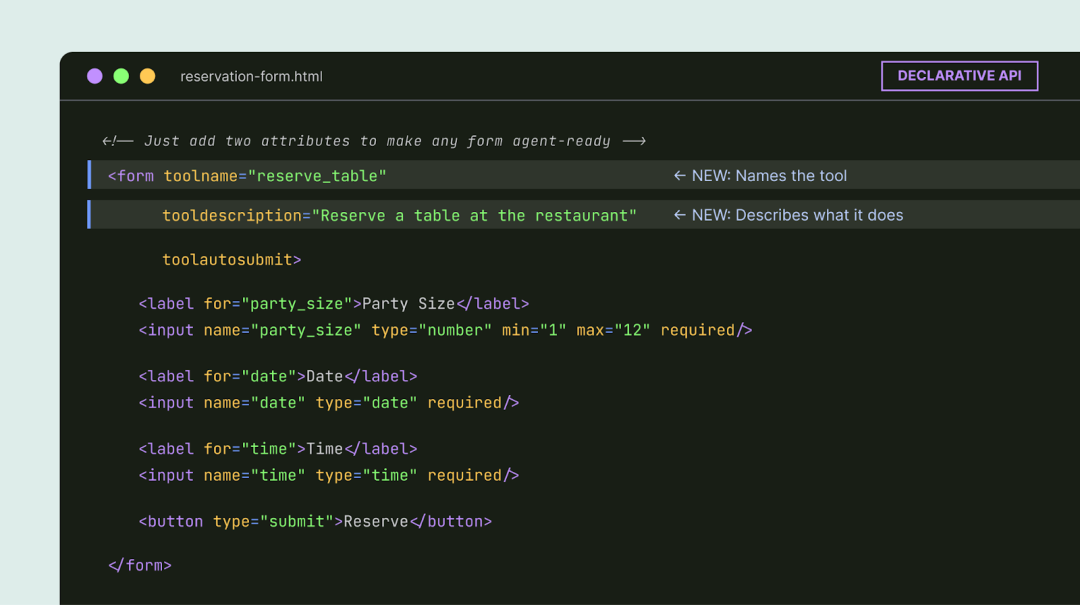
这是低投入选项。如果你的网站已经有标准 HTML 表单,你可以通过添加几个属性让它们与 Agent 兼容。
餐厅预订表单会获得 toolname 和 tooldescription 属性。浏览器会自动将其字段转换为 AI Agent 可以解释的结构化 schema。
<form toolname="reserveRestaurant"
      tooldescription="预订餐厅座位。需要日期、时间、人数和联系人信息。">
  <label>
    日期: <input type="date" name="date" required />
  </label>
  <label>
    时间: <input type="time" name="time" required />
  </label>
  <label>
    人数: <input type="number" name="partySize" required min="1" />
  </label>
  <label>
    姓名: <input type="text" name="name" required />
  </label>
  <button type="submit">预订</button>
</form>
Imperative API(基于 JavaScript)
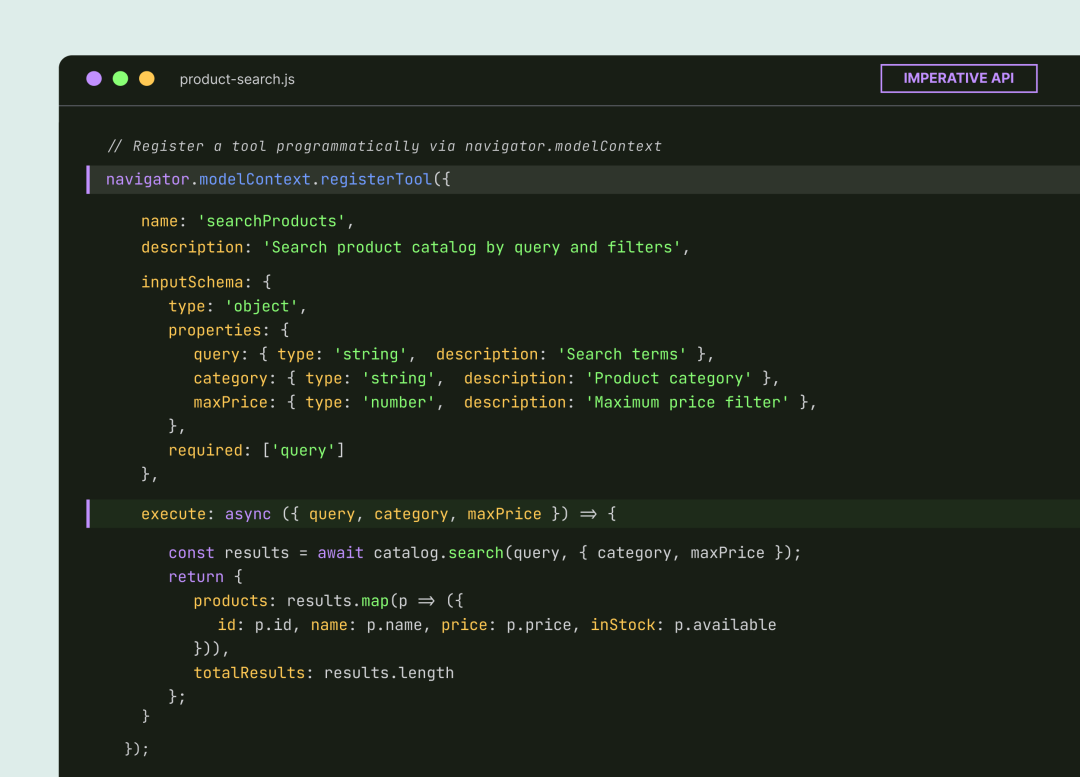
这是用于更复杂、动态交互的 API。
开发者通过一个新的浏览器接口 navigator.modelContext 以编程方式注册工具。你为工具提供名称、描述、输入 schema 和执行函数。
// 注册一个动态工具
navigator.modelContext.addTool({
  name: 'addToCart',
  description: '将商品添加到购物车',
  inputSchema: {
    type: 'object',
    properties: {
      productId: {
        type: 'string',
        description: '商品 ID'
      },
      quantity: {
        type: 'number',
        description: '添加数量',
        default: 1
      }
    },
    required: ['productId']
  },
  execute: async (input) => {
    // 执行添加到购物车的逻辑
    const result = await cartAPI.addItem(input.productId, input.quantity);
    return {
      success: true,
      cartTotal: result.total,
      itemCount: result.count
    };
  }
});

// 可以根据页面状态动态注销工具
// 当购物车为空时,移除结账工具
if (cart.isEmpty()) {
  navigator.modelContext.removeTool('checkout');
}特别强大的地方:工具可以根据页面状态注册和注销。只有当购物车中有商品时,结账工具才会出现。只有在选择日期后,预订工具才会显示。Agent 只能看到与当前上下文相关的内容。
如何测试 WebMCP
WebMCP 在 Chrome 146 中通过功能标志已经可用。以下是亲身体验的方法:
步骤 1: 确保你运行的是 Chrome 版本 146.0.7672.0 或更高版本。
步骤 2: 导航到 chrome://flags/#enable-webmcp-testing 并将标志设置为「Enabled」。
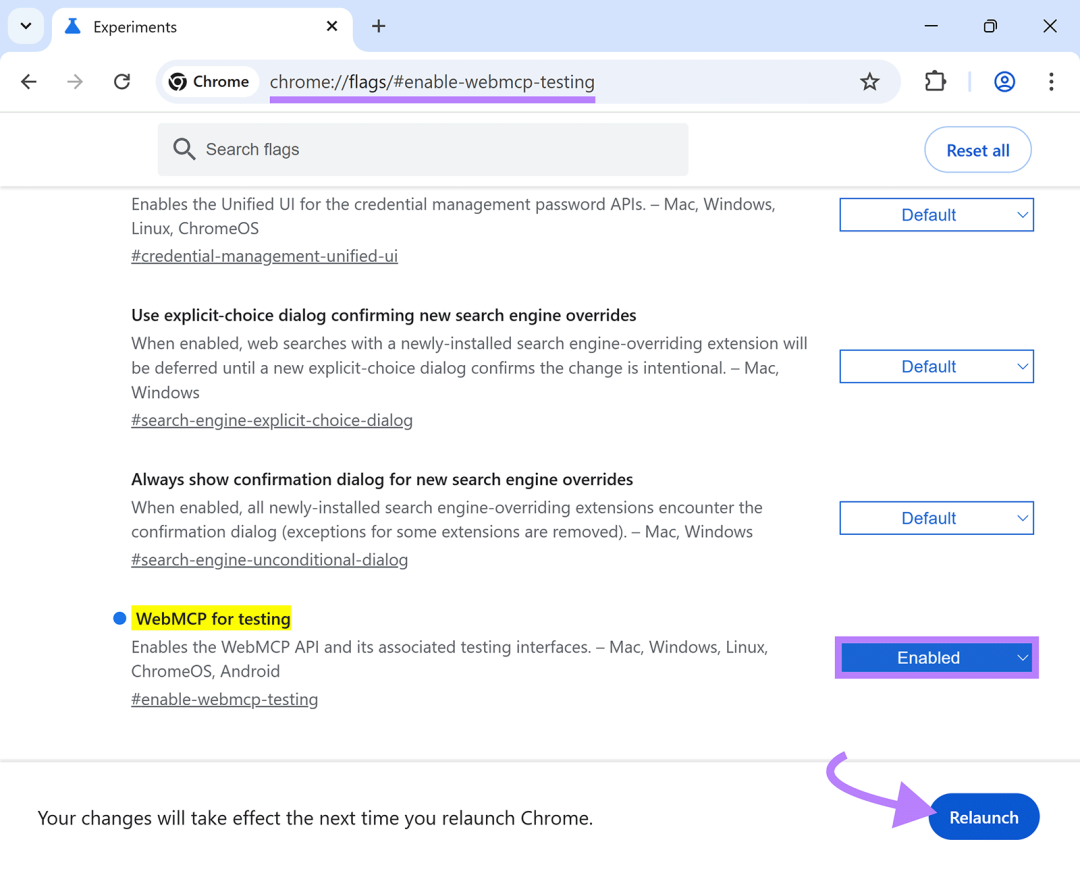
步骤 3: 重新启动 Chrome。
步骤 4: 从 Chrome 网上应用店安装 Model Context Tool Inspector 扩展程序。它允许你检查任何页面上注册的工具并使用自定义参数测试它们。
真实案例
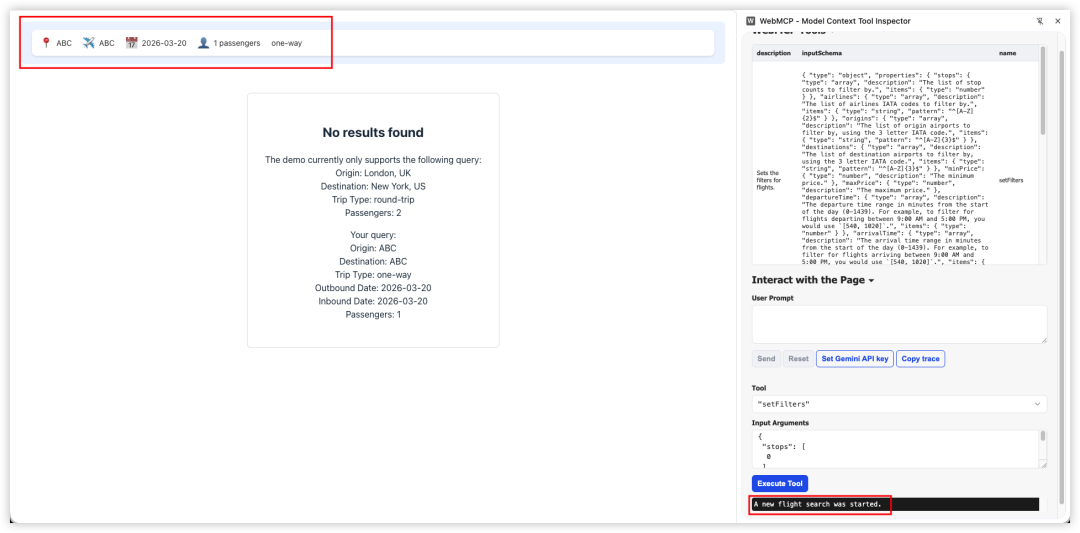
官方测试地址
Google 还发布了一个在线旅行演示,你可以在其中看到完整的流程——从发现工具到使用自然语言调用它们。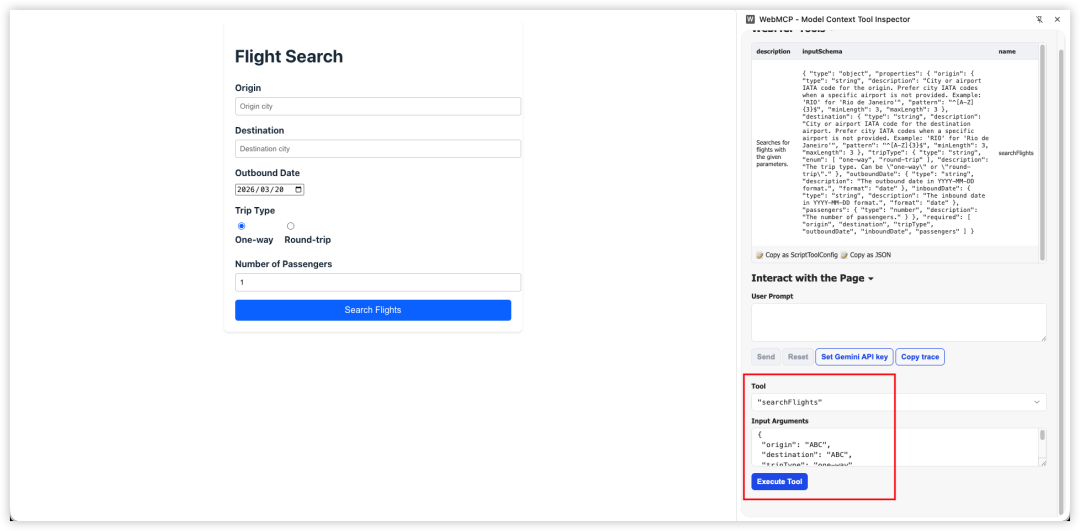
一个简单的 Todo 页面,使用 WebMCP 完成 Todo 增删改查
<!DOCTYPE html>
<html lang="zh-CN">
<head>
  <meta charset="UTF-8">
  <meta name="viewport" content="width=device-width, initial-scale=1.0">
  <title>WebMCP Todo Demo</title>
  <style>
    body {
      font-family: system-ui, -apple-system, sans-serif;
      max-width: 600px;
      margin: 50px auto;
      padding: 20px;
    }
    .todo-item {
      display: flex;
      align-items: center;
      gap: 10px;
      padding: 10px;
      border-bottom: 1px solid #eee;
    }
    .todo-item.completed span {
      text-decoration: line-through;
      color: #888;
    }
    form {
      display: flex;
      gap: 10px;
      margin-bottom: 20px;
    }
    input[type="text"] {
      flex: 1;
      padding: 10px;
      border: 1px solid #ddd;
      border-radius: 4px;
    }
    button {
      padding: 10px 20px;
      background: #007AFF;
      color: white;
      border: none;
      border-radius: 4px;
      cursor: pointer;
    }
    button:hover {
      background: #0051D5;
    }
    .delete-btn {
      background: #FF3B30;
      padding: 5px 10px;
      font-size: 12px;
    }
    .delete-btn:hover {
      background: #C8261C;
    }
    .status {
      padding: 10px;
      background: #f0f0f0;
      border-radius: 4px;
      margin-top: 20px;
    }
  </style>
</head>
<body>
  <h1>📝 Todo 列表 - WebMCP 测试</h1>

  <!-- 手动添加 Todo 的表单 -->
  <form id="addTodoForm">
    <input
      type="text"
      name="text"
      placeholder="输入新任务..."
      required
      autocomplete="off">
    <button type="submit">添加</button>
  </form>

  <div id="todoList"></div>

  <div class="status" id="status">
    当前共有 <strong id="count">0</strong> 个待办事项
  </div>

  <script>
    // Todo 数据存储
    let todos = [
      { id: 1, text: '学习 WebMCP 基础知识', completed: true },
      { id: 2, text: '实现 Declarative API 表单', completed: true },
      { id: 3, text: '实现 Imperative API 工具', completed: false },
    ];

    // 渲染 Todo 列表
    function renderTodos() {
      const list = document.getElementById('todoList');
      const count = document.getElementById('count');
      list.innerHTML = '';
      count.textContent = todos.filter(t => !t.completed).length;

      todos.forEach(todo => {
        const item = document.createElement('div');
        item.className = `todo-item${todo.completed ? ' completed' : ''}`;
        item.innerHTML = `
          <input type="checkbox" ${todo.completed ? 'checked' : ''} onchange="toggleTodo(${todo.id})">
          <span>${escapeHtml(todo.text)}</span>
          <button class="delete-btn" onclick="deleteTodo(${todo.id})">删除</button>
        `;
        list.appendChild(item);
      });
    }

    // 添加 Todo(手动表单提交)
    document.getElementById('addTodoForm').addEventListener('submit', (e) => {
      e.preventDefault();
      const formData = new FormData(e.target);
      const text = formData.get('text');
      if (text.trim()) {
        todos.push({
          id: Date.now(),
          text: text.trim(),
          completed: false
        });
        e.target.reset();
        renderTodos();
      }
    });

    // 切换完成状态
    function toggleTodo(id) {
      todos = todos.map(t =>
        t.id === id ? { ...t, completed: !t.completed } : t
      );
      renderTodos();
    }

    // 删除 Todo
    function deleteTodo(id) {
      todos = todos.filter(t => t.id !== id);
      renderTodos();
    }

    // HTML 转义
    function escapeHtml(text) {
      const div = document.createElement('div');
      div.textContent = text;
      return div.innerHTML;
    }

    // ===== WebMCP Imperative API =====
    // 初始化 WebMCP 工具
    async function initWebMCP() {
      // 检查 API 是否可用
      if (typeof navigator.modelContext === 'undefined') {
        console.error('WebMCP 不可用,请确保:1. 使用 Chrome 146+  2. 在 chrome://flags/#enable-webmcp-testing 启用  3. 重启浏览器');
        return;
      }

      try {
        // 1. 注册"添加 Todo"工具
        await navigator.modelContext.registerTool({
          name: 'addTodo',
          description: '添加一个新的待办事项到列表中。提供待办事项的文本内容,系统会自动创建并返回新创建的待办事项信息。',
          inputSchema: {
            type: 'object',
            title: '添加待办事项参数',
            description: '添加待办事项所需的参数',
            properties: {
              text: {
                type: 'string',
                title: '待办事项内容',
                description: '要添加的待办事项的文本描述,例如:购买牛奶、完成项目报告等',
                minLength: 1,
                maxLength: 200
              }
            },
            required: ['text']
          },
          execute: async (params) => {
            const text = params?.text;
            if (text && text.trim()) {
              const newTodo = {
                id: Date.now(),
                text: text.trim(),
                completed: false
              };
              todos.push(newTodo);
              renderTodos();
              return {
                content: [{
                  type: 'text',
                  text: JSON.stringify({ success: true, message: `已添加 "${text.trim()}"`, todo: newTodo }, null, 2)
                }]
              };
            }
            return {
              content: [{
                type: 'text',
                text: JSON.stringify({ success: false, message: '文本内容不能为空' }, null, 2)
              }]
            };
          }
        });

        // 2. 注册"列出所有 Todo"工具
        await navigator.modelContext.registerTool({
          name: 'listTodos',
          description: '获取所有待办事项列表,包括文本内容、完成状态和 ID。可以选择过滤条件来只查看未完成或已完成的待办事项。',
          inputSchema: {
            type: 'object',
            title: '列表过滤参数',
            description: '可选的过滤条件参数',
            properties: {
              filter: {
                type: 'string',
                title: '过滤类型',
                description: '选择要显示的待办事项类型',
                enum: ['all', 'active', 'completed'],
                default: 'all'
              }
            }
          },
          execute: async (params) => {
            const filter = params?.filter || 'all';
            let filtered = todos;
            if (filter === 'active') {
              filtered = todos.filter(t => !t.completed);
            } else if (filter === 'completed') {
              filtered = todos.filter(t => t.completed);
            }
            const result = {
              todos: filtered,
              total: todos.length,
              active: todos.filter(t => !t.completed).length,
              completed: todos.filter(t => t.completed).length
            };
            return {
              content: [{
                type: 'text',
                text: JSON.stringify(result, null, 2)
              }]
            };
          }
        });

        // 3. 注册"删除 Todo"工具
        await navigator.modelContext.registerTool({
          name: 'deleteTodo',
          description: '删除指定的待办事项。提供待办事项的 ID 即可永久删除该事项。',
          inputSchema: {
            type: 'object',
            title: '删除待办事项参数',
            description: '删除待办事项所需的参数',
            properties: {
              todoId: {
                type: 'number',
                title: '待办事项 ID',
                description: '要删除的待办事项的唯一标识符(ID)。可以通过 listTodos 工具查看所有待办事项的 ID。'
              }
            },
            required: ['todoId']
          },
          execute: async (params) => {
            const todoId = params?.todoId;
            const todo = todos.find(t => t.id === todoId);
            if (todo) {
              todos = todos.filter(t => t.id !== todoId);
              renderTodos();
              return {
                content: [{
                  type: 'text',
                  text: JSON.stringify({ success: true, message: `已删除 "${todo.text}"`, deletedId: todoId }, null, 2)
                }]
              };
            }
            return {
              content: [{
                type: 'text',
                text: JSON.stringify({ success: false, message: '未找到指定的待办事项' }, null, 2)
              }]
            };
          }
        });

        // 4. 注册"切换完成状态"工具
        await navigator.modelContext.registerTool({
          name: 'toggleTodo',
          description: '切换指定待办事项的完成状态。如果待办事项是未完成状态,则标记为已完成;如果已完成,则标记为未完成。',
          inputSchema: {
            type: 'object',
            title: '切换状态参数',
            description: '切换待办事项完成状态所需的参数',
            properties: {
              todoId: {
                type: 'number',
                title: '待办事项 ID',
                description: '要切换状态的待办事项的唯一标识符(ID)。可以通过 listTodos 工具查看所有待办事项的 ID。'
              }
            },
            required: ['todoId']
          },
          execute: async (params) => {
            const todoId = params?.todoId;
            const todo = todos.find(t => t.id === todoId);
            if (todo) {
              todo.completed = !todo.completed;
              renderTodos();
              return {
                content: [{
                  type: 'text',
                  text: JSON.stringify({ success: true, message: `"${todo.text}" 已${todo.completed ? '完成' : '未完成'}`, todoId, completed: todo.completed }, null, 2)
                }]
              };
            }
            return {
              content: [{
                type: 'text',
                text: JSON.stringify({ success: false, message: '未找到指定的待办事项' }, null, 2)
              }]
            };
          }
        });

        // 5. 注册"清空已完成"工具
        await navigator.modelContext.registerTool({
          name: 'clearCompleted',
          description: '删除所有已完成的待办事项',
          inputSchema: {
            type: 'object',
            properties: {}
          },
          execute: async () => {
            const deleted = todos.filter(t => t.completed).length;
            todos = todos.filter(t => !t.completed);
            renderTodos();
            return {
              content: [{
                type: 'text',
                text: JSON.stringify({ success: true, message: `已删除 ${deleted} 个已完成的待办事项`, deleted }, null, 2)
              }]
            };
          }
        });

      } catch (error) {
        console.error('❌ 注册 WebMCP 工具时出错:', error);
      }
    }

    // 页面加载时初始化
    document.addEventListener('DOMContentLoaded', () => {
      renderTodos();
      // 延迟初始化 WebMCP
      setTimeout(() => {
        initWebMCP();
      }, 100);
    });
  </script>
</body>
</html>
测试内容:请帮我添加一个待办事项“计划下周的团队会议”,然后列出所有我未完成的任务。最后,清除所有已完成的待办事项。
User prompt: "请帮我添加一个待办事项“计划下周的团队会议”,然后列出所有我未完成的任务。最后,清除所有已完成的待办事项。"
AI calling tool "addTodo" with {"text":"计划下周的团队会议"}
Tool "addTodo" result: {"content":[{"type":"text","text":"{\n \"success\": true,\n \"message\": \"已添加 \\\"计划下周的团队会议\\\"\",\n \"todo\": {\n \"id\": 1773996522894,\n \"text\": \"计划下周的团队会议\",\n \"completed\": false\n }\n}"}]}
AI calling tool "listTodos" with {"filter":"active"}
Tool "listTodos" result: {"content":[{"type":"text","text":"{\n \"todos\": [\n {\n \"id\": 3,\n \"text\": \"实现 Imperative API 工具\",\n \"completed\": false\n },\n {\n \"id\": 1773996522894,\n \"text\": \"计划下周的团队会议\",\n \"completed\": false\n }\n ],\n \"total\": 4,\n \"active\": 2,\n \"completed\": 2\n}"}]}
AI calling tool "clearCompleted" with {}
Tool "clearCompleted" result: {"content":[{"type":"text","text":"{\n \"success\": true,\n \"message\": \"已删除 2 个已完成的待办事项\",\n \"deleted\": 2\n}"}]}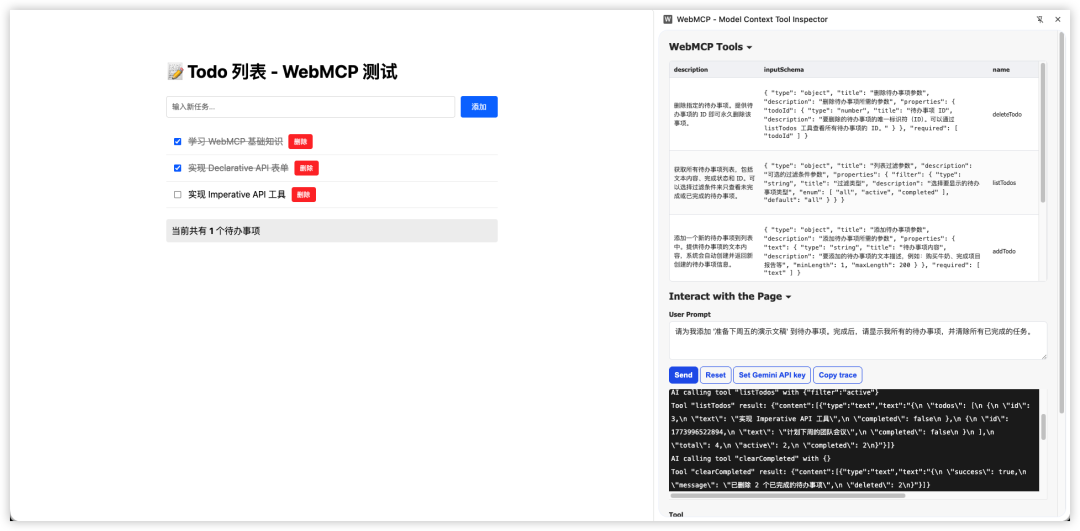
小结
Web 正在为两种类型的用户重建:人类和 AI Agent。
WebMCP 是一个严肃的尝试,为这些 Agent 提供了一种与网站交互的原生、结构化方式——没有屏幕抓取的脆弱性,也没有维护单独 API 的开销。
关键要点
-
1. 早期行动者优势:那些早期让自己对 Agent 来说可读的网站将获得复合优势
-
2. 基础仍然重要:干净的 HTML、语义化标记、结构化表单是 WebMCP 就绪的基础
-
3. 两种 API 互补:Declarative API 适合简单表单,Imperative API 适合复杂交互
-
4. 状态感知能力:工具可以根据页面状态动态注册/注销,这是 WebMCP 的强大之处
现在可以做什么
-
• 审计现有表单的结构和语义化程度
-
• 确保网站有干净、可预测的 HTML 结构
-
• 在测试环境中尝试 WebMCP API
-
• 与开发团队讨论 WebMCP 的潜在影响
参考资料:WebMCP What It Is, Why It Matters, and What to Do Now

小龙虾开发者社区是 CSDN 旗下专注 OpenClaw 生态的官方阵地,聚焦技能开发、插件实践与部署教程,为开发者提供可直接落地的方案、工具与交流平台,助力高效构建与落地 AI 应用
更多推荐

 8
8 0
0- 0


 已为社区贡献5条内容

所有评论(0)