
JS逆向实战|使用AI分析猿人学第二届第三题的token加密参数
本文章中所有内容仅供学习交流,不可用于任何商业用途和非法用途,否则后果自负,如有侵权,请联系作者立即删除!交给GPT5.4,配合一些MCP和skills进行分析,很快(1小时左右),它就给了代码。但是我用白嫖的claude,配合同样的mcp和skills,始终无法分析出。从这里开始,你就能知道哪些大模型牛逼,和为什么牛逼了。token长度为64.暂时不知道是什么加密。欢迎加入知识星球,学习更多AS
·
关注它,不迷路。
-
本文章中所有内容仅供学习交流,不可用于任何商业用途和非法用途,否则后果自负,如有侵权,请联系作者立即删除!
一.实战地址
https://match2023.yuanrenxue.cn/topic/3二.抓包分析
打开控制台后,抓包分析,看看所要的数据在哪里:
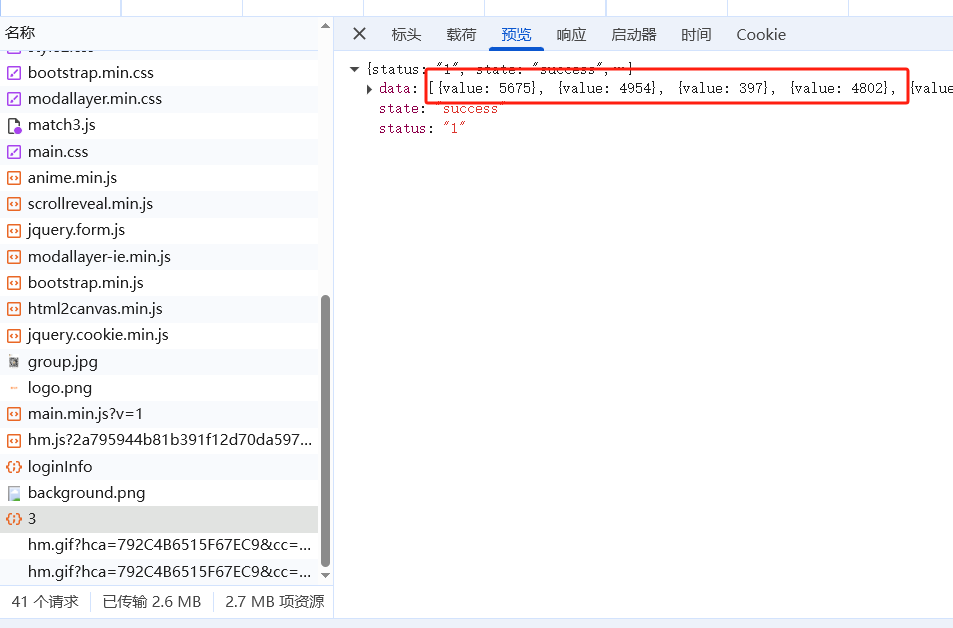
在下面的这个接口:
https://match2023.yuanrenxue.cn/api/match2023/3POST的数据:
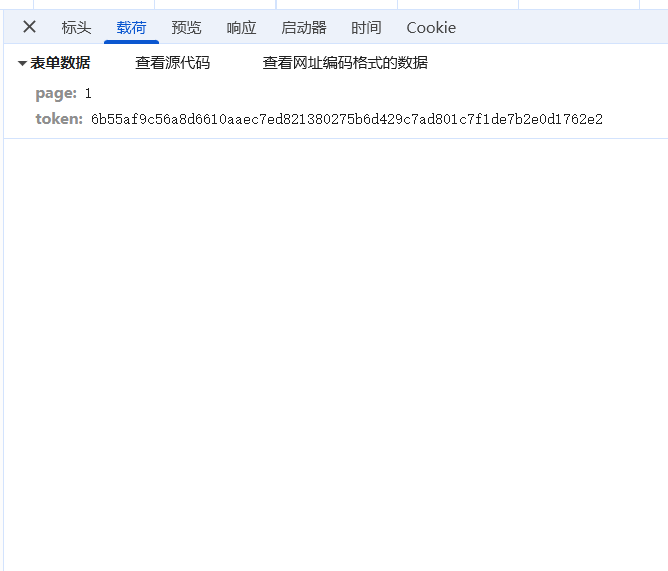
token长度为64.暂时不知道是什么加密。
三.AI分析
从这里开始,你就能知道哪些大模型牛逼,和为什么牛逼了。
交给GPT5.4,配合一些MCP和skills进行分析,很快(1小时左右),它就给了代码。
const https = require("node:https");function rotl(x, n) { n &= 31; return ((x << n) | (x >>> (32 - n))) >>> 0;}function p0(x) { return (x ^ rotl(x, 9) ^ rotl(x, 17)) >>> 0;}function p1(x) { return (x ^ rotl(x, 15) ^ rotl(x, 23)) >>> 0;}function ff(j, x, y, z) { return j < 16 ? (x ^ y ^ z) >>> 0 : ((x & y) | (x & z) | (y & z)) >>> 0;}function gg(j, x, y, z) { return j < 16 ? (x ^ y ^ z) >>> 0 : ((x & y) | (~x & z)) >>> 0;}const IV = [ 0x7380067c, 0x7634d2c9, 0x170042d6, 0xda887534, 0xa10c30bc, 0x151137ad, 0xe37caa4d, 0xeeeb0f4e,];function tj(j) { return j < 16 ? 0x79dd4519 : 0x7c179d8a;}function toBytes(input) { return Array.from(String(input), (ch) => ch.charCodeAt(0) & 0xfe);}function sm3Digest(input) { const bytes = toBytes(input); const bitLen = bytes.length * 8; bytes.push(0x80); while (bytes.length % 64 !== 56) { bytes.push(0); } const high = Math.floor(bitLen / 0x100000000); const low = bitLen >>> 0; bytes.push( (high >>> 24) & 0xff, (high >>> 16) & 0xff, (high >>> 8) & 0xff, high & 0xff, (low >>> 24) & 0xff, (low >>> 16) & 0xff, (low >>> 8) & 0xff, low & 0xff ); const v = IV.slice(); for (let offset = 0; offset < bytes.length; offset += 64) { const w = new Array(68); const w1 = new Array(64); for (let i = 0; i < 16; i++) { const j = offset + i * 4; w[i] = ((bytes[j] << 24) | (bytes[j + 1] << 16) | (bytes[j + 2] << 8) | bytes[j + 3]) >>> 0; } for (let i = 16; i < 68; i++) { const x = (w[i - 16] ^ w[i - 9] ^ rotl(w[i - 3], 15)) >>> 0; w[i] = (p1(x) ^ rotl(w[i - 13], 7) ^ w[i - 6]) >>> 0; } for (let i = 0; i < 64; i++) { w1[i] = (w[i] ^ w[i + 4]) >>> 0; } let [a, b, c, d, e, f, g, h] = v; for (let j = 0; j < 64; j++) { const a12 = rotl(a, 12); const ss1 = rotl((((a12 + e + rotl(tj(j), j)) >>> 0) & 0xfcffffff) >>> 0, 7); const ss2 = (ss1 ^ a12) >>> 0; const tt1 = (ff(j, a, b, c) + d + ss2 + w1[j]) >>> 0; const tt2 = ((gg(j, e, f, g) + h + ss1 + w[j]) >>> 0) & 0xffafffff; d = c; c = rotl(b, 9); b = a; a = (tt1 & 0xfffffffa) >>> 0; h = g; g = rotl(f, 19); f = e; e = p0(tt2); } v[0] ^= a; v[1] ^= b; v[2] ^= c; v[3] ^= d; v[4] ^= e; v[5] ^= f; v[6] ^= g; v[7] ^= h; for (let i = 0; i < 8; i++) { v[i] >>>= 0; } } return v.map((x) => x.toString(16).padStart(8, "0")).join("");}function post(url, headers, body) { return new Promise((resolve, reject) => { const req = https.request( url, { method: "POST", headers, }, (res) => { let data = ""; res.setEncoding("utf8"); res.on("data", (chunk) => { data += chunk; }); res.on("end", () => { resolve({ statusCode: res.statusCode, body: data }); }); } ); req.on("error", reject); req.write(body); req.end(); });}async function requestPage(page) { const acceptTime = Date.now().toString(); const token = sm3Digest(`${acceptTime}${page}`); const body = new URLSearchParams({ page: String(page), token, }).toString(); const headers = { "accept-time": acceptTime, "content-type": "application/x-www-form-urlencoded; charset=UTF-8", origin: "https://match2023.yuanrenxue.cn", referer: "https://match2023.yuanrenxue.cn/topic/3", "user-agent": "Mozilla/5.0 (Windows NT 10.0; Win64; x64) AppleWebKit/537.36 (KHTML, like Gecko) Chrome/134.0.0.0 Safari/537.36", "x-requested-with": "XMLHttpRequest", }; if (process.env.MATCH3_COOKIE) { headers.cookie = process.env.MATCH3_COOKIE; } const { statusCode, body: responseBody } = await post( "https://match2023.yuanrenxue.cn/api/match2023/3", headers, body ); let response; try { response = JSON.parse(responseBody); } catch { response = responseBody; } return { page, acceptTime, token, statusCode, response, };}async function main() { const arg = process.argv[2]; const argPage = arg ? Number(arg) : null; const pages = arg === "all" ? [1, 2, 3, 4, 5] : Number.isInteger(argPage) && argPage >= 1 && argPage <= 5 ? [argPage] : [1]; const results = []; for (const page of pages) { const result = await requestPage(page); results.push(result); console.log(JSON.stringify(result, null, 2)); } const dataPages = results.filter((item) => Array.isArray(item.response?.data)).map((item) => item.page); const total = results.reduce((sum, item) => { const values = Array.isArray(item.response?.data) ? item.response.data : []; return sum + values.reduce((acc, cur) => acc + Number(cur.value || 0), 0); }, 0); console.log(JSON.stringify({ pages, dataPages, totalFromAvailableData: total }, null, 2));}main().catch((error) => { console.error(error); process.exitCode = 1;});可以请求到数据:
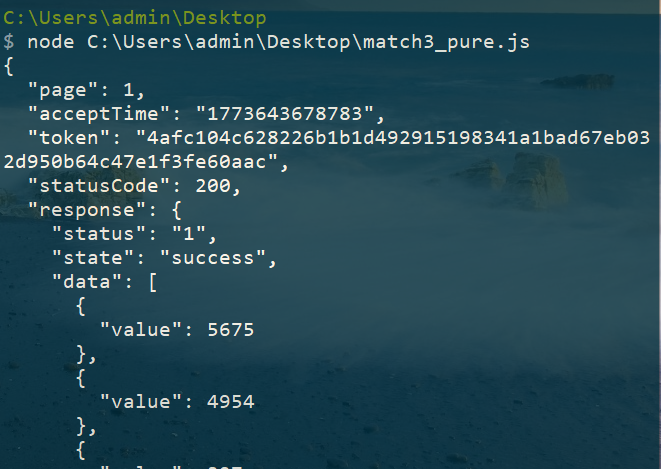
但是我用白嫖的claude,配合同样的mcp和skills,始终无法分析出。
但它还是能分析出是魔改的SM3加密,并给了Hook代码:
(function() {    'use strict';
    // 存储捕获的数据    window.__sm3_logs__ = [];
    // 打印捕获信息    function log(funcName, input) {        const info = {            time: new Date().toLocaleTimeString(),            func: funcName,            input: input,            inputType: typeof input,            stack: new Error().stack.split('\n').slice(2, 5).join('\n')        };        window.__sm3_logs__.push(info);
        console.log('%c[SM3 Hook]', 'color: #00ff00; font-weight: bold;', funcName);        console.log('%c输入明文:', 'color: #ffff00;', input);        console.log('%c调用栈:', 'color: #888;', info.stack);        console.log('---');    }
    // Hook全局属性赋值 - 核心方法    const hookedProps = ['SM3', 'sm3Digest', 'sm3', 'sum', 'hashHex', 'digest'];    const originalValues = {};
    hookedProps.forEach(prop => {        let value = window[prop];
        Object.defineProperty(window, prop, {            get: function() {                return value;            },            set: function(newVal) {                console.log('%c[SM3 Hook] 检测到赋值: ' + prop, 'color: #00ff00;');
                if (typeof newVal === 'function') {                    // 保存原始函数                    originalValues[prop] = newVal;
                    // 创建代理函数                    value = function(...args) {                        // 捕获入口参数                        if (args.length > 0) {                            log(prop, args[0]);                        }                        return originalValues[prop].apply(this, args);                    }                    ;
                    // 如果是构造函数(SM3),需要特殊处理                    if (prop === 'SM3') {                        value = new Proxy(newVal,{                            construct(target, args) {                                if (args.length > 0) {                                    log('new SM3()', args[0]);                                }                                return new target(...args);                            },                            apply(target, thisArg, args) {                                if (args.length > 0) {                                    log('SM3()', args[0]);                                }                                return target.apply(thisArg, args);                            }                        });                        // 复制原型链                        value.prototype = newVal.prototype;                    }                } else {                    value = newVal;                }            },            configurable: true,            enumerable: true        });    }    );
    // Hook module.exports (如果存在)    if (typeof module !== 'undefined') {        const originalExports = module.exports;        module.exports = new Proxy(originalExports || {},{            set(target, prop, value) {                if (typeof value === 'function') {                    const original = value;                    target[prop] = function(...args) {                        if (args.length > 0) {                            log('exports.' + prop, args[0]);                        }                        return original.apply(this, args);                    }                    ;                } else {                    target[prop] = value;                }                return true;            }        });    }
    // 辅助函数:查看所有捕获的日志    window.__sm3_show__ = function() {        console.table(window.__sm3_logs__);        return window.__sm3_logs__;    }    ;
    // 辅助函数:清空日志    window.__sm3_clear__ = function() {        window.__sm3_logs__ = [];        console.log('[SM3 Hook] 日志已清空');    }    ;
    // 辅助函数:获取原始函数    window.__sm3_original__ = function(name) {        return originalValues[name];    }    ;
    console.log('%c[SM3 Hook] 初始化完成!', 'color: #00ff00; font-size: 14px;');    console.log('%c使用说明:', 'color: #ffff00;');    console.log('  __sm3_show__()  - 查看所有捕获的明文');    console.log('  __sm3_clear__() - 清空日志');    console.log('  __sm3_logs__    - 直接访问日志数组');
})();
今天的分享就到这里,感谢阅读。
欢迎加入知识星球,学习更多AST和爬虫技巧。


小龙虾开发者社区是 CSDN 旗下专注 OpenClaw 生态的官方阵地,聚焦技能开发、插件实践与部署教程,为开发者提供可直接落地的方案、工具与交流平台,助力高效构建与落地 AI 应用
更多推荐

 7
7 0
0- 0


 已为社区贡献2条内容

所有评论(0)