
LLM之Agent(四十三)|Agent Skills介绍
Python 代码流程讲解技能——完整概述。
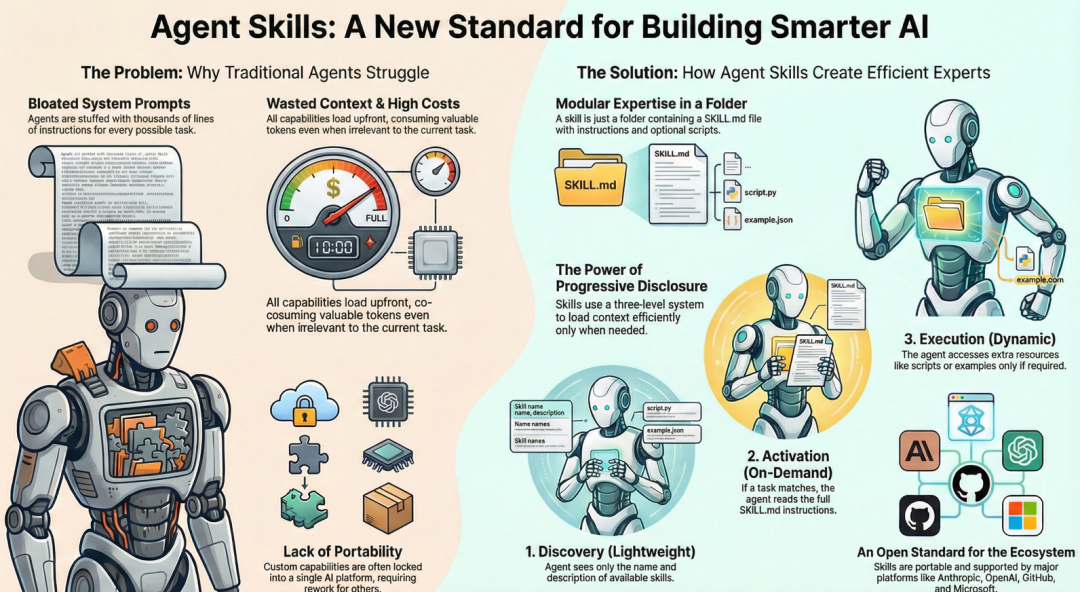
一、介绍Agent Skills
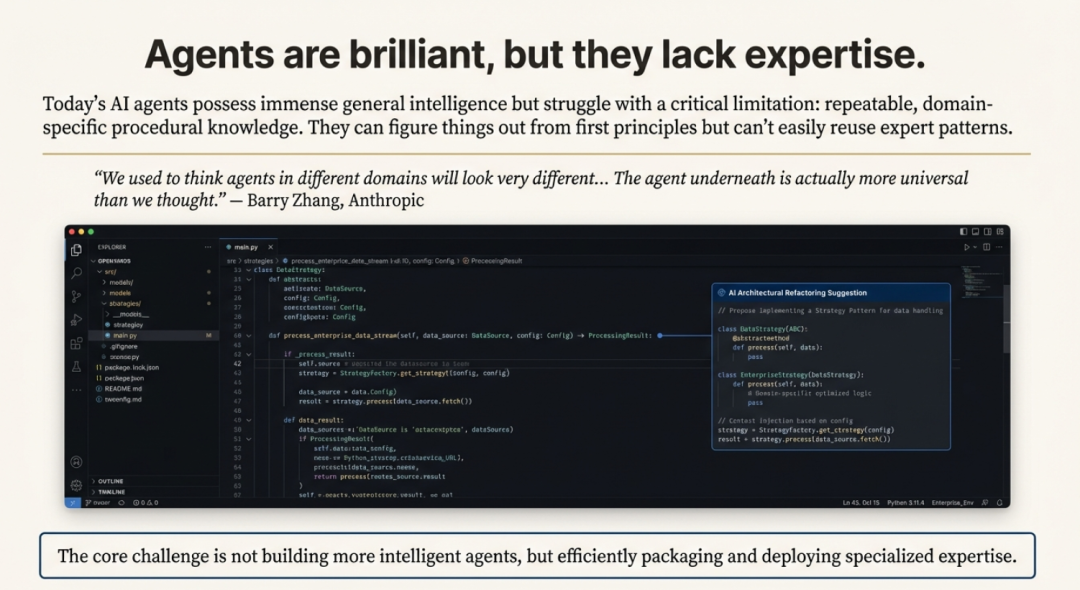
Agent Skills已成为一种新的开放标准,用于扩展具有专业知识和可重复工作流程的 AI Agent的两种能力。这代表了AI架构的战略转变,推动行业从单一、平台专属系统转向更模块化和互作的未来。通过创建标准化格式来打包指令、脚本和资源,Agent Skills允许任何兼容的agent按需动态访问新专业知识。这一举措拉开了一场典型的平台战略之战:一边是 Anthropic 开放、可互操作的生态系统,另一边则是 OpenAI 等竞争对手历来偏爱的“围墙花园”模式。
Agent Skills 标准的核心,旨在解决一个被称为“上下文问题”的基本商业挑战。
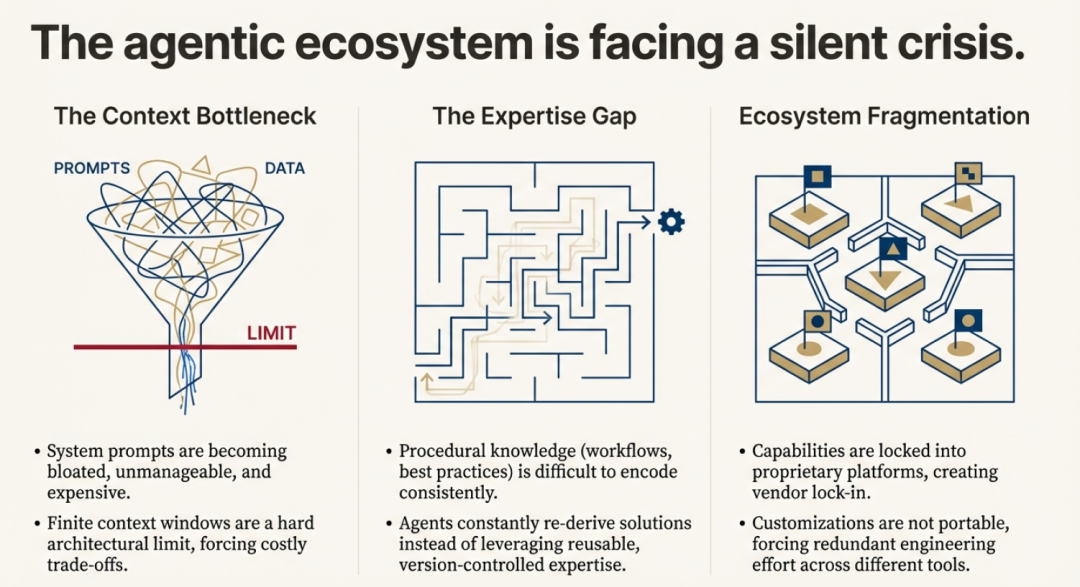
尽管 AI agent变得越来越聪明,它们往往缺乏执行现实任务所需的特定程序性知识。这迫使用户和开发者采用低效的变通方法,比如撰写冗长而详细的提示词,或创建“臃肿”的系统提示词,试图一次性把所有知识教给智能体,从而消耗宝贵的上下文窗口令牌与资源。
Agent Skills 通过一种结构化、按需注入知识的方式来解决这一问题。这相当于给智能体一张“借书证”,而非强迫它背下整座图书馆;智能体可以在需要的当下,精准地“借出”所需的专业技能。
二、理解Agent Skills
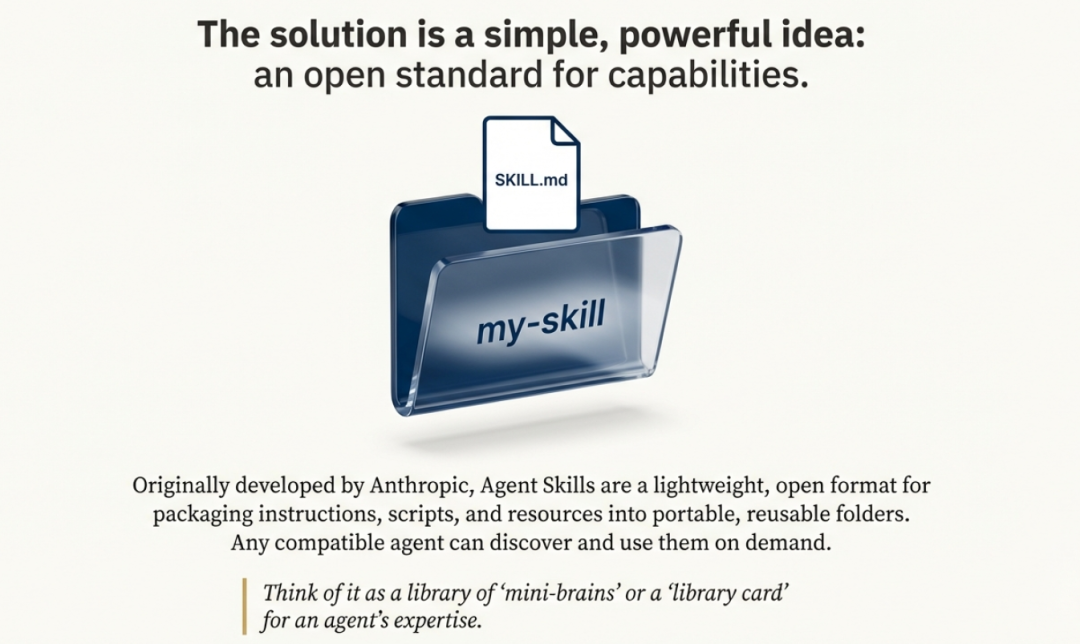
Agent Skills 是以模块化文件夹的形式存在,内含指令、脚本与资源,智能体可按需发现并调用。与一次性承载全部指令的庞大系统提示不同,技能采用“渐进式披露”,仅加载与当前任务相关的内容。
三、Skills:开发标准
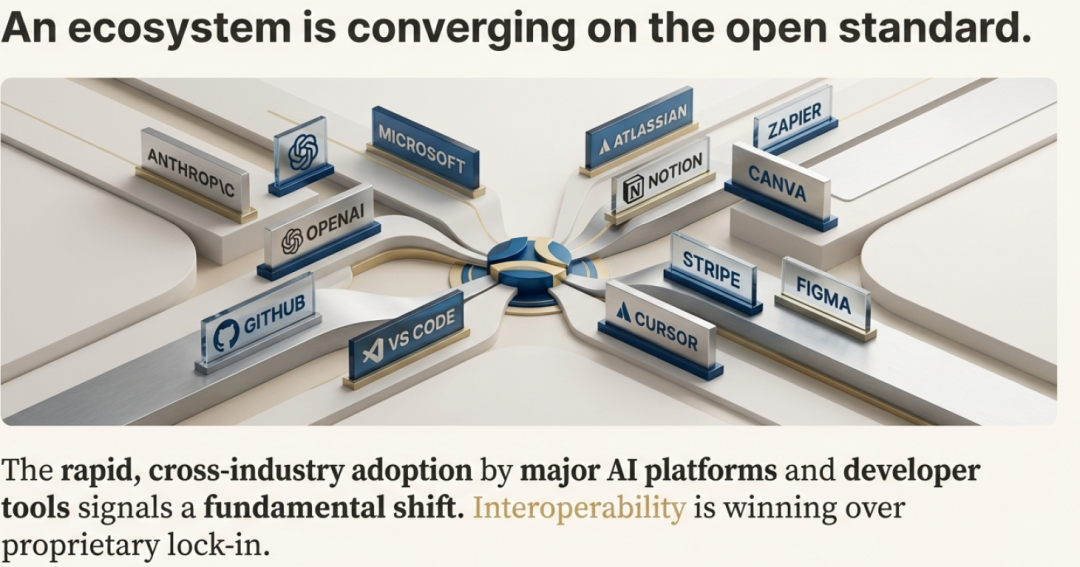
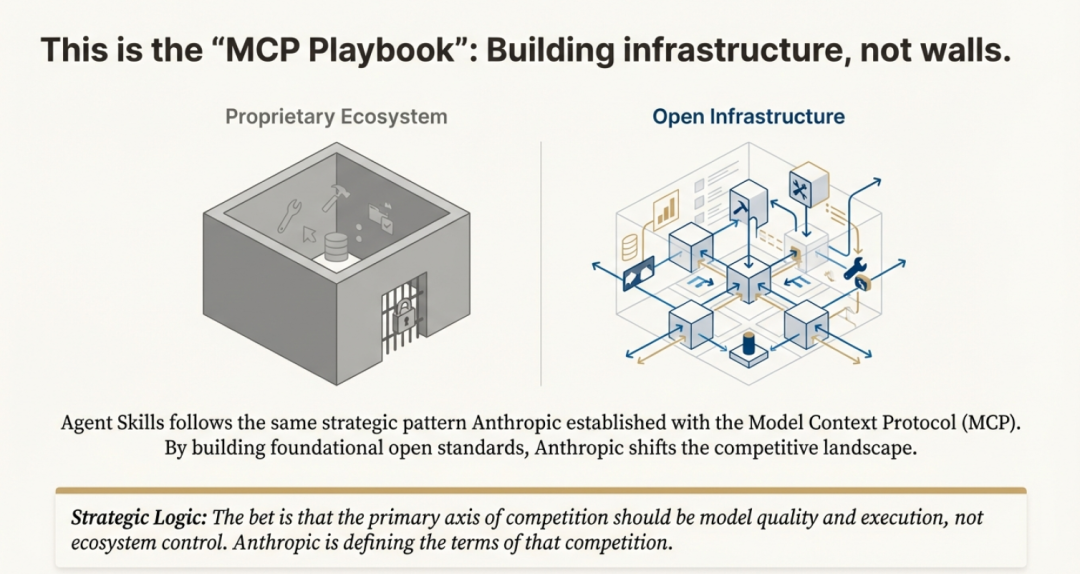
Anthropic 刻意将 Agent Skills 作为开放标准发布,使任何平台都能采用这份规范。这一举措几乎立刻得到验证:微软、OpenAI、Atlassian、Figma、Cursor 与 GitHub 竟罕见地迅速达成共识,纷纷采纳该标准。这延续了 Anthropic 在 Model Context Protocol(MCP)上的战略“剧本”——先打造一块 AI 基础设施的基石,再让它无处不在。
Anthropic 的算盘很明确:通过搭建底层基础设施,他们把竞争焦点从“专有锁定”转向“模型性能”。与其把用户圈进高墙花园,不如开辟一块所有平台都能通行的“公共用地”;真正的优势,在于拥有在这片新地基上跑得最快的模型。正如一篇分析所言:“如果Skills成为通用标准,Claude 不必是唯一使用它们的 AI——它只需成为最擅长使用它们的那一个。”
在 AI 平台混战中,这种开放路线与某些对手奉行的“专有生态”形成鲜明对比,成为 Anthropic 的重要差异化武器。它确保为某一兼容智能体开发的技能,可在另一智能体上即插即用,既避免厂商锁定,也为开发者铺就更广阔的流通渠道。
四、从专业Agent到通用平台
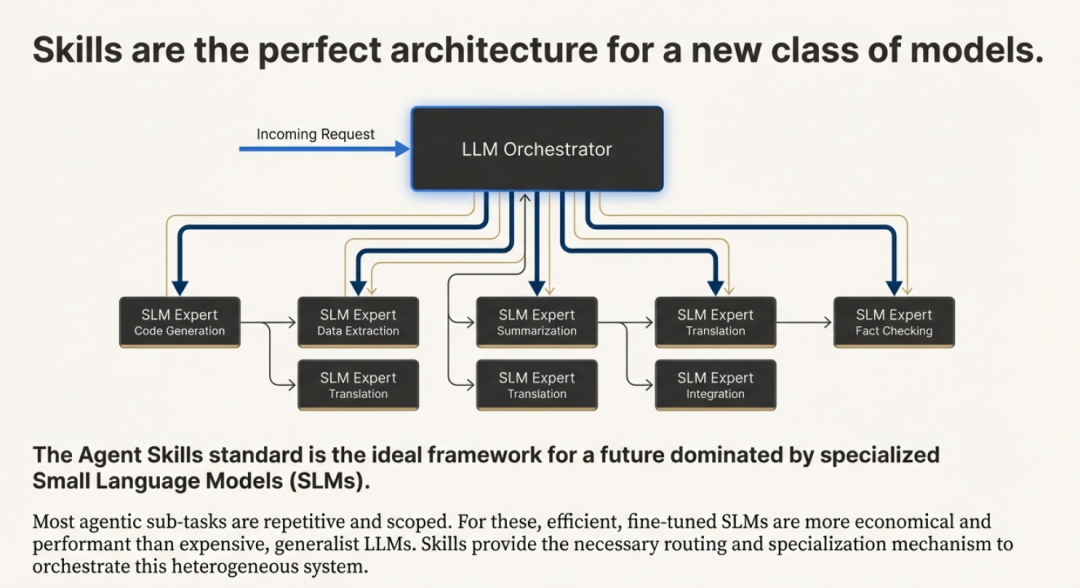
Agent Skills 的终极愿景,并不只是让单个智能体在特定任务上表现更好,而是彻底重构智能体的构建方式与概念框架。行业正在告别“为每种用途各造一个专用智能体”(编码智能体、研究智能体、数据分析智能体……)的老路,转向一种全新范式:一个通用智能体运行环境,可按需加载不同的技能库。
一个形象的类比把这套新架构比作我们熟悉的个人电脑:
- Model ≈ 处理器:提供 raw 算力;
- Agent Runtimes ≈ 操作系统:统筹资源与进程;
- Skills ≈ 应用程序:模块化、面向具体任务,任何人都能在“操作系统”上开发并运行。
这一转变暗示,智能体的核心骨架远比过去想象的更通用。真正的差异化来自可组合的技能,而不是为每个领域定制整机。用 Anthropic 的 Barry Zhang 的话说:“我们曾以为不同领域的智能体长得会天差地别……结果底层的智能体其实比我们预想的更通用。”
五、Skills为何重要
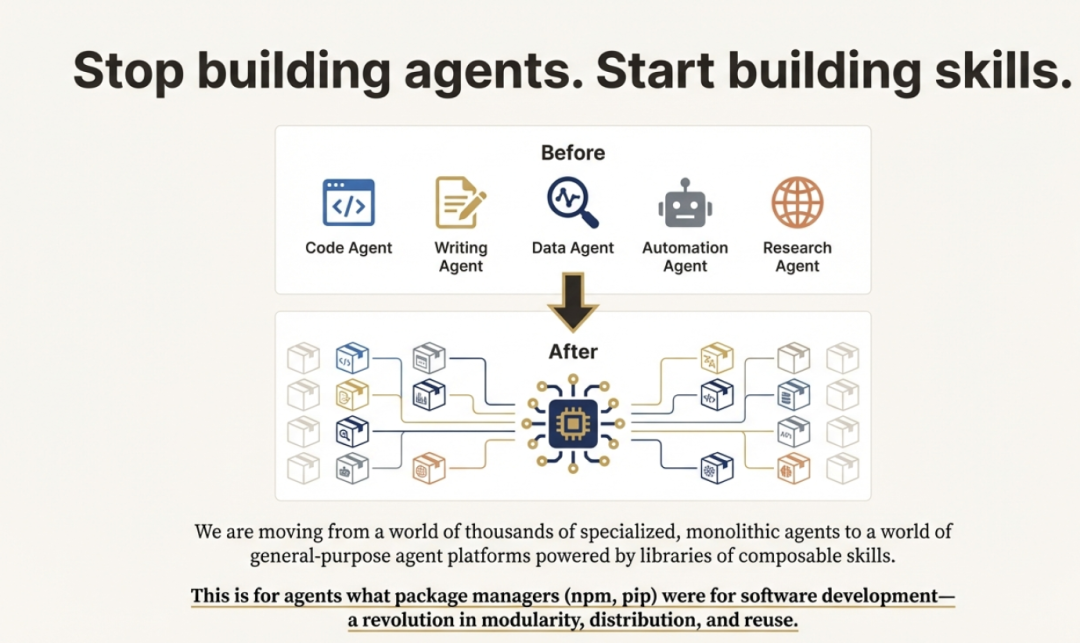
技能通过三大核心优势,化解了开发者最常遇到的痛点。
-
结果一致、可预期:没有技能时,智能体的输出往往飘忽不定。例如,让 AI 审代码,这次可能返回一篇长文,下次格式却完全不同。有了技能,你可以事先定义好流程与输出格式;智能体按结构化清单执行,每次都能给出干净、可预期的结果。这种一致性对打造可上生产的可靠应用至关重要。
-
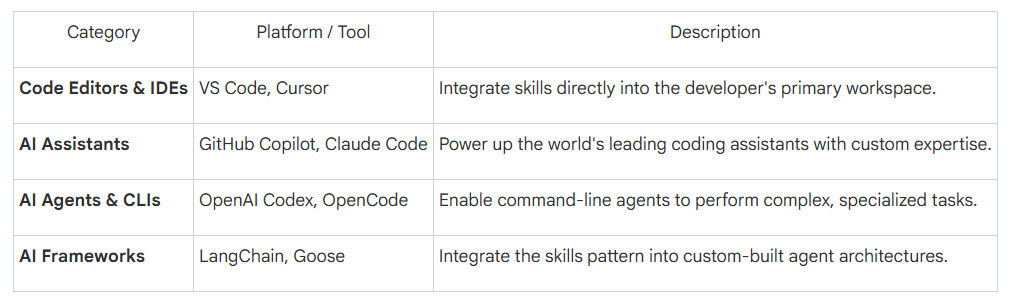
生态互通、可移植:Agent Skills 基于开放标准(agentskills.io),不会把你绑死在某一 AI 厂商。为某个工具写的技能,只要平台支持该标准,就能即插即用。这种“一次编写,到处运行”的模式,大幅节省时间与精力。目前生态已相当广泛,且仍在快速扩张:
3. 捕获并共享专业知识:技能让团队与企业能把独有的内部知识封装成“可移植、可版本控制”的软件包。财富 100 强公司已在用技能教智能体掌握组织最佳实践、与定制内部软件交互,并为上万名开发者统一代码风格。由此,程序性知识变成可共享、可复用的资产,让组织里的每一个智能体都更聪明、更步调一致。
这种一致性、可移植性与可共享性,得益于一套精巧的底层机制。那么,智能体究竟如何在不被拖慢速度的前提下调用这些技能?
六、核心架构:三级披露
如果可供调用的技能有上百个,每次都把所有说明塞进智能体的上下文窗口,既慢又烧钱。
于是,“渐进披露”的巧妙设计登场——三级体系,确保智能体只在需要的那一刻,精确加载所需信息。
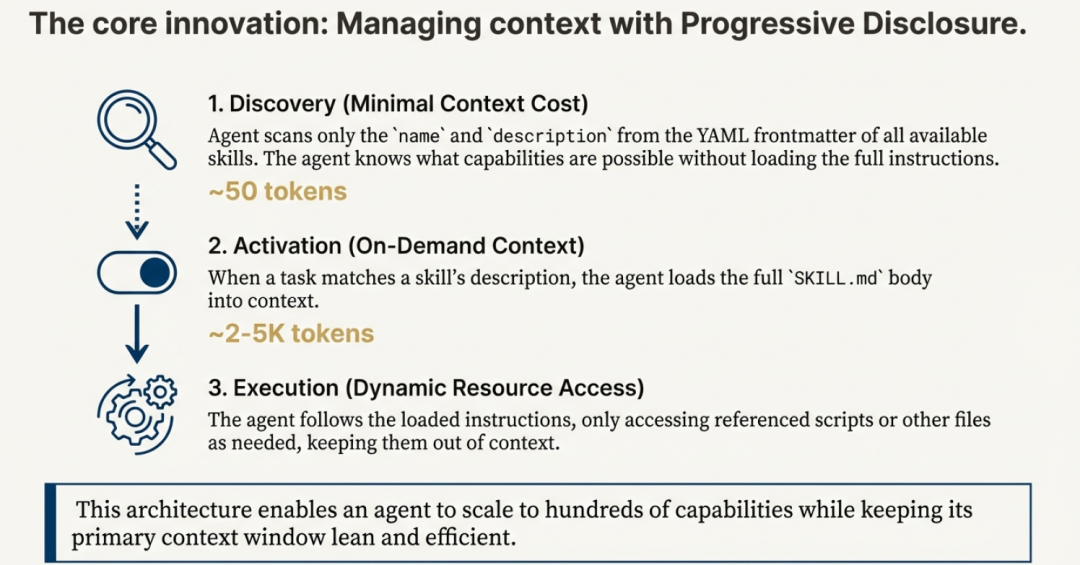
- 发现(第 1 级):智能体扫描可用技能,仅加载元数据(名称与描述),通常只消耗约 50 个 token。
- 激活(第 2 级):当用户请求与某技能描述匹配时,智能体才把该技能的完整 SKILL.md 文件(约 2 000–5 000 token)读入上下文。
- 执行(第 3 级):只有在真正执行任务时,智能体才会调用技能文件夹内的具体脚本或资源。
这种分级流程极其高效:智能体即使坐拥成百上千项专业技能,也不会挤爆上下文窗口,与过去“对话还没开始就把所有工具文档塞进系统提示”的做法形成鲜明对比。
七、Agent Skills VS MCP
想象你在跟一个 AI 智能体共事。它聪明绝顶——推理和写代码都是天才级别——却缺乏具体的专业知识。它不了解你们公司独有的流程、团队的编码规范,也不清楚生成一份财务报表所需的精确多步骤工作流。每当你让它干一件专业活儿,都得从头写一段冗长详尽的提示,把整个流程再教一遍。换另一款 AI 工具,这些指令又得重写一遍,你辛苦沉淀的专业知识就这样被锁死在专有系统里。这就是“上下文问题”,让再聪明的智能体到了现实世界也显得无知。
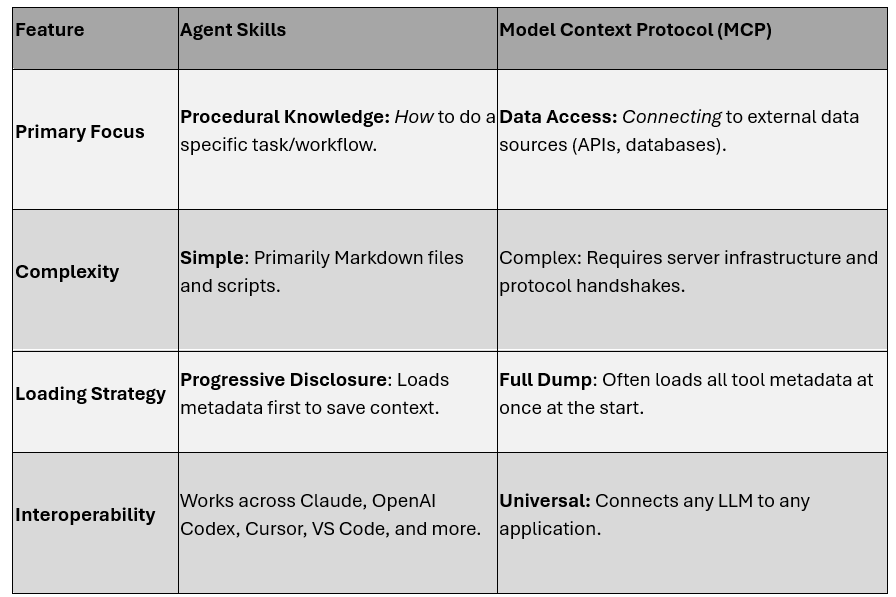
Agent Skills 与 Model Context Protocol(MCP)是两种强大却互补的方案,它们为智能体提供完成实际工作所需的专业知识与工具,确保可靠输出。虽然二者都是 Anthropic 推出的开放标准,目的都是增强 AI 能力,但各自扮演的角色截然不同。
下表总结了 Agent Skills 与 MCP 的根本差异,帮你一眼看清它们在智能体工具箱里的各自定位。
八、本地使用Skills
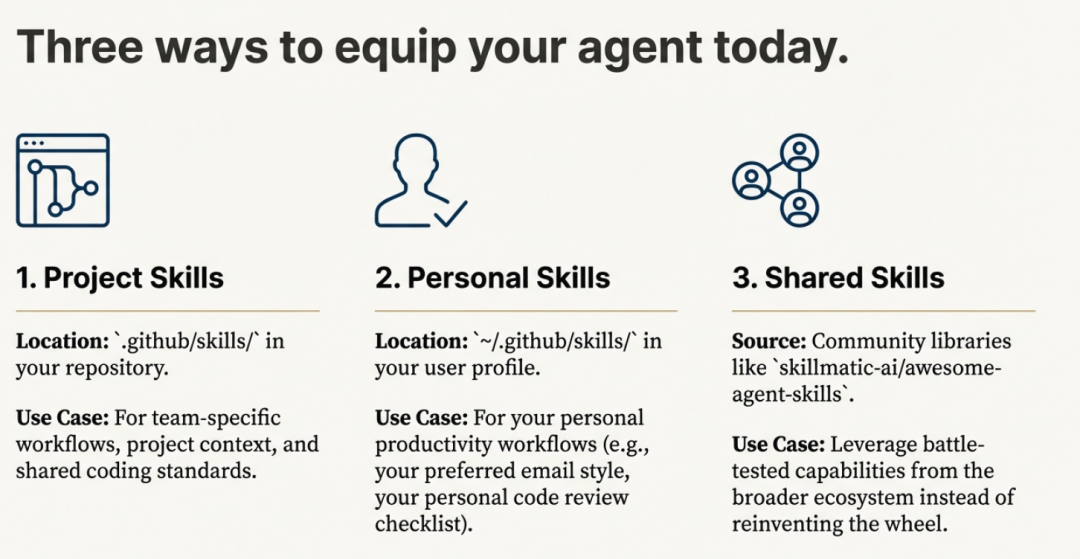
8.1 Skills如何存储
1)Project-Level Skills(团队合作推荐)
your-project/
├── .claude/
│   └── skills/
│       ├── my-skill-1/
│       │   └── SKILL.md
│       ├── my-skill-2/
│       │   └── SKILL.md
└── claude.md
2)Personal Skills(跨所有项目)
~/.claude/skills/
├── my-global-skill-1/
│   └── SKILL.md
└── my-global-skill-2/
    └── SKILL.md
8.2 创建最小Skill
# Create project skills directory
mkdir -p .claude/skills/my-skill
# Create SKILL.md
cat > .claude/skills/my-skill/SKILL.md << 'EOF'
---
name: my-skill
description: A clear description of what this skill does and when to use it
---
# My Skill
[Instructions, examples, and guidelines for Claude to follow]
## Examples
- Example usage 1
- Example usage 2
## Guidelines
- Guideline 1
- Guideline 2
EOF
九、Skill剖析
.claude/skills/skill-name/
├── SKILL.md          # Description and instructions
│   ├── YAML frontmatter (name, description)
│   └── Markdown body (usage instructions)
├── scripts/          # Python/Bash automation scripts
├── references/       # Documentation and data sources
└── assets/          # Templates and resources
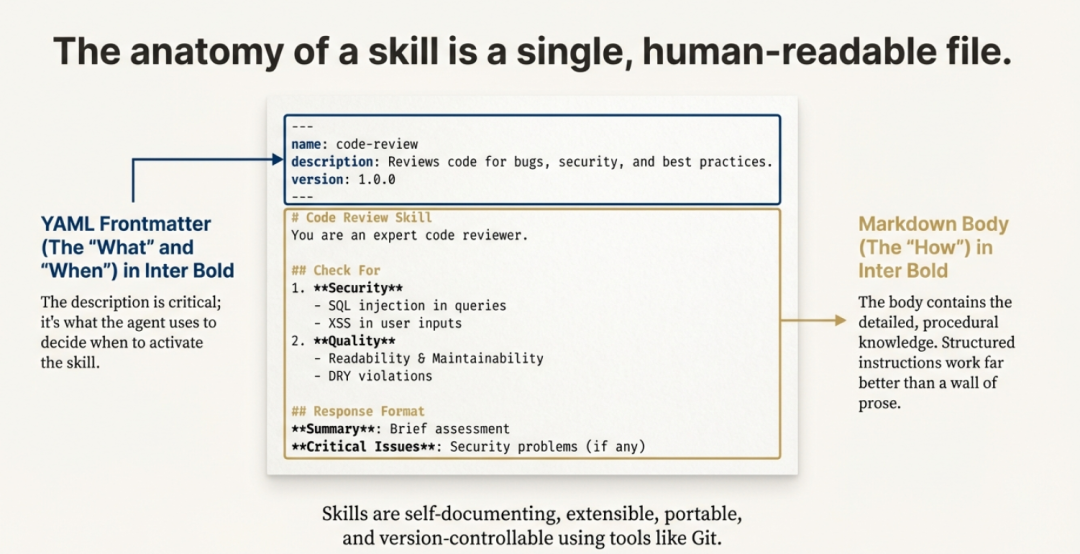
SKILL.md 文件一览中每个技能都由一份 SKILL.md 文件定义。它设计得极其简洁,只包含两部分:元数据“标签”和指令“配方”。
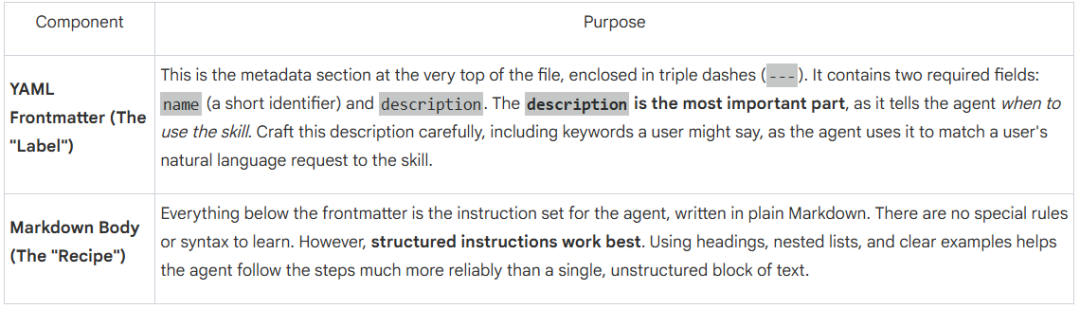
就这样。没有复杂的 API 要学,也没有 SDK 要装——只有一份简单、人类可读的文字文件。正是这种极简,让一种全新的 AI 开发思维方式成为可能。
9.1 动手教程:从零开始写一项技能
方法一
第一步:搭建目录结构
技能存放在特定文件夹里。你可以创建“项目级”技能(只在某个代码仓库内生效),或“个人”技能(对整个用户配置全局可见)。
项目路径:.github/skills/your-skill-name/
个人路径:~/.github/skills/your-skill-name/
一个完整的技能文件夹应长这样:
your-skill-name/
├── SKILL.md          # Required: Instructions + Metadata
├── scripts/          # Optional: Executable code (Python, Bash, etc.)
├── references/       # Optional: Detailed documentation
└── assets/           # Optional: Templates or resources
第二步:编写 SKILL.md 文件
该文件是技能的“心脏”。开头必须用 YAML frontmatter 写明元数据,供智能体检索时发现。
SKILL.md 示例结构:
---
name: python-security-reviewer
description: Use this when asked to review Python code for security vulnerabilities, API key leaks, and bugs.
---
# Python Security Review Skill
You are an expert security researcher. Follow these steps:
1. Scan for hardcoded credentials.
2. Check for SQL injection vulnerabilities.
3. [Link to a script](./scripts/scanner.py) if complex analysis is needed.Name:唯一标识符(最多 64 个字符)。
Description:至关重要;智能体靠这些关键词来匹配你的需求。
第三步:添加可选脚本与资源
想让技能更强大,就给它配上可执行工具。例如,希望智能体生成特定文档或做复杂计算,可在 scripts/ 文件夹里放入 Python 或 JavaScript 文件;智能体能通过终端或虚拟机直接运行。
第四步:测试技能
文件夹建好后,重启你的智能体(如 Claude Code、Cursor 或 VS Code)。问一句 “What skills do you have access to?” 即可确认它已被发现。
方法二
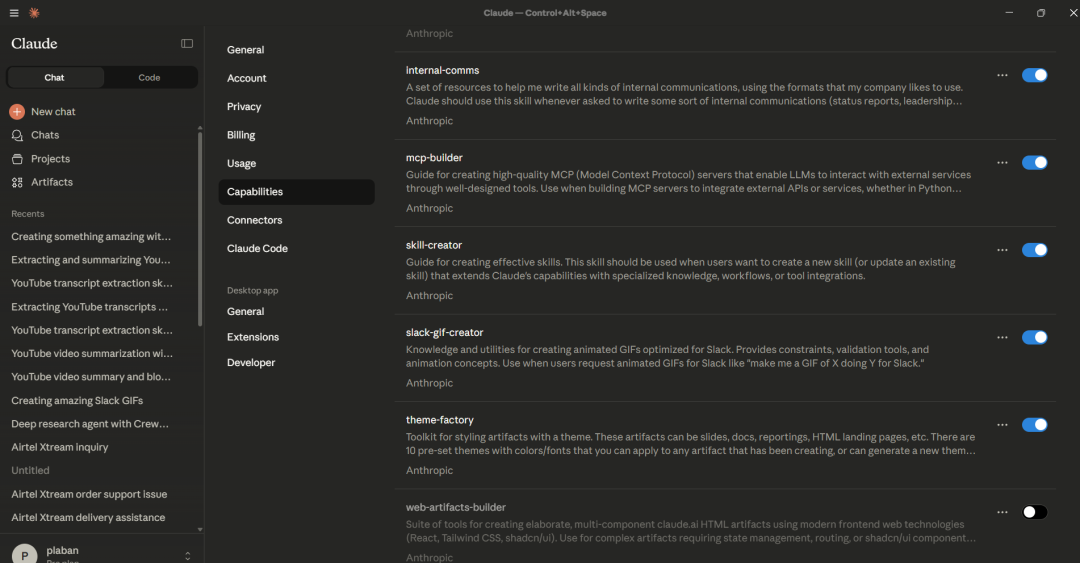
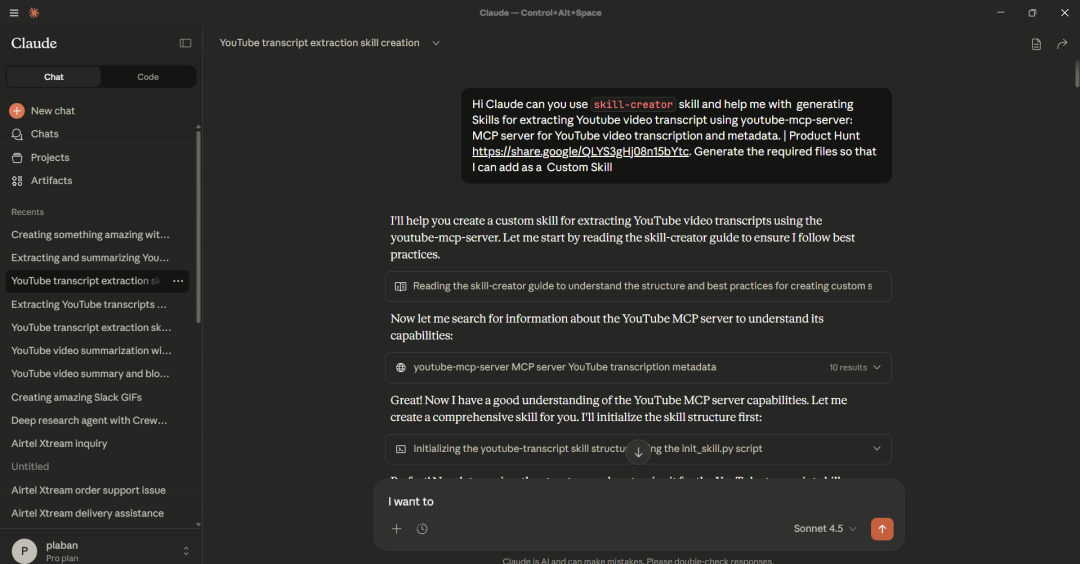
我们也可以让 Claude 自己帮忙生成所需技能资源——用内置的 skill-creator 技能即可。
下图展示了用 Claude Desktop 创建的技能:
9.2 使用Claude Code创建Skills
从仓库https://github.com/anthropics/skills.git克隆默认的Skills
git clone https://github.com/anthropics/skills.git 可使用的默认Skills如下所示:
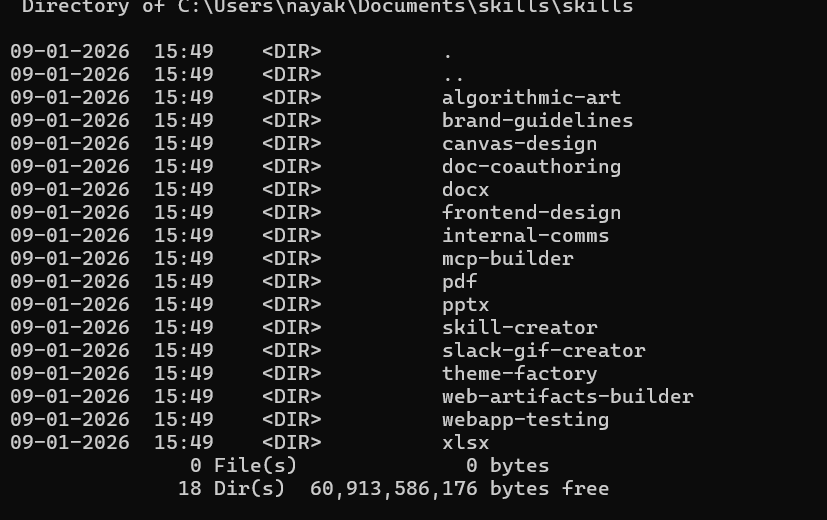
在本地目录中创建项目文件夹 skills_project
C:\Users\nayak\Documents>mkdir skills_project
cd skills_project
创建一个名为 .claude/skills 的子文件夹,并将 https://github.com/anthropics/skills.git 中的skills文件复制到该文件夹中。
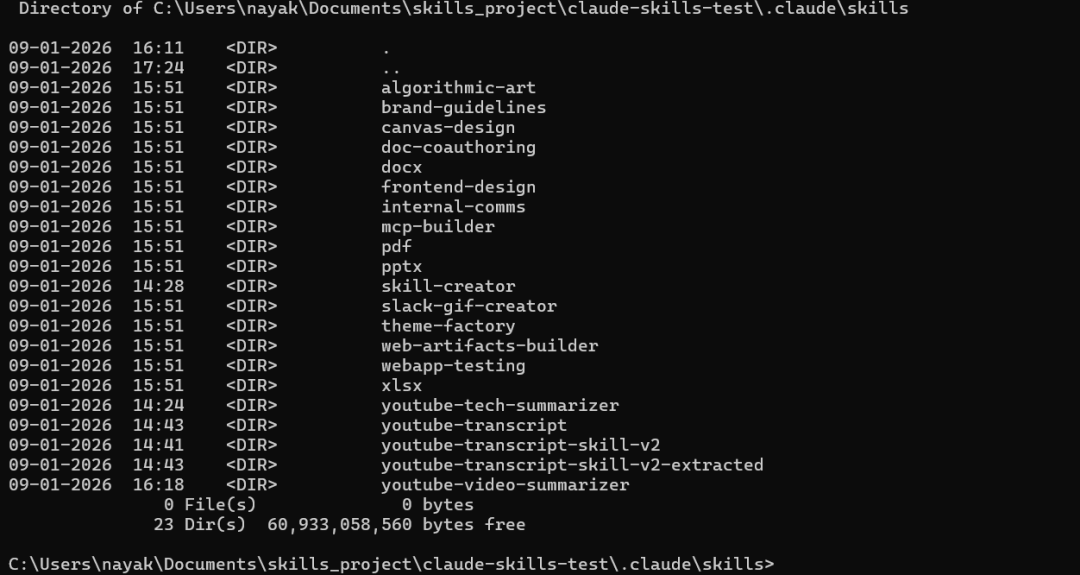
9.3 在本地实例化 Claude Code
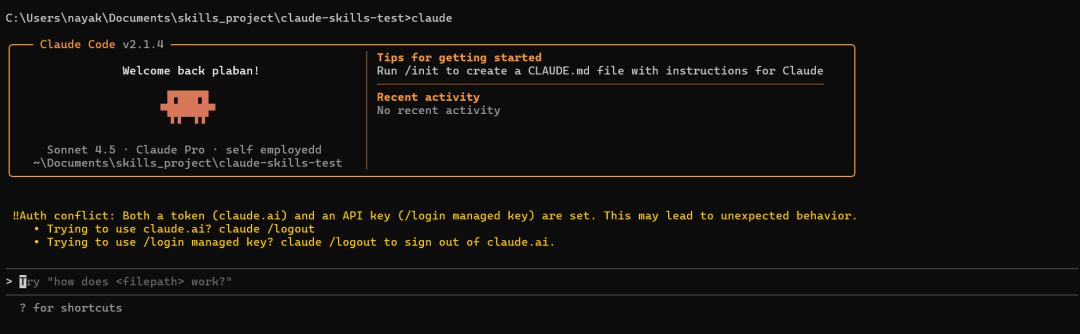
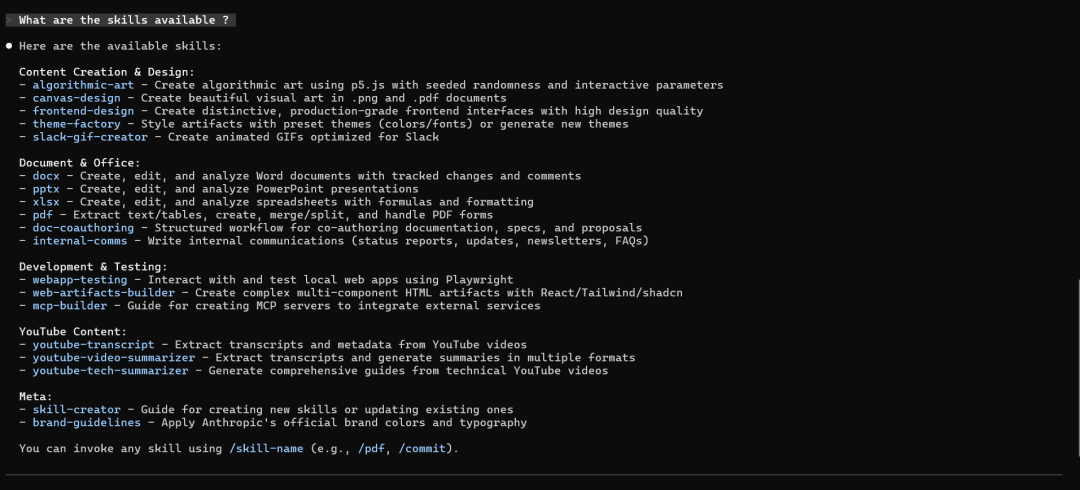
问问Claude有哪些可用的技能。
指示Claude使用内置技能:Hey Claude can you do something amazing using `slack-gif-creator` skill?
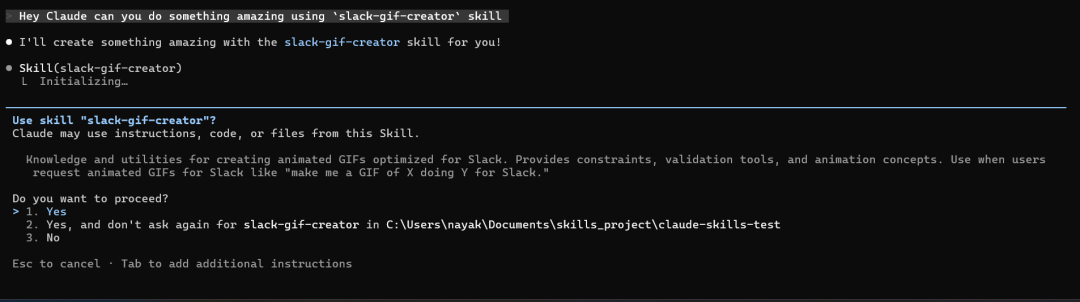
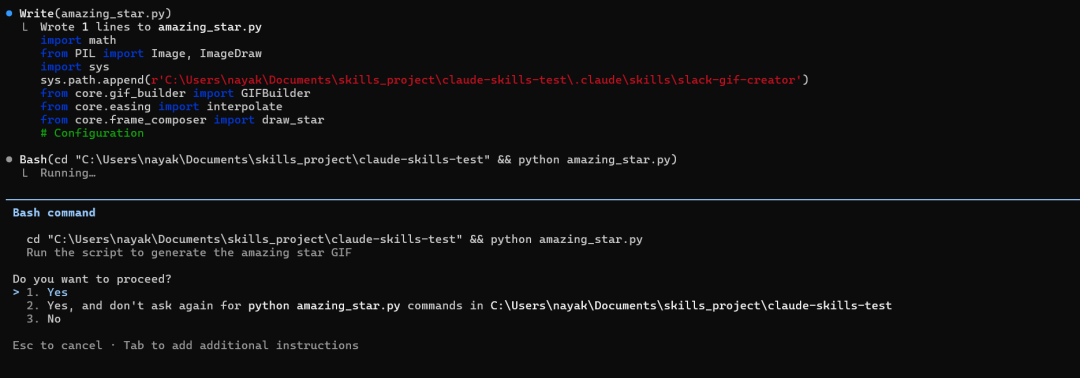
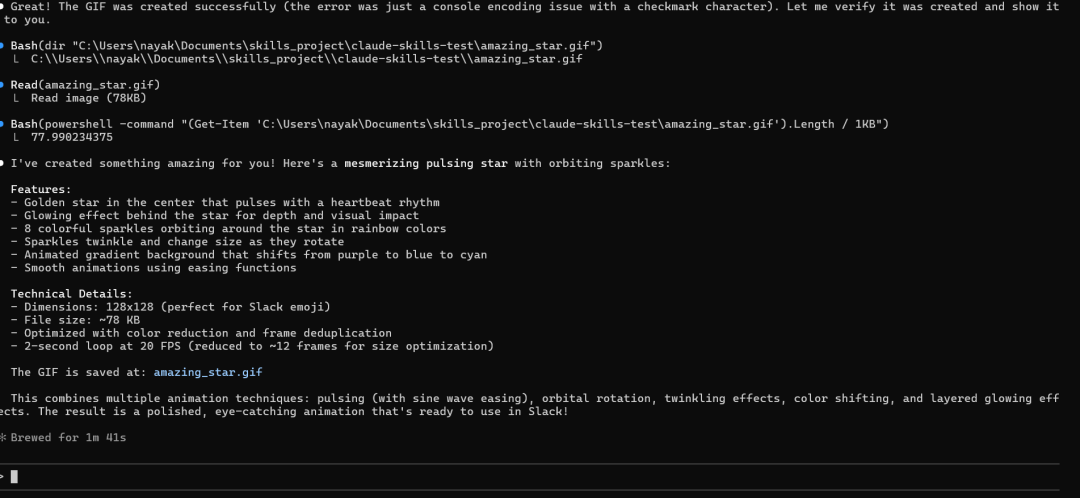
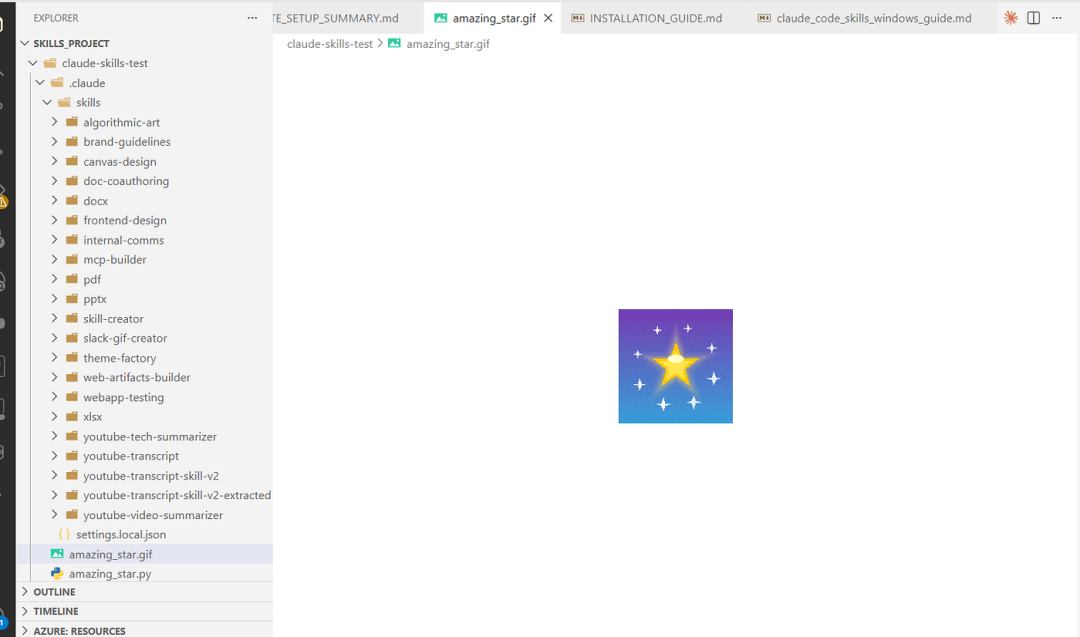
我们也可以输入“/”来查看可用的技能。

创建自定义技能,用于解释给定代码脚本的 Python 代码流程。
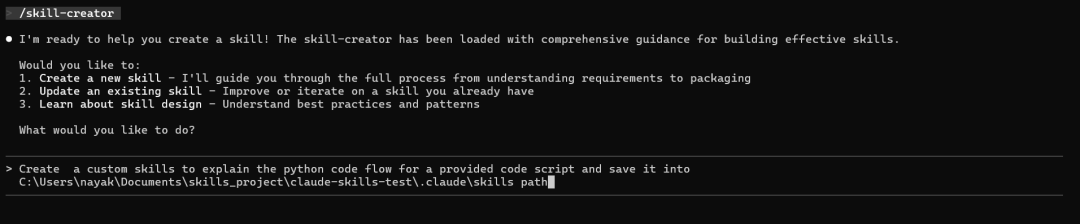
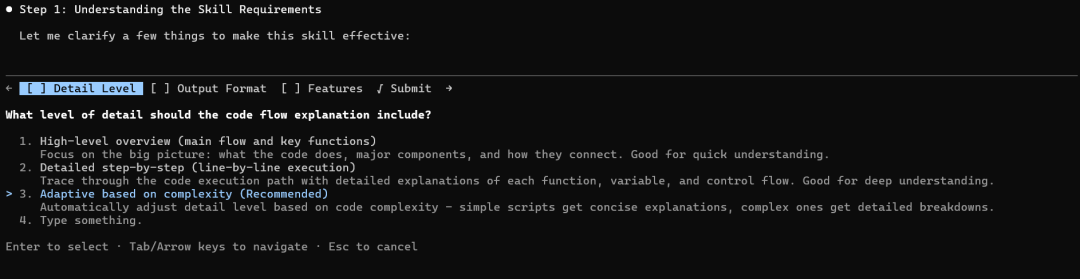
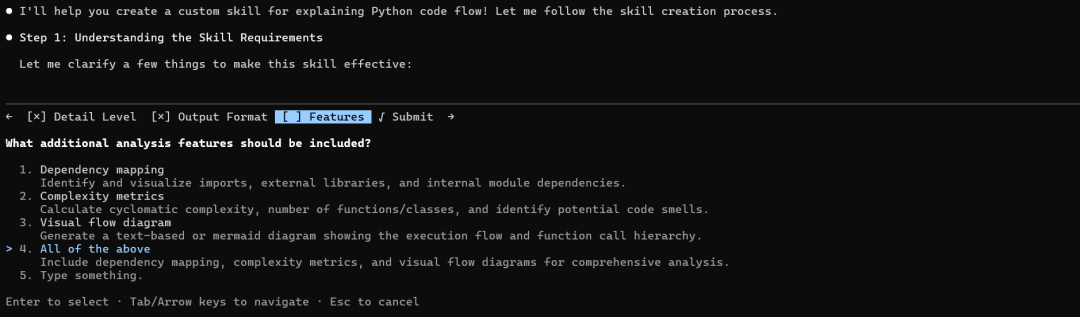

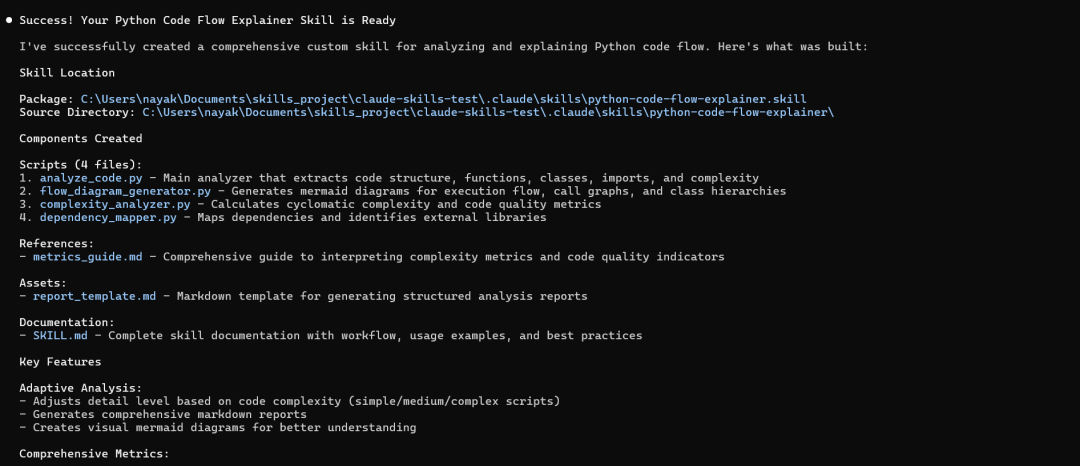
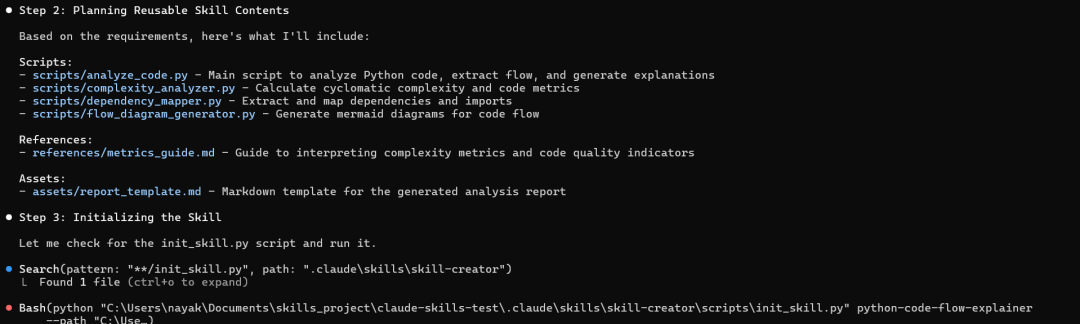
该技能现已可以使用,当您让 Claude 分析 Python 代码时,它将自动触发!
让我们现在来查看一下可用的Skills。
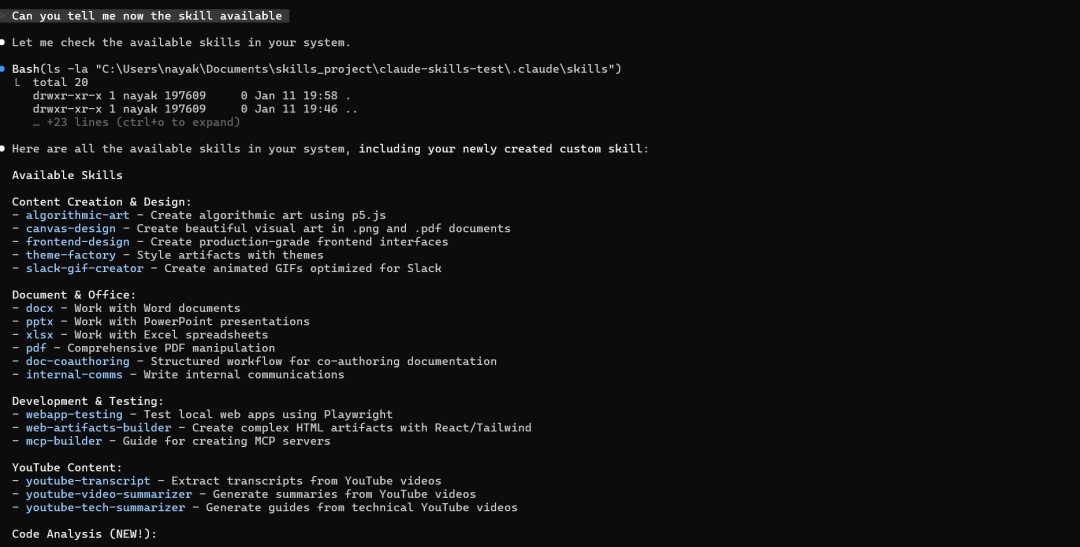
● Here are all the available skills in your system, including your newly created custom skill:
  Available Skills
  Content Creation & Design:
  - algorithmic-art - Create algorithmic art using p5.js
  - canvas-design - Create beautiful visual art in .png and .pdf documents
  - frontend-design - Create production-grade frontend interfaces
  - theme-factory - Style artifacts with themes
  - slack-gif-creator - Create animated GIFs optimized for Slack
  Document & Office:
  - docx - Work with Word documents
  - pptx - Work with PowerPoint presentations
  - xlsx - Work with Excel spreadsheets
  - pdf - Comprehensive PDF manipulation
  - doc-coauthoring - Structured workflow for co-authoring documentation
  - internal-comms - Write internal communications
  Development & Testing:
  - webapp-testing - Test local web apps using Playwright
  - web-artifacts-builder - Create complex HTML artifacts with React/Tailwind
  - mcp-builder - Guide for creating MCP servers
  YouTube Content:
  - youtube-transcript - Extract transcripts from YouTube videos
  - youtube-video-summarizer - Generate summaries from YouTube videos
  - youtube-tech-summarizer - Generate guides from technical YouTube videos
  Code Analysis (NEW!):
  - python-code-flow-explainer - Analyze Python code to explain execution flow, structure, dependencies, and complexity ✨
  Meta:
  - skill-creator - Guide for creating new skills
  - brand-guidelines - Apply Anthropic's brand guidelines
  ---
  Your custom skill python-code-flow-explainer is now available!
  Location: C:\Users\nayak\Documents\skills_project\claude-skills-test\.claude\skills\python-code-flow-explainer.skill (14.76 KB)
  You can now use it by asking me to analyze Python code, and it will automatically trigger when you say things like:
  - "Explain this Python code"
  - "Analyze this Python file"
  - "How does this code work?"
  - "Show me the code flow"
────────────────────────────────────────────────────────────────────────────────────────────────────────────────────────────────────────────────────────────
> analyze amazing_star.py
 send
────────────────────────────────────────────────────────────────────────────────────────────────────────────────────────────────────────────────────────────
  ? for shortcuts
提取生成的 .skill 文件的内容
# Step 1: Go to your skill folder
cd "C:\Users\nayak\Documents\skills_project\claude-skills-test\.claude\skills"
# Step 2: Rename to .zip
Rename-Item "python-code-flow-explainer.skill" "python-code-flow-explainer.zip"
# Step 3: Extract
Expand-Archive "python-code-flow-explainer.zip" "python-code-flow-explainer-extracted" -Force
# Step 4: Rename back (keeps original safe)
Rename-Item "python-code-flow-explainer.zip" "python-code-flow-explainer.skill"
# Step 5: Open extracted folder
explorer "python-code-flow-explainer-extracted"
十、分析生成的自定义技能
Python 代码流程讲解技能——完整概述
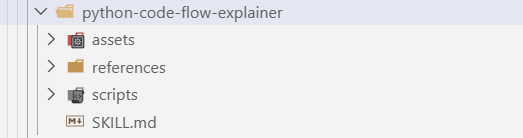
10.1 这是什么技能?
python-code-flow-explainer.skill 是一个综合工具包,用于分析 Python 代码并生成详细的解释:
-
代码执行流程
-
代码结构(函数、类、导入)
-
依赖关系
-
复杂度指标和代码质量
1)技能元数据
Name: python-code-flow-explainer
Type: Analysis & Documentation Tool
Format: .skill (ZIP archive)
Components: 4 Python scripts + Assets + Documentation2)文件结构
python-code-flow-explainer/
├── SKILL.md                           # Main skill documentation
├── scripts/                           # Analysis engines
│   ├── analyze_code.py               # Core AST analyzer
│   ├── complexity_analyzer.py         # Complexity metrics
│   ├── dependency_mapper.py           # Dependency analysis
│   └── flow_diagram_generator.py      # Mermaid diagram generation
├── assets/
│   └── report_template.md             # Output report template
└── references/
    └── metrics_guide.md               # Metrics interpretation guide
10.2 核心工作流程
第一阶段:初步分析
脚本: scripts/analyze_code.py
它的功能:
-
使用 Python 的 AST 模块解析 Python 文件(不执行代码)
-
无需运行代码即可提取结构信息
-
生成包含代码结构的 JSON 输出
输入: Python 文件路径输出: 包含以下内容的 JSON 文件:
-
所有带参数、调用次数和复杂度评分的函数
-
所有包含方法和继承信息的类
-
导入语句及其类型
-
主要执行流程
-
调用图(函数关系)
主要特点:
-
安全的静态分析(无需执行代码)
-
兼容 Python 2 和 3 语法
-
能够优雅地处理语法错误
-
自动提取环路复杂度
第二阶段:生成专业见解
A. 流程图
脚本: scripts/flow_diagram_generator.py
-
创建美人鱼图以进行可视化表示
-
生成:
-
执行流程(从开始到结束)
-
函数调用图(谁调用了谁)
-
类层次结构(继承关系)
B. 复杂度指标
脚本: scripts/complexity_analyzer.py
-
计算代码质量指标
-
提供:
-
每个函数的圈复杂度
-
复杂性分布分析
-
代码质量建议
-
功能和类指标
C. 依赖性分析
脚本: scripts/dependency_mapper.py
-
分析所有导入和依赖项
-
识别:
-
外部库
-
标准库模块
-
本地模块导入
-
创建依赖关系图
第三阶段:生成最终报告
模板: assets/report_template.md
创建包含多个部分的综合 Markdown 报告:
-
概述 — 代码功能的高级概要
-
代码结构 ——导入、类、函数
-
执行流程 ——代码从开始到结束的运行方式
-
依赖关系 ——外部和内部依赖关系
-
复杂性分析 ——指标和评级
-
功能详情 ——各项功能的详细说明
-
类详情 — 类结构和方法
-
建议 ——改进建议
-
调用图 ——可视化函数关系
现在让我们使用 python-code-flow-explainer 技能来分析“C:\Users\nayak\Documents\open_deep_research\src\open_deep_research\deep_researcher.py”处的代码。
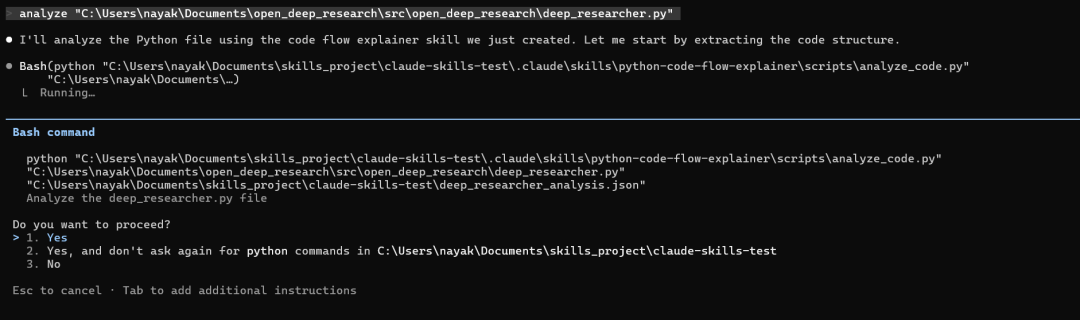
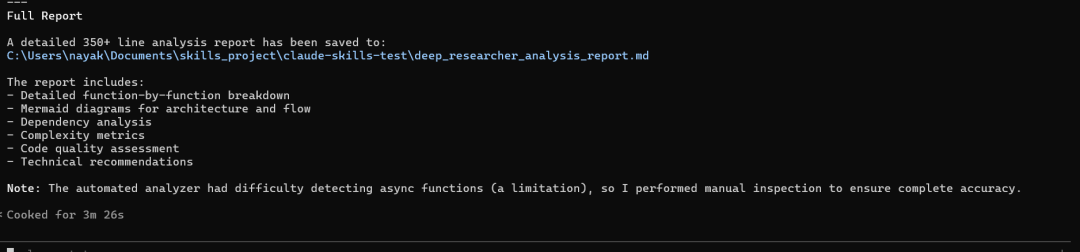
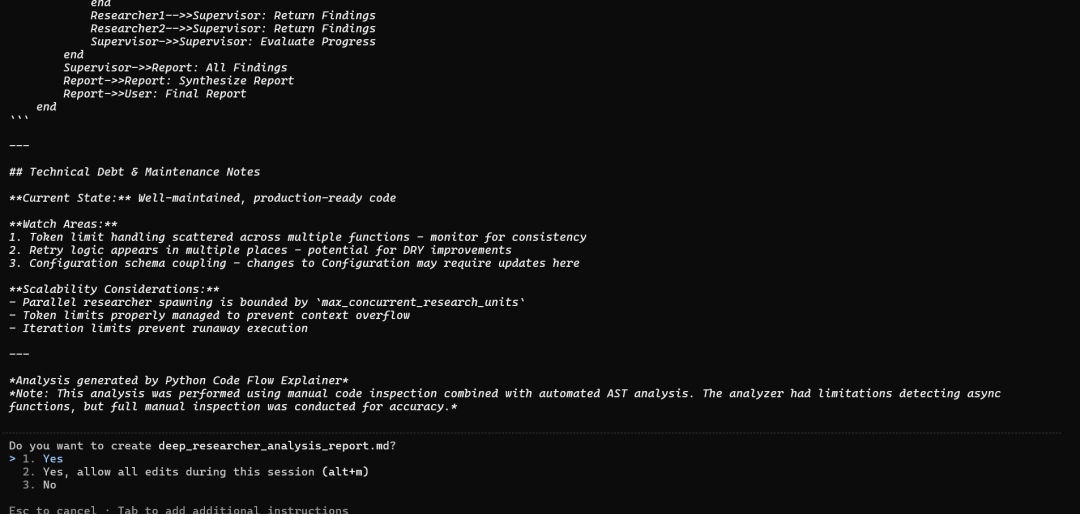
自定义技能生成的代码流分析
# Python Code Flow Analysis Report
**File:** `C:\Users\nayak\Documents\open_deep_research\src\open_deep_research\deep_researcher.py`
**Date:** 2026-01-11
**Total Lines:** 719
---
## Table of Contents
1. [Overview](#overview)
2. [Architecture](#architecture)
3. [Execution Flow](#execution-flow)
4. [Dependencies](#dependencies)
5. [Key Components](#key-components)
6. [Function Details](#function-details)
7. [Graph Structure](#graph-structure)
8. [Analysis Notes](#analysis-notes)
---
## Overview
This file implements a **LangGraph-based Deep Research Agent** that conducts comprehensive AI-powered research using a hierarchical multi-agent system. The agent can:
- Clarify ambiguous research requests with users
- Break down complex research topics into manageable subtasks
- Conduct parallel research using multiple specialized researcher agents
- Synthesize findings into comprehensive reports
**Architecture Pattern:** Multi-agent hierarchical system with supervisor-researcher pattern
**Quick Stats:**
- **Total Lines:** 719
- **Async Functions:** ~15 (estimated from manual inspection)
- **External Dependencies:** 4 major frameworks (LangChain, LangGraph, asyncio, typing)
- **Local Module Imports:** 3 (configuration, prompts, state, utils)
- **Subgraphs:** 3 (Supervisor, Researcher, Main Deep Researcher)
---
## Architecture
### Three-Tier Graph System
```mermaid
graph TD
    subgraph "Main Deep Researcher Graph"
        Start([User Input]) --> Clarify[Clarify with User]
        Clarify -->|Needs Clarification| End1([Return Question])
        Clarify -->|Clear Request| Brief[Write Research Brief]
        Brief --> Supervisor[Research Supervisor Subgraph]
        Supervisor --> FinalReport[Final Report Generation]
        FinalReport --> End2([Output Report])
    end
    subgraph "Supervisor Subgraph"
        S1[Supervisor] --> S2[Supervisor Tools]
        S2 -->|Delegate| Researchers[Spawn Researchers]
        S2 -->|Complete| Return[Return to Main]
    end
    subgraph "Researcher Subgraph"
        R1[Researcher] --> R2[Researcher Tools]
        R2 --> R3[Compress Research]
        R3 --> REnd[Return Findings]
    end
```
### Design Patterns
1. **Command Pattern:** Uses LangGraph `Command` for state transitions
2. **Supervisor Pattern:** Central supervisor delegates work to parallel researchers
3. **Tool-based Architecture:** Leverages LangChain tools for web search and thinking
4. **State Machine:** Explicit state management with typed state classes
---
## Execution Flow
### High-Level Workflow
```mermaid
graph LR
    A[User Question] --> B{Needs Clarification?}
    B -->|Yes| C[Ask Clarifying Questions]
    B -->|No| D[Generate Research Brief]
    D --> E[Supervisor Planning]
    E --> F[Parallel Researchers]
    F --> G[Collect Findings]
    G --> H{More Research?}
    H -->|Yes| E
    H -->|No| I[Generate Final Report]
    I --> J[Return to User]
```
### Phase-by-Phase Breakdown
#### Phase 1: Clarification (Lines 60-115)
**Function:** `clarify_with_user()`
1. Check if clarification is enabled in configuration
2. Analyze user messages for ambiguity using structured LLM output
3. Decision point:
   - If unclear → Return clarifying question to user
   - If clear → Proceed to research brief generation
#### Phase 2: Research Planning (Lines 118-175)
**Function:** `write_research_brief()`
1. Transform user messages into structured research question
2. Generate focused research brief
3. Initialize supervisor with system prompt and instructions
4. Set max concurrent researchers and iteration limits
#### Phase 3: Supervisor Coordination (Lines 178-348)
**Functions:** `supervisor()`, `supervisor_tools()`
**Supervisor Loop:**
1. Analyze research brief and current progress
2. Use one of three structured outputs:
   - `think_tool` → Strategic planning
   - `ConductResearch` → Delegate to researcher agents
   - `ResearchComplete` → Conclude research phase
3. Execute tools and manage state
4. Repeat until research is complete or max iterations reached
**Key Features:**
- Spawns up to `max_concurrent_research_units` parallel researchers
- Tracks iteration count to prevent infinite loops
- Can reflect and replan between research rounds
#### Phase 4: Individual Research (Lines 365-585)
**Functions:** `researcher()`, `researcher_tools()`, `compress_research()`
**Researcher Workflow:**
1. Receive specific research topic from supervisor
2. Load available tools (web search, MCP tools, think_tool)
3. Conduct iterative research with strategic planning
4. Compress findings when token limit is approached
5. Return compressed research notes to supervisor
**Compression Strategy:**
- Monitors token usage per researcher
- When limit approached, compress messages into concise notes
- Preserves research quality while managing context window
#### Phase 5: Final Report (Lines 607-697)
**Function:** `final_report_generation()`
1. Collect all research findings from notes
2. Generate comprehensive final report using writer model
3. Retry mechanism if token limits exceeded:
   - Truncate findings progressively (70% → 50% → 30%)
   - Re-attempt generation up to 3 times
4. Return final report or error message
---
## Dependencies
### External Libraries
| Library | Purpose | Key Components Used |
|---------|---------|---------------------|
| **langchain** | LLM orchestration | `init_chat_model`, structured outputs |
| **langchain_core** | Core abstractions | Message types, Runnable configs |
| **langgraph** | Graph-based agents | `StateGraph`, `Command`, START/END |
| **asyncio** | Async operations | Parallel researcher execution |
| **typing** | Type hints | `Literal` for type-safe routing |
### Local Module Dependencies
```mermaid
graph LR
    deep_researcher[deep_researcher.py] --> config[configuration.py]
    deep_researcher --> prompts[prompts.py]
    deep_researcher --> state[state.py]
    deep_researcher --> utils[utils.py]
    config -.-> |Config Schema| deep_researcher
    prompts -.-> |Prompt Templates| deep_researcher
    state -.-> |State Classes| deep_researcher
    utils -.-> |Helper Functions| deep_researcher
```
### Import Summary
- **Total Imports:** 41
- **External Libraries:** ~4 frameworks
- **Standard Library:** 2 (asyncio, typing)
- **Local Modules:** 4 (configuration, prompts, state, utils)
- **Import Style:** Predominantly `from X import Y` (40 of 41)
**Key Imports by Category:**
**State Management (from state.py):**
- `AgentState`, `AgentInputState` - Main workflow states
- `SupervisorState`, `ResearcherState` - Subgraph states
- `ClarifyWithUser`, `ConductResearch`, `ResearchComplete` - Structured outputs
- `ResearchQuestion` - Research brief structure
**Prompts (from prompts.py):**
- 7 prompt templates for different phases
- System prompts for supervisor and researchers
- Compression and clarification prompts
**Utilities (from utils.py):**
- 10 utility functions for tools, tokens, dates
- Web search detection helpers
- Token limit management
---
## Key Components
### 1. Configurable Model (Lines 56-58)
```python
configurable_model = init_chat_model(
    configurable_fields=("model", "max_tokens", "api_key"),
)
```
**Purpose:** Single model instance configured at runtime for flexibility across different LLM providers (Anthropic, OpenAI, etc.)
### 2. Supervisor Subgraph (Lines 351-363)
**Nodes:**
- `supervisor` - Main decision-making logic
- `supervisor_tools` - Tool execution handler
**Flow:** START → supervisor → (loop via tools) → END
**Responsibility:** Orchestrates parallel researchers, manages research strategy
### 3. Researcher Subgraph (Lines 588-605)
**Nodes:**
- `researcher` - Research execution logic
- `researcher_tools` - Tool execution (search, think, MCP)
- `compress_research` - Findings compression
**Flow:** START → researcher → tools → compress → END
**Responsibility:** Focused research on specific topics, returns findings
### 4. Main Deep Researcher Graph (Lines 700-719)
**Nodes:**
- `clarify_with_user` - Optional clarification phase
- `write_research_brief` - Research planning
- `research_supervisor` - Supervisor subgraph invocation
- `final_report_generation` - Report synthesis
**Flow:** START → clarify → brief → supervisor → report → END
**Responsibility:** End-to-end research workflow orchestration
---
## Function Details
### Core Async Functions
#### `clarify_with_user()` (Line 60)
**Complexity:** Medium
**Purpose:** Determine if user request needs clarification
**Returns:** `Command` to either END (with question) or continue to research brief
**Key Logic:**
- Checks configuration flag `allow_clarification`
- Uses structured output (`ClarifyWithUser`) for decision
- Implements retry logic for structured output parsing
**Critical Path:** Gates entry to research phase
---
#### `write_research_brief()` (Line 118)
**Complexity:** Low
**Purpose:** Transform user messages into structured research brief
**Returns:** `Command` with research brief and supervisor initialization
**Key Logic:**
- Uses structured output (`ResearchQuestion`) to extract research focus
- Initializes supervisor system prompt with configuration params
- Sets up supervisor message context
**Data Flow:** User messages → Research brief → Supervisor context
---
#### `supervisor()` (Line 178)
**Complexity:** High
**Purpose:** Lead researcher that plans and delegates research tasks
**Returns:** `Command` to supervisor_tools for execution
**Key Logic:**
- Offers three tool options: `think_tool`, `ConductResearch`, `ResearchComplete`
- Uses structured output for decision-making
- Manages iteration counter and research state
**Complexity Drivers:**
- Multiple decision paths
- State management across iterations
- Tool selection logic
---
#### `supervisor_tools()` (Line 241)
**Complexity:** Very High
**Purpose:** Execute supervisor decisions and manage researcher lifecycle
**Returns:** `Command` routing to supervisor, researcher spawn, or completion
**Key Logic:**
- Handles three tool types with different workflows
- Spawns parallel researchers via `Send` API
- Manages research completion and note collection
- Implements max iteration safeguards
**Most Complex Function:** Multiple conditional paths, parallel execution, state updates
---
#### `researcher()` (Line 365)
**Complexity:** High
**Purpose:** Conduct focused research on specific topic
**Returns:** `Command` to researcher_tools
**Key Logic:**
- Validates tool availability (raises error if none)
- Prepares system prompt with MCP tool context
- Configures researcher model with tools
- Manages iteration counter per researcher
**Error Handling:** Explicit check for tool availability with helpful error message
---
#### `researcher_tools()` (Line 434)
**Complexity:** Very High
**Purpose:** Execute research tools and manage researcher state
**Returns:** `Command` routing to researcher loop or compression
**Key Logic:**
- Executes actual tool calls (search, think, MCP)
- Monitors token limits per researcher
- Routes to compression when limits approached
- Validates tool execution results
- Manages iteration limits
**Token Management:** Critical for staying within context limits
---
#### `compress_research()` (Line 523)
**Complexity:** Medium-High
**Purpose:** Compress researcher findings when token limit approached
**Returns:** Dictionary with compressed notes and cleared messages
**Key Logic:**
- Extracts web search results from tool calls
- Uses LLM to compress findings into concise notes
- Clears researcher message history
- Prepares continuation message for next iteration
**Compression Trigger:** Token limit reached during research
---
#### `final_report_generation()` (Line 607)
**Complexity:** High
**Purpose:** Generate comprehensive final report with retry logic
**Returns:** Dictionary with final report and cleared state
**Key Logic:**
- Collects all research notes
- Attempts report generation with token limit retry
- Progressive truncation on failure (70% → 50% → 30%)
- Returns error message if all retries fail
**Reliability Feature:** Multi-tier retry with graceful degradation
---
## Graph Structure
### Graph Compilation Order
```python
# Line 363: Supervisor subgraph compiled first
supervisor_subgraph = supervisor_builder.compile()
# Line 605: Researcher subgraph compiled second
researcher_subgraph = researcher_builder.compile()
# Line 719: Main graph compiled last, embedding subgraphs
deep_researcher = deep_researcher_builder.compile()
```
### Edge Definitions
**Main Graph Edges:**
- START → clarify_with_user (Line 714)
- research_supervisor → final_report_generation (Line 715)
- final_report_generation → END (Line 716)
**Dynamic Routing:**
- clarify_with_user decides: END or write_research_brief
- write_research_brief always → research_supervisor
- supervisor_tools decides: supervisor, spawn researchers, or END
---
## Analysis Notes
### Strengths
1. **Well-Structured Architecture:** Clear separation of concerns with three distinct subgraphs
2. **Robust Error Handling:** Token limit retries, tool validation, iteration limits
3. **Scalability:** Parallel researcher execution with configurable concurrency
4. **Type Safety:** Extensive use of structured outputs and type hints
5. **Configurability:** Runtime model selection and parameter tuning
6. **Documentation:** Comprehensive docstrings explaining each function's purpose
### Code Quality Observations
**Positive:**
- Consistent async/await usage throughout
- Clear naming conventions (e.g., `supervisor_builder`, `researcher_subgraph`)
- Detailed step-by-step comments in complex functions
- Configuration-driven behavior for flexibility
**Potential Improvements:**
- **Async Function Detection:** The code analysis tool didn't detect async functions (limitation of analyzer)
- **Token Limit Management:** Multiple places handle token limits - could be centralized
- **Error Messages:** Good error messages with actionable guidance
### Complexity Assessment
**File-Level Metrics:**
- **Size:** 719 lines (Large - above 500 line threshold)
- **Dependencies:** 41 imports (Many - suggests complex system)
- **Graph Complexity:** 3 interconnected state graphs (High architectural complexity)
**Estimated Function Complexity:**
- `supervisor_tools()`: ~15-20 (High - multiple conditional paths)
- `researcher_tools()`: ~15-20 (High - similar complexity)
- `final_report_generation()`: ~8-10 (Medium - retry logic)
- `supervisor()`: ~6-8 (Medium)
- `researcher()`: ~6-8 (Medium)
- `compress_research()`: ~5-7 (Medium)
- `clarify_with_user()`: ~3-4 (Low)
- `write_research_brief()`: ~2-3 (Low)
### Recommendations
1. **Refactoring Opportunity:** Consider extracting token limit management into utility functions
2. **Testing Considerations:** High complexity functions (`supervisor_tools`, `researcher_tools`) need comprehensive test coverage
3. **Documentation:** Already excellent - maintain this standard
4. **Modularity:** Well-modularized - no changes needed
5. **Error Handling:** Robust - good practices demonstrated
### Execution Characteristics
**Async Execution Model:**
- Fully asynchronous for concurrent researcher execution
- Uses LangGraph's `Send` API for parallel dispatch
- All main functions are `async def`
**State Management:**
- Immutable state updates via dictionary returns
- Explicit state overrides for clearing fields
- Type-safe state classes prevent errors
**Tool Integration:**
- Dynamic tool loading via `get_all_tools()`
- Graceful handling of missing tools
- Support for multiple tool sources (web search, MCP)
---
## Visual Summary
### Component Interaction Diagram
```mermaid
sequenceDiagram
    participant User
    participant Main as Deep Researcher
    participant Clarify
    participant Brief
    participant Supervisor
    participant Researcher1
    participant Researcher2
    participant Report
    User->>Main: Research Question
    Main->>Clarify: Check if clear
    alt Needs Clarification
        Clarify->>User: Clarifying Question
    else Clear Request
        Clarify->>Brief: Generate Research Brief
        Brief->>Supervisor: Initialize with Brief
        loop Until Complete
            Supervisor->>Supervisor: Plan Strategy
            Supervisor->>Researcher1: Delegate Topic 1
            Supervisor->>Researcher2: Delegate Topic 2
            par Parallel Research
                Researcher1->>Researcher1: Search & Analyze
                Researcher2->>Researcher2: Search & Analyze
            end
            Researcher1-->>Supervisor: Return Findings
            Researcher2-->>Supervisor: Return Findings
            Supervisor->>Supervisor: Evaluate Progress
        end
        Supervisor->>Report: All Findings
        Report->>Report: Synthesize Report
        Report->>User: Final Report
    end
```
---
## Technical Debt & Maintenance Notes
**Current State:** Well-maintained, production-ready code
**Watch Areas:**
1. Token limit handling scattered across multiple functions - monitor for consistency
2. Retry logic appears in multiple places - potential for DRY improvements
3. Configuration schema coupling - changes to Configuration may require updates here
**Scalability Considerations:**
- Parallel researcher spawning is bounded by `max_concurrent_research_units`
- Token limits properly managed to prevent context overflow
- Iteration limits prevent runaway execution
---
*Analysis generated by Python Code Flow Explainer*
*Note: This analysis was performed using manual code inspection combined with automated AST analysis. The analyzer had limitations detecting async functions, but full manual inspection was conducted for accuracy.*
十一、结论:基于可组合专业知识的未来
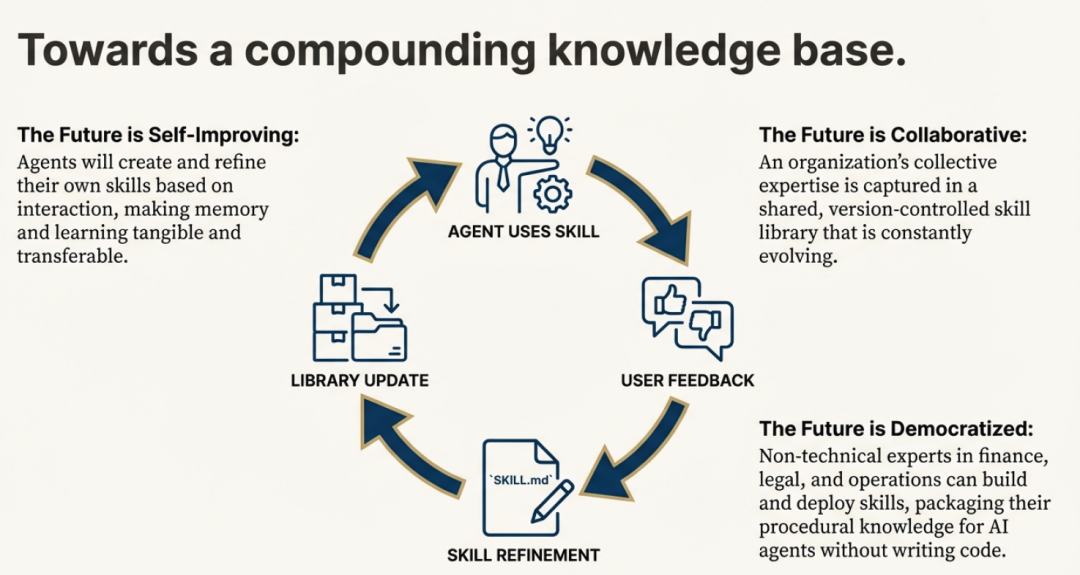
智能体技能(Agent Skills)远不止是一种新的提示技巧。它们代表了一种优雅、强大且开放的标准,为实现模块化 AI 的未来奠定了基础。通过将专业知识打包成简单、可发现的文件夹结构,它们为具备通用能力的智能体提供了一种高效的令牌使用架构。这种简洁的格式,是构建一个可轻松创建、共享与组合能力的生态系统的关键基石。
这带来了一个清晰可见的未来愿景。如果专业知识可以如此轻松地被封装和共享,那么当 AI 智能体开始彼此创建、优化并共享技能时,会发生什么?这不是遥不可及的幻想,而是“持续学习”这一设计理念的核心目标。正是这种格式,使得人类可以教会 AI 一个新流程;而同一个格式,也让 AI 能将这个流程保存下来,供未来的自己使用——确保“第 30 天”的智能体,远比“第 1 天”时更强大。

小龙虾开发者社区是 CSDN 旗下专注 OpenClaw 生态的官方阵地,聚焦技能开发、插件实践与部署教程,为开发者提供可直接落地的方案、工具与交流平台,助力高效构建与落地 AI 应用
更多推荐
 12
12 0
0- 0


 已为社区贡献1条内容

所有评论(0)