
简单使用SKILLS
·
简单使用SKILLS
1 简单介绍
Skills是Claude提出的一种模块化的能力扩展包,旨在将通用的AI智能体(Claude)转变为能够稳定、可重复地完成特定任务的“专家”。Skills的本质是一个存放在特定位置的文件夹,其核心是一个名为 SKILL.md 的文件。这个文件通过简单的YAML格式元数据和自然语言指令,教会Claude如何完成工作。
Claude提出的Skills
# Claude开源的技能仓库Github地址
https://github.com/anthropics/skills


# 智能体Skills
https://agentskills.io/home
# 智能体Skills的Github地址
https://github.com/agentskills/agentskills
开源的Skills模板
ClawHub是OpenClaw开源的Skills仓库,随着OpenClaw爆火带动这个仓库的发展。
https://clawhub.ai/
Awesome Claude Skills里面有很多不错的Skills。
https://github.com/ComposioHQ/awesome-claude-skills
Hugging Face开源的Skills
https://github.com/huggingface/skills
2 Skills文件组成
参考下面地址中对Skills说明
https://agentskills.io/what-are-skills
样例说明,注意:skills中的内容会有一些差别
my-skill/
├── SKILL.md          # 必须: 元数据(在文件开头)+指令
├── scripts/          # 可选: 可执行代码脚本
├── references/       # 可选:参考文档资料
└── assets/           # 可选:模板及其他资源文件
工作流程遵循 “渐进式披露” 机制 :
- 扫描发现:会话开始时,AI 系统扫描所有可用 Skill 的元数据,建立一个“技能清单”。
- 按需加载:当用户提出的任务与某个 Skill 的描述匹配时,AI 才会加载该 Skill 的完整指令和资源。
- 执行任务:AI 按照 Skill 中定义好的流程,结合内部脚本,稳定地完成任务。
Claude发布的创建Skill-creator的方法
# 使用方法的文档
https://resources.anthropic.com/hubfs/The-Complete-Guide-to-Building-Skill-for-Claude.pdf

# 使用方法的仓库地址
https://github.com/anthropics/skills/tree/main/skills/skill-creator
3 使用Agno创建Skills
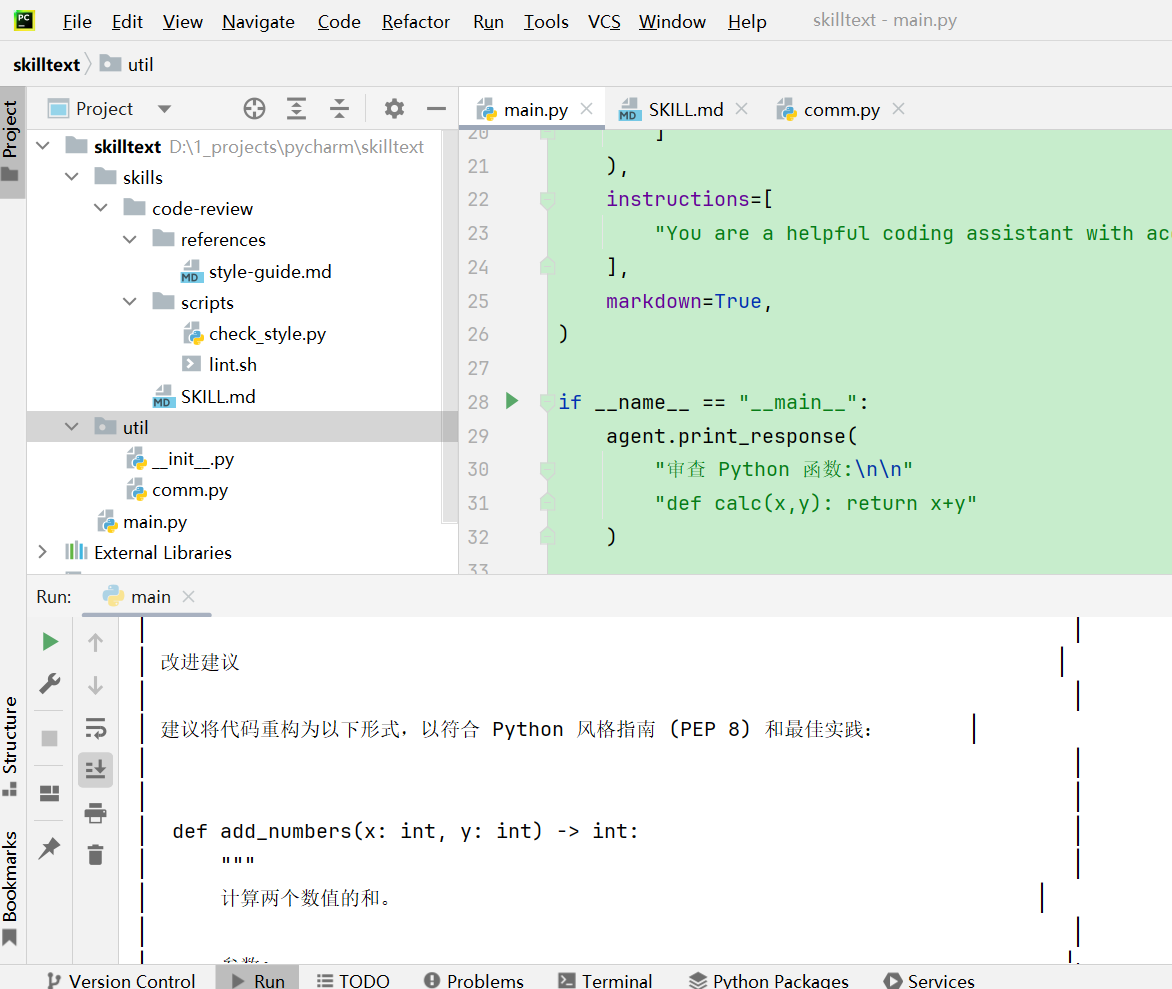
3.1 项目结构
文本内容
skilltext/
├── skills/
│   ├── code-review/
│   │   ├── references/
│   │   │   └── style-guide.md
│   │   ├── scripts/
│   │   │   ├── check_style.py
│   │   │   └── lint.sh
│   │   └── SKILL.md
│── util/
│      ├── __init__.py
│      └── comm.py
└── main.py
3.2 util
3.2.1 comm.py
from pathlib import Path


def get_root_path() -> str:
    # 如果项目结构固定,可以直接计算
    project_root = Path(__file__).resolve().parent.parent
    return project_root.as_posix()


def get_skill_path() -> str:
    # 如果项目结构固定,可以直接计算
    skill_path = Path(__file__).resolve().parent.parent.joinpath("skills")
    return skill_path.as_posix()


if __name__ == '__main__':
    get_root_path()
3.3 skills
3.3.1 code-review
注意:code-review目录的名字必须与SKILL.md中的name属性相同。
3.3.1.1 SKILL.md
---
name: code-review
description: Code review assistance with style checking and best practices
license: Apache-2.0
metadata:
  version: "1.0.0"
  author: your-name
  tags: ["python", "code-quality"]
---

# Code Review Skill

Use this skill when reviewing code for quality, style, and best practices.

## When to Use

- User asks for code review or feedback
- User wants to improve code quality
- User needs help with refactoring

## Process

1. **Analyze Structure**: Review overall code organization
2. **Check Style**: Look for style guide violations
3. **Identify Issues**: Find bugs, security issues, performance problems
4. **Suggest Improvements**: Provide actionable recommendations

## Best Practices

- Focus on the most impactful issues first
- Explain the "why" behind suggestions
- Provide code examples for fixes
3.3.1.2 scripts/
3.3.1.2.1 check_style.py
#!/usr/bin/env python3
"""Check code style and return results."""

import sys

def check_style(code: str) -> dict:
    issues = []
    lines = code.split('\n')

    for i, line in enumerate(lines, 1):
        if len(line) > 100:
            issues.append(f"Line {i}: exceeds 100 characters")
        if line.endswith(' '):
            issues.append(f"Line {i}: trailing whitespace")

    return {"issues": issues, "count": len(issues)}

if __name__ == "__main__":
    # Read code from stdin or argument
    code = sys.stdin.read() if not sys.argv[1:] else sys.argv[1]
    result = check_style(code)
    print(result)
3.3.1.2.2 lint.sh
#!/bin/bash
# Run linting on provided file

if [ -z "$1" ]; then
    echo "Usage: lint.sh <file>"
    exit 1
fi

ruff check "$1" 2>&1
3.3.1.3 references/
3.3.1.2.1 style-guide.md
# Python Style Guide

## Naming Conventions

- **Variables**: `snake_case`
- **Classes**: `PascalCase`
- **Constants**: `UPPER_SNAKE_CASE`

## Line Length

- Maximum 100 characters per line
- Break long lines at logical points

## Imports

- Standard library imports first
- Third-party imports second
- Local imports third
- Alphabetize within each group
3.4 main.py
from agno.agent import Agent
from agno.models.openai import OpenAILike
from agno.skills import Skills, LocalSkills

from util.comm import get_skill_path

openai_model = OpenAILike(
    id="qwen3.5-plus",
    api_key="sk-XXXXX",
    base_url="https://dashscope.aliyuncs.com/compatible-mode/v1"
)

# 构建智能体
agent = Agent(
    name="Code Assistant",
    model=openai_model,
    skills=Skills(
        loaders=[
            LocalSkills(get_skill_path()+"/code-review")
        ]
    ),
    instructions=[
        "You are a helpful coding assistant with access to specialized skills."
    ],
    markdown=True,
)

if __name__ == "__main__":
    agent.print_response(
        "审查 Python 函数:\n\n"
        "def calc(x,y): return x+y"
    )
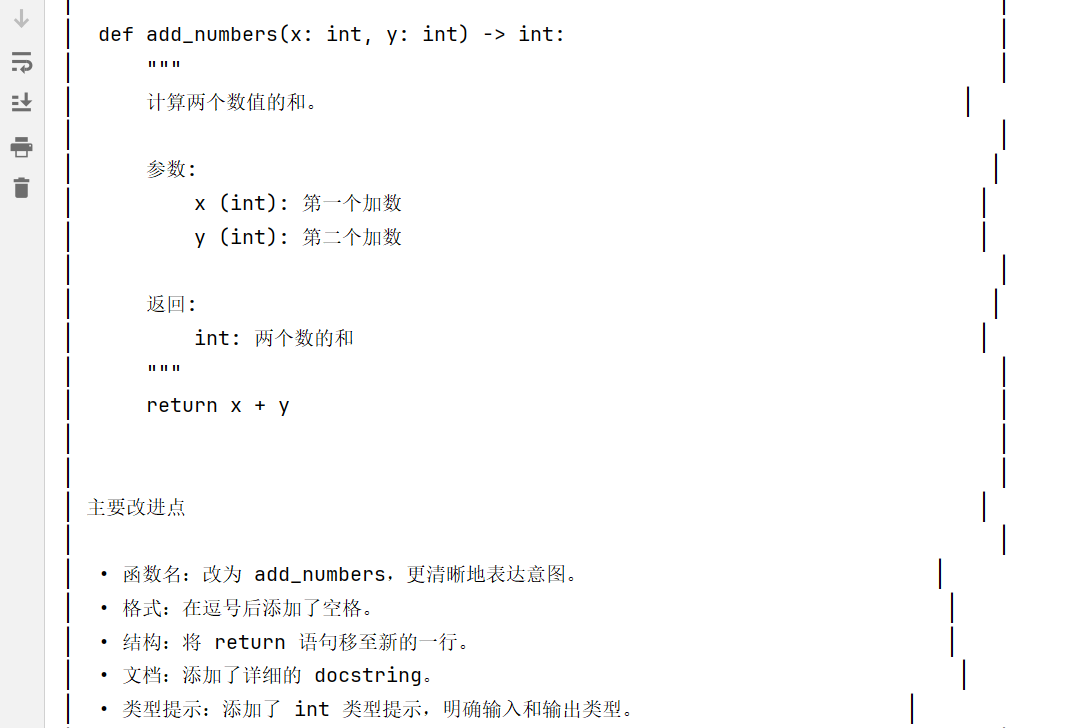
4 结果截图

小龙虾开发者社区是 CSDN 旗下专注 OpenClaw 生态的官方阵地,聚焦技能开发、插件实践与部署教程,为开发者提供可直接落地的方案、工具与交流平台,助力高效构建与落地 AI 应用
更多推荐



 4
4 0
0- 0


 已为社区贡献2条内容

所有评论(0)