clarity.js by Microsoft slowing overall page loads
Answer a question
I have a customer using bing tracking via https://bat.bing.com/bat.js.
On December, 6th 2021 it started calling in clarity.js without the customer making any changes to their code.
This slowed the overall page load by 1 second on mobile and 500ms on desktop. I've been trying to figure out how to disable this JS but I'm not sure what to do as it's being fired from the bing tracking js.
The bing tracking code is being triggered via google tag manager.
Anyone else having this issue and know how to disable clarity.js from being called at all?
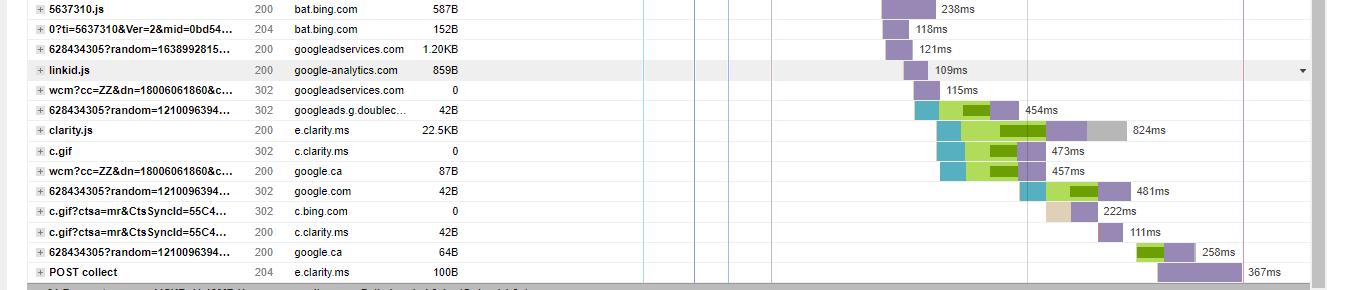
Customer is using Wordpress. Amazing Bing can implement code that slows down a site overall page speed without any notification to the customer.
Answers
This seems to be added mid-November 2021. Problematic for sure, as it broke our website in certain situations. To disable it, follow these steps:
- Go to ui.ads.microsoft.com
- In the top bar go to Tools, then under Conversion tracking click on UET tag
- In the table at the bottom of the page click on the name of your tag.
- Under Enable Microsoft Clarity disable the checkbox and click the Save button.
This should directly remove the script from your website.

WordPress社区为您提供专业的建站知识与服务支持,提供一步到位的镜像安装和wordpress主题与插件支持
更多推荐
 0
0 0
0- 0


 已为社区贡献2428条内容

所有评论(0)