

I've got my Mongoose code in a separate model.js file, while Express code for handling http requests is in app.js. I'm just practising creating APIs and testing them on Postman, for an imaginary wiki article site. The api I'm struggling to get it to work is deleting one article. (Note: for the sake of brevity, I've only included the code in question, i.e. app.delete('/articles/:id' .... from app.js, and the static method it calls from model.js - deleteOneArticleFromDB(articleID)
app.js:
const express = require('express');
const bodyParser = require('body-parser');
const model = require('./model');

const app = express();

app.use(bodyParser.urlencoded({ extended: true }));

app.delete('/articles/:id', async (req, res) => {
    const articleID = req.params.id;
    console.log(`req.params.id: ${req.params.id}`);
    try {
        const response = await model.DBUtility.deleteOneArticleFromDB(articleID);
        res.status(200).json({message: response, app: 'wiki-api'});
    } catch (err) {
        res.json({message: err, app: 'wiki-api'});
    }
});

const port = 3000;
app.listen(port, () => {
    console.log(`Server started on port ${port}`);
});
model.js:
const mongoose = require('mongoose');

mongoose.connect('mongodb://localhost:27017/wikiDB', {useNewUrlParser: true, useUnifiedTopology: true, useFindAndModify: false });

const articleSchema = new mongoose.Schema({
    title: String,
    content: String
});

const Article = mongoose.model('Article', articleSchema);

class DBUtility {

    static deleteOneArticleFromDB(articleID) {
        return new Promise((resolve, reject) => {
            Article.findByIdAndDelete(articleID, (err) => {
                if (err) {
                    reject(err);
                } else {
                    resolve(`Deleted article ${articleID} successfully`);
                }
            });
        });
    }
}

exports.DBUtility = DBUtility;
I have 5 articles (5 documents) in my Database:
{
    "_id" : "5c139771d79ac8eac11e754a",
    "title" : "API",
    "content" : "API stands for Application Programming Interface. It is a set of subroutine definitions, communication protocols, and tools for building software. In general terms, it is a set of clearly defined methods of communication among various components. A good API makes it easier to develop a computer program by providing all the building blocks, which are then put together by the programmer."
}

/* 2 */
{
    "_id" : "5c1398aad79ac8eac11e7561",
    "title" : "Bootstrap",
    "content" : "This is a framework developed by Twitter that contains pre-made front-end templates for web design"
}

/* 3 */
{
    "_id" : "5c1398ecd79ac8eac11e7567",
    "title" : "DOM",
    "content" : "The Document Object Model is like an API for interacting with our HTML"
}

/* 4 */
{
    "_id" : "5ea2c188fa57aa1b6453eda5",
    "title" : "Node JS",
    "content" : "Node.js is an open-source, cross-platform, JavaScript runtime environment that executes JavaScript code outside of a web browser. Node.js lets developers use JavaScript to write command line tools and for server-side scripting—running scripts server-side to produce dynamic web page content before the page is sent to the user's web browser. Consequently, Node.js represents a \"JavaScript everywhere\" paradigm,[6] unifying web-application development around a single programming language, rather than different languages for server- and client-side scripts.",
    "__v" : 0
}

/* 5 */
{
    "_id" : "5ea2d5304e19b11e0013a86a",
    "title" : "EJS",
    "content" : "EJS is a simple templating language that lets you generate HTML markup with plain JavaScript. No religiousness about how to organize things. No reinvention of iteration and control-flow. It's just plain JavaScript",
    "__v" : 0
}
I'm trying to delete the last article (document) with title EJS. So in Postman I run the http request as follows:
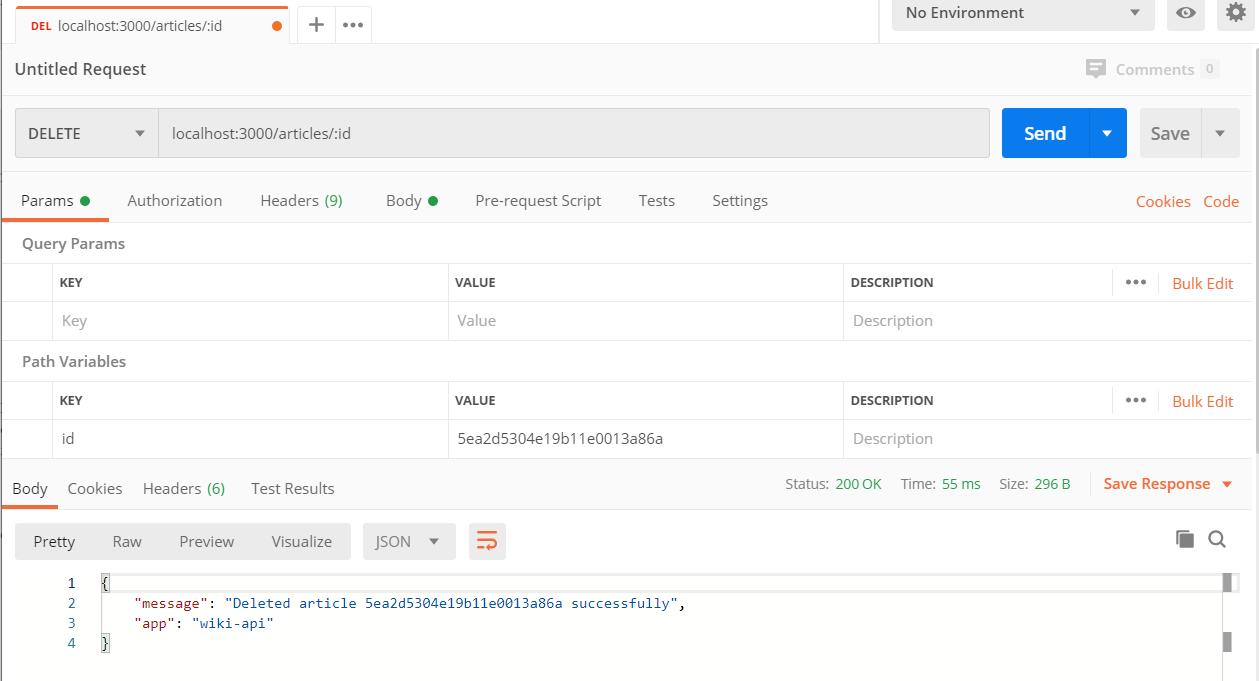
As you can see, I get a success response. However, when I check my database, the document is still there (I have clicked refresh several times and also tested it with a GET request to return all articles, which showed the article is still there): 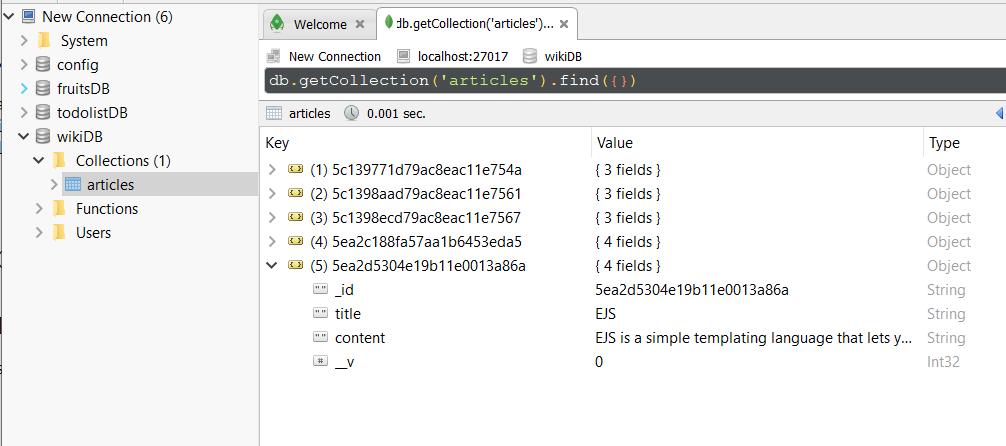
Here's the terminal output:
[nodemon] starting `node app.js`
Server started on port 3000
req.params.id: 5ea2d5304e19b11e0013a86a
I've been on this for two days. I've checked all previous SO posts with similar titles to mine, but I couldn't see one that applies to my issue. I don't understand where I'm going wrong!! Any help would be really appreciated.
UPDATE
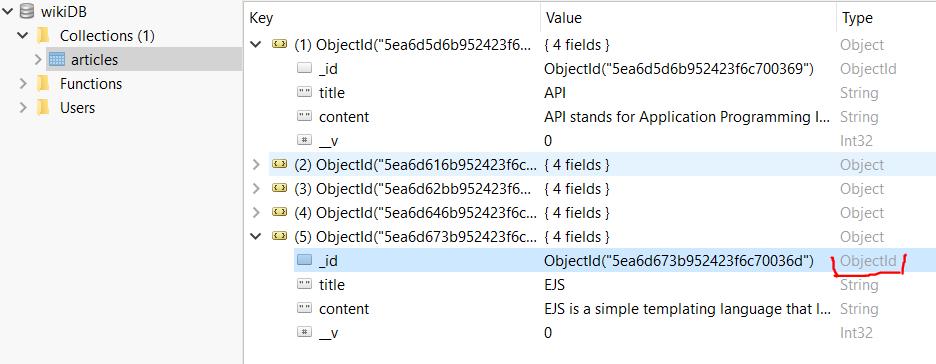
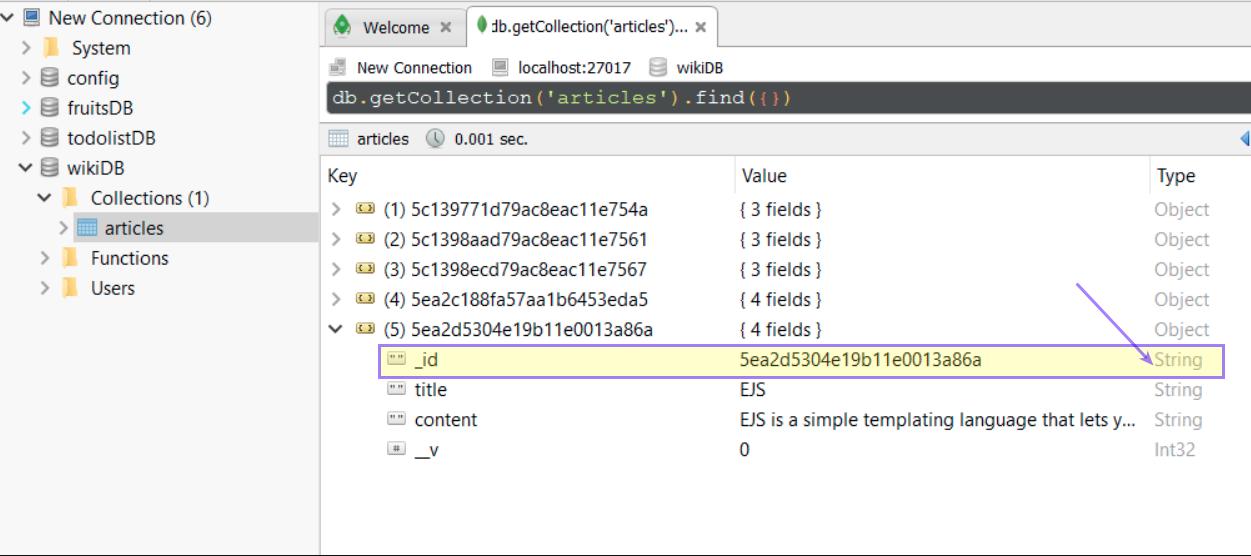
As per the solution below by Mohammed Yousry, I realised that I added the _id field manually using strings, as I was following along to a tutorial. Hence not allowing MongoDB to create the _id field instead, as an ObjectId. Therefore, my _id field was of type String rather than ObjectId. So to resolve this, I deleted all documents from the database and re-added them, using POSTMAN with the POST method I created - for creating/adding a new article document to the database, providing only the title and content fields in the request body. Hence allowing MongoDB to create the _id field instead, for each article document. Now in the database the _id field is of type ObjectId. This still hasn't resolved my issue fully, but it's one step further. Still working on reaching a solution. Please refer to the discussions below in the solution section.


 已为社区贡献1260条内容

所有评论(0)