与 Vue 一起扬帆出海——我对大班的看法
小时候,我花了很多时间在我的 Apple 2 上。我玩过很多不同的游戏,但我最喜欢的游戏之一是Taipan!。
[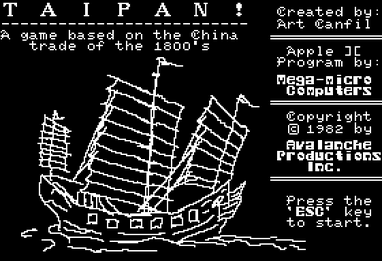 ](https://res.cloudinary.com/practicaldev/image/fetch/s--CMRQey0t--/c_limit%2Cf_auto%2Cfl_progressive%2Cq_auto%2Cw_880/https://static.raymondcamden.com/images/2019 /08/TaipanGameTitle.png)
按来源,合理使用,https://en.wikipedia.org/w/index.php?curidu003d8888638
Taipan 是一个位于远东的基本贸易模拟器。你有一艘有存储能力的船,可以在多个港口买卖货物。游戏有基本的战斗,放债人,以及其他让事情变得有趣的细节,但对我来说,我的乐趣来自纯粹的磨砺。我会在晚上玩几个小时,看看我能赚多少钱。 (当然,一旦我发现了放债人的漏洞,致富就变得微不足道了。)
作为我今年“获得更多 Vue 应用程序体验”基本目标的一部分,我决定(尽我所能)使用 Vue.js 来重建游戏。不过,我不想要精确的重建,在我的版本中我做了一些更改。
-
首先,我摆脱了战斗。我_讨厌_游戏的战斗方面,因为它感觉非常缓慢。我喜欢它为游戏增加了风险的事实,但不喜欢它如何扼杀节奏。在我的版本中,您可能会受到海盗的攻击,但他们只会造成破坏并窃取一些商品。
-
我摆脱了放债人。这是一个有趣的方面,但在到达港口时也减慢了游戏的节奏。
-
我通过李渊摆脱了“动摇”的一面。我也喜欢这个方面,最终可能会把它带回来。
-
我摆脱了仓库。对我来说,这总是让人分心。
-
我也跳过了使我的一件商品非法的行为。
差不多就是这样,但还有其他一些较小的模块。与原始游戏相比,我的游戏感觉更加活泼和快速,这让我很喜欢玩它。
我还尝试尽可能多地使用键盘。你可以在这里阅读我在该领域的工作:Working with the Keyboard in your Vue App。我没有让 everything 键盘可以访问,但是从一个端口到另一个端口的导航可以完全通过键盘完成,并且在演奏时感觉它是一个非常好的设置。所以在我进入代码之前,如果你想尝试一下,你可以在这里玩:
https://taipan.raymondcamden.now.sh/
您可以在此处查看源代码:
https://github.com/cfjedimaster/vue-demos/tree/master/taipan/
好的,让我们看一下代码。我不会详细介绍每一行,而是在高层次上谈论(对我而言)更有趣的部分。
Taipan 同时使用了 Vue Router 和 Vuex。我的路由器使用没什么特别的。有一条回家路线向您介绍游戏。只询问您的姓名的“设置”路线。然后游戏路线就完成了大部分工作。接下来是处理从一个港口到另一个港口的“旅行”路线。最后有一条游戏结束路线,显示您的最终统计数据。
我对 Vuex 的使用很有趣。与我的Lemonade Stand游戏一样,我花了很多时间思考应该在我的观点中加入什么与应该进入商店。我绝对认为我有一些不应该存在的观点。我认为 Vue 开发的这个特殊方面会随着应用程序的迭代而改变。
让我们看看游戏是如何发生的。每个回合由以下逻辑组成。
-
首先,我要求 Vuex 考虑随机事件。这确实是整个游戏中最困难的方面。核心“转向、买入、卖出”等逻辑并不太难。但是处理“特殊事件”肯定是有问题的。
-
我的视图提示输入。这可以是以下之一 - 购买商品、出售商品、修复损坏、升级船舶或移动到另一个港口。
“提示输入”方面与键盘有关。我的解决方案涉及根据您正在做的当前“状态”显示菜单。所以最初的状态是 - 显示菜单。但是如果你想买东西,我会切换到另一个菜单,提示你要数量和好。您可以在 Game.vue 的布局中看到这一点。
<template>
    <div>
        <p>
            The date is {{ date }}, Captain {{captain}}. You are currently docked at {{ port }}.
        </p>

        <div class="container">
            <Stats />
            <Hold />
            <Prices />
        </div>

        <p v-if="canUpgrade">
            <strong>Good News!</strong> You can upgrade your ship for {{ upgradeCost }}.
            <span v-if="money < upgradeCost">Unfortunately you do not have the funds.</span>
            <span v-else><button @click="doUpgrade">Purchase Upgrade</button></span>
        </p>

        <p v-if="!keyState">
            <b>Menu:</b> Type <code>B</code> to buy, <code>S</code> to sell,
            <span v-if="damage"><code>R</code> to repair, </span>
            <code>M</code> to go to another port or <code>Q</code> to quit.
        </p>

        <p v-if="keyState == 'Move'">
            Move to
                <span v-for="(p, i) in ports" :key="i">{{ i+1 }}) {{ p }} </span>
            <br/>
            Or <code>C</code> to cancel.
        </p>

        <p v-if="keyState == 'Buy'">

            Buy
                <input v-model.number="toBuyQty" type="number" min="0"> units of
                <select v-model="toBuy">
                <option v-for="(s, i) in prices" :value="s" :key="i">{{ s.name }}</option>
                </select>
                for {{ purchasePrice | num }}.
                <button :disabled="cantBuy" @click="buyGoods">Purchase</button>
            <br/>
            Or <code>C</code> to cancel.
        </p>

        <p v-if="keyState == 'Sell'">

            Sell
                <input v-model.number="toSellQty" type="number" min="0"> units of
                <select v-model="toSell">
                <option v-for="(s, i) in prices" :value="s" :key="i">{{ s.name }}</option>
                </select>
                for {{ sellPrice | num }}.
                <button :disabled="cantSell" @click="sellGoods">Sell</button>
            <br/>
            Or <code>C</code> to cancel.
        </p>

        <p v-if="keyState == 'Repair'">

            Spend
                <input v-model.number="toRepairQty" type="number" min="0"> on repairs.
                <button :disabled="cantRepair" @click="doRepair">Repair</button>
            <br/>
            Or <code>C</code> to cancel.
        </p>

    </div>
</template>
进入全屏模式 退出全屏模式
我将我的很多显示内容移到了组件中,这使该页面的布局主要集中在响应您的输入上。keyState值是我处理动态更改当前菜单的方式。这是 JavaScript:
import Hold from '@/components/Hold.vue'
import Prices from '@/components/Prices.vue'
import Stats from '@/components/Stats.vue'

export default {
    data() {
        return {
            keyState:null,
            ray:null,
            toBuy:null,
            toBuyQty:0,
            toSell:null,
            toSellQty:0,
            toRepairQty:0
        }
    },
    components:{
        Hold, Prices, Stats
    },
    created() {
        this.$store.commit('newTurn');
        window.addEventListener('keypress', this.doCommand);
    },
    destroyed() {
        window.removeEventListener('keypress', this.doCommand);
    },
    computed: {
        cantBuy() {
            return (
                this.toBuy === null
                ||
                (this.toBuy.price * this.toBuyQty) > this.money
                ||
                this.toBuyQty + this.shipUsedSpace > this.holdSize
            )
        },
        cantRepair() {
            return this.toRepairQty > this.money;
        },
        cantSell() {
            if(this.toSell === null) return true;
            let avail = 0;
            for(let i=0;i<this.hold.length;i++) {
                if(this.hold[i].name === this.toSell.name) {
                    avail = this.hold[i].quantity;
                }
            }
            console.log('avail is '+avail);
            return (
                this.toSellQty > avail
            )
        },
        canUpgrade() {
            return this.$store.state.offerUpgrade;
        },
        captain() {
            return this.$store.state.name;
        },
        damage() {
            return this.$store.state.damage;
        },
        date() {
            return this.$store.getters.gameDate;
        },
        hold() {
            return this.$store.state.hold;
        },
        holdSize() {
            return this.$store.state.holdSize;
        },
        money() {
            return this.$store.state.money;
        },
        port() {
            return this.$store.state.port.name;
        },
        ports() {
            return this.$store.getters.ports;
        },
        prices() {
            return this.$store.state.prices;
        },
        purchasePrice() {
            if(!this.toBuy) return 0;
            /* disabled due to warning about unexpected side effect, which makes sense
            if(this.toBuyQty < 0) this.toBuyQty = 0;
            */
            return this.toBuy.price * this.toBuyQty;
        },
        repairCost() {
            return this.$store.getters.repairCost;
        },
        sellPrice() {
            if(!this.toSell) return 0;
            return this.toSell.price * this.toSellQty;
        },
        shipUsedSpace() {
            return this.$store.getters.shipUsedSpace
        },
        upgradeCost() {
            return this.$store.getters.upgradeCost;
        }
    },
    methods: {
        buyGoods() {
            //in theory not needed due to other checks
            if(!this.toBuy) return;
            if(this.toBuyQty <= 0) return;

            this.$store.commit('purchase', { good: this.toBuy, qty: this.toBuyQty });
            this.keyState = null;
        },
        doUpgrade() {
            this.$store.commit('upgrade', { cost: this.upgradeCost });
        },
        sellGoods() {
            if(!this.toSell) return;
            if(this.toSellQty <= 0) return;

            this.$store.commit('sale', { good: this.toSell, qty: this.toSellQty });
            this.keyState = null;
        },
        doCommand(e) {
            let cmd = String.fromCharCode(e.keyCode).toLowerCase();

            /*
            How we respond depends on our state. If keyState is null,
            it meand we aren't doing anything, so BSM are valid.
            */
            if(!this.keyState) {

                if(cmd === 'b') {
                    console.log('Buy');
                    this.toBuy = null;
                    this.toBuyQty = 0;
                    this.keyState = 'Buy';
                }

                if(cmd === 's') {
                    console.log('Sell');
                    this.toSell = null;
                    this.toSellQty = 0;
                    this.keyState = 'Sell';
                }

                if(cmd === 'm') {
                    console.log('Move');
                    this.keyState = 'Move';
                }

                if(cmd === 'r') {
                    console.log('Repair');
                    this.keyState = 'Repair';
                }

                if(cmd === 'q') {
                    this.$router.replace('/end');
                }
                return;
            }

            //keystate for move
            if(this.keyState === 'Move') {

                if(cmd === 'c') {
                    this.keyState = null;
                    return;
                }

                cmd = parseInt(cmd, 10);
                for(let i=0;i<this.ports.length;i++) {
                    if(cmd-1 === i) {
                        console.log('going to move to '+this.ports[i]);
                        this.$router.replace({ name:'travel',
                        params: {
                            destination: this.ports[i],
                            destinationIndex: i
                        } });
                    }
                }
            }

            //keystate for buy
            if(this.keyState === 'Buy' || this.keyState === 'Sell') {

                if(cmd === 'c') {
                    this.keyState = null;
                    return;
                }

            }

        },
        doRepair() {
            // in theory not needed
            if(this.toRepairQty >= this.money) return;
            if(this.toRepairQty >= this.repairCost) this.toRepairQty = this.repairCost;

            this.$store.commit('repair', { total: this.toRepairQty, repairCost: this.repairCost });
            this.keyState = null;
        }


    }
}
进入全屏模式 退出全屏模式
这是相当多的,我很抱歉。可能最有趣的方面是doCommand,我在其中响应键盘事件并根据当前状态处理输入。我觉得这可以做得更好,但对于初稿,我很满意。
我不满意的部分是computed中的所有项目,它们只是简单地接触到 Vuex 状态及其吸气剂。我知道我可以使用mapState让它更干净一些,但我决定暂时搁置。 (我将强迫自己在下一个演示中使用它。)
除此之外,虽然这里的大部分代码只是处理输入并与商店交互。这是我很棒的设计的快速屏幕截图。
[ ](https://res.cloudinary.com/practicaldev/image/fetch/s--ij-_6IzO--/c_limit%2Cf_auto%2Cfl_progressive%2Cq_auto%2Cw_880/https://static. raymondcamden.com/images/2019/08/taipan1.png)
让我们看一下Travel.vue。这是您在端口之间移动时看到的临时屏幕。
<template>
    <div>
        <h1>On the sea...</h1>
        <p>
            You are on the way to {{ destination }}.
        </p>
        <p v-if="randomEvent">
            {{ randomMessage }}
        </p>

        <p v-if="damage >= 100">
            <strong>Your ship is completely destroyed!</strong>
        </p>
    </div>
</template>

<script>
export default {
    computed: {
        damage() {
            return this.$store.state.damage;
        },
        destination() {
            return this.$route.params.destination;
        },
        randomEvent() {
            return this.randomMessage !== '';
        },
        randomMessage() {
            return this.$store.state.randomMessage;
        }
    },
    created() {
        // check for random event
        this.$store.commit('generateRandomEvent', {destination: this.$route.params.destination});

        // this feels icky
        let destinationIndex = this.$route.params.destinationIndex;
        if(this.$store.state.newPortIndex) {
            destinationIndex = this.$store.state.newPortIndex;
        }

        let timeToWait = 1000;
        // if there was a special event, we need more time to read, and possibly end the game
        if(this.randomEvent) {
            timeToWait += 2000;
        }

        setTimeout(() => {
            console.log('done waiting');
            if(this.damage >= 100) {
                this.$router.replace('/end');
            } else {
                this.$store.commit('setPort', destinationIndex);
                this.$router.replace('/game');
            }
        }, timeToWait);
    }
}
</script>
进入全屏模式 退出全屏模式
最有趣的方面是created中的setTimeout。这个想法是你进入这个视图,然后自动移出。通常这会在一秒钟内完成,但如果发生随机事件,我会将其延迟到总共三秒钟,以便您有时间阅读发生的事情。而且由于随机事件实际上可以为您结束游戏,因此我有一些逻辑可以移动到结束视图。
最后,我们来看看这家店。我将把它分解一下,而不是仅仅粘贴整个东西。
/*
starting year for the game
*/
const BASE_YEAR = 1900;

const MONTHS = ["January", "February", "March", "April", "May", "June",
             "July", "August", "September", "October", "November", "December"];

/*
Ports. For now ports just have names but I may add boosts later, like port
X for good Y is good.
*/
const PORTS = [
  {
    name:'Bespin'
  },
  {
    name:'Dagobah'
  },
  {
    name:'Naboo'
  },
  {
    name:'Coruscant'
  },
  {
    name:'New Boston'
  }
];

/*
Goods have a value range representing, generally, what they will sell for.
illegal=true means there is a chance it will be stolen
*/
const GOODS = [
  {
    name:'General',
    salesRange: [5, 20],
    illegal:false
  },
  {
    name:'Arms',
    salesRange: [60, 120],
    illegal:false
  },
  {
    name:'Silk',
    salesRange: [200, 500],
    illegal:false
  },
  {
    name:'Spice',
    salesRange: [3000, 6000],
    illegal:true
  }

];

//how much each upgrade adds
const HOLD_UPGRADE = 10;

function getRandomInt(min, max) {
  min = Math.ceil(min);
  max = Math.floor(max);
  return Math.floor(Math.random() * (max - min)) + min; //The maximum is exclusive and the minimum is inclusive
}
进入全屏模式 退出全屏模式
我的商店从影响游戏玩法的各种常量开始。你可以看到港口(是的,我从旧游戏中转移了一点)、货物等等。港口现在只是名称,但我的意图是允许港口“偏爱”某些商品。商品支持价格下跌的范围,您可以看到我将Spice标记为非法,但尚未实施。最后我得到了一个随机效用函数,getRandomInt。
这是我的商店状态:
state: {
    name:'',
    port:null,
    money:100000,
    turn:0,
    holdSize:100,
    hold:[],
    prices: [],
    damage:0,
    randomMessage:'',
    newPortIndex:null
},
进入全屏模式 退出全屏模式
其中大部分是不言自明的,但请注意最后两项,randomMessage和newPortIndex,仅用于旅行时发生的特殊事件。
现在让我们看看各种突变。首先是bootstrap,它只是为新游戏设置东西。
bootstrap(state) {
    state.port = PORTS[0];
    GOODS.forEach(g => {
    state.hold.push({name:g.name, quantity: 0});
    });
},
进入全屏模式 退出全屏模式
接下来是我的特殊事件处理:
/*
A random event is one of the following:
    Nothing (ie nothing happened, no event
    Storm sends you to X port
    Storm damages you Y percentage points
    Pirates attack - steal items + Y damage

Also note we skip random events for the first ten turns or so

*/
generateRandomEvent(state, info) {
    state.randomMessage = '';
    state.offerUpgrade = false;

    if(state.turn < 10) return;

    let rand = getRandomInt(0, 100);

    //nothing
    if(rand < 60) return;

    if(rand >= 60 && rand < 70) {
        console.log('storm redirection');
        let newPort = null;

        while(!newPort || newPort.name === info.destination.name) {
            state.newPortIndex = getRandomInt(0, PORTS.length);
            newPort = PORTS[state.newPortIndex];
        }
        state.randomMessage = 'A storm has blown you off course to ' + newPort.name;
        console.log(state.randomMessage);
    }

    if(rand >= 70 && rand < 80) {
        let damage = getRandomInt(1, 12);
        console.log('Storm damages you for '+damage);
        state.randomMessage = 'A violent storm damages your ship!';
        state.damage += damage;
    }

    if(rand >= 80 && rand < 90) {
        //note, if your hold is empty, we ignore everything;
        //now get the hold and filter to items with stuff
        let heldItems = state.hold.filter(h => {
            return h.quantity > 0;
        });
        if(heldItems.length === 0) return;

        console.log('pirates attack and damage and steal shit');
        //first, do damange, bit less than storm to be nice
        let damage = getRandomInt(1, 7);
        console.log('Storm damages you for ' + damage);

        console.log('state.hold with items',JSON.stringify(heldItems));
        //select the index to steal
        let stealIndex = getRandomInt(0, heldItems.length);
        console.log('going to steal from '+JSON.stringify(heldItems[stealIndex]));
        let stealAmt = getRandomInt(1, heldItems[stealIndex].quantity + 1);
        console.log('stealing '+stealAmt);
        let target = -1;
        for(let i=0;i<state.hold.length;i++) {
            if(heldItems[stealIndex].name === state.hold[i].name) target = i;
        }

        state.randomMessage = 'Pirates attack your ship and steal some cargo!';
        state.damage += damage;
        state.hold[target].quantity -= stealAmt;
    }

    if(rand >= 90) {
        state.offerUpgrade = true;
    }

},
进入全屏模式 退出全屏模式
如您所见,我基本上只是选择一个随机数,然后根据结果,可能会发生一些不同的事情。其中一个(offerUpgrade)实际上会在您到达港口时触发,而不是“在运输途中”。
其余的突变很有趣,因为主要应用商品更改并进行维修或升级。在getters部分,我认为这些部分很整洁。
gameDate(state) {
    let years = Math.floor((state.turn-1)/12);
    let month = (state.turn-1) % 12;
    return `${MONTHS[month]} ${BASE_YEAR + years}`;
},
进入全屏模式 退出全屏模式
gameDategetter 是我处理显示逐月和逐年推进的日期的方式。
rank(state) {
    // your final score is just based on money, cuz life
    if(state.money < 10000) return 'Deck Hand';
    if(state.money < 50000) return 'Ensign';
    if (state.money < 100000) return 'Lieutenant';
    if (state.money < 1000000) return 'Commander';
    //below is 10 million, just fyi ;)
    if (state.money < 10000000) return 'Captain';
    //below is 100 million, just fyi ;)
    if (state.money < 100000000) return 'Admiral';
    return 'Grand Admiral';
},
进入全屏模式 退出全屏模式
rankgetter 只是根据您赚到的钱返回一个标签。请注意,我在那里使用了注释来帮助我阅读大量数字。有一个数字分隔符的 ES 提案旨在使这更容易。例如,假设最后一个条件是:
if (state.money < 100_000_000) return 'Admiral';
进入全屏模式 退出全屏模式
不幸的是,这还没有得到很好的支持。最新的 Chrome 有它,但没有 Firefox。
最后一个有趣的地方是处理船舶升级的成本:
upgradeCost(state) {
    // the cost to upgrade is based on the size of your ship;
    let cost = state.holdSize * 200 * (1 + getRandomInt(5,10)/10);
    return Math.floor(cost);
}
进入全屏模式 退出全屏模式
我的目标是让它变得昂贵,并且随着你变得越来越大,它会逐渐变得昂贵。当人们玩游戏并提供反馈时,我会对此进行调整。
无论如何,我希望这个演示对人们来说很有趣,并且一如既往,我非常愿意接受对我的设计决策的反馈和批评!请在下面给我留言,让我知道您的想法!
标题照片由Joshua J. Cotten在 Unsplash 上拍摄

Vue社区为您提供最前沿的新闻资讯和知识内容
更多推荐
 0
0 0
0- 0



 已为社区贡献6083条内容

所有评论(0)