使用 Python AIOHTTP 进行异步 Web 抓取
你好👋,欢迎光临!看过_Asynchronous Web Scraping With Python GRequests_之后,今天我们使用了我所承诺的不同的方法;我们正在使用 aiohttp
在新选项卡中打开文章,因为我将引用它。
所以我们将使用两个主要模块,一个是标准python库。
🔸aiohttp
它是一个使用 Python 和asyncio构建 web-client 和 web-server 的库。
#Ad
ScraperAPI 是一个 Web 抓取 API 工具,可与 Python、Node、Ruby 和其他流行的编程语言完美配合。
Scraper API 处理数十亿个与 Web 抓取相关的 API 请求,如果您使用此链接从他们那里获取产品,我会有所收获。
🔸asyncio
它是 Python 3 的内置库。这意味着如果你有 Python 3,它已经安装了。从 Python 3.5 开始,使用异步代码很方便。
asyncio代表异步输入输出。这是一个非常强大的概念,可以在您工作 IO 时使用。通过这种方式与 Web 或 Telegram 等外部 API 进行交互非常有意义。
让我们不要浪费时间并导入必要的模块
import aiohttp
import asyncio
from timeit import default_timer
如果您没有它,您可能需要在继续之前使用pip install aiohttp。
我们定义了与本文同步文件中使用的相同且准确的 URL;
urls = ['https://nytimes.com',
            'https://github.com',
            'https://google.com',
            'https://reddit.com',
            'https://hashnode.com',
            'https://producthunt.com']
现在创建一个预先附加了async的普通函数:async def main():并在下面添加下面的代码,我稍后会解释;
该函数将帮助我们获取 HTTP 状态响应,稍后我们将定义一个main()来等待该函数的结果并帮助我们创建和运行事件循环。
async def fetch_status():
    start_time = default_timer()

    async with ClientSession() as session:
        for url in urls:
            async with session.get(url) as response:
                print(f"[+] Getting Link [+] {url}  === {response.status} ")

    time_elapsed = default_timer() - start_time
    print("It took --- {} seconds --- for all the links"
      .format(time_elapsed))
为了具有异步功能,我们使用async关键字。
default_timer():这将在执行时返回默认时间。
我们使用with关键字打开一个客户端会话,该关键字会自动为我们处理会话的打开和关闭,然后我们遍历 URL 以获取响应状态。
我们稍后会计算这样做所用的时间。
现在让我们创建main()函数,因为它是必需的并且非常重要,它基本上会调用fetch_status()。
async def main():
        await fetch_status()
现在,如果一切正常,我们创建event loop并运行我们的文件;
loop = asyncio.get_event_loop()
loop.run_until_complete(main())
要运行异步函数(协程),您必须使用事件循环调用它。事件循环:您可以将事件循环视为运行异步任务和回调、执行网络 IO 操作和运行子进程的函数。
运行上面的脚本会产生; 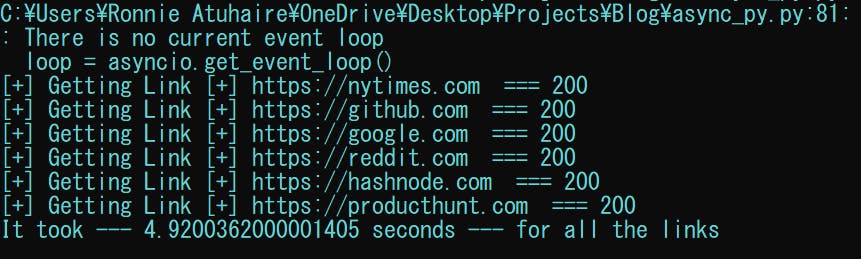 在撰写本文时,我正在使用
Python 3.10,而您的可能是完美的(在3.5-3-8之间),您可能看不到上面的那些折旧警告。
但是,如果您不想在运行文件时看到它们,可以将其添加到顶部;
import warnings
warnings.filterwarnings("ignore")
所以我们的整个文件是;
import aiohttp
import asyncio
from timeit import default_timer
from aiohttp import ClientSession
import warnings
warnings.filterwarnings("ignore")

urls = ['https://nytimes.com',
            'https://github.com',
            'https://google.com',
            'https://reddit.com',
            'https://hashnode.com',
            'https://producthunt.com']

async def fetch_status():
    start_time = default_timer()

    async with ClientSession() as session:
        for url in urls:
            async with session.get(url) as response:
                print(f"[+] Getting Link [+] {url}  === {response.status} ")

    time_elapsed = default_timer() - start_time
    print("It took --- {} seconds --- for all the links"
      .format(time_elapsed))


async def main():
        await fetch_status()

loop = asyncio.get_event_loop()
loop.run_until_complete(main())
🔸笔记和资源
而已!在此处找到 GitHub 存储库。
📌 在这里阅读我的第一篇文章。
📌asyncio官方文档
📌aiohttp官方文档
🔸 结论
再一次,希望你今天从我的小衣橱里学到了一些东西。
请考虑订阅或关注我的相关内容,尤其是关于技术、Python 和通用编程的内容。
你可以通过给我买杯咖啡来支持这个免费内容来表达额外的爱,我也对合作伙伴、技术写作角色、协作和 Python 相关的培训或角色持开放态度。
 📢 你也可以关注我Twitter:♥♥等你! 🙂

Python社区为您提供最前沿的新闻资讯和知识内容
更多推荐

 0
0 0
0- 0


 已为社区贡献126440条内容

所有评论(0)