使用 Shodan API 编写脚本
在我写的关于 Shodan 的文章之后,我承诺会回来更高级地介绍使用他们的 API,我将专门做一个 Python 实现。
如果你不喜欢 Python,他们有一堆其他的语言和客户端在这里列出。
如果您错过了我关于 Shodan 的介绍性文章,请在此处阅读,并希望您已经创建了一篇文章,因为您需要一个 API 密钥,该密钥对于基本帐户是免费的,可以帮助我们访问

任何连接到互联网的设备都必须显示一些关于自身的信息。这可能是相对有限的,因为聪明的系统配置可以阻止大多数不受欢迎的请求。在某些设备上,可能能够扫描端口以显示诸如在网络服务器上运行的服务或连接到无线网络的网络摄像头的名称等信息。
所以我们将看到两种不同的用例,一种是关于使用 API 进行基本搜索,另一种是关于使用构面创建高级搜索。 Nginx 和 Apache 是流行的 Web 服务器,用于将网页传送到用户的浏览器。

🔸基本搜索
因此,让我们创建一个 python 文件并添加以下我将在稍后解释的代码;
import shodan
SHODAN_API_KEY = "your API key"

api = shodan.Shodan(SHODAN_API_KEY)

try:
    # Search Shodan
    results = api.search('apache')
    total_results = results['total']
#     print(results)

    # Show the results
    print('Total results found: {}'.format(total_results))

    matches = results['matches']
    for result in matches:
        print('IP: {}'.format(result['ip_str']))
        print(result['data'])
        print('')
except shodan.APIError as e:
    print('Error: {}'.format(e))
从帐户仪表板获取您的 API 密钥并替换字符串“您的 API 密钥”
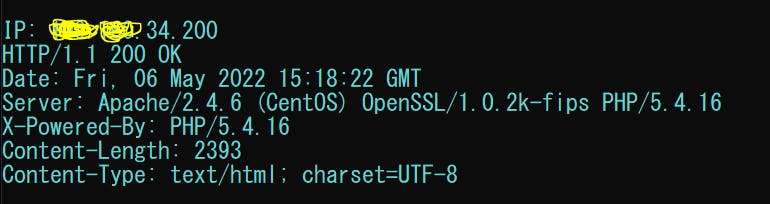
我们使用api.search()方法搜索所有 apache 网络服务器,返回一个list的 pythondicts。我们循环并查询我们需要的所有数据。您可以取消注释以查看不同的结果。
matches变量返回所有匹配的结果字典,然后我们打印出我们想要的。我们将代码包装在 try 和 except 块中以进行错误处理。
如果我们运行脚本;
🔸高级搜索
Shodan API 的强大能力是能够获取一条关于各种属性的摘要信息。例如,如果您想了解哪些国家/地区拥有最多的 Apache 服务器,那么您将使用构面。
如果你想知道哪个版本的nginx最受欢迎,你会使用 facets。或者,如果您想查看 Microsoft-IIS 服务器的正常运行时间分布,那么您将使用构面。
现在创建一个新文件并添加;
import shodan
import sys

# Configuration
API_KEY = 'your API key'

# The list of properties we want summary information on
FACETS = [
    'org',
    'domain',
    'port',
    'asn',

    # We only care about the top 3 countries, this is how we let Shodan know to return 3 instead of the
    # default 5 for a facet. If you want to see more than 5, you could do ('country', 1000) for example
    # to see the top 1,000 countries for a search query.
    ('country', 3),
]

FACET_TITLES = {
    'org': 'Top 5 Organizations',
    'domain': 'Top 5 Domains',
    'port': 'Top 5 Ports',
    'asn': 'Top 5 Autonomous Systems',
    'country': 'Top 3 Countries',
}

# Input validation
if len(sys.argv) == 1:
    print('Usage: %s <search query>' % sys.argv[0])
    sys.exit(1)

try:
    # Setup the api
    api = shodan.Shodan(API_KEY)

    # Generate a query string out of the command-line arguments
    query = ' '.join(sys.argv[1:])

    # Use the count() method because it doesn't return results and doesn't require a paid API plan
    # And it also runs faster than doing a search().
    result = api.count(query, facets=FACETS)

    print('Shodan Summary Information')
    print('Query: %s' % query)
    print('Total Results: %s\n' % result['total'])

    # Print the summary info from the facets
    for facet in result['facets']:
        print(FACET_TITLES[facet])

        for term in result['facets'][facet]:
            print('%s: %s' % (term['value'], term['count']))

        # Print an empty line between summary info
        print('')

except Exception as e:
    print('Error: %s' % e)
    sys.exit(1)
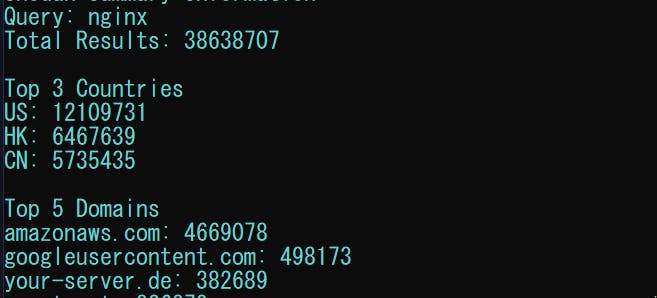
上面的脚本展示了如何使用shodan.Shodan.count()方法搜索 Shodan 而不返回任何结果,以及要求 API 返回有关组织、域、端口、ASN 和国家的分面信息。
请参阅我的评论以获取更多详细信息。
如果我们通过提供这样的参数来运行脚本;py facets.py nginx我们会得到一些相关的东西;
这篇文章中的所有代码都可以在这里找到;
🔸 结论
再一次,希望你今天从我的小衣橱里学到了一些东西。
请考虑订阅或关注我的相关内容,尤其是关于技术、Python 和通用编程的内容。
你可以通过给我买杯咖啡来支持这个免费内容来表达额外的爱,我也对合作伙伴、技术写作角色、协作和 Python 相关的培训或角色持开放态度。
 📢 你也可以在Twitter上关注我:♥ ♥ 等着你! 🙂

Python社区为您提供最前沿的新闻资讯和知识内容
更多推荐

 0
0 0
0- 0


 已为社区贡献126442条内容

所有评论(0)