如何使用 Python 在区块链上部署智能合约
依赖
Python
web3.py:Web3.py是一个用于与以太坊交互的 Python 库。
它通常出现在去中心化应用程序 (dapp) 中,以帮助发送交易、与智能合约交互、读取块数据以及各种其他用例。
安装:
点安装 web3
** _ Py-solc-x | Py-solc: _ **
Py-solc 是用于 solc Solidity 编译器的 Python 包装器和版本管理工具
安装:
点安装 py-solc-x
甘纳许用户界面 |客户端
安装:
- Ganache 桌面
下载链接

或
- Ganache-cli :
pip install ganache-cli
让我们开始吧
1. 在 VSCode 等代码编辑器中打开您放置智能合约的目录。
2. 创建solidity文件SmartContractDemo.sol。
// SPDX-License-Identifier: MIT

pragma solidity ^0.6.0;

contract SmartContractDemo {
    struct Person {
        string name;
        string dateOfBirth;
    }

    Person[] public idCard;

    function numberOfEntries() public view returns (uint256) {
        return idCard.length;
    }

    function store(string memory _name, string memory _birthday) public {
        idCard.push(Person(_name, _birthday));
    }

    function changeData(
        uint256 index,
        string memory _name,
        string memory _birthday
    ) public {
        require(index <= numberOfEntries(), "Given index not present");
        idCard[index] = Person(_name, _birthday);
    }

    function retrieve(uint256 index)
        public
        view
        returns (string memory, string memory)
    {
        require(index <= numberOfEntries(), "Given index not present");
        return (idCard[index].name, idCard[index].dateOfBirth);
    }
}
3. 接下来创建一个python文件deploy.py。在这里,我们编写了将合约推送到区块链所需的代码。
4. 首先添加下面的代码来导入python文件中的web3和py-solc-x:
from web3 import Web3
from solcx import compile_standard, install_solc

import json
5. 读取 SmartContractDemo.sol 的内容并将其存储在单独的变量中:
# extract the content of SmartContractDemo.sol
with open("./SmartContractDemo.sol", "r") as file:
    smart_contract_demo = file.read()
6. 运行以下代码安装 solc 并编译solidity代码:
install_solc("0.6.0")

# Solidity source code
compiled_sol = compile_standard(
    {
        "language": "Solidity",
        "sources": {"SmartContractDemo.sol" : { "content" : smart_contract_demo_file }},
        "settings": {
            "outputSelection": {
                "*": {
                    "*": ["abi","metadata","evm.bytecode","evm.sourceMap"]
                }
            }
        }
    },
    solc_version="0.6.0",
)
7. 下面的代码会将编译后的_code 作为一个新的 JSON 文件放入。
with open("compiled_code.json","w") as file:
    json.dump(compiled_sol,file)
8. 现在,在我们部署这个合约之前,我们首先需要 abi 和 bytecode,我们可以从compiled_code 中获取它们。这可以通过使用以下代码来实现:
# get abi
abi = compiled_sol["contracts"]["SmartContractDemo.sol"]["SmartContractDemo"]["abi"]

# bytecode
bytecode = compiled_sol["contracts"]["SmartContractDemo.sol"]["SmartContractDemo"]["evm"]["bytecode"]["object]
9. 连接到 Ganache:
要连接 ganache,我们需要一个 HTTP Provider URL、chain-id、公钥和私钥,它们将用于部署我们的智能合约。
如何获取 HTTP 提供者、chain-id、Transaction 账户的公私钥:
如果您使用的是 Ganache 用户界面
第 1 步:打开 Ganache 应用程序。
第 2 步:单击“快速启动”按钮。

 这就是 Ganache-UI 的样子
-
白色-轮廓框给我们RPC服务器即
http://127.0.0.1:7545 -
黄色-轮廓框给我们chain_id即
5777 -
红色-轮廓框标记帐户的公钥 例如,
0xE1584b4d8f1b0CeEF97190B296DaF446674A3d63 -
蓝色-轮廓框指向按钮将显示与给定帐户关联的私钥
或者
**如果您使用的是 Ganache-CLI **
第 1 步:打开终端,然后运行给定的命令:ganache-cli。
这将启动 ganache-cli 终端。

第 2 步:复制并记下与任何帐户、clain-id 和 RPC 服务器 url 关联的公钥和私钥,在我的例子中是http://127.0.0.1:8545。
重要提示:
-
Ganache 中提供的帐户仅用于开发和测试目的。请不要尝试进行实际交易。
-
私钥是高度机密的。因此,请妥善保管您的私钥。它允许用户访问钱包。
10. 管理私钥
添加私钥:
即使我们只是使用与 ganache 关联的私钥,为了最佳实践,我们应该始终避免在编码中对私钥进行硬编码。
因此,为了存储私钥,我们将其添加为环境变量,并使用 OS 模块将其提取到我们的 python 程序deploy.py中。
这样做:
-
在同一目录下,添加一个文件
.env -
打开
.env文件并写入:export $PRIVATE_KEY=<put your private key here>例如,
![[粘贴图片20220523145104.png]]
- 回到
deploy.py并在顶部导入这些模块:
![[粘贴图片20220523145413.png]]
11. 回到我们的deploy.py并将其与 ganache 连接。
# Connecting to ganache
w3 = Web3(Web3.HTTPProvider("http://127.0.0.1:8545"))
chain_id = 5777
my_address= "0xE1584b4d8f1b0CeEF97190B296DaF446674A3d63"
private_key = os.getenv("PRIVATE_KEY")
12. 现在让我们在 python 中创建合约并获取最新的交易。
# Creating contract in python
SmartContractDemo = w3.eth.contract(abi=abi, bytecode=bytecode)

# Get the latest transaction
transaction = SmartContractDemo.constructor().buildTransaction({
    "chainId": chain_id,
    "gasPrice": w3.eth.gas_price,
    "from": my_address,
    "nonce": nonce,
})
13. 最后,让我们签署我们的交易并部署它。
# Sign the transaction
signed_txn = w3.eth.account.sign_transaction(transaction, private_key=private_key)

print("Deploying Contract!")
# Sent it
tx_hash = w3.eth.send_raw_transaction(signed_txn.rawTransaction)

# Wait for the transaction to be mined, and get the transaction receipt
print("Waiting for Transaction to finish...")

tx_receipt=w3.eth.wait_for_transaction_receipt(tx_hash)
print(f"Done! Contract Deployed to {tx_receipt.contractAddress}")
做得好!我们已经成功学会了将智能合约部署到本地区块链。
与我们的智能合约交互
智能合约可以进行两种类型的交互:
1.调用 -> 模拟调用并获取返回值
- Transact -> 实际进行状态更改
让我们执行与我们的智能合约的交互:
1. 要从 SmartContractDemo 调用公共函数numberOfEnteries(),请返回deploy.py。
# Working with the contracts
smart_contract_demo = w3.eth.contract(address=tx_receipt.contractAddress, abi=abi)

print(f"Number of Enteries in idCard array is {smart_contract_demo.functions.numberOfEnteries()}")
2. 现在通过使用函数store()向idCard数组添加数据来改变状态:
store_transaction = smart_contract_demo.functions.store("Naruto", "10-10-1999").buildTransaction({
    "chainId": chain_id,
    "gasPrice": w3.eth.gas_price,
    "from":my_address,
    "nonce":nonce+1,
})

signed_store_txn = w3.eth.account.sign_transaction(
    store_transaction, private_key=private_key
)

signed_store_hash = w3.eth.send_raw_transaction(signed_store_txn.rawTransaction)

tx_receipt = w3.eth.wait_for_transaction_receipt(signed_store_hash)
每当我们进行状态更改时,必须首先使用我们的私钥对交易进行签名。
注意: 调用视图或纯公共函数不需要任何费用。而部署智能合约并进行更改区块链状态的函数调用会花费一定数量的 GAS 费用。
3. 最后再次调用numberOfEnteries()函数和retrieve()函数完成。
print(f"Number of Enteries in idCard array is {smart_contract_demo.functions.numberOfEnteries()}")

print(f"Person at 0th index in idCard array is {smart_contract_demo.functions.idCard(0)}")
4. 现在运行deploy.py文件(通过终端运行:python ./deploy.py)。
输出:
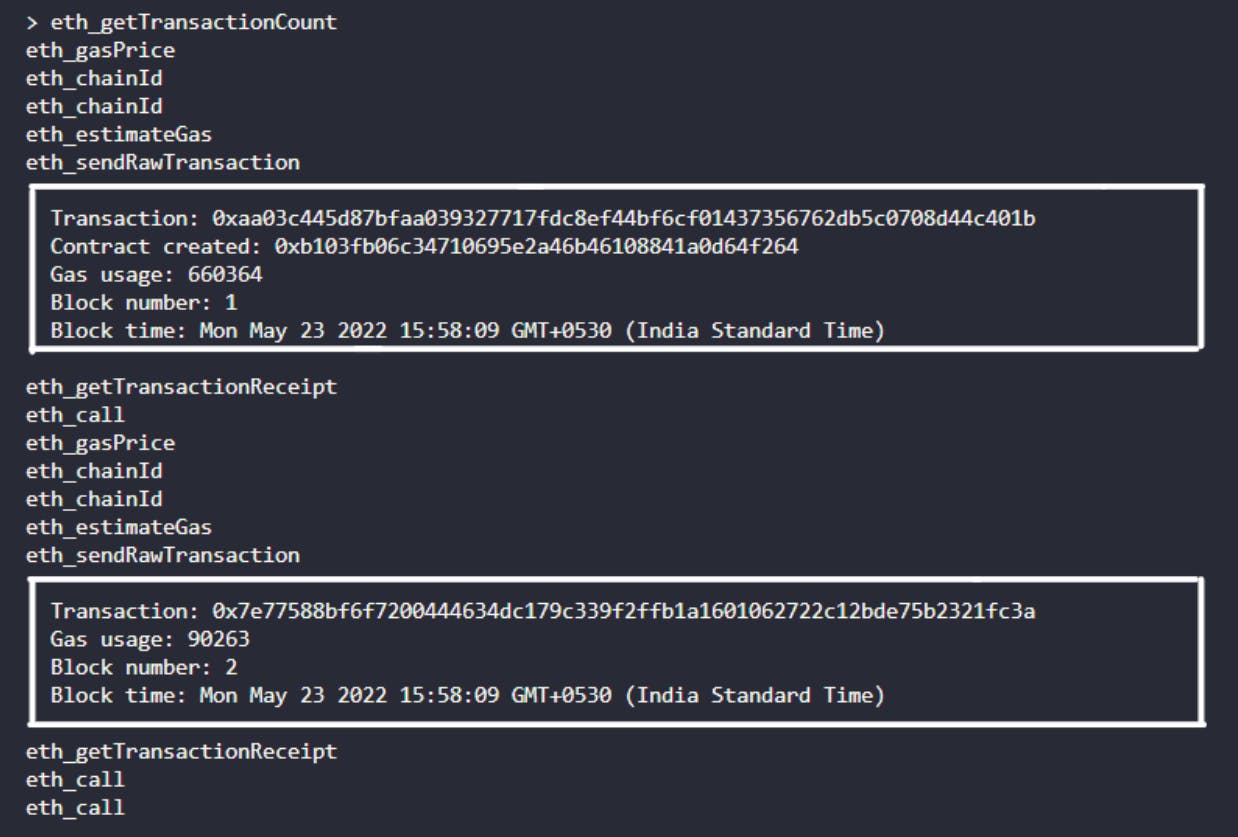
 现在,如果我们检查 ganache-cli,我们可以在其中找到两条交易记录,
-
第一笔交易是关于合约的创建。
-
进行第二次交易,我们调用 store 函数将个人详细信息添加到 idCard 数组。
资源链接
项目链接:
- GitHub:github.com/subrotokumar/SmartContractDemo
文档:
-
web3.py:web3py.readthedocs.io/en/stable
-
py-solc-x :solcx.readthedocs.io/en/latest
跟我联系
我希望这篇文章对您有所帮助。感谢您的阅读!

Python社区为您提供最前沿的新闻资讯和知识内容
更多推荐

 0
0 0
0- 0


 已为社区贡献126442条内容

所有评论(0)