使用python抓取IMDB数据(美汤)
·
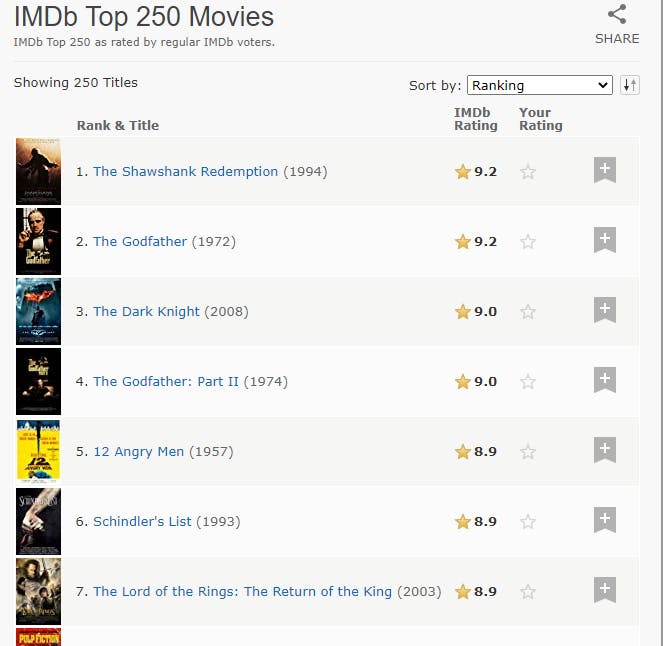
我这里用来拉数据的源网站是IMDB。从评分最高的电影页面。
所以这是网络上可用数据的屏幕截图
并将其存储在这样的excel文件中。
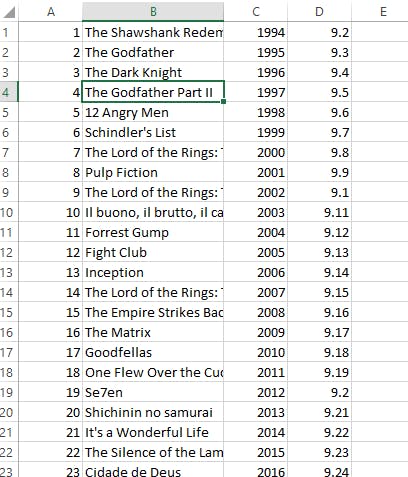 为了抓取数据,我使用了 requests 模块 和 beautiful soup python 库。并将数据保存在我使用 openpyxl 的 excel 文件中
Requests 模块: Requests 模块帮助我们向网页发出请求,并打印响应文本。
Beautiful Soup: Beautiful Soup 库用于从 HTML 和 XML 文件中提取数据。
安装美汤和openpyxl
     -pip3 install bs4

     - pip3 install openpyxl
使用openpyxl设置Excel文件以后存储数据
excel=openpyxl.Workbook()
sheet=excel.active
sheet.title='top rated movies'
从 IMDB 下载数据
导入请求模块使用请求获取源网站的源代码并将“源”转换为 HTML 文本
import requests

source = requests.get('https://www.imdb.com/chart/top/')

source.raise_for_status()

soup=BeautifulSoup(source.text,'html.parser')
查找所需数据的目标 HTML 标签
因为目标数据在表格标签中,并且在
使用名为 lister-list 的类,然后它在 td 标记中可用
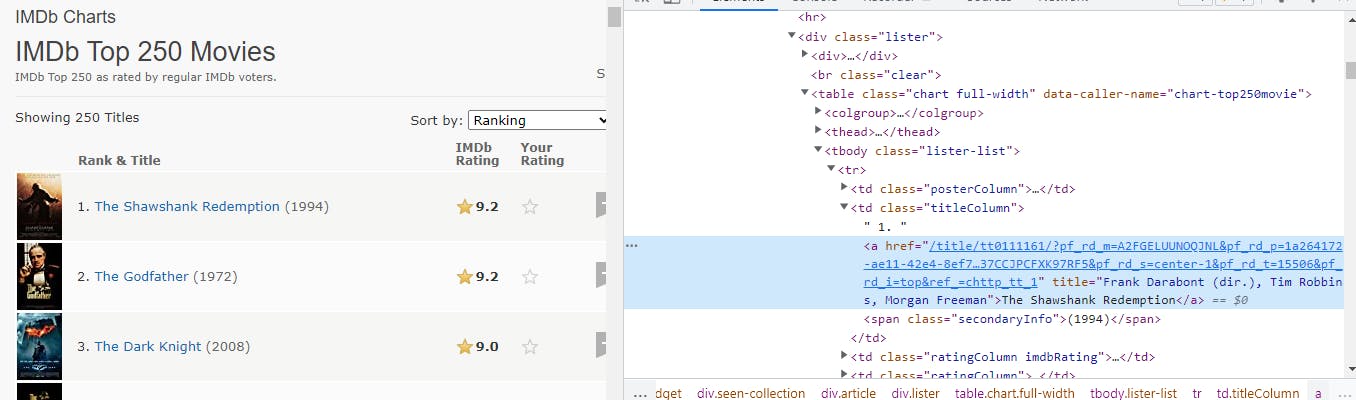
通过观察检查窗口,我们可以清楚地看到电影的标题包含在“a”标签中。
获取所有tr标签
movies=soup.find('tbody',class_='lister-list').find_all('tr')
find_all 方法给了我们一个列表,所以现在我们需要遍历它来获取适当的内容。
for movie in movies:
    title= movie.find('td',class_='titleColumn').a.text
    rank=movie.find('td',class_='titleColumn').get_text(strip=True).split('.')[0]
    year=movie.find('td',class_='titleColumn').span.text.strip('()')
    rating = movie.find('td',class_='ratingColumn imdbRating').strong.text
    sheet.append([rank,title,year,rating])
用名字保存excel文件
excel.save('imdbtoprated.xlsx')
完整源代码
from csv import excel
from turtle import title
from bs4 import BeautifulSoup
import requests
import openpyxl

excel=openpyxl.Workbook()
sheet=excel.active
sheet.title='top rated movies'

source = requests.get('https://www.imdb.com/chart/top/')
source.raise_for_status()

soup=BeautifulSoup(source.text,'html.parser')

movies=soup.find('tbody',class_='lister-list').find_all('tr')


for movie in movies:
    title= movie.find('td',class_='titleColumn').a.text
    rank=movie.find('td',class_='titleColumn').get_text(strip=True).split('.')[0]
    year=movie.find('td',class_='titleColumn').span.text.strip('()')
    rating = movie.find('td',class_='ratingColumn imdbRating').strong.text
    sheet.append([rank,title,year,rating])


excel.save('imdbtoprated.xlsx')
执行代码后,可以看到在当前目录下新建了一个excel文件。

Python社区为您提供最前沿的新闻资讯和知识内容
更多推荐

 0
0 0
0- 0


 已为社区贡献126445条内容

所有评论(0)