

At present almost everything is done using computers. Computers play a significant role in fields such as engineering, medicine, transportation and business. Therefore it is quite essential to have a good knowledge about programming languages as they act as a bridge between humans and the machines. Even though there are plenty of programming languages already, such as C++, Java, Ruby etc. Python is without a doubt the best beginner friendly language compared to others due to its simplicity. So in this article I would like to discuss about 4 simple yet fun and creative Python projects which a beginner can do to improve their Python skills.

1. BMI Calculator
This project involves taking user inputs and conditional statements. First of all let’s take a look at what we have to build here. Body Mass Index (BMI) is used to measure the body fat in an adult’s body. It is calculated by dividing one’s mass by the square of one’s height. The mathematical formula is as follows.
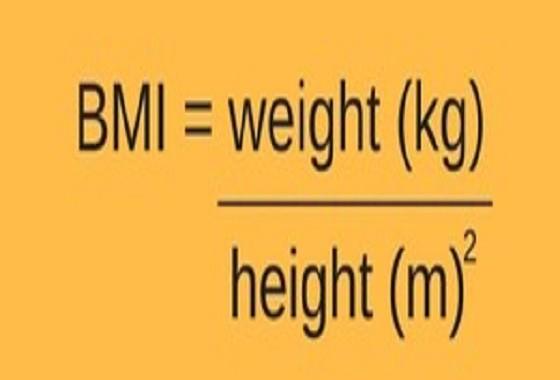
According to the BMI score one’s weight status can be categorized as follows.

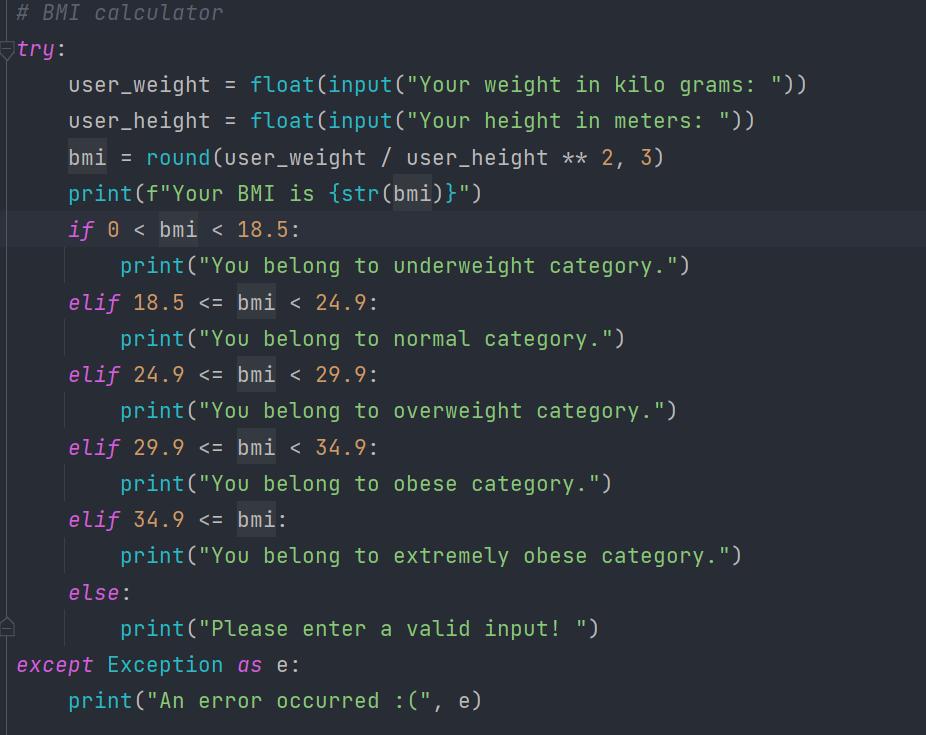
So here’s what we are going to do in our little project.
- We are going to take the user’s weight (in kg s) and height (in meters).
- Following that we are going to display the calculated BMI value (make sure to round that value to 3 decimal places) alongside with the weight status.
- For example let’s say the user’s BMI was equal to 19.234. Then you should print this message. “ Your BMI is 19.234. You belong to Normal category .”
Since this project is fairly easier than the others I’d recommend you to give this one a try on your own and then take a look at the sample solution code given below.
2. Number Guessing Game
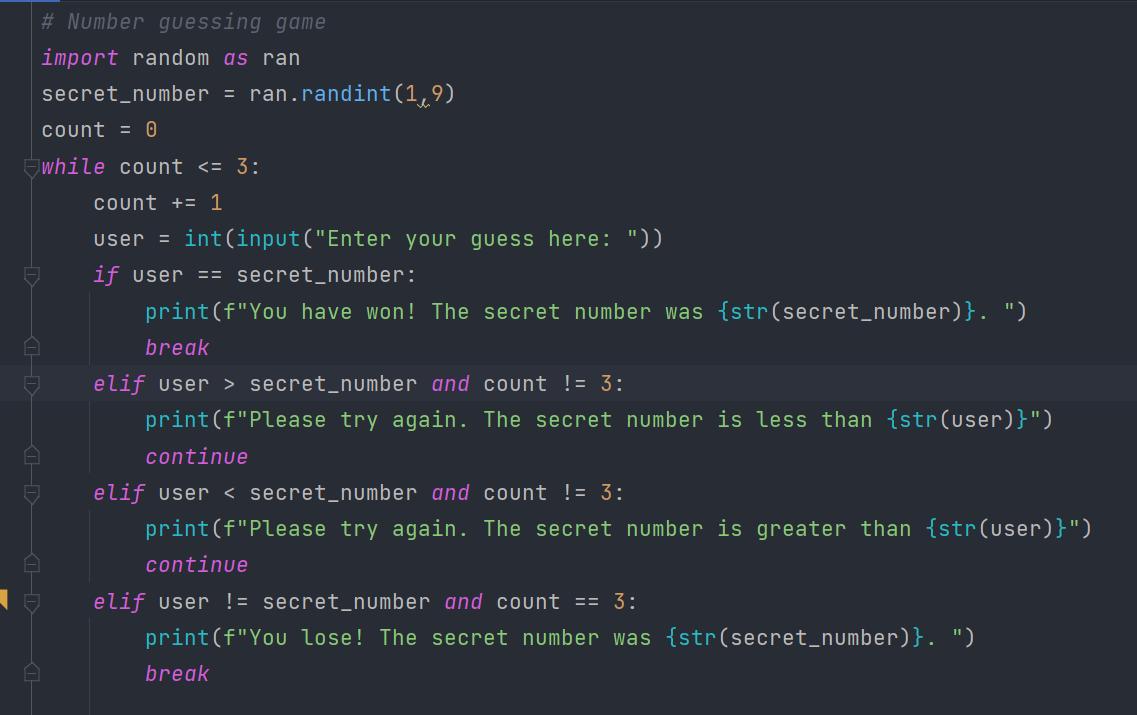
Here’s what happens in this simple game. Your opponent (The computer) thinks of a number between 1 and 10. You have three chances to guess that specific number correctly. If you could guess the correct number in less than 3 attempts you’d win the game. If not you’d lose. This is the basic idea behind this game.
The main features/ conditions, the game should have are as follows :-
- You can use Python’s random library (To store the secret number)
- Player should be given a maximum of 3 chances to guess the correct number.
- If the player’s guess is greater than the secret number then program should print “ Please try again. The secret number is less than X ”. Likewise if the player enters something less than the correct number then it should print “ Please try again. The secret number is greater than X ” (Note that ‘X’ means the number inputted by the user) If the user still has not used up all 3 of his chances then the program should ask the player for another input.
- If the player was able to guess the number correctly within the allowed three attempts then you should print this command and terminate the program. “You have won!. The secret number was Y ” (Note that ‘Y’ means the secret number)
- Unfortunately if the player was not able to guess the correct number even after the allowed 3 attempts then you should print the following and terminate the program.
Here is the code I wrote to solve this. I’d recommend you to give it a try on your own before viewing the sample solution code. (If you are capable of writing the program in less lines of code than mine, do let me know)
3. Rock Paper Scissors
I don’t think I have to describe you about this game in detail since many of us are quite familiar with it. The game is played between 2 (Obviously 1 player would be the computer) and there are three options for each player. One can opt to choose rock paper or scissors. If you don’t know about this game please visit this link to get to know more before continuing further. (https://wrpsa.com/the-official-rules-of-rock-paper-scissors/)
The main features/ conditions, the game should have are as follows :-
- You can use Python’s random library. (To store the choices of the computer)
- Take the user input. (choice of the user)
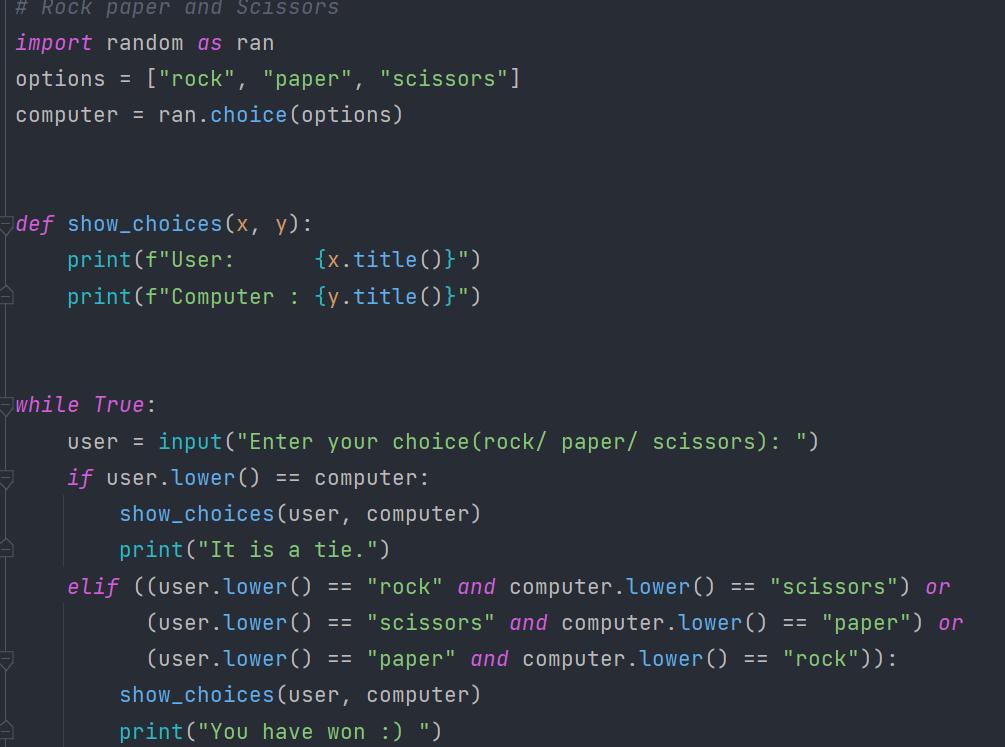
- Make sure to build a function to display the choices of both computer and the user.
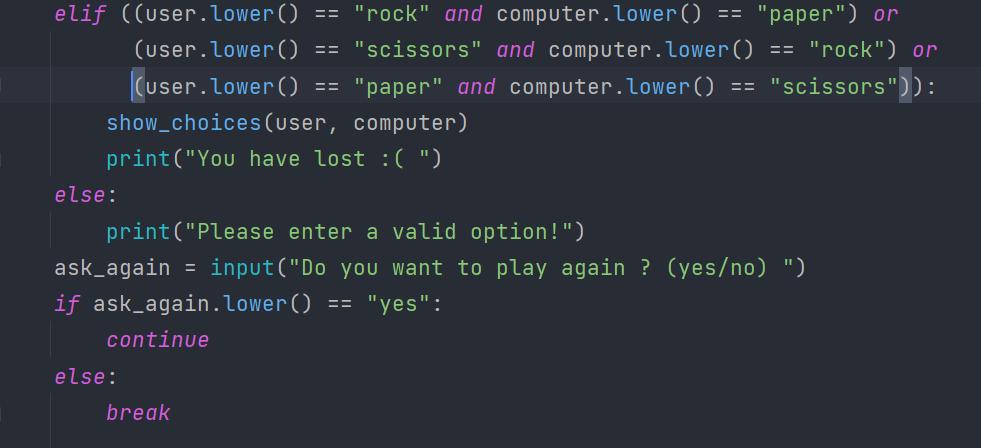
- Case no. 1 :- If both computer and the user has chosen the same option then program should print “ It is a tie. ”
- Case no. 2 :- If the user has won according to the rules of the game then program should print “ You have won. ”
- Case no. 3:- If the user has lost according to the rules of the game then program should print “ You have lost. ”
- Case no 4:- If the user doesn’t enter a valid option then the program should print this command. “ Please enter a valid option! ”
- Once a round is completed the program should ask the user whether he/she wants to play the game again. (take user input) If the answer is ‘yes’ repeat the same process. If not terminate the program.
A special thing to consider :- Capitalization should not be an issue. That means if the user inputs the choice ‘rock’ as [‘Rock’ / ‘RoCK’ / ‘rocK’, … ] program should be able to identify the input as ‘rock’.
4. MCQ Quiz Game
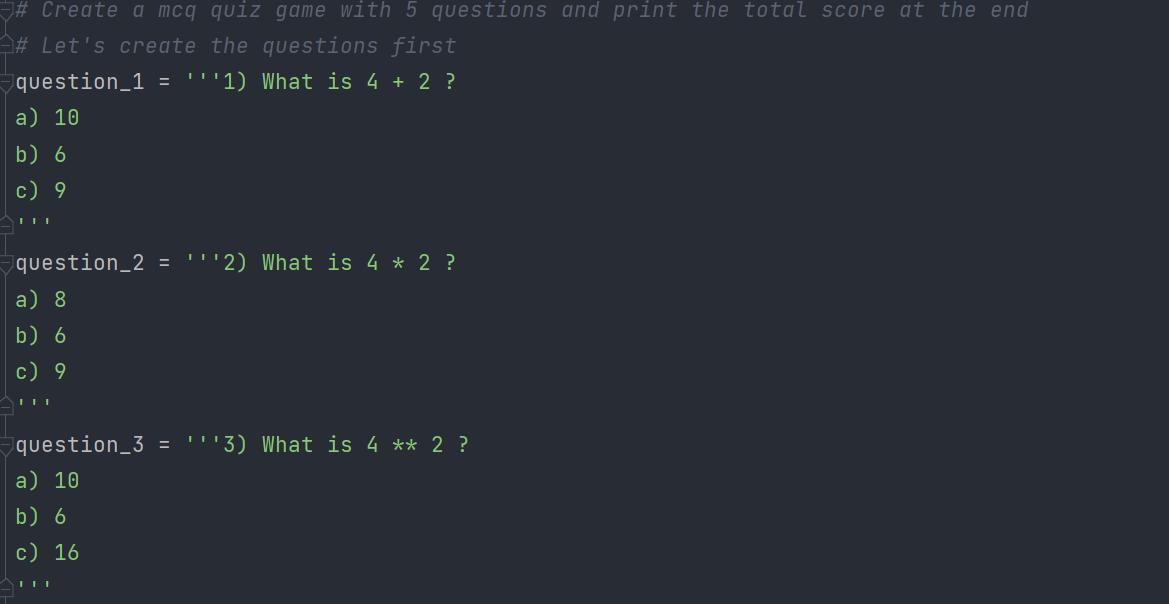
Last but not least we are going to try building a little MCQ game which grades us according to our performance. First of all we need to create some sample questions. Here are the 5 sample questions I created for the sake of this project. (I know they are quite easy 🙄)
question_1 = '''1) What is 4 + 2 ?
a) 10
b) 6
c) 9
'''
question_2 = '''2) What is 4 * 2 ?
a) 8
b) 6
c) 9
'''
question_3 = '''3) What is 4 ** 2 ?
a) 10
b) 6
c) 16
'''
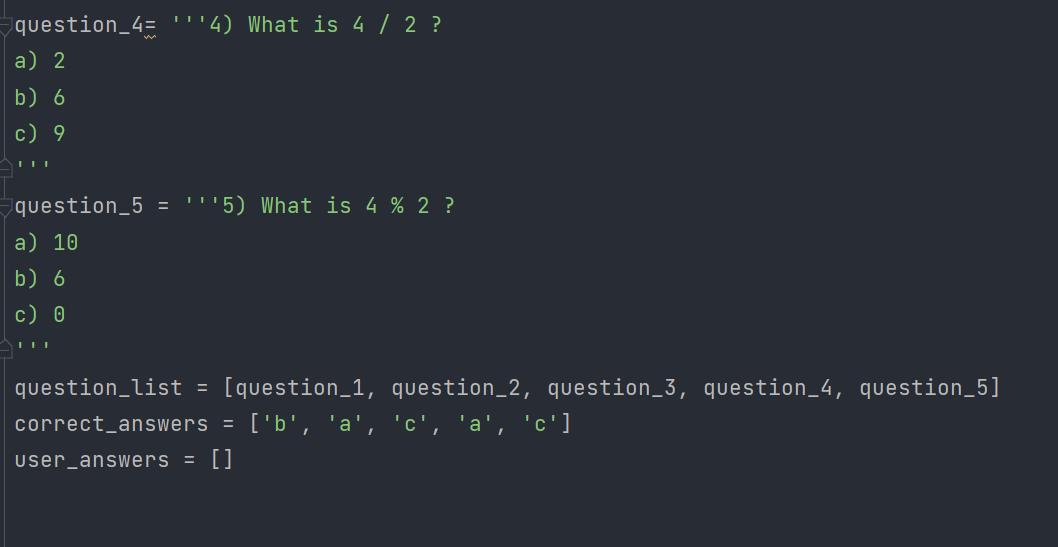
question_4= '''4) What is 4 / 2 ?
a) 2
b) 6
c) 9
'''
question_5 = '''5) What is 4 % 2 ?
a) 10
b) 6
c) 0
'''
Here is what we are going to do.
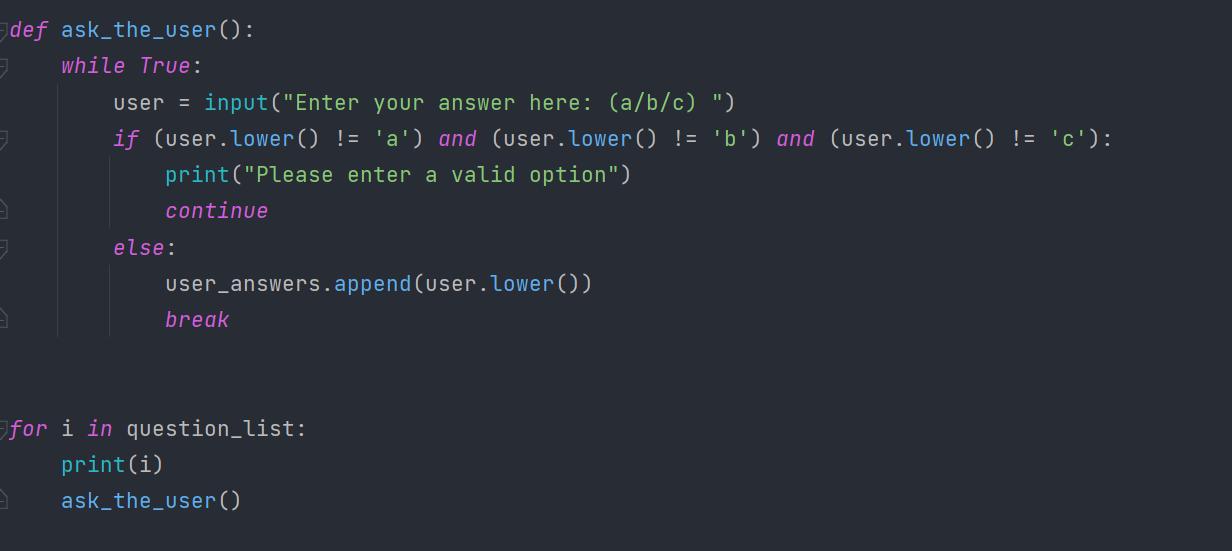
- We should present the user each 5 questions one by one. Before proceeding to the next question we should get the user’s answer for the question through user input.
user = input("Enter your answer here: (a/b/c) ")
- We need to make sure that user enters [‘a’, ‘b’ or ‘c’] only. That means if the user was to input something else we should tell the user to enter only one out of the three given options.
print("Please enter a valid option")
- Then we should store the user inputs in a list. Furthermore we should store the correct answers in a separate list.
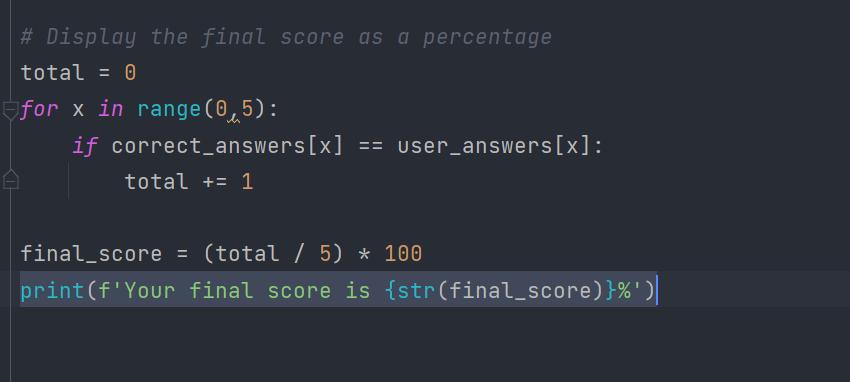
- Once the user has answered all 5 questions we should output his final score as a percentage.
print(f'Your final score is {str(final_score)}%')
Here is the sample solution code.
All right, then. I do hope that you learned something from this. I’d highly appreciate it if you could comment down what you think of this article and your valuable suggestions, since this is my first post on Medium. I am so excited to write about “Solving mathematical problems using Python” in my next article. So make sure to follow me on Medium to see more of quality content like this. Don’t forget to connect with me on Linkedin as well.😃
Buy me a coffee here. — https://www.buymeacoffee.com/chamikajaya




 已为社区贡献126445条内容

所有评论(0)