Enable Observability for FastAPI Service with OpenTelemetry, Prometheus, and Grafana
Debugging and tracing issue in distributed system is a nightmare if you can't observe service from outside. Enabling Observability for service is the solutions for this situation. You will have a better understanding of how your service's doing.
This post gives a brief introduction of Observability and demos how to enable Observability to a FastAPI application. The observation targets are logs, metrics, and traces in our sample project. We use OpenTelemetry, Prometheus and a set of Grafana tools to collect and present data. Sample project is available on our GitHub repository fastapi-observability.
What is Observability
CNCF defines Observability as follows:
Observability is a characteristic of an application that refers to how well a system’s state or status can be understood from its external outputs. Computer systems are measured by observing CPU time, memory, disk space, latency, errors, etc. The more observable a system is, the easier it is to understand how it’s doing by looking at it.
Source: glossary.cncf.io/observability
However we are focusing on service's state in stead of machine's state. So our observation targets are:
- Traces: recoding a request between services with a span in distributed system
- Metrics: service's time series data of indicators, e.g. latency, request rate, and process duration
- Logs: things happened in service, e.g. error messages, exceptions, and request logs
They have called three pillars of Observability since the founder of LightStep, Ben Sigelman, gave the Three Pillars of Observability talk on KubeCon NA 2018.
OpenTelemetry
In order to unify the standardization of Observability, CNCF proposed a vendor-neutral open-source Observability framework OpenTelemetry. OpenTelemetry also provides a collections of tools, APIs, SDKs for instrumenting, generating, collecting, and exporting telemetry data such as traces, metrics, logs. But we only use the OpenTelemetry Python SDK in our sample project.
Connecting All
Observing logs, metrics, and traces separately is not good enough. We need a mechanism to connect these information and viewing on a unified tool. Therefore Grafana provides a great solution, which could observe specific action in service between traces, metrics and logs through trace ID from traces and exemplar from OpenMetrics.
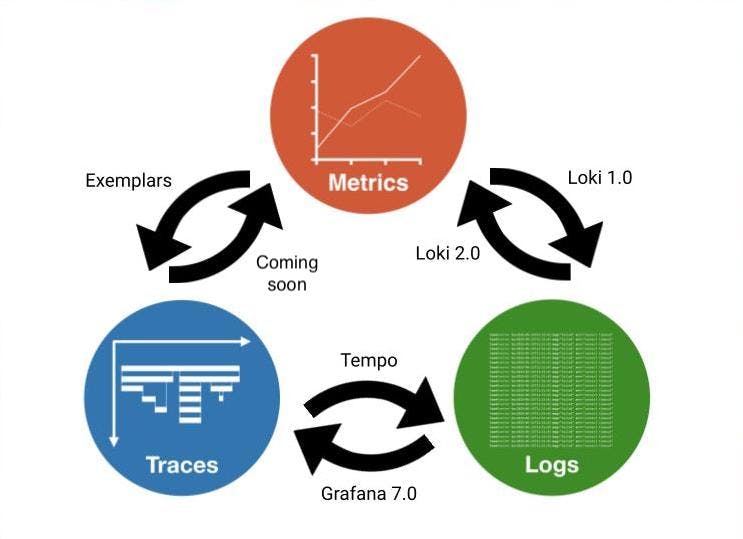
Image Source: Grafana
Sample Project
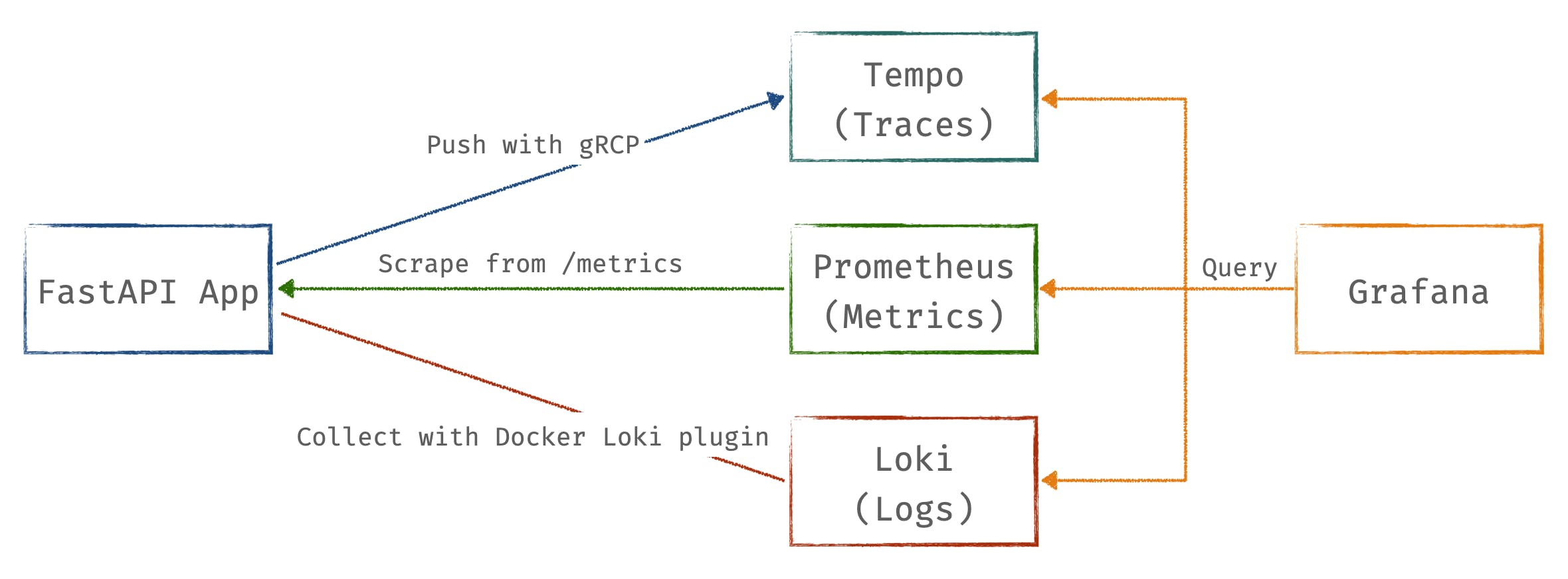
For better understanding of Observability, we create a sample project with FastAPI, a python API framework, and a set of Grafana tools. All service is defined in docker compose file. The architecture is as follows:
- Traces with Tempo and OpenTelemetry Python SDK
- Metrics with Prometheus and Prometheus Python Client
- Logs with Loki
Quick Start
-
Cloud sample project repository
git clone https://github.com/Blueswen/fastapi-observability.git cd fastapi-observability -
Install Loki Docker Driver
docker plugin install grafana/loki-docker-driver:latest --alias loki --grant-all-permissions -
Build application image and start all service with docker-compose
docker-compose build docker-compose up -d -
Send requests with siege to FastAPI app
bash request-script.sh bash trace.sh -
Check predefined dashboard
FastAPI Observabilityon Grafana http://localhost:3000/Dashboard screenshot:

Dashboard is also available on Grafana Dashboards.
Explore with Grafana
Metrics to Traces
Get Trace ID from exemplar in metrics, then query in Tempo.
Query: histogram_quantile(.99,sum(rate(fastapi_requests_duration_seconds_bucket{app_name="app-a", path!="/metrics"}[1m])) by(path, le))

Traces to Logs
Get Trace ID and tags (here is compose.service) defined in Tempo data source from span, then query with Loki.

Logs to Traces
Get Trace ID pared from log (regex defined in Loki data source), then query in Tempo.

FastAPI Application
For more complex scenario, we use three FastAPI applications with same code in this project. There is a cross service action in /chain endpoint, which provides a good example for how to use OpenTelemetry SDK and how Grafana presents trace information.
Traces and Logs
We use OpenTelemetry Python SDK to send trace info with gRCP to Tempo. Each request span contains other child spans when using OpenTelemetry instrumentation. The reason is that instrumentation will catch each internal asgi interaction (opentelemetry-python-contrib issue #831). If you want to get rid of the internal spans, there is a workaround in the same issue #831 through using a new OpenTelemetry middleware with two overridden method about span processing.
We use OpenTelemetry Logging Instrumentation to override logger format with another format with trace id and span id.
# fastapi_app/utils.py

def setting_otlp(app: ASGIApp, app_name: str, endpoint: str, log_correlation: bool = True) -> None:
    # Setting OpenTelemetry
    # set the service name to show in traces
    resource = Resource.create(attributes={
        "service.name": app_name, # for Tempo to distinguish source
        "compose_service": app_name # as a query criteria for Trace to logs
    })

    # set the tracer provider
    tracer = TracerProvider(resource=resource)
    trace.set_tracer_provider(tracer)

    tracer.add_span_processor(BatchSpanProcessor(
        OTLPSpanExporter(endpoint=endpoint)))

    if log_correlation:
        LoggingInstrumentor().instrument(set_logging_format=True)

    FastAPIInstrumentor.instrument_app(app, tracer_provider=tracer)
The following image shows the span info sended to Tempo and queried on Grafana. Trace span info provided by FastAPIInstrumentor with trace ID (17785b4c3d530b832fb28ede767c672c), span id(d410eb45cc61f442), service name(app-a), custom attributes(service.name=app-a, compose_service=app-a) and so on.

Log format with trace id and span id, which override by LoggingInstrumentor
%(asctime)s %(levelname)s [%(name)s] [%(filename)s:%(lineno)d] [trace_id=%(otelTraceID)s span_id=%(otelSpanID)s resource.service.name=%(otelServiceName)s] - %(message)s
The following image is what the logs look like.

Span Inject
If you want other services use the same Trace ID, you have to use inject function to add current span information to header. Because OpenTelemetry FastAPI instrumentation only takes care the asgi app's request and response, it does not affect any other modules or actions like send http request to other server or function calls.
# fastapi_app/main.py

from opentelemetry.propagate import inject

@app.get("/chain")
async def chain(response: Response):

    headers = {}
    inject(headers)  # inject trace info to header

    async with httpx.AsyncClient() as client:
        await client.get(f"http://localhost:8000/", headers=headers,)
    async with httpx.AsyncClient() as client:
        await client.get(f"http://{TARGET_ONE_HOST}:8000/io_task", headers=headers,)
    async with httpx.AsyncClient() as client:
        await client.get(f"http://{TARGET_TWO_HOST}:8000/cpu_task", headers=headers,)

    return {"path": "/chain"}
Metrics
Use Prometheus Python Client to generate OpenTelemetry format metric with exemplars and expose on /metrics for Prometheus.
In order to add exemplar to metrics, we retrieve trace id from current span for exemplar, and add trace id dict to Histogram or Counter metrics.
# fastapi_app/utils.py

from opentelemetry import trace
from prometheus_client import Histogram

REQUESTS_PROCESSING_TIME = Histogram(
    "fastapi_requests_duration_seconds",
    "Histogram of requests processing time by path (in seconds)",
    ["method", "path", "app_name"],
)

# retrieve trace id for exemplar
span = trace.get_current_span()
trace_id = trace.format_trace_id(
      span.get_span_context().trace_id)

REQUESTS_PROCESSING_TIME.labels(method=method, path=path, app_name=self.app_name).observe(
      after_time - before_time, exemplar={'TraceID': trace_id}
)
Because exemplars is a new datatype proposed in OpenMetrics, /metrics have to use CONTENT_TYPE_LATEST and generate_latest from prometheus_client.openmetrics.exposition module instead of prometheus_client module. Otherwise using wrong generate_latest the exemplars dict behind Counter and Histogram will never showup, and using wrong CONTENT_TYPE_LATEST will cause Prometheus scrape failed.
# fastapi_app/utils.py

from prometheus_client import REGISTRY
from prometheus_client.openmetrics.exposition import CONTENT_TYPE_LATEST, generate_latest

def metrics(request: Request) -> Response:
    return Response(generate_latest(REGISTRY), headers={"Content-Type": CONTENT_TYPE_LATEST})
Metrics with exemplars

Prometheus - Metrics
Collects metrics from applications.
Prometheus Config
Define all FastAPI applications metrics scrape jobs in etc/prometheus/prometheus.yml
...
scrape_configs:
  - job_name: 'app-a'
    scrape_interval: 5s
    static_configs:
      - targets: ['app-a:8000']
  - job_name: 'app-b'
    scrape_interval: 5s
    static_configs:
      - targets: ['app-b:8000']
  - job_name: 'app-c'
    scrape_interval: 5s
    static_configs:
      - targets: ['app-c:8000']
Grafana Data Source
Add an Exemplars which use value of TraceID label to create a Tempo link.
Grafana data source setting example:

Grafana data sources config example:
name: Prometheus
type: prometheus
typeName: Prometheus
access: proxy
url: http://prometheus:9090
password: ''
user: ''
database: ''
basicAuth: false
isDefault: true
jsonData:
exemplarTraceIdDestinations:
   - datasourceUid: tempo
      name: TraceID
httpMethod: POST
readOnly: false
editable: true
Tempo - Traces
Receives spans from applications.
Grafana Data Source
Trace to logs setting:
- Data source: target log source
- Tags: key of tags or process level attributes from trace, which will be log query criterial if key exists in trace
- Map tag names: Convert exists key of tags or process level attributes from trace to another key, then used as log query criterial. Use this feature when the values of trace tag and log label are identical but keys are different.
Grafana data source setting example:

Grafana data sources config example:
name: Tempo
type: tempo
typeName: Tempo
access: proxy
url: http://tempo
password: ''
user: ''
database: ''
basicAuth: false
isDefault: false
jsonData:
nodeGraph:
   enabled: true
tracesToLogs:
   datasourceUid: loki
   filterBySpanID: false
   filterByTraceID: true
   mapTagNamesEnabled: false
   tags:
      - compose_service
readOnly: false
editable: true
Loki - Logs
Collects logs with Loki Docker Driver from all services.
Loki Docker Driver
- Use YAML anchor and alias feature to setting logging options for each services.
- Set Loki Docker Driver options
- loki-url: loki service endpoint
- loki-pipeline-stages: processes multiline log from FastAPI application with multiline and regex stages (reference)
x-logging: &default-logging # anchor(&): 'default-logging' for defines a chunk of configuration
  driver: loki
  options:
    loki-url: 'http://localhost:3100/api/prom/push'
    loki-pipeline-stages: |
      - multiline:
          firstline: '^\d{4}-\d{2}-\d{2} \d{1,2}:\d{2}:\d{2}'
          max_wait_time: 3s
      - regex:
          expression: '^(?P<time>\d{4}-\d{2}-\d{2} \d{1,2}:\d{2}:\d{2},d{3}) (?P<message>(?s:.*))$$'
# Use $$ (double-dollar sign) when your configuration needs a literal dollar sign.

version: "3.4"

services:
   foo:
      image: foo
      logging: *default-logging # alias(*): refer to 'default-logging' chunk
Grafana Data Source
Add a TraceID derived field to extract trace id and create a Tempo link from trace id.
Grafana data source setting example:

Grafana data source config example:
name: Loki
type: loki
typeName: Loki
access: proxy
url: http://loki:3100
password: ''
user: ''
database: ''
basicAuth: false
isDefault: false
jsonData:
derivedFields:
   - datasourceUid: tempo
      matcherRegex: (?:trace_id)=(\w+)
      name: TraceID
      url: $${__value.raw}
      # Use $$ (double-dollar sign) when your configuration needs a literal dollar sign.
readOnly: false
editable: true
Grafana
- Add prometheus, tempo and loki to data source with config file
etc/grafana/datasource.yml. - Load predefined dashboard with
etc/dashboards.yamlandetc/dashboards/fastapi-observability.json.
# grafana in docker-compose.yaml
grafana:
   image: grafana/grafana:8.4.3
   volumes:
      - ./etc/grafana/:/etc/grafana/provisioning/datasources # data sources
      - ./etc/dashboards.yaml:/etc/grafana/provisioning/dashboards/dashboards.yaml # dashboard setting
      - ./etc/dashboards:/etc/grafana/dashboards # dashboard json files directory
Conclusion
In this post we introduce Observability and show how to enable Observability for a service. We only focus on logs, metrics, and traces with Prometheus and Grafana tools. If you don't prefer Grafana, there are a lot of alternative open-source solutions like OpenTelemetry, Jaeger with Service Performance Monitoring (SPM), or Elastic Observability.
Beside tools, there is much room for development in Observability itself. The concept of three pillars of Observability was proposed in 2018, almost 4 years ago. After years of community discussions, Technical Advisory Group of CNCF gives more details about Observability in their whitepaper. They use Observability Signals to describe logs, metrics and traces instead of pillars, and also add another two more signals, profiles and dumps. Maybe in the near future we can see much more tools about profiles and dumps having better compatibility with current system.
Reference
- FastAPI Traces Demo
- Waber - A Uber-like (Car-Hailing APP) cloud-native application with OpenTelemetry
- Intro to exemplars, which enable Grafana Tempo’s distributed tracing at massive scale
- Trace discovery in Grafana Tempo using Prometheus exemplars, Loki 2.0 queries, and more
- The New Stack (TNS) observability app
- Don’t Repeat Yourself with Anchors, Aliases and Extensions in Docker Compose Files
- How can I escape a $ dollar sign in a docker compose file?
- Tempo Trace to logs tags discussion
- Starlette Prometheus
- Grafana Labs at KubeCon: What is the Future of Observability?
- The Key Message from KubeCon NA 2018: Prometheus is King

Python社区为您提供最前沿的新闻资讯和知识内容
更多推荐

 0
0 0
0- 0


 已为社区贡献126445条内容

所有评论(0)