📖 在 Go 上构建 RESTful API:Fiber、PostgreSQL、JWT 和 Swagger 文档在隔离的 Docker 容器中
简介
大家好! 😉 欢迎来到 真的 很棒的教程。我已尝试根据实际应用程序为您提供尽可能简单的分步说明,以便您可以在_here and now_应用这些知识。
我故意不想将本教程分成几个不连贯的部分,以免您失去思路和重点。毕竟,我写这篇教程只是为了分享我的经验,并表明使用 Fiber 框架在 Golang 中进行后端开发很容易!
在本教程的最后,您将找到一个自检知识块,以及进一步开发应用程序的计划。因此,我建议您将本教程的链接保存到您的书签中,并在您的社交网络上分享。
❤️喜欢,🦄独角兽,🔖书签,让我们走吧!
📝 目录
- 我们要构建什么?
*API 方法
*高级用户的完整应用程序代码
- 我的 Go 项目架构方法
*仅具有业务逻辑的文件夹
*包含 API 文档的文件夹
*具有项目特定功能的文件夹
*具有平台级逻辑的文件夹
- 项目配置
*生成文件
*ENV 文件中的光纤配置
*Docker 网络
*PostgreSQL 和初始迁移
*Dockerfile 用于 Fiber 应用程序
*招摇
- 实用部分
*创建模型
*为模型字段创建验证器
*创建查询和控制器
*主要功能
*中间件功能
*API 端点的路由
*数据库连接
*有用的实用程序
-
测试应用程序
-
本地运行项目
-
自检知识块
-
进一步发展计划
我们要构建什么?
让我们为在线图书馆应用程序创建一个 REST API,我们可以在其中创建新书、查看它们以及更新和删除它们的信息。但有些方法会要求我们通过提供有效的 JWT 访问令牌进行授权。像往常一样,我将把关于这些书的所有信息存储在我心爱的 PostgreSQL 中。
我认为,这个功能足以帮助您理解,使用FiberWeb 框架在 Go 中创建 REST API 是多么容易**。
↑ 目录
API 方法
上市:
-
GET:
/api/v1/books,获取所有书籍; -
GET:
/api/v1/book/{id},通过给定ID获取图书; -
GET:
/api/v1/token/new,创建一个新的访问令牌(用于演示);
私有(受 JWT 保护):
-
POST:
/api/v1/book,创建新书; -
PATCH:
/api/v1/book,更新现有书籍; -
DELETE:
/api/v1/book,删除现有书籍;
↑ 目录
高级用户的完整应用程序代码
如果您觉得自己足够强大,可以自己弄清楚代码,那么这个应用程序的整个草稿都会发布在我的 GitHub 存储库中:
 koddr/tutorial-go-fiber-rest-api
📖 在 Go 上构建 RESTful API:Fiber、PostgreSQL、JWT 和 Swagger 文档在隔离的 Docker 容器中。
📖 教程:在 Go 上构建 RESTful API
隔离的 Docker 容器中的 Fiber、PostgreSQL、JWT 和 Swagger 文档。
👉 全文发表于 March 22, 2021, 在 Dev.to:https://dev.to/koddr/build-a-restful-api-on-go-fiber-postgresql-jwt-和-swagger-docs-in-isolated-docker-containers-475j

快速启动
-
将
.env.example重命名为.env并填写您的环境值。 -
安装Docker和migrate应用迁移工具。
-
通过以下命令运行项目:
制作 docker.run
进程:
- Swagger 生成 API 文档
- 为容器创建一个新的 Docker 网络
- 构建和运行 Docker 容器(Fiber、PostgreSQL)
- 应用数据库迁移(使用 github.com/golang-migrate/migrate)
进入全屏模式 退出全屏模式
- 转到您的 API 文档页面:127.0.0.1:5000/swagger/index.html

附注
如果您想在此博客上看到更多类似的文章,请在下面发表评论并订阅我。谢谢! 😘
当然,您可以通过LiberaPay捐款来支持我。 每笔捐款将用于撰写新文章和开发非营利性开源项目,供...
在 GitHub 上查看
↑ 目录
我的 Go 项目架构方法
在过去的两年中,我为 Go 应用程序尝试了许多结构,但最终还是选择了我的,我现在将尝试向您解释。
↑ 目录
仅具有业务逻辑的文件夹
./app文件夹不关心_您使用的数据库驱动程序_或_您选择的缓存解决方案或任何第三方的事情。
-
./app/controllers功能控制器文件夹(用于路由); -
./app/models用于描述商业模式和方法的文件夹; -
./app/queries用于描述模型查询的文件夹;
↑ 目录
包含 API 文档的文件夹
./docs文件夹包含 Swagger 自动生成的 API 文档的配置文件。
↑ 目录
具有项目特定功能的文件夹
./pkg文件夹包含仅为您的业务用例量身定制的所有项目特定代码,例如_configs_、middleware、routes 或_utilities_。
-
./pkg/configs用于配置功能的文件夹; -
./pkg/middleware添加中间件的文件夹; -
./pkg/routes用于描述项目路线的文件夹; -
./pkg/utils具有实用功能的文件夹(服务器启动器、生成器等);
↑ 目录
具有平台级逻辑的文件夹
./platform文件夹包含将构建实际项目的所有平台级逻辑,例如_设置数据库_或_缓存服务器实例_和_存储迁移_。
-
./platform/database具有数据库设置功能的文件夹; -
./platform/migrations带有迁移文件的文件夹;
↑ 目录
项目配置
乍一看,项目的配置可能看起来非常复杂。 别担心,我会尽可能简单和容易地描述每个点。
↑ 目录
生成文件
我强烈建议使用Makefile来加快项目管理!但在这篇文章中,我想展示整个过程。所以,我会直接写所有的命令,不用魔法make。
👋 如果您已经知道,这里的是完整项目的
Makefile的链接。
↑ 目录
ENV 文件中的光纤配置
我知道有些人喜欢使用 YML 文件来配置他们的 Go 应用程序,但我习惯于使用经典的.env配置,并没有看到 YML 有多少好处(即使我写了一篇文章关于这种过去在 Go 中的应用程序配置)。
该项目的配置文件如下:
# ./.env

# Server settings:
SERVER_URL="0.0.0.0:5000"
SERVER_READ_TIMEOUT=60

# JWT settings:
JWT_SECRET_KEY="secret"
JWT_SECRET_KEY_EXPIRE_MINUTES_COUNT=15

# Database settings:
DB_SERVER_URL="host=localhost port=5432 user=postgres password=password dbname=postgres sslmode=disable"
DB_MAX_CONNECTIONS=100
DB_MAX_IDLE_CONNECTIONS=10
DB_MAX_LIFETIME_CONNECTIONS=2
进入全屏模式 退出全屏模式
↑ 目录
Docker 网络
为您的操作系统安装并运行Docker服务。顺便说一句,在本教程中,我使用的是最新版本(at this moment)v20.10.2。
好的,让我们新建一个 Docker 网络,名为dev-network:
docker network create -d bridge dev-network
进入全屏模式 退出全屏模式
我们将来在隔离容器中运行数据库和 Fiber 实例时会使用它。如果不这样做,两个容器将无法相互通信。
☝️ 更多信息请访问:https://docs.docker.com/network/
↑ 目录
PostgreSQL 和初始迁移
所以,让我们用数据库启动容器:
docker run --rm -d \
    --name dev-postgres \
    --network dev-network \
    -e POSTGRES_USER=postgres \
    -e POSTGRES_PASSWORD=password \
    -e POSTGRES_DB=postgres \
    -v ${HOME}/dev-postgres/data/:/var/lib/postgresql/data \
    -p 5432:5432 \
    postgres
进入全屏模式 退出全屏模式
检查容器是否正在运行。例如,通过ctop控制台实用程序:
[ ](https://res.cloudinary.com/practicaldev/image/fetch/s--LKK9HRfn--/c_limit%2Cf_auto%2Cfl_progressive%2Cq_auto%2Cw_880/https://dev-to-uploads .s3.amazonaws.com/uploads/articles/fq5qjopj8bb7q83bxmy2.png)
伟大的!现在我们准备对原始结构进行迁移。这是up迁移的文件,称为000001_create_init_tables.up.sql:
-- ./platform/migrations/000001_create_init_tables.up.sql

-- Add UUID extension
CREATE EXTENSION IF NOT EXISTS "uuid-ossp";

-- Set timezone
-- For more information, please visit:
-- https://en.wikipedia.org/wiki/List_of_tz_database_time_zones
SET TIMEZONE="Europe/Moscow";

-- Create books table
CREATE TABLE books (
    id UUID DEFAULT uuid_generate_v4 () PRIMARY KEY,
    created_at TIMESTAMP WITH TIME ZONE DEFAULT NOW (),
    updated_at TIMESTAMP NULL,
    title VARCHAR (255) NOT NULL,
    author VARCHAR (255) NOT NULL,
    book_status INT NOT NULL,
    book_attrs JSONB NOT NULL
);

-- Add indexes
CREATE INDEX active_books ON books (title) WHERE book_status = 1;
进入全屏模式 退出全屏模式
☝️ 为了方便处理额外的书籍属性,我使用
JSONB类型作为book_attrs字段。有关更多信息,请访问 PostgreSQL文档。
而000001_create_init_tables.down.sql则为down此迁移:
-- ./platform/migrations/000001_create_init_tables.down.sql

-- Delete tables
DROP TABLE IF EXISTS books;
进入全屏模式 退出全屏模式
好的!我们可以滚动这个迁移。
👍 我建议使用golang-migrate/migrate工具在一个控制台命令中轻松上下数据库迁移。
migrate \
    -path $(PWD)/platform/migrations \
    -database "postgres://postgres:password@localhost/postgres?sslmode=disable" \
    up
进入全屏模式 退出全屏模式
↑ 目录
用于 Fiber 应用程序的 Dockerfile
在项目根文件夹中创建一个Dockerfile:
# ./Dockerfile

FROM golang:1.16-alpine AS builder

# Move to working directory (/build).
WORKDIR /build

# Copy and download dependency using go mod.
COPY go.mod go.sum ./
RUN go mod download

# Copy the code into the container.
COPY . .

# Set necessary environment variables needed for our image
# and build the API server.
ENV CGO_ENABLED=0 GOOS=linux GOARCH=amd64
RUN go build -ldflags="-s -w" -o apiserver .

FROM scratch

# Copy binary and config files from /build
# to root folder of scratch container.
COPY --from=builder ["/build/apiserver", "/build/.env", "/"]

# Export necessary port.
EXPOSE 5000

# Command to run when starting the container.
ENTRYPOINT ["/apiserver"]
进入全屏模式 退出全屏模式
是的,我正在使用两阶段容器构建和 Golang1.16.x。应用程序将使用CGO_ENABLED=0和-ldflags="-s -w"构建到减少完成二进制文件的大小。否则,这是任何 Go 项目中最常见的Dockerfile,您可以在任何地方使用它。
构建 Fiber Docker 镜像的命令:
docker build -t fiber .
进入全屏模式 退出全屏模式
☝️不要忘记将
.dockerignore文件添加到项目的根文件夹以及所有文件和文件夹,创建容器时应该忽略。这是我在本教程中使用的示例。
从镜像创建和启动容器的命令:
docker run --rm -d \
    --name dev-fiber \
    --network dev-network \
    -p 5000:5000 \
    fiber
进入全屏模式 退出全屏模式
↑ 目录
大摇大摆
正如您从标题中猜到的那样,我们不会太担心记录我们的 API 方法。仅仅是因为有一个很棒的工具,比如Swagger可以为我们完成所有工作!
-
swaggo/swag包,用于在 Go 中轻松生成 Swagger 配置;
-
arsmn/fiber-swagger官方Fiber的中间件;
↑ 目录
[ ](https://res.cloudinary.com/practicaldev/image/fetch/s--IeRwhgvR--/c_limit%2Cf_auto%2Cfl_progressive%2Cq_auto%2Cw_880/https://dev-to- uploads.s3.amazonaws.com/uploads/articles/pwzmlh4zc2il8pv3e0j1.jpg)
实用部分
好了,我们已经准备好了所有必要的配置文件和工作环境,我们知道我们要创建什么了。现在是时候打开我们最喜欢的 IDE 并开始编写代码了。
👋 请注意,因为我将直接在代码中的注释中解释一些要点,而不是在文章中。
↑ 目录
创建模型
在实现模型之前,我总是创建一个带有 SQL 结构的迁移文件(来自第 3 章)。这使得一次呈现所有必要的模型字段变得更加容易。
// ./app/models/book_model.go

package models

import (
    "database/sql/driver"
    "encoding/json"
    "errors"
    "time"

    "github.com/google/uuid"
)

// Book struct to describe book object.
type Book struct {
    ID         uuid.UUID `db:"id" json:"id" validate:"required,uuid"`
    CreatedAt  time.Time `db:"created_at" json:"created_at"`
    UpdatedAt  time.Time `db:"updated_at" json:"updated_at"`
    UserID     uuid.UUID `db:"user_id" json:"user_id" validate:"required,uuid"`
    Title      string    `db:"title" json:"title" validate:"required,lte=255"`
    Author     string    `db:"author" json:"author" validate:"required,lte=255"`
    BookStatus int       `db:"book_status" json:"book_status" validate:"required,len=1"`
    BookAttrs  BookAttrs `db:"book_attrs" json:"book_attrs" validate:"required,dive"`
}

// BookAttrs struct to describe book attributes.
type BookAttrs struct {
    Picture     string `json:"picture"`
    Description string `json:"description"`
    Rating      int    `json:"rating" validate:"min=1,max=10"`
}

// ...
进入全屏模式 退出全屏模式
👍 我建议使用google/uuid包来创建唯一 ID,因为这是一种更通用的方法来保护您的应用程序免受常见数字暴力攻击。 特别是如果您的 REST API 将具有未经授权和请求限制的公共方法。
但这还不是全部。您需要编写两个特殊方法:
1.Value(),用于返回结构的 JSON 编码表示;
2.Scan(),用于将 JSON 编码的值解码为结构字段;
它们可能看起来像这样:
// ...

// Value make the BookAttrs struct implement the driver.Valuer interface.
// This method simply returns the JSON-encoded representation of the struct.
func (b BookAttrs) Value() (driver.Value, error) {
    return json.Marshal(b)
}

// Scan make the BookAttrs struct implement the sql.Scanner interface.
// This method simply decodes a JSON-encoded value into the struct fields.
func (b *BookAttrs) Scan(value interface{}) error {
    j, ok := value.([]byte)
    if !ok {
        return errors.New("type assertion to []byte failed")
    }

    return json.Unmarshal(j, &b)
}
进入全屏模式 退出全屏模式
↑ 目录
为模型字段创建验证器
好的,让我们在将它们传递给控制器业务逻辑之前定义我们需要检查输入的字段:
ID字段,用于检查有效的UUID;
这些字段是最大的关注点,因为在某些场景中它们会从用户那里来。顺便说一句,这就是为什么我们不仅要验证它们,还要考虑它们required。
这就是我实现验证器的方式:
// ./app/utils/validator.go

package utils

import (
    "github.com/go-playground/validator/v10"
    "github.com/google/uuid"
)

// NewValidator func for create a new validator for model fields.
func NewValidator() *validator.Validate {
    // Create a new validator for a Book model.
    validate := validator.New()

    // Custom validation for uuid.UUID fields.
    _ = validate.RegisterValidation("uuid", func(fl validator.FieldLevel) bool {
        field := fl.Field().String()
        if _, err := uuid.Parse(field); err != nil {
            return true
        }
        return false
    })

    return validate
}

// ValidatorErrors func for show validation errors for each invalid fields.
func ValidatorErrors(err error) map[string]string {
    // Define fields map.
    fields := map[string]string{}

    // Make error message for each invalid field.
    for _, err := range err.(validator.ValidationErrors) {
        fields[err.Field()] = err.Error()
    }

    return fields
}
进入全屏模式 退出全屏模式
👌 我使用go-playground/validator
v10来发布这个功能。
↑ 目录
创建查询和控制器
数据库查询
为了不损失性能,我喜欢使用没有 sugar 的 pure SQL 查询,例如gorm或类似包。它可以更好地理解应用程序的工作原理,这将有助于将来在优化数据库查询时不犯愚蠢的错误!
// ./app/queries/book_query.go

package queries

import (
    "github.com/google/uuid"
    "github.com/jmoiron/sqlx"
    "github.com/koddr/tutorial-go-fiber-rest-api/app/models"
)

// BookQueries struct for queries from Book model.
type BookQueries struct {
    *sqlx.DB
}

// GetBooks method for getting all books.
func (q *BookQueries) GetBooks() ([]models.Book, error) {
    // Define books variable.
    books := []models.Book{}

    // Define query string.
    query := `SELECT * FROM books`

    // Send query to database.
    err := q.Get(&books, query)
    if err != nil {
        // Return empty object and error.
        return books, err
    }

    // Return query result.
    return books, nil
}

// GetBook method for getting one book by given ID.
func (q *BookQueries) GetBook(id uuid.UUID) (models.Book, error) {
    // Define book variable.
    book := models.Book{}

    // Define query string.
    query := `SELECT * FROM books WHERE id = $1`

    // Send query to database.
    err := q.Get(&book, query, id)
    if err != nil {
        // Return empty object and error.
        return book, err
    }

    // Return query result.
    return book, nil
}

// CreateBook method for creating book by given Book object.
func (q *BookQueries) CreateBook(b *models.Book) error {
    // Define query string.
    query := `INSERT INTO books VALUES ($1, $2, $3, $4, $5, $6, $7, $8)`

    // Send query to database.
    _, err := q.Exec(query, b.ID, b.CreatedAt, b.UpdatedAt, b.UserID, b.Title, b.Author, b.BookStatus, b.BookAttrs)
    if err != nil {
        // Return only error.
        return err
    }

    // This query returns nothing.
    return nil
}

// UpdateBook method for updating book by given Book object.
func (q *BookQueries) UpdateBook(id uuid.UUID, b *models.Book) error {
    // Define query string.
    query := `UPDATE books SET updated_at = $2, title = $3, author = $4, book_status = $5, book_attrs = $6 WHERE id = $1`

    // Send query to database.
    _, err := q.Exec(query, id, b.UpdatedAt, b.Title, b.Author, b.BookStatus, b.BookAttrs)
    if err != nil {
        // Return only error.
        return err
    }

    // This query returns nothing.
    return nil
}

// DeleteBook method for delete book by given ID.
func (q *BookQueries) DeleteBook(id uuid.UUID) error {
    // Define query string.
    query := `DELETE FROM books WHERE id = $1`

    // Send query to database.
    _, err := q.Exec(query, id)
    if err != nil {
        // Return only error.
        return err
    }

    // This query returns nothing.
    return nil
}
进入全屏模式 退出全屏模式
创建模型控制器
GET方法的原理:
-
向 API 端点发出请求;
-
连接数据库(或出错);
-
进行查询以从表
books中获取记录(或错误); -
返回状态
200和带有已创建书籍的 JSON;
// ./app/controllers/book_controller.go

package controllers

import (
    "time"

    "github.com/gofiber/fiber/v2"
    "github.com/google/uuid"
    "github.com/koddr/tutorial-go-fiber-rest-api/app/models"
    "github.com/koddr/tutorial-go-fiber-rest-api/pkg/utils"
    "github.com/koddr/tutorial-go-fiber-rest-api/platform/database"
)

// GetBooks func gets all exists books.
// @Description Get all exists books.
// @Summary get all exists books
// @Tags Books
// @Accept json
// @Produce json
// @Success 200 {array} models.Book
// @Router /v1/books [get]
func GetBooks(c *fiber.Ctx) error {
    // Create database connection.
    db, err := database.OpenDBConnection()
    if err != nil {
        // Return status 500 and database connection error.
        return c.Status(fiber.StatusInternalServerError).JSON(fiber.Map{
            "error": true,
            "msg":   err.Error(),
        })
    }

    // Get all books.
    books, err := db.GetBooks()
    if err != nil {
        // Return, if books not found.
        return c.Status(fiber.StatusNotFound).JSON(fiber.Map{
            "error": true,
            "msg":   "books were not found",
            "count": 0,
            "books": nil,
        })
    }

    // Return status 200 OK.
    return c.JSON(fiber.Map{
        "error": false,
        "msg":   nil,
        "count": len(books),
        "books": books,
    })
}

// GetBook func gets book by given ID or 404 error.
// @Description Get book by given ID.
// @Summary get book by given ID
// @Tags Book
// @Accept json
// @Produce json
// @Param id path string true "Book ID"
// @Success 200 {object} models.Book
// @Router /v1/book/{id} [get]
func GetBook(c *fiber.Ctx) error {
    // Catch book ID from URL.
    id, err := uuid.Parse(c.Params("id"))
    if err != nil {
        return c.Status(fiber.StatusInternalServerError).JSON(fiber.Map{
            "error": true,
            "msg":   err.Error(),
        })
    }

    // Create database connection.
    db, err := database.OpenDBConnection()
    if err != nil {
        // Return status 500 and database connection error.
        return c.Status(fiber.StatusInternalServerError).JSON(fiber.Map{
            "error": true,
            "msg":   err.Error(),
        })
    }

    // Get book by ID.
    book, err := db.GetBook(id)
    if err != nil {
        // Return, if book not found.
        return c.Status(fiber.StatusNotFound).JSON(fiber.Map{
            "error": true,
            "msg":   "book with the given ID is not found",
            "book":  nil,
        })
    }

    // Return status 200 OK.
    return c.JSON(fiber.Map{
        "error": false,
        "msg":   nil,
        "book":  book,
    })
}

// ...
进入全屏模式 退出全屏模式
POST方法的原理:
-
向 API 端点发出请求;
-
检查请求
Header是否具有有效的 JWT; -
检查 JWT 的到期日期是否大于现在(或错误);
-
解析请求正文并将字段绑定到 Book 结构(或错误);
-
连接数据库(或出错);
-
使用 Body 中的新内容验证结构字段(或错误);
-
查询在表
books中创建新记录(或出错); -
用新书返回状态
200和JSON;
// ...

// CreateBook func for creates a new book.
// @Description Create a new book.
// @Summary create a new book
// @Tags Book
// @Accept json
// @Produce json
// @Param title body string true "Title"
// @Param author body string true "Author"
// @Param book_attrs body models.BookAttrs true "Book attributes"
// @Success 200 {object} models.Book
// @Security ApiKeyAuth
// @Router /v1/book [post]
func CreateBook(c *fiber.Ctx) error {
    // Get now time.
    now := time.Now().Unix()

    // Get claims from JWT.
    claims, err := utils.ExtractTokenMetadata(c)
    if err != nil {
        // Return status 500 and JWT parse error.
        return c.Status(fiber.StatusInternalServerError).JSON(fiber.Map{
            "error": true,
            "msg":   err.Error(),
        })
    }

    // Set expiration time from JWT data of current book.
    expires := claims.Expires

    // Checking, if now time greather than expiration from JWT.
    if now > expires {
        // Return status 401 and unauthorized error message.
        return c.Status(fiber.StatusUnauthorized).JSON(fiber.Map{
            "error": true,
            "msg":   "unauthorized, check expiration time of your token",
        })
    }

    // Create new Book struct
    book := &models.Book{}

    // Check, if received JSON data is valid.
    if err := c.BodyParser(book); err != nil {
        // Return status 400 and error message.
        return c.Status(fiber.StatusBadRequest).JSON(fiber.Map{
            "error": true,
            "msg":   err.Error(),
        })
    }

    // Create database connection.
    db, err := database.OpenDBConnection()
    if err != nil {
        // Return status 500 and database connection error.
        return c.Status(fiber.StatusInternalServerError).JSON(fiber.Map{
            "error": true,
            "msg":   err.Error(),
        })
    }

    // Create a new validator for a Book model.
    validate := utils.NewValidator()

    // Set initialized default data for book:
    book.ID = uuid.New()
    book.CreatedAt = time.Now()
    book.BookStatus = 1 // 0 == draft, 1 == active

    // Validate book fields.
    if err := validate.Struct(book); err != nil {
        // Return, if some fields are not valid.
        return c.Status(fiber.StatusBadRequest).JSON(fiber.Map{
            "error": true,
            "msg":   utils.ValidatorErrors(err),
        })
    }

    // Delete book by given ID.
    if err := db.CreateBook(book); err != nil {
        // Return status 500 and error message.
        return c.Status(fiber.StatusInternalServerError).JSON(fiber.Map{
            "error": true,
            "msg":   err.Error(),
        })
    }

    // Return status 200 OK.
    return c.JSON(fiber.Map{
        "error": false,
        "msg":   nil,
        "book":  book,
    })
}

// ...
进入全屏模式 退出全屏模式
PUT方法的原理:
-
向 API 端点发出请求;
-
检查请求
Header是否有有效的 JWT; -
检查 JWT 的到期日期是否大于现在(或错误);
-
解析请求正文并将字段绑定到 Book 结构(或错误);
-
连接数据库(或出错);
-
使用 Body 中的新内容验证结构字段(或错误);
-
检查是否存在具有此 ID 的书(或错误);
-
查询更新表
books中的这条记录(或出错); -
返回状态
201无内容;
// ...

// UpdateBook func for updates book by given ID.
// @Description Update book.
// @Summary update book
// @Tags Book
// @Accept json
// @Produce json
// @Param id body string true "Book ID"
// @Param title body string true "Title"
// @Param author body string true "Author"
// @Param book_status body integer true "Book status"
// @Param book_attrs body models.BookAttrs true "Book attributes"
// @Success 201 {string} status "ok"
// @Security ApiKeyAuth
// @Router /v1/book [put]
func UpdateBook(c *fiber.Ctx) error {
    // Get now time.
    now := time.Now().Unix()

    // Get claims from JWT.
    claims, err := utils.ExtractTokenMetadata(c)
    if err != nil {
        // Return status 500 and JWT parse error.
        return c.Status(fiber.StatusInternalServerError).JSON(fiber.Map{
            "error": true,
            "msg":   err.Error(),
        })
    }

    // Set expiration time from JWT data of current book.
    expires := claims.Expires

    // Checking, if now time greather than expiration from JWT.
    if now > expires {
        // Return status 401 and unauthorized error message.
        return c.Status(fiber.StatusUnauthorized).JSON(fiber.Map{
            "error": true,
            "msg":   "unauthorized, check expiration time of your token",
        })
    }

    // Create new Book struct
    book := &models.Book{}

    // Check, if received JSON data is valid.
    if err := c.BodyParser(book); err != nil {
        // Return status 400 and error message.
        return c.Status(fiber.StatusBadRequest).JSON(fiber.Map{
            "error": true,
            "msg":   err.Error(),
        })
    }

    // Create database connection.
    db, err := database.OpenDBConnection()
    if err != nil {
        // Return status 500 and database connection error.
        return c.Status(fiber.StatusInternalServerError).JSON(fiber.Map{
            "error": true,
            "msg":   err.Error(),
        })
    }

    // Checking, if book with given ID is exists.
    foundedBook, err := db.GetBook(book.ID)
    if err != nil {
        // Return status 404 and book not found error.
        return c.Status(fiber.StatusNotFound).JSON(fiber.Map{
            "error": true,
            "msg":   "book with this ID not found",
        })
    }

    // Set initialized default data for book:
    book.UpdatedAt = time.Now()

    // Create a new validator for a Book model.
    validate := utils.NewValidator()

    // Validate book fields.
    if err := validate.Struct(book); err != nil {
        // Return, if some fields are not valid.
        return c.Status(fiber.StatusBadRequest).JSON(fiber.Map{
            "error": true,
            "msg":   utils.ValidatorErrors(err),
        })
    }

    // Update book by given ID.
    if err := db.UpdateBook(foundedBook.ID, book); err != nil {
        // Return status 500 and error message.
        return c.Status(fiber.StatusInternalServerError).JSON(fiber.Map{
            "error": true,
            "msg":   err.Error(),
        })
    }

    // Return status 201.
    return c.SendStatus(fiber.StatusCreated)
}

// ...
进入全屏模式 退出全屏模式
DELETE方法的原理:
-
向 API 端点发出请求;
-
检查请求
Header是否有有效的 JWT; -
检查 JWT 的到期日期是否大于现在(或错误);
-
解析请求正文并将字段绑定到 Book 结构(或错误);
-
建立与数据库的连接(或错误);
-
使用 Body 中的新内容验证结构字段(或错误);
-
检查是否存在具有此 ID 的书(或错误);
-
查询从表
books中删除这条记录(或出错); -
无内容返回状态
204;
// ...

// DeleteBook func for deletes book by given ID.
// @Description Delete book by given ID.
// @Summary delete book by given ID
// @Tags Book
// @Accept json
// @Produce json
// @Param id body string true "Book ID"
// @Success 204 {string} status "ok"
// @Security ApiKeyAuth
// @Router /v1/book [delete]
func DeleteBook(c *fiber.Ctx) error {
    // Get now time.
    now := time.Now().Unix()

    // Get claims from JWT.
    claims, err := utils.ExtractTokenMetadata(c)
    if err != nil {
        // Return status 500 and JWT parse error.
        return c.Status(fiber.StatusInternalServerError).JSON(fiber.Map{
            "error": true,
            "msg":   err.Error(),
        })
    }

    // Set expiration time from JWT data of current book.
    expires := claims.Expires

    // Checking, if now time greather than expiration from JWT.
    if now > expires {
        // Return status 401 and unauthorized error message.
        return c.Status(fiber.StatusUnauthorized).JSON(fiber.Map{
            "error": true,
            "msg":   "unauthorized, check expiration time of your token",
        })
    }

    // Create new Book struct
    book := &models.Book{}

    // Check, if received JSON data is valid.
    if err := c.BodyParser(book); err != nil {
        // Return status 400 and error message.
        return c.Status(fiber.StatusBadRequest).JSON(fiber.Map{
            "error": true,
            "msg":   err.Error(),
        })
    }

    // Create a new validator for a Book model.
    validate := utils.NewValidator()

    // Validate only one book field ID.
    if err := validate.StructPartial(book, "id"); err != nil {
        // Return, if some fields are not valid.
        return c.Status(fiber.StatusBadRequest).JSON(fiber.Map{
            "error": true,
            "msg":   utils.ValidatorErrors(err),
        })
    }

    // Create database connection.
    db, err := database.OpenDBConnection()
    if err != nil {
        // Return status 500 and database connection error.
        return c.Status(fiber.StatusInternalServerError).JSON(fiber.Map{
            "error": true,
            "msg":   err.Error(),
        })
    }

    // Checking, if book with given ID is exists.
    foundedBook, err := db.GetBook(book.ID)
    if err != nil {
        // Return status 404 and book not found error.
        return c.Status(fiber.StatusNotFound).JSON(fiber.Map{
            "error": true,
            "msg":   "book with this ID not found",
        })
    }

    // Delete book by given ID.
    if err := db.DeleteBook(foundedBook.ID); err != nil {
        // Return status 500 and error message.
        return c.Status(fiber.StatusInternalServerError).JSON(fiber.Map{
            "error": true,
            "msg":   err.Error(),
        })
    }

    // Return status 204 no content.
    return c.SendStatus(fiber.StatusNoContent)
}
进入全屏模式 退出全屏模式
获取新访问令牌(JWT)的方法
-
向 API 端点发出请求;
-
返回状态
200和带有新访问令牌的 JSON;
// ./app/controllers/token_controller.go

package controllers

import (
    "github.com/gofiber/fiber/v2"
    "github.com/koddr/tutorial-go-fiber-rest-api/pkg/utils"
)

// GetNewAccessToken method for create a new access token.
// @Description Create a new access token.
// @Summary create a new access token
// @Tags Token
// @Accept json
// @Produce json
// @Success 200 {string} status "ok"
// @Router /v1/token/new [get]
func GetNewAccessToken(c *fiber.Ctx) error {
    // Generate a new Access token.
    token, err := utils.GenerateNewAccessToken()
    if err != nil {
        // Return status 500 and token generation error.
        return c.Status(fiber.StatusInternalServerError).JSON(fiber.Map{
            "error": true,
            "msg":   err.Error(),
        })
    }

    return c.JSON(fiber.Map{
        "error":        false,
        "msg":          nil,
        "access_token": token,
    })
}
进入全屏模式 退出全屏模式
↑ 目录
主要功能
这是我们整个应用程序中最重要的功能。它从.env文件加载配置,定义 Swagger 设置,创建新的 Fiber 实例,连接必要的端点组并启动 API 服务器。
// ./main.go

package main

import (
    "github.com/gofiber/fiber/v2"
    "github.com/koddr/tutorial-go-fiber-rest-api/pkg/configs"
    "github.com/koddr/tutorial-go-fiber-rest-api/pkg/middleware"
    "github.com/koddr/tutorial-go-fiber-rest-api/pkg/routes"
    "github.com/koddr/tutorial-go-fiber-rest-api/pkg/utils"

    _ "github.com/joho/godotenv/autoload"                // load .env file automatically
    _ "github.com/koddr/tutorial-go-fiber-rest-api/docs" // load API Docs files (Swagger)
)

// @title API
// @version 1.0
// @description This is an auto-generated API Docs.
// @termsOfService http://swagger.io/terms/
// @contact.name API Support
// @contact.email your@mail.com
// @license.name Apache 2.0
// @license.url http://www.apache.org/licenses/LICENSE-2.0.html
// @securityDefinitions.apikey ApiKeyAuth
// @in header
// @name Authorization
// @BasePath /api
func main() {
    // Define Fiber config.
    config := configs.FiberConfig()

    // Define a new Fiber app with config.
    app := fiber.New(config)

    // Middlewares.
    middleware.FiberMiddleware(app) // Register Fiber's middleware for app.

    // Routes.
    routes.SwaggerRoute(app)  // Register a route for API Docs (Swagger).
    routes.PublicRoutes(app)  // Register a public routes for app.
    routes.PrivateRoutes(app) // Register a private routes for app.
    routes.NotFoundRoute(app) // Register route for 404 Error.

    // Start server (with graceful shutdown).
    utils.StartServerWithGracefulShutdown(app)
}
进入全屏模式 退出全屏模式
↑ 目录
中间件功能
由于在这个应用程序中我想展示如何使用 JWT 来授权一些查询,我们需要编写额外的中间件来验证它:
// ./pkg/middleware/jwt_middleware.go

package middleware

import (
    "os"

    "github.com/gofiber/fiber/v2"

    jwtMiddleware "github.com/gofiber/jwt/v2"
)

// JWTProtected func for specify routes group with JWT authentication.
// See: https://github.com/gofiber/jwt
func JWTProtected() func(*fiber.Ctx) error {
    // Create config for JWT authentication middleware.
    config := jwtMiddleware.Config{
        SigningKey:   []byte(os.Getenv("JWT_SECRET_KEY")),
        ContextKey:   "jwt", // used in private routes
        ErrorHandler: jwtError,
    }

    return jwtMiddleware.New(config)
}

func jwtError(c *fiber.Ctx, err error) error {
    // Return status 401 and failed authentication error.
    if err.Error() == "Missing or malformed JWT" {
        return c.Status(fiber.StatusBadRequest).JSON(fiber.Map{
            "error": true,
            "msg":   err.Error(),
        })
    }

    // Return status 401 and failed authentication error.
    return c.Status(fiber.StatusUnauthorized).JSON(fiber.Map{
        "error": true,
        "msg":   err.Error(),
    })
}
进入全屏模式 退出全屏模式
↑ 目录
API 端点的路由
- 对于公共方法:
// ./pkg/routes/private_routes.go

package routes

import (
    "github.com/gofiber/fiber/v2"
    "github.com/koddr/tutorial-go-fiber-rest-api/app/controllers"
)

// PublicRoutes func for describe group of public routes.
func PublicRoutes(a *fiber.App) {
    // Create routes group.
    route := a.Group("/api/v1")

    // Routes for GET method:
    route.Get("/books", controllers.GetBooks)              // get list of all books
    route.Get("/book/:id", controllers.GetBook)            // get one book by ID
    route.Get("/token/new", controllers.GetNewAccessToken) // create a new access tokens
}
进入全屏模式 退出全屏模式
- 对于私有(JWT 保护)方法:
// ./pkg/routes/private_routes.go

package routes

import (
    "github.com/gofiber/fiber/v2"
    "github.com/koddr/tutorial-go-fiber-rest-api/app/controllers"
    "github.com/koddr/tutorial-go-fiber-rest-api/pkg/middleware"
)

// PrivateRoutes func for describe group of private routes.
func PrivateRoutes(a *fiber.App) {
    // Create routes group.
    route := a.Group("/api/v1")

    // Routes for POST method:
    route.Post("/book", middleware.JWTProtected(), controllers.CreateBook) // create a new book

    // Routes for PUT method:
    route.Put("/book", middleware.JWTProtected(), controllers.UpdateBook) // update one book by ID

    // Routes for DELETE method:
    route.Delete("/book", middleware.JWTProtected(), controllers.DeleteBook) // delete one book by ID
}
进入全屏模式 退出全屏模式
- 对于招摇:
// ./pkg/routes/swagger_route.go


package routes

import (
    "github.com/gofiber/fiber/v2"

    swagger "github.com/arsmn/fiber-swagger/v2"
)

// SwaggerRoute func for describe group of API Docs routes.
func SwaggerRoute(a *fiber.App) {
    // Create routes group.
    route := a.Group("/swagger")

    // Routes for GET method:
    route.Get("*", swagger.Handler) // get one user by ID
}
进入全屏模式 退出全屏模式
Not found(404)路线:
// ./pkg/routes/not_found_route.go

package routes

import "github.com/gofiber/fiber/v2"

// NotFoundRoute func for describe 404 Error route.
func NotFoundRoute(a *fiber.App) {
    // Register new special route.
    a.Use(
        // Anonimus function.
        func(c *fiber.Ctx) error {
            // Return HTTP 404 status and JSON response.
            return c.Status(fiber.StatusNotFound).JSON(fiber.Map{
                "error": true,
                "msg":   "sorry, endpoint is not found",
            })
        },
    )
}
进入全屏模式 退出全屏模式
↑ 目录
数据库连接
数据库连接是这个应用程序最重要的部分(以及其他任何部分,老实说)。我喜欢把这个过程分解成两个部分。
- 连接方法:
// ./platform/database/open_db_connection.go

package database

import "github.com/koddr/tutorial-go-fiber-rest-api/app/queries"

// Queries struct for collect all app queries.
type Queries struct {
    *queries.BookQueries // load queries from Book model
}

// OpenDBConnection func for opening database connection.
func OpenDBConnection() (*Queries, error) {
    // Define a new PostgreSQL connection.
    db, err := PostgreSQLConnection()
    if err != nil {
        return nil, err
    }

    return &Queries{
        // Set queries from models:
        BookQueries: &queries.BookQueries{DB: db}, // from Book model
    }, nil
}
进入全屏模式 退出全屏模式
- 所选数据库的具体连接设置:
// ./platform/database/postgres.go

package database

import (
    "fmt"
    "os"
    "strconv"
    "time"

    "github.com/jmoiron/sqlx"

    _ "github.com/jackc/pgx/v4/stdlib" // load pgx driver for PostgreSQL
)

// PostgreSQLConnection func for connection to PostgreSQL database.
func PostgreSQLConnection() (*sqlx.DB, error) {
    // Define database connection settings.
    maxConn, _ := strconv.Atoi(os.Getenv("DB_MAX_CONNECTIONS"))
    maxIdleConn, _ := strconv.Atoi(os.Getenv("DB_MAX_IDLE_CONNECTIONS"))
    maxLifetimeConn, _ := strconv.Atoi(os.Getenv("DB_MAX_LIFETIME_CONNECTIONS"))

    // Define database connection for PostgreSQL.
    db, err := sqlx.Connect("pgx", os.Getenv("DB_SERVER_URL"))
    if err != nil {
        return nil, fmt.Errorf("error, not connected to database, %w", err)
    }

    // Set database connection settings.
    db.SetMaxOpenConns(maxConn)                           // the default is 0 (unlimited)
    db.SetMaxIdleConns(maxIdleConn)                       // defaultMaxIdleConns = 2
    db.SetConnMaxLifetime(time.Duration(maxLifetimeConn)) // 0, connections are reused forever

    // Try to ping database.
    if err := db.Ping(); err != nil {
        defer db.Close() // close database connection
        return nil, fmt.Errorf("error, not sent ping to database, %w", err)
    }

    return db, nil
}
进入全屏模式 退出全屏模式
☝️ 这种方法有助于在需要时更轻松地连接其他数据库,并始终在应用程序中保持清晰的数据存储层次结构。
↑ 目录
有用的实用程序
- 对于启动 API 服务器(正常关闭或简单的开发):
// ./pkg/utils/start_server.go

package utils

import (
    "log"
    "os"
    "os/signal"

    "github.com/gofiber/fiber/v2"
)

// StartServerWithGracefulShutdown function for starting server with a graceful shutdown.
func StartServerWithGracefulShutdown(a *fiber.App) {
    // Create channel for idle connections.
    idleConnsClosed := make(chan struct{})

    go func() {
        sigint := make(chan os.Signal, 1)
        signal.Notify(sigint, os.Interrupt) // Catch OS signals.
        <-sigint

        // Received an interrupt signal, shutdown.
        if err := a.Shutdown(); err != nil {
            // Error from closing listeners, or context timeout:
            log.Printf("Oops... Server is not shutting down! Reason: %v", err)
        }

        close(idleConnsClosed)
    }()

    // Run server.
    if err := a.Listen(os.Getenv("SERVER_URL")); err != nil {
        log.Printf("Oops... Server is not running! Reason: %v", err)
    }

    <-idleConnsClosed
}

// StartServer func for starting a simple server.
func StartServer(a *fiber.App) {
    // Run server.
    if err := a.Listen(os.Getenv("SERVER_URL")); err != nil {
        log.Printf("Oops... Server is not running! Reason: %v", err)
    }
}
进入全屏模式 退出全屏模式
- 要生成有效的 JWT:
// ./pkg/utils/jwt_generator.go

package utils

import (
    "os"
    "strconv"
    "time"

    "github.com/golang-jwt/jwt"
)

// GenerateNewAccessToken func for generate a new Access token.
func GenerateNewAccessToken() (string, error) {
    // Set secret key from .env file.
    secret := os.Getenv("JWT_SECRET_KEY")

    // Set expires minutes count for secret key from .env file.
    minutesCount, _ := strconv.Atoi(os.Getenv("JWT_SECRET_KEY_EXPIRE_MINUTES_COUNT"))

    // Create a new claims.
    claims := jwt.MapClaims{}

    // Set public claims:
    claims["exp"] = time.Now().Add(time.Minute * time.Duration(minutesCount)).Unix()

    // Create a new JWT access token with claims.
    token := jwt.NewWithClaims(jwt.SigningMethodHS256, claims)

    // Generate token.
    t, err := token.SignedString([]byte(secret))
    if err != nil {
        // Return error, it JWT token generation failed.
        return "", err
    }

    return t, nil
}
进入全屏模式 退出全屏模式
- 对于解析和验证 JWT:
// ./pkg/utils/jwt_parser.go

package utils

import (
    "os"
    "strings"

    "github.com/golang-jwt/jwt"
    "github.com/gofiber/fiber/v2"
)

// TokenMetadata struct to describe metadata in JWT.
type TokenMetadata struct {
    Expires int64
}

// ExtractTokenMetadata func to extract metadata from JWT.
func ExtractTokenMetadata(c *fiber.Ctx) (*TokenMetadata, error) {
    token, err := verifyToken(c)
    if err != nil {
        return nil, err
    }

    // Setting and checking token and credentials.
    claims, ok := token.Claims.(jwt.MapClaims)
    if ok && token.Valid {
        // Expires time.
        expires := int64(claims["exp"].(float64))

        return &TokenMetadata{
            Expires: expires,
        }, nil
    }

    return nil, err
}

func extractToken(c *fiber.Ctx) string {
    bearToken := c.Get("Authorization")

    // Normally Authorization HTTP header.
    onlyToken := strings.Split(bearToken, " ")
    if len(onlyToken) == 2 {
        return onlyToken[1]
    }

    return ""
}

func verifyToken(c *fiber.Ctx) (*jwt.Token, error) {
    tokenString := extractToken(c)

    token, err := jwt.Parse(tokenString, jwtKeyFunc)
    if err != nil {
        return nil, err
    }

    return token, nil
}

func jwtKeyFunc(token *jwt.Token) (interface{}, error) {
    return []byte(os.Getenv("JWT_SECRET_KEY")), nil
}
进入全屏模式 退出全屏模式
↑ 目录
[ ](https://res.cloudinary.com/practicaldev/image/fetch/s--p8wPGNp3--/c_limit%2Cf_auto%2Cfl_progressive%2Cq_auto%2Cw_880/https://dev-to-uploads .s3.amazonaws.com/uploads/articles/v6znat2q0yfoijsv555r.jpg)
测试应用程序
所以,我们到了最重要的阶段!让我们通过测试来检查一下我们的 Fiber 应用。我将通过测试私有路由(受 JWT 保护)向您展示原理。
☝️ 一如既往,我将使用 Fiber 的内置
Test()方法和一个很棒的包stretchr/testify来测试 Golang 应用程序。
另外,我喜欢将用于测试的配置放在单独的文件中,我不想将生产配置与测试配置混合在一起。所以,我使用名为.env.test的文件,我将把它添加到项目的根目录中。
注意定义路由的代码部分。我们正在调用应用程序的真实路由,因此在运行测试之前,您需要启动数据库(例如_为简单起见,在 Docker 容器中_)。
// ./pkg/routes/private_routes_test.go

package routes

import (
    "io"
    "net/http/httptest"
    "strings"
    "testing"

    "github.com/gofiber/fiber/v2"
    "github.com/joho/godotenv"
    "github.com/koddr/tutorial-go-fiber-rest-api/pkg/utils"
    "github.com/stretchr/testify/assert"
)

func TestPrivateRoutes(t *testing.T) {
    // Load .env.test file from the root folder.
    if err := godotenv.Load("../../.env.test"); err != nil {
        panic(err)
    }

    // Create a sample data string.
    dataString := `{"id": "00000000-0000-0000-0000-000000000000"}`

    // Create access token.
    token, err := utils.GenerateNewAccessToken()
    if err != nil {
        panic(err)
    }

    // Define a structure for specifying input and output data of a single test case.
    tests := []struct {
        description   string
        route         string // input route
        method        string // input method
        tokenString   string // input token
        body          io.Reader
        expectedError bool
        expectedCode  int
    }{
        {
            description:   "delete book without JWT and body",
            route:         "/api/v1/book",
            method:        "DELETE",
            tokenString:   "",
            body:          nil,
            expectedError: false,
            expectedCode:  400,
        },
        {
            description:   "delete book without right credentials",
            route:         "/api/v1/book",
            method:        "DELETE",
            tokenString:   "Bearer " + token,
            body:          strings.NewReader(dataString),
            expectedError: false,
            expectedCode:  403,
        },
        {
            description:   "delete book with credentials",
            route:         "/api/v1/book",
            method:        "DELETE",
            tokenString:   "Bearer " + token,
            body:          strings.NewReader(dataString),
            expectedError: false,
            expectedCode:  404,
        },
    }

    // Define a new Fiber app.
    app := fiber.New()

    // Define routes.
    PrivateRoutes(app)

    // Iterate through test single test cases
    for _, test := range tests {
        // Create a new http request with the route from the test case.
        req := httptest.NewRequest(test.method, test.route, test.body)
        req.Header.Set("Authorization", test.tokenString)
        req.Header.Set("Content-Type", "application/json")

        // Perform the request plain with the app.
        resp, err := app.Test(req, -1) // the -1 disables request latency

        // Verify, that no error occurred, that is not expected
        assert.Equalf(t, test.expectedError, err != nil, test.description)

        // As expected errors lead to broken responses,
        // the next test case needs to be processed.
        if test.expectedError {
            continue
        }

        // Verify, if the status code is as expected.
        assert.Equalf(t, test.expectedCode, resp.StatusCode, test.description)
    }
}

// ...
进入全屏模式 退出全屏模式
↑ 目录
本地运行项目
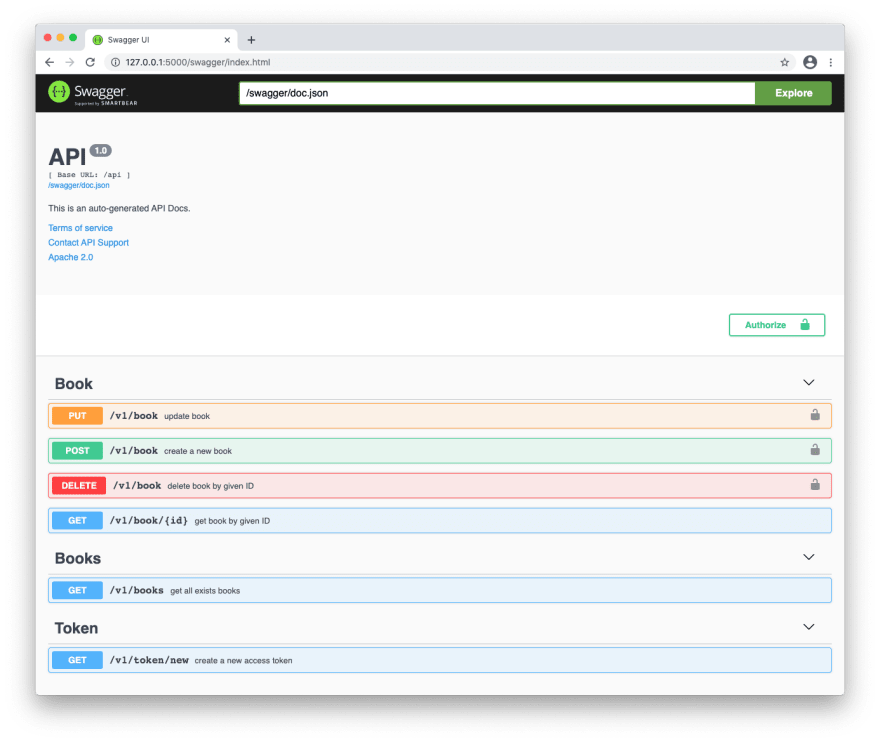
让我们运行 Docker 容器,应用迁移并转到http://127.0.0.1:5000/swagger/index.html:
[ ](https://res.cloudinary.com/practicaldev/image/fetch/s--pM-Az_Ei--/c_limit%2Cf_auto%2Cfl_progressive%2Cq_auto%2Cw_880/https://dev-to -uploads.s3.amazonaws.com/uploads/articles/cid2egkowu1vr4nd3ck0.png)
有用。呜呼! 🎉
↑ 目录
自查知识块
尽量不要偷看教程的文字,并尽可能以快速和诚实的方式回答。如果您忘记了什么,请不要担心!尽管继续:
-
允许应用程序在隔离环境中运行的技术名称是什么?
-
应用程序的业务逻辑应该放在哪里(文件夹名)?
-
应该在项目的根目录下创建什么文件来描述为应用程序创建容器的过程?
-
什么是 UUID,为什么我们将它用于 ID?
-
我们使用什么类型的 PostgreSQL 字段来创建书籍属性的模型?
-
为什么在 Go 应用程序中使用纯 SQL 更好?
-
自动生成文档的API方法需要在哪里描述(by Swagger)?
-
为什么在测试中单独配置?
↑ 目录
进一步发展计划
对于此应用程序的进一步(独立)开发,我建议考虑以下选项:
- 升级
CreateBook方法:添加处理程序将图片保存到云存储服务(例如_Amazon S3或类似_)并仅将图片ID保存到我们的数据库中;
2、升级GetBook和GetBooks方法:添加处理程序,将图片ID从云服务更改为直接链接到该图片;
-
新增注册新用户的方法(例如,注册用户可以获得一个角色,这将允许他们执行REST API中的一些方法);
-
新增用户授权方法(如_授权后,用户会收到一个JWT令牌,其中包含根据其角色的凭证_);
5.添加一个带有Redis(或类似)的独立容器来存储这些授权用户的会话;
↑ 目录
图片来源
-
约书亚 Woronieckihttps://unsplash.com/photos/LeleZeefJ7M
-
麦克斯韦纳尔逊https://unsplash.com/photos/Y9w872CNIyI
-
维克肖斯塔克https://shostak.dev
如果您想在此博客上看到更多类似的文章,请在下面发表评论并订阅我。谢谢! 😘
当然,您可以通过LiberaPay捐款来支持我。 每笔捐款将用于撰写新文章和为社区开发非盈利开源项目。


PostgreSQL社区为您提供最前沿的新闻资讯和知识内容
更多推荐
 0
0 0
0- 0


 已为社区贡献19909条内容

所有评论(0)