

OpenSSH Authentication Agent
How to check to see if your OpenSSH Authentication Agent is active or disabled.
- Open your Windows 10 PowerShell (user mode)
- Type
Get-Service ssh-agentin your PowerShell Terminal
You should see this if it's Active/Running:
Status Name DisplayName------ ---- -----------Running ssh-agent OpenSSH Authentication Agent
If it disabled, off or stopped and you want to turn it back on or activate it, follow the steps below.
Activate your OpenSSH Authentication Agent
- Hit the WINDOWS KEY
- Type
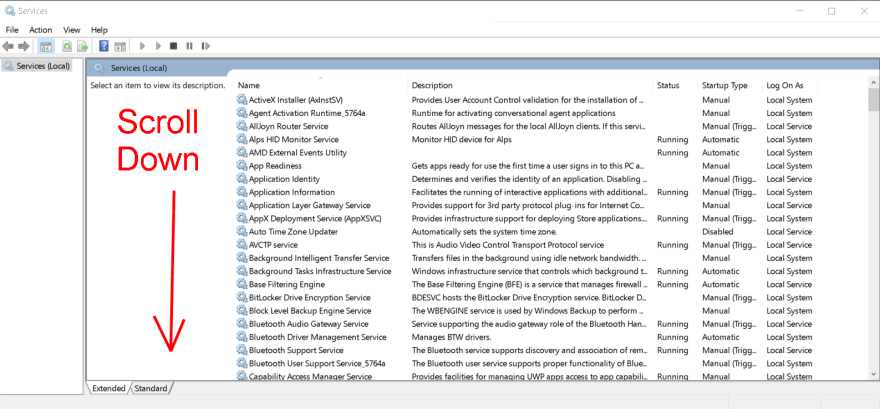
services.msc or servicesit will be under Apps and press ENTER - Scroll down and look for OpenSSH Authentication Agent
- Make sure both of those services are on Automatic

If they are not, make sure each one is set to Automatic individually.
- Right click over
OpenSSH Authentication Agent -
Click on
Properties -
Right click over
OpenSSH SSH Server -
Click on
Properties

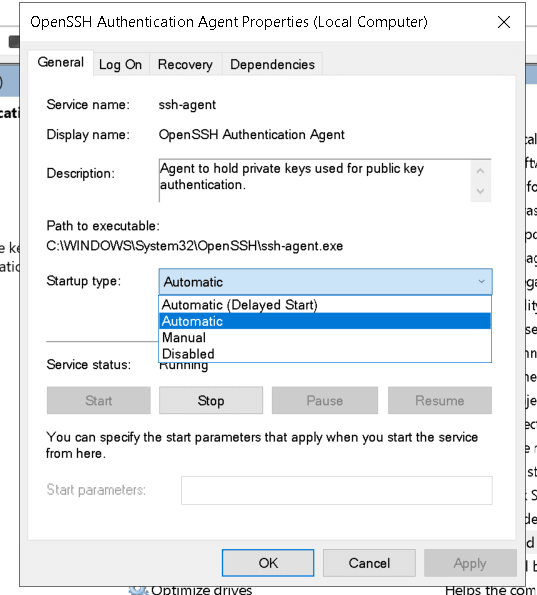
Once you set both to Automatic:
OpenSSH Authentication AgentOpenSSH SSH Server
Finally:
- Hit APPLY **and **OK
- Close all your open windows
- Reboot
I hope this helps you out! Reach out to me if you have any other questions or need help with a problem you cant solve on your own.
J



 已为社区贡献27134条内容

所有评论(0)