

Using Conventional Commits ⭐ as a standard for your commit messages, makes Semantic Versioning 🔖 as easy as can be, with tools like Conventional Changelog 📄,Standard Version 🔖 and Semantic Release 📦🚀
Devmoji is a command line tool that adds color 🌈 to conventional
commits, using emojis inspired by
Gitmoji 😜
Some of the things Devmoji can do:
- emojify: convert input between diferent emoji formats
unicode,shortcodeanddevmoji. devmoji are easy to remember aliases like::test:,:refactor:,:docs:,:securityinstead of hard to remember emoji codes - git commit: install a
prepare-commit-msgcommit hook to :sparkles: automagically emojify your commit message - git log: emojify and colorify the output of
git logeven for projects not using emojis
What does it look like?
- see the commit messages of the Devmoji github repository
- generated Devmoji CHANGELOG.md
📦 Installation
Install with npm or yarn
globally
npm install -g devmoji
yarn global install devmoji
locally inside your project. use with
npx devmoji
npm install --dev devmoji
yarn add --dev devmoji
See --edit for information on how to setup a git commit
hook.
💥 Usage
devmoji --help
$ devmoji --help
Usage: devmoji [options]

Options:
  -c|--config <file>    location of the devmoji.config.js file
  -l|--list             list all known devmojis
  -t|--text <text>      text to format. reads from stdin when omitted
  -f|--format <format>  format should be one of: unicode, shortcode, devmoji (default: "unicode")
  --commit              automatically add a devmoji to the conventional commit header (default: true)
  --no-commit           do not process conventional commit headers
  -e|--edit             read last commit message from .git/COMMIT_EDITMSG in the git root
  --log                 format conventional commits in text similar to git log
  --color               use colors for formatting. Colors are enabled by default, unless output is piped to another command (default: true)
  --no-color            don't use colors
  --version             output the version number
  -h, --help            output usage information
devmoji emojify
Emojify text using --text or piping it to stdin. Input can be a combination
using any valid format. Output formats:
| Format | Description |
|---|---|
shortcode |
outputs Github Markdown short codes like :sparkles: :rocket: |
unicode |
outputs the emoji unicode symbols like ✨ 🚀 |
devmoji |
outputs the devmoji shortcodes like :feat: :chore-release: |
strip |
removes all emoji from the input |
The default format is
unicode, since this can be used pretty much everywhere
and has the shortest text length (relevant for commit messages)
$ echo "This is a :test: of the first :release: :boom: ✨" | devmoji --format shortcode
This is a :rotating_light: of the first :rocket: :boom: :sparkles:

$ echo "This is a :test: of the first :release: :boom: :sparkles:" | devmoji --format unicode
This is a 🚨 of the first 🚀 💥 ✨

$ echo "🚀 :boom: :sparkles:" | devmoji --format devmoji
:chore-release: :breaking: :feat:

$ echo "test 🚀 :boom: :sparkles: :security:" | devmoji --format strip
test
devmoji --commit
Automagically ✨ emojifies a conventional commit message of the formattype(scope): something useful, using the following pseudo code:
if (exists(":type-scope:")) return emoji(":type-scope:")

if (exists(":type:") && exists(":scope:"))
  return emoji(":type:") + emoji(":scope:")

if (exists(":type:")) return emoji(":type:")
example ouput:
$ echo "feat: added a new feature :smile:" | devmoji --commit
feat: ✨ added a new feature 😄

$ echo "chore(release): 1.1.1" | devmoji --commit
chore(release): 🚀 1.1.1

$ echo "fix(security): upgraded lodash" | devmoji --commit
fix(security): 🐛 🔒 upgraded lodash
devmoji --edit
Formats and saves your current commit message .git/COMMIT_EDITMSG. This is
only really useful as a prepare-commit-msg hook.
Configuration using Husky
// package.json
{
  "husky": {
    "hooks": {
      "prepare-commit-msg": "devmoji -e"
    }
  }
}
Configuration using Yorkie
// package.json
{
  "gitHooks": {
    "prepare-commit-msg": "devmoji -e"
  }
}
If you installed Devmoji locally in your project as a dev dependency, then
use something likenpx --no-install devmoji -einstead of the commands
above.
devmoji --log
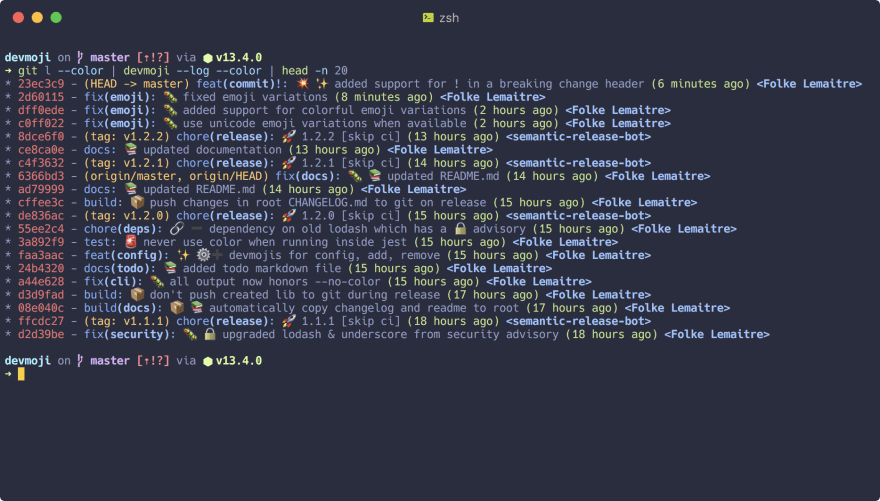
Works similar to --commit, but formats type(scope): something useful
anywhere in the input instead of the beginning of the first line.
This is useful to format the output of git log. Any git log option works,
but my favorite alias is:
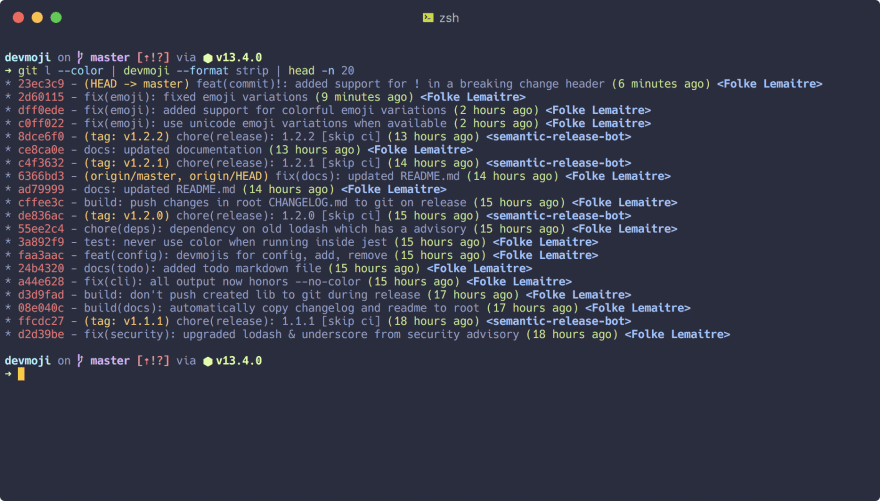
$ git log --graph --pretty=format:'%Cred%h%Creset -%C(yellow)%d%Creset %s %Cgreen(%cr) %C(bold blue)<%an>%Creset' --abbrev-commit --decorate --date=short
I'll use my alias
git l, instead of the above, for clarity. Thedevmoji --format stripis only for demonstration purposes, since all devmoji
commits already have emojiusing
devmoji --log>
devmoji --list
To get a list of all available Devmiji, run with --list. (see also
Default Devmoji)

⚙️ Configuration
devmoji uses the config file as specified with the --config option, or looks
for devmoji.config.js in the following paths:
- current directory
- parent directory that contains a
package.jsonfile - parent directory that is a
gitrepository - home directory
Example Config File
export const defaults = {
  // extra types used in commit messages
  types: ["lint"],
  // custom devmoji
  devmoji: [
    // use :boom: instead of :sparkles: for the type 'feat'
    { code: "feat", emoji: "boom" },
    // add a custom devmoji
    {
      code: "fail",
      emoji: "poop",
      description: "something bad happened",
    },
    // add a new devmoji based on an existing gitmoji. description will be taken from the gitmoji
    {
      code: "css",
      gitmoji: "art",
    },
    // the emoji from the gitmoji can be overriden as well
    {
      code: "config",
      gitmoji: "wrench",
      emoji: "gear",
    },
  ],
}
Default Devmoji Reference
| Emoji | Devmoji Code | Description |
|---|---|---|
| ✨ | :feat: |
feat: a new feature |
| 🐛 | :fix: |
fix: a bug fix |
| 📚 | :docs: |
docs: documentation only changes |
| 🎨 | :style: |
style: changes that do not affect the meaning of the code (white-space, formatting, missing semi-colons, etc) |
| ♻️ | :refactor: |
refactor: a code change that neither fixes a bug nor adds a feature |
| ⚡ | :perf: |
perf: a code change that improves performance |
| 🚨 | :test: |
test: adding missing or correcting existing tests |
| 🔧 | :chore: |
chore: changes to the build process or auxiliary tools and libraries such as documentation generation |
| 🚀 | :chore-release: |
chore(release): code deployment or publishing to external repositories |
| 🔗 | :chore-deps: |
chore(deps): add or delete dependencies |
| 📦 | :build: |
build: changes related to build processes |
| 👷 | :ci: |
ci: updates to the continuous integration system |
| 🚀 | :release: |
code deployment or publishing to external repositories |
| 🔒 | :security: |
Fixing security issues. |
| 🌐 | :i18n: |
Internationalization and localization. |
| 💥 | :breaking: |
Introducing breaking changes. |
| ⚙️ | :config: |
Changing configuration files. |
| ➕ | :add: |
add something |
| ➖ | :remove: |
remove something |



 已为社区贡献3966条内容

所有评论(0)