CRUD API Using Python, FastAPI, and MongoDB
In this blog, we are learning how to create a simple CRUD(Create, Read, Update and Delete) API using Python, FastAPI, and MongoDB.
I've been working on Python for a while now and started learning FastAPI, a lightweight super-fast micro-framework, especially for APIs. In this article, I'll explain how simple it is to create an API with just a few lines of code.
Please find the code on GitHub here.
Tech stack
-
Python
-
FastAPI
-
MongoDB
Here I'm using MongoDB Atlas, which is a MongoDB on the cloud so it is easy to maintain. Atlas is very easy to set up and use.
We are developing an API that can create an employee and perform different operations on the employee. So we create a DB EmployeeDB and a collection for employees as Employee
Connect to Mongo Atlas using pymongo
import pymongo
import dotenv
import os

def get_db(db_name="EmployeeDB"):
    client = pymongo.MongoClient(os.getenv("MONGO_URL"))
    db = client.get_database(db_name)
    return db
The above code makes the connection to MongoDB and returns the db object. It is best practice to hide the connection string in the config file or as an environment variable.
Declare schema model for employee
FastAPI works with Pydantic for schema validation. So let's declare our Employee schema.
from pydantic import BaseModel

class Employee(BaseModel):
    id: int
    name: str
    email: str
    profession: str
    level: str
let's declare one schema more model for an employee update. In this model, the user can send a particular field that needs to be updated.
from typing import Optional

class EmployeeUpdate(BaseModel):
    id: int
    name: Optional[str]
    email: Optional[str]
    profession: Optional[str]
    level: Optional[str]
Create a FastAPI app
Now that we have our Database and schema model ready, let's build an API.
from fastapi import FastAPI

app = FastAPI()

@app.get("/")
def home():
    return {"message": "Welcome Home!!"}
That's it, You have created an API.
To run the application on localhost fastapi comes with uvicorn.
uvicorn main:app
In the above command, main is the file name i.e main.py. and app is the instance of FastAPI, we declared earlier.
CRUD operations on our employee database
GET Employee by id
First the get operation:
@app.get("/employee/{id}", response_model=Employee)
def get_employee(id: int):
    db = get_db()
    col = db.get_collection("Employee")
    emp = col.find_one({"id": id})
    return emp
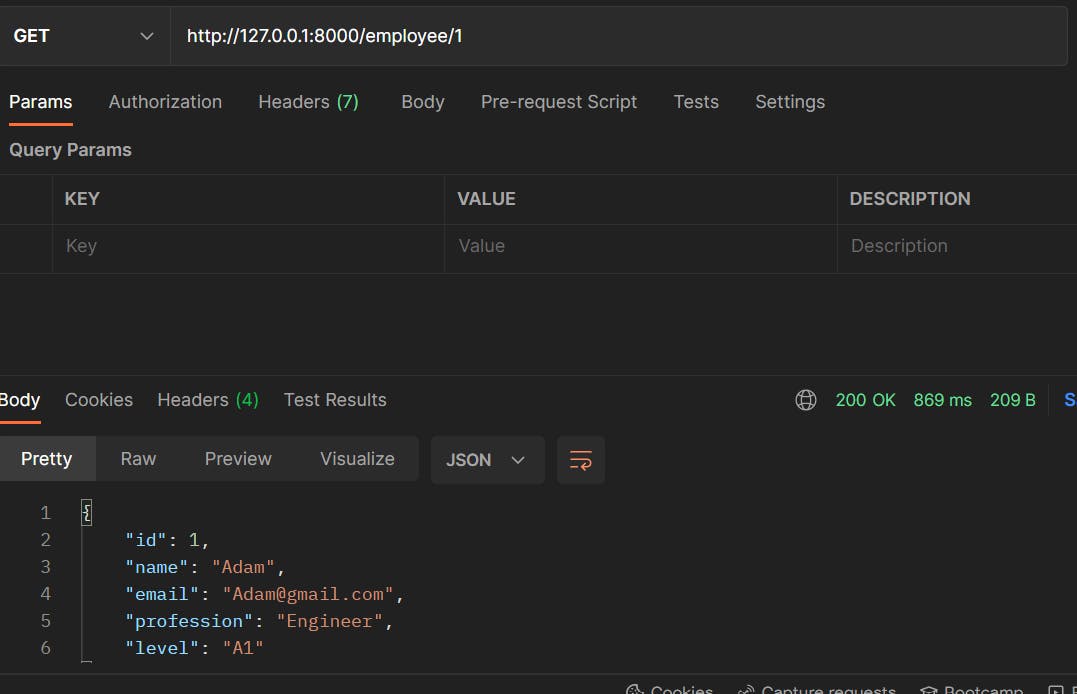
Here we get the employee by id and display the details. Fun thing is, Here we are using the Employee schema, so it filters out and sends only fields mentioned in the Employee schema.
Below are the Employee details on MongoDB:

but when he hit the API and get the response it will emit _id and return the rest of the fields.
Create a new Employee
@app.post("/employee")
def create_employee(data: Employee):
    db = get_db()
    col = db.get_collection("Employee")

    new_emp = col.insert_one(data.dict())
    if new_emp.acknowledged:
        return {"message": f"Employee {data.name} created"}
    return {"message": "error occured while creating employee"}
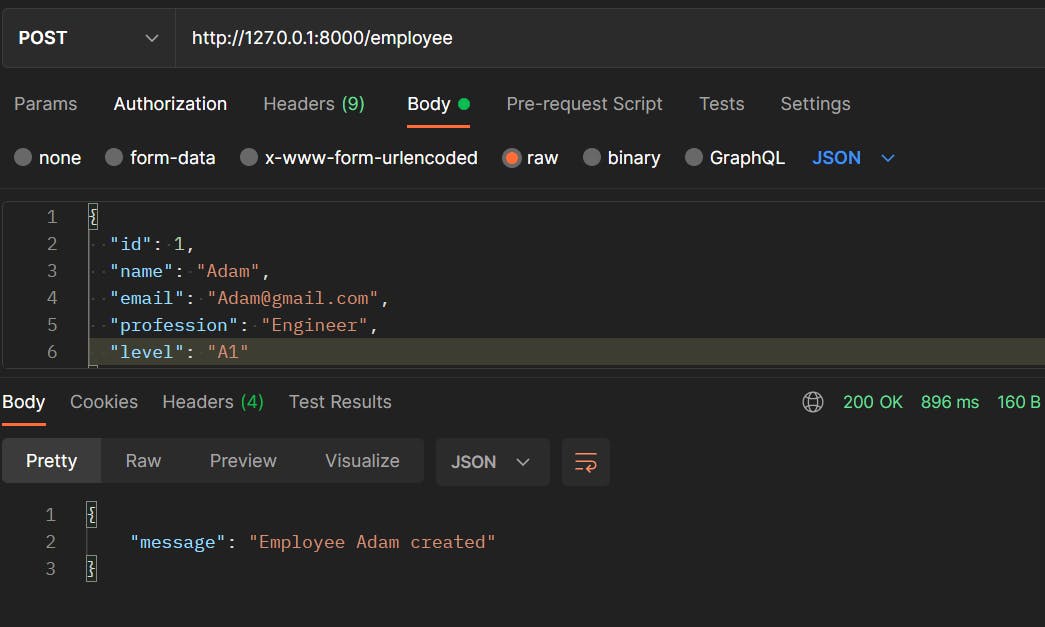
We will pass the fields mentioned in Employee schema to create a new Employee. FastAPI is do the schema validation and created the employee in MongoDB.
Below is the sample post request from the postman.
Update the Employee
@app.put("/employee")
def update_employee(data: EmployeeUpdate):
    db = get_db()
    col = db.get_collection("Employee")
    emp_dict = {k: v for k, v in data.dict().items() if v is not None}
    result = col.update_one({"id": data.id}, {"$set": emp_dict})
    if result.modified_count == 1:
        return {"message": f"Employee updated."}
    return {"message": f"error occured while updating employee {data.name}"}
We are using the put method to update the Employee records. Another thing to notice is, that we are using EmployeeUpdate pydantic model for our schema validation.
EmployeeUpdate only id is the mandatory field and rest of the fields are not required. we pass only required fields and new values to the endpoint. After validation, only the passed fields are updated on MongoDB.

Only fields email and level are updated.

DELETE the Employee record from the Database
To delete the record we pass the id of the employee as a parameter in the API call.
@app.delete("/employee/{id}")
def delete_employee(id: int):
    db = get_db()
    col = db.get_collection("Employee")
    result = col.delete_one({"id": id})
    if result.deleted_count == 1:
        return {"message": "Employee deleted"}
    return {"message": "error occured while deleting employee."}

That's all. We completed our CRUD API using FastAPI and MongoDB.
MongoDB社区为您提供最前沿的新闻资讯和知识内容
更多推荐
 0
0 0
0- 0


 已为社区贡献32862条内容

所有评论(0)