
What is MongoDB
According to the official website of mongoDB, MongoDB is a document database with the scalability and flexibility that you want with the querying and indexing that you need.
MongoDB is an open-source document database that is designed to store a large scale of data and it allows you to work with data very efficiently. It used NoSQL (Not only SQL) database because it does not use table form to store the data like SQL.
MongoDB also provides official driver support for all the popular programming languages like C, C++, Python, Java, Node JS, Go.. etc..
There are so many companies which uses MongoDB to store data Facebook, Nokia, Adobe, Google, etc..
what happens behind the scenes
MongoDB is a database server and the data is stored in these databases. MongoDB gives you a server that allows you to start and create multiple databases on it using MongoDB.
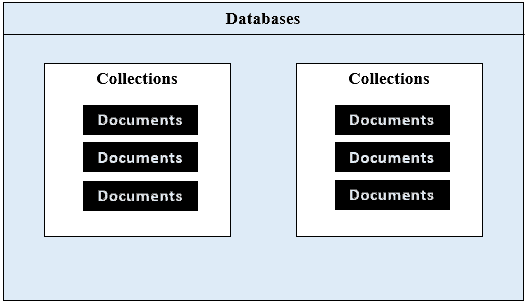
MongoDB uses NoSQL database, which means data is stored in the collections and document. Hence the database, collection and documents are related each other as shown below.
image credits : sqlserverguides.com
MongoDB collections are Similar to MySQL tables. You can create any number of databases and collections.
Installing MongoDB
installing is very easy you just need to visit mongodb website. Just leave the default settings while installing.
Now you we need to bin folder path in our environment variables if you are on windows.
most of the cases it will be in this path :
C:\Program Files\MongoDB\Server\5.0\bin
check and add it to path variables.
Some Important Commands
show dbs; -> to view all existing databases
use newDatabase -> to use existing database or to created and use database
db -> used to show on which database we are on
db.dropDatabase() -> used to drop/delete a database
db.createCollection('name') -> used to create a collection inside a database
db.showCollections() -> used to view collections inside a database
db.CollectionName.drop() -> used to drop a collection in a database
Lets say we have a collection called Content, now we will see how to insert rows into it.
db.Content.insert({'name': 'vamsi','age': 20}) -> used to insert a row into collection
db.Content.insert([objects]) -> used to insert more than one row
This is the Basics of MongoDB.
Thank You 🌹
Also Read :
Getting Started with Express JS


 已为社区贡献1706条内容

所有评论(0)