

In the last post, we looked at viewing and sorting of files.
There are many times that we want to look at only a specific part of the file and even more times when just want to analyze the file content.
In this post, we are going to have a look at basic commands to filter the contents of a file.
1. grep command
The grep command is used to search text or search the given file for lines containing a match to the given strings or words.
The syntax for grep command
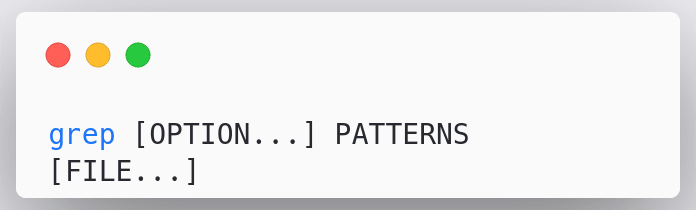
To filter a file using grep we use grep along with the options like "case", patterns we want it to match and the source files.
Let's take an example
We have the following log file

- filter out which user is mentioned in the logs

In the above example, we used the command cat logs.txt | grep user@ where
cat represents cat command to read the file contentlogs.txt represents the file to read content fromgrep represents the grep commandUser@ represents the text we used to filter the logs.txt file.
Note: The grep command by default is case-sensitive
- get the same output as above using
User@as the pattern

In the above example, we first used the command to check whether we can directly use the User@ but it did not work sincegrep is case-sensitive so to fix this we used the command
cat logs.txt | grep -i User@ wherecat represents cat command to read the file contentlogs.txt represents the file to read content fromgrep represents the grep command-i represents the option to filter case-insensitiveuser@ represents the text we used to filter the logs.txt file.
We can also use the grep command to get the count of a specific word
- find number of occurrences of the word "exceed"

In the above example, we used the command cat logs.txt | grep -ic exceed wherecat represents cat command to read the file contentlogs.txt represents the file to read content fromgrep represents the grep command-ic represents the option to count the number of **occurrences of the word irrespective of the caseexceed represents the text we used to filter the logs.txt file.
What if we need to revert the above case?
- find the count of words that do not match the word "exceed"

In the above example, we used the command cat logs.txt | grep -cv exceed wherecat represents cat command to read the file contentlogs.txt represents the file to read content fromgrep represents the grep command-cv represents the option to count the number of occurrences of the words not matchingexceed represents the text we used to filter the logs.txt file.
Let's move on to the next command
2.wc command
The wc stands for word count is used for printing the number of lines, words, and bytes contained in files
The syntax for wc command
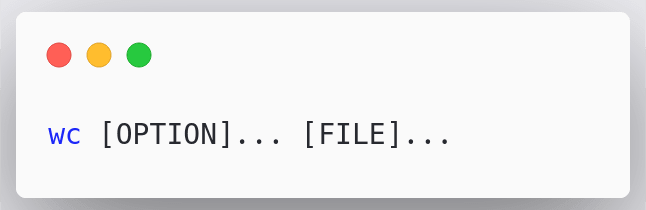
To use the wc command we simply use wc along with options and files
Let's take an example
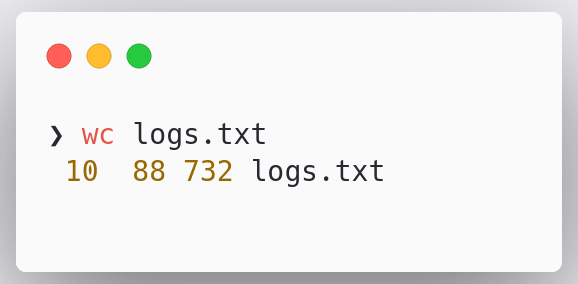
In the above example, we used the command wc logs.txt to get the number of lines, words, and bytes.
- get only the number of lines in a file

In the above example, we used the option -l and created a command wc -l logs.txt to get the number of lines.
Similarly, we can use -w for words, -c for bytes and -m for characters
3.uniq command
The uniq command is used to report or omit repeated lines.
By default, uniq prints its input lines, except that it filters all but the first of adjacent repeated lines so that no output lines are repeated.
uniq is mostly used with sort command. the sort command provides with the sorted input and uniq command removes the repeated lines.
Let's take an example of the following file

- use unique to filter file contents

In the above example, we first used the command sort random-words.txt | we to find the current count and then to get the unique values only we used sort random-words.txt | uniq | wc where
sort represents sort commandrandom-words.txt represents the input fileuniq represents uniq commandwc represents wordcount command
4.tr command
The tr command is used to translate, squeeze, and/or delete characters.
The syntax for tr command

By default, the tr command will replace each character in SET1 with each character in the same position in SET2.
Let's take examples for better understanding
- convert lowercase to uppercase

In the above example, we used the command tr "[:lower:]" "[:upper:]" wheretr represents tr command[:lower:] represents SET1 all the lower-case letters[abcd...][:upper:] represents SET2 all the upper-case letters[ABCD...]
- delete a specified character

In the above example, we used the command cat hello.txt | tr -d 'o' wherecat represents the concatenation commandhello.txt represents the input filetr represents tr command-d represents the delete optiono represents character to be deleted
- join all the lines into a single line

In the above example, we used the command tr -s '\n' ' ' < logs.txt wheretr represents tr command-s represents squeeze repeats\n represents a new line' ' represents single spacelogs.txt represents the input file
5.head and tail command
In the recent past, we already had a look at this command. Let's take a recap.
head command is used to print the lines from the start of the file whereas the tail command is used to print the files from the bottom of the file.
Let's take an example for better understanding
- print only the first two line from a file
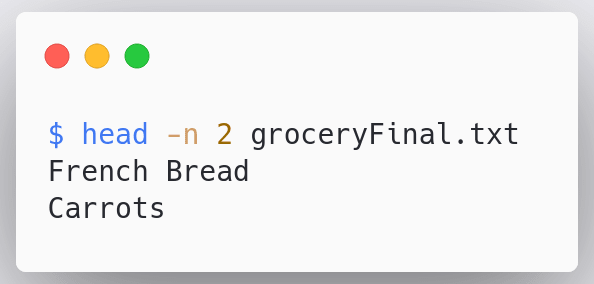
In the above example, we used the command head -n 2 groceryFinal.txt where
head represents the head command-n 2 represents the number of lines optiongroceryFinal.txt represents the file we want to read
- print only the last two lines from a file
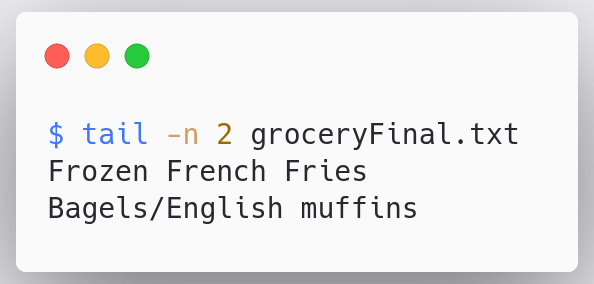
tail represents the tail command-n 2 represents the number of lines optiongroceryFinal.txt represents the file we want to read
So head and the tail command is basically used to view the snippet of file content.
Note: There are two commands sed and awk that I have purposefully left out to cover them later in deep.
So these were the commands to filter file contents. If I missed any please let me know in the discussions below.
Also, let me know if you have any questions down below. See you in the funny papers.


 已为社区贡献12493条内容

所有评论(0)