
亚马逊关键词搜索接口 Python 代码实战指南
通过本文的介绍,您应该已经掌握了如何高效地使用亚马逊关键词搜索接口,并通过 Python 代码实现数据的获取和解析。无论是使用官方 API,还是第三方服务,甚至是爬虫技术,都可以根据需求选择合适的方法。希望本文能够帮助您更好地利用亚马逊关键词搜索接口,为您的电商运营和数据分析提供支持。如遇任何疑问或有进一步的需求,请随时与我私信或者评论联系。
在电商运营和市场研究中,通过关键词搜索获取亚马逊商品信息是常见的需求。本文将详细介绍如何高效地使用亚马逊关键词搜索接口,并通过 Python 代码实现数据的获取和解析。无论是使用官方的 Product Advertising API,还是第三方服务,本文都将提供详细的实战指南。
一、准备工作
(一)注册亚马逊开发者账号并获取 API 权限
-
注册亚马逊平台账户。
-
在开发者中心创建一个应用,获取 Access Key 和 Secret Key,这些密钥将用于身份验证。
-
(二)安装 Python 环境和依赖库
确保已安装 Python,并安装以下库:
-
requests:用于发送 HTTP 请求。 -
beautifulsoup4:用于解析 HTML 文档。 -
lxml:作为解析器,提升解析效率。 -
selenium:用于模拟浏览器操作,处理动态加载的内容。
可以通过以下命令安装这些库:
bash
pip install requests beautifulsoup4 lxml selenium二、使用亚马逊官方 API 获取关键词搜索结果
(一)构建请求
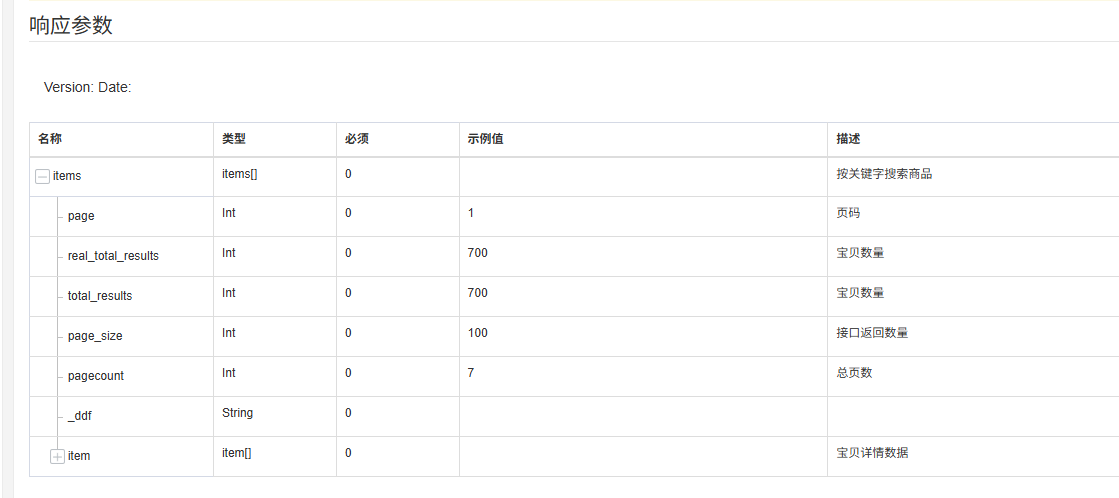
亚马逊官方的 Product Advertising API 提供了强大的功能,可以通过关键词搜索商品。以下是构建请求的基本步骤:
-
设置基础参数:
Python
import requests
from datetime import datetime
import hmac
import hashlib
from urllib.parse import urlencode

base_params = {
    "Service": "AWSECommerceService",
    "AWSAccessKeyId": "YOUR_ACCESS_KEY",
    "AssociateTag": "YOUR_ASSOCIATE_TAG",
    "Operation": "ItemSearch",
    "ResponseGroup": "ItemAttributes,Offers",
    "SearchIndex": "All",
    "Keywords": "",  # 预留关键词参数
    "Timestamp": datetime.utcnow().isoformat()
}-
生成签名:
Python
def generate_signature(params, secret_key):
    query_string = urlencode(sorted(params.items()))
    string_to_sign = f"GET\necs.amazonaws.com\n/onca/xml\n{query_string}"
    signature = hmac.new(secret_key.encode(), string_to_sign.encode(), hashlib.sha256).digest()
return requests.utils.quote(signature)-
发送请求:
Python
def search_amazon(keywords, access_key, secret_key, associate_tag):
    params = base_params.copy()
    params["Keywords"] = keywords
    params["AWSAccessKeyId"] = access_key
    params["AssociateTag"] = associate_tag
    params["Signature"] = generate_signature(params, secret_key)
    response = requests.get("https://ecs.amazonaws.com/onca/xml", params=params)
    return response.text
(二)解析响应数据
响应数据通常是 XML 格式,可以使用 xml.etree.ElementTree 或其他 XML 解析库来提取所需信息。
Python
import xml.etree.ElementTree as ET

def parse_response(xml_data):
    root = ET.fromstring(xml_data)
    products = []
    for item in root.findall(".//Item"):
        product = {
            "title": item.find("ItemAttributes/Title").text,
            "price": item.find("Offers/Offer/OfferListing/Price/FormattedPrice").text,
            "image_url": item.find("SmallImage/URL").text
        }
        products.append(product)
    return products
三、使用第三方 API 服务
除了亚马逊官方 API,还可以使用第三方服务,如 Pangolin Scrape API 或 Scrapeless,这些服务通常更简单易用。
(一)使用 Pangolin Scrape API
-
注册 Pangolin 账号并获取 API 密钥。
-
使用以下代码调用 API:
Python
import requests

API_ENDPOINT = "https://api.pangolinfo.com/v1/amazon/search"
headers = {"Authorization": "Bearer YOUR_API_TOKEN"}

def search_with_pangolin(keyword, marketplace="US"):
    params = {
        "keyword": keyword,
        "marketplace": marketplace,
        "fields": "title,price,link"
    }
    response = requests.get(API_ENDPOINT, headers=headers, params=params)
    if response.status_code == 200:
        return response.json()
    else:
        raise Exception(f"请求失败,错误码:{response.status_code}")
(二)使用 Scrapeless
-
注册 Scrapeless 账号并获取 API Key。
-
使用以下代码调用 API:
Python
import requests

API_KEY = "YOUR_SCRAPLEASE_API_KEY"
API_ENDPOINT = "https://api.scrapeless.com/v1/amazon/search"

def search_with_scrapeless(keyword, marketplace="US"):
    params = {
        "keyword": keyword,
        "marketplace": marketplace
    }
    headers = {"Authorization": f"Bearer {API_KEY}"}
    response = requests.get(API_ENDPOINT, headers=headers, params=params)
    if response.status_code == 200:
        return response.json()
    else:
        raise Exception(f"请求失败,错误码:{response.status_code}")
四、使用爬虫技术获取搜索结果
如果不想使用 API,也可以通过爬虫技术获取亚马逊搜索结果。以下是一个使用 Selenium 和 BeautifulSoup 的示例:
(一)初始化 Selenium
Python
from selenium import webdriver
from selenium.webdriver.chrome.service import Service
from webdriver_manager.chrome import ChromeDriverManager

service = Service(ChromeDriverManager().install())
driver = webdriver.Chrome(service=service)
(二)搜索商品
Python
def search_amazon(keyword):
    url = "https://www.amazon.com/s"
    driver.get(url)
    search_box = driver.find_element_by_name('k')
    search_box.send_keys(keyword)
    search_box.submit()
(三)解析商品信息
Python
from bs4 import BeautifulSoup

def parse_products():
    soup = BeautifulSoup(driver.page_source, 'lxml')
    products = []
    for product in soup.find_all('div', {'data-component-type': 's-search-result'}):
        try:
            title = product.find('span', class_='a-size-medium a-color-base a-text-normal').get_text()
            price = product.find('span', class_='a-price-whole').get_text()
            link = product.find('a', class_='a-link-normal')['href']
            products.append({'title': title, 'price': price, 'link': link})
        except AttributeError:
            continue
    return products
(四)完整流程
Python
def amazon_crawler(keyword):
    search_amazon(keyword)
    products = parse_products()
    return products

keyword = "python books"
products = amazon_crawler(keyword)
for product in products:
    print(product)
五、注意事项
(一)合规性
在使用亚马逊 API 或爬虫技术时,必须严格遵守亚马逊的使用条款和相关法律法规。
(二)性能优化
合理安排请求频率,避免触发亚马逊的反爬机制。如果需要高频请求,建议使用代理 IP。
(三)错误处理
在代码中添加适当的错误处理逻辑,以便在请求失败时能够及时发现并解决问题。
六、总结
通过本文的介绍,您应该已经掌握了如何高效地使用亚马逊关键词搜索接口,并通过 Python 代码实现数据的获取和解析。无论是使用官方 API,还是第三方服务,甚至是爬虫技术,都可以根据需求选择合适的方法。希望本文能够帮助您更好地利用亚马逊关键词搜索接口,为您的电商运营和数据分析提供支持。
如遇任何疑问或有进一步的需求,请随时与我私信或者评论联系。

更多推荐
 16
16 0
0- 0


 已为社区贡献1条内容

所有评论(0)