How to Pass your KCNA Exam
The CNCF has just launched the new Kubernetes and Cloud Native Associate Exam also known as the KCNA. I was one of the first 400 people to go through the Beta exam which contained the full suite of questions instead of the normal 60 questions. And have recently passed with a 90% score, and wanted to share some tips on how you can do the same!

As a hiring manager, I highly regard certain certificates, particularly from the Linux foundation. The KCNA exam gives me confidence that candidates are able to work with cloud-native technologies and pursue further CNCF credentials, including CKAD, CKA, and CKS.
I will go over the following:
- Exam format
- Exam domains
- Booking the Exam
- Study Tips
- Exam Day Tips
Exam Format
The exam is a multiple-choice exam that consists of around 60 questions. You have 90 minutes to complete it and must get a score of 75% or above. The certification is valid for 3 years.
For a video overview of this exam, you can watch a great explanation from Saiyam Pathak here.
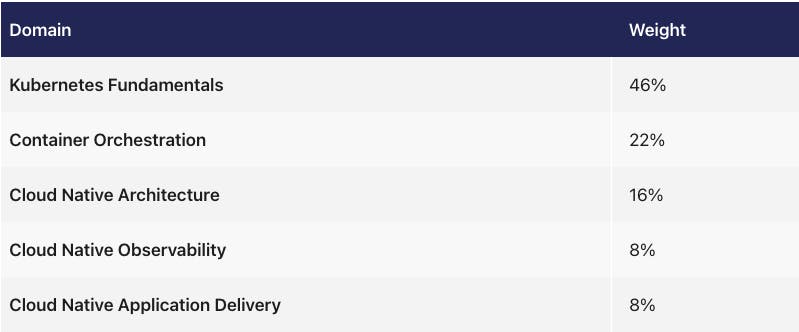
The exam is broken down into the following categories:
Exam Domains
Use this guide to tell you the areas you should focus on the most. You can see that Kubernetes almost takes up half of the exam so your main focus should be around that. Also, a lot of the CNCF projects are built on Kubernetes so you will learn them naturally the deeper you study Kubernetes so it is a natural path.
Kubernetes Fundamentals — 46%
If you are new to Kubernetes I recommend starting with an introduction course there are many great ones out there, I did the EDX Introduction to Kubernetes course, it was great to get into the study and exam mode. Never be afraid to walk before you can run. Even I do Introduction courses when I learning new technologies. It’s actually faster in the long run. There are many courses available on Kubernetes now, so make sure you check out the reviews before you purchase. Also, reach out to the community for free courses.
Container Orchestration — 22%
As you are learning Kubernetes a lot of this will come up naturally. Except for maybe service mesh. I would learn what a service mesh is and what problems it solves after you have done the Kubernetes study.
A good start to learning about this category is by taking a step back and learning about Interfaces. Kubernetes is designed to support modular cloud-native applications from the ground up, Interfaces allow the platform to be equally modular and flexible.
I recommend learning the following and seeing how they contribute to the bigger picture:
- Container Runtime Interface (CRI)
- Container Network Interface (CNI)
- Container Storage Interface (CSI)
- Service Mesh Interface (SMI)
Cloud Native Architecture — 16%
When I was studying for the Beta exam, there was not much content available for study so I would go to a lot of different sources to study. One person that had great content was Kate Gamanji, her blog is really impressive and it’s good to read it to mix it up when you are studying courses all day. You can find it here. I also enjoyed her YouTube videos. One of them was on Open Standards which can be found here.
It is also important to know how the CNCF works. There are many blogs and videos on this. Make sure you look at the more recent ones, as there are small changes from time to time.
You can start with the picture below and learn more about each bubble to go over Community and Governance, and Roles and Personas.

Cloud Native Observability — 8%
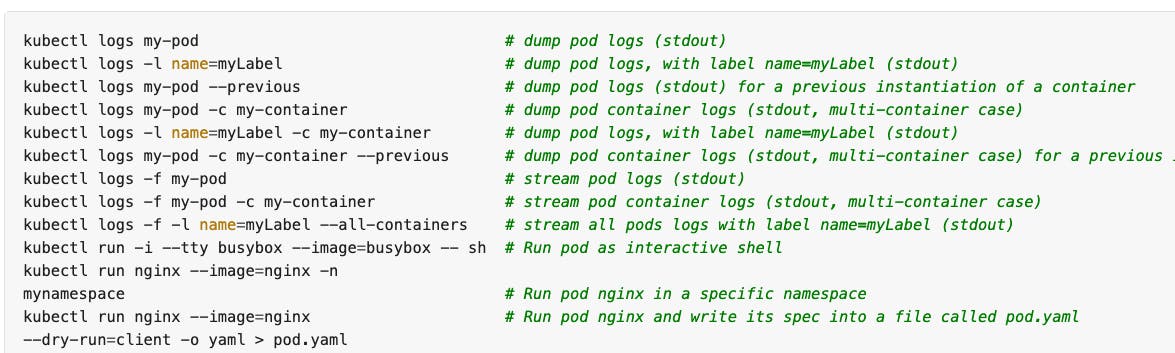
One thing I found that I needed to study more on after the exam was kubectl logs commands. When you are studying the kubectl cheat sheet make sure you go over the logs part well as listed below.
It's also good to learn about Prometheus and what it is and why you would use it at a high level.
Cloud Native Application Delivery — 8%
For this domain, you need to know a high-level overview of GitOps, CI/CD, and Application Delivery Fundamentals. It's important to know the difference between DevOps and SRE, as there will be questions around this. Also, check out the CNCF landscape to look at high-level information on projects such as ArgoCD and Flux. One GitOps resource I really like is the Weaveworks Guide to GitOps it will really help you to understand GitOps. Also look at the fundamentals of CI/CD, what it is, and the difference between the two.
Booking the Exam
Booking the date of the exam in advance is important, this will keep you on track with your study, if you find you are not ready you can reschedule 24 hours in advance for free.
The Exam costs $250 US with one retake. Something I always do to get a discount is to register for an early bird ticket for KubeCon that costs $10, and on the day of KubeCon normally you will get a 50% voucher for the exams so research that.
Each exam comes with a free resit of the exam. Don’t worry if you are not quite ready to sit the exam, you can use the first take as a practice test, and then see the areas where you need more attention.
To book your exam go here: KCNA
If you want to do a course alongside the exam consider this bundle: LFS250
Study Tips
- Join our free mentoring program that can be found here. This is a ten-week program where you will have the ability to get training sessions from some amazing mentors.
- Study in 2-hour blocks. This avoids context switching of tasks and is not too long that you will have information overload.
- Create a training schedule before you book the exam of what you want to study up until the exam.
- Go back to basics to start with and then study more complex things at the end, closer to the exam so they are fresher in your head. If you study hard things first by the time you do the exam you will forget.
- Another good way to mix up your study is to look at memenetes on Twitter, if you don't find it funny and don't get the jokes you are not prepared.
Exam Day Tips
- You can start the exam 15 minutes before the scheduled time, this is the amount of time it will take to talk to the proctor.
- Make sure that your room is clean on exam day, they will ask you to walk around the room with your camera, to show nothing on your desk. Some of the proctors are very annoying. Remember to not get angry and be patient with them, and your exam will be launched faster.
- If you are not sure about a question give it your best answer, flag it and move on, if you have time in the end you can spend more time on it. Sometimes other questions ahead spark your memory and then you remember the answer.
- I normally book my exams on a Saturday around lunchtime, so on exam day I wake up, have breakfast, and binge study until one hour before my exam then go for a walk and then sit the exam.
- Make sure you have your ID available as per the guidelines, I always make sure my passport is on my desk the day before.
Conclusion
The hardest part of doing these exams is waiting for exam results, normally they will come around 24 hours, so don’t worry about checking your emails every ten minutes, don’t be worried if you failed, consider it a practice test. Remember don't be afraid to start learning basics, good things take time!

K8S/Kubernetes社区为您提供最前沿的新闻资讯和知识内容
更多推荐
 0
0 0
0- 0


 已为社区贡献20439条内容

所有评论(0)