

Summary
Grav is one of CMS frameworks, which is open source and MIT Licensed. It is developed as a flat-file based one using Symfony PHP framework. Symfony officially introduces it on their own website.
This post shows how to install it on OpenBSD.
Environment
- OS: OpenBSD 6.9
- Web server: OpenBSD httpd
- App server: PHP 7.4 with PHP-FPM and Composer 2.0
- CMS: Grav 1.7
Installation
Preparation
Composer
Install with OpenBSD's Ports:
$ doas pkg_add composer
OpenBSD httpd and PHP-FPM
Confirm the required daemons, httpd and php-fpm, are started:
$ # enabled? (optional)
$ doas rcctl ls on | grep -E "(httpd|php)"
httpd
php74_fpm

$ # started?
$ doas rcctl ls started | grep -E "(httpd|php)"
httpd
php74_fpm
When they are not shown, which means they are not ready, prepare them. There are examples of tutorials:
OpenBSD httpd

OpenBSD httpd 6.3: Web Server
Heddi Nabbisen ・ Oct 5 '18 ・ 3 min read
PHP-FPM
PHP-FPM 7.2 on OpenBSD 6.4
Heddi Nabbisen ・ Dec 13 '18 ・ 2 min read
Project creation and configuration
Here goes the main part.
Creation
Let's get the Grav project template and install dependencies:
$ composer create-project getgrav/grav <grav-dir>
The output is:
Creating a "getgrav/grav" project at "./"
Installing getgrav/grav (1.7.18)
  - Installing getgrav/grav (1.7.18): Extracting archive
Created project in /(...)/<grav-dir>/.
Installing dependencies from lock file (including require-dev)
Verifying lock file contents can be installed on current platform.
Package operations: 103 installs, 0 updates, 0 removals
  - Downloading behat/gherkin (v4.8.0)
(...)
  - Downloading phpstan/phpstan-deprecation-rules (0.12.6)
  - Installing antoligy/dom-string-iterators (v1.0.1): Extracting archive
(...)
  - Installing willdurand/negotiation (3.0.0): Extracting archive
Generating autoload files
57 packages you are using are looking for funding.
Use the `composer fund` command to find out more!
> bin/grav install

Installing vendor dependencies
Installing dependencies from lock file
Verifying lock file contents can be installed on current platform.
Package operations: 0 installs, 0 updates, 52 removals
  - Removing webmozart/assert (1.10.0)
(...)
  - Removing behat/gherkin (v4.8.0)
    0 [>---------------------------]    0 [>---------------------------]    0 [>---------------------------]Generating optimized autoload files
Class ParsedownExtraTest located in ./vendor/erusev/parsedown-extra/test/ParsedownExtraTest.php does not comply with psr-0 autoloading standard. Skipping.
24 packages you are using are looking for funding.
Use the `composer fund` command to find out more!


Cloning Bits
============

Cloning into 'user/plugins/problems'...
(...)
SUCCESS cloned https://github.com/getgrav/grav-plugin-problems -> /(...)/<grav-dir>/user/plugins/problems

Cloning into 'user/plugins/error'...
(...)
SUCCESS cloned https://github.com/getgrav/grav-plugin-error -> /(...)/<grav-dir>/user/plugins/error

Cloning into 'user/plugins/markdown-notices'...
(...)
SUCCESS cloned https://github.com/getgrav/grav-plugin-markdown-notices -> /(...)/<grav-dir>/user/plugins/markdown-notices

Cloning into 'user/themes/quark'...
(...)
SUCCESS cloned https://github.com/getgrav/grav-theme-quark -> /(...)/<grav-dir>/user/themes/quark
Done.
Configuration
There are two parts: Admin panel installation (optional) and OpenBSD httpd configuration.
Admin panel (optional)
Well, Admin panel is very useful to manage Grav sites, so I recommend installing it.
Use GPM, grav package manager, to install it:
$ cd <grav-dir>

$ php bin/gpm install admin
The output is:
GPM Releases Configuration: Stable


The following dependencies need to be installed...
  |- Package form
  |- Package login
  |- Package email
  |- Package flex-objects

 Install these packages? [Y|n]  (yes/no) [yes]:
 >

Preparing to install Form [v5.0.3]
(...)
  '- Success!

Preparing to install Login [v3.4.4]
(...)
  '- Success!

Preparing to install Email [v3.1.3]
(...)
  '- Success!

Preparing to install Flex Objects [v1.0.16]
(...)
  '- Success!


Dependencies are OK

Preparing to install Admin Panel [v1.10.18]
  |- Downloading package...   100%
  |- Checking destination...  ok
  |- Installing package...    ok
  '- Success!


Clearing cache

Cleared:  /(...)/<grav-dir>/cache/doctrine/*
Cleared:  /(...)/<grav-dir>/cache/compiled/*

Touched: /(...)/<grav-dir>/user/config/system.yaml
OpenBSD httpd
Let's add a server to serve a Grav site.
$ doas nvim /etc/httpd.conf
OpenBSD httpd.conf should be like this:
server "<fqdn>" {
    root "/(...care about `chroot`...)/<grav-dir>"
    #directory no index

    # security
    location "*/.git*"                      { block }

    # assets
    location "*.html"                       { pass }
    location "*.css"                        { pass }
    location "*.js"                         { pass }
    location "*.jpg"                        { pass }
    location "*.jpeg"                       { pass }
    location "*.png"                        { pass }
    location "*.webp"                       { pass }
    location "*.gif"                        { pass }
    location "*.mp4"                        { pass }
    location "*.woff"                       { pass }
    location "*.woff2"                      { pass }
    location "*.ttf"                        { pass }
    # robots.txt
    location "/robots.txt"                  { pass }

    location "*" {
        root "/(...care about `chroot`...)/<grav-dir>/index.php"
        fastcgi socket "/run/php-fpm.sock"
    }
}
Then restart the server:
$ doas rcctl restart httpd
Done.
Conclusion
Access http(s)://<fqdn>/ and you will see:

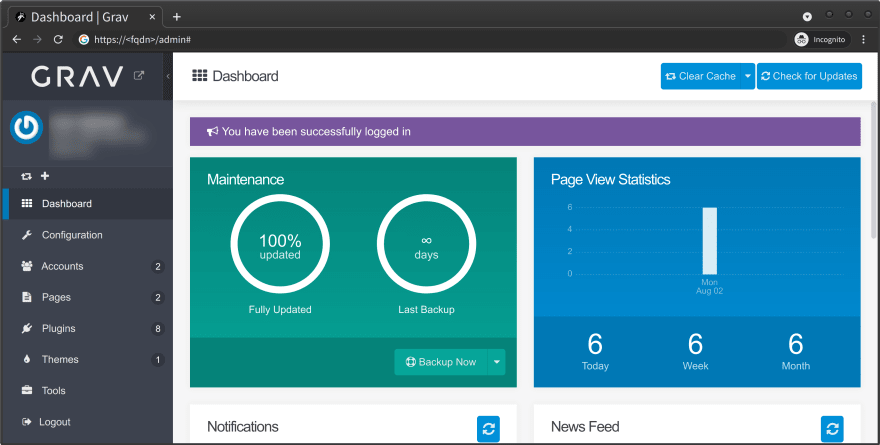
The admin panel is available :)

The admin panel dashboard looks like this:


 已为社区贡献20535条内容

所有评论(0)