Grafana login with oauth2_proxy
Answer a question
Issue:
I am trying to set up a very simple configuration locally
grafanarunning on default port3000oauth2_proxyrunning on default port4180
Expectation:
Expectation is: after successfully login through oauth2_proxy using google credentials, the login "is carried over" in Grafana. However, the user is only redirected to the Grafana login page.
Steps to reproduce: Create the following empty directory structure
/monitoring/data/grafana// this acts as mounted volume to grafana/data/oauth2// this acts as mounted volume to oauth2_proxy
Copy the docker-compose.yaml file below, inside the /monitoring folder
docker-compose.yaml
# docker-compose.yml
version: '3'
services:
  grafana:
    container_name: grafana
    image: grafana/grafana:latest
    restart: always
    user: '104'
    volumes:
      - $PWD/data/grafana:/var/lib/grafana
    ports:
      - 3000:3000
    environment:
      # [users]
      - GF_USERS_ALLOW_SIGN_UP=false
      - GF_USERS_AUTO_ASSIGN_ORG=true
      - GF_USERS_AUTO_ASSIGN_ORG_ROLE=Admin

      # [auth]
      - GF_AUTH_DISABLE_LOGIN_FORM=true

      # [auth.generic_oauth]
      - GF_AUTH_GENERIC_OAUTH_ENABLED=true
      - GF_AUTH_GENERIC_OAUTH_NAME=OAuth
      - GF_AUTH_GENERIC_OAUTH_ALLOW_SIGN_UP=true
      - GF_AUTH_GENERIC_OAUTH_CLIENT_ID=<google_client_id>
      - GF_AUTH_GENERIC_OAUTH_CLIENT_SECRET=<google_client_secret>
      - GF_AUTH_GENERIC_OAUTH_SCOPES=openid email nickname
      - GF_AUTH_GENERIC_OAUTH_AUTH_URL=http://localhost:4180/auth
      - GF_AUTH_GENERIC_OAUTH_TOKEN_URL=http://localhost:4180/token
      - GF_AUTH_GENERIC_OAUTH_API_URL=http://localhost:4180/userinfo

  oauth2-proxy:
    container_name: oauth2-proxy
    image: quay.io/oauth2-proxy/oauth2-proxy:latest
    restart: always
    ports:
      - 4180:4180
    volumes:
      - $PWD/data/oauth2:/var/lib/oauth2_proxy
    environment:
      - OAUTH2_PROXY_PROVIDER=oidc
      - OAUTH2_PROXY_CLIENT_ID=<google_client_id>
      - OAUTH2_PROXY_CLIENT_SECRET=<google_client_secret>
      - OAUTH2_PROXY_OIDC_ISSUER_URL=https://accounts.google.com
      - OAUTH2_PROXY_COOKIE_SECRET=<some_secret>
      - OAUTH2_PROXY_COOKIE_DOMAIN=http://localhost:3000
      - OAUTH2_PROXY_EMAIL_DOMAINS=*
      - OAUTH2_PROXY_REDIRECT_URL=http://localhost:3000/oauth2/callback
      - OAUTH2_PROXY_HTTP_ADDRESS=http://:4180
      - OAUTH2_PROXY_UPSTREAMS=http://localhost:3000/
      - OAUTH2_PROXY_COOKIE_SECURE=false
      - OAUTH2_PROXY_ERRORS_TO_INFO_LOG=true
run
docker-compose up -d --build
Run Grafana: http://localhost:3000
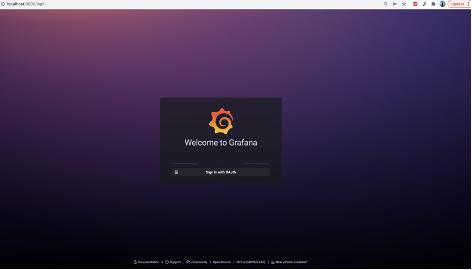
So far so good, we get Grafana login page with only OAuth login enabled
Now we click on OAuth login button
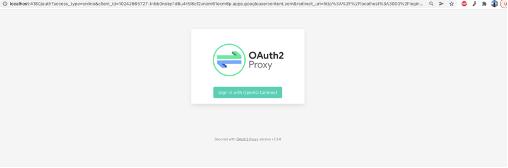
After successful authentication, the user authenticated session is not carried over to Grafana. Instead, the user is redirected to login page.
No errors in either Grafana or oauth2_proxy
Please note, using Google as Identity Provider here is only for simplification (I am aware that I can plug that in directly in grafana without oauth2_proxy) The reason I am using generic_oauth is because, ultimately, the oauth2_proxy will be integrated with a corporate identity provider.
Answers
You don't need any oauth2-proxy. I guess you find it somewhere, but that's a solution for old Grafana version, which didn't have OIDC support - a few years ago. Now, Grafana has good native support for OIDC, so just configure all GF_AUTH_GENERIC_OAUTH_* variables properly.

云原生社区为您提供最前沿的新闻资讯和知识内容
更多推荐
 0
0 0
0- 0


 已为社区贡献35528条内容

所有评论(0)