

1. Eureka Basics
1.1 what is service governance?
In the traditional rpc remote invocation framework, it is complex to manage the dependency relationship between each service and service, so it is necessary to use service governance to manage the dependency relationship between services, so as to realize service invocation, load balancing, fault tolerance, service discovery and registration.
- Spring cloud encapsulates the Eureka module developed by Netflix to realize service governance.
1.2. What is service registration and discovery?
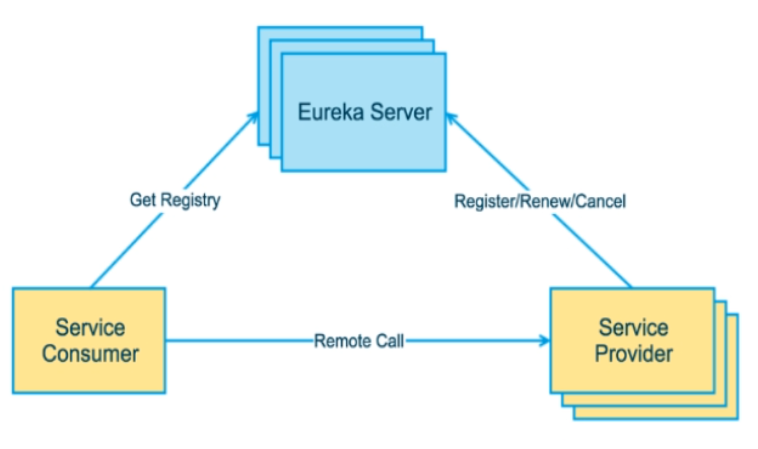
- Eureka Server is the server of service registration function. It is the service registration center. Other microservices in the system use Eureka's client to connect to Eureka Server and maintain heartbeat connection. In this way, the maintenance personnel of the system can monitor whether each micro service of the system is running normally through Eureka Server.
Service registration and discovery
In service registration and discovery, there is a registry. When the server starts, it will register its current server information, such as service address, communication address, etc. in the registration center in the form of alias. The other party (consumer and service provider) obtains the actual service communication address from the registry in the way of this alias, and then implements the local RPC to call RPC. The core design idea of the remote invocation framework: the registry is used to manage a dependency between each service and services (service governance concept). In any RPC remote framework, there will be a registry (storing service address related information (interface address)).
1.3 Eureka two major components
Eureka consists of two components: Eureka Server and Eureka Client.
- Eureka Server: provides service registration service. After each micro service node is started through configuration, the information of all available service nodes will be stored in the service registry in Eureka Server, and the information of service nodes can be seen intuitively in the interface.
- Eureka Client: access through the registry. It is a Java client to simplify the interaction of Eureka Server. The client also has a built-in load balancer using round robin load algorithm. After the application starts, a heartbeat will be sent to Eureka Server (the default cycle is 30 seconds). If Eureka Server does not receive the heartbeat of a node in multiple heartbeat cycles, Eureka Server
2. Steps for building a stand-alone Eureka
1. Build Module
- The name is cloud Eureka server7001
2. Change POM
<?xml version="1.0" encoding="UTF-8"?>
<project xmlns="http://maven.apache.org/POM/4.0.0"
         xmlns:xsi="http://www.w3.org/2001/XMLSchema-instance"
         xsi:schemaLocation="http://maven.apache.org/POM/4.0.0 http://maven.apache.org/xsd/maven-4.0.0.xsd">
    <parent>
        <artifactId>cloud02</artifactId>
        <groupId>com.xiao</groupId>
        <version>1.0-SNAPSHOT</version>
    </parent>
    <modelVersion>4.0.0</modelVersion>


    <artifactId>cloud-eureka-server7001</artifactId>

    <dependencies>
        <!-- https://mvnrepository.com/artifact/org.springframework.cloud/spring-cloud-starter-eureka-server -->
        <dependency>
            <groupId>org.springframework.cloud</groupId>
            <artifactId>spring-cloud-starter-netflix-eureka-server</artifactId>
        </dependency>

        <dependency>
            <groupId>com.xiao</groupId>
            <artifactId>cloud-api-commons</artifactId>
            <version>${project.version}</version>
        </dependency>
        <!-- https://mvnrepository.com/artifact/org.springframework.boot/spring-boot-starter-web -->
        <dependency>
            <groupId>org.springframework.boot</groupId>
            <artifactId>spring-boot-starter-web</artifactId>
        </dependency>

        <!-- https://mvnrepository.com/artifact/org.springframework.boot/spring-boot-starter-web  -->
        <dependency>
            <groupId>org.springframework.boot</groupId>
            <artifactId>spring-boot-starter-actuator</artifactId>
        </dependency>

        <!-- https://mvnrepository.com/artifact/org.springframework.boot/spring-boot-devtools -->
        <dependency>
            <groupId>org.springframework.boot</groupId>
            <artifactId>spring-boot-devtools</artifactId>
            <scope>runtime</scope>
            <optional>true</optional>
        </dependency>

        <!-- https://mvnrepository.com/artifact/org.projectlombok/lombok -->
        <dependency>
            <groupId>org.projectlombok</groupId>
            <artifactId>lombok</artifactId>
        </dependency>

        <!-- https://mvnrepository.com/artifact/org.springframework.boot/spring-boot-starter-test -->
        <dependency>
            <groupId>org.springframework.boot</groupId>
            <artifactId>spring-boot-starter-test</artifactId>
            <scope>test</scope>
        </dependency>
        <dependency>
            <groupId>junit</groupId>
            <artifactId>junit</artifactId>
        </dependency>

    </dependencies>
</project>
3. Change YML
server:
  port: 7001

eureka:
  instance:
    hostname: localhost  #Instance name of eureka server
  client:
    #I don't register myself with the registry
    register-with-eureka: false
    #It means that it is the registry. Its responsibility is to maintain service instances and does not need to retrieve services
    fetch-registry: false
    service-url:
      #This address is required for setting the address query service and registration service interacting with eureka server
      defaultZone: http://${eureka.instance.hostname}:${server.port}/eureka/
4. Main startup
import org.springframework.boot.SpringApplication;
import org.springframework.boot.autoconfigure.SpringBootApplication;
import org.springframework.cloud.netflix.eureka.server.EnableEurekaServer;

@SpringBootApplication
@EnableEurekaServer
public class EurekaMain7001 {
    public static void main(String[] args) {
        SpringApplication.run(EurekaMain7001.class,args);
    }
}
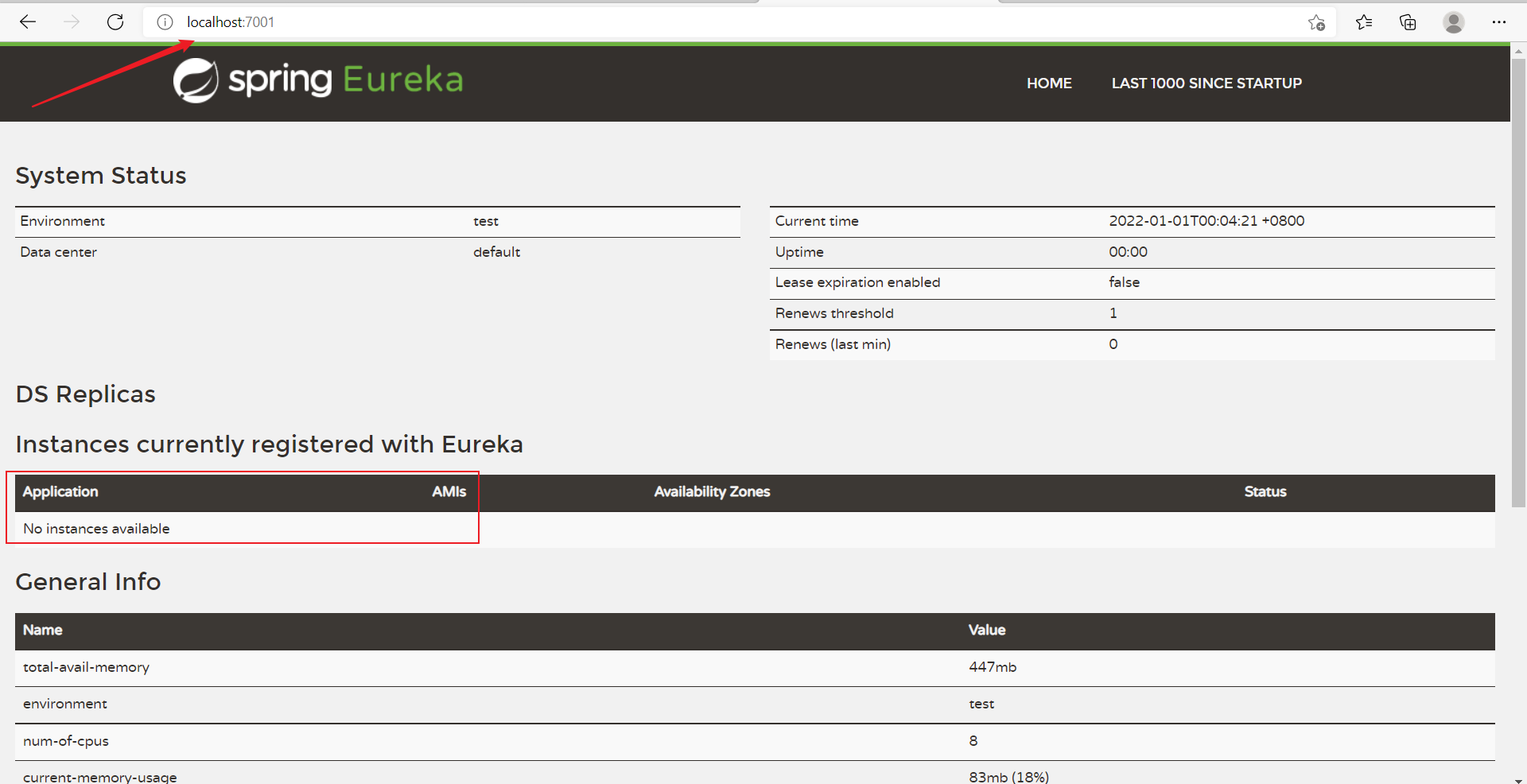
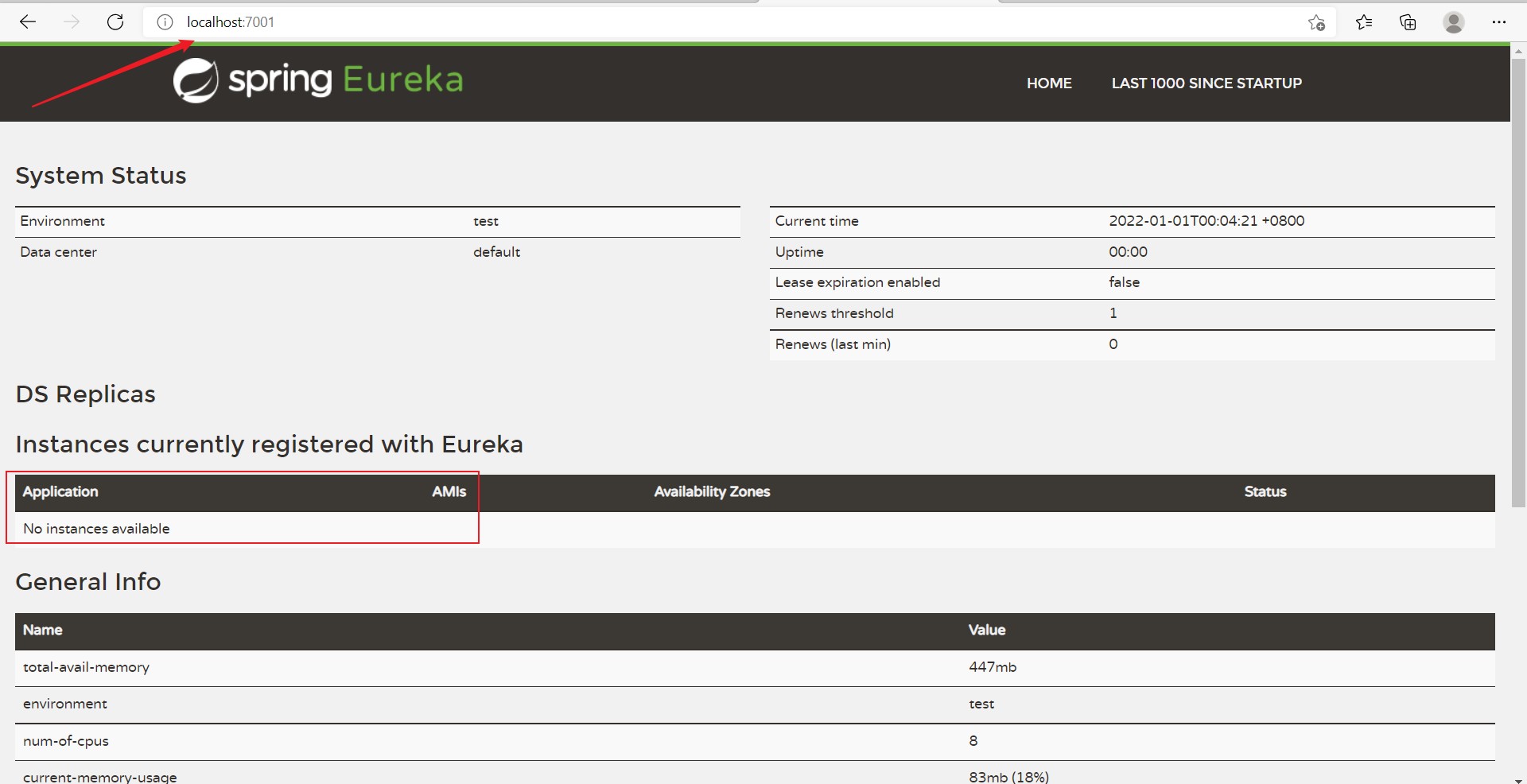
5. Test results
6. Screenshot of package structure
3. Payment module settled in Eureka Server
1. Build Module
- The payment module has been written earlier and can be used directly. The name is cloud provider payment8001.
2. Change POM
New content
	  	<!--Newly added dependencies-->
        <!-- https://mvnrepository.com/artifact/org.springframework.cloud/spring-cloud-starter-eureka-server -->
        <dependency>
            <groupId>org.springframework.cloud</groupId>
            <artifactId>spring-cloud-starter-netflix-eureka-client</artifactId>
        </dependency>
3. Change YML
New content
# Newly added content
eureka:
  client:
    # Identify yourself to be stationed in Eureka Server
    register-with-eureka: true
    fetchRegistry: true
    service-url:
      defaultZone: http://localhost:7001/eureka
4. Main startup
import org.springframework.boot.SpringApplication;
import org.springframework.boot.autoconfigure.SpringBootApplication;
import org.springframework.cloud.netflix.eureka.EnableEurekaClient;

@SpringBootApplication
@EnableEurekaClient
public class PaymentMain8001 {
    public static void main(String[] args) {
        SpringApplication.run(PaymentMain8001.class,args);
    }
}
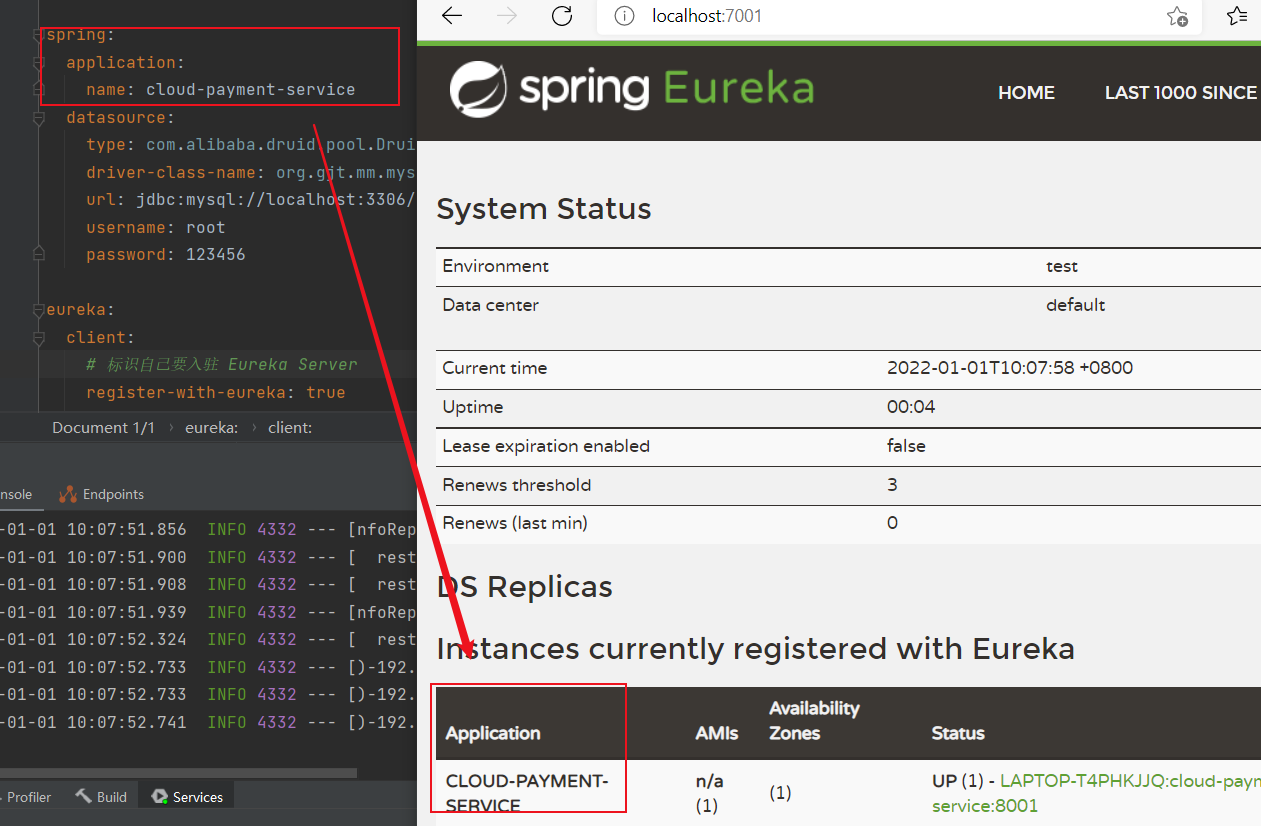
5. Test results
4. Order module settled in Eureka Server
1. Build Module
- The order module has been written earlier and can be used directly. The name is cloud-consumer-order80.
2. Change POM
New content
    	<!--Newly added dependencies-->
        <!-- https://mvnrepository.com/artifact/org.springframework.cloud/spring-cloud-starter-eureka-server -->
        <dependency>
            <groupId>org.springframework.cloud</groupId>
            <artifactId>spring-cloud-starter-netflix-eureka-client</artifactId>
        </dependency>
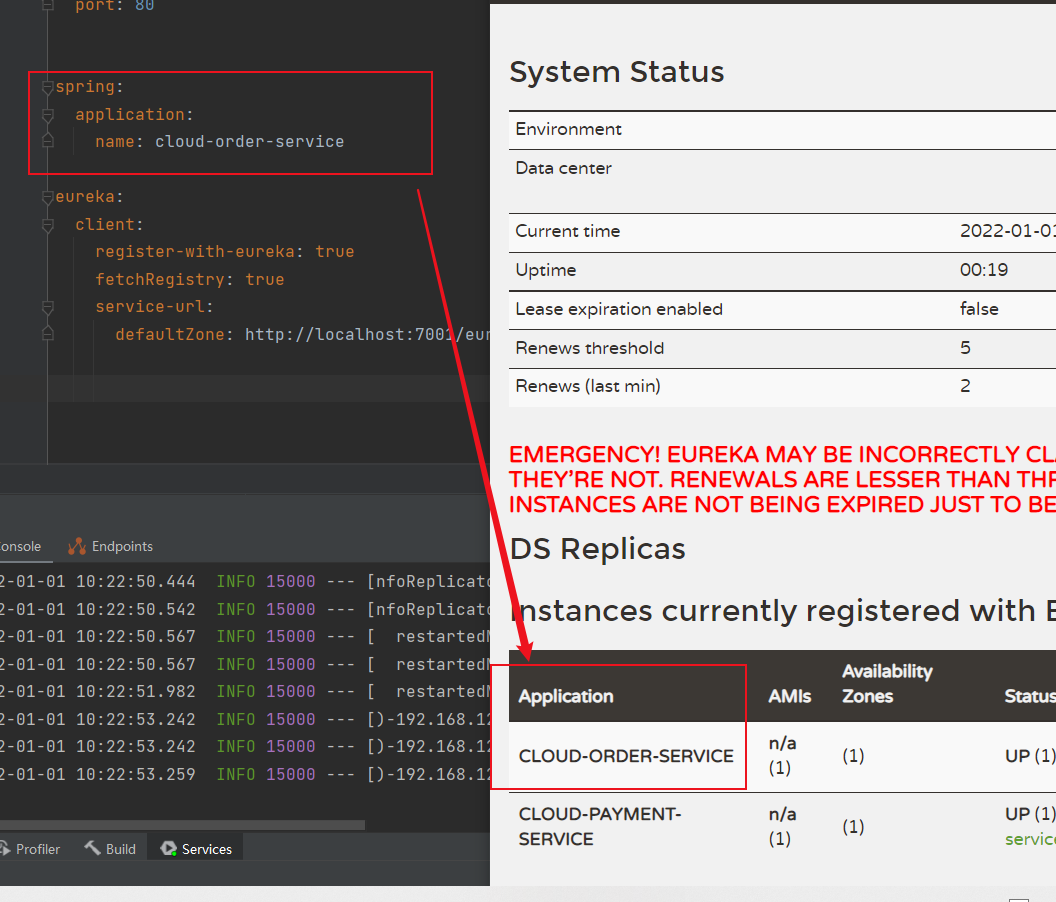
3. Change YML
New content
spring:
  application:
    name: cloud-order-service

eureka:
  client:
    register-with-eureka: true
    fetchRegistry: true
    service-url:
      defaultZone: http://localhost:7001/eureka
4. Main startup
import org.springframework.boot.SpringApplication;
import org.springframework.boot.autoconfigure.SpringBootApplication;
import org.springframework.cloud.netflix.eureka.EnableEurekaClient;

@SpringBootApplication
@EnableEurekaClient
public class OrderMain80 {
    public static void main(String[] args) {
        SpringApplication.run(OrderMain80.class,args);
    }
}
5. Test results
5. Cluster Eureka construction
5.1 Eureka working principle
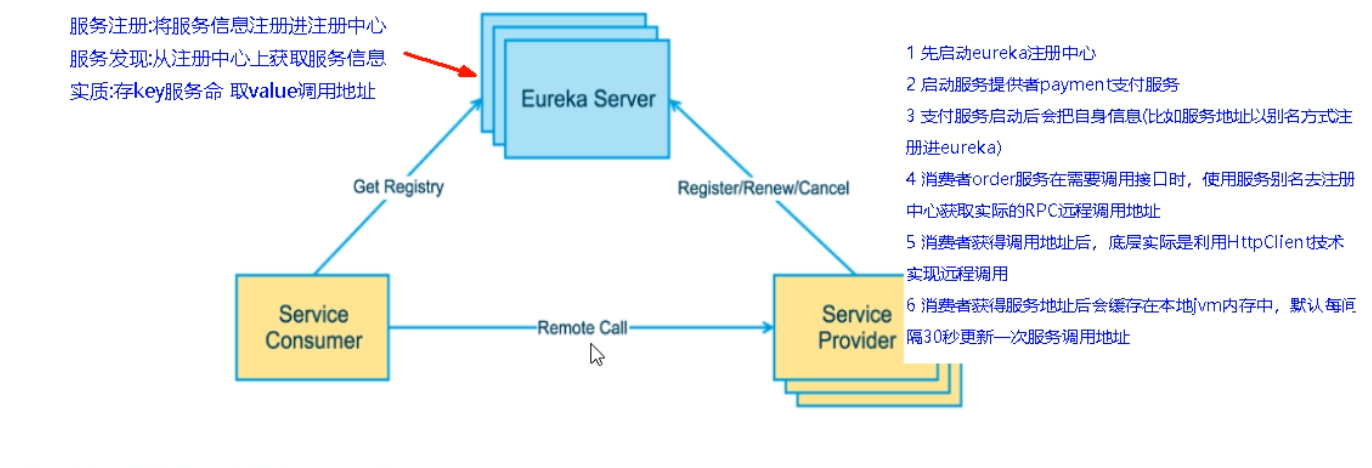
- Start the eureka registry first
- Start payment service of service provider
- After the payment service is started, it will register its own information (such as the service address in eureka by alias)
- When the consumer order service needs to call the interface, it uses the service alias to get the actual RPC remote call address from the registry.
- After the consumer obtains the call address, the bottom layer actually uses HttpClient technology to realize remote call.
- After obtaining the service address, the consumer will cache it in the local jvm. By default, the service call address is updated every 30 seconds.
5.2 description of Eureka cluster principle
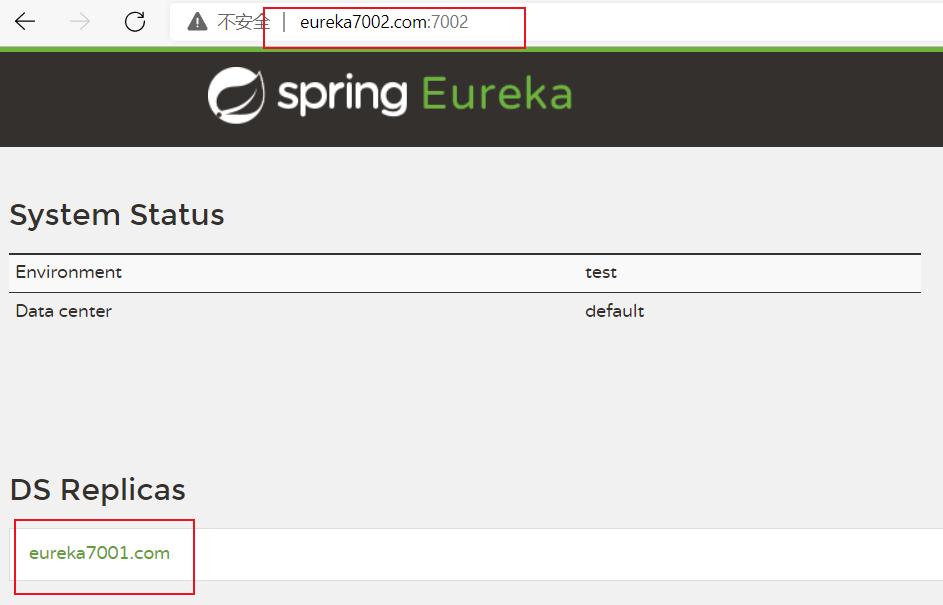
- Multiple Eureka servers register with each other, watch each other, and present an Eureka service externally, so as to achieve high availability.
5.3 steps of Eureka cluster construction
1. Preparation
Modify the corresponding mapping file in the host
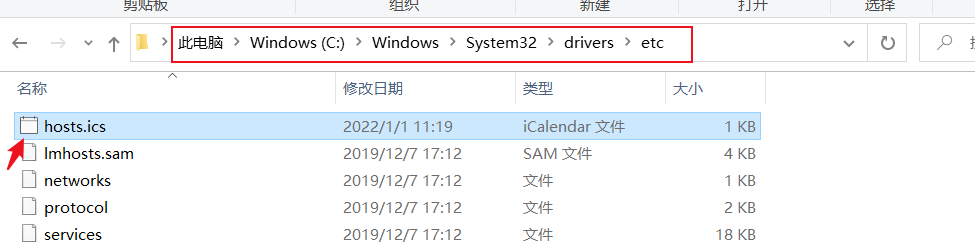
The content added is
127.0.0.1  eureka7001.com
127.0.0.1  eureka7002.com
2. Build Module
- Create a new Module named cloud Eureka server7002.
3. Change POM
- The pom file of cloud Eureka server7002 remains unchanged, and the pom file of cloud Eureka server7002 is the same as that of cloud Eureka server7001.
4. Change YML
- YML file of cloud Eureka server7001
server:
  port: 7001

eureka:
  instance:
    hostname: eureka7001.com    #Instance name of eureka server
  client:
    register-with-eureka: false    #I don't register myself with the registry
    fetch-registry: false   #It means that it is the registry. Its responsibility is to maintain service instances and does not need to retrieve services
    service-url:
      defaultZone: http://eureka7002.com:7002/eureka / # set the address on which the query service and registration service interact with eureka server depend
- YML file of cloud Eureka server7002
server:
  port: 7002

eureka:
  instance:
    hostname: eureka7002.com #Instance name of eureka server
  client:
    register-with-eureka: false    #I don't register myself with the registry
    fetch-registry: false   #It means that it is the registry. Its responsibility is to maintain service instances and does not need to retrieve services
    service-url:
      defaultZone: http://eureka7001.com:7001/eureka / # set the address on which the query service and registration service interact with eureka server depend
5. Main startup
import org.springframework.boot.SpringApplication;
import org.springframework.boot.autoconfigure.SpringBootApplication;
import org.springframework.cloud.netflix.eureka.EnableEurekaClient;

@SpringBootApplication
@EnableEurekaServer
public class EurekaMain7002 {
    public static void main(String[] args) {
        SpringApplication.run(EurekaMain7002.class,args);
    }
}
6. Test results
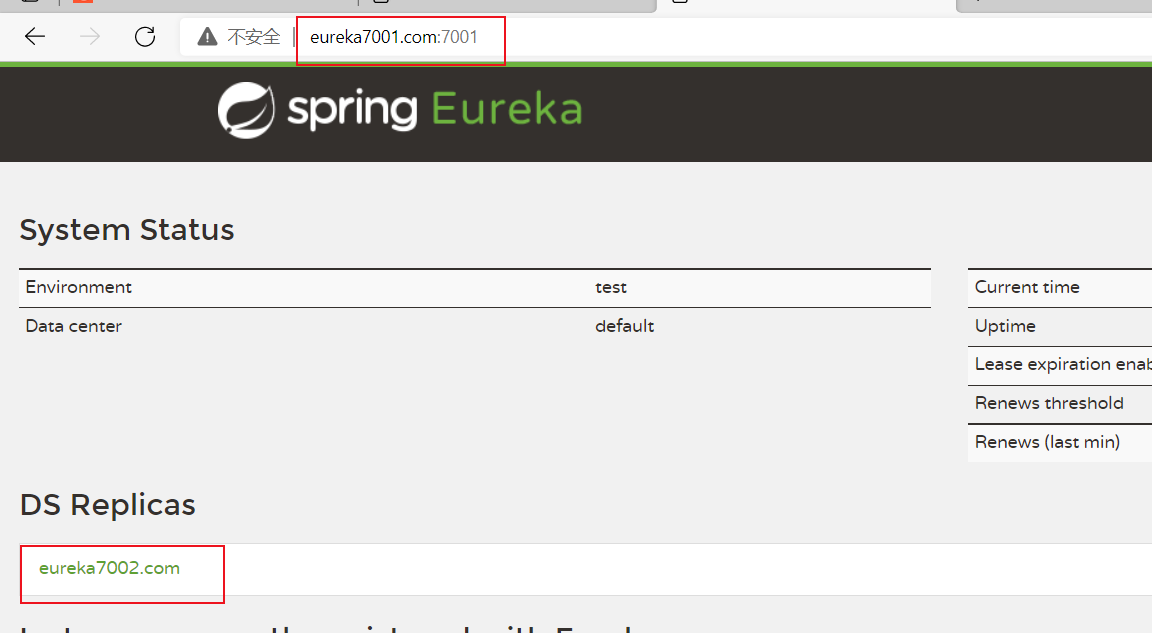
5.4. Settle the payment module in Eureka Server
Modify the yml file as follows
server:
  port: 8001


spring:
  application:
    name: cloud-payment-service
  datasource:
    type: com.alibaba.druid.pool.DruidDataSource
    driver-class-name: org.gjt.mm.mysql.Driver
    url: jdbc:mysql://localhost:3306/db2019?useUnicode=true&characterEncoding=utf-8&useSSL=false
    username: root
    password: 123456

eureka:
  client:
    # Identify yourself to be stationed in Eureka Server
    register-with-eureka: true
    fetchRegistry: true
      #defaultZone: http://localhost:7001/eureka Stand alone version
    service-url:
      defaultZone: http://eureka7001.com:7001/eureka,http://eureka7002.com:7002/eureka #Cluster version


mybatis:
  mapperLocations: classpath:mapper/*.xml
  type-aliases-package: com.xiao.cloud.entities
5.5. Place the order module in Eureka Server
Modify the yml file as follows
server:
  port: 80


spring:
  application:
    name: cloud-order-service

eureka:
  client:
    register-with-eureka: true
    fetchRegistry: true
    service-url:
      #defaultZone: http://localhost:7001/eureka Stand alone version
      defaultZone: http://eureka7001.com:7001/eureka,http://eureka7002.com:7002/eureka #Cluster version
5.6. Cluster building steps of payment service providers
1. Create a new Module named cloud provider payment8002
- The only difference from cloud provider payment8001 is that the port number of the yml file is 8002.
2. Modify the controller class of the payment module
import com.xiao.cloud.entities.CommonResult;
import com.xiao.cloud.entities.Payment;
import com.xiao.cloud.service.PaymentService;
import lombok.extern.slf4j.Slf4j;
import org.springframework.beans.factory.annotation.Autowired;
import org.springframework.beans.factory.annotation.Value;
import org.springframework.web.bind.annotation.*;

@RestController
@Slf4j
public class PaymentController {

    @Autowired
    private PaymentService paymentService;

    @Value("${server.port}")
    private String ServerPort;

    @PostMapping("/payment/create")
    public CommonResult create(@RequestBody Payment payment){
        int result = paymentService.create(payment);
        log.info("*****The insertion result is:" + result);
        if(result > 0){
            return new CommonResult(200,"Insert database succeeded,The port number is:" + ServerPort,result);
        }else {
            return new CommonResult(444,"Insert database failed",null);
        }
    }

    @GetMapping("/payment/get/{id}")
    public CommonResult getPaymentById(@PathVariable("id") Long id){
        Payment payment = paymentService.getPaymentById(id);
        log.info("*****The query result is:" + payment);
        if(payment != null){
            return new CommonResult(200,"Query database succeeded,The port number is:" + ServerPort,payment);
        }else {
            return new CommonResult(444,"Failed to query the database. There is no corresponding record, id Is:" + id,null);
        }
    }
}
- When querying, the port number is also output.
- Except for the above modifications, other parts are the same as cloud provider payment8001.
3. Modify the URL in the controller class of the order module
public static final String URL = "http://CLOUD-PAYMENT-SERVICE";
- Here we access it by the name of the microservice.
4. Modify the configuration class of the order module
import org.springframework.cloud.client.loadbalancer.LoadBalanced;
import org.springframework.context.annotation.Bean;
import org.springframework.context.annotation.Configuration;
import org.springframework.web.client.RestTemplate;

@Configuration
public class ApplicationContextConfig {

    @Bean
    @LoadBalanced
    public RestTemplate getRestTemplate(){
        return new RestTemplate();
    }
}
- An additional @ LoadBalanced annotation is added to achieve load balancing.
5. Test results
The order module is used to call the payment module for many times, and the port number of each call is different. So as to realize load balancing.
5.7. Improvement of actor micro service information
Add the following contents to the yml configuration files of cloud provider payment8001 and cloud provider payment8002
eureka:
  instance:
    instance-id: payment8001 # If it is cloud provider payment8002, it is payment8002 here
    prefer-ip-address: true
- Modify the service name.
- And there is ip display when accessing.
5.8. Service Discovery configuration
1. Purpose
- We can obtain the relevant details of the service through the Discovery configuration.
2. Newly added content on Controller class
    @Autowired
    private DiscoveryClient discoveryClient;

    @GetMapping("/payment/discovery")
    public Object discovery(){
        List<String> services = discoveryClient.getServices();
        for (String service : services) {
            log.info("*****Services:" + service);
        }

        List<ServiceInstance> instances = discoveryClient.getInstances("CLOUD-PAYMENT-SERVICE");
        for (ServiceInstance instance : instances) {
            log.info("****Details:" + instance.getServiceId() + "\t" + instance.getHost() + "\t" + instance.getPort() + "\t" + instance.getUri());
        }
        return this.discoveryClient;
    }
3. Add a new annotation on the main startup class
@EnableDiscoveryClient
4. Test results

5.9 Eureka self protection
5.9.1 phenomena

5.9.2 contents of self-protection mechanism
- Bottom line: when a microservice is unavailable at a certain time, Eureka will not clean it immediately, but will still save the information of the microservice.
- It belongs to the AP branch in the CAP.
- Self protection mechanism is a security protection measure to deal with network abnormalities.
5.9.3 why do we need a self-protection mechanism?
- In order to prevent Eureka client from working normally, but when the network with Eureka server is disconnected, Eureka server will not immediately remove Eureka client service.
5.9.4 how to protect yourself?
Add the following contents to Eureka server yml file
eureka:
  server:
    enable-self-preservation: false
    eviction-interval-timer-in-ms: 2000
Add the following content to Eureka client yml file
eureka:
  instance:
  # The time interval between Eureka client sending heartbeat to server, in seconds
    lease-expiration-interval-in-seconds: 1
  #The upper limit of waiting time of Eureka server after receiving the last heartbeat, in seconds. If it times out, the service will be excluded
    lease-expiration-duration-in-seconds: 2


 已为社区贡献35528条内容

所有评论(0)