How to run Angular serve, tests and lint in realtime simultaneously?
Answer a question
Currently, when developing a Angular applications in Visual Studio Code I have ng serve started.
It means the project is running in dev mode, and TypeScript compilation errors show up in the console. Also, some of errors are displayed in the debugging window.
Moreover since lint is configured, I see lint errors in currently opened files.
It helps develop the application without rebuilding it each time.
But if there is a linter error in a file that is not opened. I don't see it, until I call ng lint in the console.
The same goes for tests. In order to find errors I need to separately start ng test, or launch tests with a Visual Studio Code extension.
What I would like to achieve is to have realtime serving, linting and testing of my application. So that after each file change linter checks all files of the project for errors. And all tests are also executed at once.
How to run linting, testing and serving of whole Angular application in realtime based on file changes made with output being shown at once?
Answers
You can run ng serve in one integrated terminal and then create a new integrated terminal by pressing the + icons.
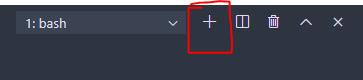
You can run your test in the new terminal tab, and both ng serve and ng test will run concurrently.
If you want to run both test and serve from a single command then use concurrently.
install the package by
npm install concurrently --save
and modify start script in package.json file as:
"start": "concurrently \"ng serve\" \"ng test\""
now start the app by running npm start, this will run both rest script and serve.
ng lint will end as soon as listing for all files is finished, so better not to including it in the start script won't do much.
I Suggest installing tslint extension, which will show lint errors in real-time in the editor.
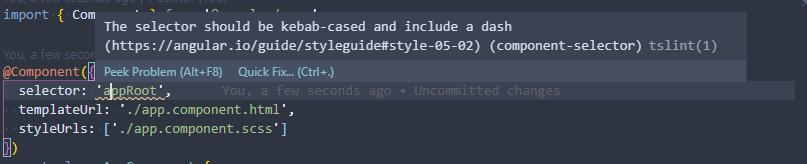
Lint errors are also visible in the problems tab of the integrated terminal window.


开发云社区提供前沿行业资讯和优质的学习知识,同时提供优质稳定、价格优惠的云主机、数据库、网络、云储存等云服务产品
更多推荐
 0
0 0
0- 0


 已为社区贡献4439条内容

所有评论(0)