VS Code cursor in wrong position after tab
Answer a question
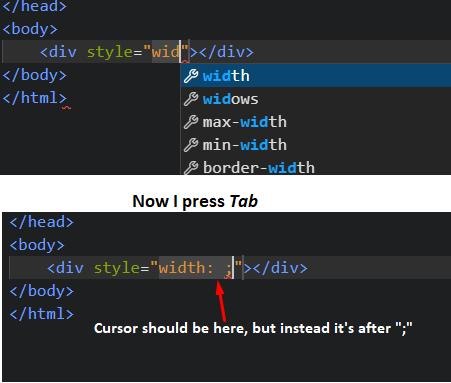
When I write some code, and then click Tab to autofill from context menu the cursor is now in the wrong position. It should be before ";" but for some reason it is after ";". Worked fine for about a year, and now suddenly something like this, any ideas?
Answers
This problem is related to snippets in vscode.
The easiest way to solve this is to use the snippet extension.
Install "HTML CSS Support" extension made by "ecmel" to visual studio code. Close the program and open it again and you are ready. Problem fixed.
Extension URL: https://marketplace.visualstudio.com/items?itemName=ecmel.vscode-html-css
Long way: You can write your own or update snippets, to solve this.
Documentation to make your own snippets: https://code.visualstudio.com/docs/editor/userdefinedsnippets

开发云社区提供前沿行业资讯和优质的学习知识,同时提供优质稳定、价格优惠的云主机、数据库、网络、云储存等云服务产品
更多推荐
 0
0 0
0- 0


 已为社区贡献4439条内容

所有评论(0)