Build OpenCV application with MSVS compiler in VSCode
Answer a question
I'm trying to build my C++ project in VSCode. However, I'm experiencing link issues with OpenCV "error LNK2001: unresolved external symbol". I've build all the libraries I use with vcpkg.
I build using this .bat file:
@echo off
if exist "C:\Program Files (x86)\Microsoft Visual Studio\2019\BuildTools\VC\Auxiliary\Build\vcvarsall.bat" (
    call "C:\Program Files (x86)\Microsoft Visual Studio\2019\BuildTools\VC\Auxiliary\Build\vcvarsall.bat" x64
) else (
    call "C:\Program Files (x86)\Microsoft Visual Studio\2019\Community\VC\Auxiliary\Build\vcvarsall.bat" x64
)
set compilerflags=/Od /Zi /EHsc /std:c++latest /I include /I C:\includes\vcpkg\installed\x64-windows\include
set linkerflags=/OUT:bin\main.exe
cl.exe %compilerflags% src\*.cpp /link %linkerflags% /LIBPATH:C:\includes\vcpkg\installed\x64-windows\lib
del bin\*.ilk *.obj *.pdb
My tasks.json file is:
{
    "version": "2.0.0",
    "tasks": [
        {
            "label": "Build C++ project",
            "type": "shell",
            "group": {
                "kind": "build",
                "isDefault": true
            },
            "command": ".\\build.bat"
        },
        {
            "label": "Build & run C++ project",
            "type": "shell",
            "group": {
                "kind": "test",
                "isDefault": true
            },
            "command": ".\\build.bat && .\\bin\\main.exe"
        }
    ]
}
My launch.json file is:
{
    "version": "0.2.0",
    "configurations": [
        {
            "name": "C++ Debug (Windows)",
            "type": "cppvsdbg",
            "request": "launch",
            "program": "${workspaceFolder}/bin/main.exe",
            "preLaunchTask": "Build C++ project",
            "args": [],
            "stopAtEntry": false,
            "cwd": "${workspaceFolder}",
            "environment": [],
            "externalConsole": true,
        }
    ]
}
and finally my settings.json file is:
{
    "terminal.integrated.shell.windows": "cmd.exe"
}
I can't seem to find any documentation on how to properly link vcpkg libraries with VSCode using the MSVS compiler. I would really appreciate some help.
Answers
I recently installed OpenCV 4.3.0 (64bits) on Windows 10 and had to configure a workspace in Visual Studio Code (VSC) to build a simple application.
The following configuration uses the x64 version of cl.exe, the C/C++ compiler that ships with Microsoft Visual Studio 2019 (Community Edition) to build the OpenCV application.
Pay attention to the paths defined on this tasks.json file because they might be different in your system:
{
    "version": "2.0.0",
    "windows": {
        "options": {
            "shell": {
                "executable": "C:\\WINDOWS\\System32\\cmd.exe",
                "args": [ "/d", "/c" ]
            }
        },
        "isShellCommand": true,
        "showOutput": "always",
        "echoCommand": true,
    },
    "tasks": [
        {
            "label": "build_vs2019",
            "type": "shell",
            "windows": {
                "command": "call \"C:\\Program Files (x86)\\Microsoft Visual Studio\\2019\\Community\\VC\\Auxiliary\\Build\\vcvars64.bat\" && cl.exe",
                "args": [
                    "/Zi",
                    "/EHsc",
                    "/Fe:",
                    "${fileDirname}\\${fileBasenameNoExtension}.exe",
                    "${file}",
                    "-I", "C:\\opencv\\build\\include",
                    "/link", "/libpath:C:\\opencv\\build\\x64\\vc15\\lib", "opencv_world430.lib"
                ],
                "problemMatcher": [ "$msCompile" ],
            },
            "group": {
                "kind": "build",
                "isDefault": true
            }
        },
        {
            "label": "run",
            "type": "shell",
            "dependsOn": [ "build_vs2019" ],
            "windows": {
                "command": "${fileDirname}\\${fileBasenameNoExtension}.exe",
                "args": [ "superDark.jpg" ],
                "options": {
                    "env": {
                        "PATH": "C:\\opencv\\build\\x64\\vc15\\bin"
                    }
                }
            },
            "presentation": {
                "reveal": "silent",
                "clear": true,
                "showReuseMessage": false,
            }
        }
    ]
}
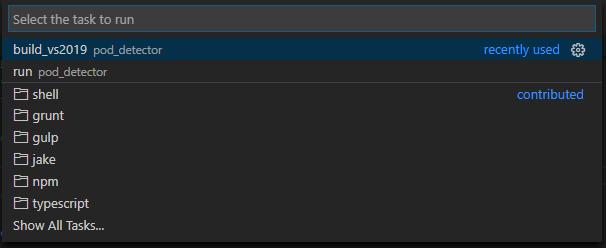
This configuration must be used to replace the one in your workspace. It will give you two options to select from when attempting to run tasks:
-
build_vs2019: defines the shell as
cmd.exeand executesvcvars64.batto setup the environment variables and paths that let you use the x64 version ofcl.exe. It also specifies the headers and required libraries to build an OpenCV-based application. This option builds the application. -
run: depends on the success of the previous task to run the OpenCV application on the cmd-line. It adjusts the
PATHenvironment variable to point to OpenCV DLLs directory. This option executes the application.

开发云社区提供前沿行业资讯和优质的学习知识,同时提供优质稳定、价格优惠的云主机、数据库、网络、云储存等云服务产品
更多推荐
 0
0 0
0- 0


 已为社区贡献4439条内容

所有评论(0)