Disable "Run last successful build" in Visual Studio Code (!)
Answer a question
If a C# compile/build fails, I usually got a prompt whether to run the last successful build.
Somehow this dialog got turned off permanently. Now, if there is a compile error, VSC will automatically run the last successful build without a query, which is usually pretty useless and annoying.
How can I (a) get back the query, and then, if possible, (b) remove it, but in a way the last successful build is not executed?
Note: there is a documented procedure for Visual Studio, but I need the procedure for Visual Studio Code (latest version 1.61.0).
Thanx, Armin.
Answers
It's saved in your user settings file. Called:
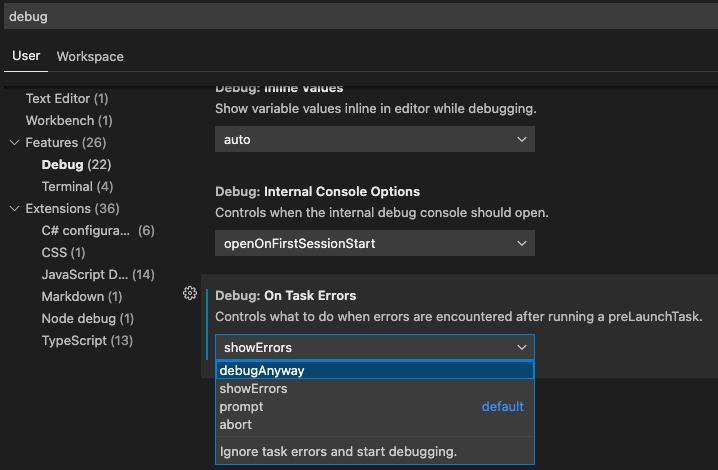
"debug.onTaskErrors": "showErrors"
The options are:
- prompt (the default)
- debugAnyway (your setting)
- showErrors (what you seem to be looking for)
- abort (neither of the above)
It's in the UI as well, under "Features --> Debug --> On Task Errors":

开发云社区提供前沿行业资讯和优质的学习知识,同时提供优质稳定、价格优惠的云主机、数据库、网络、云储存等云服务产品
更多推荐
 0
0 0
0- 0


 已为社区贡献4439条内容

所有评论(0)