VSCode mouse-hover on Python Keywords not working
Answer a question
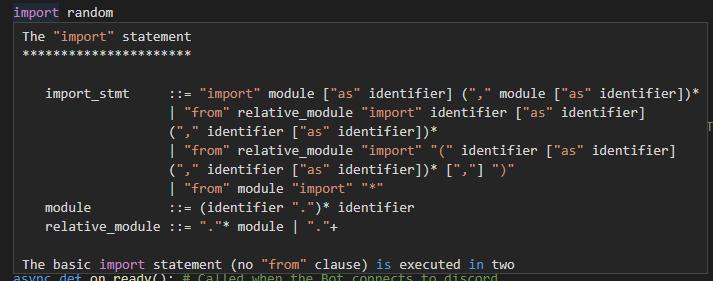
While beginning to teach a friend how to code in Python, I observed something in his VSCode that was different than my own - he could mouse-hover on a Python keyword such as as import or def, and it would show the Python Manual definition for the keyword. My own VSCode does not do this.
I have tried everything I can think of to find why this won't work for me, and I'm at a complete loss. I have compared my installation process to my friend's, followed the exact same steps I provided him for setting up his environment, and do not get the same results. I tried completely removing Python, VSCode and all residual VSCode files from my laptop, and reinstalling in the same order he did, still to no avail.
I followed those same steps on a different laptop at work, and I can get the MouseHover to work there. The only feasible difference I can think of is that my work machine is not using the same Windows account as both my home PC and laptop - but I do not have Settings Sync enabled so I can't see why that should matter anyway.
Any thoughts for what I'm overlooking to get this functionality working properly in VSCode for myself? I don't particularly need it, but I'd like to be in the same environment as my friend while I teach him.
We're both on VSCode 1.55.2, Python 3.9.4, using a virtual environment created from VSCode's Powershell terminal, then restarted VSCode to get it to detect the virtual environment and use it as default for Terminals, and finally pip installed and enabled Pylint as the linter.
Editing to add steps followed - I just went through all of this again on my home laptop, after completely removing all traces of VisualStudio2019 and Code, and Python. Note: this was on Windows 10, with all updates applied
- Install VSCode
- Install VSCode Python extension, MS version
- Install Python 3.9.4
- Open a new folder in VSCode, then open Terminal
- python -m venv venv
- create a
something.pyin the Explorer pane - VSCode should detect the venv and offer to load it. Say yes
- VScode may also indiacte that
pylintis not installed, Allow it to install, or manuallypip install pylintfrom the venv. - in
something.pytype outimport random - Mouse over
import-- this is the discrepancy. On both of my home machines, there is no mousehover anything. on both of my friend's machines, as well as my machine at work, the following is shown:
Answers
With help from riov8's comment on the original post, I was able to compare the Experiment Groups that were in effect for each of the environments.
- In VSCode, with a Python file loaded, switch to the Output panel (in same area as Terminal) and change the dropdown to Python.
- Scroll to the top of this panel, and examine the Experiment Groups you belong to.
- Most of the experiment groups do not apply to this issue.
- Look specifically for either
pythonJediLSP,pythonJediLSPcfor if you have neither.
If you are experiencing the issue I describe, then at the bottom of this same panel, when you first mouse over a python keyword after starting VSCode, you will get errors similar to the following:
Error 2021-04-16 15:33:40: stderr jediProxy Error (stderr) %UserProfile%\.vscode\extensions\ms-python.python-2021.3.680753044\pythonFiles\completion.py:598: DeprecationWarning: Providing the line is now done in the functions themselves like `Script(...).complete(line, column)`
  sys_path=sys.path,
%UserProfile%\.vscode\extensions\ms-python.python-2021.3.680753044\pythonFiles\completion.py:598: DeprecationWarning: Providing the column is now done in the functions themselves like `Script(...).complete(line, column)`
  sys_path=sys.path,

Error 2021-04-16 15:33:40: stderr jediProxy Error (stderr) %UserProfile%\.vscode\extensions\ms-python.python-2021.3.680753044\pythonFiles\completion.py:598: DeprecationWarning: Deprecated since version 0.17.0. Use the project API instead, which means Script(project=Project(dir, sys_path=sys_path)) instead.
  sys_path=sys.path,

Error 2021-04-16 15:33:40: stderr jediProxy Error (stderr) %UserProfile%\.vscode\extensions\ms-python.python-2021.3.680753044\pythonFiles\completion.py:626: DeprecationWarning: Deprecated since version 0.16.0. Use Script(...).infer instead.
  script.goto_definitions(), request["id"]
The following scenarios resolved the issue for me:
User belongs to experiment group pythonJediLSPcf:
- File > Preferences > Settings
- in Search Settings, begin typing
python.experiment - under Python> Experiments: Opt Out From, click
Edit in settings.json - in the section
"python.experiments.optOutFrom", add"pythonJediLSPcf"(quoted) - if it does not exist, add another section
"python.experiments.optInto" - In the OptInto section, add
"pythonJediLSP"(quoted) - Save the settings.json, and restart VSCode.
- MouseHover tooltips on Python keywords now should work.
User does not belong to either pythonJediLSPcf or pythonJediLSP:
- File > Preferences > Settings
- in Search Settings, begin typing
python.experiment - under Python › Experiments: Opt Into, click
Edit in settings.json - In the
"python.experiments.optIntosection, add"pythonJediLSP"(quoted) - Save the settings.json, and restart VSCode.
- MouseHover tooltips on Python keywords now should work.
User belongs to pythonJediLSP:
- It was my experience that this was the experiment required in order for the feature to work properly. If you have this experiment enabled already, then ensure you do not also have
pythonJediLSPcf. Disable it if you do, following the instructions in the first sub-heading. If it continues to not work, then there may be another conflict that I did not experience myself.
I am posting a GitHub issue regarding this problem and will update this answer with the link when done.

开发云社区提供前沿行业资讯和优质的学习知识,同时提供优质稳定、价格优惠的云主机、数据库、网络、云储存等云服务产品
更多推荐
 0
0 0
0- 0


 已为社区贡献4439条内容

所有评论(0)