How can I jump to function definitions using VS Code in SSH remote development
Answer a question
Okay I am new to Embedded Linux development. Right now, I am trying to setup the development environment as efficiently as possible.
I have a python code running on a lightweight Linux based device, that is located remotely
So far I was able to setup my VS Code on my Windows system, in such a way that I can edit the files directly on the remote Linux device. I followed the instructions below
https://code.visualstudio.com/docs/remote/ssh
https://code.visualstudio.com/docs/remote/ssh-tutorial
Now that I am able to edit my files directly, I face only one obstacle. I find it hard to traverse to a function/method definition.
In my windows system, I could just Ctrl+LeftClick on a method/function, and it would take me there.
But here when I opened VS Code with the terminal running remotely, I have to do a Ctrl+F and search in the VS Code editor, which is like working on a notepad.
Does anyone know how to get around this?
On my main windows system, I am able to jump to method definitions quickly by Ctrl+LefClick-ing them.
Hope the question is clear enough.
Answers
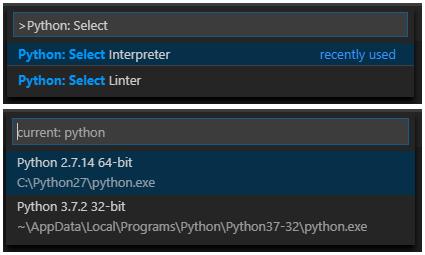
Install the Python extension on the remote server and select the Python interpreter on the Linux device in VS code:
Press Ctrl+Shift+P to bring up the command palette and run the command Python: Select Interpreter.

开发云社区提供前沿行业资讯和优质的学习知识,同时提供优质稳定、价格优惠的云主机、数据库、网络、云储存等云服务产品
更多推荐
 0
0 0
0- 0


 已为社区贡献4439条内容

所有评论(0)