How to fix `SyntaxError: Invalid or unexpected token` when trying to run Node.js app
Answer a question
I have installed Node.js from the official website.
Following these Microsoft Docs I tried to create my first Node.js app with the following steps:
-
Open PowerShell and create a new directory:
mkdir NodeApp, then enter the directory:cd NodeApp -
Open the directory and your app.js file in VS Code:
code . -
Add a simple string variable ("Hello World"), then send the contents of the string to your console by entering this in your "app.js" file:
var msg = 'Hello World';
console.log(msg);
-
To run your "app.js" file with Node.js, open your terminal right inside VS Code by selecting View > Terminal.
-
In the terminal, enter
node app.js. You should see the output: "Hello World".
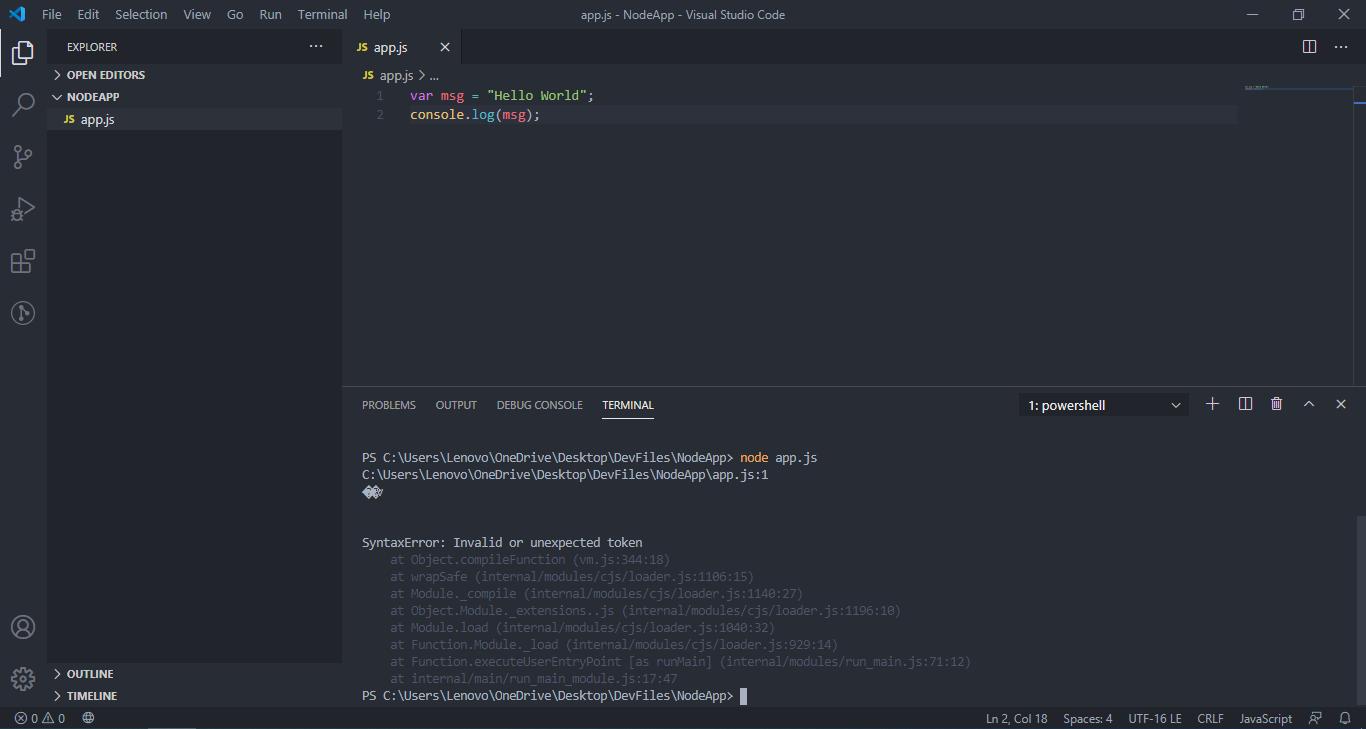
After following these steps I have this console output:
PS C:\Users\Lenovo\OneDrive\Desktop\DevFiles\NodeApp> node app.js
C:\Users\Lenovo\OneDrive\Desktop\DevFiles\NodeApp\app.js:1
��v


SyntaxError: Invalid or unexpected token
    at Object.compileFunction (vm.js:344:18)
    at wrapSafe (internal/modules/cjs/loader.js:1106:15)
    at Module._compile (internal/modules/cjs/loader.js:1140:27)
    at Object.Module._extensions..js (internal/modules/cjs/loader.js:1196:10)
    at Module.load (internal/modules/cjs/loader.js:1040:32)
    at Function.Module._load (internal/modules/cjs/loader.js:929:14)
    at Function.executeUserEntryPoint [as runMain] (internal/modules/run_main.js:71:12)
    at internal/main/run_main_module.js:17:47
PS C:\Users\Lenovo\OneDrive\Desktop\DevFiles\NodeApp>
Since I'm completely new to Node.js (but not JavaScript) I'm not sure what do to. How can I fix this problem?
Answers
Your file is encoded with UTF-16 LE ("little endian").
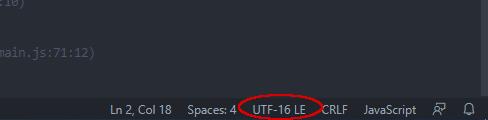
Node.js doesn't understand that encoding by default (it assumes UTF-8; actually, I don't even see an option for other encodings...) so it's choking on the first "character" of the file since that "character" doesn't look like valid JavaScript syntax. (In this case, the first two bytes are a byte-order mark [BOM]. UTF-16 almost always starts with a BOM indicating whether it's little-endian or big-endian.)
Click the "UTF-16 LE" in the lower right-hand part of vscode and choose "Save with Encoding" and save it as UTF-8 (not "UTF-8 with BOM," just "UTF-8").
Then Node.js will understand it.

开发云社区提供前沿行业资讯和优质的学习知识,同时提供优质稳定、价格优惠的云主机、数据库、网络、云储存等云服务产品
更多推荐
 0
0 0
0- 0


 已为社区贡献4438条内容

所有评论(0)