Find all unused code in my project (Rider/VSCode)
Answer a question
Goal
Ideally, our projects contain no unused namespaces / methods / functions and classes.
It is fairly simple to find the number of usages of all of these, for instance;

Has two usages while the following class is never used:
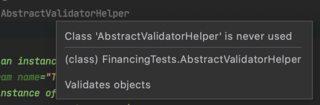
Such code can remain unnoticed for quite some time, while providing unwanted overhead to the total solution. What I'd like to achieve is an overview of all unused code, so developers can easily assess what should and shouldn't stay in the solution.
Question
Of course we're not going to manually search for these... How can we find all unused code?
Answers
To find unused code in Rider:
- Select Code | Inspect Code in the application menu.
- Choose a scope to inspect (solution, project, or a custom scope).
- In the Inspection Results window, group inspections by issue category (and optionally by issue type).
- Focus on issues under Redundancies in code and Redundancies in symbol declarations:
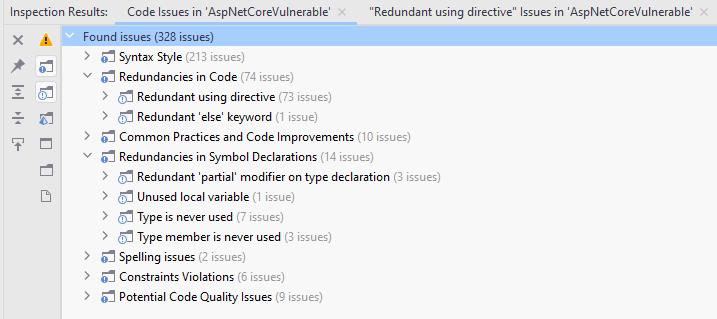
Alternatively, as you read or edit your code in the editor, you may encounter specific unused code warnings that Rider shows you. If you want to find all issues similar to one specific issue:
- Press Alt+Enter to display Rider's code inspection pop-up.
- Press Right arrow to expand options for the current inspection.
- Press Right arrow to expand the Find similar issues submenu.
- Select a scope to find issues.
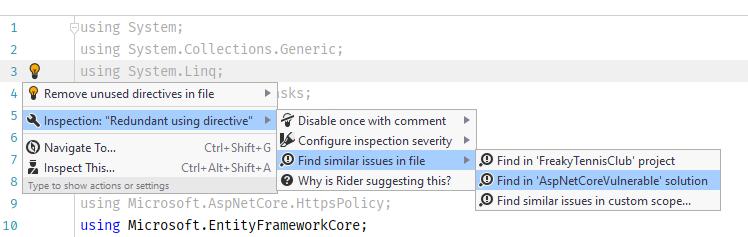
- Work with the Inspection Results window as shown above.

开发云社区提供前沿行业资讯和优质的学习知识,同时提供优质稳定、价格优惠的云主机、数据库、网络、云储存等云服务产品
更多推荐
 0
0 0
0- 0


 已为社区贡献4439条内容

所有评论(0)