How to Export Jupyter Notebook by VSCode in PDF format? (Windows 10)
·
Answer a question
When I try to export my Jupyter Notebook in pdf format in VSCode like this: 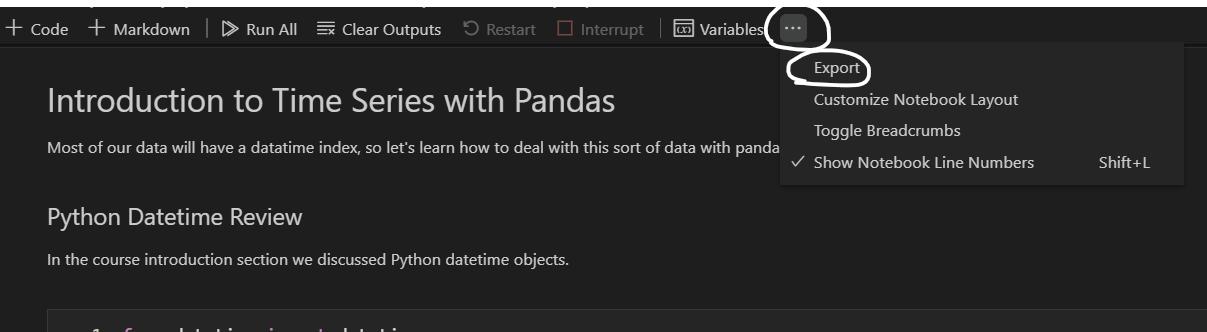

then I got this error:
and jupyter output panel says: 
so i tried to install MikTeX and update the required packages, but still I can't export Jupyter Notebooks in PDF format by VSCode!
how can I fix this problem?
Note That I know i can do it by convert it to HTML and then with ctrl+p try to save it as pdf! but I want to convert it to pdf in straight way!
Answers
Since I'm using conda venvs, I did these steps:
- Activate conda venv using:
conda activate <NAME_OF_VENV>in Anaconda prompt. - Install nbconvert using
conda install -c anaconda nbconvert
Now it's all okay, and I can export Jupyter notebooks in HTML and PDF format both.
Update
Also, you should consider that nbconvert is compatible with Python 3.7-3.9 based on the official doc.

开发云社区提供前沿行业资讯和优质的学习知识,同时提供优质稳定、价格优惠的云主机、数据库、网络、云储存等云服务产品
更多推荐
 0
0 0
0- 0


 已为社区贡献4439条内容

所有评论(0)