

Apache Hive Home
https://cwiki.apache.org/confluence/display/Hive/Home
Explain about Hive architecture
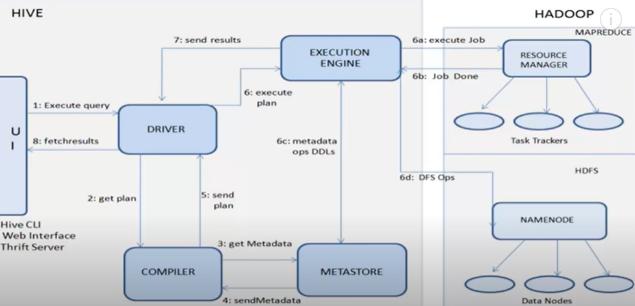
Hive is an open-source data warehousing tool.
The major components of Apache Hive are the
1. Hive clients(Thirft(JDBC,ODBC),Web UI, Hive CLI), — receive request from client
2. Hive services(Hive server2, Beeline,), — handle concurrent requests from more than one client due to which it was replaced by HiveServer2.
3. The Hive driver receives the HiveQL statements submitted by the user through the command shell. It the session handles for the query and sends the query to the compiler.
4. Hive compiler parses the query. It performs semantic analysis and type-checking on the different query blocks and query expressions by using the metadata stored in 5. metastore and generates an creates execution plan.
The execution plan created by the compiler is the DAG(Directed Acyclic Graph), where each stage is a map/reduce job, operation on HDFS, a metadata operation.
6. Optimizer performs the transformation operations on the execution plan and splits the task to improve efficiency and scalability.
7.Execution engine, after the compilation and optimization steps, executes the execution plan created by the compiler in order of their dependencies using Hadoop.
From: https://data-flair.training/blogs/apache-hive-architecture/#:~:text=The%20Hive%20driver%20receives%20the,the%20query%20to%20the%20compiler.
MetaStore
What is a metastore in Hive?
Metastore is the central repository of Apache Hive metadata. It stores metadata for Hive tables (like their schema and location) and partitions in a relational database. It provides client access to this information by using metastore service API.
Hive metastore consists of two fundamental units:
- A service that provides metastore access to other Apache Hive services.
- Disk storage for the Hive metadata which is separate from HDFS storage.
Embedded vs local vs remote metastore
Embedded : metastore service runs in the same JVM as the Hive service.
The default metastore,derby, does not provide multiple instances of hive client
Local: JDBC compliant like MySQL is used which runs in a separate JVM or different machines than that of the Hive service and metastore service which are running in the same JVM.
Remote : In this mode, metastore runs on its own separate JVM, not in the Hive service JVM.
https://data-flair.training/blogs/apache-hive-metastore/#:~:text=What%20is%20Hive%20Metastore%3F,by%20using%20metastore%20service%20API.
Scenario Question:
Suppose I have installed Apache Hive on top of my Hadoop cluster using default metastore configuration. Then, what will happen if we have multiple clients trying to access Hive at the same time?
Errors!!
How do you configure MySQL database as the local metastore in Apache Hive:
- In hive-site.xml
→ javax.jdo.option.ConnectionURL property should be set to jdbc:mysql://host/dbname? createDatabaseIfNotExist=true
→ javax.jdo.option.ConnectionDriverName should be set to com.mysql.jdbc.Driver.
→ javax.jdo.option.ConnectionUserName should be set to desired username.
→ javax.jdo.option.ConnectionPassword should be set to the desired password - The JDBC driver JAR file for MySQL must be on Hive’s classpath, which is achieved by placing it in Hive’s lib directory.
- Hive Shell to be restarted
In a hadoop cluster, should hive be installed on all nodes?
No. We don’t need Hive to be installed in all nodes of Hadoop cluster. Hive SQL will get converted to MapReduce jobs.
Hive TABLE
Hive tables — Managed and External
- Managed tables are Hive owned tables where the entire lifecycle of the tables’ data are managed and controlled by Hive. External tables are tables where Hive has loose coupling with the data.
- All the write operations to the Managed tables are performed using Hive SQL commands. The writes on External tables can be performed using Hive SQL commands but data files can also be accessed and managed by processes outside of Hive.
- If a Managed table or partition is dropped, the data and metadata associated with that table or partition are deleted. The transactional semantics (ACID) are also supported only on Managed tables. If an External table or partition is dropped, only the metadata associated with the table or partition is deleted but the underlying data files stay intact. A typical example for External table is to run analytical queries on HBase or Druid owned data via Hive, where data files are written by HBase or Druid and Hive reads them for analytics.
From : https://docs.cloudera.com/HDPDocuments/DLM1/DLM-1.5.1/administration/content/dlm_managed_tables_external_tables.html
How do you choose External or managed table?
Use EXTERNAL tables when:
- The data is also used outside of Hive. For example, the data files are read and processed by an existing program that doesn’t lock the files.
- Data needs to remain in the underlying location even after a DROP TABLE. This can apply if you are pointing multiple schemas (tables or views) at a single data set or if you are iterating through various possible schemas.
- You want to use a custom location
- Hive should not own data and control settings, dirs, etc., you have another program or process that will do those things.
- You are not creating table based on existing table (CREATE TABLE AS SELECT).
Use INTERNAL tables when:
- The data is temporary.
- You want Hive to completely manage the lifecycle of the table and data.
From : https://docs.microsoft.com/en-us/archive/blogs/cindygross/hdinsight-hive-internal-and-external-tables-intro
How to Change table from external to managed and vice versa?
alter table tablename SET TBLPROPERTIES(‘EXTERNAL’=’FALSE’);
If we rename a managed hive table does the location also change automatically?
Yes if I don’t explicitly mention a location or if the table created with default location
If we rename a external hive table does the location also change automatically?
No
Create table Options
How to create an empty table in hive from another table without copying data?
create table paymentscopy as select * from payments where 1=2;
How to skip header/footer row rows from a table in Hive?
TBLPROPERTIES(“skip.header.line.count”=”2”);
TBLPROPERTIES(“skip.bigtableter.line.count”=”1");
INSERT
Insert into
Can we insert multiple records into a hive table?
Yes.
How do I Insert data from a partitioned table into a partitioned table
Insert overwrite
- Deletes all data from the Hive table and writes the new records
- INSERT OVERWRITE with PARTITION clause removes the records from the specified partition only
- You can also write without PARTITION clause as shown below. When you use this approach make sure to keep the partition column as the last column.
- Insert overwrite to partition table
Insert Overwrite “auto.purge”=”true”
- INSERT OVERWRITE will overwrite any existing data in the table or partition unless IF NOT EXISTS is provided for a partition and the existing data is moved to Trash
- As of Hive 2.3.0 (HIVE-15880), if the table has TBLPROPERTIES (“auto.purge”=”true”) the previous data of the table is not moved to Trash when INSERT OVERWRITE query is run against the table. This functionality is applicable only for managed tables (see managed tables) and is turned off when “auto.purge” property is unset or set to false.
Export
INSERT OVERWRITE statement is also used to export Hive table into HDFS or LOCAL directory:
Note: Here, ROW FORMAT DELIMITED FIELDS TERMINATED BY ‘,’ is used to export the file in CSV format.
Hive Load
How many mappers are required for a 500MB file?
500/128=no.of partitions=no.of mappers
Drop
I dropped a hive managed table, can I get the hdfs data recovered back?
Yes, from the trash folder.
Partitioning
Dynamic Partition : How do I Insert data into a partitioned table?
For dynamic partition insertion, before executing the INSERT statement you have to execute two properties of hive:
set hive.exec.dynamic.partition=true;
set hive.exec.dynamic.partition.mode=nonstrict;
By default it is set to strict mode. In strict mode dynamic partition is not allowed.
Partitioning Best Practice
- It’s important to consider the cardinality of the column that will be partitioned on. Selecting a column with high cardinality will result in fragmentation of data and put strain on the name node to manage all the underlying structures in HDFS.
- Do not over-partition the data. With too many small partitions, the task of recursively scanning the directories becomes more expensive than a full table scan of the table.
- Partitioning columns should be selected such that it results in roughly similar size partitions in order to prevent a single long running thread from holding up things.
- If hive.exec.dynamic.partition.mode is set to strict, then you need to do at least one static partition. In non-strict mode, all partitions are allowed to be dynamic.
- If your partitioned table is very large, you could block any full table scan queries by putting Hive into strict mode using the set hive.mapred.mode=strict command. In this mode, when users submit a query that would result in a full table scan (i.e. queries without any partitioned columns) an error is issued.
Join
Types of Joins:
- INNER JOIN
- LEFT OUTER JOIN
- RIGHT OUTER JOIN
- FULL OUTER JOIN
Can we join data between tables residing in two different databases?
Yes, prefix the schema before every table name.
Hive Join strategies:
- Shuffle Join
Mappers output the join-key pair to intermediate file, these files are shuffled , sorted and join is performed at reducer.
Use case:
1. It works for any table size.
2. Especially when other join types cannot be used, for example, full outer join.
Cons:
1. Most resource intensive since shuffle is an expensive operation. - Map Join (Broadcast Join)
The small table is broadcasted to all mappers and join is done at mapper. No shuffle and reduce stage.
Use case:
1. Small table(dimension table) joins big table(fact table). It is very fast since it saves shuffle and reduce stage.
Cons:
1. It requires at least one table is small enough.
2. Right/Full outer join don’t work. - Bucket Map Join
Matching buckets of the smaller table is replicated at the mapper. Join is done at the mapper side.
Use case:
When all tables are:
1. Large.
2. Bucketed using the join columns.
3. The number of buckets in one table is a multiple of the number of buckets in the other table.
4. Not sorted.
Cons:
Tables need to be bucketed in the same way how the SQL joins, so it cannot be used for other types of SQLs. - Sort Merge Bucket Map Join
Matching buckets of the smaller table is replicated at the mapper. Join is done at the mapper side.
Use case:
When all tables are:
1. Large.
2. Bucketed using the join columns.
3. Sorted using the join columns.
4. All tables have the same number of buckets.
Cons:
1. Tables need to be bucketed in the same way how the SQL joins, so it cannot be used for other types of SQLs.
2. Partition tables might slow down.
From: http://www.openkb.info/2014/11/understanding-hive-joins-in-explain.html
Hive Analytic functions
How to identify duplicate records
How to Generate surrogate keys/ sequence numbers/ primary key in Hive?
row_number() over (partition by col1 order by col1)
HiveQL to find the second largest value from a table?
select * from (SELECT col1,col2,DENSE_RANK() over(ORDER BY col2 desc) as rnk FROM tbl) as A where rnk = 2;
Get the highest value of each group
SELECT col1, MAX(col2) FROM table_name GROUP BY col1;
When you use group by is the aggregation is mandatory?
No
eg: select customerNumber,checkNumber,paymentDate,amount from payments group by customerNumber,checkNumber,paymentDate,amount;
To be continued in part 2….



 已为社区贡献20424条内容

所有评论(0)