
850. 大学生HTML期末大作业 ―【企业竞价网站建设公司网页(3页)】 Web前端网页制作 html5+css3+js
目录
欢迎光临仙女的网页世界!这里有各行各业的Web前端网页制作的案例,样式齐全新颖,并持续更新!感谢CSDN,提供了这么好的知识学习、技术交流的平台,让我们在这里相遇,小伙伴们,来吧,让我们一起开启Web前端网页制作的奇妙之旅!
说起Web前端,大学开启这扇技术之门以来,一切起始于兴趣爱好和专业钻研。自16年中大研究生毕业步入社会工作以来,才真正开启了这段奇妙的旅行!在一次次需求分析、成品交付和客户服务的过程中,进行了一次又一次的知识应用的实践和验证。学以致用,实践出真知!从最初的Web前端的迷途小书童到如今的技术专家,多年的服务客户和服务大学生的实践经验,早就驾轻就熟!
奇妙之处在于:当你得到客户的认可、公司的赞赏和同事的敬仰,尤其是业余时间为广大的大学生提供各种各样的帮助和指引,学弟学妹们一致好评,认为学姐是他们的榜样的时候,你会发现,知识的应用除了体现自身价值,还能实现自我满足!这种感觉是相当奇妙的!
我在CSDN的奇妙旅行,除了学习其他知识和持续发布优质的网页实例之外,后续时间允许的情况下,我会发布前端相关知识的学习和应用的教程。目前提供的服务类型包括:Web前端网页制作的专题研究辅导、网页定制、大学生课程作业辅导、毕设辅导、网页模板源码、教程资料、技术咨询,以及其他有偿或无偿的服务。如有需要,欢迎随时咨询!能满足你们所需,是我的荣幸!
非常感谢大家的关注和点赞,你们的关注和点赞是我持续创作的动力,谢谢!

一、网页概述
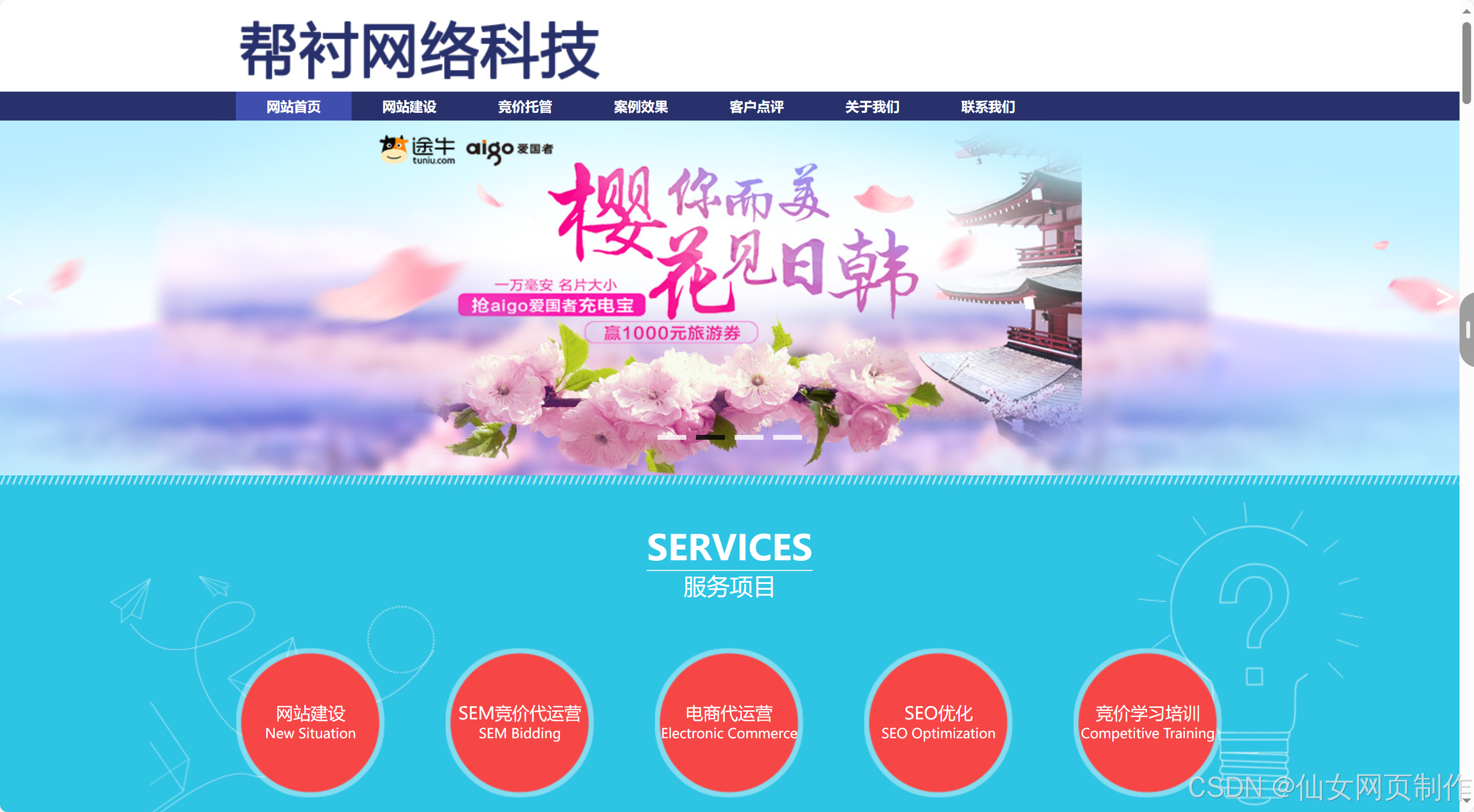
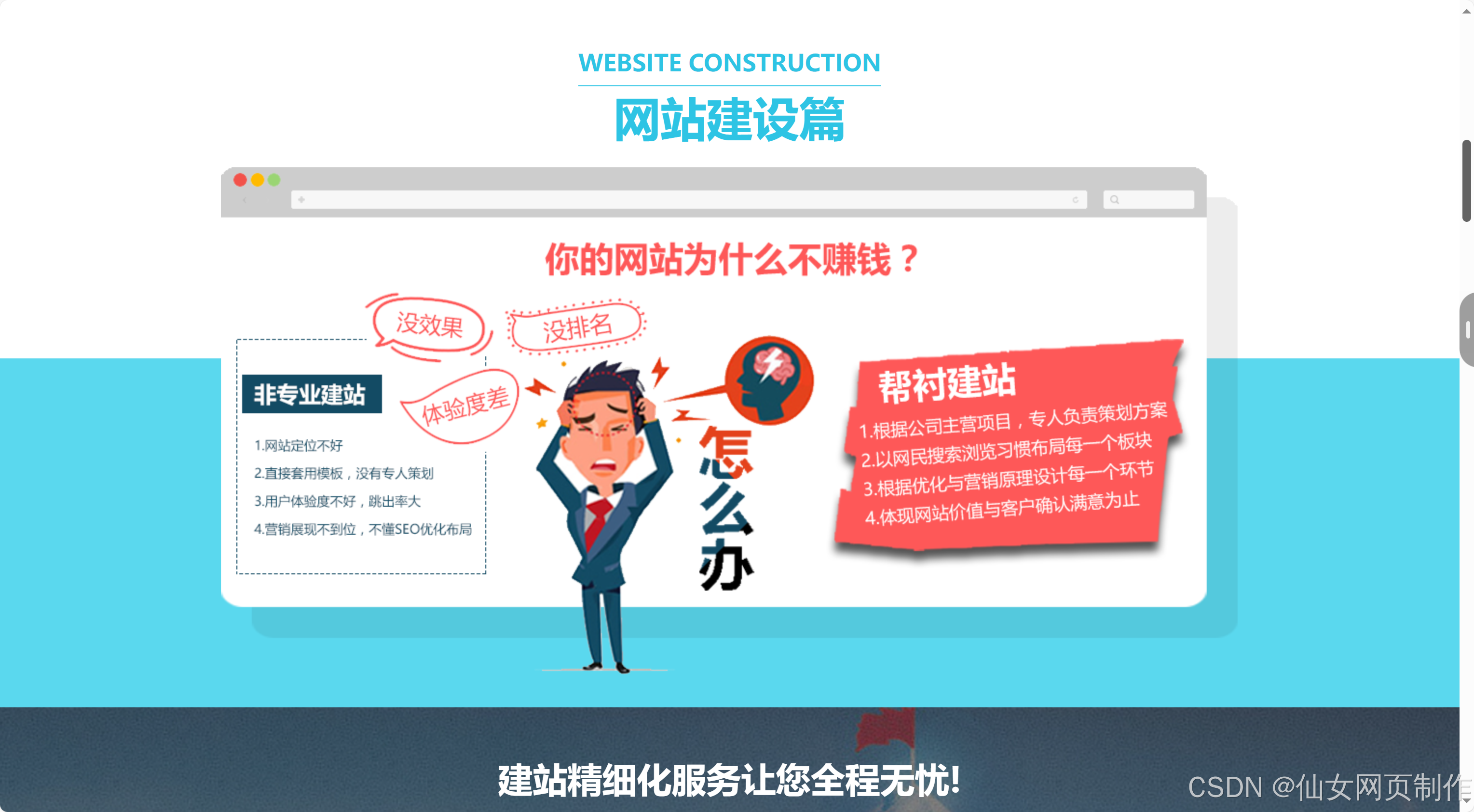
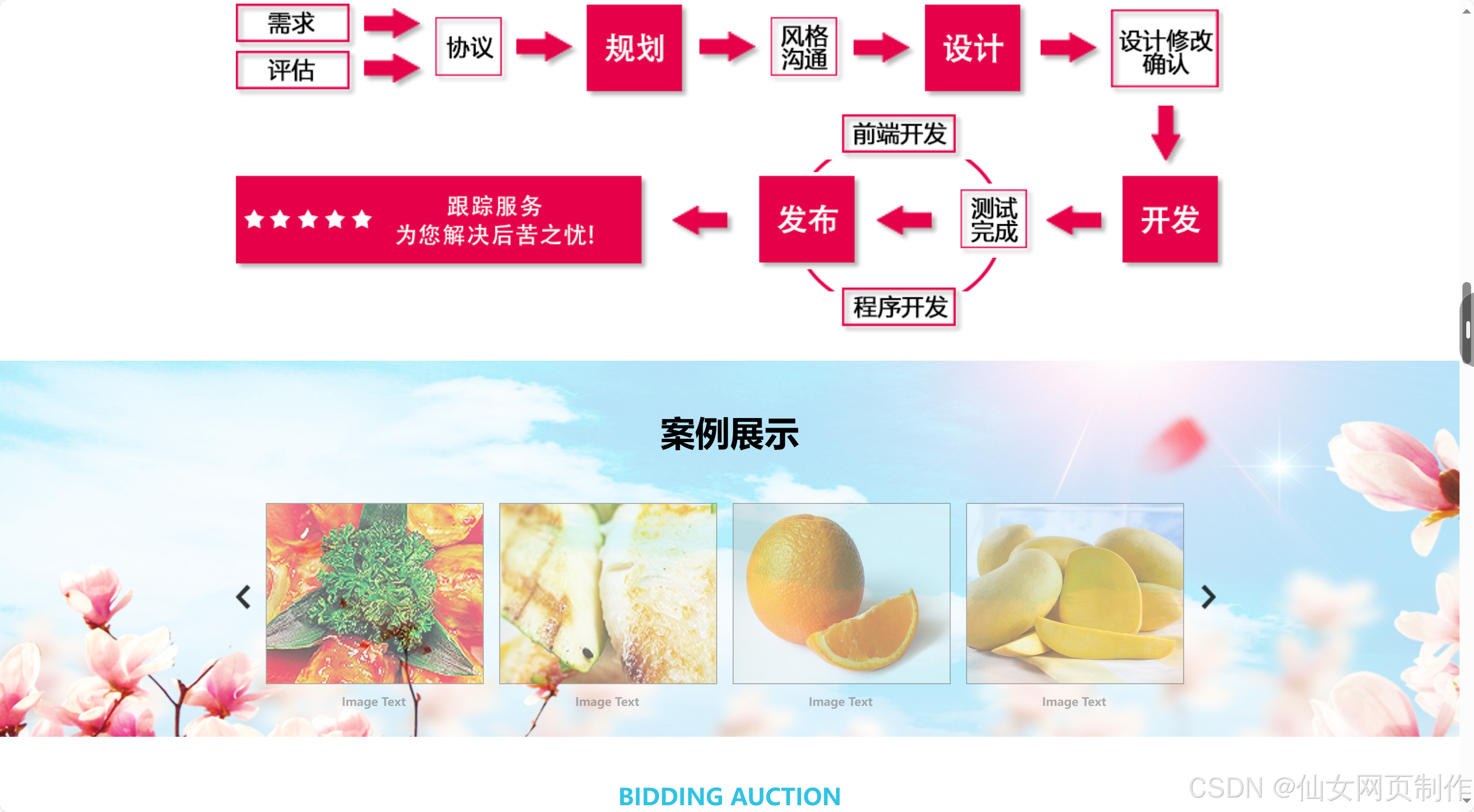
本实例应用html5+css3+js: 导航菜单、图片轮翻、jquery等。响应式自适应网页,可以根据不同的设备屏幕大小自动调整页面布局,提高用户体验;本网页支持如Dreamweaver、HBuilder、Text 、Vscode 等任意html编辑软件进行编辑修改;支持包括IE、Firefox、Chrome、Safari主流浏览器浏览。
二、网页文件
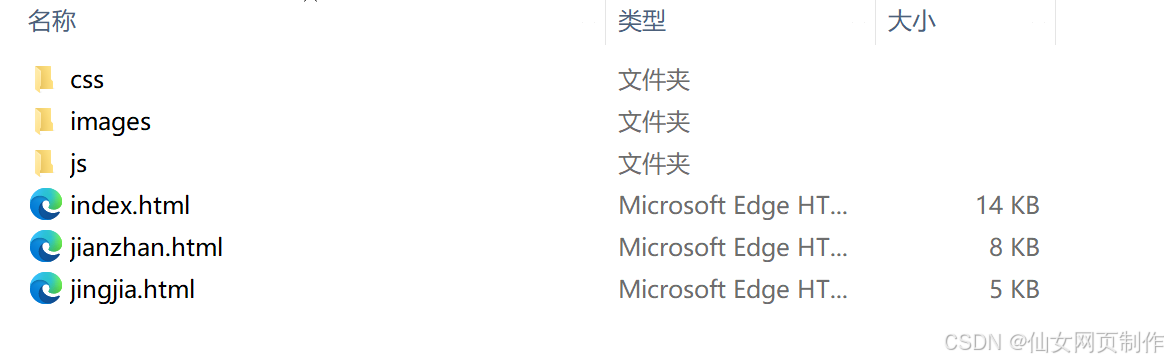
本网页共包含3个页面:
三、网页效果
以下是本篇文章正文内容,下面案例仅供参考(节选示例):

四、代码展示
1.html
<!doctype html>
<html>
<head>
<meta charset="utf-8">
<title>无标题文档</title>
<link href="css/style.css" rel="stylesheet" type="text/css" />
<script type="text/javascript" src="js/jquery-1.7.2.js"></script>
<script type="text/javascript" src="js/lubotu.js"></script>
</head>
<body>
<div class="layout">
<div class="logo fl">
<img src="images/logo.jpg" height="70" />
</div>
</div>
<div class="nav">
<ul class="layout fn">
<a href=""><li class="cur">网站首页</li></a>
<a href=""><li>网站建设</li></a>
<a href=""><li>竞价托管</li></a>
<a href=""><li>案例效果</li></a>
<a href=""><li>客户点评</li></a>
<a href=""><li>关于我们</li></a>
<a href=""><li>联系我们</li></a>
</ul>
</div>
<div class="cl"></div>
<div class="lubo">
<ul class="lubo_box">
<li style=" opacity: 1;filter:alpha(opacity=100);"><a href="" style="background:url(images/1.jpeg) center top no-repeat"></a></li>
<li><a href="" style="background:url(images/2.jpeg) center top no-repeat"></a></li>
<li><a href="" style="background:url(images/3.jpeg) center top no-repeat"></a></li>
<li><a href="" style="background:url(images/4.jpeg) center top no-repeat"></a></li>
</ul>
</div>
<script type="text/javascript">
$(function(){
$(".lubo").lubo({
});
})
</script>
<div class="cont">
<div class="layout">
<div class="title">
<p><span class="fn">SERVICES</span></p>
<p>服务项目</p>
</div>
<div class="f-bottom">
<div class="block">
<a href=""><p><span>网站建设</span></p></a>
<p>New Situation</p>
</div>
<div class="block">
<a href=""><p><span>SEM竞价代运营</span></p></a>
<p>SEM Bidding</p>
</div>
<div class="block">
<a href=""><p><span>电商代运营</span></p></a>
<p>Electronic Commerce</p>
</div>
<div class="block">
<a href=""><p><span>SEO优化</span></p></a>
<p>SEO Optimization</p>
</div>
<div class="block" style="margin-right:0;">
<a href=""><p><span>竞价学习培训</span></p></a>
<p>Competitive Training</p>
</div>
</div>
</div>
</div>
<div class="cl"></div>
<div class="layout">
<div class="news">
<div class="n-title fn">
<p><span>公司动态</span></p>
<p>Company Dynamics</p>
</div>
<div class="n-top">
<img src="images/2.jpg" height="80" width="100" class="fl" />
<div class="n-con fr">
<p><b>5月20日</b></p>
<p><span>谷歌VR负责人:谷歌VR将……</span></p>
<a href=""><p>从成本和功能上来讲,Google Cardboard是非常实用的VR设备……</p></a>
</div>
</div>
<ul class="n-c">
<li><a href="" class="fl">佛协:不可能存在莆田人承包中国90%……</a><span class="fr">05-20</span></li>
<li><a href="" class="fl">佛协:不可能存在莆田人承包中国90%……</a><span class="fr">05-20</span></li>
<li><a href="" class="fl">佛协:不可能存在莆田人承包中国90%……</a><span class="fr">05-20</span></li>
<li><a href="" class="fl">佛协:不可能存在莆田人承包中国90%……</a><span class="fr">05-20</span></li>
<li><a href="" class="fl">佛协:不可能存在莆田人承包中国90%……</a><span class="fr">05-20</span></li>
</ul>
</div>
...
2.CSS
代码如下(节选示例):
@charset "utf-8";
/* CSS Document */
body,ol,ul,h1,h2,h3,h4,h5,h6,p,th,td,dl,dd,form,fieldset,legend,input,textarea,select{margin:0;padding:0}
body{font:12px "微软雅黑","Arial Narrow",HELVETICA;background:#fff;-webkit-text-size-adjust:100%; color:#fff;}
a{color:#fff;text-decoration:none}
a:hover{color:#e9e9e9;text-decoration:underline}
em{font-style:normal}
li{list-style:none}
img{border:0;vertical-align:middle}
table{border-collapse:collapse;border-spacing:0}
p{word-wrap:break-word}
.noborder{border:0;}
.fl,.layout .fl,.chief{float:left;display:inline}
.fr,.layout .fr,.extra{float:right;display:inline}
.fn{font-weight:bold;}
.layout{width:1024px;margin:0 auto; overflow:hidden;}
.cl{clear:both;}
.logo{height:60px; margin-top:15px; margin-bottom:20px;}
.tel{color:#28316c; font-size:24px; font-weight:bold;}
.tel span{font-family:Constantia, "Lucida Bright", "DejaVu Serif", Georgia, serif; font-size:36px;}
.ewm{height:70px; width:70px; margin-top:15px; margin-left:10px;}
.nav{height:30px; background:#28316c; width:100%;}
.nav li{height:30px; line-height:30px; font-size:14px; float:left; color:#fff; text-align:center; width:120px;}
.nav .cur{background:#404fae;}
.nav a:hover li{background:#404fae;}
.cont{height:380px; background:url(../images/bg1.jpg) top center;}
.cont .title{margin-top:50px; overflow:hidden; text-align:center;}
.cont .title p{color:#FFFFFF; line-height:30px; font-size:24px;}
.cont .title p span{border-bottom:1px solid #FFFFFF; font-size:36px; line-height:48px; display:inline-block;}
.cont .f-bottom{height:155px; margin-top:50px;}
.cont .f-bottom .block{width:155px; height:100px; background:url(../images/bg2.png) center center no-repeat; float:left; padding-top:55px; margin-right:62px;}
.cont .f-bottom .block p{text-align:center; font-size:14px;}
.cont .f-bottom .block p span{font-size:18px;}
.news{width:310px; float:left; margin-right:10px; color:#000; padding-top:20px; padding-bottom:20px;}
.news .n-title{height:40px; font-size:14px;}
.news .n-title span{font-size:18px;}
.news .n-top{padding-top:20px; padding-bottom:20px; border-bottom:1px dashed #6d6d6d; overflow:hidden;}
.news .n-top .n-con{width:200px; color:#6d6d6d;}
.news .n-top .n-con b{font-size:24px; line-height:24px;}
.news .n-top .n-con span{font-size:14px; color:#000; line-height:24px;}
.news a{color:#6d6d6d;}
.news a:hover{color:#000;}
.news .n-c{ padding-top:16px;}
.news .n-c li{ line-height:24px;}
.dp-con{padding-top:10px;}
.dp-con li{ width:370px; padding:10px 0; border-bottom:1px dashed #6d6d6d; overflow:hidden;}
.dp-con .d-con1{width:260px; color:#6d6d6d; line-height:20px;}
.dp-con .d-con1 span{font-size:14px; color:#000;}
h2{margin-top:20px; margin-bottom:20px; overflow:hidden; text-align:center; color:#2ec4e4;}
h2 p{line-height:64px; font-size:48px;}
h2 p span{border-bottom:1px solid #2ec4e4; font-size:24px; line-height:48px; display:inline-block;}
.cont1{height:560px; background:url(../images/bg2.jpg);}
.cont1 .con-img{width:1055px; margin:0 auto;}
.cont2{height:600px; background:url(../images/bg3.jpg) center top;}
.i-title{text-align:center; font-size:36px; padding:50px 0 30px;}
.i-title span{font-size:14px; color:#e63d49;}
.i-title1{text-align:center; font-size:36px;}
.i-title1 span{font-size:18px; color:#fff;}
.cont2 .servercon{height:64xp; width:482px; background:url(../images/bg4.png) center center; line-height:64px; padding-left:20px; float:left; font-size:16px; margin-right:10px; margin-bottom:10px;}
.cont3{height:390px; background:url(../images/bg5.jpg) center top;}
.cont4{height:90px; background:url(../images/bg6.jpg) center top; padding-top:20px;}
.cont4 p{font-size:24px; text-align:center;}
.cont4 p span{font-size:36px;}
.cont41{height:90px; background:url(../images/bg6.jpg) center top; padding-top:20px;}
.cont41 p{font-size:24px;}
.cont41 p span{font-size:36px; text-align:left;}
.cont41 .p{ text-align:right;}
.cont5{height:160px; background:#37cbea; padding-top:30px;}
.cont6{height:320px; background:url(../images/bg7.jpg) center top; padding-top:30px;}
.cont6 .c6div{width:500px; margin:30px auto 0; background:rgba(0,0,0,0.4); padding:30px 0;}
.cont6 .c6div p{text-align:center; font-size:18px; font-weight:bold; line-height:30px;}
.cont8{height:210px; background:#f8f8f8; padding-top:20px;}
.cont8 .head{width:390px; margin-right:50px;}
.cont8 .head h1{height:80px; width:390px; text-align:center; background:#0367b2; line-height:72px; font-size:54px;}
.cont8 p{color:#0367b2; font-size:24px; font-weight:bold;}
.cont8 p span{ font-size:36px;}
.cont7{padding-bottom:30px;}
.cont7 .f-server{height:250px; margin-top:50px; float:left; margin-right:88px;}
.cont7 .f-server .f-b{height:250px; width:190px;}
.cont7 .f-server .f-b p{font-size:18px; font-weight:bold; text-align:center; line-height:36px; color:#e63d49;}
/*js效果*/
.lubo{ width: 100%; min-width:1000px;clear: both; position: relative; height:368px;}
.lubo_box{ position: relative; width: 100%; height:368px; }
.lubo_box li{ float: left;position: absolute; top: 0; left: 0; width: 100%; height:368px; opacity: 0;filter:alpha(opacity=0);}
.lubo_box li a{ display: block;width: 100%; height: 100%;}
.lubo_box li img{ width: 100%; height: 368px;}
/*圆点*/
.cir_box{ overflow: hidden; position: absolute; z-index: 100;}
.cir_box li{ float: left; width: 30px; height: 5px; margin:0 5px; cursor: pointer; background: #fff; opacity: 0.8;filter:alpha(opacity=80);}
.cir_on{ background: #000 !important;}
/*按钮*/
.lubo_btn{ position: absolute; width: 100%; top: 140px;}
.left_btn, .right_btn{ width: 30px; height: 80px; cursor: pointer; color: #fff; line-height: 80px; font-size: 36px; text-align: center;-webkit-user-select:none;-moz-user-select:none;-ms-user-select:none;user-select:none;}
.left_btn{ float: left;}
.right_btn{ float: right;}
...
3.JS
代码如下(节选示例):
;(function($){
$.fn.lubo=function(options){
// var defaults={
// }
// //通过覆盖来传参数
// var options=$.extend(defaults,options);
return this.each(function(){
var _lubo=jQuery('.lubo');
var _box=jQuery('.lubo_box');
var _this=jQuery(this); //
var luboHei=_box.height();
var Over='mouseover';
var Out='mouseout';
var Click='click';
var Li="li";
var _cirBox='.cir_box';
var cirOn='cir_on';
var _cirOn='.cir_on';
var cirlen=_box.children(Li).length; //圆点的数量 图片的数量
var luboTime=2000; //轮播时间
var switchTime=400;//图片切换时间
cir();
Btn();
//根据图片的数量来生成圆点
function cir(){
_lubo.append('<ul class="cir_box"></ul>');
var cir_box=jQuery('.cir_box');
for(var i=0; i<cirlen;i++){
cir_box.append('<li style="" value="'+i+'"></li>');
}
var cir_dss=cir_box.width();
cir_box.css({
left:'50%',
marginLeft:-cir_dss/2,
bottom:'10%'
});
cir_box.children(Li).eq(0).addClass(cirOn);
}
//生成左右按钮
function Btn(){
_lubo.append('<div class="lubo_btn"></div>');
var _btn=jQuery('.lubo_btn');
_btn.append('<div class="left_btn"><</div><div class="right_btn">></div>');
var leftBtn=jQuery('.left_btn');
var rightBtn=jQuery('.right_btn');
//点击左面按钮
leftBtn.bind(Click,function(){
var cir_box=jQuery(_cirBox);
var onLen=jQuery(_cirOn).val();
_box.children(Li).eq(onLen).stop(false,false).animate({
opacity:0
},switchTime);
if(onLen==0){
onLen=cirlen;
}
_box.children(Li).eq(onLen-1).stop(false,false).animate({
opacity:1
},switchTime);
cir_box.children(Li).eq(onLen-1).addClass(cirOn).siblings().removeClass(cirOn);
})
//点击右面按钮
rightBtn.bind(Click,function(){
var cir_box=jQuery(_cirBox);
var onLen=jQuery(_cirOn).val();
...
五、总结
设计一个样式美观又人性化的网页,除了具备扎实的专业知识,还需具备美学和人机工程学等相关知识,优秀的网页应具备以下几个特点:
1.简洁实用
尽量以最高效率的方式将用户所要想得到的信息传送给他就是最好的,要去掉所有的冗余的东西;
2.使用方便
要满足使用者的要求,网页适合使用,显示出其功能美;
3.整体性好
围绕一个统一的目标设计,强调整体的功能性;
4.形象突出
尽量符合网页美的标准,能够使网站的形象得到最大限度的提升,追求雅俗共赏。页面用色协调,布局符合形式美的要求:布局有条理,充分利用美的形式,使网页富有可欣赏性,提高档次。
5.交互式强
发挥网络的优势,想方设法使每个使用者都参与到其中来。
六、更多推荐
【关注作者|获取更多源码|优质文章】;Web前端网页制作、大学生毕业设计辅导、期末大作业辅导、模板源码、技术咨询等,有兴趣的联系我!
更多优质博客文章、网页模板点击以下链接查阅:
关注作者,点赞收藏博文,获取更多源码,Thanks!5000+完整代码,主题涵盖30+种类型:

大学生期末大作业、课程设计、毕业设计、完整代码案例模板、Web前端网页定制、教学课程、学习资料等,有兴趣的添加以下微信交流👇🏻👇🏻👇🏻
更多推荐

 21
21 0
0- 0


 已为社区贡献4条内容

所有评论(0)