
ESP32-S3-WROOM-1-N16R8引脚io35,io36,io37的一个大坑,专用小b字号坑新手
ESP32-S3-WROOM-1-N16R8模组开发按钮,我设置了几个按钮
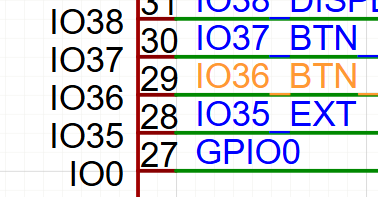
测试程序,总是在启动后反复重启,报看门狗错误,折腾了两天,还写了例程,最后发现一个大坑。
/*
 * SPDX-FileCopyrightText: 2010-2022 Espressif Systems (Shanghai) CO LTD
 *
 * SPDX-License-Identifier: CC0-1.0
 */

#include <stdio.h>
#include <inttypes.h>
#include "sdkconfig.h"
#include "freertos/FreeRTOS.h"
#include "freertos/task.h"
#include "esp_chip_info.h"
#include "esp_flash.h"
#include "esp_system.h"

#include <driver/gpio.h>
#include <iot_button.h>
#include <button_types.h>
#include <button_adc.h>
#include <button_gpio.h>

#include <esp_log.h>

#define TAG "Button"
#define BUTTON_GPIO       GPIO_NUM_37// GPIO_NUM_47

// ✅ C 语言回调函数:点击后打印 "test ok"
static void button_click_handler(void *handle, void *usr_data)
{
    ESP_LOGI(TAG, "test ok");
}


void app_main(void)
{
    printf("Hello world!\n");

    /* Print chip information */
    esp_chip_info_t chip_info;
    uint32_t flash_size;
    esp_chip_info(&chip_info);
    printf("This is %s chip with %d CPU core(s), %s%s%s%s, ",
           CONFIG_IDF_TARGET,
           chip_info.cores,
           (chip_info.features & CHIP_FEATURE_WIFI_BGN) ? "WiFi/" : "",
           (chip_info.features & CHIP_FEATURE_BT) ? "BT" : "",
           (chip_info.features & CHIP_FEATURE_BLE) ? "BLE" : "",
           (chip_info.features & CHIP_FEATURE_IEEE802154) ? ", 802.15.4 (Zigbee/Thread)" : "");

    unsigned major_rev = chip_info.revision / 100;
    unsigned minor_rev = chip_info.revision % 100;
    printf("silicon revision v%d.%d, ", major_rev, minor_rev);
    if(esp_flash_get_size(NULL, &flash_size) != ESP_OK) {
        printf("Get flash size failed");
        return;
    }

    printf("%" PRIu32 "MB %s flash\n", flash_size / (uint32_t)(1024 * 1024),
           (chip_info.features & CHIP_FEATURE_EMB_FLASH) ? "embedded" : "external");

    printf("Minimum free heap size: %" PRIu32 " bytes\n", esp_get_minimum_free_heap_size());


    /* 初始化按钮 */
    button_handle_t button_handle_ = NULL;

    // 1. 定义按钮配置参数
    uint16_t long_press_time = 2000;   // 长按触发时间:2000ms
    uint16_t short_press_time = 100;   // 短按判断时间:100ms
    bool active_high = false;          // false=低电平有效(常见接法)
    bool enable_power_save = false;    // 不启用省电模式
    bool disable_pull = false;         // 不禁用上下拉

    button_config_t button_config = {
        .long_press_time = long_press_time,
        .short_press_time = short_press_time
    };
    button_gpio_config_t gpio_config = {
        .gpio_num = BUTTON_GPIO,
        .active_level = 0,
        .enable_power_save = enable_power_save,
        .disable_pull = false
    };
    //ESP_ERROR_CHECK(iot_button_new_gpio_device(&button_config, &gpio_config, &button_handle_));
    // 创建按钮设备
    ESP_ERROR_CHECK(iot_button_new_gpio_device(&button_config, &gpio_config, &button_handle_));
    ESP_LOGI(TAG, "✅ Button device created on GPIO %d", BUTTON_GPIO);


    ESP_LOGI(TAG, "Button initialized on GPIO %d", BUTTON_GPIO);

    iot_button_register_cb(button_handle_,
                          BUTTON_SINGLE_CLICK,
                          NULL,           // ✅ 新增:事件参数结构体指针
                          button_click_handler,  // ✅ C 语言函数指针
                          NULL);          // ✅ 用户数据(不需要)

    ESP_LOGI(TAG, "Button initialized on GPIO %d", BUTTON_GPIO);

    ESP_LOGI(TAG, "✅ Button callbacks registered");

    // 让主任务保持运行(不再重启)
    while(1) {
        vTaskDelay(1000 / portTICK_PERIOD_MS);
    }
}
上面是例程,例程中也有问题。
idf_component.yml中我下载了新版本的组件,但实际代码使用了旧版的,但是还好,新代码兼容旧代码,凑合能跑,这个事不细说。
## IDF Component Manager Manifest File
dependencies:
  espressif/button: ~4.1.3   # 和主项目完全一致

  ## Required IDF version
  idf:
    version: '>=5.4.0'        # 保持与主项目一致
========================
现在来说说大坑在哪里。
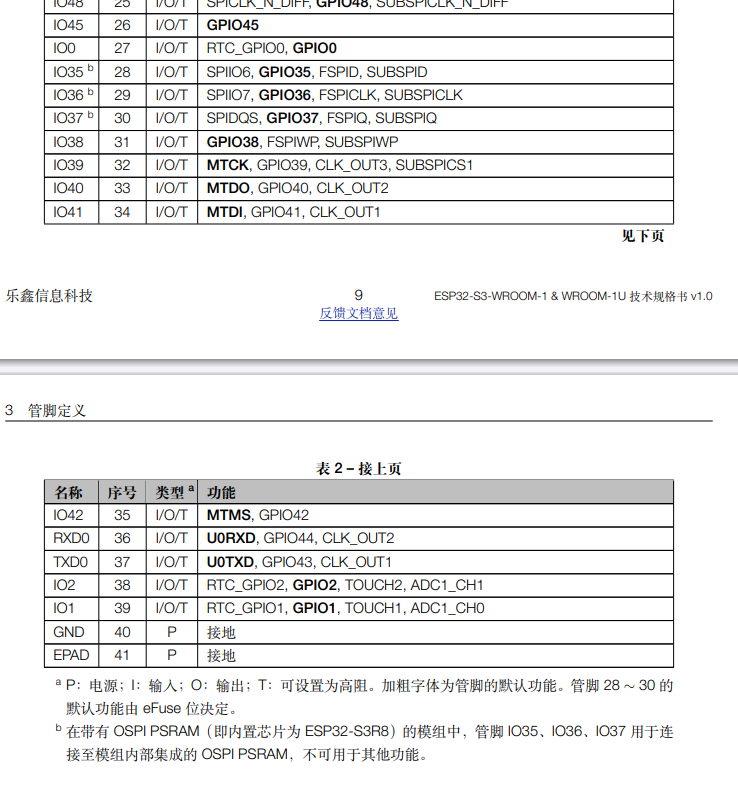
注意,io35,io36,Io37三个引脚,标了小b,被内存给占用了。
ai解释如下:
SP32-S3-WROOM-1-N16R8 这三个引脚 IO35、IO36、IO37 绝对不能用!
硬件铁证
你的模组型号 N16R8 明确说明:
-
N16 = 16MB Flash
-
R8 = 8MB PSRAM(R = PSRAM, 8 = 8MB)
根据 ESP32-S3 技术规格书:
**"在带有 OSPI PSRAM(即内置芯片为 ESP32-S3R8)的模组中,管脚 IO35、IO36、IO37 用于连接至模组内部集成的 OSPI PSRAM,不可用于其他功能。" **
** 这是硬件层面的物理连接,无法通过软件规避 。这些引脚在模组内部 直接焊接到 PSRAM 芯片 , 没有任何办法断开 **。
为什么启动会重启?
-
** 上电瞬间 **:Bootloader 通过 OSPI 接口读取 Flash 和 PSRAM 数据
-
** 你的代码 **:初始化按钮时调用
gpio_config(),覆盖 IO35 的功能为普通输入 -
** 冲突发生 **:OSPI 通信被干扰 → 读取指令/数据错误 → CPU 执行非法指令 → ** 看门狗复位 ** → 无限重启
================================
上面是ai的解释,好吧,这玩意是个大坑啊,经验不足肯定要被坑到,竖了个小字的牌子,告诉你不能用,他么的,就不能在硬件上别引出这三个引脚得了。真贱,坑新手啊
更多推荐
 8
8 0
0- 0


 已为社区贡献1条内容

所有评论(0)