
ClickHouse 快速入门
·
ClickHouse 快速入门
1 ClickHouse 介绍
ClickHouse 是由 Yandex 开发的一款开源的列式存储 OLAP(联机分析处理)数据库管理系统,专为海量数据的高性能查询和分析场景设计。
它的核心目标是在秒级甚至毫秒级内,完成对亿级、十亿级乃至百亿级数据的复杂分析查询,广泛应用于大数据统计分析、用户行为分析、日志分析、实时监控报表等场景。
ClickHouse 支持 SQL 查询语法,具备向量化执行引擎、数据分区与分片、多副本高可用等特性,同时支持实时数据写入和批量数据导入,兼顾了查询性能和数据写入的灵活性。
1 行式存储VS列式存储
| 特性 | 行式存储数据库 | 列式存储数据库 |
|---|---|---|
| 存储方式 | 按行存储数据,一行的所有字段连续存储在磁盘上 | 按列存储数据,同一列的所有数据连续存储在磁盘上 |
| 典型代表 | MySQL、PostgreSQL、Oracle(OLTP 数据库) | ClickHouse、Hive、Greenplum(OLAP 数据库) |
| 查询场景 | 适合点查询和事务操作,需要读取整行数据(如用户登录、订单创建) | 适合分析查询,只需要读取部分列(如统计某列的总和、平均值) |
| 压缩率 | 低,不同字段类型差异大,难以高效压缩 | 高,同列数据类型一致,可使用专用压缩算法(如 LZ4、ZSTD) |
| 查询性能 | 读取整行数据,列越多效率越低 | 只读取需要的列,列越少效率越高,支持向量化执行 |
| 写入性能 | 高,适合高频次的单行/小批量写入(OLTP 场景) | 批量写入性能高,单行写入性能较差(OLAP 场景) |
2 ClickHouse VS MySQL
| 特性 | ClickHouse | MySQL |
|---|---|---|
| 数据库类型 | OLAP(联机分析处理),面向海量数据统计分析 | OLTP(联机事务处理),面向高频次事务操作 |
| 存储模型 | 列式存储,支持高压缩比 | 行式存储(默认),部分引擎支持列式存储(如 InnoDB 列式模式) |
| 查询语法 | 支持标准 SQL,扩展了 OLAP 相关函数(如窗口函数、聚合函数) | 支持标准 SQL,扩展了事务和索引相关语法 |
| 查询性能 | 亿级数据查询毫秒级响应,支持向量化执行、分区剪枝 | 适合百万级以下数据查询,大数据量下复杂查询性能下降明显 |
| 事务支持 | 不支持 ACID 事务,仅支持最终一致性 | 支持 ACID 事务,支持行级锁和 MVCC |
| 索引机制 | 支持主键索引、二级索引(如跳数索引、布隆索引),索引设计为分析查询优化 | 支持 B+ 树索引、哈希索引、全文索引,索引设计为点查询优化 |
| 写入特性 | 批量写入性能高,单行写入性能差,适合批量导入 | 单行/小批量写入性能高,支持实时写入和事务性写入 |
| 适用场景 | 日志分析、用户行为分析、报表统计、实时监控 | 电商订单、用户管理、金融交易、内容管理系统 |
3 ClickHouse VS Apache Doris
| 特性 | ClickHouse | Apache Doris |
|---|---|---|
| 项目定位 | 专注于 OLAP 查询性能,极致的数据分析引擎 | 一站式 MPP 分析数据库,兼顾查询性能和易用性 |
| 存储引擎 | 多存储引擎(如 MergeTree、ReplacingMergeTree),灵活适配不同场景 | 自研存储引擎,支持明细模型、聚合模型、更新模型 |
| 数据模型 | 以 MergeTree 为核心,支持明细数据、去重数据存储 | 支持多种数据模型,聚合模型可提前预计算,降低查询开销 |
| 写入能力 | 批量写入性能高,实时写入依赖 Kafka Engine 等插件 | 原生支持实时写入和批量导入,写入稳定性更优 |
| SQL 兼容性 | 兼容标准 SQL,OLAP 函数丰富,语法灵活 | 高度兼容 MySQL 语法,可直接使用 MySQL 客户端连接 |
| 物化视图 | 支持物化视图,但刷新策略相对简单 | 支持自动刷新物化视图,预计算能力更强,适合复杂报表 |
| 生态集成 | 与 Kafka、Flink 等流处理系统集成良好 | 与 Hadoop 生态(HDFS、Hive)集成更紧密,支持直接读取 Hive 表 |
| 运维成本 | 分片和副本配置较复杂,需要手动管理数据分布 | 集群管理自动化程度高,运维成本更低,适合中小企业 |
| 适用场景 | 对查询性能要求极高的场景,如实时监控、日志分析 | 一站式分析平台,适合需要兼顾易用性和性能的企业级数据仓库 |
4 ClickHouse 的优缺点
| 优点 | 缺点 |
|---|---|
| 极致查询性能:向量化执行引擎 + 列式存储,亿级数据查询秒级响应 | 不支持事务:无法满足 ACID 事务要求,不适合 OLTP 场景 |
| 高压缩率:同列数据类型一致,压缩比可达 5:1 ~ 30:1,节省存储成本 | 单行写入性能差:高频次单行写入会导致性能瓶颈,建议批量写入 |
| 支持 SQL 语法:降低学习成本,兼容传统数据分析工具(如 Tableau、Power BI) | 弱删除/更新能力:UPDATE/DELETE 操作性能较低,适合追加写入场景 |
| 水平扩展能力:支持数据分片与多副本,轻松扩展集群容量和高可用 | 生态相对薄弱:相比 MySQL/Hive,第三方工具和集成方案较少 |
| 实时数据写入:支持 Kafka 等流数据接入,兼顾批量和实时分析 | 运维复杂度高:分片、副本、压缩等配置需要专业运维经验 |
5 ClickHouse 适用的场景
| 场景类型 | 具体描述 | 核心优势 |
|---|---|---|
| 日志/埋点分析 | 服务器日志、用户行为埋点数据的存储与分析,如 PV/UV 统计、页面跳转分析 | 高压缩率节省存储,快速聚合查询支撑实时报表 |
| 实时监控报表 | 业务指标监控、运维监控数据的实时计算,如服务器 CPU/内存监控、订单量实时统计 | 毫秒级查询响应,支持实时数据写入 |
| 用户行为分析 | 电商用户画像、广告投放效果分析、用户留存率计算 | 支持海量数据的多维分析,灵活的 SQL 函数满足复杂统计需求 |
| 大数据统计分析 | 替代 Hive 进行离线数据仓库分析,缩短分析任务执行时间 | 比 Hive 快 10~100 倍,无需依赖 MapReduce 框架 |
| 时序数据存储 | IoT 设备数据、传感器数据的存储与分析,如温度、湿度等时序指标统计 | 支持按时间分区,时间范围查询性能优异 |
2 ClickHouse 安装
1 镜像下载
PS C:\Users\hyacinth\Desktop> docker pull clickhouse/clickhouse-server:latest
latest: Pulling from clickhouse/clickhouse-server
7e49dc6156b0: Pull complete
73e01fe5c14e: Pull complete
4f4fb700ef54: Pull complete
33449e77f874: Pull complete
8c47c9d3110d: Pull complete
eb8ee1043261: Pull complete
d9d691d19f73: Pull complete
d5d232e77897: Pull complete
00790804120e: Pull complete
Digest: sha256:dcd74ae94f16bee4bb61a44ab0fc4ff973d5bb42180e52fc82c4fe68cfe70cf6
Status: Downloaded newer image for clickhouse/clickhouse-server:latest
docker.io/clickhouse/clickhouse-server:lates
2 容器运行
PS C:\Users\hyacinth\Desktop> docker run -d --name clickhouse-server --ulimit nofile=262144:262144 -p 8123:8123 -p 9000:9000 clickhouse/clickhouse-server
41fa47171498b983f257e246e70702342263aebe0e475d319ec1eb608921a837
3 创建用户
- 1 进入容器
PS C:\Users\hyacinth\Desktop> docker exec -it clickhouse-server bash
root@41fa47171498:/#
- 2 修改配置
root@41fa47171498:/# vi /etc/clickhouse-server/users.xml
- 3 修改XML
在users里面增加用户
标签 | 含义
-------- | -----
user_name | 用户名称
user_pwd | 用户密码
<user_name>
    <password>user_pwd</password>
    <networks>
        <ip>::/0</ip>
    </networks>
    <access_management>1</access_management>
</user_name>
3 ClickHouse 连接
1 连接
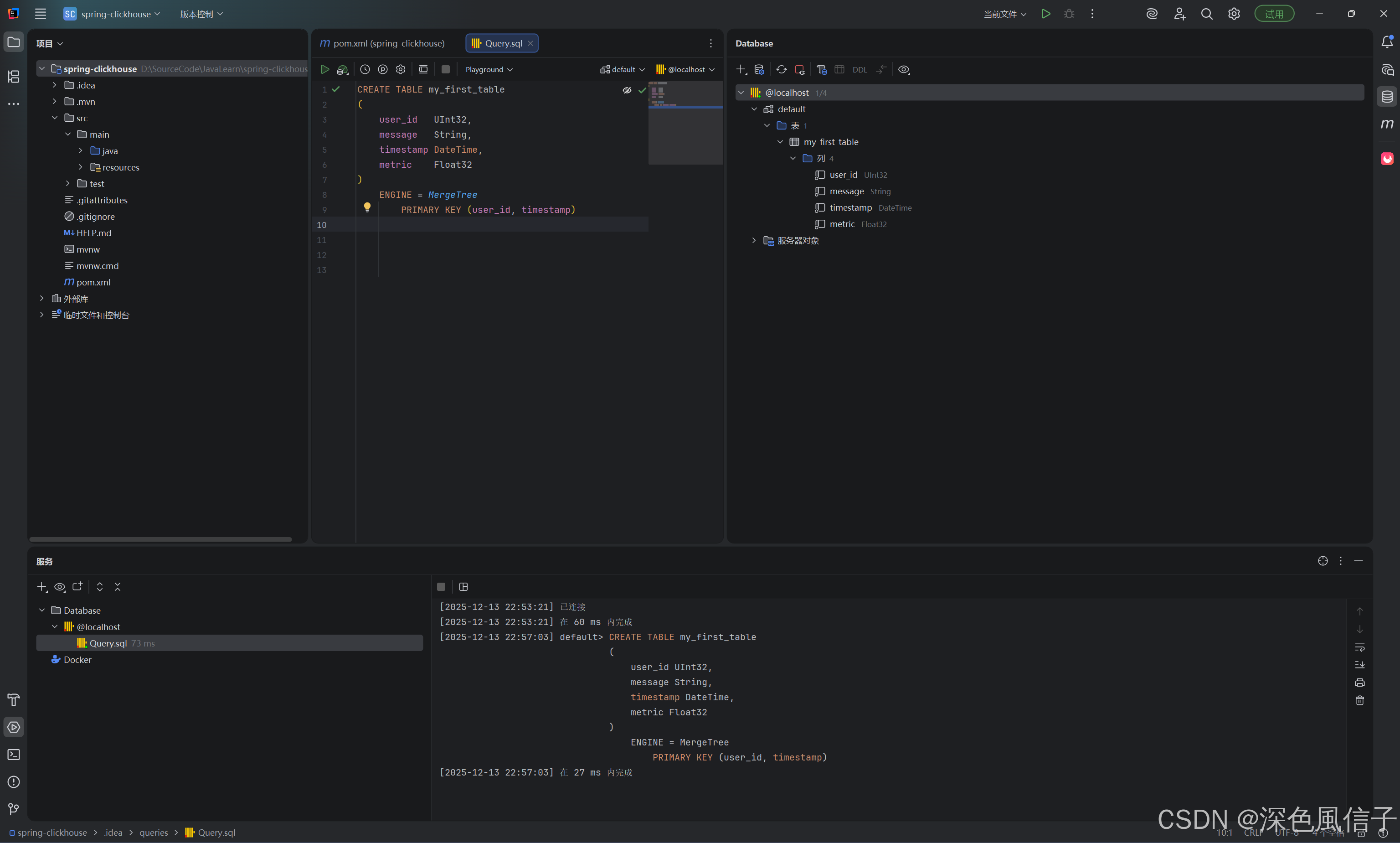
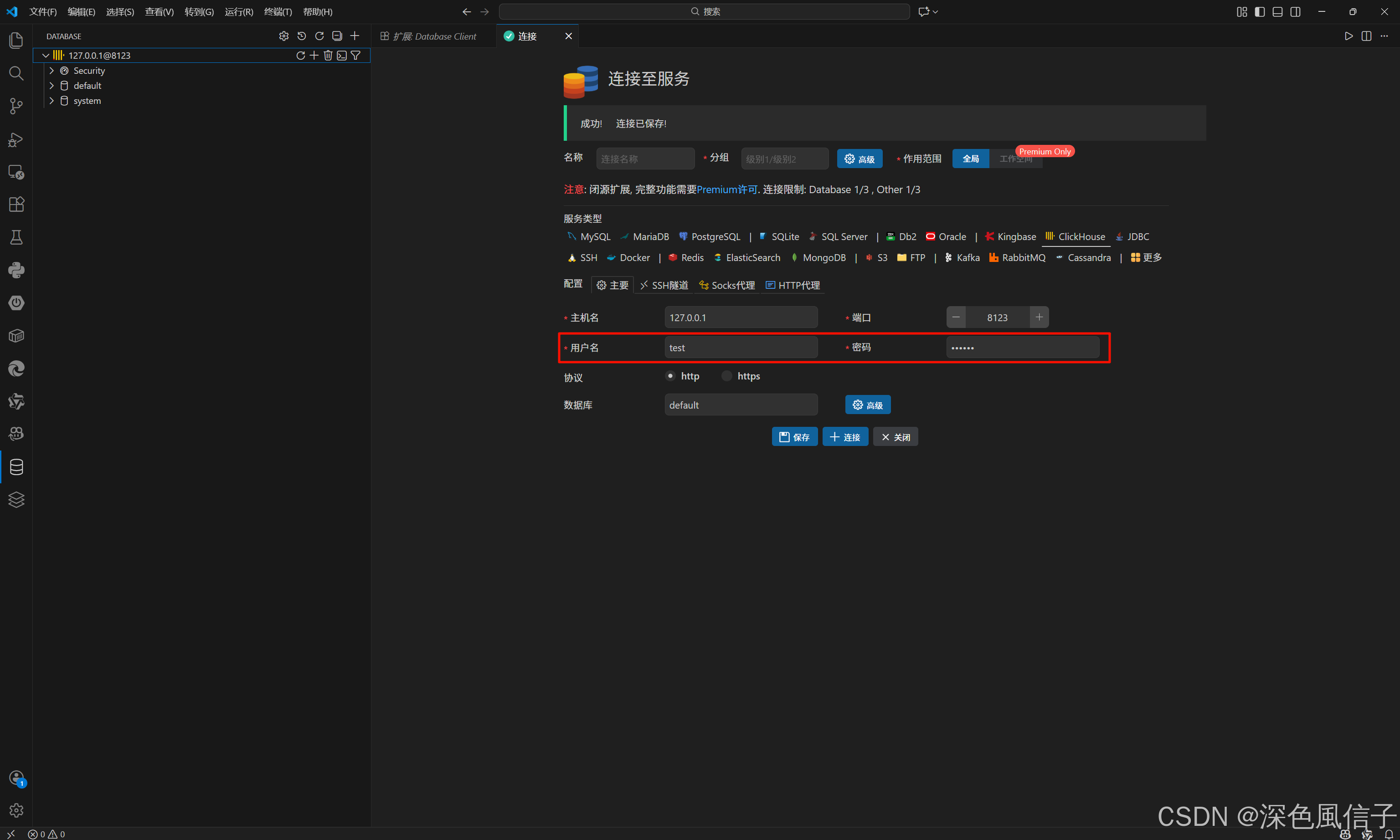
2 建表测试
CREATE TABLE my_first_table (
    user_id   UInt32,
    message   String,
    timestamp DateTime,
    metric    Float32
) ENGINE = MergeTree PRIMARY KEY (user_id, timestamp)
4 SpringBoot 集成 ClickHouse
1 依赖
<?xml version="1.0" encoding="UTF-8"?>
<project xmlns="http://maven.apache.org/POM/4.0.0" xmlns:xsi="http://www.w3.org/2001/XMLSchema-instance"
	xsi:schemaLocation="http://maven.apache.org/POM/4.0.0 https://maven.apache.org/xsd/maven-4.0.0.xsd">

	<modelVersion>4.0.0</modelVersion>
	<parent>

		<groupId>org.springframework.boot</groupId>
		<artifactId>spring-boot-starter-parent</artifactId>
		<version>4.0.0</version>
		<relativePath/> <!-- lookup parent from repository -->
	</parent>

	<groupId>com.xu</groupId>
	<artifactId>spring-clickhouse</artifactId>
	<version>0.0.1-SNAPSHOT</version>
	<name>spring-clickhouse</name>
	<description>Demo project for Spring Boot</description>

	<properties>
		<java.version>25</java.version>
	</properties>

	<dependencies>

		<dependency>
			<groupId>org.springframework.boot</groupId>
			<artifactId>spring-boot-starter-webmvc</artifactId>
		</dependency>

		<dependency>
			<groupId>org.springframework.boot</groupId>
			<artifactId>spring-boot-devtools</artifactId>
			<scope>runtime</scope>
			<optional>true</optional>
		</dependency>

		<dependency>
			<groupId>org.projectlombok</groupId>
			<artifactId>lombok</artifactId>
			<optional>true</optional>
		</dependency>

		<dependency>
			<groupId>com.clickhouse</groupId>
			<artifactId>clickhouse-jdbc</artifactId>
			<version>0.9.4</version>
		</dependency>

		<dependency>
			<groupId>cn.hutool</groupId>
			<artifactId>hutool-all</artifactId>
			<version>5.8.42</version>
		</dependency>

		<dependency>
			<groupId>com.baomidou</groupId>
			<artifactId>mybatis-plus-spring-boot4-starter</artifactId>
			<version>3.5.15</version>
		</dependency>

		<dependency>
			<groupId>org.springframework.boot</groupId>
			<artifactId>spring-boot-starter-webmvc-test</artifactId>
			<scope>test</scope>
		</dependency>

	</dependencies>

	<build>
		<plugins>
			<plugin>
				<groupId>org.apache.maven.plugins</groupId>
				<artifactId>maven-compiler-plugin</artifactId>
				<configuration>
					<annotationProcessorPaths>
						<path>
							<groupId>org.projectlombok</groupId>
							<artifactId>lombok</artifactId>
						</path>
					</annotationProcessorPaths>
				</configuration>
			</plugin>
			<plugin>
				<groupId>org.springframework.boot</groupId>
				<artifactId>spring-boot-maven-plugin</artifactId>
				<configuration>
					<excludes>
						<exclude>
							<groupId>org.projectlombok</groupId>
							<artifactId>lombok</artifactId>
						</exclude>
					</excludes>
				</configuration>
			</plugin>
		</plugins>
	</build>

</project>
2 配置
# 服务配置
spring:
  application:
    name: spring-clickhouse
  datasource:
    url: jdbc:clickhouse://127.0.0.1:8123/default?useSSL=false&socket_timeout=30000
    username: test
    password: 123456
    type: com.zaxxer.hikari.HikariDataSource
    hikari:
      maximum-pool-size: 10  # 连接池最大连接数
      minimum-idle: 2        # 最小空闲连接
      idle-timeout: 60000    # 空闲连接超时时间
      connection-timeout: 30000 # 连接超时时间

# MyBatis-Plus 配置(替代原 MyBatis 配置)
mybatis-plus:
  mapper-locations: classpath:mapper/*.xml
  type-aliases-package: com.xu.*
  configuration:
    map-underscore-to-camel-case: true  # 下划线转驼峰
    log-impl: org.apache.ibatis.logging.stdout.StdOutImpl
  global-config:
    db-config:
      id-type: NONE  # ClickHouse无自增主键,禁用默认主键策略

# 日志配置
logging:
  level:
    com.xu: debug
# 基础镜像
FROM eclipse-temurin:25-jre-alpine
# 设置工作目录
WORKDIR /app
# 复制应用
COPY ./target/*.jar app.jar
# 暴露端口
EXPOSE 8080
# 启动命令
ENTRYPOINT ["java", "-XX:+UseContainerSupport", "-jar", "app.jar"]
3 Mapper
package com.xu.test.mapper;

import com.baomidou.mybatisplus.core.mapper.BaseMapper;
import com.xu.test.entity.MyFirstTable;
import org.apache.ibatis.annotations.Mapper;
import org.apache.ibatis.annotations.Param;
import org.apache.ibatis.annotations.Update;

/**
 * @author hyacinth
 */
@Mapper
public interface MyFirstTableMapper extends BaseMapper<MyFirstTable> {

    /**
     * 自定义更新(ClickHouse UPDATE 语法:ALTER TABLE ... UPDATE)
     */
    @Override
    @Update("ALTER TABLE my_first_table UPDATE " +
            "message = #{entity.message}, metric = #{entity.metric} " +
            "WHERE user_id = #{entity.userId}")
    int updateById(@Param("entity") MyFirstTable entity);

}
4 XML
<?xml version="1.0" encoding="UTF-8"?>
<!DOCTYPE mapper PUBLIC "-//mybatis.org//DTD Mapper 3.0//EN"
        "http://mybatis.org/dtd/mybatis-3-mapper.dtd">
<mapper namespace="com.xu.test.mapper.MyFirstTableMapper">

</mapper>
5 Service
package com.xu.test.service;

import com.baomidou.mybatisplus.extension.service.IService;
import com.xu.test.entity.MyFirstTable;

/**
 * @author hyacinth
 */
public interface MyFirstTableService extends IService<MyFirstTable> {

}
6 ServiceImpl
package com.xu.test.service.impl;

import com.baomidou.mybatisplus.extension.service.impl.ServiceImpl;
import com.xu.test.entity.MyFirstTable;
import com.xu.test.mapper.MyFirstTableMapper;
import com.xu.test.service.MyFirstTableService;
import org.springframework.stereotype.Service;

/**
 * @author hyacinth
 */
@Service
public class MyFirstTableServiceImpl extends ServiceImpl<MyFirstTableMapper, MyFirstTable> implements MyFirstTableService {

}
7 Entity
package com.xu.test.entity;

import com.baomidou.mybatisplus.annotation.TableField;
import com.baomidou.mybatisplus.annotation.TableId;
import com.baomidou.mybatisplus.annotation.TableName;
import lombok.Data;

import java.util.Date;

/**
 * 对应 ClickHouse 的 my_first_table
 * 注意:ClickHouse 的 MergeTree 主键非自增,且是复合主键
 */
@Data
@TableName("my_first_table")  // 明确指定表名(大小写敏感,需和ClickHouse一致)
public class MyFirstTable {

    /**
     * 用户ID(复合主键1)
     */
    @TableId
    @TableField(value = "user_id")  // 显式指定字段名,避免驼峰转换问题
    private Integer userId;

    /**
     * 消息内容
     */
    @TableField(value = "message")
    private String message;

    /**
     * 时间戳(复合主键2)
     */
    @TableField(value = "timestamp")
    private Date timestamp;

    /**
     * 指标值
     */
    @TableField(value = "metric")
    private Float metric;
}
7 Test
package com.xu;

import cn.hutool.json.JSONUtil;
import com.baomidou.mybatisplus.core.conditions.query.QueryWrapper;
import com.baomidou.mybatisplus.extension.plugins.pagination.Page;
import com.xu.test.entity.MyFirstTable;
import com.xu.test.service.MyFirstTableService;
import org.junit.jupiter.api.Test;
import org.springframework.beans.factory.annotation.Autowired;
import org.springframework.boot.test.context.SpringBootTest;

import java.time.LocalDateTime;
import java.util.ArrayList;
import java.util.Date;
import java.util.List;

@SpringBootTest
class AppTest {

	@Autowired
	private MyFirstTableService myFirstTableService;

	@Test
	void contextLoads() {
	}

	@Test
	public void save() {
		List<MyFirstTable> list = new ArrayList<>();
		for (int i = 1; i <= 10; i++) {
			MyFirstTable entity = new MyFirstTable();
			entity.setUserId(i);
			entity.setMessage("MP测试消息" + i);
			entity.setTimestamp(new Date());
			entity.setMetric(20.0f + i);
			list.add(entity);
		}
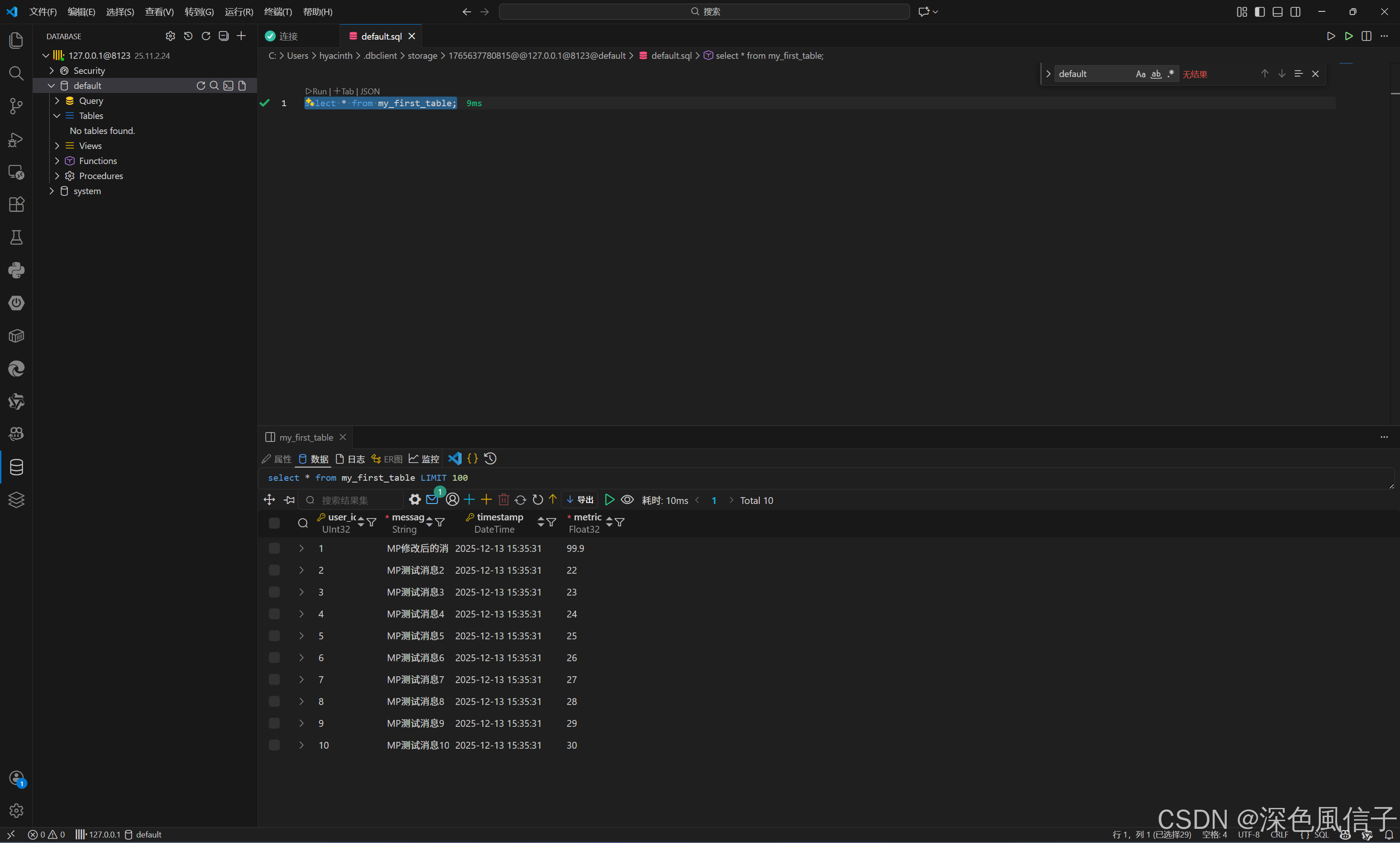
		boolean success = myFirstTableService.saveBatch(list);
		System.out.println("批量插入是否成功:" + success);
	}

	@Test
	public void page() {
		Page<MyFirstTable> page = new Page<>(1, 5);
		QueryWrapper<MyFirstTable> wrapper = new QueryWrapper<>();
		System.out.println(JSONUtil.toJsonPrettyStr(myFirstTableService.page(page,wrapper)));
	}

	@Test
	public void update() {
		MyFirstTable entity = new MyFirstTable();
		entity.setUserId(1);
		entity.setMessage("MP修改后的消息");
		entity.setMetric(99.9f);

		boolean success = myFirstTableService.updateById(entity);
		System.out.println("更新是否成功:" + success);
	}

	// 4. 测试删除
	@Test
	public void delete() {
		myFirstTableService.removeById(1);
	}

}
更多推荐

 7
7 0
0- 0


 已为社区贡献6条内容

所有评论(0)