
Chapter6 :Spark SQL
文章目录
前言
Spark SQL是用于结构化数据处理的Spark模块。 与基本的Spark RDD API不同,Spark SQL提供的接口为Spark提供了更多关于数据结构和正在执行的计算的信息。 在内部,Spark SQL使用这些额外的信息来执行额外的优化。 有几种方法可以与Spark SQL交互,包括SQL和Dataset API。 在计算结果时,使用相同的执行引擎,而不管您使用什么API/语言来表达计算。 这种统一意味着开发人员可以轻松地在不同的api之间来回切换,提供最自然的方式来表达给定的转换。
一、SparkSQL是什么?
(一)介绍
Spark SQL模块提供了处理结构化和半结构化数据的接口。它集成了关系型数据处理和Spark的函数式编程api。
Spark SQL is a module that provides an interface for working with structured and semi-structured data. It integrates relational data processing with Spark’s functional programming APIs.
(二)特性
1.Unified data access 统一数据访问
Spark SQL集成了多种数据源,包括Hive、Avro、*Parquet*、ORC、JSON和JDBC。
Spark SQL integrates with a variety of data sources, including Hive, Avro, Parquet, ORC, JSON, and JDBC.
它允许你使用SQL从这些数据源中查询数据,并将其与Spark的编程API结合起来。
It allows you to query data from these sources using SQL and combine it with Spark’s programmatic API.
2.Compatibility with Hive 与hive的兼容
Spark SQL支持查询存储在Apache Hive中的数据,它可以读取Hive表、运行Hive UDF和执行Hive查询。
Spark SQL supports querying data stored in Apache Hive, and it can read Hive tables, run Hive UDFs, and execute Hive queries.
3.Schema Management 表结构管理
它提供了一种使用模式管理结构化数据的方法,允许更好的数据治理和查询优化。
It provides a way to manage structured data using schemas, allowing for better data governance and query optimization.
4.SQL and DataFrame API
允许用户使用SQL或DataFrame DSL(领域特定语言)编写查询,这使得来自不同背景的用户可以灵活使用。
Allows users to write queries using SQL or DataFrame DSL (Domain-Specific Language), making it flexible for users from different backgrounds.
5.Performance and scalability
Spark SQL包括基于成本的优化器、列式存储和代码生成,以实现快速查询。 同时,它使用Spark引擎扩展到数千个节点和多个小时的查询,引擎提供完整的中间查询容错能力。 不要担心使用不同的引擎来获取历史数据。
Spark SQL includes a cost-based optimizer, columnar storage, and code generation to quickly query. At the same time, it uses the Spark engine to scale to thousands of nodes and multiple hours of query, the engine provides complete intermediate query fault tolerance. Don’t worry about using different engines to get historical data.
(三)Basic Concepts of Datasets and DataFrames
1.DataFrame
DataFrame是组织成命名列的数据集。 它在概念上相当于关系数据库中的表或R/Python中的数据框架(数据框架),但在底部进行了更丰富的优化。
A distributed collection of data organized into named columns. It is similar to a table in a relational database.
**DataFrame可以从多个来源构建,**例如:结构化数据文件、Hive中的表、外部数据库或现有的RDD。 DataFrame API在Scala, Java, Python和R中可用。
在Scala和Java中,DataFrame由行数据集表示。
在Scala API中,DataFrame只是Dataset [Row]的类型别名。
在Java API中,用户需要使用Dataset 来表示DataFrame。
2.Dataset
数据集是一种分布式的数据集合。 ,它提供了RDD的优点(强类型,能够使用强大的lambda函数)和Spark SQL优化执行引擎的优点。
数据集可以从JVM对象构造,然后使用功能转换(map、flatMap、filter等)进行操作。 数据集API在Scala和Java中可用。 Python不支持Dataset API。
A strongly-typed, distributed collection of data. Datasets provide the benefits of RDDs (type safety and object-oriented programming) along with the optimizations available with DataFrames.
二、相关语法
(一)Create DataFrame using RDD
1.RDD to DataFrame
val dataRdd = sc.parallelize(1 to 10).map(x => (x, "HNU"))
This RDD has number 1 to 10 with HNU.

To check the data, we have to perform action collect.
dataRdd.collect

2.To Create RDD to DataFrame
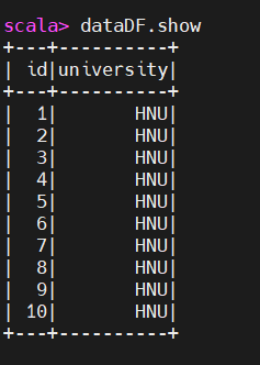
val dataDF = dataRdd.toDF("id","university")

Display Data
dataDF.show
(二)Creating Data Frames using Spark SQL
1. Create data using spark.sql
import org.apache.spark.sql.Row
val studentRdd = sc.parallelize(Array(
 Row(1, "Mike", 25),
Row(2, "Jason", 37),
Row(3, "Leo", 31)
))

studentRdd.collect

2.Creating Schema for Data
import org.apache.spark.sql.types._
val schema = StructType( Array(
StructField("rollNo", IntegerType, true),
StructField("name", StringType, true),
StructField("age", IntegerType, true)
 ) )

3.Create DF (data in schema) using Spark Session
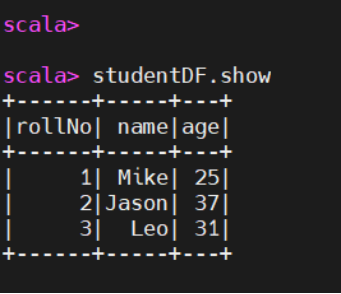
val studentDF = spark.createDataFrame(studentRdd,schema)

studentDF.show
(三)Creating DF for Text File
1.Creating Schema for Data
val dataRdd = sc.textFile("/root/Documents/movie.txt")
dataRdd.collect.foreach(println)

2.Create DF for textFile
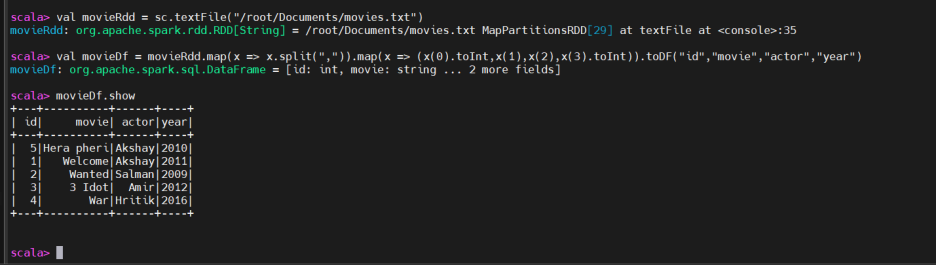
val dataDf = dataRdd.map(x => x.split(",")).map(x => (x(0).toInt,x(1),x(2),x(3).toInt)).toDF("id","movie","actor","year")
dataDf.show
3.Save Output in a csv file
dataDf.write.option("header","true").csv("/root/Documents/movies.csv")

(四)Creating DF for csv using sparksession
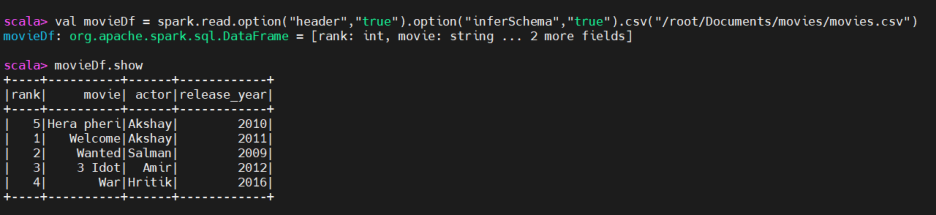
val dataDf = spark.read.option("header", "true").option(“inferSchema”,”true”).csv("")
dataDf.show()
(五)Creating DF using Paraquet
val dataDf = spark.read.load("")

dataDf.show
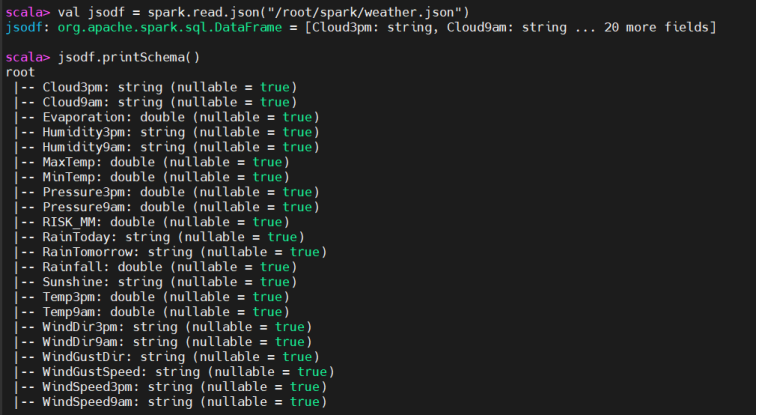
(六)Creating DF using Json
val dataDf = spark.read.json("")
# print schema
dataDf.printSchema()
(七)Creating DF using mysql table
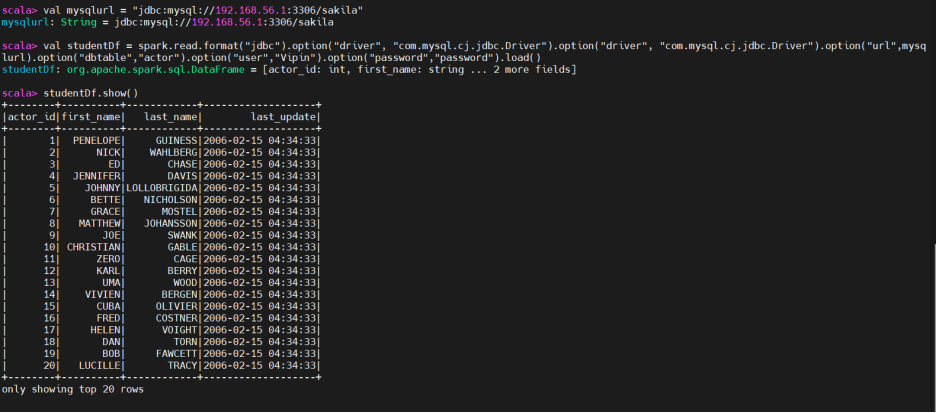
在启动spark-shell之前,将mysql connector (mysql-connector-j-8.0.31.jar)复制到spark的jars文件夹中。
在mysql中创建全局账户(global user)。
val mysqlurl = "jdbc:mysql://192.168.56.1:3306/sakila"
val studentDf = spark.read.format("jdbc").option("driver", "com.mysql.cj.jdbc.Driver").option("url",mysqlurl).option("dbtable","actor").option("user","Vipin").option("password","password").load()

studentDf.printSchema
studentDf.show
三、Spark UDF
用户定义函数,也叫UDF (User Defined function),它允许我们使用Python/Java/ scala注册一个自定义函数,并在SQLCall中调用。 这种方法非常常见,通常用于向组织中的SQL用户提供高级功能支持,以便这些用户可以直接调用注册的函数,而无需进行编程。 在SparkSQL中,编写udf特别简单。 SparkSQL不仅有自己的UDF接口,而且还支持现有的Apache Hive UDF。
hive UDF 我们放到HIVE笔记里来讲
四、View
(一)介绍
创建视图可以让你直接在DataFrames上执行SQL查询。 这对于那些更熟悉SQL而不是DataFrame操作的用户来说特别有用。通过创建视图,可以充分利用SQL的强大功能进行数据查询和操作。
Creating a view allows you to execute SQL queries directly on DataFrames. This is particularly useful for users who are more comfortable with SQL than with DataFrame operations. By creating a view, you can leverage the full power of SQL for data querying and manipulation.
一旦将DataFrame注册为视图,就可以在多个SQL查询中重用此视图,而无需重新指定DataFrame转换。这可以简化代码并使其更加模块化。
Once you register a DataFrame as a view, you can reuse this view across multiple SQL queries without having to re-specify the DataFrame transformations. This can simplify your code and make it more modular.
(二)种类
在Spark SQL中,你可以创建多种类型的视图,每种视图都有其特定的用例和特征。主要的视图类型有:
1.Temporary Views
(1)Characteristics
Session-Scope:临时视图仅在创建它们的会话中可见。
Lifetime: 它们只在Spark会话期间存在,在会话结束时被删除。
Purpose: 用于中间计算和简化会话中的复杂查询
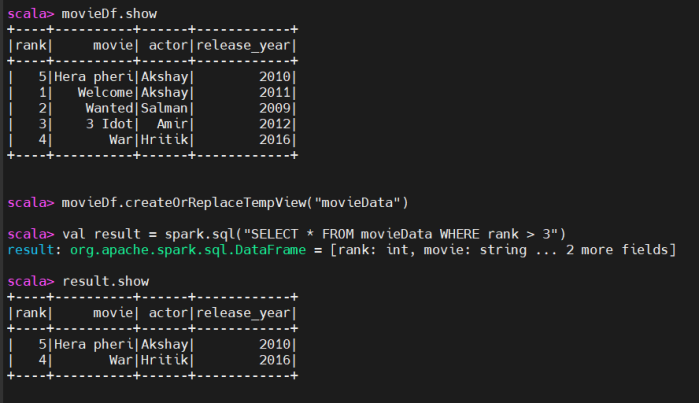
(2)Create Temporary view
movieDf.createOrReplaceTempView("people")
2.Global Temporary Views
如果我们有多个用户,并且我们想为所有用户提供视图,我们必须创建全局视图。
(1)Characteristics
全局作用域:全局临时视图在所有会话中都可见。
共享数据库:它们存储在名为global_temp的系统数据库中,可以使用global_temp.view_name访问。
生命周期(Lifetime):只要Spark应用在运行,它们就会一直存在。
(2)Create a global temporary view
df.createOrReplaceGlobalTempView("global_temp.view")

// Query the global temporary view from any session
result = spark.sql("SELECT * FROM global_temp.global_temp.view WHERE age > 20")
result.show()
(3)Create view for query
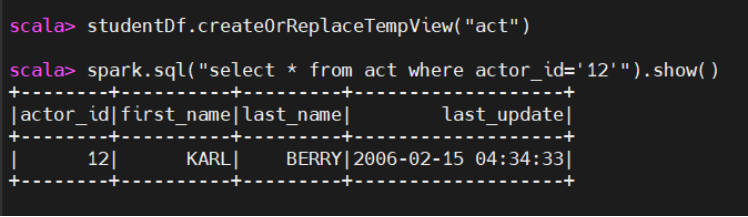
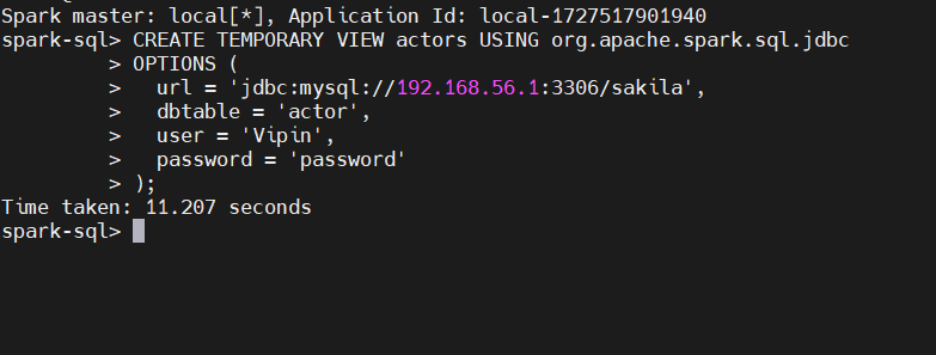
Create Temporary view of mysql table
CREATE TEMPORARY VIEW actors USING org.apache.spark.sql.jdbc
OPTIONS (
  url = 'jdbc:mysql://192.168.56.1:3306/sakila',
  dbtable = 'actor',
  user = 'Vipin',
  password = 'password'
);
五、Spark SQL其他用法
(一)Data From Hive
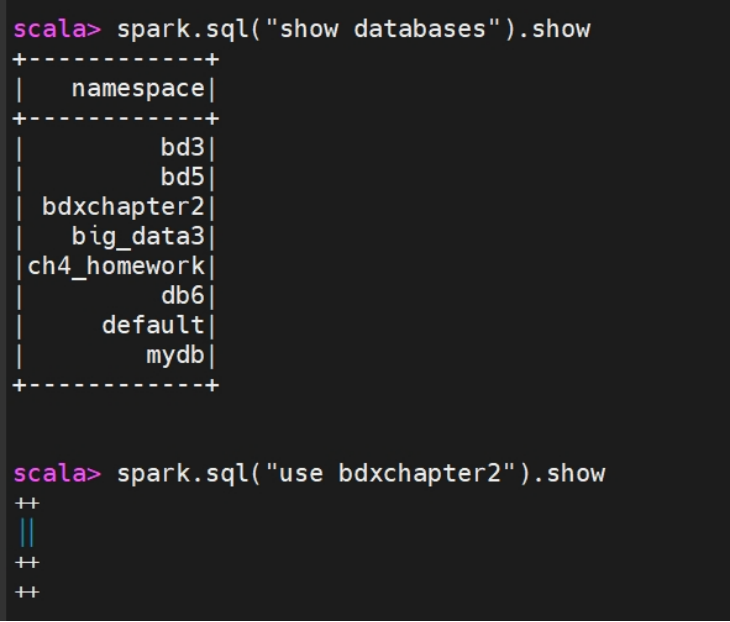
Before starting spark-shell copy mysql connector (mysql-connector-j-8.0.31.jar) to spark’s jars folder.Also create global account in mysql.
sc.setLoglevel(“Error”)
# show database
spark.sql("show databases").show
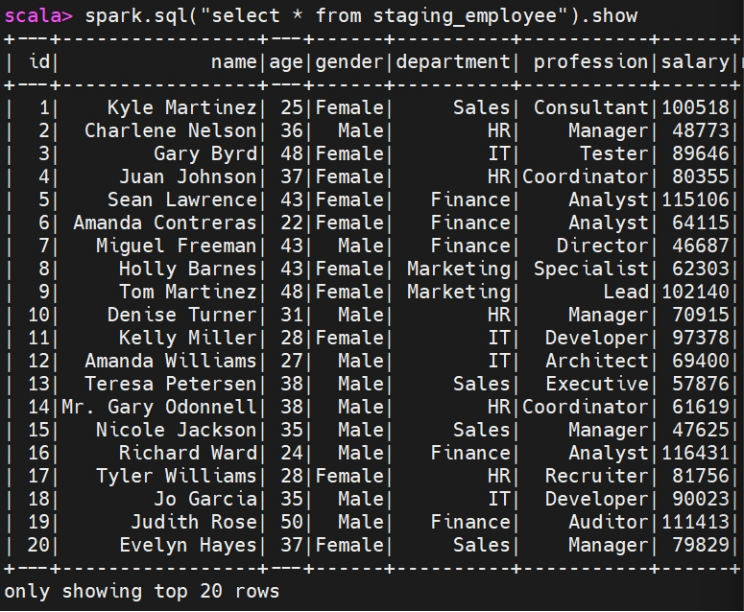
spark.sql("select * from dbname.tablenm").show
(二)Save Data in a File
spark.sql("select * from vipin.user_info").write.format("parquet ").save("/root/spark/vipin")
spark.sql("select * from vipin.user_info").write.format("csv").save("/root/spark/vipin")
总结
在本章中,主要简述了:Spark中,数据集和数据集的基本概念、语法、数据集的创建和基本操作等内容,特别是掌握DataFrame和DataSet是重点
更多推荐

 20
20 0
0- 0


 已为社区贡献16条内容

所有评论(0)